Virtualization, Cloud, Infrastructure and all that stuff in-between
My ramblings on the stuff that holds it all together
Monthly Archives: October 2007
Managing lots of RSS feeds
Posted by on October 31, 2007
I’ve been into reading people’s blogs and tracking websites like theregister for a good couple of years. I never really found an RSS reader app that worked for me; I wanted to build custom views of feeds, flag and prioritize them and mark things to read later – and I could find standalong apps to do these things but not one that did it all – hopefully this post will show you how I do it – if you have some other suggestions feel free to comment & share them.
Outlook 2007 supports RSS feeds out of the box, and it’s ideal as I already use Outlook and it’s calendar/tasks features to manage my workflow. Outlook 2003 and later (I think) added the ability to flag and tag items and even build a custom category list.
It means I can basically add all my RSS feeds as sources of information in the same way as I use it to manage my company emails, and categorise, flag as required and it all merges with into task list.
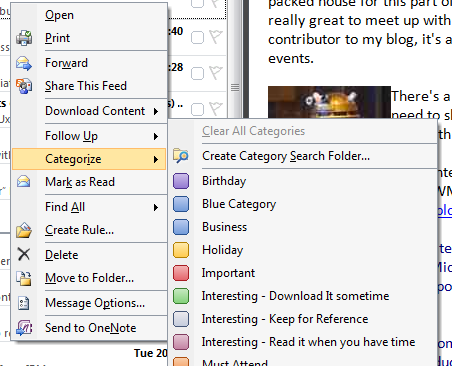
I can do this categorization manually or I think automatically via a rule
Custom Categories
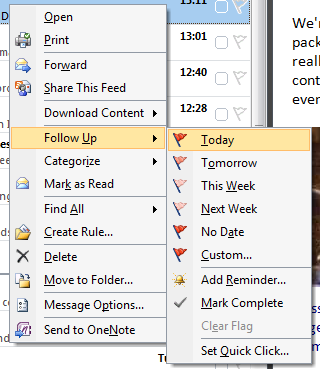
Flagging – which passes it into Outlook’s task list
I have two main folder/sub-folder structures – regular reads, for feeds that have a lot of frequent/interesting traffic and another folder/sub-folder structure for less noisy but important feeds (for example software release notifications etc.)

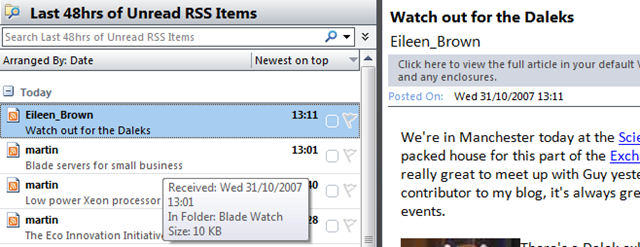
Best of all I can build custom views across of all my RSS feeds using custom search folders – for example I have the following (yes, and lots of unread emails too!)

And this gives me the following consolidated view across all my feeds, sorted by date (but could be lots of other criteria)
The add feed GUI components definitely have the feel of an afterthought but using them works brilliantly for me. Clicking on a page’s RSS feed brings up Outlook but doesn’t want to add it as a feed so I’ve always cut & pasted.. I assumed this was a beta bug but have been using RTM for quite a while now – must get round to investigating that.
Technorati Tags: Microsoft , office , 2007 , Outlook , Cool ways to do things , RSS , managing feeds
Tiny Laptop for £229 with solid state HDD
Posted by on October 31, 2007
I generally wouldn’t touch anything other than a Dell/HP/IBM laptop with a bargepole for reasons of spares availability/cost… but at £229 inc VAT this is almost disposable if something dies.

It’s tiny and has a (small) solid state HDD but SD card reader slot to allow you to add more storage space.
Review here..
http://www.cnet.co.uk//i/c/rv/e/laptops/asus/eee_pc/asus-eee_pc-440x330_2.jpg
Expansys are going to have them soon..
http://www.expansys.com/p.aspx?i=158485&partner=froogle
No Bluetooth but has a £40 option for adding an integrated 3G modem very cool.
I had a P133 Toshiba Libretto years ago and it was ace.. I like the idea of this..
Linux OS only at the moment (+VMWare maybe?) but WinXP in near future
And a bit of an update to this post Bryce posted a great link to a site covering upgrades to this mini notebook – 2Gb RAM upgrade, how to install other software & WinXP. Must, resist… must… http://www.notebookreview.com/default.asp?newsID=4062
HP Builds "Smart-cooled" Datacentre in Bangalore
Posted by on October 31, 2007
the following article details how HP are consolidating 14 datacentres into 1 and taking a smart approach to cooling.
Rather than uniformly cool the datacentre thousands of temperature sensors installed in racks feed back readings to the cooling control system so hot spots can be automatically cooled.
Be cool (ha ha) if HP made this an open specification or product that you could pull all the readings from the datacentre racks and individual servers/blades to control your HVAC systems.
This is ideal for "dynamic" datacentre environments or grid based systems where you might ramp up performance/utilization (and thus power/cooling requirements) in a set of blades and have the HVAC automatically compensate rather than having to physically install the kit with sufficient dedicated space/cooling from day 1.
http://www.techworld.com/green-it/features/index.cfm?featureID=3764&pagtype=all
Interestingly, also mentions the utility power supply being more expensive and unreliable in Bangalore than in the US so they are supplementing the utility power supply with Diesel generators which somewhat harms their overall carbon footprint argument.
Guess the government must be building big comms infrastructure in India to support the booming tech industry over there, cheap labour/construction cost etc. is probably how they forecast such a quick ROI compared with the US/RoW.
And surely, if your datacentre is in a country with a hot climate you’ll spend/use more power over the year than hosting in somewhere like Iceland?
Microsoft DHCP Team Blog
Posted by on October 26, 2007
Might be useful to someone, some handy hacks and scripts for doing useful DHCP things, I always found MS DHCP servers lacking these sorts of interfaces to do have DHCP help with "clever" things on Windows infrastructures – particularly in migrations.
http://blogs.technet.com/teamdhcp/default.aspx
These kinds of sites are an example of the good ways blogs can help improve companies images by allowing you to communicate in a manageable fashion to people at the coal-face.
Dick vs Microsoft
Posted by on October 24, 2007
I’ve subscribed to Dick Morrell’s RSS feed for donkeys now, partly cos I find his rants entertaining and mainly because they contain some useful information about interesting OSS projects, heck I even used and donated to Smoothwall in the days before cheap ADSL routers and still use smoothwall/IPCop as a quick way to get some basic firewalling into my VM test environments.
I first encountered Dick when he was at Smoothwall and his inter-personal skills were highly entertaining, if a little tactless when dealing with people on their mailing lists/IRC (I’m sure there’s an archive somewhere if you are interested)
When I saw his post about Eileen Brown* on Monday I wondered how long it would be before the buns started flying, I’ve met Eileen a couple of times and was quite sure she wouldn’t just let it slide.
But does it really warrant legal action? can’t we all get along </hippy mode> I’ve seen far worse & personal come from Dick’s hand to others on the net!
Linkage here so you can make your own mind up…. maybe my signed Smoothwall Xmas card will be worth something on eBay now 😉
http://blog.dickmorrell.org/ and http://blogs.technet.com/eileen_brown/archive/2007/10/19/evangelism-or-marketing.aspx and http://blogs.technet.com/jamesone/default.aspx
*Another blog I follow as it’s very useful for Exchange stuff
Building a Better Test Lab
Posted by on October 22, 2007
This is the outline of a number of posts on building a {relatively} low-cost accurate test lab of your production systems using P2V, VMWare, ESX, custom scripted HP voodoo, HP MSA1500 SAN, Virtual Switch Tagging (VST), Checkpoint on Sun Firewalls and Cisco switches. in order to clone a complicated multi-tier Windows based production platform with lots of DMZ segments into a VMWare farm for use as a test/dev & development environment (and possibly a DR one too in future)
This is all based on some of my recent work with customers* and I hope will help someone else to navigate the pitfalls (both business and technological) I & my team encountered in delivering this idea.
The following is a list of titles or sections and will hopefully serve as an index, but please, don’t expect them all at once I do have a day job to do! 😉
Why do this?
The traditional approach to test labs & why I think it’s wrong
Pro’s
Con’s
Isn’t this all a bit too complicated/mad-scientist/far out?
Reload lab from production process – how often?
is change control important?
What do you want a test lab to do?
Scoping/Expectation Setting
Load Testing – is VMWare right for this
Dynamic/Grid based approach to load testing
Break/Fix analysis
Release Testing
Options for disaster recovery/production failover
What won’t it do?
Storage Design
“Big” SAN’s are always better if you have them, but what if you don’t?
HP MSA 1500 – it’s not big, but it’s clever
Disk/SAN bandwidth – my practical experiences
Server Design
ESX Node specification
The RAM per VM debate
Networking Design
VLAN tagging
VST vs. Guest Tagging etc.
Firewalls
Clone to test lab Process
P2V Tools – VMWare Convertor vs. the rest
Changing IP addresses
HP uninstall Scripts
Build-Out Steps
Build ESX environment
Scripted VMWare installations – automatically create custom Virtual NIC’s/LANs
Adjust install paths for SAN storage
Set administrator password/create accounts
Install Networking
Configure VLAN’ing
IP Load Balancing
Install Firewall(s)
Test Communications between virtual DMZ segments and across hosts
Import Production machines
VMWare Convertor
General issues found
P2V Windows 2003 Domain Controllers – Special Notes
P2V’ing entire Windows Cluster’s – not that easy but do-able
P2V Process over a WAN – issues found & workaround.
Fresh VM 1st boot, changing IP address etc.
HP tools removal
Some further problems caused by changing IP addressing.
Into the Future
Can you use this for disaster recovery?
VMWare Lab Manager
Total Automation – Platespin products?
*This article has been deliberately made anonymous & I’m afraid I can’t disclose the name of the customer or provide any further reference materials without a commercial engagement via my employer, you can contact me for more details on this via this blog.
This article & information contained within is provided entirely without warranty.
Technorati Tags: VMWare , ESX , HP , MSA1500 , Test Lab , P2V , production , clone , Sun , Checkpoint firewall , VLAN tagging , VST
Windows Live Writer
Posted by on October 22, 2007
I have downloaded Windows Live Writer as it seems pretty well recommended for people wanting to compose posts off-line.. so here it is 1st blog using it!
Sorry, will try to come up with something more compelling to write about!
I have a couple of posts in the pipeline about building a Virtualised test lab environment on low-end HP SAN hardware, yes an MSA1500!! I can almost hear all the VMWare people withdrawing in horror! but it does work and I can explain why.. more in a couple of days.
Blogging from the beach…
Posted by on October 14, 2007
… to further my earlier post about how useful 3G datacards are; I’ve spent the whole of today (yes, it’s a Sundy – but had some stuff to do) working on the beach in Brighton.
Niiiice, I’ve also got two extended batteries in my laptop.. runs for about 6-8hrs! must do this more often!
Schipol Airport Police
Posted by on October 10, 2007
These guys zip about the airport on Segways – very cool, especially when you consider how far apart everthing is!
Glad to see they managed to sell them to someone
Vodafone 3G Data in a laptop
Posted by on October 10, 2007
My laptop is a Dell D620, I opted for the built in 3G data modem when I ordered it as my PCMCIA vodafone 3G card didn’t have Vista drivers available and I liked the idea of not having to have a great big card hanging out the side waiting to be snapped off.
I have been very impressed since I got it and I use it a lot on the train, hotels and on client-sites when I can’t get an Internet connection to my own laptop because of some company security policy about connecting non-corporate machines, sometimes it’s even more convenient to use it rather than the corporate wireless LAN!
It’s suprisingly cost-effective too (although full-disclosure I don’t pay the Vodafone bill myself) especially if you travel a fair bit and stay in hotels/use public hotspots. It never ceases to amaze me that here in the UK they want to charge so much for WiFi or broadband access in public places.
Hilton Hotels for example; I stay in a lot of Hiltons on business, they typically charge at least £110 per room per night even on a corporate rate, they then want £15 per night for wireless/BB access; they do a number of package deals but they’re still pretty expensive, and let’s not get started on the “tray charge” of £3.50 + the overpriced food… yes I guess I do have a choice to stay elsewhere, but they are convenient to where I usually work and have a good points scheme – so maybe I’m a sucker for familiarity whilst I’m away!
I see a fair number of BT Openzone, T-mobile Swisscom, wireless hotspots about the place but they all generally want you to take a subscription with them, some offer a complicated roaming deal but if you do the maths it’s not cheap.
Add in the limited coverage and highly variable quality of service (I lost count of the number of public hotspot’s I’ve used that either just didn’t work or were too slow to be usable – a fact you find out after you’ve given them your credit card details.
Now compare that against my 3G data card – I can use it pretty much wherever there is mobile coverage; granted it falls back to GPRS where there is no 3G coverage – but the mobile network has significantly more coverage than any WiFi at the moment.
It’s flexible, I can use it when/where I want and I’m not tied to a particular provider and the locations that they provide WiFi and the best part of all its about £40/month for an unlimited* data package, or to put it another way that’s the same price as 3 x 24 hr sessions a month in a Hilton, or most other WiFi hotspots – yes they offer pay by hour – but do you really want to do that?
3G speed is pretty good; I’m typically getting about 250kbs+ and that’s more than usable for email and general web browsing etc.
Will be interesting to see how some of the bigger carriers change this market space with their quad-play offerings, that may make mobile 3G data even cheaper if you take a TV/home phone/mobile/broadband package – I see a lot of people buying laptops rather than desktop, they could really clean up here.
However, I’ve been in Amsterdam for a couple of days now and have ben using it quite a lot inbetween conference sessions as the on-site free WiFi hasn’t been working – suspect I may get shot when the bill comes in at the end of the month as roaming data isn’t quite as cheap as doing it in the UK! I just discovered iTunes has been downloading about 150Mb of Podcasts as I typed this over my 3G connection, a figure of £4/Mb for roaming data seems to be at the back of my mind..ulp.
*Fair-use terms & conditions apply – from memory “fair use” is up to 1Gb/Month

 Virtualization, Cloud, Infrastructure and all that stuff in-between
