Virtualization, Cloud, Infrastructure and all that stuff in-between
My ramblings on the stuff that holds it all together
Daily Archives: June 7, 2009
vSphere – How to Enable FT for a Nested VM
Posted by on June 7, 2009
As in my previous post; I am working on a lab with virtual ESX4 servers in it – I can vMotion VMs from a physical vSphere cluster into the virtual vSphere cluster perfectly and performance is very good (just 1 dropped ping in my testing)
One of the physical hosts belongs to www.techhead.co.uk which he has kindly lent for this joint experiment – see his posts here, here and here on running vSphere on these HP ML115g5 servers and their FT compatibility. We have some joint postings in the pipeline on guest performance with complicated apps like SQL & Exchange when protected via FT , so keep your eyes peeled.
As the physical ESX hosts themselves are FT compatible I thought I’d see if I can enable FT for a VM running inside a virtual ESX server cluster, so a VM running inside a hypervisor, inside another hypervisor..!


Our of the box, unfortunately not; as it gives the following error message 😦
|
Power On virtual machine Record/Replay is not supported on this CPU for this guest operating system. Vou may have an incompatible CPU, you may have specified the wrong guest operating system type, or you may have conflicting options set in your config file. See the online help fot a list of supported guest operating systems, CPUs and associated config options. Unable to enter fault tolerance mode. |
To work around this you can enable the following advanced (and likely totally unsupported) settings to enable FT on the nested VM (the default is/was false) (thanks to the comment on this post for the replay.allowBTOnly = TRUE setting!)


And here it is – Nested VM running, with FT enabled

Very nice
Later on you can see some warnings about hosts getting a bit behind, also I had some initial problems getting FT to bring up the 2nd VM properly, the UI said it was restarting and it got stuck there, I dropped the virtual ESXi host down to a single vCPU rather than two and it worked ok from then on. I decided to do this as the virtual ESXi nodes were coming up reporting 2 x Quad core CPUs; whilst the physical host only has a 1 x Quad Core CPU so I guess that was causing some confusion.
At this point both of my virtual ESXi hosts were on the same physical vSphere server, and I seemed to have problems with the secondary getting behind. (vLockstep interval)
In this instance my nested VM is running an x86 Windows 2003 unattended setup.


I vMotioned one of the virtual ESXi hosts to the second physical vSphere server (very cool in itself) and it seemed to be better for a while, I assume there was some CPU contention from the nested VM.
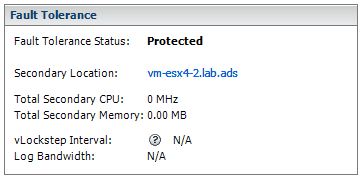
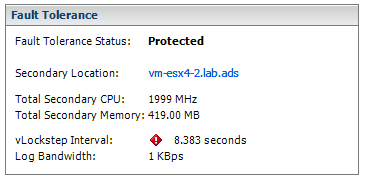
However in the end it flagged up similar errors, I assume this is due to the overhead of running a VM inside a hypervisor, inside another hypervisor 🙂 this is a lab setup but will prove very useful if you have to learn about this stuff or experiment with different configurations.
This is probably totally unsupported, use at your own risk – but it does work well enough to play about with in the lab.

 Virtualization, Cloud, Infrastructure and all that stuff in-between