Virtualization, Cloud, Infrastructure and all that stuff in-between
My ramblings on the stuff that holds it all together
Daily Archives: October 29, 2009
iSCSI LUN is very slow/no longer visible from vSphere host
Posted by on October 29, 2009
I encountered this situation in my home lab recently – to be honest I’m not exactly sure of the cause yet, but I think it was because of some excessive I/O from the large number of virtualized vSphere hosts and FT instances I have been using mixed with some scheduled storage vMotion – over the weekend all of my virtual machines seem to have died and crashed or become unresponsive.
Firstly, to be clear this is a lab setup; using a cheap/home PC type SATA disk and equipment not your typical production cluster so it’s already working pretty hard (and doing quite well, most of the time too)
The hosts could ping the Openfiler via he vmkernel interface using vmkping so I knew there wasn’t an IP/VLAN problem but access to the LUNs was very slow, or intermittent – directory listings would be very slow, time out and eventually became non-responsive.
I couldn’t power off or restart VMs via the VI client, and starting them was very slow/unresponsive and eventually failed, I tried rebooting the vSphere 4 hosts, as well as the OpenFiler PC that runs the storage but that didn’t resolve the problem either.
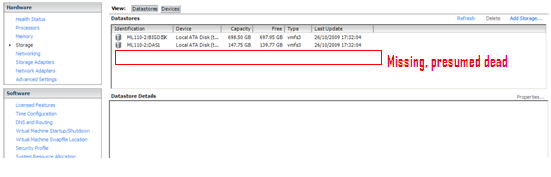
At some point during this troubleshooting the 1TB iSCSI LUN I store my VMs on disappeared totally from the vSphere hosts and no amount of rescanning HBA’s would bring it back.
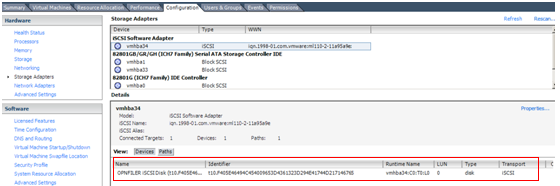
The Path/LUN was visible down the iSCSI HBA but from the storage tab of the VI client
Visible down the iSCSI path..
But the VMFS volume it contains is missing from the list of data stores
This is a command line representation of the same thing from the /vmfs/devices/disks directory.

OpenFiler and it’s LVM tools didn’t seem to report any disk/iSCSI problems and my thoughts turned to some kind of logical VMFS corruption, which reminded me of that long standing but never completed task to install some kind of VMFS backup utility!
At this point I powered down all of the ESX hosts, except one to eliminate any complications and set about researching VMFS repair/recovery tools.
I checked the VMKernel log file (/var/log/vmkernel) and found the following
[root@ml110-2 /]# tail /var/log/vmkernel
Oct 26 17:31:56 ml110-2 vmkernel: 0:00:06:48.323 cpu0:4096)VMNIX: VmkDev: 2249: Added SCSI device vml0:3:0 (t10.F405E46494C454009653D4361323D294E41744D217146765)
Oct 26 17:31:57 ml110-2 vmkernel: 0:00:06:49.244 cpu1:4097)NMP: nmp_CompleteCommandForPath: Command 0x12 (0x410004168500) to NMP device "mpx.vmhba0:C0:T0:L0" failed on physical path "vmhba0:C0:T0:L0" H:0x0 D:0x2 P:0x0 Valid sense data: 0x5 0x24 0x0.
Oct 26 17:31:57 ml110-2 vmkernel: 0:00:06:49.244 cpu1:4097)ScsiDeviceIO: 747: Command 0x12 to device "mpx.vmhba0:C0:T0:L0" failed H:0x0 D:0x2 P:0x0 Valid sense data: 0x5 0x24 0x0.
Oct 26 17:32:00 ml110-2 vmkernel: 0:00:06:51.750 cpu0:4103)ScsiCore: 1179: Sync CR at 64
Oct 26 17:32:01 ml110-2 vmkernel: 0:00:06:52.702 cpu0:4103)ScsiCore: 1179: Sync CR at 48
Oct 26 17:32:02 ml110-2 vmkernel: 0:00:06:53.702 cpu0:4103)ScsiCore: 1179: Sync CR at 32
Oct 26 17:32:03 ml110-2 vmkernel: 0:00:06:54.690 cpu0:4103)ScsiCore: 1179: Sync CR at 16
Oct 26 17:32:04 ml110-2 vmkernel: 0:00:06:55.700 cpu0:4103)WARNING: ScsiDeviceIO: 1374: I/O failed due to too many reservation conflicts. t10.F405E46494C454009653D4361323D294E41744D217146765 (920 0 3)
Oct 26 17:32:04 ml110-2 vmkernel: 0:00:06:55.700 cpu0:4103)ScsiDeviceIO: 2348: Could not execute READ CAPACITY for Device "t10.F405E46494C454009653D4361323D294E41744D217146765" from Plugin "NMP" due to SCSI reservation. Using default values.
Oct 26 17:32:04 ml110-2 vmkernel: 0:00:06:55.881 cpu1:4103)FSS: 3647: No FS driver claimed device ‘4a531c32-1d468864-4515-0019bbcbc9ac’: Not supported
Due to too many SCSI reservation conflicts, so hopefully it wasn’t looking like corruption but a locked-out disk – a quick Google turned up this KB article – which reminded me that SATA disks can only do so much 🙂
Multiple reboots of hosts and the OpenFiler hadn’t cleared this situation – so I had to use vmkfstools to reset the locks and get my LUN back, these are the steps I took..
You need to find the disk ID to pass to the vmkfstools –L targetreset command, to do this from the command line look under /vmfs/devices/disks (top screenshot below)
You should be able to identify which one you want by matching up the disk identifier.

Then pass this identifier to the vmkfstools command as follows (your own disk identifier will be different) – hint: use cut & paste or tab-completion to put the disk identifier in.
vmkfstools-L targetreset /vmfs/devices/disks/t10.F405E46494C4540096(…)
You will then need to rescan the relevant HBA using the esxcfg-rescan command (in this instance the LUN is presented down the iSCSI HBA – which is vmhba34 in vSphere)
esxcfg-rescan vmhba34
(you can also do this part via the vSphere client)
if you now look under /vmfs/volumes the VMFS volume should be back online, or do a refresh in the vSphere client storage pane.
All was now resolved and virtual machines started to change from (inaccessible) in the VM inventory back to the correct VM names.
One other complication was that my DC, DNS, SQL and vCenter server are all VMs on this platform and residing on that same LUN. So you can imagine the havoc that causes when none of them can run because the storage has disappeared; in this case it’s worth remembering that you can point the vSphere client directly at an ESX node, not just vCenter and start/stop VMs from there – to do this just put the hostname or IP address when you logon rather than the vCenter address (and remember the root password for your boxes!) – if you had DRS enabled it does mean you’ll have to go hunting for where the VM was running when it died.
In conclusion I guess there was gradual degradation of access as all the hosts fought with a single SATA disk and increased I/O traffic until the point all my troubleshooting/restarting of VMs overwhelmed what it could do. I might need to reconsider how many VMs I run from a single SATA disk as I’m probably pushing it too far – remember kids this is a lab/home setup; not production, so I can get away with it 🙂
In my case it was an inconvenience that it took the volume offline and prevented further access, I can only assume this mechanism is in-place to prevent disk activity being dropped/lost which would result in corruption of the VMFS or individual VMs.
With the mention of I/O DRS in upcoming versions of vSphere that could be an interesting way of pre-emotively avoiding this situation if it does automated storage vMotion to less busy LUNs rather than just vMotion between hosts on the basis of IOPs.

 Virtualization, Cloud, Infrastructure and all that stuff in-between