Virtualization, Cloud, Infrastructure and all that stuff in-between
My ramblings on the stuff that holds it all together
Monthly Archives: December 2009
vT.A.R.D.I.S – 10 ESXi node cluster on a trolley as demonstrated at London VMUG
Posted by on December 17, 2009
I recently presented a session at the London VMware User Group meeting about home labs, this post is a follow-up with the slides I used and some more details on the configuration.
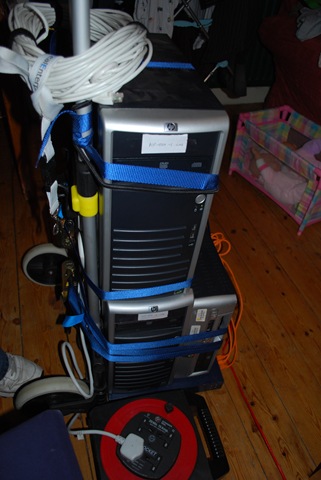
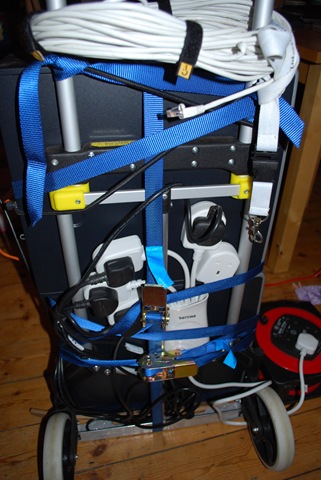
The kit I demo’d has affectionately been named the the vT.A.R.D.I.S which stands for Trolley Attached Random Datacentre of Inexpensive Servers 🙂 or Hernia-maker – don’t feel like you actually have to strap yours to a trolley though 🙂
This is part of a series of joint postings with my esteemed colleague Mr.Techhead, my sections of the series concentrate on the details of building a virtualized ESX cluster using the vSphere 4 for learning and test & development; Techhead’s posts will focus on the best low-cost hardware to use and specific configuration steps and I will cover some of the configurations and use cases.
You may be wondering why you would want to do this? well, if you are studying for your VCP or developing scripts or utilities for managing vSphere environments you rarely have a multi-node cluster at your disposal to test against because by it’s very nature it requires a lot of {usually expensive} hardware and you miss the more advanced configurations like HA/DRS/FT that this type of environment can use.
Also consider the larger production-type environment where you want to test some automatic deployment or management scripts and tools – this is an ideal approach which uses minimal hardware to conduct the 1st stages of test and development – if you’re an ITIL shop this is release management. Even the best equipped test labs won’t give you more than a couple of hosts to play with – this virtualized ESX approach means you can have many more ESX hosts to test against without busting the bank.
So we have put our heads together and have come up with what we think is the lowest possible cost way to build such an environment, and unsurprisingly it makes heavy use of virtualization – to allow you to study and work on without
- Being too noisy to leave switched on
- drawing too much {expensive} power
- costing the earth
The catch: Now, of course nothing is for free so to build this it will cost you some money, but it will be a lot less than your typical production environment and more into the hobbyist market – of course you get what you pay for, and I wouldn’t be going into this with the expectation that this will perform well enough for you to compete with EC2 🙂 but for your own general home use; and probably that of an SoHo/SME type organisation it’s ideal.
The photo below shows the demo kit we used for the London meeting cunningly strapped to a B&Q trolley for “portability” 🙂
<
To break it down into each major functional area and as a taster of the follow-up posts here are some of the things you need to consider..
Storage
Shared storage is a requirement for HA/DRS/FT and is usually the most expensive part in a production environment which would typically be Fibre Channel and SCSI disk SAN storage, you’ll never get this on our budget so we have taken the OpenSource and iSCSI and SATA approach, we have put this through its paces for the last 2 years in varying topologies and it performs very well and will more than service your own personal/study needs, it also has the advantage that it can probably be recycled from that pile of spare PC parts you have in the cupboard.
There are also a number of low-cost NAS devices which should be within your budget if you don’t; Techhead has a number of posts on the way around this.
Network
Building flat networks is easy – you just need a dumb switch, or even a hub and away you go; but by doing this you miss the subtle configuration problems you need to understand to do things properly in a production environment, so ideally you need something that will support VLANs and routing – you also need Gigabit ports for vSphere; although I have had vMotion working on a 100Mb switch in the past.
We have looked for a long time but there are no cheap (<£400) Gigabit switches even if you go 2nd hand.
There are numerous low-end switches that support VLANs, but can’t do the routing between VLANs so you either need an external hardware router like a Cisco 2600 or something else..
So, a compromise is needed – we opt for a low-cost Gigabit switch with VLAN support like the 8-port Linksys SLMxxx and compliment it with a virtual machine running the Vyatta community edition virtual appliance which can provide the L3 routing betweenn your VLANs (a sample of how easy to configure it is shown below)..

Server
Techhead is an avid HP-fan; and rightly so as they make great production kit but I had never really explored the lower-ends of their range such as the ML110 and ML115 range – these are single CPU socket servers with internal (non hot-swap) SATA storage, whilst they don;t have on-board redundant hardware they are quiet and more importantly – surprisingly cheap and fully ESX 3/4 compatible.
Techhead has some good deals on the ML115 G5 hardware at this link, here and here and best of all the ML115 G5 is compatible with the new Fault Tolerance feature of vSphere
if you wonder what is inside an ML115 server read this link
Hypervisor & Nested Hypervisor VM
VMware ESXi is my current weapon of choice for this environment and so will be the focus of this series of posts; unfortunately I’ve not found a way to run nested Hyper-V or Xen Virtual Machines, that would be the ultimate in flexible learning platform – unless anyone out there knows how to?
I make heavy use of the new Fault Tolerance feature of vSphere to protect the vCenter and Vyatta virtual machines in this environment.
It’s the ideal setup to test unattended deployments of ESX hosts as well as you can just delete them and start again.
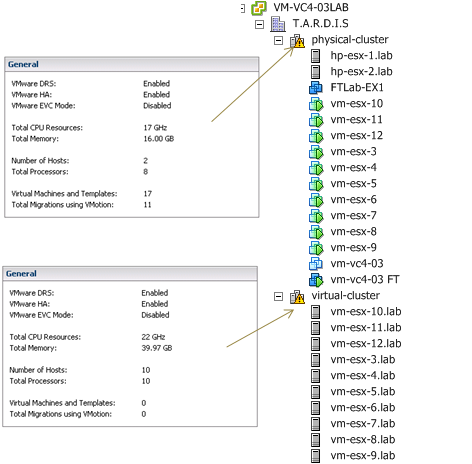
Virtualized ESX Hosts – 10 ESXi hosts running on 2 physical machines
Detailed Posts Index
Rather than do one long post we have a series of break-out posts on the specific areas of this topic.
this is the list of topics to come; when articles are posted the links will be populated and become clickable.
Part 1 – Lab Hardware Overview (coming soon @Techhead)
Part 2 – Lab Hardware Configuration (coming soon @Techhead)
Part 3 – ESXi Installation & Configuration (coming soon @Techhead)
Part 4 – Shared Storage Installation & Configuration (coming soon @Techhead)
Part 5 – Networking Configuration (VLAN’ing & Jumbo Frames) (coming soon @Techhead)
Part 6 – VM’d ESXi (Coming soon @vinf.net)
Part 7 – VM’d vCenter; auto start-up of VMs (Coming soon @vinf.net)
Part 8 – VM’d FT and FT’ing vCenter VMs (Coming soon @vinf.net)
Part 9 – FT on the ML115 series – benchmarking with some Exchange VMs (Coming soon @vinf.net)
Part 10 – VM’d Lab Manager farm environment on a pair of ML’s (VM’d ESXi) (Coming soon @vinf.net)
Part 11 – VM’d View 4 farm environment on a pair on ML’s (VM’d ESXi) (Coming soon @vinf.net)
Part 12 – Home backup – VMware data recovery / fastSCP/Veeam backup or something else low-cost with USB drives/etc. (Coming soon – joint posting)
The slides from my original VMUG presentation are available online at this link
OWA 503 Service Unavailable following 973917 update
Posted by on December 17, 2009
I’ve seen a couple of instances of this in the last week where previously working Exchange 2003 servers suddenly stop serving Outlook Web Access (OWA) Requests overnight
Investigating the eventlog shows the following entry which corresponds with stopped application pools in IIS Manager;
Event Type: Error
Event Source: W3SVC
Event Category: None
Event ID: 1059
Date: 14/12/2009
Time: 02:01:37
User: N/A
Computer: EXCHANGESERVER
Description:
A failure was encountered while launching the process serving application pool ‘DefaultAppPool’. The application pool has been disabled.
For more information, see Help and Support Center at http://go.microsoft.com/fwlink/events.asp.
This seems to be related to a recent Microsoft Update – 973917 uninstalling the hotfix, followed by a reboot immediately resolves the problem and OWA starts working again.
I’ve also had reports from people that this update has affected some other bespoke IIS applications, again uninstalling the patch seems to resolve the problem.
This situation seems to arise from a mismatch of installed binaries – now I thought system file protection and the .msi based patch installers were supposed to avoid this situation from Windows 2003 and onwards – anyway for more information on the cause and how to resolve without uninstalling the 973917 patch see the following links
http://msdnrss.thecoderblogs.com/2009/12/16/aftermath-of-the-release-of-kb-973917-for-iis/
Cloud Camp London (21st Jan 2010) now open for registrations
Posted by on December 16, 2009
You can register for the next Cloudcamp London on the 21st Jan 2010 at this link
If you don’t know what cloudcamp is about – check out one of my previous posts if you are available I recommend it.
The GeekCabin
Posted by on December 15, 2009
I am currently building a new home office/lab/cave for my computer habit and have been maintaining a separate blog with all of the details – it’s online at http://geekcabin.wordpress.com so please check it out.
Don’t worry I’ll still be posting my normal content here and nothing is happening to this blog – but the other blog is for people interested in the construction etc. and keeps it away from my technical stuff
It’s turning up next week (just in time for xmas – hopefully) and I look forward to having some space to work on things again as children seem to take up so much room – especially after every xmas!
Amazon EC2 boot from EBS
Posted by on December 4, 2009
This is a much wanted feature, I haven’t checked yet – but if this is allowed for Windows instances I can see a whole heap of new use-cases in my work – check it out – this is akin to boot from SAN in a traditional infrastructure and allows for persistent OS images to be kept around when they are not running on EC2.
official announcement..
Amazon EC2 Boot from Amazon EBS
Amazon EC2 has also announced the ability to boot instances directly from Amazon EBS snapshots, providing significantly increased flexibility in how customers can manage their instances. You can still save an Amazon Machine Image (AMI) in an Amazon S3 bucket and boot it from the local instance store, but you can now also choose to save AMIs as Amazon EBS snapshots and boot directly from an Amazon EBS volume. When an instance is booted from an Amazon EBS snapshot, the root partition of the instance is created on an Amazon EBS volume. Instances booted from Amazon EBS volumes can be stopped and later restarted, preserving any of the state that is saved to your volume and allowing you to modify some properties of your instances while it is stopped. For example, you can change your instance size or update the kernel it is using, or attach your root partition to a different running instance, making it easier to do debugging when you are creating new boot images. When booting from an Amazon EBS volume, AMIs and root partitions are no longer limited to 10GB, but can be up to 1TB in size, enabling significantly more complex images. Additionally, you are not charged for stopped instance hours and you will only incur charges for your Amazon EBS volumes while your instance is stopped, allowing you to reduce your Amazon EC2 costs when you do not need your instances running. Customers can now use a newly launched API that makes it easy to bundle images without using the command line tools, and can also take advantage of the fact that the content of an Amazon EBS volume is available to the instance immediately on volume creation which can lead to much faster instance boot times. For more details on this new addition to Amazon EC2, please see the Boot from Amazon EBS Feature Guide.

 Virtualization, Cloud, Infrastructure and all that stuff in-between