Virtualization, Cloud, Infrastructure and all that stuff in-between
My ramblings on the stuff that holds it all together
Monthly Archives: January 2010
The Fantastic Tavern: London
Posted by on January 28, 2010
Bit of a diversion from the norm this evening, I attended an event called “The Fantastic Tavern” – which is a community focused series of events on a variety of creative and social-media type topics, as I normally live on the infrastructure side of bringing such concepts to life I thought it would be good to get a better feel for what’s coming and some of the thought behind it, oh yes and there was an offer of free beer and sausages…. how could I resist? 🙂
This evening’s topic was “2010 Trends – what’s hot and what’s not” and is set as a series of short 5 minute presentations by people in the creative industry – similar to the lightning talk format used at Cloudcamp. they made innovative use of a cool wall (Top Gear fans will know what I’m talking about :)) to rate the trends as hot or not through some alcohol fuelled volume based popularity measurement techniques (a.k.a shouting).
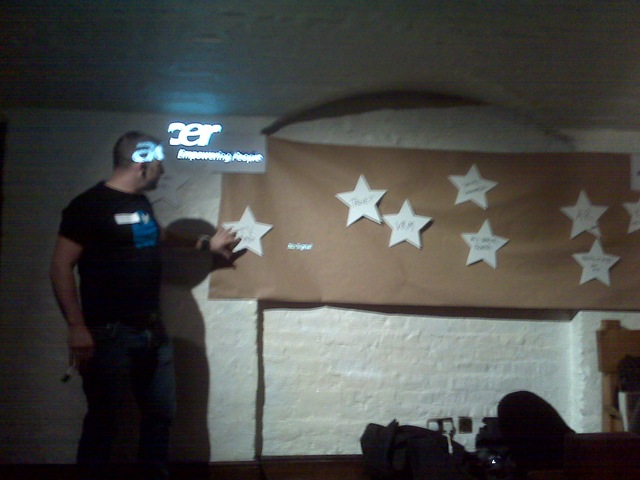
The evening was hosted by Michelle Flynn (Communities manager at EMC Consulting) and well compered by Matt Bagwell (Creative Director at EMC Consulting) these are my thoughts on the most interesting of the talks;
Augmented Reality – this is a really interesting technology to me, and he explained some the use-cases and examples of applications already available to find things like free WiFi or the nearest tube station in a visual manner – very clever stuff, I personally think this is a going to be big this year and next with the array of uber-smart phones like the iPhone and Android equipped devices with built in GPS/compass etc.
This video is a demo from one of the app makers..
Realtime – twitter, and other social networking sites have meant that information is out there very quickly for public consumption you can express your opinion brutally and loudly – this can have a big impact on brand image – poor service @your local Starbucks?, it’s all out there for people to search and read – instantly.
This can be risky – flippant, off-the-cuff remarks can have repercussions and it’s all to easy to broadcast something ill-thought out in the blink of an eye and regret it later.
Some people have used this as a great marketing hook, there was an example of a person in SF who sells Creme Brulee from a cart in the street; he has built up a massive almost cult-following by only announcing his location via twitter when we sets up, if this were “just a guy with a shop” would he have such a loyal and keen, repeat customer base? – he obviously makes creme brulee 🙂 but he has a marketing “hook”.
Behavioural Architecture this is a field of thinking being championed by Dan Lockton at Brunel university and I found it quite interesting, it’s about designing sites or services to make people want to use them, through some subtle social psychology; there was a good example of rewarding positive/healthy behaviour (like the piano stairs below) or features in facebook like the ‘like’ button and suggestions of things to do to engage further with your fb friends like completing profiles.
Playfulness – it sounds obvious but making something fun to use, encourages people use it, there was an example of Chore Wars which is an online game where you can gain a reward (points/stars/etc.) for completing chores – ideal for kids, make it a game, it’s less like work.
There was also a great example of a bottle bank turned into an arcade game
we need some of these where I live! 🙂
Truth – playing to the points of the realtime session and the concepts of citizen reporting, as an organisation it’s so easy to be caught out if you are not being truthful, you can be so visible online that any person can point out if you are being inconsistent and that can carry heavy damage. the realtime world also means we (the consumer) can be very intolerant where things don’t go our way, what customer service slights we may have previously just forgotten about and moved on from are now broadcast in CAPS and shouty !!!! to anyone that cares to listen, and more importantly it’s all there, on-record.
Transparency is becoming increasingly important and from my perspective movements like the blog with integrity programme are this in action; reputation is everything, and there was a poignant example of Tiger Wood’s recent fall from grace and the resulting fall-out
The 30-second TV ad is dead – argued the position that ad’s that are distributed online are much more likely to reach their target audience and get better engagement than the traditional linear 30-second TV advert.
I can see the logic to this, online ad’s can be made interactive and non-linear with click through and the ability to send to friends/share as this screen capture from YouTube illustrates

There was an example video shown of an interactive advert (with some naked people and strategic blue buttons that I couldn’t find online…:)) and a Toshiba advert that appears totally irrelevant to the product they were selling but got a lot of traffic.
Whilst it wasn’t explicitly mentioned this sort of model also has a much better way of measuring return on investment, you can very quickly get feedback on how well your ad is doing, click through rates, conversions to sales etc. – this is almost impossible with traditional linear TV advertising (although some of this is coming to more advanced IP-enabled STB’s)
Social Retail/Commerce – this was particularly interesting and one I have already been a consumer of; sites like Amazon make algorithmic recommendations to you, based on what you have viewed, social networks add a second dimension – social theory says that “people generally like people that like what they like” (try saying that after a few free beers !:)) recommendations from people in your “network” carry a lot of weight, and this is definitely something I have seen in the music space already.
Ratings and recommendations are also a key decision influencer, I always check out the reviews on Amazon, because they are from people (well, mostly from real people anyway).
Companies like yub.com and mflow take this a step further and offer to pay a commission on purchases that you recommend to your network (or are discovered through your network) – much like the Amazon affiliate system that I have used in the past on this blog, but extended into your social network.
His little friend Last up was Michael from Microsoft talking about the ways developments in mobile devices like pico projectors can be used to add an extra level of presence to social networking, using an example of your facebook friend being projected on a wall during a chat session from a mobile device, rather than just a normal small screen.
I had to feel for him as this is a highly visual topic but the promised internet access wasn’t available so he had to ad-lib it, but did very well.
Microsoft have some interesting demonstrations on this in Project Natal
and there was the SixthSense demonstration shown as part of the TED talks which is very cool – maybe a little bit of Minority Report in action
In the end the result was that Playfulness/Fun was voted the hottest trend for 2010, personally I disagree – I think it’s going to be social retail/commerce and augmented reality as they both have a strong potential for quick and easy monetization, with the SixthSense stuff coming to fruition around 2013/14 – no doubt I’ll be wrong, but it’s very cool.
Realtime is also a hot-topic now, but that’s so 2009 🙂
All in it was a fun evening, it’s quite refreshing that the presentations were entertaining and a lot less staid than the usual technical stuff I attend (we techies have a fair bit to learn about audience engagement during presentations), there was a liberal garnish of swearing too, which further goes to prove the truthfulness/honesty trend for 2010; if something is crap – tell it like it is and people will trust you 🙂
Next London event is likely to be in April, with an event scheduled in New York in early Feb, I highly recommend it!
Running a VM from a RAM Disk
Posted by on January 26, 2010
I posted earlier about some of my experiments with the FusionIO solid state storage card, SSD’s and the feature I spotted in Starwind to create a virtual disk from RAM – these are the quick results I see when running a Windows 2003 R2 virtual machine from a RAM disk.
This is done by creating a RAM disk on a Windows 2008 x64 machine running the StarWind vSAN software. the physical machine is an HP ML110 G5 with 8Gb of RAM.


In this test I allocated a 6Gb RAM disk on the vSAN host and shared it out via iSCSI to a vSphere 4 host running on an HP ML115 G5, where it shows up as a normal LUN and vSphere is unaware that it is actually physical RAM on a host elsewhere rather than a normal spinning disk (virtualization/abstraction :)).
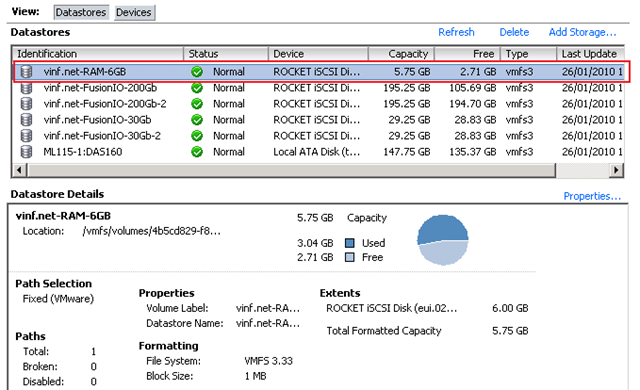
I deployed a single Windows 2003 R2 virtual machine into the 6Gb LUN via the usual processes with thin-provisioning enabled.

The topology for this test looks like the following;

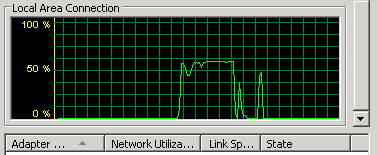
As with previous tests, and based on Eric’s work I used HD Tune Pro (trial) to get some disk access statistics; during the test the iSCSI traffic used c.50% of the bandwidth on the physical box running the Starwind software.
These are the results; which you can compare to Eric, Simon Seagrave and my FusionIO results.
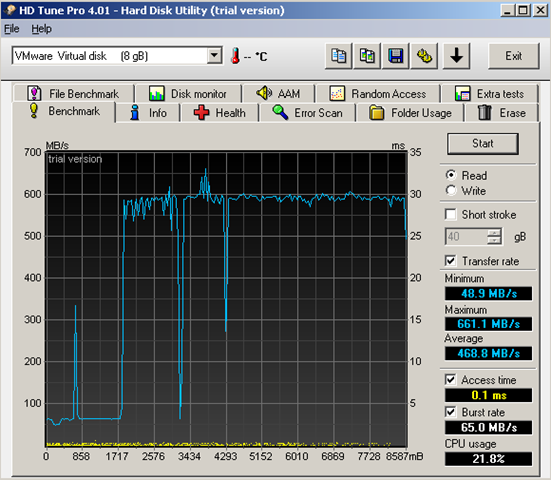

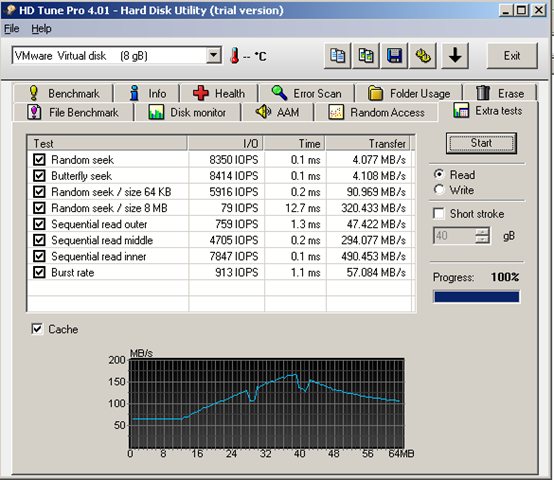
So far I have only done read speed testing, as write-testing requires some extra virtual disks – I’ll get this done in the coming weeks.
There is no escaping the fact that physical RAM is still expensive in quantities sufficient to meet the size of normal VM storage requirements. There are commercially available hardware SAN products that use this sort of concept like the RAMSAN and FusionIO but this is definitely the way the industry is going in future.
Thin-provisioning, linked-cloned and automated storage tiering (like EMC FAST) are going to be key to giving this level of performance whilst keeping costs low by minimising physical storage consumption until RAM/SSD prices reach the current spinning disk levels.
These results go to show how this software concept could be scaled up and combined with commodity Nehalem blades or servers which are capable of supporting several hundred Gb of RAM to build a bespoke high performance storage solution that is likely to cost less than a dedicated commercial solid-state SAN product.
In the real world It’s unlikely that you would want to take this bespoke approach unless you have some very specific requirements as the trade-off is that a bespoke solution is likely to have a higher ongoing complexity/management cost and is probably less reliable/supportable – I did it “just because I could”; your mileage may vary 🙂
Running VMs from a FusionIO Solid State Storage Card and Consumer-grade SSD
Posted by on January 25, 2010
Following on from Eric’s post on running VMs from SSD’s at this page, and my previous experiments at using SSD’s to run VMs I thought I would post up my initial (non-scientific) findings from the FusionIO card that I have been loaned.
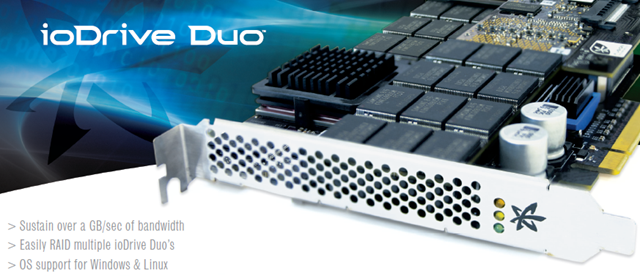
FusionIO make solid state storage cards that come packaged as PCIe x8 format expansion cards, they make use of multi-level cell (MLC) NAND storage to create amazingly high speed direct-attach storage, the Duo640 device I am working with is the mid-range offering, at the higher end forthcoming versions can support up to 1TB/sec throughput. the Woz is also their chief scientist 🙂

In my test rig I am using it and the Starwind software on Windows 2008 R2 to share the FusionIO card over iSCSI to a couple of vSphere 4 hosts – in this initial test I’m just using a single GbE NIC in both the server and the vSphere client – as you’ll see from the screenshot below it can actually max out the GbE connection in these hosts if you push it with several concurrent VM cloning sessions – so there is plenty more performance to be had out of the card and high levels of concurrency, in this case the NIC was the bottleneck.

The FusionIO duo card comes with 2 banks of 320Gb of memory (640Gb in total), in my initial configurations it’s not configured to RAID across the 2 banks, but that is possible to improve performance and fault-tolerance.
The FusionIO card doesn’t yet have drivers for vSphere but they are working on them – so you can’t directly access it from an ESX host yet so I am connecting to it using the Starwind software iSCSI target software.
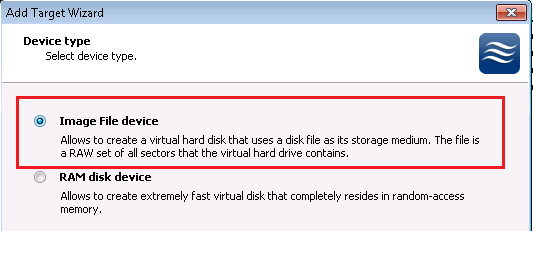
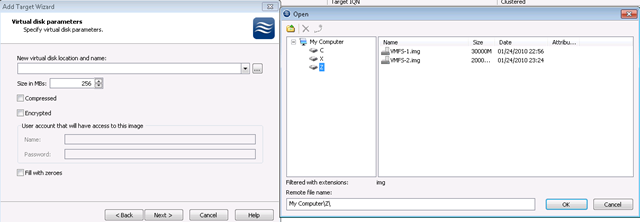
One issue I found with my Starwind configuration is that the Starwind software is’t able to see the FusionIO card as raw block storage like it can with normal direct attached storage (SSD/SATA HDD etc.) although it is visible to Windows disk manager as a normal disk. so to get it to work I had to format and mount the FusionIO “disks” as NTFS drives under Windows 2008 R2 Disk Manager and create a virtual disk files in these drives using the Virtual Disk feature of the Starwind software – this is then accessible both directly to the Windows 2008 host and to my ESX hosts via iSCSI.

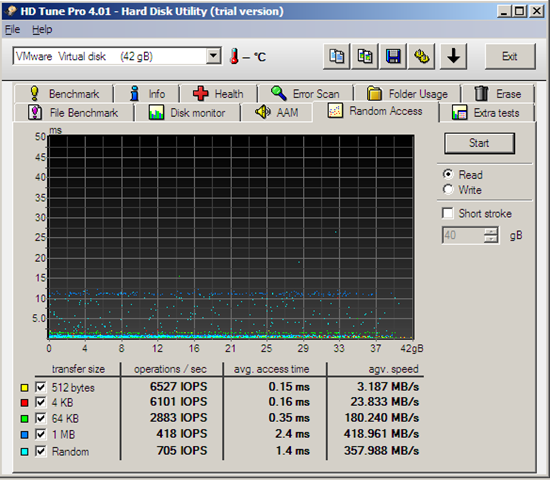
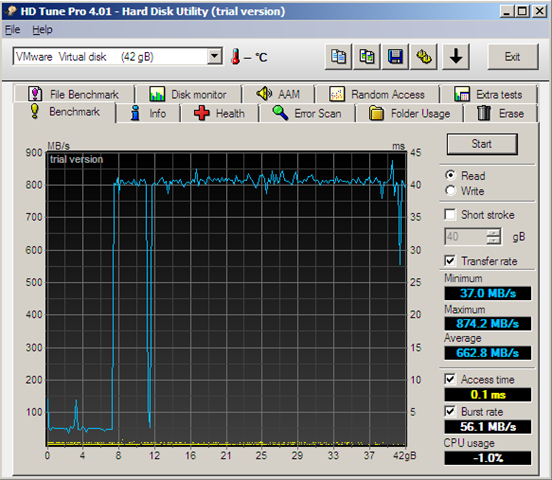
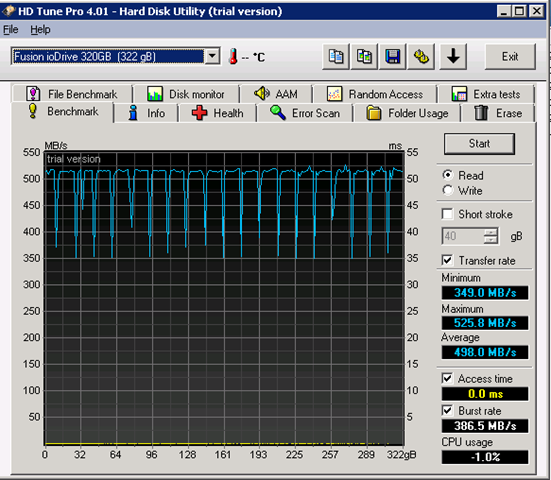
So, based on the same software that Eric used in his post these are the out of the box numbers the FusionIO card gets – there is still significant scope for fine-tuning to increase performance – But it’s pretty impressive.
FusionIO (non-RAID configuration) inside a VM over iSCSI
FusionIO (non-RAID configuration) – direct attached to a Windows 2008 R2 host

Consumer-grade SSD – direct attached to a Windows 2008 R2 host
This is using the following SSD which I purchased last year for under £200.
|
ASIN: B001BPH4Y8 |
 Trans64GB 2.5in SSD SATA MLC: Electronics & Photo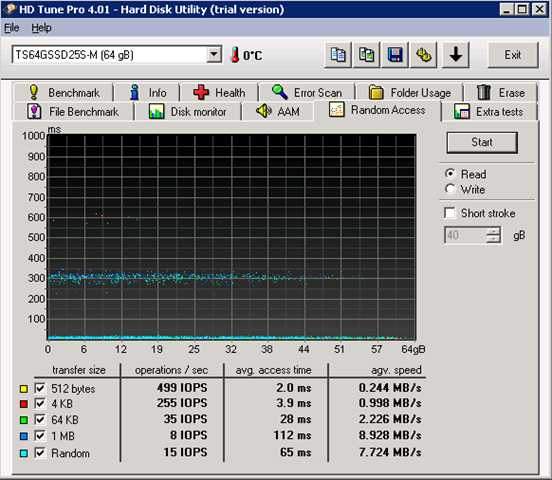
In conclusion…
The FusionIO cards aren’t cheap storage; they are in the ‘000’s of £ price-range, but they are FAST! with solid state storage pricing coming down in 2010 and when combined with iSCSI target software like Starwind it’s an excellent way to build a very high performance solid state SAN using DAS technology without the enterprise SSD SAN price-range and FC/network interconnects.
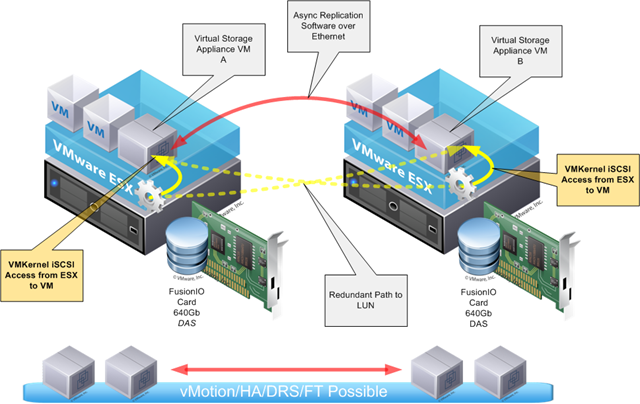
When vSphere drivers become available I can see some excellent 2-node/p2p replicating cluster/vSAN configurations using either Starwind or HP Lefthand Networks vSAN VM appliances as shown below, removing the dependency on single shared storage is a great design goal.
Disclosure: FusionIO and their UK distributor have kindly lent me a 640Gb duo card to work with, I have received no financial compensation nor have they imposed any copy approval or conditions with regards to what I write about their device – it’s just great and I’m that impressed.
Share a RAM disk via iSCSI…run VM’s from it?
Posted by on January 25, 2010
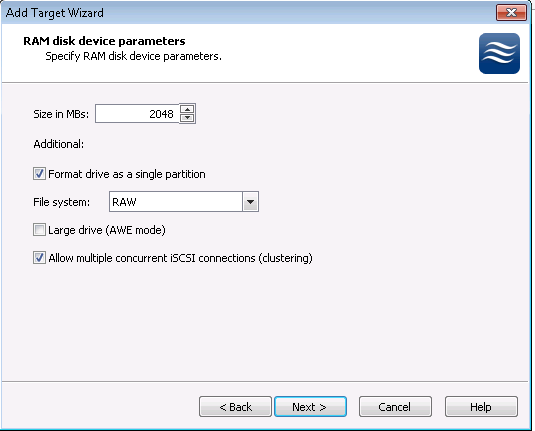
I found this very clever feature in the StarWind vSAN product that allows you to allocate a chunk of physical memory on a host (i.e real RAM) and present it out as an iSCSI target – imagine the possibilities for running virtual machines from that? watch this space 🙂
\
Nothing happens when I try to run Starwind software Manager on Windows 2008 R2
Posted by on January 24, 2010
I am doing some work with a FusionIO solid state flash storage card at the moment (more on this in a future post) as part of this I need a windows based iSCSI target for my testing, and rather handily you can download an evaluation copy of the Starwind Enterprise Edition from here
I usually use OpenFiler for this sort of thing, but not being a particular Linux wizz (ok, and being a bit lazy and in a hurry) I wanted to try out the Fusion IO Duo card I have been loaned, and the Linux drivers are an .RPM or .deb package for which OpenFiler doesn’t have the required package management software – so I have installed it in a Windows 2008 machine and will use the Starwind software as an iSCSI target.
(In terms of disclosure, whilst i was writing this post up last week VMware vExperts were offered an NFR license for the product, this test was done with the freely downloadable eval version rather than the NFR license we have been offered – but I urge you to check it out, it’s pretty cool.
Anyway – when you first install the software on Windows 2008 , there is a Starwind icon on the desktop

When you double-click on it (or any of the start menu entries nothing happens, you don’t get a UI or anything. this confused me for a while until I discovered that it places a system tray icon on boot, which you use to configure the software.
by default on my Windows 2008 R2 machine this icon is hidden, and set to only show notifications – of which there were none yet.

A quick trip to the customize button on the Notification area menu options on the properties of the task bar shows the default setting which is hiding it
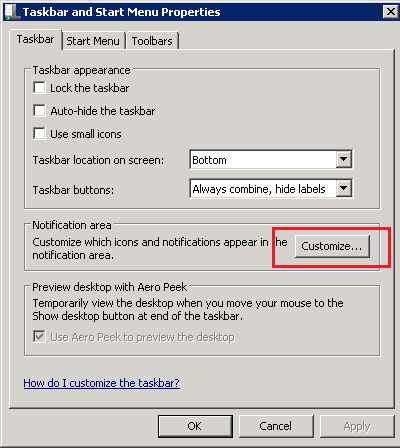

Setting this to show icon and notifications made it re-appear on the taskbar/notification area


You can now right-click and launch the management console 
The management console
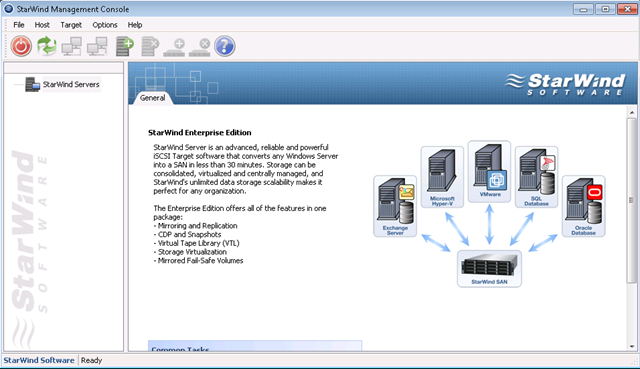
It’s a bit strange that the desktop or start-menu icon doesn’t launch the manager ‘out of the box’ with Windows 2008 – but this is how to resolve it, the hint eventually came from the online help, which said to go via the system tray icon, so it just goes to show – maybe sometimes you should look at the help files!
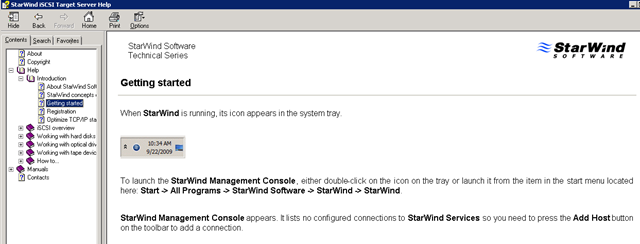
Hopefully that will save you some time with your eval!
Using the VCE/vBlock concept to aid disaster relief in situations like the Haiti Earthquake
Posted by on January 16, 2010
Seeing the tragic events of the last couple of days in Haiti played out on the news spurred me into evolving some thinking that I had been working on, the sheer scale of infrastructure destruction left by the earthquake in Haiti is making it hard to get relief distributed via road, so airlifting and military assistance is the only realistic method of getting help around.
Whilst providing physical, medical, food and engineering relief is of paramount importance during a crisis, communications networks are vital to co-ordinate efforts between agencies, it is likely that whatever civil communications infrastructure, cell towers, landlines etc. are badly impacted by the earthquake so aid agencies rely on radio based systems, however as in the “business as usual” world the Internet can act as a well-understood common medium for exchanging digital information and services – if you can get access.
Crisis Camp is a very interesting and noble concept for gathering technically minded volunteers around the world to collaborate on producing useful tools for relief staff on the ground, missing people databases, geo-mapping mashups on Google Earth etc. using open source tools and donated people time makes this a free/low-cost soft-solution for relief agencies.
However, with the scale of infrastructure destruction in large disasters getting access to shared networks, bandwidth and cellular communications networks on the ground is likely to be difficult – in this post I propose a vendor neutral solution, whilst I reference the VCE/vBlock concept which is essentially an EMC/Cisco/VMware product line; the concept of a packaged, pre-built and quick to deploy infrastructure solution can apply equally to a single or multi-vendor “infrastructure care package” – standardisation and/or abstraction are the key to making it flexible (sound familiar to your day job?) by using virtual machines as the building blocks of useful services able to run on any donated/purchased/loaned hardware.
These care packages would typically be required for 2-3 months to aid disaster relief during the worst periods and whilst civil infrastructure is re-established. None of this stuff is free in the normal world, it’s a physical product, it’s tin, cables, margin and invoices but is flexible enough that it could be redeployed again and again as needs dictate, with my UN or DEC hat on this is a pool of shared equipment that can be sent around the world and deployed in 24hours to aid on the ground relief efforts, donated, loaned by vendors or sponsors.
What is it?
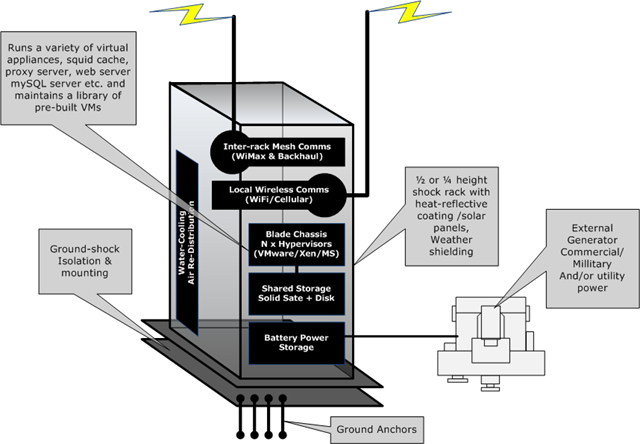
A bunch of low-power footprint commodity servers, storage and communications gear packed into a single, specialised shock-rack with a generator (gas/diesel/solar as available) and battery backup.
It makes heavy use of virtualization technologies to provide high-availability of data and services to work around individual equipment and/or rack failures due to damage or loss of power (generator out of fuel or localized aftershock etc.)
Because systems running to support relief operations typically will only be required for short term use, virtual appliances are an ideal platform, for example a pre-configured database cluster or web server farm, technologies like SpringSource can be used to deploy and bootstrap web applications around the infrastructure into virtual appliances.
Data storage and replication is achieved not using expensive hardware array based solutions but DAS storage within the blades (or shared disk stores) using virtual storage appliances like the HP Lefthand networks VSA or Celerra VSA or OpenFiler – allowing the use of cheap, commodity storage but achieving block-level replication between multiple storage locations via software – each blade uses storage within the same rack, if access to the storage fails it can be restarted on an alternative blade or an alternative rack (like the HA feature of vSphere)
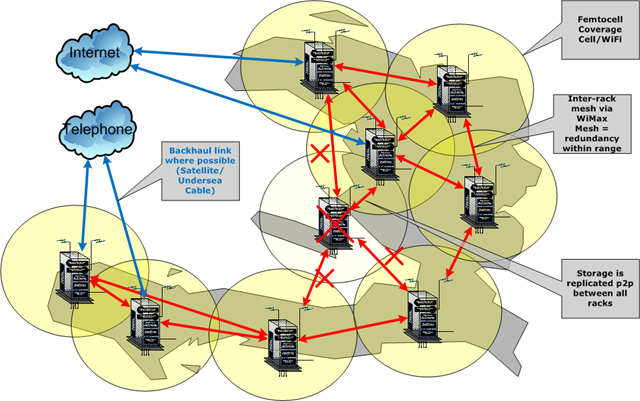
These racks are deployed across a wide geographic area – creating a meshed wireless network using something like WiMax to handle inter-mesh and backhaul transit and local Femtocell/WiFi technology, providing 3 services
- private communications – for inter rack replication and data backhaul
- public data communications – wireless IP based internet access with a local proxy server/cache (backhaul via satellite or whatever is available – distributed across the mesh)
- local access to a public cellular system femtocell (GSM, or whatever the local standard is)

The availability/load balancing features of modern hypervisors like VMware’s HA/DRS and FT technology can re-start virtual machines to an alternative rack should one fail. Because the VSA technology replicates datastores between all racks at a block level using a p2p type protocol it’s always possible to restart a virtual appliance elsewhere within the infrastructure – but on a much wider scale and with a real-impact.
Ok, but what does it do?
Even if you were to establish a meshed communications network to assist with disaster relief activities on the ground, bandwidth and back-haul to the Internet or global public telecoms systems will be at a premium, chances are any high-bandwidth civil infrastructure will be damaged or degraded and satellite technology is expensive and can have limited bandwidth and high-latency.
The mesh system this solution could provide can give a layer of local caching and data storage, thinking particularly with the Google Maps type mashups people at Crisiscamp are discussing to help co-ordinate relief efforts that can require transferring a large amount of data – if you could get a local data cache of all the mapping information within the mesh transfer times would be drastically reduced.
this is really just a bunch of my thoughts on how you can take current hypervisor technology and build a p2p type private cloud infrastructure in a hurry, virtualization technology brings a powerful opportunity in that it can support a large number of services in a small power footprint; the more services that can be moved from dedicated hardware and run inside a virtual machine (for example a VoIP call manager, video conferencing system or GSM base station manager) mean less demand for scarce fuel and power resources on the ground; and virtualization brings portability – less dependence on a dedicated “black-box” that is hard to replace in the field, virtualization means you can use commodity x86 hardware, and have enough spares to keep things working or work around failures.
The technology to build this type of emergency service is available today with some tweaking. The key is having it in-place and ready to ship on a plane to wherever it is needed in the world, some more developed nations have this sort of service in-country for things like emergency cellular networks following hurricanes but it will need a lot of international co-operation to make this a reality on a global scale.
Whilst I’m not aware of any current projects by international relief agencies to build this sort of system I’d like to draw people’s attention to the possibilities.
The DEC are accepting donations for the Haiti earthquake relief fund at the following address.
or the international red-cross appeal here
It’s voting time..
Posted by on January 4, 2010
Eric Siebert runs vsphere-land.com which is a handy site listing popular blogs about vSphere; I’ve been on the list for a while but Eric is running a poll to determine the top 25 virtualization bloggers.
if you are feeling generous towards this site *cough* you may find this link useful 🙂
if it helps to remind you, or you haven’t seen them before – these are my most popular posts this year;
10 node virtual ESXi cluster on a trolley
How to deploy Windows 2008 server with a template in vCenter
Comparing disk I/O of virtual machines on SSD and SATA disks with IOmeter
Performance of cheap vSphere server
How to enable FT for a nested VM (a VM running on ESX inside ESX)
Applying Agile methodologies to Infrastructure – virtualization is your friend
Using virtualization to extend the hardware lifecycle
VMware ESX 5 – what would you like to see
My VMworld Europe 2009 posts (list courtesy of Duncan Epping)
It’s 2010 Your Usergoup and the blogsphere.. need you!
Posted by on January 4, 2010
Ok – it’s new year’s resolution time – how about this one..
User groups (and blogs, in a less face-face manner) are an excellent way to meet like minded tech people in an informal setting and are a useful way to get information about how other people are doing things and current real-world trends/best practice.
But, none of this is possible without people stepping up and contributing – you don’t have to be a genius to contribute (look at me! :)) nor do you have to be in-charge of the largest planet munching datacentre laden with the most advanced, cutting edge tech in the world, even the humblest IT shop have something in the way of experience that they can contribute – what problems have you seen, and how did you fix them, what do you think would be useful, something creative you’ve built?
Public speaking isn’t my idea of absolute fun, it’s hard and you are putting yourself “out there” in anticipation that people will be interested; or at the very least be polite enough not to throw things at you.
my advice..
Don’t feel you have to know everything about everything, it’s ok to say I don’t know, and throw it to the floor – the man who says he knows everything actually knows nothing! it could spark an interesting debate – you don’t get that kind of thing at formal conferences.
User groups are about users, not sponsors or vendors showing their wares – they have ample online and conference time for that (although sponsors are obviously an important part of it – as they pay for it!) so take advantage of the experience in the room
It’s also easy to start a blog, it’s easy to get your thoughts out there (however serial twitter RT’ers and blog-scrapers need not apply :)).
it’s also good personal and career development, even if it’s just about making you structure your thoughts properly – I wrote some thoughts on this a while back
If you have some ideas for user group presentation sessions, or indeed something different – just write up a proposal, it doesn’t need to be anything majorly formal – just an email with the salient points and submit it to the co-coordinators;
Title:
Format: presentation/panel/discussion
How long you would like: (keep it under 45mins)
Outline: agenda, key points and/or questions you would like to cover, what people would get from the session
Along similar lines – get a blog, get some thoughts, something you’ve fixed (with some pictures) even something you’d like to see in future versions – write it up, get it out there www.wordpress.com is all you need!
Go forth and contribute in 2010 .. 🙂

 Virtualization, Cloud, Infrastructure and all that stuff in-between