Virtualization, Cloud, Infrastructure and all that stuff in-between
My ramblings on the stuff that holds it all together
Monthly Archives: February 2010
The Computing Super-Powers are Aligning Their Stacks
Posted by on February 18, 2010
I noted with interest the rumours today of Cisco ceasing a long-standing partner arrangement with HP (more here); essentially locking HP out of special pricing and insider product information and roadmaps.
For a long-time HP have offered Cisco components for their c-class blade chassis like the 3020 catalyst blade switch; to infrastructure people like myself this offered the best of both breeds (compute and networking) in a nicely integrated blade solution.
With HP’s recent acquisition on 3Com and their existing HP ProCurve range I would hazard a guess that they will stop selling Cisco blade switches in future – I also note from an email that all HP partners got this week that all Cisco manufactured blade switch components were facing supply issues, stoking the fires somewhat to resellers to push the HP product with some choice anti-Cisco FUD which I won’t repeat here.
 Integrated is the key point for me, if you are building infrastructure solutions you want something that has been thoroughly tested together, even if bits come from different manufacturers and follow “industry standards” you can’t beat a pre-packaged solution with proven support processes and management toolsets.
To my mind this is why Apple have always been so much more successful in the consumer space than Microsoft have; aspiration brand arguments aside, Apple have always maintained a tight grip on the end-end quality of components that go into their products (software, firmware, hardware, accessories) whereas Microsoft were born out of the opposite*;
*let’s leave aside Microsoft’s later leverage and downright abuse of closed and proprietary formats and API’s to wield their market share weight – that’s a whole different argument..
Microsoft took the x86 PC out of the grip of it’s one-vendor supplier and inventor (IBM) in the 80’s and allowed it’s software to run on a wide variety of compatible, commodity hardware, providing API’s for thousands of independent software and accessory vendors to integrate their products with DOS and latterly the Windows OS.
Contrary to what many think (Apple included) Microsoft opened up the PC market to the masses by enabling competition – allowing the consumer to choose from devices that varied in quality and thus cost to match the needs and budget of the end-user – whilst Apple maintained a steady line of expensive/premium but excellent quality products.
In the longer-term Microsoft’s image suffered as a result of this “openness” because there was less (or no) quality control of what 3rd parties produced poor quality drivers, applications and hardware entered widespread use, and all that integration often ended up in a poor end-user experience; how many times have you been frustrated trying to get product X to work on PC Y with software from Z – you are relying on 3 different vendors, each with it’s own target market and user to all do their jobs properly, and to the standards they are given to work with (Win32 API etc.)
If you are a hardware company selling an optical mouse it’s a tight margin high-volume business so you don’t have a lot to spend on quality control or good coders – you want it “done” and shipped and get the profits in – or you may just be a fly by night company that wants to rip off consumers and make a quick buck, there is nothing really stopping you.
Microsoft took steps in recent years to address the poor-quality 3rd party stuff from tarnishing the mother OS’s image through the Windows Certified logo scheme, but they never took it as far as Apple; who refuse any code that is not blessed by their own quality control on devices like the iPhone – and look how it gets almost universal praise for it’s ease of use and reliability.
The ever increasing amount of crap-ware that PCs ship with is astounding – my new HP laptop ships with about 20 different 3rd party drivers and tools out of the HP box, Hawei 3G card, AuthenTec fingerprint scanner, ATI video card with it’s own software To boot, it would seem HP weren’t too diligent about their quality control either.
Now compare that to a MacBook Pro out of the box. Apple own the end-end process – you can only (legally) run THEIR OS X on it, sure they use things like Broadcom NICs and ATI video cards but because they control the OS as well as the underlying hardware they can ensure support is baked-in when it comes out of the box, as a result their test matricies are much simpler and the end-result is a much simpler and reliable end-user experience, they also reduce the bells and whistles to what people want (how many corporate IT departments really take advantage of the smartcard or biometrics support on modern PC hardware or the SD card readers, more often than not time is spent to disable such bells and whistles in the interest of support and not overwhelming end-users).
So, after that rather lengthy into back to my point – if you want something that is good quality and just works as a vendor you need a greater control of the whole “stack” – reduce the variance of components that make up each slice of the stack and the result is;
Simpler/smaller test matrix
Quicker time to market (less variance to test)
Simpler to support – less variance
Better scale of economies
smaller supplier portfolio to manage
There seems to be a fair bit of consolidation in the market place at the moment with the bigger players announcing grand partnerships or simply making massive acquisitions.
Maybe some of the open market, where you could run Linux, Microsoft or something else on your XYZ server is being replaced with a premium/preferred “stack” from a consortium of big-name vendors.
With all the talk of cloud computing this stack has gone well beyond the desktop, office or even corporate datacentre – You can buy the stack from a vendor consortium to run on-premise and offload some your infrastructure into their IaaS/PaaS/SaaS stack – with the promise of a more joined-up approach to support and services.
In the current landscape Microsoft are in an odd position; Ballmer is pushing them all the way into the cloud stack but at the lower levels they essentially have an open partner model, I would expect to see Microsoft partner with Dell (or even acquire, as has been rumoured for a while) to come up with a “premium”/integrated product line-up; but not entirely stop their traditional OEM arrangements with other hardware vendors.
Cisco would seem to have fired the first shot in this war at HP, maybe the gloves of co-operation will come off for the rest now that people don’t necessarily have to be seen to be playing nicely in the market.
The following table shows my take on the major players and the offerings they have; I’m a realist and a lot of these are recent acquisitions or products so I don’t honestly think in all cases they really do have fully integrated end-end sales, services and support but it looks to be the goal.

Presenting at the London VMware User Group Meeting – Feb 25th
Posted by on February 18, 2010
I am pleased to announce that I’ve been asked to present again at this month’s VMware London user group meeting.
I’ll be giving a follow-up on my previous Home Lab : vT.A.R.D.I.S session for which I’ll be bringing a (quieter!) demo environment which I have dubbed vTARDIS:Nano Edition showing how you can build a complex 10 node clustered ESX environment with dvSwitch, iSCSI SAN and vMotion etc. on a single physical host for study and play.
I’ll also be presenting a case study for a project I worked on virtualizing a large Microsoft Windows 2003 Terminal Server estate and will be showing some interesting statistics that we gathered along the way.
I understand the event is now fully-booked which is a great turn out!
The agenda as as follows
1100 – 1200 (Optional) PowerCLI / Powershell workshop – Alan Renouf. Please bring your own curly brackets.
12:30 – 13:00 Arrive & Refreshments
13:00 – 13:20 Welcome & News – Alaric Davies
13:20 – 14:00 Sponsor Presentation – Chris Hammans, Pano Logic
Real world vSphere deployment experiences – Stuart Thompson
(Mostly) Zero downtime DC migration for Dummies – Jonathan Medd
15:00 – 15:20 Refreshment break
ESX home lab update, virtualizing Terminal Server workloads – Simon Gallagher
Thin provisioning and capacity planning in a virtual world – Chris Evans, ‘The Storage Architect’
Bringing the Cloud Down to Earth – Stuart Radnidge, vinternals
16:45 – 17:00 Close
17:00 – Pub
In future, to register your interest in attending, please send an email to londonvmug@yahoo.com with up to two named attendees from your organisation. If you do not receive a confirmation mail, please don’t just turn up since we will not be able to admit you to the meeting.
Content from the meetings will continue to be uploaded to www.box.net/londonug, NDA permitting.
Microsoft Tech-Days London – Free Technical Events for IT-Pro’s and Developers
Posted by on February 17, 2010
Microsoft have just announced a series of 5 “tech days” in central London, covering the following topics for IT Pro’s on W/C 12th April

Virtualization Summit – From the Desktop to the Datacentre
Office 2010 – Experience the Next Wave in Business Productivity
Windows 7 and Windows Server 2008 R2 – Deployment made easy
SQL Server 2008 R2 – The Information Platform
Looking ahead, keeping the boss happy and raising the profile of IT
It’s free to attend and although the full agenda hasn’t been released yet but I would hope they have a decent amount of technical content.
There are also similar tracks for developers.
You can read more about the ITPro days it here and the developer days here and you’ll need to register as I would think they will be booked up fast
You can also follow them on twitter for more information or with the #uktd hash-tag
Problems with HP EliteBook and built-in un2400 3G Modem
Posted by on February 11, 2010
I recently got a new laptop, an HP EliteBook 8530p; it’s quite a powerful machine and importantly for me has 8Gb of RAM and dual HDD’s which is very useful for the increasing number of VMs I have to carry around and run.

Rather usefully it comes with a built in HP un2400 3G modem behind the battery, this is a really useful feature and is better than the USB dongles you usually get as there is no chance of dropping the laptop and snapping it off or breaking the USB port.
Unfortunately I had several problems with the x64 Vista OEM build the machine was supplied with, after resuming from sleep it was unable to find the 3G modem and would stoically refuse to recognise that it had one installed or work at all after the 1st connection.
 Some posts on the web indicate this was fixed with an updated version of the HP Wireless Connection Assistant so I installed v3.5 from this page and the updated HP Connection Manager 2.0 (default build had v1.1) that seemed to sort of fix the sleep/resume problem but it still wasn’t working 100%. A forum post led me to turn off this option in the HP connection manager application, but still no joy
I wasn’t overly impressed with the quality of the drivers so went on a hunt (as you do) for newer ones.
Oddly if you look at the normal HP driver download page for this laptop it only lists a driver from June 2009 which doesn’t work, after some investigation with the HP RomPaq download tool it seems there is a newer driver on their FTP site, just it’s not listed on the web page – this driver is the most recent one version – 3.0 (details here) (sp45888 driver download here)
On 1st attempt just running the .exe it still didn’t work properly and didn’t install the driver, I had to extract the sp45888.exe file and run the C:\SWSetup\SP45888\Qualcomm\QCUSBDriver\setup.exe file rather than the setup.exe in the root of the SP45888 directory as you would normally do.
This setup app gives you a UI and lets you choose the carrier and contract type.
Once this was installed it worked ok. not the best quality control HP! – hope this post helps someone else with the same problem.


 As a side note – HP do you really need to have this many 3rd party apps, tools and drivers installed (and requiring updates) in the OEM build!?
sure there is an updater utility… but that’s a lot of build maintenance for people running lots of these machines?
Upgrading to a new PC in stages using VMware Converter
Posted by on February 8, 2010
If like me you travel around a lot and are pretty busy finding the time to get a new laptop setup with all of the data and non-standard build software you require can be a time-consuming chore.
More often than not you will be upgrading to a new more powerful machine with larger disks (unless you are unlucky :)) rather than carrying around two laptops on a trip or risking going without a particular ready to go application why not consider P2V’ing your old laptop onto your new one?
I am doing just this at the moment, I got my new laptop before I had to head out for a couple of days, VMware Converter is a free download and it took me about 3hrs with a cross-over ethernet cable this evening to P2V my old Dell laptop into a virtual machine on my new HP one. and I can now transfer my data and re-install my own applications into the host OS at my leisure; as a side advantage I instantly get the benefits of a machine with a faster CPU and better screen resolution without having to mess around with the software build or “personalisation”.
VMware Player is also free and you can use a VM in full screen mode, Player even supports Unity mode – this could be a viable long-term solution if it weren’t for the licensing position of having to maintain 2 x OS licenses (guest and host).
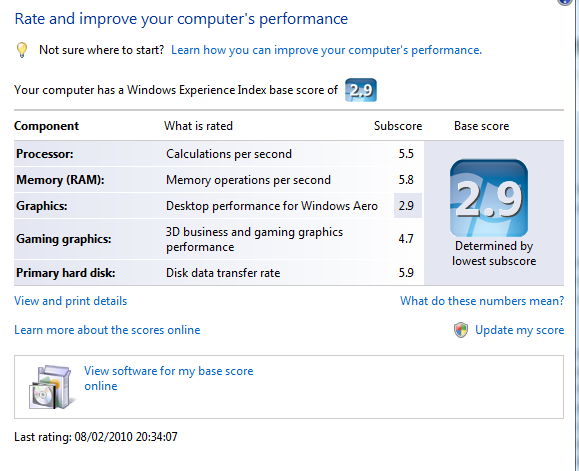
Performance is also pretty good – my VM’d laptop gets a 2.9 performance score in Vista – with the video being the lowest score.
Before (physical Dell D620, 2GHz Dual Core Intel, 4Gb, 200Gb, c.3yrs old)

After VM running under VMware Player on an HP EliteBook, 2.8GHz Dual Core Intel, 8Gb RAM, 250Gb HDD
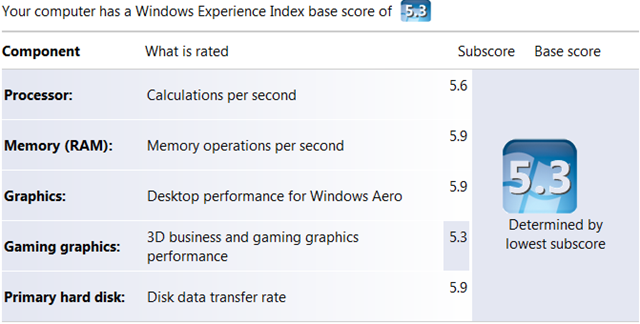
And, for comparison on the native hardware of the new HP Laptop
Keep it in mind next time you switch…

 Virtualization, Cloud, Infrastructure and all that stuff in-between