Virtualization, Cloud, Infrastructure and all that stuff in-between
My ramblings on the stuff that holds it all together
Daily Archives: January 15, 2008
VMWare Buy Thinstall
Posted by on January 15, 2008
Mmmm, interesting.
They’re aiming for virtualizing much more than just the OS.. VMWare obviously realise the Hypervizor game is coming to an end where ESX will be a free/commodity release and all the add-ons/management will make the money.
This makes an interesting foray into application level virtualization – more anlysis here.
Another other interesting but unrelated point here is about how RSS feeds break news far quicker than Google can index it!
Virtual Center 2.5 as a Virtual Machine
Posted by on January 15, 2008
I’ve not tried this before but it seems to work, my config is as follows – note this is a home/test system so I don’t suppose this is supported for a production platform
- Single ESX 3.5 host
- 1 x Windows 2003 VM with Virtual Center 2.5, licence manager, update manager and convertor plug ins, SQL Express database for VC (not supported for production)
- VM is connected to the same IP network as the ESX service console.
Because I was short on hardware I built the 1st Virtual Centre server as a VM on my laptop with VM Workstation 6 as a linked clone from my standard VM server image.
Once everything is up and running I used VM Convertor from Virtual Centre to do a P2V migration of itself over the network (weird!) into ESX – technically a V2V 😉
I then powered up the VC VM on the ESX box and changed it’s IP address to avoid conflicts.
Then shut down and killed the VC VM on my workstation.
It worked – I can connect to the virtual VC box and use it as before.
I also installed the VI client directly on my laptop so I could manage the virtual VC box over the network without RDP’ing into it.
I set the VC VM to auto-start with the ESX host and physically rebooted the ESX box to make sure – and it all rebooted fine and both the ESX and VC VM started up, I believe the ESX host caches licence data in case of a short-term VC server failure – this seems to get around the issue of not being able to power on a VM without a licence and seems to work ok for me.
VMWare Licence Manager – LMTools
Posted by on January 15, 2008
Whilst I’m having a rant, the licence manager for VMWare has to have the worst documentation and weirdest UI ever – VMWare have licenced it from Macrovision and it’s a multi-vendor app but I’ve yet to encounter anyone who has managed to follow the documentation 1st time to install a centralised licence server for a VMWare farm and I always forget how to do it…
So, here it is in simple terms for reference.
Install the licence server on a Windows box somewhere (VC node or elsewhere)
Ignore the LMTools app for now.
get your VMWare licence key file.
When you purchased ESX you would get a licence activation key (LAC) in an email – it looks something like the following
ABC-12ABC-ABC1A-ABC0A-1AB1A
You need to go to the Vmware site, logon with your account that is tied to the licence key request
Plug in the LAC
then go and activate your licences, if you’ve purchased a bunch of licences this will involve selecting how many instances of CPU licences you want to bundle into the licence key file – you can add more later.
download the file it generates
Rename it VMWARE.LIC (don’t think this is 100% required, but works for me)
Stop the “VMWare Licence Server” service
on your licence server navigate to C:\Program Files\VMware\VMware License Server\Licenses
overwrite the default vmware.lic file with the file you downloaded
Start the “VMWare Licence Server” service
Run VMWare Licence Server Tools from your start menu
and then go to the server status tab and click “Perform Status Enquiry”
You should see something like the following

Hint – you can look in the .lic file yourself to check it’s contents- it’s just plain text and I think you can put multiple .lic files in this directory.
There is a default licence file in the licenses directory – this is a dummy one and it says so in the text.
The LMTools GUI is a bit weird, if you run this first and select “Configuration using License File” from the default tab (which would be the logical thing) then it doesn’t seem to do this file copy and you keeps using the dummy vmware.lic file which is really confusing as nothing works and when you try to point ESX nodes at it via VC they all fall back to unlicenced.
Also, the ESX server itself seems to cache the licence data a reboot seems to flush it out and it becomes properly licenced.
Technorati Tags: VMWare , Licencing , licensing , Virtual center , centralized , british spelling , not american , LMTools , weirdness , odd UI , not brilliant design
VMWare Convertor is Brain-Dead
Posted by on January 15, 2008
ok, it’s free so I can’t complain too much (well, I can as I would have had to pay for the ESX licence to use it in this way!).
I want to import a bunch of my VM Workstation VM’s into an ESX server; why can’t I multi-select, or even browse for these VM files to import – I have to do them one by one cut & pasting the UNC path from Windows explorer.
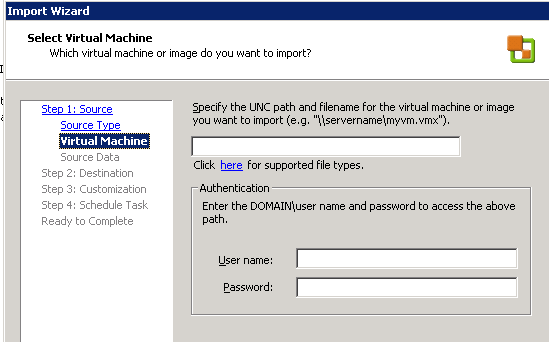
Come on – that’s not good UI design is it – how difficult would it be to have a “browse” button on there!
Rant over..!
Technorati Tags: VMWare , p2v , convertor , annoyance , free so I should just shut up and give thanks , rant , weird , bad UI design

 Virtualization, Cloud, Infrastructure and all that stuff in-between