Virtualization, Cloud, Infrastructure and all that stuff in-between
My ramblings on the stuff that holds it all together
Monthly Archives: September 2010
Distributed Power Management (DPM) for your Home Lab
Posted by on September 28, 2010
I am in the middle of rebuilding and expanding my vTARDIS home lab environment (look out for an update soon) but as I’m adding more physical vSphere hosts I’ve been looking at ways to reduce the overall power consumption as my lab has now overtaken the idle power consumption of the rest of my house (measured using one of these – get one they are great, and Google Powermeter integration coming soon for online monitoring).
Distributed Power Management (DPM) was 1st introduced in experimental form in ESX 3.5 and has since gone into supported use with vSphere 4.0, it’s an interesting technology that allows you to consolidate workloads within a cluster to as few physical hosts as possible using vMotion/DRS and put the idle hosts into stand-by, thus reducing the overall power consumption. DPM can automatically make them resume when demand increases and use DRS to re-distribute hosts across the cluster – essentially making the physical host layer somewhat elastic.
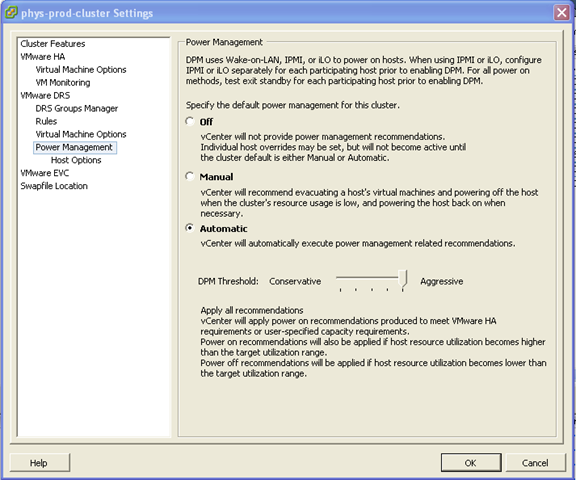

Whilst maybe production use-cases are more limited as most DC managers hate varying power loads in the datacentre (they are much harder to plan for) I have definitely found a use for it in my lab.
Out of the box, the ML115 g5 (I have only tested this on the AMD quad-core versions) it “just works” using the onboard BMC and doesn’t seem to require the expensive iLO add-on, I assume it’s using Wake on LAN (WoL) magic packets to wake up the hosts – but in my testing it works fine and reliably suspends/resumes hosts as demand changes (your mileage may vary)
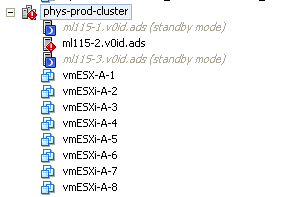
The screenshot below shows a 3-node cluster, with 4 running virtual machines (which are actually virtual ESXi hosts, but the principal also applies to normal VMs running on a cluster) note; one host is suspended because the workload is “light”.

If I power on another 4 virtual ESXi hosts, the cluster realises it wants more resource and asks the node in standby mode to start-up.



In my environment it takes approx 3-5 minutes for a host to power back on and be admitted back into the cluster.

Then, DRS will kick in and do it’s thing to balance the VMs across the newly (dynamically) expanded cluster.

If I power down those VMs again (taking the total cluster load to zero VMs)within 5mins it puts 2 of the hosts into stand-by mode again (thus saving the power consumption for 2 hosts)

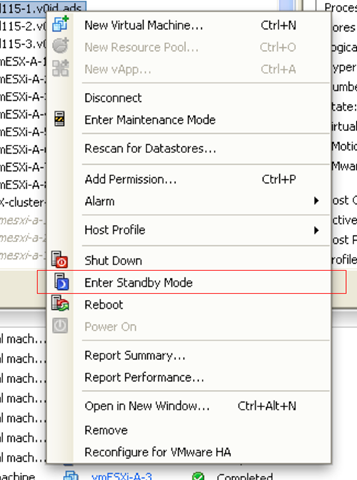
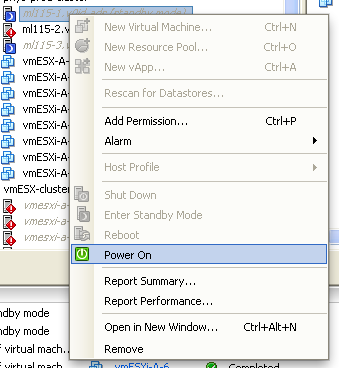
Even if you don’t want to turn on the automation settings, you can use this feature to remotely power on/off some of your home lab (assuming you have VPN access and more than one host) What impressed me more than anything is that this just worked out of the box with the ML115 G5.
If you want more tips on power-saving with the ML115 range it’s worth checking out this post on Techhead to see what you can do with the more advanced range of CPU settings on a per-host basis.
No Response from vCD Web Interface
Posted by on September 21, 2010
I encountered a problem recently in my vCD lab environment where the cell server wasn’t responding to any HTTP requests following some re-configuration work.
After some investigation I found my Oracle back-end DB server had fallen over (this was because it’s a VM and I un-presented its storage which BSOD’d the OS (caveat:Lab setup!) so I rebooted it and not being an Oracle DBA, it looked like the Oracle services had all started correctly but my cell still wouldn’t initialize.
For reference the /opt/vmware/cloud-director/logs/cell.log file looks like this when it isn’t happy (IP’s changed to protect the innocent – me :));
|
[root@cloud ~]# tail /opt/vmware/cloud-director/logs/cell.log *DEBUG* Running task Update: pid=org.apache.servicemix.features *DEBUG* Scheduling task Fire ConfigurationEvent: pid=org.apache.servicemix.features *DEBUG* Running task Fire ConfigurationEvent: pid=org.apache.servicemix.features *DEBUG* Scheduling task Update: pid=org.ops4j.pax.url.mvn *DEBUG* Running task Update: pid=org.ops4j.pax.url.mvn *DEBUG* Scheduling task Fire ConfigurationEvent: pid=org.ops4j.pax.url.mvn *DEBUG* Running task Fire ConfigurationEvent: pid=org.ops4j.pax.url.mvn Application startup begins: 9/21/10 9:54 AM Successfully bound network port: 80 on host address: 192.168.xx.241 Successfully bound network port: 443 on host address: 192.168.xx.241 [root@cloud ~]# service vmware-vcd restart |
The basic test is to check that the cell server can talk to the Oracle DB where the configuration is stored (the cell server is essentially a stateless web-app in the vCD architecture), this goes over port 1521/tcp – so a quick telnet check from the cell server to the back-end DB proved that this wasn’t working
|
[root@cloud bin]# telnet mgt-db01.v0id.ads 1521 |
When looking at my Oracle server, (which is on Windows in my lab (sorry!)) the OracleOraDB11g_home1TNSListener service didn’t start up correctly and wasn’t running.
I did a manual start of this service, then restarted the vmware-vcd service on my cell server
|
[root@cloud bin]# service vmware-vcd start |
and then checked the cell.log file, this time I saw more progress until it started correctly (successful initialization shown below)
|
[root@cloud bin]# cd /opt/vmware/cloud-director/logs/ [root@cloud logs]# cat cell.log *DEBUG* Scheduling task ManagedService Update: pid=org.ops4j.pax.url.mvn *DEBUG* Scheduling task ManagedService Update: pid=org.ops4j.pax.url.wrap *DEBUG* Running task ManagedService Update: pid=org.ops4j.pax.url.mvn *DEBUG* Running task ManagedService Update: pid=org.ops4j.pax.url.wrap *DEBUG* Scheduling task ManagedServiceFactory Update: factoryPid=org.apache.servicemix.kernel.filemonitor.FileMonitor *DEBUG* Running task ManagedServiceFactory Update: factoryPid=org.apache.servicemix.kernel.filemonitor.FileMonitor *DEBUG* Scheduling task Update: pid=org.apache.servicemix.management *DEBUG* Running task Update: pid=org.apache.servicemix.management *DEBUG* Scheduling task Fire ConfigurationEvent: pid=org.apache.servicemix.management *DEBUG* Running task Fire ConfigurationEvent: pid=org.apache.servicemix.management *DEBUG* Scheduling task Update: pid=org.apache.servicemix.transaction *DEBUG* Running task Update: pid=org.apache.servicemix.transaction *DEBUG* Scheduling task Fire ConfigurationEvent: pid=org.apache.servicemix.transaction *DEBUG* Running task Fire ConfigurationEvent: pid=org.apache.servicemix.transaction *DEBUG* Scheduling task Update: pid=org.apache.servicemix.shell *DEBUG* Running task Update: pid=org.apache.servicemix.shell *DEBUG* Scheduling task Fire ConfigurationEvent: pid=org.apache.servicemix.shell *DEBUG* Running task Fire ConfigurationEvent: pid=org.apache.servicemix.shell *DEBUG* Scheduling task Update: pid=org.apache.servicemix.features *DEBUG* Running task Update: pid=org.apache.servicemix.features *DEBUG* Scheduling task Fire ConfigurationEvent: pid=org.apache.servicemix.features *DEBUG* Running task Fire ConfigurationEvent: pid=org.apache.servicemix.features *DEBUG* Scheduling task Update: pid=org.ops4j.pax.url.mvn *DEBUG* Running task Update: pid=org.ops4j.pax.url.mvn *DEBUG* Scheduling task Fire ConfigurationEvent: pid=org.ops4j.pax.url.mvn *DEBUG* Running task Fire ConfigurationEvent: pid=org.ops4j.pax.url.mvn Application startup begins: 9/21/10 2:33 PM Successfully bound network port: 80 on host address: 192.168.xx.241 Successfully bound network port: 443 on host address: 192.168.xx.241 Application Initialization: 9% complete. Subsystem ‘com.vmware.vcloud.common.core’ started Successfully connected to database: jdbc:oracle:thin:@mgt-db01.v0id.ads:1521/cloud Successfully bound network port: 443 on host address: 192.168.xx.242 Successfully bound network port: 61616 on host address: 192.168.xx.241 Successfully bound network port: 61613 on host address: 192.168.xx.241 Application Initialization: 18% complete. Subsystem ‘com.vmware.vcloud.common-util’ started Application Initialization: 27% complete. Subsystem ‘com.vmware.vcloud.consoleproxy’ started Application Initialization: 36% complete. Subsystem ‘com.vmware.vcloud.vlsi-core’ started Application Initialization: 45% complete. Subsystem ‘com.vmware.vcloud.vim-proxy’ started Successfully verified transfer spooling area: /opt/vmware/cloud-director/data/transfer Application Initialization: 54% complete. Subsystem ‘com.vmware.vcloud.backend-core’ started Application Initialization: 63% complete. Subsystem ‘com.vmware.vcloud.ui.configuration’ started Application Initialization: 72% complete. Subsystem ‘com.vmware.vcloud.imagetransfer-server’ started Application Initialization: 81% complete. Subsystem ‘com.vmware.vcloud.rest-api-handlers’ started Application Initialization: 90% complete. Subsystem ‘com.vmware.vcloud.jax-rs-servlet’ started Application initialization detailed status report: 90% complete com.vmware.vcloud.backend-core Subsystem Status: [COMPLETE] com.vmware.vcloud.ui.configuration Subsystem Status: [COMPLETE] com.vmware.vcloud.consoleproxy Subsystem Status: [COMPLETE] com.vmware.vcloud.vim-proxy Subsystem Status: [COMPLETE] com.vmware.vcloud.common-util Subsystem Status: [COMPLETE] com.vmware.vcloud.ui-vcloud-webapp Subsystem Status: [WAITING] com.vmware.vcloud.rest-api-handlers Subsystem Status: [COMPLETE] com.vmware.vcloud.common.core Subsystem Status: [COMPLETE] com.vmware.vcloud.vlsi-core Subsystem Status: [COMPLETE] com.vmware.vcloud.jax-rs-servlet Subsystem Status: [COMPLETE] com.vmware.vcloud.imagetransfer-server Subsystem Status: [COMPLETE] Application Initialization: 100% complete. Subsystem ‘com.vmware.vcloud.ui-vcloud-webapp’ started Application Initialization: Complete. Server is ready in 2:35 (minutes:seconds) Successfully initialized ConfigurationService session factory Successfully started scheduler Successfully started remote JMX connector on port 8999 [root@cloud logs]# |
And I could now log in to the web UI of my vCD cell.
Top Virtualization Blog Voting Time
Posted by on September 14, 2010
Eric Siebert is looking for votes for the top virtualization blogs on vsphere-land.com. I met Eric in the flesh a couple of weeks ago at VMworld when we did a joint session on home-lab environments, featuring the vTARDIS (demo videos will be uploaded this week hopefully).
If you feel like voting for me, feel free to follow this link 🙂

Please bear in mind, that whilst I now work for VMware, all of these posts were written way before that was even an option, and I’ll keep on blogging despite being borg’d 🙂
Here’s a quick sample of the posts I have written up this year that I thought were interesting, I like to think I provide some interesting food for thought, if nothing else 🙂 I was quite surprised how many posts I have done this year when looking back through WordPress, that would certainly explain where my evenings went this year..!
The vTARDIS
Hardware Emulators… please
https://vinf.net/2010/04/26/hardware-vendors-release-the-emulators-to-the-masses-please/
Where next for VMware Workstation?
https://vinf.net/2010/04/28/where-next-for-vmware-workstation/
Augmented Reality
https://vinf.net/2010/04/29/augmented-reality-tftlondon/
My VCE/VCD310 Exam Experiences
https://vinf.net/2010/06/22/vce310-and-vcd310-and-the-path-to-vcdx-exam-experiences/
Software Licensing for vCloud (note: written before I started at VMware’s cloud team :))
https://vinf.net/2010/03/29/vmware-licensing-for-the-vcloud/
PowerShell to create lots of sequentially named linked clones
FusionIO Solid State Drive and VMs
vApp sprawl in the cloud
Posted by on September 1, 2010
This question came up in a session at VMworld, if vApps are being used to deploy entire self-contained and silo’d application stacks won’t that lead to massive VM sprawl. Because cloud deployments are less considered and are a result of quick instant gratification provisioning in the private/public cloud by business units who don’t necessarily understand IT services and the burden of operations, integration, etc.
Well, yes – and that’s an interesting point for a number of reasons which apply equally to private and public cloud;
vApps encourage less shared application services
This is both a good and a bad thing, good in the sense that less shared typically means higher SLA’s are possible and change is simpler because there are less interdependencies to consider. But, bad in the sense that it increases the overall number of machine instances required to support all of your IT services.
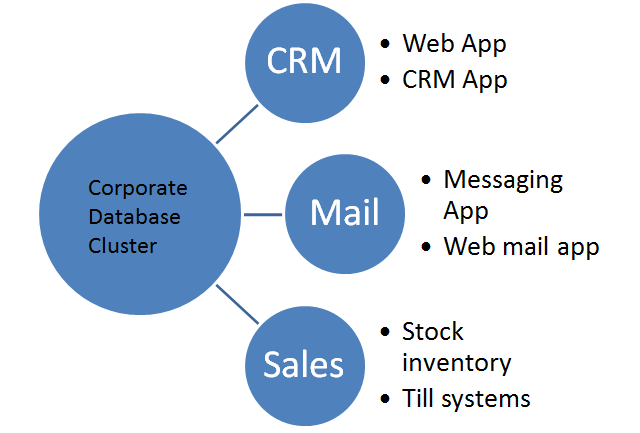
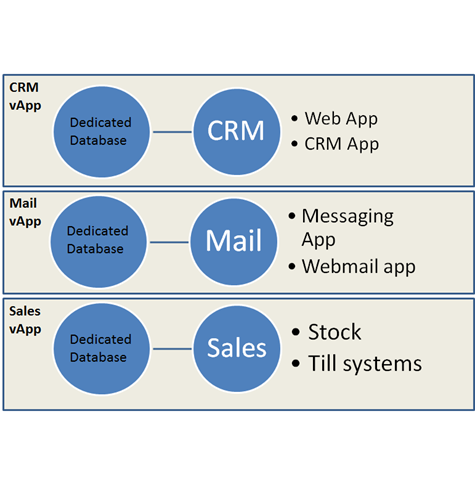
Traditional Shared application Services vs. vApp
Guest Software Licensing Increase
When you consider you will normally have to license the software running in each vApp, providing a shared corporate database cluster is typically a way of providing an HA Oracle or SQL database service in a cost-effective manner because those applications are expensive and more cost-effective to license by CPU in larger environments.
Software licensing needs to change for the cloud, the move to a more consumption/rental based model is underway for most major vendors; those that don’t will die.
Guest Management overhead
Now a vApp may have it’s own DNS, domain controllers, databases, web services, applications VMs each of these will need to be patched, maintained, monitored etc.
Automation solves a lot of this and is the holy grail but particularly when VUM is going to have it’s guest patching functionality removed in future releases this could be a concern.
However…
If you think about it the costs in the vApp model are more controllable and accountable – yes you may have more machine instances than you did in the more traditional IT world but you know exactly who is using it, how much of it they are using (the charge units are more easily quantifiable) and they can easily stop using it or move it to a lower SLA tier if it’s costing too much.
The control/decision of cost/benefit is back with the consumer (internal business unit) rather than being dictated as a fixed fact by IT – moving the consumer to a different service tier is MUCH harder to do with traditional shared services, in the cloud world it’s configuration from a shared pool of infrastructure.
if a vApp isn’t used anymore it’s easier to archive the data and destroy it, it’s much harder to disentangle a tenant from a traditional shared application service like CRM or an intranet where customisations or extra components may have to remain in-situ because just uninstalling them poses a risk to overall service.
It also has the advantage of potentially providing a higher net SLA, there are less inter-dependent parts across the enterprise so less scope for things to break as a result of subtle incompatibilities.
Likewise you can clone an entire vApp in-situ to a test or DR environment with data and configuration in-place and run it in isolation from the production copy to fully test changes, this is much harder with traditional IT shared application services.
So in conclusion; Yes it could lead to some degree of silo’ing of application services which is somewhat at odds of what virtualization has done in breaking down and consolidating these silos from an infrastructure perspective. Strategically, software architecture frameworks will make applications move to a different deployment model that is more “cloud friendly” and less tied to machines, operating systems and infrastructure.
The net benefit is choice and cost control for the end-user.
vApps moving centre-stage
Posted by on September 1, 2010
vApps were introduced as part of the vSphere 4 release but were largely a forgotten area of functionality until now.
The concept of a vApp is as a bar-code for an IT service, where that service consists of a number of inter-dependent virtual machines containing applications that provide a service – for example a website. the vApp contains a number of virutal machines and is tagged with required levels of service and other pertinent information like start-up order, dependencies and required networks etc. to allow them to run successfully.
For example a corporate Sharepoint service could be grouped and deployed as a vApp containing relevant domain controllers, DNS, SQL and MOSS VMs to allow it to run – from a VMware perspective you manage and deploy the servers as a whole vApp rather than individual VMs.
With the vCloud Director (vCD) announcements it’s clear what VMware’s intention was; vApps are core to the service catalog concept for vCD, you don’t just pick virtual machines you can pick ready-to-use and self-contained application stacks to deploy and un-deploy.
However, if you think about it, it’s not as simple as it might seem once you go beyond the infrastructure level as you’ll still need to do in-guest engineering and automation to make this sort of deployment model successful but it’s a good foundation to work from.
This type of rapid provisioning and the level of in-guest automation required to make it useful can be problematic with Windows guest OS’es – there are still tight dependencies on domain controllers, forests and domain SIDs to get around for many applications. As more and more Microsoft applications move to PowerShell at the core this becomes more feasible but architecturally speaking it’s a problem for anything other than trivial applications.
The guest automation story is much better for Linux VMs deployed as part of vApps as scripting and automation is at the core of Linux deployment and always has been but it’s not done for you, vCD just handles the {virtual} infrastructure provisioning; tailoring and automating the resultant guest OS images is up to you but there is much more precedent on this space.
Strategically, Springsource makes a lot of sense for these sort of container deployments, the use of application frameworks breaks the dependencies on the underlying OS and makes applications much more flexible and portable, but this is an evolution away from current enterprise applications.

 Virtualization, Cloud, Infrastructure and all that stuff in-between