Virtualization, Cloud, Infrastructure and all that stuff in-between
My ramblings on the stuff that holds it all together
Monthly Archives: October 2010
vSphere App for iPad Download
Posted by on October 26, 2010
Whilst we all await the “official” vSphere administration app for the iPad, as previewed at VMworld I found myself needing something to control my home vSphere lab environment from my shiny new iPad.
The iPad has now integrated itself as the device of choice with my wife & kids and is in regular use as a web-browser and media-player in the living room at home rather than laptops so this seemed like a logical extension
A quick browse of the iTunes store turned up iDatacenter, whilst not cheap at 8.99 GBP it works well in my testing as a basic administration interface to my lab and allows me to reboot guests/hosts as well as kick off vMotion and storage vMotion tasks.
It doesn’t offer a remote console or any historical performance graphing but it is good for basic administration tasks and looking at current statistics like CPU, memory and disk space – which is handy as my home lab currently has 21 ESX hosts and 54 “production” virtual machines 
The following photo shows a quick view of the interface, my only minor gripe is that it doesn’t seem to recognise clusters as a management object – just individual ESX hosts or virtual machines and it can be a little bit slow at times, but those aside it’s worth checking out if you have this sort of requirement.
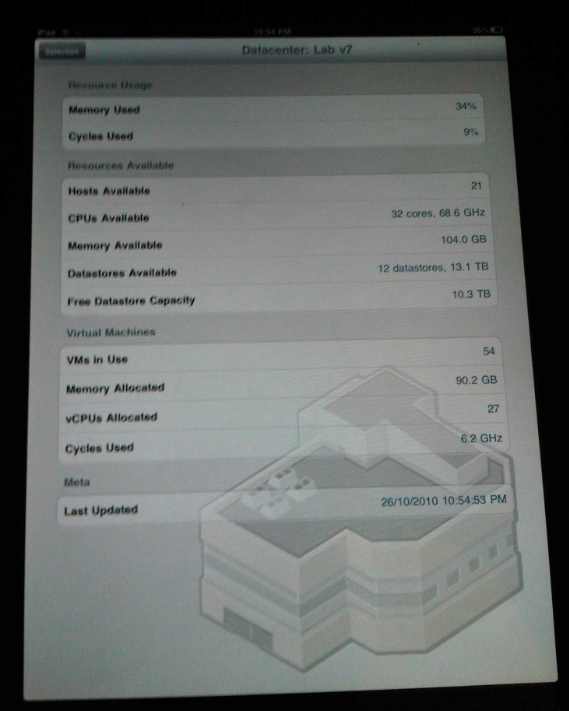

The application home-page is here http://nym.se/idatacenter/ and there is a video demonstrating the key features.
vTARDIS wins Best of Show at VMworld Europe 2010
Posted by on October 14, 2010
Wow, what can I say, my vTARDIS project has won 2 awards at VMworld Europe 2010 in the following user categories;
There is some good coverage of the VMworld event on the the searchVirtualDataCentre.co.uk site here

I’d like to thank <#insert <paltro/gwenneth.h>.. 🙂
But seriously I appreciate this recognition for the vTARDIS project which has burnt many of my brain-cells and personal-time over the last 12-months, as well as airport-stress as I had to convince the TSA that I wasn’t some 24-inspired nut-job shipping a suitcase-nuke round the US with me for BriForum, the Charlotte(US) VMUG and various London, UK VMUGs.
Here is a picture of it in it’s off-the-shelf Marks & Spencer shipping container (a.k.a suitcase) note:

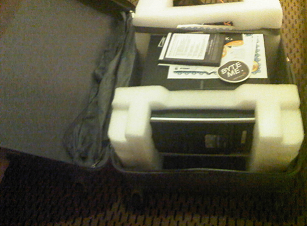
Note cool “my datacenter is bigger than yours” sticker courtesy of Solarwinds
Trying to understand what vTARDIS is is hard for many people, and it’s even harder to explain sometimes, but the concept is basically trying to build a complex, enterprise type vSphere implementation on as little hardware as possible for testing/training, but hopefully the following diagram (and the original post) explain it better at a technical level

That-said, I particularly like how TechTarget (who sponsor the awards) phrase it..
"This is the kind of bonkers-crazy stuff that has made the virtualisation community the bedrock of innovation. The only limitation is people’s imagination, and Gallagher’s vTARDIS demonstrates imagination in spades."
Winner: vTARDIS (Transportable Awfully Revolutionary Data Centre of Invisible Servers)
IT project owner: Simon Gallagher
Vendors and technology used: VMware Inc. vSphere 4.0 and 4.1
Vyatta Core
Openfiler
Microsoft Windows Server 2008 R2
Hewlett-Packard Co. ML115 G5
Advanced Micro Devices Inc. (AMD) quad-core processors
IT project: Gallagher’s lab features low storage latency and solid performance. Gallagher’s configuration also pushes beyond the "official" use of VMware technology by using solid-state drives to reduce disk I/O and "nested VMware ESX" instances, which give the appearance of owning many ESX hosts when the entire infrastructure actually sits on one physical box. His configuration runs eight virtual ESX hosts and nearly 60 virtual machines on just the one physical server, rather than multiple PCs and storage appliances.
What the judges said: "No other entry showed the same degree of doing a lot with so little."
I hope it stands as an example of how flexible VMware technology is and what you can do with a bit of imagination and some good, hard-graft.
But things don’t stand still in the IT world, and nor do they in my mad-scientist home-lab, look out soon for posts on further developments which are running now;
vTARDIS v2 : 20 node PXE booting, DHCP configured ESXi cluster with powershell provisioning script on a single physical 500GBP server.
vTARDIS.cloud : 3 x 20 node ESXi cluster, DPM enabled, VMware vCloud Director, Chargeback, EMC Celerra VSA, on 3 x physical 300GBP hosts plus iomega IX4-200, 2-node Management cluster pod.
Whilst in the last couple of weeks I started working directly for VMware in the cloud practice, my vTARDIS project was started about a year ago and was demonstrated at many VMUGs and events (including VMworld SF 2010) in that time.
All of the equipment, power, space, brainpower and cooling for this project have been paid for entirely out of my own pocket/cranium, I do not receive any kind of sponsorship for this work from my current or previous employers, and it has been completed on my own (personal) time, so to invoke the Paltro convention I’d definitely like to thank my family for their tolerance and patience whilst I have gnashed my teeth at powershell and danced way beyond edges of supportability, and in many cases physics!
Stay tuned, so much more arcane geekery to come…!
Importing a PST file into Outlook 2011 for Mac
Posted by on October 4, 2010
I have been a long-term Outlook user and I’m a serial information hoarder 🙂 so I have a calendar and contact set that goes back a LONG way in time, in a previous life I was also an Exchange/AD consultant so I see the benefits of a server-side mailbox store (centrally held data with local disposable replicas, search, access anywhere etc.).
As well as my work schedule it has all my regular personal appointments, kids school schedules etc. – for simplicity’s sake I only keep one calendar, I don’t have a separate work and personal calendar – your mileage may vary, but this is the way I work.
Having recently moved companies and moved from Wintel/Office to a Mac with the new Outlook 2011 I needed a way of importing my PST-archived calendar to my new Exchange store (calling it a mailbox doesn’t seem to do it justice anymore as it contains calendar, contacts, etc as well now).
I also use a BES-connected Blackberry so I want it to sync my calendar to my device via the BES and a server-side calendar means it’s accessible using OWA from any PC.
This is pretty straightforward for normal Windows Outlook as you just import the .PST and choose the new server-side store/calendar as the target.
However, it seems that the built-in import function in Outlook 2011 won’t import calendar data from a .PST file directly to an Exchange server-side store, it will import it but it only keep it in a separate locally held calendar, nor can you cut & paste or sync or do anything to move the contents from “calendar – on my computer” into the server-side calendar.
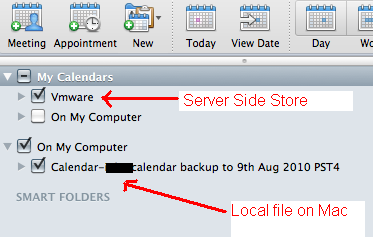
My “VMware calendar” (note: not my capitalization :)) is the server-side one but I can’t import directly to it, it always goes into “On my computer” which I can only assume is held somewhere client-side.
Whilst I can select both (as shown above) and they get overlaid on the calendar view this is only accessible when I use my Mac and thus won’t be available via OWA, or on my Blackberry.
So – the only solution I found was to use a Windows VM under Fusion with Office 2010 installed and use it to import my calendar contents, thus it synced back down to my Outlook 2011 offline store and onwards to my Blackberry via the BES.
This seemed a sort of backwards process so I would love to know if anyone has found a better native way to do this….?

 Virtualization, Cloud, Infrastructure and all that stuff in-between