Virtualization, Cloud, Infrastructure and all that stuff in-between
My ramblings on the stuff that holds it all together
OS X Lion can’t connect to Iomega IX4 NAS workaround
Posted by on July 20, 2011
Today a received my new Mac Book Pro, it shipped with OS X Snow Leopard but by coincidence it arrived on the day Lion was released in the App Store so being an early adopter (read gadget freak) I upgraded it immediately to Lion – which took ~15mins on my Mac which has an SSD nice 🙂
However once completed I couldn’t connect to my Iomega IX4-200d NAS, which was kind of a problem as it’s my time-machine server as well as storing all my useful data, finder just reports an error.
“There was a problem connecting to the server”
The version of the server you are trying to connect to is not supported (…)
It turns out this is a common problem; Lion implements a more secure AFP authentication method and most Linux based NASes don’t yet support the more advanced version.
However, I found the following blog post which shows a work-around enabling you to use the less-secure authentication method, use at your risk whilst we all wait to see if the NAS vendors implement an updated firmware to address this issue.
It’s pretty straightforward, some command line and 2 reboots required, but I can verify it works fine on my Mac.
http://www.alexanderwilde.com/2011/04/os-x-lion-connection-error-with-afp-and-workaround/
Early adopters beware.
Other than that, liking Lion so far – Mission Control with hot-corners and full-screen apps is very nice, new scrolling method is nice but a bit confusing as older apps seem to need specific support to work with it, Google Chrome works with the new full screen but seems to have some issues, I can’t find a way in the UI to take the window out of full-screen mode and the tab drop down obscures the search entry box if you have a Google window open.
VMworld US is still better value than VMworld EMEA
Posted by on July 5, 2011
I’m in the middle of planning my VMworld trip(s) this year, now I’m no longer working for a vendor or a consultancy I have to fund my trip myself, I’m happy to do this as I view it as an excellent training & networking opportunity.
I already have a good foundation in infrastructure and virtualization technologies so I find normal training courses a bit slow, and very narrowly focused – VMworld gives you the flexibility to pick and choose your own agenda and allows you to go much deeper if you choose.
Based on a previous presentation I did for the London VMware, I still maintain that even for us Europeans, VMworld US is better value, this post represents my logic
If you want to get the lowest cost, you should
- Book early and take advantage of early-bird discounts
- Book a cheap, non-official conference hotel – often I also find the cheapest hotels have free WiFi –it might be a short walk
- You don’t need to stay in the best hotel in town, there are so many after-hours events and parties you can take advantage of you’ll just be sleeping there.
- Don’t bother booking a rate with breakfast, you can usually get it at the conference
My pricing is all in GBP where I have only been able to obtain USD$ pricing (as I live in the UK) I have converted to GBP at the current exchange rate, pricing has been taken from the Expedia.co.uk website, which is quite useful for this sort of what-if work.
VMworld Admission Price(early bird-discount)
VMworld US £990 ($1595 (early bird pricing has now expired))
There are 124 Breakout Sessions, 8 Panel Sessions & 24 Hands-on Labs.
VMworld EMEA £683 ($1100 early bird pricing still available)
There are 116 Breakout Sessions, 3 Panel Sessions & 23 Hands-on Labs.
The US conference is 1 day longer.
Hotel & Airfare
I usually try to fly out the day before the conference as it gives you a full day to get over jetlag and have a bit of time to have a look around and do some quick tourist stuff.
I then try to fly back the day after the conference has finished, this avoids the last-day rush and means you can hang around until the end and wind-down properly.
The other main reason I do this is that I had a nightmare journey once returning from Microsoft Tech-Ed in Amsterdam on the final day of the conference – 10,000+ geeks with laptops + questionable souvenirs to scan all descending on the nearest airport isn’t a fun experience.
Travelling a day before/after also means you can usually take advantage of cheaper flights – even if it costs you an extra night of hotel.
Book a Saturday in most places and you’ll find your flights and hotel are significantly cheaper.
VMworld US

It’s not a direct flight, you can get a direct flight for approx £300 more on this package – but we’re doing this on a budget – when flying UK to west-coast US sometimes it’s also better to do a 2-leg journey so you can get off a plane for a bit
This hotel looks to be a 30min walk (or short, cheap cab-ride) from the Venetian where the conference is being held
VMworld EMEA

I’ve not stayed at this hotel, but looks pretty close, and Copenhagen has an excellent metro system, cheapest I found for flight + hotel was about £200 but it included the word hostel 🙂
Total Costs
I based my expenses on previous years in SF and CPH, as you’ll see there is obviously a difference, it’s about 30% more expensive to go to Las Vegas, this doesn’t factor in lost revenue/time from not being able to be at work, but the VMworld US trip involves travel over a weekend/Friday to compensate.
If you consider that VMworld US is a 4-day event compared to a 3-day event for VMworld EMEA the gap gets even closer.
Food, drink and taxis are significantly more expensive in Copenhagen than in the US
| Event | Admission | Airfare/Hotel | Spending Food/Drink/Taxis | Total Cost |
| US | £990.00 | £791.00 | £150.00 | £1,931.00 |
| EMEA | £683.00 | £336.00 | £280.00 | £1,299.00 |
| Difference | £632.00 |
July London VMware User Group Meeting
Posted by on June 15, 2011
Quick heads-up it’s not long now until the next London VMware User Group (VMUG) meeting on 14th July, I’m also pleased to announce that I have joined the steering committee and will be helping out with finding useful and content. We are always open to suggestions and VMUG is all about the User so don’t be shy, particularly if you have ideas for hands-on labs or topics you would like to see covered – leave a comment with an idea, or drop me a mail (details on my about page) – you don’t have to be running the largest infrastructure in the world or have a brain the size of a planet, bring your ideas, your woes, your experiences and share them with the community.
If you’ve never been before – now is the time to make time.
London VMUG Meeting
Thursday, July 14, 2011
Meeting: 10:00 a.m. – 17:00 p.m.
Networking Reception: 17:00 p.m.
London Chamber of Commerce and Industry
33 Queen Street
London, EC4R 1AP
Click here for directions
Networking Reception
Pavilion End
23 Watling Street, EC4M 9BR
The London VMUG Steering Committee are delighted to invite you to our next event. Following on from the success of the new format unveiled at the May 12th VMUG, we will continue with multiple tracks and a vCOPS focused lab, along with a Genius Bar from VMware GSS to answer any burning issues you might have. Details are below and we are grateful to our sponsors – Arista Networks, Embotics and Vision Solutions.
Please Note: If you wish to participate in the lab, you MUST bring your own laptop/client device please! You will need View 4.6 client installed (or admin rights to install it).
Agenda
Plenary sessions in Capital
10:00 a.m. – 10:15 a.m. – Welcome, Alaric Davies, Chairman
10:15 a.m. – 11:00 a.m. – Cloudvision for the Virtualised Environment, John Peach, Arista Networks, Sention System Architect
11:00 a.m. – 11:45 a.m. – Private Cloud Management Made Simple, Martin Sajkowski, Embotics, EMEA Operations & Colin Jacks Senior Solutions Specialist
11:45 a.m. – 12:15 p.m. – Break in Sponsor Expo
12:15 p.m. – 13:00 p.m.– Double-Take by Vision Solutions – Christian Willis, Technical Director: Meeting the Availability Challenges of physical, Virtual and Geographically Dispersed Systems
13:00 p.m. – 14:00 p.m.– Lunch in Sponsor Expo
Track 1
14:00 p.m. – 14:50 p.m. – vCOPS Advanced, Mark Stockham, VMware
15:00 p.m. – 15:50 p.m. – SRM Futures, Mike Laverick
16:00 p.m. – 16:50 p.m.- Cloud: Can You Compete? Mark Craddock
Track 2
14:00 p.m. – 14:50 p.m. – Thinking, Building & Scripting Globally, Julian Wood
15:00 p.m. – 15:50 p.m. – Managing IT as We Evolve to Cloud Computing, Colin Fernandez, VMware
16:00 p.m. – 16:50 p.m. - How to Save your Time With PowerCLI, Jonathan Medd
17:00 p.m. – Close
17:00 p.m. – Onward Drinks at Pavilion End
Please note the agenda is subject to change
Thank you to our meeting sponsor:
Register Today to join us for this free informative event.
Please note: You will need to log into the VMUG web site to register for this meeting. If you have not already obtained your VMUG login credentials, please visit the Username and/or Password Help page to request your username and password.
vTARDIS.next runs on vSphere 5.0
Posted by on May 27, 2011
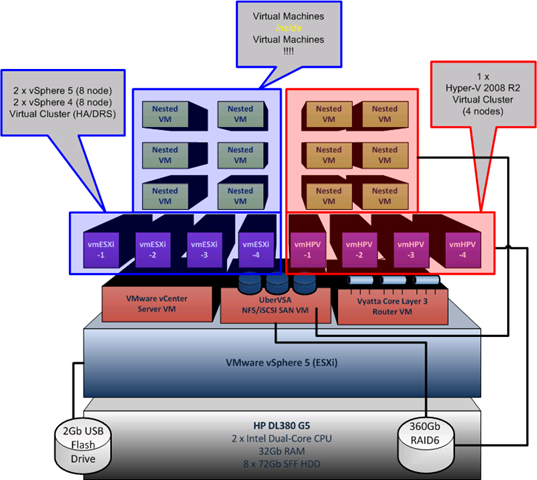
I have been working furiously on an updated version of the vTARDIS based around vSphere 5, and now it’s in the open (I was on the heavily NDA’d beta programme) the goal is the same: lowest cost possible physical hardware, but the ability to build complex production like ESX environments and run large amounts of virtual ESX hypervisors and guests.
This time round, and due to some VERY cool [UNSUPPORTED] features of ESX 5 you can run more than just clusters of nested ESX virtual machines as I did in the original vTARDIS, but you can also run all the following on a SINGLE physical server running vSphere 5 – this is seriously cool IMHO
- Run 64-bit guests inside an ESX virtual machine (you couldn’t do this previously as it didn’t pass through the x64 extensions)
- Run HyperV under ESX as a virtual machine,
and allow it to run nested guests*and even build clusters of Hyper V servers - Run XenServers under ESX as a virtual machine
and allow it to run nested guests –to be tested - Fully stateless deployment of ESX guests using my former colleague’s amazing PXE Manager so no need to configure lots of hosts
- Run large vSphere clusters
- Multiple Virtual Storage Appliances
*I have had problems with the guests inside virtual Hyper-V nodes, more on this soon as I think it was just a config problem
Hardware
In the past I used the HP ML1xx range of PC-servers, they’re great bits of kit but I was starting to run into challenges with the 8Gb RAM limit, so I have branched out a bit and gone for an HP DL380 G5 – yes it’s not quiet enough to put under your bed 😉 but they are reasonably cheap 2nd hand on eBay and more importantly they take up to 32Gb of RAM. and in day to day use it’s not too noisy
Total acquisition cost of this server as follows (all from eBay and out of my own pocket)
| HP DL380 G5, 2 x dual core Xeon 2.0GHz, 8Gb RAM, 2 x 72Gb SAS disks, P400 array controller, redundant PSU, iLo advanced license. | £550 (Refurbished) |
| 6 x 72Gb 10k RPM SAS HP Disks | £270 (Refurbished) |
| 32Gb RAM | £520 (!) ouch new. |
| Sold supplied 8Gb RAM kit from server | -£150 |
| Total Cost | £1,190 |
This box has a good pedigree as you’ll see because it’s former owners didn’t erase the iLo settings before they decommissioned it (oops).

Whilst it’s noisy as hell, it seems surprisingly frugal when it comes to power consumption with approx 50% CPU load on the physical host

Storage
Local DAS array of 8 x 72Gb SFF hot-plug HP drives, I’m also backing them up to my Iomega NAS using Veeam Backup and Replication 5.
Hypervisor
I did this work with the beta and Release Candidate (RC) builds of ESX and vCenter, I used the Windows vCenter installation rather than the appliance.
Next… The iTARDIS* more soon!
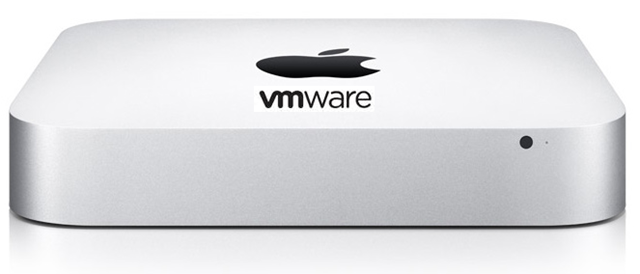
*Don’t try this at home.. you won’t be able to make it work (yet), there are some firmware issues that stop it working on a Mac Mini – but I had access to some internal resources whilst working at VMware to get around it
Stay tuned for step-by-step instructions
vPastures New
Posted by on May 25, 2011
I’ve had a great time working at VMware since last year and have worked with some of the greatest minds in the industry on some interesting projects. But, after a lot of deliberation I have taken the decision to leave the relative comfort of a “permanent” position at a vendor to work on a freelance basis as an Infrastructure Architect – specialising in virtualization and cloud solutions.
My reasons for this move are varied and personal, but suffice to say that I have a number of outside ventures that are coming to fruition and I need the flexibility to work on them independently.
VMware have some great stuff in the pipeline and I’m going to enjoy working with it albeit back on the customer/partner side of the equation rather than inside, it’s also gratifying to see the cloud concepts I was working on in 2008 becoming very much mainstream – so maybe I wasn’t mad after all 🙂
VMware have some challenges and growing pains in scaling out the business and avoiding Microsoft syndrome (too much, too wide, too thin). They need to make sure that they don’t loose sight of the requirement for end-end integrated customer solutions with services and support to match. Particularly where there are so many technology acquisitions involved. That said, VMware have the best senior exec’s in the technology industry steering the ship – I can say that as I’ve met most of them over the last couple of years and they’ve been there & done it.
I will still be heavily involved in the community and need to set aside some time for vTARDIS.next and my recently neglected blog – many cool mind-bending, physics defying hypervisor inside a hypervisor posts to come!
I have some interesting professional engagements lined up and I’m looking forward to a new challenge.
Cheers
Shortcut key for CTRL-ALT-DEL on a Mac for a Fusion VM
Posted by on April 19, 2011
Apologies if this is old-hat or obvious but I didn’t realize you could do this until recently – if you have a Windows VM and want to press CTRL-ALT-DEL to logon or bring up the lock screen etc. there isn’t an obvious shortcut key as the Mac doesn’t have a physical DEL key like a normal PC keyboard, so if you’re a Fusion user you can hit the Fusion bar and choose to send CTRL-ALT-DEL to the guest OS.
However if you hit Fn-CTRL-ALT and Backspace on the Mac keyboard it has the same effect and sends CTRL-ALT-DEL to the guest (a 4-finger salute, rather than the traditonal 3-finger salute  ).
).

Next London VMware User Group is on May 12th Register NOW
Posted by on April 11, 2011
The next London VMware User group is open for registration, with a rather cloudy-theme and for the 1st time ever – live labs and multiple tracks!
Thursday, May 12, 2011
London Chamber of Commerce and Industry
33 Queen Street
London, EC4R 1APThe London VMUG Steering Committee are delighted to invite you to our next event and to unveil a new format to our previous VMUGs taking place on Thursday, May 12, 2011. In response to your feedback and suggestions, we will have multiple tracks, multiple sponsors and labs. Our theme for this VMUG is “Your Journey to the Cloud” and to deliver our comprehensive agenda, the day will now start at 10am! Details are below and we are grateful to our sponsors – COLT, EMC and Quest.
Registration is open and included as part of member benefits for all VMUG members. Please note, in order to register for this meeting we ask that you sign up for a complimentary VMUG membership. Click login below to sign up today.
Agenda:
Plenary sessions in Capital
10.00 – 10.20 – Welcome, Alaric Davies, Chairman
10.20 – 11.00 – presententation & demo the vCloud1 -Greg Branch, Director of Architecture, Colt and Dan Senior, Virtualisation Architect, Colt
1.00 – 11.45 – Paul Martin, Quest – Private Cloud – Build for Success by Planning for Failure, with Quest Software
11.45 – 12.15 – Break in Thames where our sponsors will be exhibiting
12.15 – 13.00 – EMC
13.00 – 14.00 – Lunch in Thames where our sponsors will be exhibiting
TRACK 1
14.00 – 14.50 Massimo re Ferre, Making sense of vShield & vCD for the “average Joe”
15.00 – 15.50 Jason Miles, Automation in the Cloud
16.00 – 16.50 Mark Craddock
TRACK 2
14.00 – 14.50 Stuart Radnidge, Rethinking Infrastructure
15.00 – 15.50 Tom Brand, Cloud topic
16.00 – 16.50 Cloud topic TBA
17.00 – Close
17.00 – Networking Reception at Pavilion End, 23 Watling Street, EC4M 9BR
Labs
These will be running simultaneously from 10:20 a.m. and you will need to register upon arrival to book your lab session.
The VMUG are providing VMware vCloud Director Labs for all UG members to get a look and feel for the product. COLT has very kindly agreed to host the labs ontheir infrastructure in the Cloud. COLT are a certified VMware vCloudDatacenter Services Provider and the first in EMEA to provide this service. The COLT team along with VMware vCloud Architects have provided two types of labs to provide the best experience possible.
Lab A – Consuming Cloud resources from VMware vCloud Director
This lab is tailored to provide a user’s view of consuming compute resource from the cloud. It provides an insight into the ability provide resources via a self-service portal deploying virtual machines via vApps within private virtual datacenters.Lab B – Administrating VMware vCloud Director
This lab provides the administrators view of vCloud Director. The lab contains a virtual center server, vCloud Director server and an ESX host to create compute resources within the cloud. It provides the ability to define different compute services in the form of vApp’s which can then be published within the vCloud Catalogue. This also enables the administrator to define different
I am running the admin-track of the cloud labs so will be on-hand to answer any queries
Click on this link to register – register now, as I’m pretty sure this one is going to “sell out” quickly
Where is the wireless iTunes Sync?
Posted by on March 31, 2011
A lot of i* devices from Apple have turned up in my household over the last few years, it started with iPods until we all had one (or more!) then an iPad, an iPhone, a MacBook pro and most recently an AirPort Express and most likely an Apple TV in the future (for streaming music in the family room and/or kitchen).
But there is still one Achilles heel for these device; iTunes – they all rely on this awful application to update their content, sync photos, music etc. from my own collection. I own a lot of music CD’s and I have lots of DVDs ripped to MP4 format – I don’t buy everything online (despite Apple’s best efforts).
Why, when almost all of these devices have built in WiFi do I still have to sync them via a USB cable with iTunes, particularly as my iPad has 64Gb of storage, that takes ages to sync over USB.
Apple has had all this chatty bonjour p2p networking stuff in the products for year and home-sharing was a long over-due feature but still nothing in the iPad 2 and most recent OS updates.
I can see this being integrated into MobileMe; but for people like me with a *large* multi-TB media collection that’s going to be an expensive (and for many folks) impossible solution.
Come on, Apple – your stuff is generally great but this is rapidly becoming a pain point!
Excellent Book about Cybercrime
Posted by on March 17, 2011
A colleague recommended Kingpin by Kevin Poulsen to me for a recent business trip, so I duly purchased the Kindle edition at the airport and haven’t put it down since.

It’s an easy read and provides a fascinating insight into how an American teen got into the computer underground and latterly bigger business crime and credit-card fraud, even staging hostile take-overs of rival criminal forums.
If, like me you were in the industry in the 90’s/2000’s and/or have ever had your credit card cloned this stuff makes for fascinating reading about the darker edges of the Internet and how shockingly easy it really was.
Highly recommended.
Upgrading to vCloud Director 1.0.1 from GA
Posted by on March 10, 2011
A couple of people have asked recently how complicated it is to upgrade from the GA 1.0 release of vCloud Director to 1.0.1 which was released recently – this is a post of my notes, and I will add as I find new things – I will be doing this in the coming weeks on my lab.
vCloud Director Cells
Luckily, it’s pretty simple – it’s just a case of upgrading the cell servers, downtime is required if you have a single cell, if you have a multi-cell deployment you can do a rolling upgrade by taking one cell offline at a time
You can find the upgrade steps and a list of changes and known issues in the release notes here
No database changes are required, and it has the same minimum system requirements as the 1.0 GA build although 1.0.1 adds support for vSphere 4.1 U1
Chargeback
There is also an updated build of Chargeback (v1.6) – release notes here – note there is no in-place upgrade if you have 1.5 you need to uninstall 1.5, keeping the database intact and install 1.6 connecting it to the same database.
vShield
I am investigating the impact for vShield but as I understand it the 1.0.1 download does not absolutely require an upgrade to the vShield appliance.
Licensing
I have not personally confirmed this, but my understanding is that this is a maintenance release and v1.0 and v1.0.1 serial numbers are the same.

 Virtualization, Cloud, Infrastructure and all that stuff in-between