Virtualization, Cloud, Infrastructure and all that stuff in-between
My ramblings on the stuff that holds it all together
vSphere RC RAM Under VMware Workstation: How Low Can You Go?
Posted by on May 8, 2009
Getting ESX (in it’s various versions) to run under VMware Workstation has proven to be a very popular article on this blog, if you are a consultant who has to do product demos of VI3/vSphere or are studying for your VCP it’s a very useful thing to be able to do on your own laptop rather than rely on remote connections or lugging around demo kit.
Good news; the RC build of vSphere will boot under the latest VMware Workstation build (6.5.2) without any of the .vmx hackery you had to do in previous versions and it seems quite fast to boot.
Bad news: the RC build of vSphere needs at least 2GB of RAM to boot, this is a problem for a laptop with 4GB of RAM as it means you can only really run one at a time.
Luckily: Duncan Epping (or VCDX 007; licenced to design :)) has discovered how you can hack the startup script to allow it to run in less than 2GB of RAM – details here, this isn’t officially supported – but it does work.
In the interests of science I did some experimentation with VM’s with various amounts of decreasing RAM to see what the bare minimum RAM you can get away with for a VM’d version of vSphere RC.
The magic number seems to be 768Mb of RAM, if you allocate less than this to the VM then it results in a Purple Screen of Death (PSOD) at boot time.
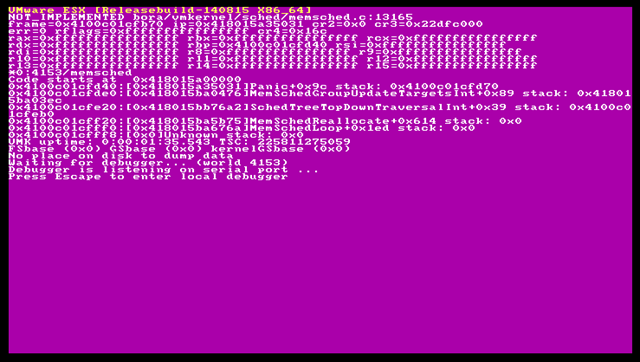
Note – this may change for the GA/RTM final version – but these are my findings for RC
The relevant section of my /etc/vmware/init/init.d/00.vmnix file looks like the following (note it won’t actually boot with 512mb assigned to the VM)

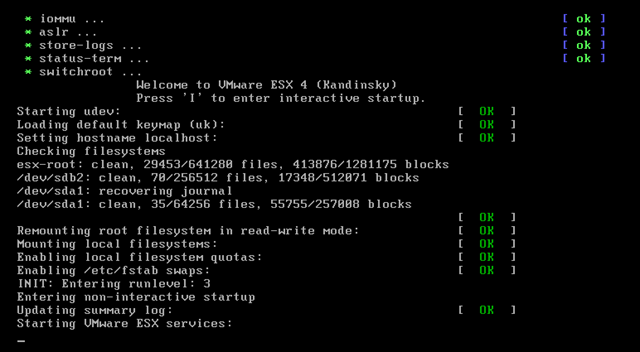
Some screen captures of the vSphere RC boot process below

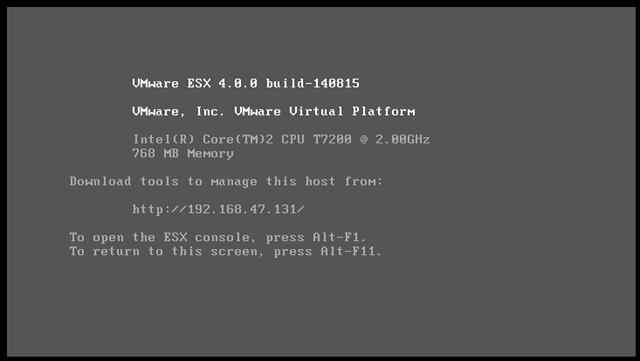
And finally the boot screen once it’s finished – it takes 2-3 mins with 768Mb of RAM on my laptop to get to this boot screen.
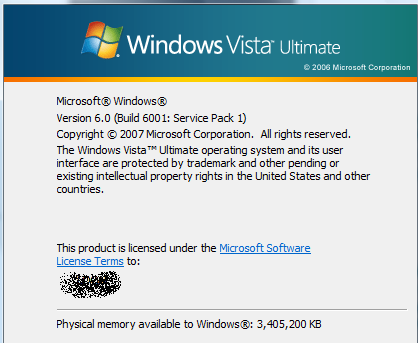
I am doing this on a Dell D620 with 4Gb RAM and Intel VT enabled in the BIOS, running Vista x86 and VMware Workstation v6.5.2 build 156735

I haven’t tried, but I assume I can’t power on VM’s under this instance of vSphere but I can connect them to a vCenter 4 machine and practice with all the management and configuration tools.
Happy tweaking…
Importing vCenter 2.5 Customization Specifications into vCenter 4
Posted by on May 7, 2009
If you have a lot of customization specifications setup in your vCenter server you are likely to want to copy these to your vSphere/vCenter 4 lab or production system when it’s released, otherwise it’s a bit tedious typing it all in again 🙂
The following steps show how to export and then import your guest customization specifications into vCenter 4 you have to do them one by one as there is no multi-select available.
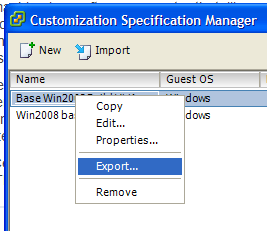
First, export the settings from the vCenter 2.5 server using the VI client connected to the vCenter 2.5 server (not the ESX host)

Then save each one out as an .XML file
Then connect your VI client to your vCenter 4 server (not the vSphere host itself) and go to the home view and click on the Customization Specifications Manager icon
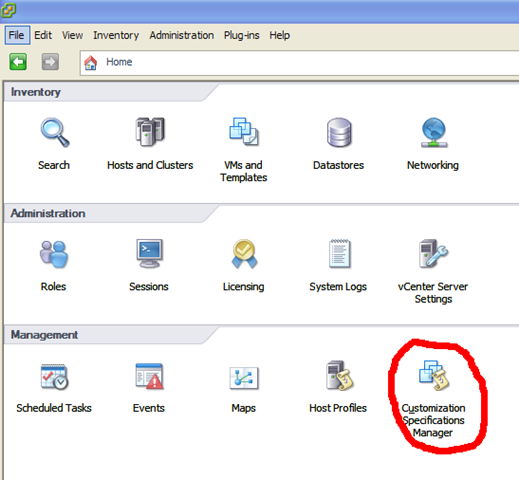
Then click import and choose the .XML file you exported previously

Click OK and it will import the template
if you have encrypted passwords stored in your customization template then you will be prompted to re-enter them (unless you used a real certificate or PKI across both hosts)

It will then run you through the guest customization wizard to re-enter the password, but don’t worry all the other settings are retained you only need to re-type the password.

Once you’ve been through this process the customization specification is now available for use when you deploy from a template within vCenter 4.
Other than that the overall template process is similar to the VI3 process that I wrote about a while ago here
Applying “Agile” to Infrastructure…? Virtualization is Your Friend
Posted by on April 28, 2009
I have been looking at this for a while, in the traditional model of delivering an IT solution there is an extended phase of analysis and design, which leads through to build and hand-over stages; there are various formalised methodologies for this – in general all rely on having good upfront requirements to deliver a successful project against. and in infrastructure terms this means you need to know exactly what is going to be built (typically a software product) before you can design and implement the required infrastructure to support it.
This has always been a point of contention between customers, development teams and infrastructure teams because it’s hard to produce meaningful sizing data without a lot of up-front work and prototyping unless you really are building something which is easily repeatable (in which case is using a SaaS provider a more appropriate model?)
In any case the extended period these steps require on larger projects often doesn’t keep pace with the rate of technical and organisational change that is typical in modern business; end result – the tech teams are looking after an infrastructure that was designed to outdated or at worst made-up requirements; the developers are having to retro-fit changes to the code to support changing requirements and the customer has something which is expensive to manage and they wonder why they aren’t using the latest whizzy technology that is more cost-effective and they are looking at a refresh early into it’s life-cycle – which means more money thrown at a solution.
With the growing popularity of Agile-type methodologies to solve these sort of issues for software projects infrastructure teams are facing a much harder time, even if they are integrated into the Agile process which they should be (the attitude should be that you can’t deliver a service without infrastructure and vice-versa) they struggle to keep up with the rate of change because of the physical and operational constraints they work within.
Other than some basic training and some hands-on experience I’m definitely not an Agile expert – but to me “agile” means starting from an overall vision of what needs to be delivered and iteratively breaking a solution into bite-sized chunks and tackling them in small parts, delivering small incremental pieces of functionality through a series of “sprints” – for example delivering basic UI and customer details screen for an order entry application and letting people use it in production then layering further functionality through further sprints and releases. a key part of this process is reviewing work done and feeding that experience back into the subsequent sprints and the overall project.
Typically in Agile you would try to tackle the hardest parts of a solution from day one – these are the parts that make or break a project – if you can’t solve it in the 1st or 2nd iteration maybe it actually is impossible and you have a more informed decision on if the project actually is feasible, or at a minimum you take further the learning and practical experience of trying to solve the problem and what does/doesn’t work and are able to produce better estimates.
This has another very important benefit; end-user involvement – the real user feedback means it’s easier to get their buy-in to the solution and the feedback they give from using something tangible day to day rather than a bunch of upfront UI workflow diagrams or a finally delivered solution is invaluable – you get it BEFORE it’s too late (or too expensive) to change it; fail early (cheaply) rather than at the end (costly).
For me, this is how Google have released the various “beta” products like gMail over the last few years; I don’t know if they used “Agile” methodologies but; set expectations that it’s still a work in progress; it’s “good-enough” and “safe” you (the user) have the feedback channel to get something changed to how you think it should be.
Imagine if Google had spent the 2 years doing an upfront design and build project for gMail only for it to become unpopular because it only supported a single font in an email because they hadn’t captured that in their upfront requirements – something that for argument’s sake could be implemented in weeks during a sprint but would take months to implement post-release as it meant re-architecting all the dependent modules that were developed later on.
In application development terms this is fine – this Agile thing is just a continual release/review cycle and just means deploying application code to a bunch of servers – but how does that map to the underlying infrastructure platform where you need to provide and run something more tangible and physical? every incremental piece of functionality may need more server roles or more capacity to service the load this functionality places on databases, web servers, firewalls etc.
With physical hardware implementing this sort of change means physical intervention – people in data centres, cabling, server builds, lead time, purchase orders deliveries, racking, cabling etc. every time there is a release – with typical sprints being 2/4 week iterations quite often traditional physical infrastructure can’t keep up with the rate of change, or at a basic level can’t do so in a managed risk fashion with planned changes.
What if the development sprint radically changes the amount of storage that is required by a host?, needs a totally different firewall and network topology or needs more CPU or RAM resource than you can physically support in current hardware.
What if the release has an unexpected and undesirable effect on the platform as a whole – for example a service places a heavy load on a CPU because of some inefficient coding that had not shown up through testing phases and is not trivial to patch – you have 2 choices; roll back the change or scale the production hardware to work around it until it can be resolved in a subsequent release.
Both of these examples mean you may need servers to be upgraded/replaced and all adds up to increased time to deliver – in this case the infrastructure becomes a roadblock not a facility.
Add to this the complication of doing this “online” as the system this functionality is being delivered to is in production with real, live users – that makes things difficult to do with a low-risk or no downtime.
The traditional approach to this lack of accurate requirements and uncertainty has been to over-specify the infrastructure from day one and build in a lot of headroom and redundancy to deal with on-line maintenance, however with traditional infrastructure you can’t easily and quickly move services (web services, applications, code) and capacity (compute, storage, network) from one host to another without downtime, engineering time, risk etc.
Enter virtualization.
Rather than making developers or customers specify a raft of non-functional requirements before any detailed work has started on design; what if you could start with some hardware (compute, network, storage) that you can scale out in an incremental and horizontal manner.
If you abstract the underlying hardware from the server instance through virtualization it suddenly become much more agile – cloud like, even.

You can start small, with a moderate investment in platform infrastructure and scale it out as the incremental releases require more, maintain a pragmatic headroom within the infrastructure capacity and you can easily react straight away as long as you are diligent at back-filling that capacity to maintain the headroom.
Virtualization, and particularly at the moment with vMotion, DRS and Live Migration type technologies you have an infrastructure that is capable of horizontal scaling far beyond anything that you could achieve with physical platforms – even with the most advanced automated bare-metal server and application provisioning platforms.
Virtualization has a place in horizontal scaling where individual hosts need more CPU, Compute etc. even if you need to upgrade the underlying physical hardware to support more CPU cores virtualization allows you to do most of this online by moving server instances to and from upgraded hardware online.
VMware vSphere for example supports up to 8 virtual CPU’s and 256GB RAM presented to an individual virtual machine. You can add new higher capacity servers to a VMware ESX/vSphere cluster and then present these increased resources to the virtual machine sometimes without downtime to the server instance – this seamless upgrade technology will improve as modern operating systems become more adapted to virtualization – in any case vMotion allows you to move server instances around online to support such maintenance of the underlying infrastructure platform in a way that was never possible before virtualization.
This approach allows you to right-size your infrastructure solution based on real-world usage, you are running the service in production with some flex/headroom capacity not only to deal with spikes to can satisfy immediate demands but also with a view to capacity planning for the future – backed up with real statistics.
Maybe at day one you don’t even need to purchase any hardware or infrastructure to build your 1st couple of platform iterations – you could take advantage of a number of cloud solutions like EC2 and VMware vCloud to rent capacity to support the initial stages of your product development;
This avoids any upfront investment whilst you are still establishing the real feasibility of the project and outsources the infrastructure pain to someone else for the initial phases; once you are sure your project is going to succeed (or at least you have identified the major technical roadblocks and have a plan) you can design and specify a dedicated platform based on real-world usage rather than best-guesses – the abstraction that virtualization offers makes it much easier to do this kind of transition once you have a dedicated platform in place, or even another service provider.
To solve the release/risk complexity virtualization allows you to snapshot and rollback entire software and infrastructure platform stacks in their entirety – something that is almost impossible in the physical world – you can also clone your production system off to an isolated network for staging/destructive type testing or even disaster recovery.
Hopefully this has given you some food for thought on how Agile can apply to infrastructure and where virtualization can help you out – I only ever see the Agile topic being discussed in relation to software development – virtualization can help your infrastructure to work with Agile methodologies. However it’s important to remember that neither Agile methodologies or Virtualization a panacea – they are not the cure for all ills and you will need to carefully evaluate your own needs, they are both valuable tools in the architect’s toolbox.
High CPU utilization with Windows XP SP3 guest under VMware Fusion
Posted by on April 23, 2009
I have had a curious problem recently, I am currently running Windows XP under Fusion on a MacBook Pro; since I did some software updates recently the fan was going crazy and running at up to 6000 RPM even when apparently idling not only was the noise annoying it seemed to eat battery power.
Handy utility here for monitoring Mac temperature and fan speed.
With a bit of investigation I found that the Windows Search service was installed whilst I did some updates to the XP VM – it was doing it’s initial indexing the C: drive of the VM in the background – as soon as I disabled the “Windows Search” service it used much less CPU, and as a result quieter, cooler and the battery now lasts longer 🙂
Luckily I had no real use for Windows Search in this VM, but if you are experiencing the same problem worth looking into what background services are running in your guest OS and remembering that higher CPU usage = more heat = faster fan.
Remote in-place upgrade from ESX3.5 to vSphere
Posted by on April 22, 2009
I have an ESX 3.5 host running on an ML-110g4 that I want to upgrade to the beta of vSphere.
The vSphere client seems to come with a remote update utility as shown below.

It will download the upgrade packages over the network and then upgrade the OS remotely, nice no iLo or trip to the DC required… hopefully! {this was done with beta code remember}
Point it at ESX4 DVD .iso file
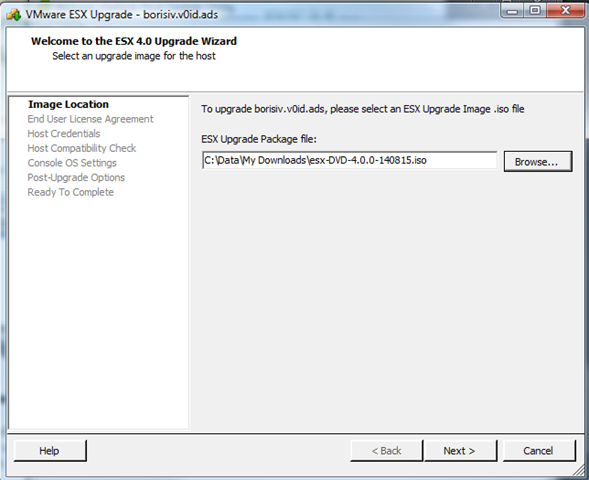
Validating the .iso file 
Accepting the EULA
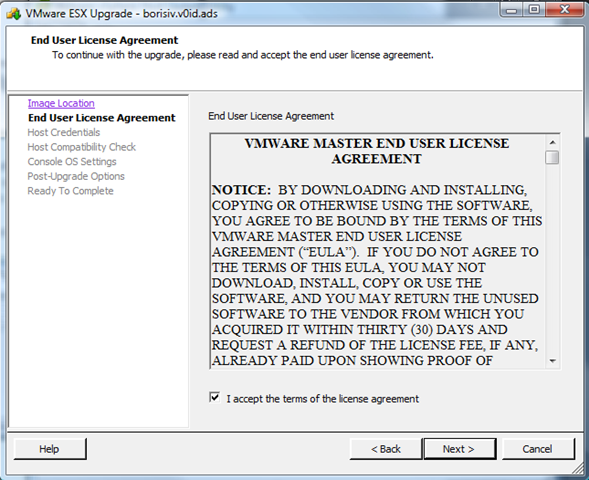
Supply the appropriate credentials for the ESX host
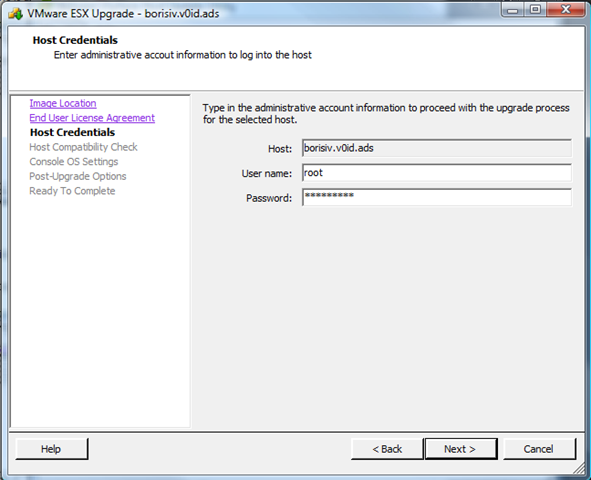
Host needs to be in maintenance mode, as you might expect 🙂

with the host in maintenance mode it can continue

You need to choose a location to store the virtual disk file for the COS

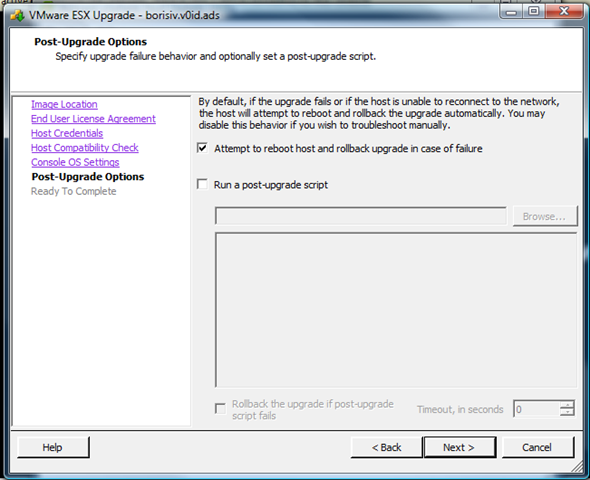
Enter failure options, what to do if it doesn’t work!
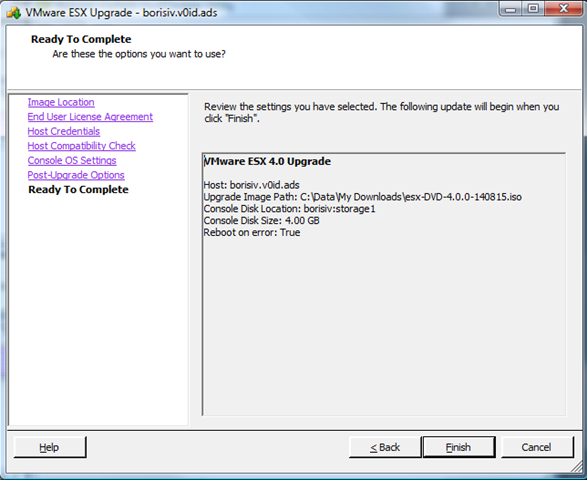
Summary screen and we’re ready to go..
On its way

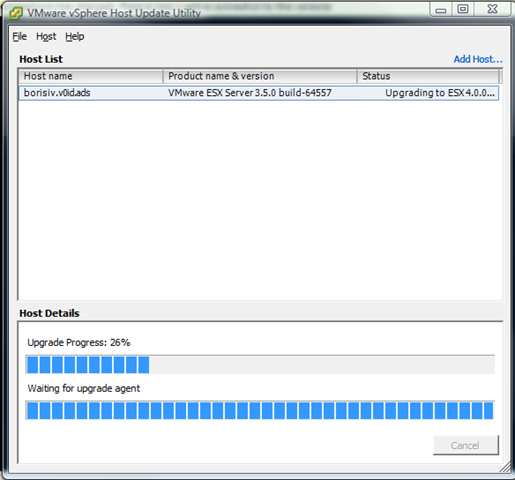
unfortunately this eventually timed out
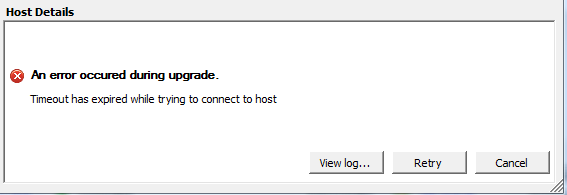
Upon investigating my ESX 3.5 host was shutting down and got stuck for some reason, manual reboot saw the upgrade process proceeding on the console, this was done with the RC beta build so this could be a bug..
about 30mins later it was all complete and my ESX 3.5 host was upgraded to vSphere.
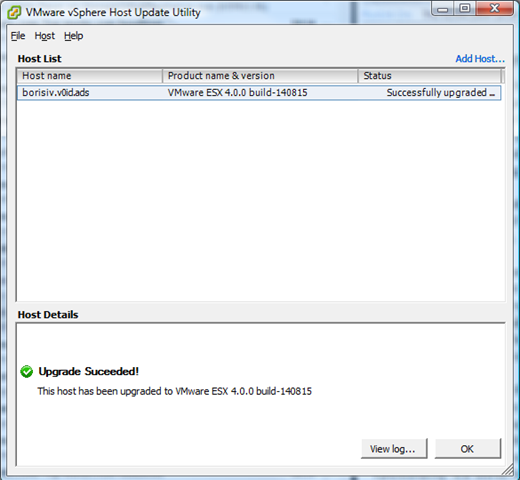
Very useful feature 🙂
I wrote this post last month but hopefully now the covers are off vSphere I can post more of this without falling foul of the NDA that covered the beta programme.
Today is vSphere Launch Day
Posted by on April 20, 2009
The covers are coming off today – you can still register for the webcast here if you want to watch it live.
I have been participating in the private beta for a couple of months and have been privy to most of the announcement information via the VMware partner programme, it’s all been under NDA until tomorrow so I have not been able to discuss them in public.
Unfortunately I have a customer engagement for most of today so won’t be folowing/posting live but I’m sure there will be plenty of coverage from other v12n bloggers and via Twitter – Rich Bramley has some good suggestions here on how to keeo up with things today.
I have a couple of vSphere related posts queued up and once things are in the open I look forward to discussing vSphere with you in more detail once the covers are off 🙂
Using Virtualization to Extend The Hardware Lifecycle
Posted by on April 7, 2009
In harder economic times getting real money to spend on server refreshes is difficult. There are the arguments that new kit is more power efficient; supports higher VM/CPU core densities but the reality is that even if you can show a cost saving over time most current project budgets are at best frozen until the economic uncertainty passes, at worst eliminated.
Although power costs have become increasingly visible because they’ve risen so much over the last 18 months this is still a hidden cost to many organisations, particularly if you run servers in your offices where a facilities team picks up the bill the overall energy savings through virtualization and hardware refresh don’t always get through.
So, I propose some alternative thinking to ride out the recession and make the kit you have and can’t get budget to replace last longer, as well as delivering a basic disaster recovery or test & development platform (business value) in the meantime.
Breaking the Cycle
In the traditional Wintel world server, OS, app and configuration are all tightly integrated. It’s hard to move a Windows install from an HP server to a cheaper Dell server for example without reinstalling or at least some in-depth registry surgery – you can use PlateSpin products to do P2P conversion but they come at a cost (see point above).
Let’s take an example; you have a Microsoft Windows 2003 server loaded with BizTalk server and a bunch of custom orchestrations running on an HP DL380g2. If the motherboard on that server were to die could you get a replacement quickly or at all? do you have to carry the cost of a care-pack on that server and because it’s gone “end of life” what is the SLA around any replacement hardware that is becoming increasingly scarce as supplier stocks are used up.
If you can’t get hold of replacement hardware in time, what about restoring it to an alternative server that you do have spare? For example a Dell Power Edge – that type of bare-metal recovery is still not a simple task due to the drivers/OS level components required and is laden with risks & 3rd party backup software which you needed to have.
Are your backups/recovery procedures good, tested last week…? yes they should be, but are they? – will the new array controller drivers or old firmware cause problems with your AV software or management agents for example.
Virtualization makes this simpler – the hypervisor layer abstracts the complicated bit that you care about (OS/App configuration “workload”) from the underlying hardware – which is essentially a commodity these days, it’s just a “server”.
So, if you virtualize your workload and the underlying hardware dies (for example that old HP DL380g2) restarting that workload on an alternative piece of hardware like the Dell is very simple – no complicated drivers or OS reinstallation, just start it up and go. If you have shared storage then this is even simpler, you might even have had a chance to proactively move workloads away from a failing server using vMotion.

Even if you only run 1 VM per piece of physical hardware to maintain almost equivalent performance because you can’t purchase a new, more powerful host(VMware call this containment) you’ve broken the hardware/OS ties and have made replacement easier as & when you are able to do so. VMware provide the VMware convertor tool, which is free/cheap, version 4 does almost everything you could ever want in a P2V tool to achieve this virtualization goal, if not PlateSpin powerConvert is cheap for a one-hit conversion.
So, this leads to my point – this can effectively extend the life of your server hardware, if it’s gone out of official vendor support – do you care as much? The hypervisor has broken the tight workload/hardware integration you are less tied to a continual refresh cycle of hardware as it goes in/out of vendor support – you can almost treat it as disposable – when it dies or has problems throw it away, cannibalise it for spare parts to keep other similar servers going – it’s just “capacity”.
Shiny New or 2nd Hand?
Another angle on this is that businesses almost always buy new hardware, direct from a reseller or manufacturer – traditionally because it’s best-practice and you are less likely to have problems with new kit. The reality is that with virtualization; server hardware is actually pretty flexible, serviceable and as I hope I’ve demonstrated here, disposable.
For example, look on eBay there are hundreds of recent 2nd hand servers and storage arrays on the open market, maybe that’s really something to do with the numbers of companies currently going into administration (hmm).
What’s to stop your department or project from buying some 2nd hand or liquidated servers, you’ll probably pay a tiny fraction of the “new” price and as I hope I’ve shown here if it dies then you would probably have saved enough money overall to replace it or buy some spares up-front to deal with any failures in a controlled way.
This type of commoditisation is where Google really have things sorted – this is exactly the same approach they have taken to their infrastructure, and virtualization is what gets you there now.
Recycle for DR/Dev/Test
Alternatively, if you can show a cost saving through a production kit refresh and are lucky enough to get some budget to buy servers you can recycle the older kit and use ESXi to setup a lab or very basic DR facility.
Cannibalise the de-commissioned servers to build fewer, loaded up hosts that can run restored copies of virtual machines in the event of a DR situation – your organization has already purchased this equipment so this is a good way to show your management how you are extending the life-cycle of previous hardware “investments”, greater RoI etc. heck I’m sure you could get a “green message” out of that as well 🙂
If you are able to do so, you can run this in parallel at an alternative site to the refreshed production system and act as a DR site – virtualization makes the “workloads” entirely portable across sites, servers and storage.
Summary
I do realise that this is post is somewhat of a simplification and ignores the power/hosting cost and new functionality of new hardware but the reality is that this is still often a sunk/invisible cost to many small/medium businesses.
There is still a wide perception that purchased hardware is an investment by a business, rather than the commodity that the IT community regards it as.
An analogy I often use is with company cars/vans, they are well established as depreciating, disposable assets to a business and more often than not are leased and regularly replaced because of this very reason. If you can’t get management to buy into this mindset for IT hardware; virtualization is your only sane solution.
in summary, you can show the powers that be that you can make servers last longer by virtualizing and cannibalising them, and this was a lot harder to do with before virtualization came along as it all meant downtime, hands-on and risk, now it’s just configuration and change.
New Home Lab Design
Posted by on April 2, 2009
I have had a lab/test setup at home for over 15 years now, it’s proven invaluable to keep my skills up to date and help me with study towards the various certifications I’ve had to pass for work, plus I’m a geek at heart and I love this stuff 🙂
over the years it’s grown from a BNC based 10mbit LAN running Netware 3/Win 3.x, through Netware 4/NT4, Slackware Linux and all variants of Windows 200x/RedHat.
Around 2000 I started to make heavy use of VMware Workstation to reduce the amount of hardware I had (8 PCs in various states of disrepair to 2 or 3 homebrew PCs) in latter years there has been an array of cheap server kit on eBay and last time we moved house I consolidated all the ageing hardware into a bargain eBay find – a single Compaq ML570G1 (Quad CPU/12Gb RAM and an external HDD array) which served fine until I realised just how much our home electricity bills were becoming!
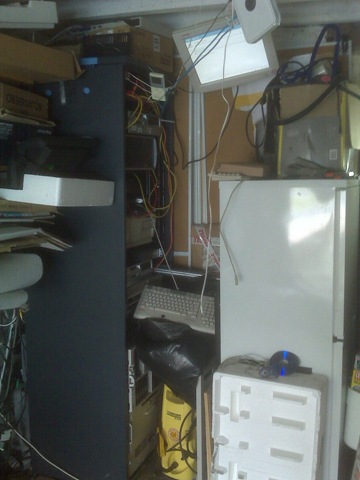
Note the best practice location of my suburban data centre, beer-fridge providing hot-hot aisle heating, pressure washer conveniently located to provide fine-mist fire suppression; oh and plenty of polystyrene packing to stop me accidentally nudging things with my car. 🙂
I’ve been using a pair of HP D530 SFF desktops to run ESX 3.5 for the last year and they have performed excellently (links here here and here) but I need more power and the ability to run 64 bit VMs (D530’s are 32-bit only) I also need to start work on vSphere which unfortunately doesn’t look like it will run on a D530.
So I a acquired a 2nd-hand ML110 G4 and added 8Gb RAM – this has served as my vSphere test lab to-date, but I now want to add a 2nd vSphere node and use DRS/HA etc. (looks like no FT for me unfortunately though) – Techhead put me onto a deal that Servers Plus are currently running so I now have 2 x ML110 servers 🙂 they are also doing quad-core AMD boxes for even less money here – see Techhead for details of how to get free delivery here
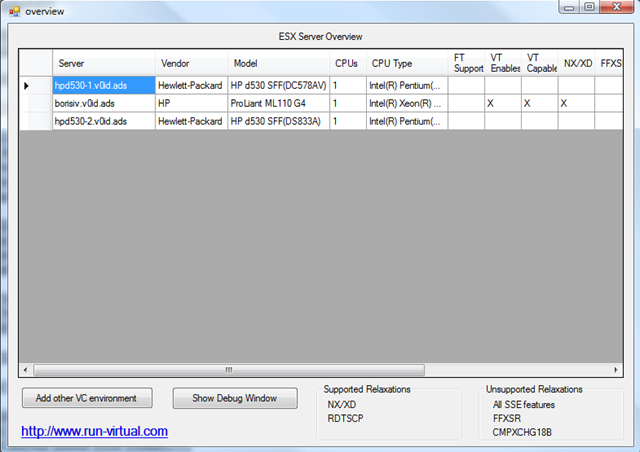
In the past my labs have grown rather organically as I’ve acquired hardware or components have failed; being as this time round I’ve had to spend a fair bit of my own money buying items I thought it would be a good idea to design it properly from the outset 🙂
The design goals are:
- ESX 3.5 cluster with DRS/HA to support VM 3.5 work
- vSphere DRS/HA cluster to support future work and more advanced beta testing
- Ability to run 64-bit VMs (for Exchange 2007)
- Windows 2008 domain services
- Use clustering to allow individual physical hosts to be rebuilt temporarily for things like Hyper-V or P2V/V2P testing
- Support a separate WAN DMZ and my wireless network
- Support VLAN tagging
- Adopt best-practice for VLAN isolation for vMotion, Storage etc. as far as practical
- VMware Update manager for testing
- keep ESX 3/4 clusters seperate
- Resource pool for “production” home services – MP3/photo library etc.
- Resource pool for test/lab services (Windows/Linux VMs etc.)
- iSCSI SAN (OpenFiler as a VM) to allow clustering, and have all VMs run over iSCSI.
The design challenges are:
- this has to live in my garage rack
- I need to limit the overall number of hosts to the bare minimum
- budget is very limited
- make heavy re-use of existing hardware
- Cheap Netgear switch with only basic VLAN support and no budget to buy a decent Cisco.
Luckily I’m looking to start from scratch in terms of my VM-estate (30+) most of them are test machines or something that I want to build separately, data has been archived off so I can start with a clean slate.
The 1st pass at my design for the ESX 3.5 cluster looks like the following
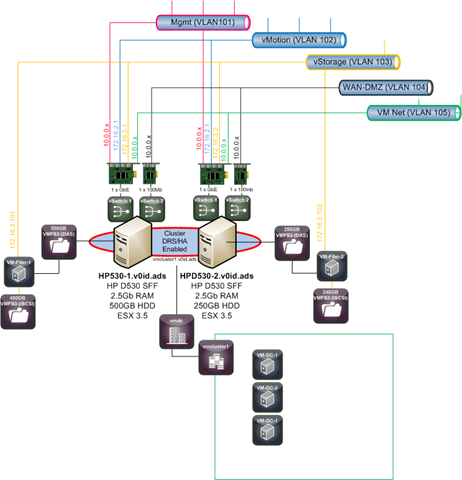
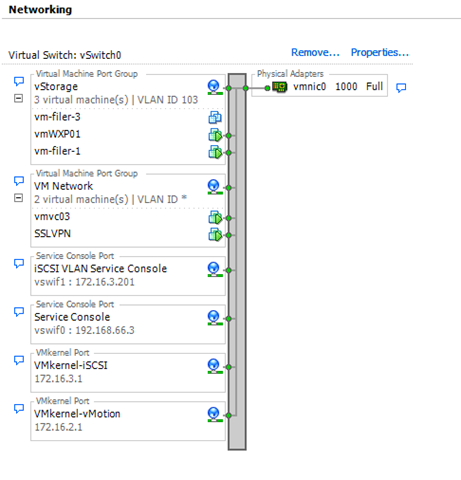
I had some problems with the iSCSI VLAN, and after several days of head scratching I figured out why; in my network the various VLANs aren’t routable (my switch doesn’t do Layer 3 routing). For iSCSI to work the service console needs to be accessible from the iSCSI VKernel port. In my case I resolved this by adding an extra service console on the iSCSI VLAN to get round this problem and discovery worked fine immediately
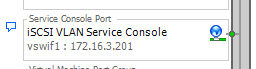
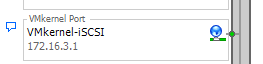
I also need to make sure the Netgear switch had the relevant ports set to T (Tag egress mode) for the VLAN mapping to work – there isn’t much documentation on this on the web but this is how you get it to work.

The vSwitch configuration looks like the following – note these boxes only have a single GbE NIC, so all traffic passes over them – not ideal but performance is acceptable.

iSCSI SAN – OpenFiler
In this instance I have implemented 2 OpenFiler VMs, one on each D530 machine, each presenting a single 200Gb LUN which is mapped to both hosts
Techhead has a good step-by-step how to setup an OpenFiler here that you should check out if you want to know how to setup the volumes etc.
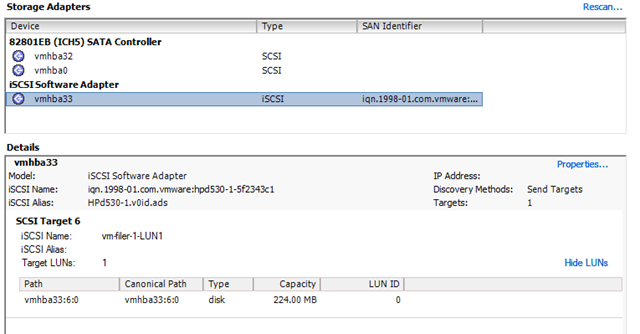
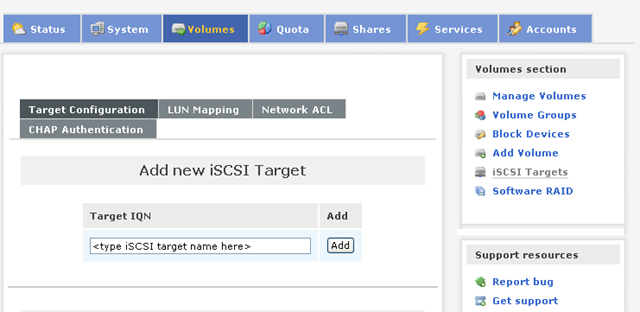
I made sure I set the target name in Openfiler to match the LUN and filer name so it’s not too confusing in the iSCSI setup – as shown below;
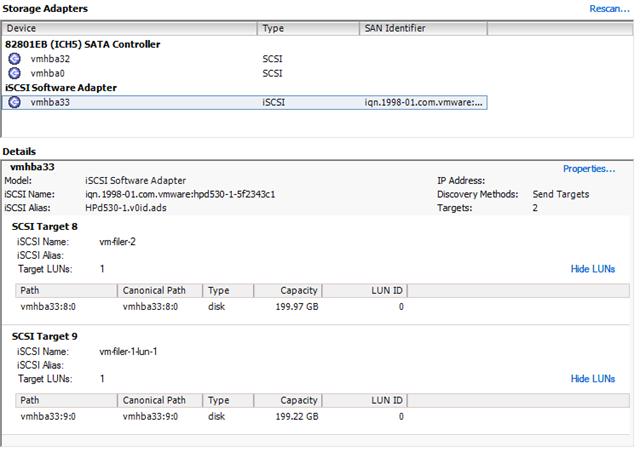
if it helps my target naming convention was vm-filer-X-lun-X which means I can have multiple filers, presenting multiple targets with a sensible naming convention – the target name is only visible within iSCSI communications but does need to be unique if you will be integrating with real-world stuff.
Storage Adapters view from an ESX host – it doesn’t know the iSCSI target is a VM that it is running 🙂
Because I have a non routed L3 network my storage is all hidden in the 103 VLAN, to administer my OpenFiler I have to use a browser in a VM connected to the storage VLAN, I did play around with multi-homing my OpenFilers but didn’t have much success getting iSCSI to play nicely, it’s not too much of a pain to do it this way and I’m sure my storage is isolated to a specific VLAN.
The 3.5 cluster will run my general VMs like Windows domain controllers, file servers and my SSL VPN, they will vMotion between the nodes perfectly. HA won’t really work as the back-end storage for the VM’s live inside an OpenFiler, which is a VM – but it suits my needs and storage vMotion makes online maintenance possible with some advanced planning.
Performance from VM’d OpenFilers has been pretty good and I’m planning to run as many as possible of my VMs on iSCSI – the vSphere cluster running on the ML110’s will likley use the OpenFilers as their SAN storage.
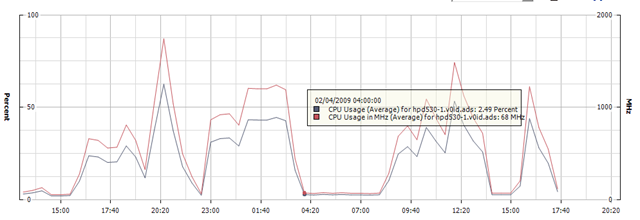
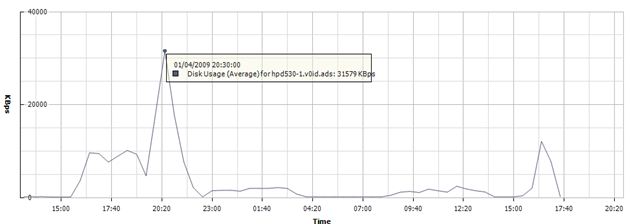
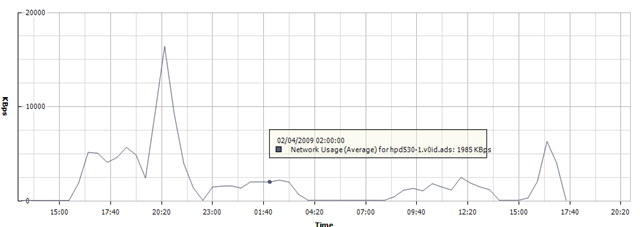
This is the CPU chart from one of the D530 nodes in the last 32hrs whilst I’ve been doing some serious storage vMotion between the OpenFiler VM’s it hosts.
That’s it for now, I’m going to build out the vSphere side of the lab shortly on the ML110’s and will post what I can (subject to NDA, although GA looks to be close)
Google opens up its DC so you can look inside.
Posted by on April 2, 2009
Google are hosting a conference at the moment with a focus on energy efficient DC design, because of their scale they have a vested interest in this sort of thing, up until now they have been very protective of their “Secret sauce” but are now sharing their experiences with the wider community.
Key interesting points for me are; Google have been using container based DC’s with 4000 servers per container since 2005 – pics and info here and they are still building their own custom servers but with built in UPS batteries rather than relying on building based UPS. This is interesting as it distributes the battery storage and de-centralises the impact/risk of UPS maintenance or problems. Google also say this scale is actually more energy efficient.
There are some good close up pictures of an older Google server here, posts have referred to the more recent revisions as using laptop style PSUs; details of which I don’t believe they are making public, this design is a part of their competitive advantage I guess.
Dave Ohara has a comprehensive list of links to bloggers covering the conference here, along with his own interesting posts about the information that has been shared here and here.
I believe the videos will be available on YouTube on Monday so it will be interesting viewing, particularly seeing how Google have taken an entirely custom approach to their hardware & DC infrastructure rather than relying on off the shelf major vendor servers (Dell, HP, etc.)
On the subject of Google, I have heard rumours that the fabled GoogleOS is actually RHEL with heavy customisations for job management and distributed, autonomous control – at their scale the hardware needs to be just a utility; the “clever” bit is what their software does in managing horizontal scalability rather than high levels of raw compute power.
Whatever they can share with the community whilst maintaining their competitive edge can only benefit everyone – I’m sure Microsoft, Amazon and all the other cloud providers are watching closely 🙂
VMware Visio/PPT Objects
Posted by on March 26, 2009
Thanks to this post from Eric and following on from my last post on the subject of network diagrams here is a list of places to go and download good quality official Visio stencils for doing VMware related diagramming.
Links:
PPT objects http://viops.vmware.com/home/docs/DOC-1338
Visio objects http://viops.vmware.com/home/docs/DOC-1346
Some examples of the objects they contain are below:
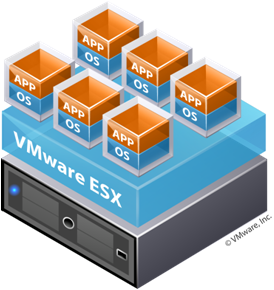


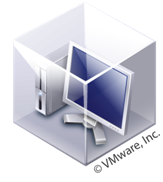
I particularly like the “build your own” – which is a quick way of doing stack/consolidation diagrams in a uniform way.
it’s a shame that you can’t ungroup these sort of shapes and split the components out or edit the text though


 Virtualization, Cloud, Infrastructure and all that stuff in-between