Virtualization, Cloud, Infrastructure and all that stuff in-between
My ramblings on the stuff that holds it all together
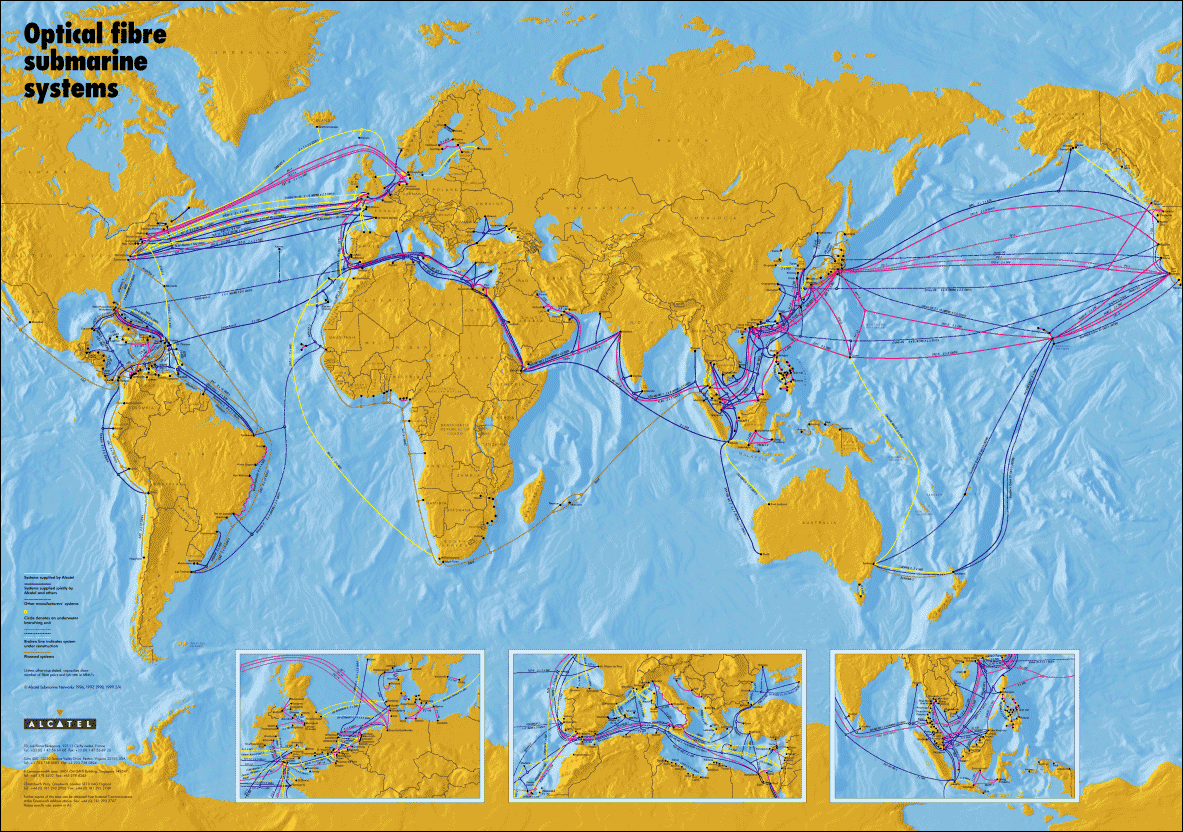
Ever Wondered How Your Traffic Arrived at this Blog?
Posted by on March 8, 2008
if you’re not in the same country as the wordpress.com server farms, chances are your HTTP request arrived here courtesy of one of these undersea fibre optic cables… fascinating stuff, you sometimes forget about the complicated (and expensive!) physical infrastructure that underpins your browsing on t’internet!
More info on how this works here courtesy of Wikipedia
iPhone SDK & Roadmap
Posted by on March 7, 2008
Now, I’ve been a bit skeptical about the iPhone, I’ve played with a few – nice to use but very much a 1.0 product from a software point of view (great hardware – except for the battery), this link from engadget gives a transcript of the SDK announcement/press conference – more here too.
Looks like there are some good apps coming and support for Exchange over the air via ActiveSync (EAS) – this will be a big selling point, most current EAS compatible devices are Windows Mobile and IMHO are quite poor from a usability point of view, this could change all that… the touch interface opens up a lot of interesting possibilities.
Interestingly apps will be available for the iPod touch too (at a nominal cost), making that a compelling proper PDA/media platform rather than “just a big video iPod”.
Will see how things go, but that’s the only announcement that’s even piqued my interest in getting one at some point, iTunes is neat and easy to use (bit slow, but) and will be the primary method for downloading apps.
**update: BBC iPlayer now available for the iPhone. Cool – shame it’s not 3G capable yet or that really would be compelling!**
Microsoft Offering Hosted Exchange & Sharepoint
Posted by on March 5, 2008
Interesting to note this post and register post here of a beta version of hosted Exchange and MOS (MS Office Sharepoint) offered by Microsoft itself.
Would assume this is one of the reasons they are building out vast new datacentres as they try to keep pace with Google’s range of online applications.
Working for a service provider, I’ve seen the technical challenges of offering multi-tenanted versions of these applications in the past (show stopper for most service providers that need to offer an SLA), even that MS won’t support them unless they have helped build and design it themselves via their consulting arm.
I have to wonder if MS are adopting virtualization under the hood and some kind of on-demand provisioning to handle the isolation required or just piling them onto a shared AD/SQL/Exchange infrastructure. There are a huge number of questionably supportable “tweaks” required to achieve the latter.
Hopefully it’s better in the the current 2007/8 round of products. Microsoft do support some those products under VS2005r2 virtualization for end-customers – so would be interesting to know if they do it in-house or are {planning to} moving to Hyper-V.
Information on BGP For The Rest Of Us
Posted by on March 3, 2008
Useful (if starting from an unrelated point) blog post on how companies deploy BGP – for people who don’t normally need to know this kind of stuff – I see a fair few organisations use it for providing network/carrier resilience at the network edge.
Detailed networking isn’t my field but you always need to know enough to get by and bring in the experts when you are out of your depth or doing something complicated.
How to stop Terminal Services Clients Beeping!
Posted by on March 3, 2008
This always annoys me, when I connect my laptop via the MSTSC terminal services client it always beeps at logon; if it did this via the onboard sound card on my laptp that would be fine as typically it’s always muted when I’m in the office/on a client site as it’s annoying.
However it seems to use the system board loud default beep – and ignores the mute setting on my laptop and this always seems to affect VMWare workstation Win2003 VM’s at logon too – which is doubly annoying as I use them a lot.
so, for reference this kills it off permanently – I can’t really think of any situations where I’d need it to beep – especially not at a volume that totally ignores my chosen settings!
C:Windowssystem32>sc config beep start= disabled
[SC] ChangeServiceConfig SUCCESS
Some other options posted here
Exchange 2007 SP1 Upgrade Process on a CCR cluster
Posted by on March 1, 2008
I used this process to carry this out – worth bearing in mind that you do need some downtime to the clustered mailbox instance to carry this out – it took about 60 seconds to do that and installing the SP1 code on each passive node took approx 5 mins each + a reboot

Exchange 2007 CCR Configuration Notes
Posted by on February 29, 2008
Once you’ve followed the installation process and have your active and passive nodes setup you may not actually be able to failover and mount the stores – it fails and logs an event 9317 from MSExchangeSA as below;

The fix is to register an SPN for each cluster node as per this KB article – why setup doesn’t do this for you I don’t know?
add-ADPermission -Identity “cn=exchange-cms,cn=computers,dc=mydomain,dc=com” -User “node-cl1$” -AccessRights WriteProperty -Properties “Validated-SPN”
You do this using the Exchange Management {Power}Shell Applet using the following command.
One thing to bear in mind – particularly if you are implementing a CCR cluster across mode than one physical site (single subnet required) you’ll need to wait for each node’s respective AD Domain Controller to replicate the changes.
Once that was completed I could fail over the cluster nodes perfectly.
Novell Acquire Platespin
Posted by on February 29, 2008
As noted here and here, they’ve done it – lets hope they don’t stuff it up – Platespin have a good roadmap in my book – particularly around virtual DR/BC with their Forge product.
Novell had, and to some extent still do have very good technical products but they just make such a mess of integrating them all and making it easy to deploy and support which is one of the reasons MS beat them in the server wars…. the virtualization wars are the current battleground!
Today, You Work For Nothing
Posted by on February 29, 2008
I hadn’t really thought about this, but as the BBC point out technically you are working today without pay..!
As if we didn’t already work enough unpaid overtime
Now, if I didn’t have this big pile of things to do today then….
😦
VMWare Vulnerability during VMotion.. is it really?
Posted by on February 27, 2008
As the Hoff posts here and on VMTN here. the proposed vulnerability that you can manipulate and possibly compromise a VM during a VMotion process isn’t exactly major, it’s clever.. but – like anything if you don’t follow the best-practice recommendations then you expose yourself to these risks… same reason they recommend you lock your server room or don’t have blank passwords – this attack is akin to gaining physical access to the hardware or being able to sniff a physical switch port – in this instance, it’s “virtual” hardware.
VMWare have always recommended keeping the VMotion traffic on a separate VLAN or network.
the other vulnerability where VMTools can be compromised on is different, but again preventable.. and not enabled on server instances of VMWare.

 Virtualization, Cloud, Infrastructure and all that stuff in-between