Virtualization, Cloud, Infrastructure and all that stuff in-between
My ramblings on the stuff that holds it all together
Performance on a cheap ESX PC
Posted by on February 1, 2008
I thought I’d post some performance graphs from my cheap HP D530 ESX server using the Virtual Centre console (which incidentally, is good for getting this info quickly and simply).
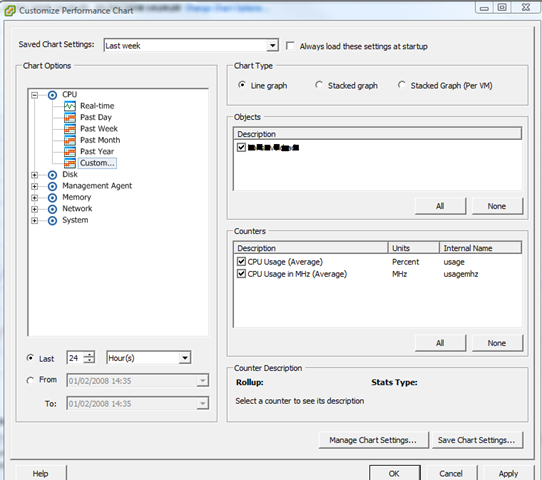
Screenshot of the UI for querying performance stats.
View of currently running VMs – a mix of Windows 2003/2008 VMs
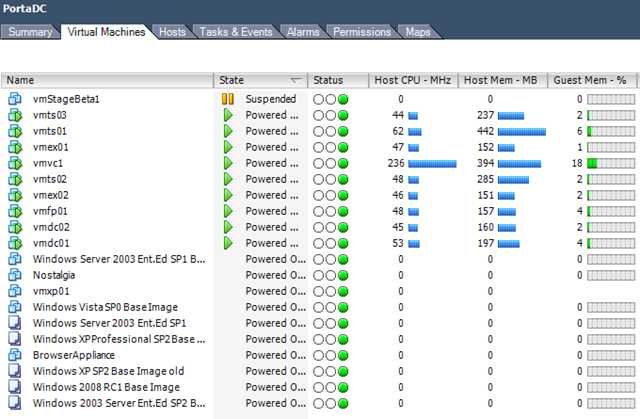
Current Overall ESX Host statistics (with a clone from template going on)

As I noted elsewhere on my blog it has 4Gb RAM and a single 2.8GHz HT CPU – and with this VM load it gives an average CPU load of 25-30%. Almost all of these VM’s are idling but all respond in good time to network access/TS etc- not bad at all for a desktop PC!
CPU usage for the last 24 hours
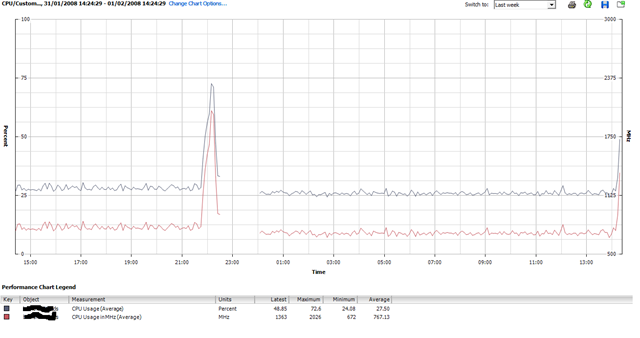
The big spike around 22:00 was when I cloned up a whole load more VM’s – seems to have upset the stats so need to try and have a look at that..
It’s also interesting to note that I added 4 Windows 2003 VM’s last night but that hasn’t actually increased the overall CPU average – ESX must be quite efficient at time-slicing all those idle VMs.
I had 3-4 “deploy from template..” operations going on at the same time and it really bogged down the performance of the VM’s (usable, but only just..) but it is just a single SATA disk drive so I can live with that.
Deploying 1 VM at a time had little or no impact – slight CPU spike to ~50% as you’ll see to the far right of the chart as I kicked off another one just now.
When i get time I’m going to drop some jobs into the VM’s that will tax the virtual CPUs a bit more and compare results – maybe some Folding@Home activity Mmmmm that would definitley tax it.
When Web 2.0 Goes Bad…
Posted by on February 1, 2008
Interesting article here and here on “side-jacking”; discussing people snooping session ID’s from URL strings to possibly bypass SSL security which is normally only applied at logon and then content typically reverts to non-SSL.
I’ve seen similar issues several times at airport or public Internet “Kiosks” and have accidentally walked into people’s airline reservations, webmail etc. by looking in the browser cache – and sometimes even in the address bar drop-down! as those machines don’t get wiped when you start/stop using them (easyInternet used to do a total wipe/re-provision of the OS once you’d finished using their machines)
Moral of the story? public kiosks are bad for doing anything you don’t want to share with other people even if you’re clever and choose the “secure session” option and if you can “sniff” a public WiFi connection you can get all of this over the air so game over anyway.
Of course session time-out typically means this is only vaid for “fresh” data… but still worth bearing in mind.
This is nothing new and has been around since the Internet started; but you’d think all the hip ‘2.0 tech companies and users would be up on this by now..
Update on the Cheap ESX Home Server
Posted by on January 31, 2008
All running well, we had a power cut the other day but the PC didn’t automatically power back on when power was restored; I wonder if there is a BIOS setting for that – PC’s always used to have something along those lines.
Bit of manual intervention to switch it on and it was back and running.. no ill effects and all the VM’s started up normally.
I’m hammering it a bit now and have some Windows Server 2008 RC1 templates setup as I need to try out the new Terminal Services functionality so I’m hoping to build a small 2008 TS farm under ESX – no customization wizard available yet for 2008 😦
Maybe will see how Windows built in NLB works under ESX Mmmm.
So, will see what performance is like when I have a lot more going on..
Windows 2008 RC1 running with 32-Cores
Posted by on January 26, 2008
cool.. http://www.hpcsystems.com/blog/?p=24
Hyper V apparently only supports 16 cores , but here’s some info on hyper V running on an 4 x 4 CPU core system.
Won’t be long before the price point for these really drops; imagine how many VM’s you can cram on one of these at the recommendation of 3vCPu:1pCPU-Core.
(8 sockets x 4 core) x 3 vCPU = 96 single CPU VM’s per server Nice.
Nice & Tidy Rack Cabling
Posted by on January 25, 2008
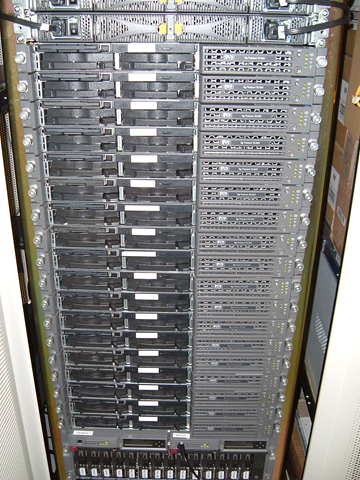
Yeah, one for the real geeks to appreciate (myself included!) I’ve been guilty of some not so nice installs in the past where time allocated supercedes art by a significant margin… but these are ace!
Shame we can’t really stack cabs with 42 x 1U servers anymore without someone coming to shout at me about power allocations.. ah those were the halcyon days of providers selling rack space by the U.. no power limits 🙂
Where There’s Blame, There’s a ….
Posted by on January 24, 2008
Argh, I hate this kind of thing .. give us £5.99 and we’ll send you some PDFs to allow you to claim compensation from the govt. for identity fraud arising from the loss of confidential data, if you read around a little bit I doubt they’ll be paying much out unless something serious really does happen but the ambulance chasers with the website will have made a few quid. And even then if they did get forced to pay some kind of compensation – don’t you people get it? if you sue the Govt. where do you think the money comes from? that’s right – your own pocket, we fund the govt. they don’t really “earn” money; they are not Comet, or Sofa Warehouse, we are the share-holders – you might as well take an extra £10 out of your monthly salary and put it in the bank as compensation; as if the govt. have to pay the entire nation compensation they’ll pay for it one way or another via via your tax money, or by shutting down a hospital etc; it’s like fining police forces and the NHS for not performing.. by doing so you reduce their capacity to pay for improving things and give them a further excuse to grumble about how they don’t get enough funds.
I think it would be better for the govt. to do some kind of deal with Equifax’s identity watch scheme to give people a cheap/free subscription to their service for ID fraud detection.
This would be a good thing to do on a national level as the trouble with ID fraud is that it goes un-noticed for so long, it might also be better for the people that seem totally incapable of working out their monthly finances and don’t realise what impact missing payments/defaulting really has on their future pans to buy a house, TV, car “bling” etc. on finance. All those ad’s for sub-prime loans etc. are not cheap money and lenders don’t really just “write off” your debts just because you say you can’t pay them back and say “never mind… don’t worry about it”.
Seeing your credit report really makes it plain to see what criteria lenders use to assess your credit-worthiness, rather than making it such a dark secret; I guess the other side of the argument is that it gives people some scope to “game” the system; but this information is already available on request from the credit scoring agencies (£10 IIRC) so anyone wishing to do so already has the tools available.
Anyway, rant over.. must get back to the paracetemol, this cold is making me cranky!
Encrypting Documents in-Transit – is WinZip Enough?
Posted by on January 24, 2008
I’ve looked at this topic a number of times as we often have requirements to send sensitive files around – lots of customers send them to me via email/FTP or on CD within encrypted WinZip files as this is what they find easiest as it’s pretty ubiquitous rather than having to agree a compatible encryption app/protocol and have it “blessed” by a security dept/PC build team – Dave Whitelegg has posted a useful article here outlining the practical limits of this approach and suggested password lengths.
Obviously if you have information that is worth an attacker spending several weeks brute-forcing then I would suggest maybe you shouldn’t be sending it electronically or even holding it at all; as I’m sure there would be quicker ways for an attacker to find this information once its in it’s unencrypted form at either end, social engineering/bribery etc.
And of course – if you do have to persist in the encrypted WinZip approach maybe rename the files held within for a bit of security by obscurity – “Board of directors – salary review.xls” is probably a lot more tantalizing to an attacker than “Photocopier Toner Audit.xls” or “AACD12323.DAT” or place a .zip file within another .zip file as you can see the table of contents with in the .zip regardless of its encryption state.
Our very own marvelous HMRC could do with reading this article being as it seems to be data breach disclosure month!
keep up the good work Dave!
Security in "Virtual Clouds"
Posted by on January 22, 2008
Interesting article here
What if you could breach the hypervisor? best practice would dictate firewalling off the management traffic to the service console to a management network but what if you could exploit the VM Tools or other enlightenments/paravirtualizations to compromise the hypervisor – if you could you own every VM it’s running.
Does this compare to VLAN jumping on a Cisco switch? As far as I understand it show me a practical exploit to do this and the mitigation steps are quite well documented.
This is (and will) always a big issue with Multi-tennant systems but it’s the same issue that we currently face in most service providers, shared SANs, LAN, WAN, even physical buildings/suites etc. – virtualization is just a marketing tag, the same principals have been applied in the physical world for ages and mitigated against – I don’t think this is any different.
A session with the US Marine Corps at VMWorld 2007 mentioned that the US DoD had audited the code of ESX for this issue and found it to be satisfactory – but I’ve not seen this documented anywhere, if it’s safe for the US .mil isn’t it safe enough for you?
Compare risk vs cost saving, patch, mitigate, move on but keep your eyes open.
Apple: Nothing to see here, move along please
Posted by on January 22, 2008
This is a bit underhanded; preventing debugging tools from tracing your applications especially when the underlying OS is derived from Open Source technology where one would expect to have such access.
Although you can obviously patch it yourself as you can have the source and recompile the associated binaries; bit of a waste of time?
Lots of Useful Scripts to Automate VMWare
Posted by on January 22, 2008
http://www.ntpro.nl/blog/categories/10-VMware-PowerShell
Like this one … must have a go at this http://www.ntpro.nl/blog/archives/316-Create-multiple-VMs-using-PowerShell.html and http://www.ntpro.nl/blog/archives/279-My-first-VMware-PowerShell-script.html
Wonder if you can also use these against the Free VMWare Server?

 Virtualization, Cloud, Infrastructure and all that stuff in-between