Virtualization, Cloud, Infrastructure and all that stuff in-between
My ramblings on the stuff that holds it all together
Monthly Archives: March 2011
Where is the wireless iTunes Sync?
Posted by on March 31, 2011
A lot of i* devices from Apple have turned up in my household over the last few years, it started with iPods until we all had one (or more!) then an iPad, an iPhone, a MacBook pro and most recently an AirPort Express and most likely an Apple TV in the future (for streaming music in the family room and/or kitchen).
But there is still one Achilles heel for these device; iTunes – they all rely on this awful application to update their content, sync photos, music etc. from my own collection. I own a lot of music CD’s and I have lots of DVDs ripped to MP4 format – I don’t buy everything online (despite Apple’s best efforts).
Why, when almost all of these devices have built in WiFi do I still have to sync them via a USB cable with iTunes, particularly as my iPad has 64Gb of storage, that takes ages to sync over USB.
Apple has had all this chatty bonjour p2p networking stuff in the products for year and home-sharing was a long over-due feature but still nothing in the iPad 2 and most recent OS updates.
I can see this being integrated into MobileMe; but for people like me with a *large* multi-TB media collection that’s going to be an expensive (and for many folks) impossible solution.
Come on, Apple – your stuff is generally great but this is rapidly becoming a pain point!
Excellent Book about Cybercrime
Posted by on March 17, 2011
A colleague recommended Kingpin by Kevin Poulsen to me for a recent business trip, so I duly purchased the Kindle edition at the airport and haven’t put it down since.

It’s an easy read and provides a fascinating insight into how an American teen got into the computer underground and latterly bigger business crime and credit-card fraud, even staging hostile take-overs of rival criminal forums.
If, like me you were in the industry in the 90’s/2000’s and/or have ever had your credit card cloned this stuff makes for fascinating reading about the darker edges of the Internet and how shockingly easy it really was.
Highly recommended.
Upgrading to vCloud Director 1.0.1 from GA
Posted by on March 10, 2011
A couple of people have asked recently how complicated it is to upgrade from the GA 1.0 release of vCloud Director to 1.0.1 which was released recently – this is a post of my notes, and I will add as I find new things – I will be doing this in the coming weeks on my lab.
vCloud Director Cells
Luckily, it’s pretty simple – it’s just a case of upgrading the cell servers, downtime is required if you have a single cell, if you have a multi-cell deployment you can do a rolling upgrade by taking one cell offline at a time
You can find the upgrade steps and a list of changes and known issues in the release notes here
No database changes are required, and it has the same minimum system requirements as the 1.0 GA build although 1.0.1 adds support for vSphere 4.1 U1
Chargeback
There is also an updated build of Chargeback (v1.6) – release notes here – note there is no in-place upgrade if you have 1.5 you need to uninstall 1.5, keeping the database intact and install 1.6 connecting it to the same database.
vShield
I am investigating the impact for vShield but as I understand it the 1.0.1 download does not absolutely require an upgrade to the vShield appliance.
Licensing
I have not personally confirmed this, but my understanding is that this is a maintenance release and v1.0 and v1.0.1 serial numbers are the same.
vSphere RDP Client Plugin
Posted by on March 8, 2011
Another handy utility from Xtravirt – it adds a shortcut to the right-click context menu in the vSphere client to launch an RDP session to that particular VM.
Very useful, of course you’ll need to ensure your admin workstation can get to port 3389/TCP (RDP) on that particular VM, but I find this very useful.

You can download it here (basic registration required)
Mac Users, Stop Exposing Yourself to other Hotel Guests
Posted by on March 3, 2011
If you use an Apple Mac (like I do), then maybe you’re happy not to have to be too bothered about all those virii, malware, worms and hackers attacks so don’t bother spending too long on your personal IT security like you did in the Windows days.

However, please think about this – I’m currently in a hotel, I can see all the other Mac users on the WiFi, because they are broadcasting their hostnames, which in OS X defaults to what you told it your name was at setup time.

If I were that sort of person, not only do I have the ability to look at some of the files you’ve made public in your dropbox folders, your shared iTunes library (Stephen – Princess Bride sound-track, really?!) more importantly I have your real full-name, you’re probably staying in the same hotel as me, so just think of all the social engineering japes I could have with that..
“I’ve forgotten my room key – here is my Employee photo ID (that I’ve just doctored with your information), can you remind me what my room number is?”
“Hi, reception – can you put me through to Mr Adam ABC please.. Hello? Hi – FedEx here I’m at reception and I have a package to deliver to you, which room number are you in please?”
“Can I put these drinks on my room tab please?”
I found you on Facebook
I found you on LinkedIn
Believe me, hotel front-desk’s aren’t too clever about protecting this stuff and the “customer” is always right.
In the interest of balance, Windows has slightly more secure defaults and corporate laptops typically have group policies to enforce certain network behaviors, although I can still see all your company domain names in the netbios broadcasts you make, even if your name is something less personal like PC03432.
Turn this stuff off, just because you have a Mac doesn’t mean you don’t need to be sensible!
Look under System preferences Security and Sharing for options
Think about it.
Using an Apple Remote Control to drive PowerPoint in a Windows VM using Fusion
Posted by on March 1, 2011
I recently purchased a remote control for my MacBook Pro so that I could use it to control presentations without having to be at the keyboard, rather than opt for anything flashy I just assumed I could use the normal Apple Infra-red Remote Control, install the Bootcamp drivers to my Win7 VM and use it with PowerPoint, ah how wrong I was!
Even with the Bootcamp drivers installed Powerpoint does not recognize the IR remote as a “clicker” so after some head-scratching and a bit of Google-Fu I came up with the following solution;
Insert your OS X installation CD into your Windows VM (not the Mac, the DVD seems to be dual-format and has some partitions that only show up in a Windows host) you can do this via the virtual machine CD/DVD menu in Fusion as shown below
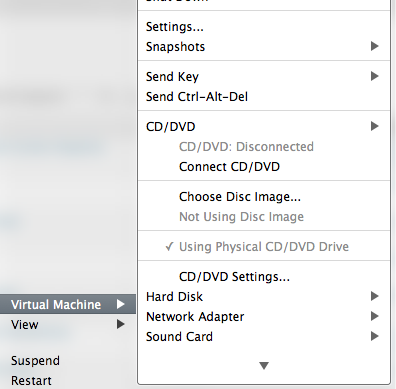
Install the BootCamp Drivers from the DVD (will require a reboot)
When it’s finished, run Apple Update to get the latest version (you’ll probably have an older version unless you have a brand-new Mac, reboot required)
Map the Apple IR receiver to your VM (screenshot shows it already connected here)

You will get some driver being installed mumbo-jumbo in Windows
Download and install the latest build of EventGhost
Download and extract the configuration file I have created here
Run EventGhost
Choose File/Open and locate the configuration file you downloaded.
I would also suggest setting it to run at logon via the file/Options menu
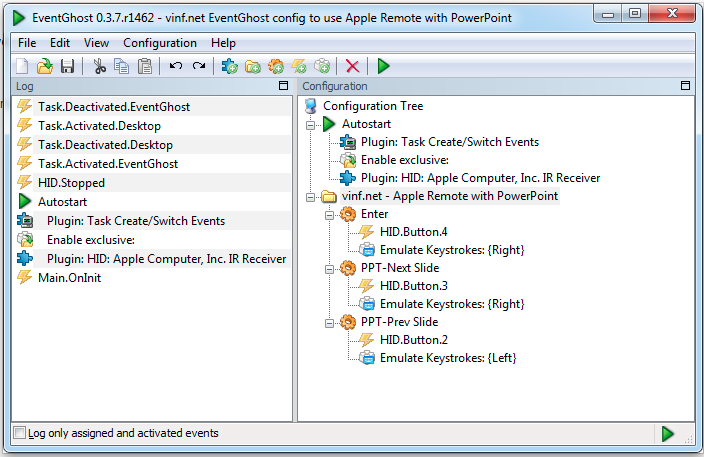
If you get an error about loading the HID plugin, then you may need to add it manually, right-click on HID: Apple Computers Inc IR Receiver and choose configure (you may have to remove/add it again as the file I exported may have device-specific IDs that don’t match yours exactly)
Now when you are in presenter mode in PowerPoint the left button will back-up one slide, the right and centre buttons will advance to the next slide.
the up/down buttons still map to the Mac volume control.
This is a pretty basic configuration, but it works reliably – it doesn’t seem to recognize the Menu button on my remote so I assume this is a limitation of the generic HID driver.

 Virtualization, Cloud, Infrastructure and all that stuff in-between