Virtualization, Cloud, Infrastructure and all that stuff in-between
My ramblings on the stuff that holds it all together
Category Archives: Uncategorized
OneNote Power Toys
Posted by on January 18, 2008
Microsoft OneNote is my favorite Microsoft product – I’ve used it for a couple of years now and it’s almost totally replaced my need to lug around hardback notepads.
I say almost as sometimes I still need to scribble down some diagrams, something that doesn’t work well with OneNote unless you have a Tablet PC, that said it’s easy to scan diagrams into OneNote with a scanner and keep a record and takes away all the concerns with loosing a paper notebook or not having it with you.
I work disconnected from our corporate network for most of the day but OneNote allows me to host a shared notebook on a SharePoint site which is accessible over SSL I can work on a local sync’d copy and I can make it sync with the server held copy.
It’s useful for sharing notes with my co-workers on a project – it’s essentially a Wiki like tool with good off-line capability.
I would like to see better support for drawing with a non-tablet PC and having it properly anchor scribbles over bits of text – but maybe that’s just me not working it correctly as when I move the text block my scribble over the top doesn’t move.
Anyways – the team have posted some useful Power Toys for OneNote which I will definitley be looking into..
Available from http://blogs.msdn.com/johnguin/archive/2008/01/17/a-summary-of-the-onenote-powertoys-from-the-test-team-for-2007.aspx
More OneNote goodness here http://blogs.msdn.com/chris_pratley/default.aspx
and http://blogs.msdn.com/descapa/archive/2008/01/04/blog-roundup-for-dec-2007.aspx
and http://stevepietrekweblog.wordpress.com/2008/01/17/links-1172008/
Microsoft really don’t push/promote this product enough.. it’s great, everyone I show it to ends up using it; as Chris point’s out here it spreads virally between you show it to!
You can even use it to manage cooking Christmas dinner (…maybe I’ll blog about how I did that one day…:))
Live VM Migration Without Shared Storage?
Posted by on January 18, 2008
This looks interesting, uses p2p storage syncing to allow live workloads to be moved between VM Hosts.
Would be a very interesting tech, you could build a large VM compute farm with cheap DAS storage without having to invest in “proper” shared storage such as a fibre channel SAN or iSCSI.
Considering even a DL360/380g5 can take about 800Gb of SCSI/SAS disk these days that’s a lot of storage for replicated/sync’d VMs.
Wonder if VMWare have something in the pipleline to compete, We often see the cost of the shared storage as a big blocker to building VM farms, servers can be obtained relatively cheaply and allow you to easily scale out horizontally, SAN’s not so much as you need to invest upfront in the fibre switching/shelves to allow you to scale out, it’s not so easy to do it incrementally – if you can just buy cheap incremental servers with DAS and just add them into a farm that’s quite appealing; to me anyway.
Windows "7"
Posted by on January 18, 2008
Interesting Blog to keep an eye on here http://shippingseven.blogspot.com/ allegedly from an engineer working on the new Windows OS, be good to see what comes out – MS haven’t said very much at all about it.
VMWare Buy Thinstall
Posted by on January 15, 2008
Mmmm, interesting.
They’re aiming for virtualizing much more than just the OS.. VMWare obviously realise the Hypervizor game is coming to an end where ESX will be a free/commodity release and all the add-ons/management will make the money.
This makes an interesting foray into application level virtualization – more anlysis here.
Another other interesting but unrelated point here is about how RSS feeds break news far quicker than Google can index it!
Virtual Center 2.5 as a Virtual Machine
Posted by on January 15, 2008
I’ve not tried this before but it seems to work, my config is as follows – note this is a home/test system so I don’t suppose this is supported for a production platform
- Single ESX 3.5 host
- 1 x Windows 2003 VM with Virtual Center 2.5, licence manager, update manager and convertor plug ins, SQL Express database for VC (not supported for production)
- VM is connected to the same IP network as the ESX service console.
Because I was short on hardware I built the 1st Virtual Centre server as a VM on my laptop with VM Workstation 6 as a linked clone from my standard VM server image.
Once everything is up and running I used VM Convertor from Virtual Centre to do a P2V migration of itself over the network (weird!) into ESX – technically a V2V 😉
I then powered up the VC VM on the ESX box and changed it’s IP address to avoid conflicts.
Then shut down and killed the VC VM on my workstation.
It worked – I can connect to the virtual VC box and use it as before.
I also installed the VI client directly on my laptop so I could manage the virtual VC box over the network without RDP’ing into it.
I set the VC VM to auto-start with the ESX host and physically rebooted the ESX box to make sure – and it all rebooted fine and both the ESX and VC VM started up, I believe the ESX host caches licence data in case of a short-term VC server failure – this seems to get around the issue of not being able to power on a VM without a licence and seems to work ok for me.
VMWare Licence Manager – LMTools
Posted by on January 15, 2008
Whilst I’m having a rant, the licence manager for VMWare has to have the worst documentation and weirdest UI ever – VMWare have licenced it from Macrovision and it’s a multi-vendor app but I’ve yet to encounter anyone who has managed to follow the documentation 1st time to install a centralised licence server for a VMWare farm and I always forget how to do it…
So, here it is in simple terms for reference.
Install the licence server on a Windows box somewhere (VC node or elsewhere)
Ignore the LMTools app for now.
get your VMWare licence key file.
When you purchased ESX you would get a licence activation key (LAC) in an email – it looks something like the following
ABC-12ABC-ABC1A-ABC0A-1AB1A
You need to go to the Vmware site, logon with your account that is tied to the licence key request
Plug in the LAC
then go and activate your licences, if you’ve purchased a bunch of licences this will involve selecting how many instances of CPU licences you want to bundle into the licence key file – you can add more later.
download the file it generates
Rename it VMWARE.LIC (don’t think this is 100% required, but works for me)
Stop the “VMWare Licence Server” service
on your licence server navigate to C:\Program Files\VMware\VMware License Server\Licenses
overwrite the default vmware.lic file with the file you downloaded
Start the “VMWare Licence Server” service
Run VMWare Licence Server Tools from your start menu
and then go to the server status tab and click “Perform Status Enquiry”
You should see something like the following

Hint – you can look in the .lic file yourself to check it’s contents- it’s just plain text and I think you can put multiple .lic files in this directory.
There is a default licence file in the licenses directory – this is a dummy one and it says so in the text.
The LMTools GUI is a bit weird, if you run this first and select “Configuration using License File” from the default tab (which would be the logical thing) then it doesn’t seem to do this file copy and you keeps using the dummy vmware.lic file which is really confusing as nothing works and when you try to point ESX nodes at it via VC they all fall back to unlicenced.
Also, the ESX server itself seems to cache the licence data a reboot seems to flush it out and it becomes properly licenced.
Technorati Tags: VMWare , Licencing , licensing , Virtual center , centralized , british spelling , not american , LMTools , weirdness , odd UI , not brilliant design
VMWare Convertor is Brain-Dead
Posted by on January 15, 2008
ok, it’s free so I can’t complain too much (well, I can as I would have had to pay for the ESX licence to use it in this way!).
I want to import a bunch of my VM Workstation VM’s into an ESX server; why can’t I multi-select, or even browse for these VM files to import – I have to do them one by one cut & pasting the UNC path from Windows explorer.
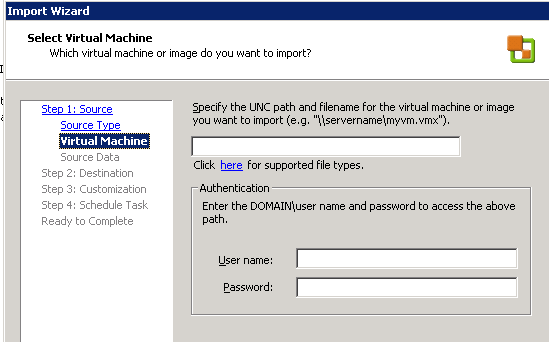
Come on – that’s not good UI design is it – how difficult would it be to have a “browse” button on there!
Rant over..!
Technorati Tags: VMWare , p2v , convertor , annoyance , free so I should just shut up and give thanks , rant , weird , bad UI design
VMWare ESX v3.5 on Cheap PC Hardware
Posted by on January 14, 2008
As eric and some people here and here very helpfully pointed out last week the HP Compaq D530 desktop PC has hardware that is compatible with ESX 3.5’s new SATA drivers.
I managed to get a 2.8GHz HT one from eBay with 4Gb RAM and a 500Gb SATA disk for approx £315 GBP delivered, including VAT.
And I’m pleased to report ESX installed 1st time straight from the CD, no fiddling required, this is very handy as until about 6 months ago I had a Compaq ML570 G1 (4x 700 MHz Xeon CPU and 12Gb RAM plus external disk shelf) which was fine until my electricity supplier caught up with the fact they had been seriously under-billing me for my electricity consumption, so the rather large bill for running it for a year led to it’s powering down for a majority of the time.
I’m in the process of migrating all my home VM’s from VMWare Server (I used to run Windows as the actual host OS) to ESX 3.5.. don’t have a “proper” licence yet, but I will do at some point before the eval times out, with the power saving it will more than pay for itself!
Whilst this is lowly desktop PC hardware it uses about 1/8th of the power of the ML570 and performance is probably on-par.. although slower disks (I previously had 14 x 18Gb U3 SCSI for my VM volumes)
Will post more results when I’ve finished, seriously considering picking up another one and enabling vMotion; I’ve used OpenFiler in the past to get a reasonable iSCSI “SAN” up and running – although I suspect my very old Cisco 10/100 hub is going to need replacing next!
Why? you might ask – well, because I can and my Garage has rack-space 😉 I’ve always had a decent sized home network, maybe I’ll blog about what I run at home later and it’s always handy to “eat your own dogfood” – I work with this stuff, so it’s useful to use it myself and have something I can rip apart/trash as required without having to buy expensive hardware or fill out lots of change-control forms!
VMWare Stage Manager
Posted by on January 14, 2008
I like this idea of this. it sounds like a product for automating a lot of what I blogged about in my Build a better test lab series (much delayed in publishing… must find some time to post further!).
We had a lot of trouble with the out of the box p2v tools; would be great if they could deliver this, I’ve asked to join the beta via our partner manager – fingers crossed!
Floating Data Centres – Arr Shiver Me Timbers..
Posted by on January 9, 2008
Interesting ideal posted here about a company build floating datacentres on old container ships. plenty of water for cooling and bio Diesel for power and land docked for power/connectivity.
Combined with a fluid infrastructure (no pun intended!) based virtualized systems as proposed on blade watch, and you have a portable datacentre. in the event of disaster VMotion all your VMs to another ship and move, when you get there bring them back.
Also a further advantage would be with a global energy market in flux, it does give you the option to move your Data centre to an entirely different country which may have cheaper power rather than an investment in bricks and mortar which is hard-tied to the local power grid.
if you could get good ship to shore comms with high bandwidth you could maybe do away with the land tether for reasonable periods of time to keep running whilst you relocate, or even keep it outside a nations waters for legal reasons – like they tried at Sealand (and) in the English Channel, wow a real container load of pr0n 🙂
Not without practical problems, but Interesting

 Virtualization, Cloud, Infrastructure and all that stuff in-between