Virtualization, Cloud, Infrastructure and all that stuff in-between
My ramblings on the stuff that holds it all together
Category Archives: Uncategorized
Cannot logon to vCAC portal and you get Internal error when logging on as the root tenant
Posted by on May 20, 2014
If you came to London VMUG last week and were one of the people who attended my vCAC real world session, you’ll have seen the demo gods not shining kindly on me as I couldn’t logon to my vCAC demo environment.
This was particularly annoying as I was testing it not 15mins before my session started and it was working 100%
With some quick on-stage debugging I found that I was unable to logon as any of the tenants on my vCAC deployment so was unable to show my cool demo 😦
After some further digging I found that I could logon to the root org https://vcacserver.net/shell-ui-app/ using the administrator@vsphere.local account but nothing else and I couldn’t logon to any of my tenant organisations despite the credentials being 100% correct.
When logged onto the root org as administrator I could see the following error… which translates as “not good, your tenant has disapeared and I have an internal problem”

After some digging this seems this is a sort of time-bomb bug that has only been recently discovered, it occours after 90 days and will stop tenants being able to login using LDAP credentials.
When attempting to log into a tenant, a blank page is displayed with a Submit button in the upper left corner.
You receive a System Exception error when accessing the tenant identity store configuration page and the identity store configuration may have disappeared.
You cannot log in to a tenant using an LDAP account.
You are unable to add a new identity store configuration to the affected tenant.
The tenant identity store disappears from the SSO Administrator login.
This KB article details the issue and a temporary workaround
I assume a fix will follow in due-course.
In my case I worked out that it was exactly 90 days until about 15mins before my vCAC session started last Thursday – which is bad-timing taken to the extreme.
Once I have verified this fix in my environment and resumed access I will post a video of my intended real-world demo, where I’m using vCAC to deploy a VM and talk to a massive “enterprise system” via a REST API (e.g Twitter :)) – whilst an odd use-case this is an easy way of demonstrating the extensibility of vCAC (well, when it works anyway)
So, in summary if you have a vCAC implementation that you deployed since 6.0.1 came out you’re going to run into this install date +90 days.
Why can’t I add a new VM to my vCAC blueprint
Posted by on March 7, 2014
If you are trying to add a blueprint using the clone or linked clone methods in vCloud Automation Center 6.x (vCAC) using a recently created VM or template from vCenter you won’t be able to find it in the search box no matter how hard you try or esoteric your search strings.
This is because by default the vCAC server only inventories the VMs on your vCenter every 24hrs, you can either manually perform an inventory update or increase the frequency.
It was confusing (to me) as the agent logs showed by vSphere IaaS server polling the vCenter service sucessfully, frequently so I assumed it would be looking for new VMs etc, alas no.
You can see the polling & inventory activities in the agent’s log file at the following location
c:\program files (x86)\VMware\vCAC\Agents\\Logs\vSphereAgent.log
To resolve this you can either A) wait 24hrs (hmm) or B) go to Home/Infrastructure/Compute Resources
Right click on your compute resource (e.g vCenter)
And click Data Collection
Under the inventory section you can update the frequency, or click request now to force an immediate update
This took 5-10mins to complete on my fairly large test cluster.
VMware Training for Contractors
Posted by on September 28, 2012
As a freelance contractor you need to strike a careful balance between managing your own professional development, earning a living and delivering for your customers.
You don’t benefit from paid holidays or paid-for training courses during work hours from your employer and I also find it hard to schedule courses into downtime between engagements or slotting in a training course around customer demands for your 9-5 availability.
So, I was particularly interested to see today the mention of vFLEX-ILT Flexible instructor-led training from VMware and a partner. You can see a video at the following link, but the basic concept is that you “virtually” attend a real-life training class with what look to be excellent remote access tools and HD video conferencing, the modern world has come to training 
You can see details of the courses and a demo video here:
http://mylearn.vmware.com/mgrReg/plan.cfm?plan=32083&ui=www_edu
This isn’t that new, some companies have been offering WebEx based training for a while but the inclusion of 2-way HD video is good and brings in some of the interactivity you would normally lose with remote access.
But, what particularly caught my eye is that the courses are delivered out of the US, opening the possibility that (with a bit of sacrifice of personal time and some double-shifting) you could feasibly do you your UK contract day-job but then virtually attend one of these classes in the evenings.
Courses that start at 9am Arizona time are towards the end of the UK day.

Cost-wise it isn’t too bad either – if you take the example of the View 5.1 install, configure, manage course (and assume that NC sales tax is similar to UK VAT – these prices are excluding tax)
Cost to attend virtually is currently £1,475 GBP + VAT @20% (note the cost to attend in-person in the US is the same as the virtual option, which I guess is understandable, they’re not buying you lunch – but they still need to pay for the trainer and your remote facilities).
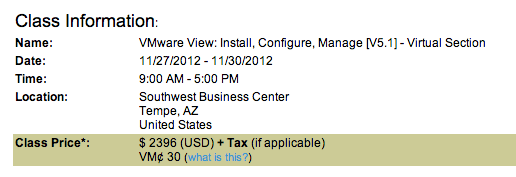
The same in-person course delivered in the UK is between
£1, 950 +VAT http://www.magirus.com/uk/training/vmware/view-5-install-configure-manage
£2,076 + VAT http://www.globalknowledge.co.uk/courses/vmware/virtualisation/vmview.html
So, if you are a contractor or paid by the hour/day outside of the US (and have good English skills) you could potentially use this technology and some of your personal time to save £500 over an in-person course and still be able to meet your day job commitments.
(Assuming you can keep up the pace of some short-term double-shifting, e.g doing a day-job then an evening course for 4 days) and still meet your customer’s requirements. Not a problem for many IT people in my experience.
iTARDIS vSphere on a Mac Mini
Posted by on September 21, 2012
You may be familiar with my vTARDIS project; I’ve been trying for a long time to make this work on a Mac Mini that I have as that would be the most awesome home lab possible – it’s almost silent and is small enough to fit underneath your monitor (however large your monitor is  )
)

I alluded to this in this previous post, but due to a bug the Mac Mini locked up on boot with ESX5 and there were no network drivers, with vSphere 5.1 and a little bit of frigging it finally works – it lives!

The network drivers don’t ship out of the box with ESX 5.1 but it no longer locks up on boot so you can get in and configure the IP address, kudos to this post on the VMware communities for finding the steps, which are summarized as;
- Download the NIC driver VIB for the Mac Mini (mine reports as MacMini4,1) is the server version with 8Gb and 2 x 500GB SATA drives.
- Customize your installation ISO with the driver VIB using this simple tool
- Install ESXi to a bootable USB drive (I used a 2GB Kingston flash drive) using Fusion
- create ESX5 VM in Fusion (or Workstation, principal is the same)
- attach customized ESX ISO to VM
- insert USB disk into laptop
- map USB drive to ESX VM
- boot VM from ISO file and install to USB stick when prompted
- Insert USB stick into Mac Mini
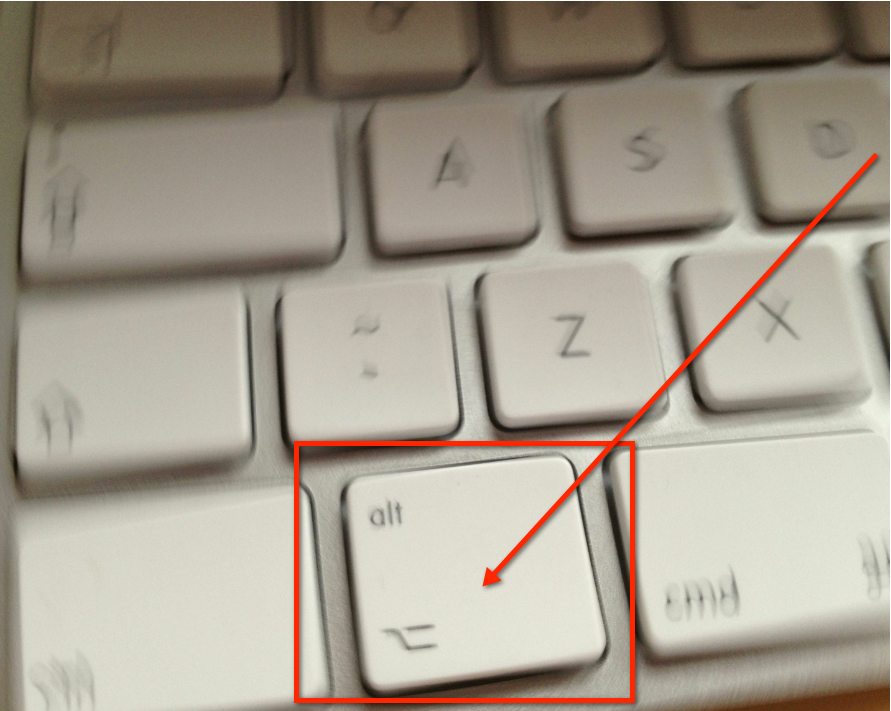
- Boot Mac Mini holding down alt key

- Select EFI boot when prompted
- ESX will boot
- set the management NIC and it’s IP address (or wait for it to get a DHCP address)
- You can now even install some nested ESX VMs on to it – see Williams post here which is more up to date than my vTARDIS pages for the required steps.
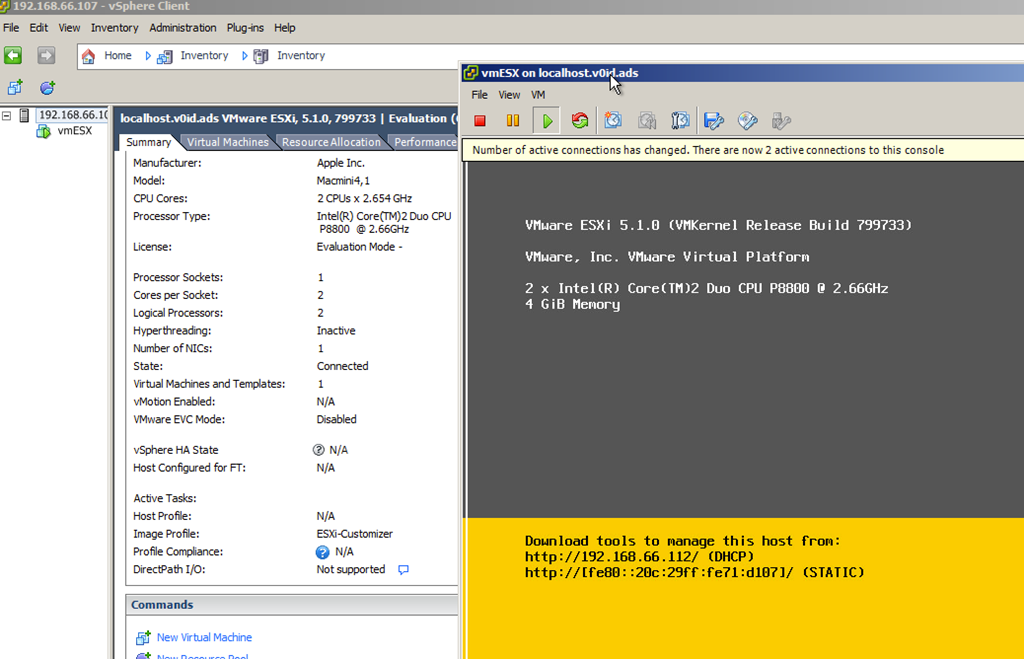
Ok, so it’s only got 8Gb of RAM, but this opens up all sorts of possibilities outside of nested ESX, because it’s Apple hardware you can install OS X as a VM (this is prevented on non-Apple hardware in ESX to comply with Apple’s licensing conditions).

Much more experimenting to come!
Call for Papers for UKVMUG is Open
Posted by on September 5, 2012
The steering committee would like to invite proposals for community sessions at UK VMUG in November.
Due to the limited number of available community sessions we will need to short-list proposed sessions and we will notify you by the end of September if you have been short-listed, you’ll also be asked if you would like to have your session submitted for a future London VMUG event.
VMUG is a voluntary organisation for VMware users, vendor sponsorship covers the actual cost of the event, as such we’re not usually able to cover travel costs for speakers, but we can offer endless gratitude and recognition for your efforts and if accepted you’ll be automatically entered for our annual best community presentation awards (see https://vinf.net/2012/01/30/lonvmug-best-community-presentation-of-2011-awards/ for last year’s winners).
VMware employees, sponsors and vendors are not eligible to submit community sessions unless you can clearly demonstrate that your content is independent of your company affiliation, potential sponsors should contact VMUG HQ for details (http://www.vmug.com/p/cm/ld/fid=52).
For more information on the event, location and logistics etc. click this link for more information http://www.vmug.com/p/cm/ld/fid=212
You can submit your proposal by clicking HERE

VMware Roadmap NDA Session at London VMUG 19th July 2012
Posted by on June 26, 2012
As you may have seen the next London VMware User Group meeting is on 19th July 2012 and is open for registration at this link.
We (the committee) are delighted that VMware will be presenting a roadmap NDA session at our meeting. It is a unique opportunity to discover what is coming from VMware in the future and a first for us!
However, as we’re privileged to have this session we have to abide by some very stringent rules and we hope you understand if you are refused entry to this session. For those that don’t meet the criteria to attend, we will have VMware experts on hand in the Thames Suite, where are sponsors are located, to meet and discuss any topics you wish to chat about. As a reminder, the entry criteria is:
• Signed, personal NDA
• Photo ID and proof of where you work
• Not working for a vendor
• Not working for a partner
• Not working for a competitor
We are really looking forward to the whole day, the agenda is another great one and has a storage bias to it, which is actually totally unintentional 🙂
See you in July!
Your London VMUG Steering Committee
This blog is not dead. but it is a little bit quiet
Posted by on December 8, 2011
Apologies for the lack of posting, this is another one of those I’ve been too busy to blog busy excuse posts.
I have a ton of stuff I am working on – including the next London VMware User Group meeting on Jan 26th and vTARDIS 5 posts as well as a very challenging customer project.
But, the main reason is that all my spare time is currently going into a new book that I am writing for Wiley/Sybex on building a private cloud with VMware Technology including vCloud Director 1.5, vSphere 5.0 and Hopefully some vFabric coverage.
You can pre-order it on Amazon at this link, and if you’d like to see it on the Kindle I would strongly recommend clicking on the part of the page shown below 

OS X Lion can’t connect to Iomega IX4 NAS workaround
Posted by on July 20, 2011
Today a received my new Mac Book Pro, it shipped with OS X Snow Leopard but by coincidence it arrived on the day Lion was released in the App Store so being an early adopter (read gadget freak) I upgraded it immediately to Lion – which took ~15mins on my Mac which has an SSD nice 🙂
However once completed I couldn’t connect to my Iomega IX4-200d NAS, which was kind of a problem as it’s my time-machine server as well as storing all my useful data, finder just reports an error.
“There was a problem connecting to the server”
The version of the server you are trying to connect to is not supported (…)
It turns out this is a common problem; Lion implements a more secure AFP authentication method and most Linux based NASes don’t yet support the more advanced version.
However, I found the following blog post which shows a work-around enabling you to use the less-secure authentication method, use at your risk whilst we all wait to see if the NAS vendors implement an updated firmware to address this issue.
It’s pretty straightforward, some command line and 2 reboots required, but I can verify it works fine on my Mac.
http://www.alexanderwilde.com/2011/04/os-x-lion-connection-error-with-afp-and-workaround/
Early adopters beware.
Other than that, liking Lion so far – Mission Control with hot-corners and full-screen apps is very nice, new scrolling method is nice but a bit confusing as older apps seem to need specific support to work with it, Google Chrome works with the new full screen but seems to have some issues, I can’t find a way in the UI to take the window out of full-screen mode and the tab drop down obscures the search entry box if you have a Google window open.
VMworld US is still better value than VMworld EMEA
Posted by on July 5, 2011
I’m in the middle of planning my VMworld trip(s) this year, now I’m no longer working for a vendor or a consultancy I have to fund my trip myself, I’m happy to do this as I view it as an excellent training & networking opportunity.
I already have a good foundation in infrastructure and virtualization technologies so I find normal training courses a bit slow, and very narrowly focused – VMworld gives you the flexibility to pick and choose your own agenda and allows you to go much deeper if you choose.
Based on a previous presentation I did for the London VMware, I still maintain that even for us Europeans, VMworld US is better value, this post represents my logic
If you want to get the lowest cost, you should
- Book early and take advantage of early-bird discounts
- Book a cheap, non-official conference hotel – often I also find the cheapest hotels have free WiFi –it might be a short walk
- You don’t need to stay in the best hotel in town, there are so many after-hours events and parties you can take advantage of you’ll just be sleeping there.
- Don’t bother booking a rate with breakfast, you can usually get it at the conference
My pricing is all in GBP where I have only been able to obtain USD$ pricing (as I live in the UK) I have converted to GBP at the current exchange rate, pricing has been taken from the Expedia.co.uk website, which is quite useful for this sort of what-if work.
VMworld Admission Price(early bird-discount)
VMworld US £990 ($1595 (early bird pricing has now expired))
There are 124 Breakout Sessions, 8 Panel Sessions & 24 Hands-on Labs.
VMworld EMEA £683 ($1100 early bird pricing still available)
There are 116 Breakout Sessions, 3 Panel Sessions & 23 Hands-on Labs.
The US conference is 1 day longer.
Hotel & Airfare
I usually try to fly out the day before the conference as it gives you a full day to get over jetlag and have a bit of time to have a look around and do some quick tourist stuff.
I then try to fly back the day after the conference has finished, this avoids the last-day rush and means you can hang around until the end and wind-down properly.
The other main reason I do this is that I had a nightmare journey once returning from Microsoft Tech-Ed in Amsterdam on the final day of the conference – 10,000+ geeks with laptops + questionable souvenirs to scan all descending on the nearest airport isn’t a fun experience.
Travelling a day before/after also means you can usually take advantage of cheaper flights – even if it costs you an extra night of hotel.
Book a Saturday in most places and you’ll find your flights and hotel are significantly cheaper.
VMworld US

It’s not a direct flight, you can get a direct flight for approx £300 more on this package – but we’re doing this on a budget – when flying UK to west-coast US sometimes it’s also better to do a 2-leg journey so you can get off a plane for a bit
This hotel looks to be a 30min walk (or short, cheap cab-ride) from the Venetian where the conference is being held
VMworld EMEA

I’ve not stayed at this hotel, but looks pretty close, and Copenhagen has an excellent metro system, cheapest I found for flight + hotel was about £200 but it included the word hostel 🙂
Total Costs
I based my expenses on previous years in SF and CPH, as you’ll see there is obviously a difference, it’s about 30% more expensive to go to Las Vegas, this doesn’t factor in lost revenue/time from not being able to be at work, but the VMworld US trip involves travel over a weekend/Friday to compensate.
If you consider that VMworld US is a 4-day event compared to a 3-day event for VMworld EMEA the gap gets even closer.
Food, drink and taxis are significantly more expensive in Copenhagen than in the US
| Event | Admission | Airfare/Hotel | Spending Food/Drink/Taxis | Total Cost |
| US | £990.00 | £791.00 | £150.00 | £1,931.00 |
| EMEA | £683.00 | £336.00 | £280.00 | £1,299.00 |
| Difference | £632.00 |
vPastures New
Posted by on May 25, 2011
I’ve had a great time working at VMware since last year and have worked with some of the greatest minds in the industry on some interesting projects. But, after a lot of deliberation I have taken the decision to leave the relative comfort of a “permanent” position at a vendor to work on a freelance basis as an Infrastructure Architect – specialising in virtualization and cloud solutions.
My reasons for this move are varied and personal, but suffice to say that I have a number of outside ventures that are coming to fruition and I need the flexibility to work on them independently.
VMware have some great stuff in the pipeline and I’m going to enjoy working with it albeit back on the customer/partner side of the equation rather than inside, it’s also gratifying to see the cloud concepts I was working on in 2008 becoming very much mainstream – so maybe I wasn’t mad after all 🙂
VMware have some challenges and growing pains in scaling out the business and avoiding Microsoft syndrome (too much, too wide, too thin). They need to make sure that they don’t loose sight of the requirement for end-end integrated customer solutions with services and support to match. Particularly where there are so many technology acquisitions involved. That said, VMware have the best senior exec’s in the technology industry steering the ship – I can say that as I’ve met most of them over the last couple of years and they’ve been there & done it.
I will still be heavily involved in the community and need to set aside some time for vTARDIS.next and my recently neglected blog – many cool mind-bending, physics defying hypervisor inside a hypervisor posts to come!
I have some interesting professional engagements lined up and I’m looking forward to a new challenge.
Cheers

 Virtualization, Cloud, Infrastructure and all that stuff in-between