Virtualization, Cloud, Infrastructure and all that stuff in-between
My ramblings on the stuff that holds it all together
Cannot Logon to vCD guest with Auto-generated Password
Posted by on December 20, 2010
vCD by default will customize Windows 200x guests using Sysprep (see administrators guide, page 12 for how to create the sysprep packages) to generate a new SID, password, etc.
One problem I have noticed is that the auto-generated password often includes the hash/pound character.
When the sysprep process is executed during VM boot the regional settings are reset to US and any regional customization’s you’ve made in the guest are overridden.
If, like me you live in the UK (and I would assume the rest of the world) our keyboards are slightly different from US ones;
On US keyboards the # (pound/hash) key is above the number 3, on UK keyboards this space is reserved for the £ (GBP) currency character.
When you try and logon for the 1st time using the auto-generated password sometimes you won’t be able to enter the correct password and logon. this is because the auto-generated password sometimes includes a hash symbol “#” because the sysprep’d guest now VM has a US keyboard set you need to press shift-3 (£) where it wants a # symbol.
For now, within the vCD guest customization options (below) there are no options to set the regional settings for a VM in the catalog at customization time.
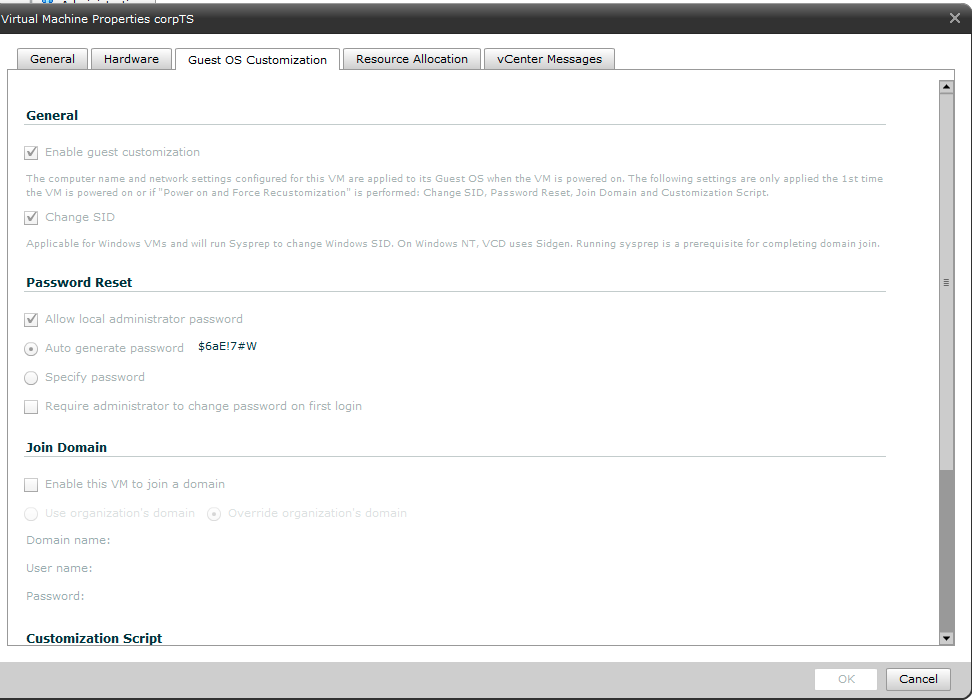
The work-around is to remember this # key issue when you logon to the VM 1st time, and if appropriate manually set the guest VM regional settings to what you require, or (less fun) re-map your client workstation to use a US keyboard.
Pushing Packets Round The M25
Posted by on November 11, 2010
Since starting at VMware I find myself driving a lot more on one of the UK’s greatest national landmarks – the M25, it’s such a delight to tourists and locals alike I really encourage you all to check it out (unless you actually want to get anywhere fast of course  ) infact if you click here you can check it out on the webcams – particular “highlights” are just before 8.30am and around 5.30pm.
it’s very much a case of this

rather than this

Although there are occasional moments of entertainment…

I can only listen to Radio 1, Capital or Kiss or even Radio 4/LBC for so long before I want to poke pencils in my ears (think I’m getting old) and my CD collection, whilst vast and conveniently encoded onto my iPod in my car offers entertainment for only so long and is tricky to navigate and stay on the road at the same time.
I’ve been a train commuter into central London for a long time rather than a car commuter and I have come to value this time (if not personal space) for reading books/websites and generally educateralizing myself (yes, I made that word up) – this is kind of tricky in the car as reading a book whilst driving is frowned upon, and to be honest my hands are already tied up with my mobile phone, coffee and … (I jest, seriously road safety is important).
So, in an effort to make more use of this “dead” time; I started investigating podcasts.
I discovered Greg Ferro’s Packetpushers (Etherealmind.com) Podcast via his blog and from bumping into him at VMworld, I’ve always known enough to be dangerous with networking stuff but this is really useful as I (and a lot of my colleagues) live in a server/software centric world, it’s so easy to forget that networking is more than just a bit of copper and some IP addresses (although let’s not forget that cuts both ways and both sides are guilty of that!); It’s really useful to get the network-side perspective of the industry at a good from the trenches technical level to expand your knowledge, plus it’s a nice change of pace from day-day work – I’ve been listening to the IPv6 stuff recently and it’s very interesting.
Other good podcasts I regularly listen to (and occasionally participate in) is the VMware communites roundtable podcast; although as Mr Troyer says himself sometimes it’s better experienced live, as the real-time chat that accompanies the dial-in show is quite entertaining.]
Check them out
vTARDIS Cloud
Posted by on November 4, 2010
Following on from my recent VMworld Europe user award I have mentioned that I’ve been working on a scaled out version of the vTARDIS, this post will act as the index for this project, there is a lot of ground to cover in terms of it’s configuration.
| Disclosure/Disclaimer – I am a VMware employee, this project is not an official VMware effort, project, fling or even a thing – it’s my private-time work, documented for the community
Very little of this is an officially supported configuration, particularly the use of nested ESX – to re-iterate, this is not a VMware supported, recommended or blessed configuration – but it works well enough for my own needs – your mileage may vary and no warranty is granted, expressly or otherwise. This is not a solution for production use, it’s suitable for lab/study work and actual performance is limited by the laws of physics If you run into difficulties with any of this please feel free to drop me a line via the comments section of this post, however I do have a full-time day job at VMware, I’ll help where I am able. |
What is vTARDIS? – see this post for details of the original vTARDIS project
What is vTARDIS.cloud?
A small, low cost physical infrastructure which is capable of supporting several multi-node ESX clusters. It provides an infrastructure representative of enterprise-grade vSphere/vCD deployments through heavy over-subscription of physical hardware as well as providing “production” home services like media streaming, data storage, DNS, DHCP etc.
Why?
My original home lab has been scaled out to support my new position at VMware and my VCDX/VCAP studies, a core part of my work is VMware vCloud Director (herein refered to as vCD) so my lab reflects that. Additionally my wife is trying to continue her IT studies, so it’s helpful to have a self-service portal for building out virtual machines for learning.
You very rarely have a large number of ESX hosts and shared storage to experiment with, testing scripts, rebuilding hosts, changing configurations. This provides a representation of a large vSphere/vCD deployment so you can carry out such work to support studies, or pre-production work.
What does it look like? – photo
The vTARDIS.cloud lives in my geek-cabin which is my home office (more info on that here) and now takes up most of a full rack.

What does it look like? – High-level architecture
the following diagram illustrates the layout of the vTARDIS.cloud
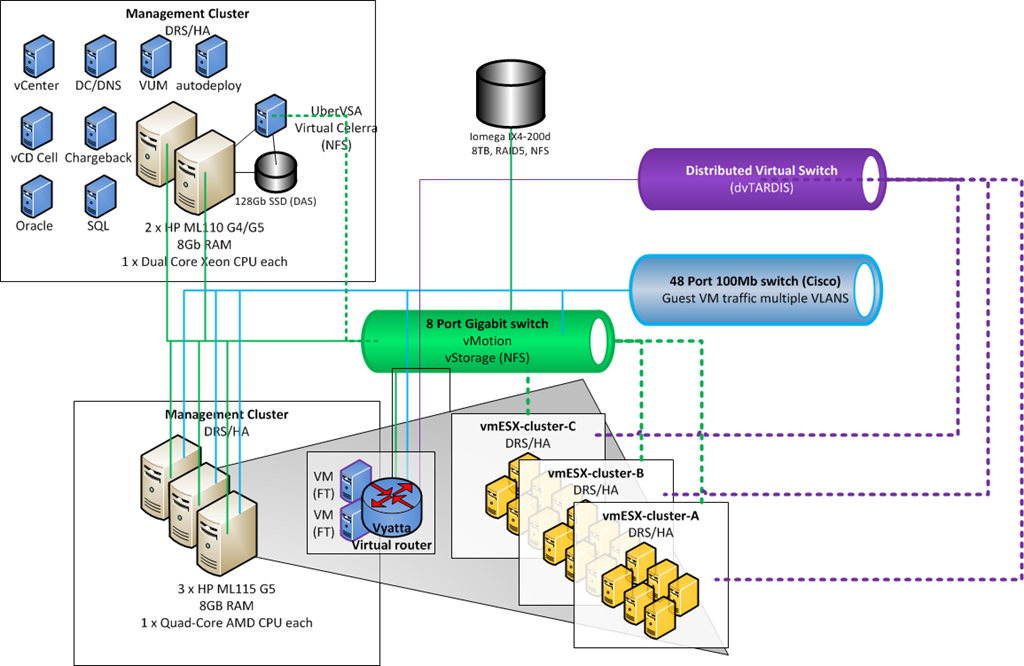
The key configurations and components of the design which I will post further details on are as follows (+more to follow);
- Stateless ESXi deployment – Using autodeploy VM to PXE boot and configure large numbers of {virtual} ESXi hosts
- Script to deploy large numbers of VMs and create DHCP reservations
- Using the Distributed Virtual Switch with nested ESX – share a single dvSwitch between physical and nested ESX hosts (complicated virtual wiring!)
- Remote Access to your home lab with a virtual appliance
- vMotion between nested VMs
- vMotion between nested ESX and physical hosts
- Configuring the Cisco 3500 XL switch with VLAN, trunk ports for ESX
- HA Layer 3 routing for the lab using Vyatta virtual appliance and FT
- Using Distributed Power Management (DPM) with your home lab
- Enabling Self-service with vCD
- Backup on a budget
How much did you spend?
I cannot say, as my wife will probably kill me  I’ve acquired most of the hardware over the years or from eBay/factory outlet stores so it’s been a gradual expansion rather than an upfront cost. But still, it’s all been out of my own pocket – there are no sponsors or generous donations of kit (if you are reading this and would like to donate some equipment, read the disclaimer at the start and if you’d still like to talk drop me a line)
| Item | Approx Cost (£GBP) | Status |
| Cisco 3500 XL 100mb switch (48 ports) | £100 (eBay) | in-use, VLAN-trunks from ESX hosts and office workstations connectivity |
| Netgear GS487T 48 port gigabit switch | £100 (eBay) | Spares (decent switch but too noisy for use in office) |
| Linksys SLM2008 8 port gigabit switch | £90 (Amazon) | vMotion/vStorage networks |
| Iomega IX4-200d 8Tb NAS in RAID5 configuration | £1,000 (online, ouch!) | in-use, critical, like it a lot but v.expensive |
| Multiple USB2 drives 500Gb-1Tb | varies | in-use plugged into IX4 for backup |
| 2 x HP ML110G4 Intel Xeon, 8Gb | £200 each | in-use (management cluster) special online deals, now defunct  |
| 3 x HP ML115 G5 AMD Quad Core, 8Gb RAM, dual port GbE Intel NIC | £2-300 for each serverwith RAM (varying deals) 80-100 for 8Gb RAM 40 for dual port Intel GbE NIC (job-lot on eBay) |
in-use (resource cluster) now EoL – hopefully they won’t die! |
| 42U Rack (no-brand) | free | holding up servers |
| 1 x HP D530 SFF Desktop PC, 4Gb RAM, 500Gb SATA | £90 (eBay) | in-reserve, was ESX 3.5 host (non x64 CPU) |
| HP TFT 15” rack mount monitor | free from skip at customer | in-use |
| HP 4 port PS/2 KVM | free from skip at customer | in-use |
| 128Gb Kingston SSD | £200 (Amazon) | UberVSA virtual SAN storage (was in original vTARDIS project; since cannibalised) |
| 64Gb Transcend SSD | £100 (Amazon – a while ago) | UberVSA virtual SAN storage |
| Compaq ML570 G1, quad Xeon CPU, 12Gb RAM, external disk array multiple 18Gb SCSI disks, SmartArray | £400 eBay (4 or 5 years ago) | retired, non-x64 and too power hungry (was power-sucken-cluster) [open to offers!] spider refuge |
| Compaq DL360 G1, single Xeon CPU, 4Gb RAM, 2 x 18Gb HDD | £500 eBay (a long time ago) | retired, non-x64 and too power hungry (was power-sucken-cluster) [open to offers!] spider refuge |
| Compaq DL320 G1 – unknown spec | free, from customer refresh a long time ago | retired and faulty, spider refuge |
| Sun Netra | free from a customer refresh a long time ago | retired, was old firewall, spider refuge |
| Compaq 2 drive DLT tape-loader | free from a customer refresh a long time ago | retired, and probably faulty by now, spider refuge |
How much does it cost to run?
This uses approx 600w of power 24/7 – it’s not that cheap here in the UK, I estimate about £6-700 per year, DPM certainly helps to reduce the power consumption of the resource cluster when it’s less-busy, although as a side-benefit the vTARDIS acts as passive heating for my garden office during the winter, that’s “green”, right?
Domestic Schedule Bliss? There’s an iPad app for that in the Cloud
Posted by on November 3, 2010
Anyone reading this that has a partner and family will probably understand my pain… My wife & I have a pretty busy schedule; work commitments and travel that are part of any modern IT consultant job, 2 young children and their highly complex schedule of social and school, nursery, classes add to that a widely distributed network of family and friends and their social events/weekend visiting and it gets pretty complex to keep track of.
As I’ve written about before my Outlook/BES Blackberry calendar is de-facto to me; I just don’t have the mental bandwidth to track everything and the bit of my brain that deals with remembering dates over a week away is either missing or faulty and multiple personal/work calendars just mess with my head.
My wife has performed a heroic task of maintaining a paper family calendar for years, but that forced me to also maintain it manually and often things were forgotten which has led to much confusion and mis-scheduling, especially when I have been away and there have been changes to my schedule.
We work in IT right? there has to be a technical solution to this pain? well yes, there is; however my wife found using a laptop or small screened mobile phone to manage a shared calendar too difficult whilst juggling 2 small children and always fell back to the paper calendar and lived with it’s limitations.
So, when an iPad was introduced and quickly adopted by everyone in the household as “good-enough” for everything from quick browsing of the web to TV guides, iPlayer, recipes, games I spotted an opportunity.
I was a bit skeptical about the iPad at first and didn’t think it would be much more than a nice toy, however it was used so much by all of the family because;
- It switched on instantly (unlike a laptop)
- the battery lasts literally forever so you don’t have to be tethered to power (unlike a laptop or iPhone)
- Has a usable sized screen that you could read things without having to scroll/pan about (unlike a smartphone); and having 2 young kids it’s wipe-clean and reasonably robust (parents will understand
 ).
).
So with some fiddling we ended up at this solution

- Google calendar acting as the central “hub” reference – accessible via a web browser from anywhere and with a good API that is used by sync applications across multiple platforms.
- My Exchange-hosted calendar is automatically synced to my fat-Outlook client and to my Blackberry via the BES.
- the Google calendar sync application runs in the background on my Blackberry and syncs with the shared Google Calendar.
- The iPad application CalenGoo syncs with the Google Calendar so the calendar can always be viewed and edited from the iPad in a convenient home-use form-factor.
- My wife’s new smartphone (which will either be a BIS Blackberry or iPhone will be able to sync with the Google calendar “hub” giving her a mobile and up to date editable copy of the calendar.
For us it works pretty well, if you have a similar problem I’d suggest you investigate it, one word of warning the BB/Gmail sync app won’t sync historical appointments from your calendar so be careful if you try to get around this with a manual import; you may end up with duplicate calendar entries (at least I did, and had to de-dupe them).
There are also Google calendar sync plug-ins for Outlook and other mail clients, but I was happy enough with doing it via my BB as that nearly always has a network connection and is kept constantly in-sync with my work calendar.
With all that sync’ing there is a latency of about an hour for changes to get replicated end-end which is more than enough for our family needs.
In terms of security my family or work schedule isn’t particularly sensitive but it’s tied down to usernames/passwords where relevant and transmission is over SSL, entries from our shared calendar get synced into my corporate calendar marked as ‘private’ – but there could be better support for a more granular model both ways here, Google calendar seems to have this concept but it doesn’t federate into into the Exchange/BB world {yet}.
vSphere App for iPad Download
Posted by on October 26, 2010
Whilst we all await the “official” vSphere administration app for the iPad, as previewed at VMworld I found myself needing something to control my home vSphere lab environment from my shiny new iPad.
The iPad has now integrated itself as the device of choice with my wife & kids and is in regular use as a web-browser and media-player in the living room at home rather than laptops so this seemed like a logical extension
A quick browse of the iTunes store turned up iDatacenter, whilst not cheap at 8.99 GBP it works well in my testing as a basic administration interface to my lab and allows me to reboot guests/hosts as well as kick off vMotion and storage vMotion tasks.
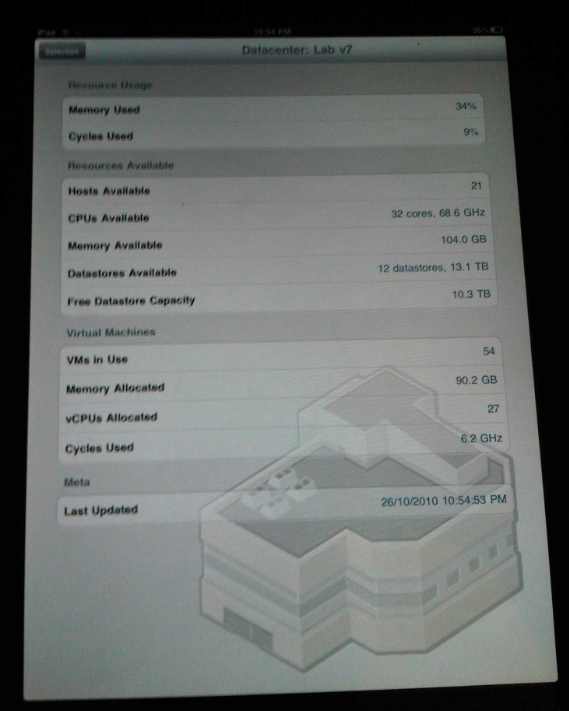
It doesn’t offer a remote console or any historical performance graphing but it is good for basic administration tasks and looking at current statistics like CPU, memory and disk space – which is handy as my home lab currently has 21 ESX hosts and 54 “production” virtual machines 
The following photo shows a quick view of the interface, my only minor gripe is that it doesn’t seem to recognise clusters as a management object – just individual ESX hosts or virtual machines and it can be a little bit slow at times, but those aside it’s worth checking out if you have this sort of requirement.

The application home-page is here http://nym.se/idatacenter/ and there is a video demonstrating the key features.
vTARDIS wins Best of Show at VMworld Europe 2010
Posted by on October 14, 2010
Wow, what can I say, my vTARDIS project has won 2 awards at VMworld Europe 2010 in the following user categories;
There is some good coverage of the VMworld event on the the searchVirtualDataCentre.co.uk site here

I’d like to thank <#insert <paltro/gwenneth.h>.. 🙂
But seriously I appreciate this recognition for the vTARDIS project which has burnt many of my brain-cells and personal-time over the last 12-months, as well as airport-stress as I had to convince the TSA that I wasn’t some 24-inspired nut-job shipping a suitcase-nuke round the US with me for BriForum, the Charlotte(US) VMUG and various London, UK VMUGs.
Here is a picture of it in it’s off-the-shelf Marks & Spencer shipping container (a.k.a suitcase) note:

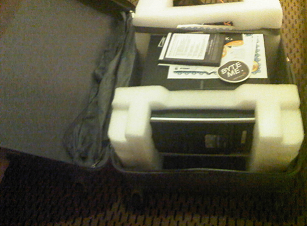
Note cool “my datacenter is bigger than yours” sticker courtesy of Solarwinds
Trying to understand what vTARDIS is is hard for many people, and it’s even harder to explain sometimes, but the concept is basically trying to build a complex, enterprise type vSphere implementation on as little hardware as possible for testing/training, but hopefully the following diagram (and the original post) explain it better at a technical level

That-said, I particularly like how TechTarget (who sponsor the awards) phrase it..
"This is the kind of bonkers-crazy stuff that has made the virtualisation community the bedrock of innovation. The only limitation is people’s imagination, and Gallagher’s vTARDIS demonstrates imagination in spades."
Winner: vTARDIS (Transportable Awfully Revolutionary Data Centre of Invisible Servers)
IT project owner: Simon Gallagher
Vendors and technology used: VMware Inc. vSphere 4.0 and 4.1
Vyatta Core
Openfiler
Microsoft Windows Server 2008 R2
Hewlett-Packard Co. ML115 G5
Advanced Micro Devices Inc. (AMD) quad-core processors
IT project: Gallagher’s lab features low storage latency and solid performance. Gallagher’s configuration also pushes beyond the "official" use of VMware technology by using solid-state drives to reduce disk I/O and "nested VMware ESX" instances, which give the appearance of owning many ESX hosts when the entire infrastructure actually sits on one physical box. His configuration runs eight virtual ESX hosts and nearly 60 virtual machines on just the one physical server, rather than multiple PCs and storage appliances.
What the judges said: "No other entry showed the same degree of doing a lot with so little."
I hope it stands as an example of how flexible VMware technology is and what you can do with a bit of imagination and some good, hard-graft.
But things don’t stand still in the IT world, and nor do they in my mad-scientist home-lab, look out soon for posts on further developments which are running now;
vTARDIS v2 : 20 node PXE booting, DHCP configured ESXi cluster with powershell provisioning script on a single physical 500GBP server.
vTARDIS.cloud : 3 x 20 node ESXi cluster, DPM enabled, VMware vCloud Director, Chargeback, EMC Celerra VSA, on 3 x physical 300GBP hosts plus iomega IX4-200, 2-node Management cluster pod.
Whilst in the last couple of weeks I started working directly for VMware in the cloud practice, my vTARDIS project was started about a year ago and was demonstrated at many VMUGs and events (including VMworld SF 2010) in that time.
All of the equipment, power, space, brainpower and cooling for this project have been paid for entirely out of my own pocket/cranium, I do not receive any kind of sponsorship for this work from my current or previous employers, and it has been completed on my own (personal) time, so to invoke the Paltro convention I’d definitely like to thank my family for their tolerance and patience whilst I have gnashed my teeth at powershell and danced way beyond edges of supportability, and in many cases physics!
Stay tuned, so much more arcane geekery to come…!
Importing a PST file into Outlook 2011 for Mac
Posted by on October 4, 2010
I have been a long-term Outlook user and I’m a serial information hoarder 🙂 so I have a calendar and contact set that goes back a LONG way in time, in a previous life I was also an Exchange/AD consultant so I see the benefits of a server-side mailbox store (centrally held data with local disposable replicas, search, access anywhere etc.).
As well as my work schedule it has all my regular personal appointments, kids school schedules etc. – for simplicity’s sake I only keep one calendar, I don’t have a separate work and personal calendar – your mileage may vary, but this is the way I work.
Having recently moved companies and moved from Wintel/Office to a Mac with the new Outlook 2011 I needed a way of importing my PST-archived calendar to my new Exchange store (calling it a mailbox doesn’t seem to do it justice anymore as it contains calendar, contacts, etc as well now).
I also use a BES-connected Blackberry so I want it to sync my calendar to my device via the BES and a server-side calendar means it’s accessible using OWA from any PC.
This is pretty straightforward for normal Windows Outlook as you just import the .PST and choose the new server-side store/calendar as the target.
However, it seems that the built-in import function in Outlook 2011 won’t import calendar data from a .PST file directly to an Exchange server-side store, it will import it but it only keep it in a separate locally held calendar, nor can you cut & paste or sync or do anything to move the contents from “calendar – on my computer” into the server-side calendar.
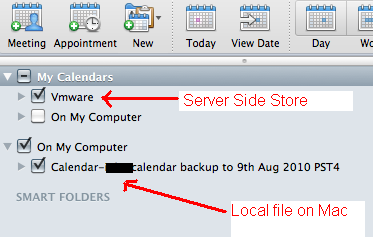
My “VMware calendar” (note: not my capitalization :)) is the server-side one but I can’t import directly to it, it always goes into “On my computer” which I can only assume is held somewhere client-side.
Whilst I can select both (as shown above) and they get overlaid on the calendar view this is only accessible when I use my Mac and thus won’t be available via OWA, or on my Blackberry.
So – the only solution I found was to use a Windows VM under Fusion with Office 2010 installed and use it to import my calendar contents, thus it synced back down to my Outlook 2011 offline store and onwards to my Blackberry via the BES.
This seemed a sort of backwards process so I would love to know if anyone has found a better native way to do this….?
Distributed Power Management (DPM) for your Home Lab
Posted by on September 28, 2010
I am in the middle of rebuilding and expanding my vTARDIS home lab environment (look out for an update soon) but as I’m adding more physical vSphere hosts I’ve been looking at ways to reduce the overall power consumption as my lab has now overtaken the idle power consumption of the rest of my house (measured using one of these – get one they are great, and Google Powermeter integration coming soon for online monitoring).
Distributed Power Management (DPM) was 1st introduced in experimental form in ESX 3.5 and has since gone into supported use with vSphere 4.0, it’s an interesting technology that allows you to consolidate workloads within a cluster to as few physical hosts as possible using vMotion/DRS and put the idle hosts into stand-by, thus reducing the overall power consumption. DPM can automatically make them resume when demand increases and use DRS to re-distribute hosts across the cluster – essentially making the physical host layer somewhat elastic.
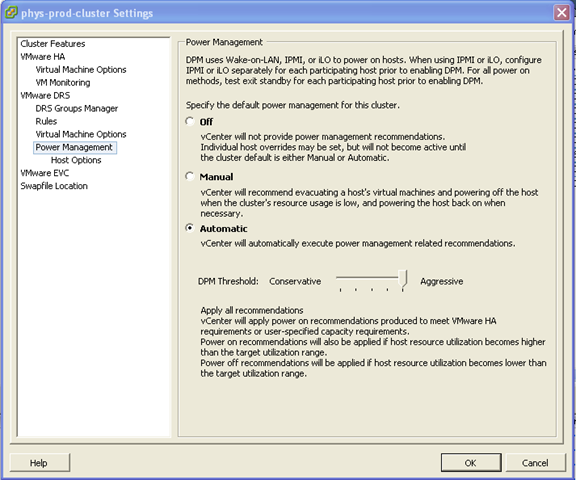

Whilst maybe production use-cases are more limited as most DC managers hate varying power loads in the datacentre (they are much harder to plan for) I have definitely found a use for it in my lab.
Out of the box, the ML115 g5 (I have only tested this on the AMD quad-core versions) it “just works” using the onboard BMC and doesn’t seem to require the expensive iLO add-on, I assume it’s using Wake on LAN (WoL) magic packets to wake up the hosts – but in my testing it works fine and reliably suspends/resumes hosts as demand changes (your mileage may vary)
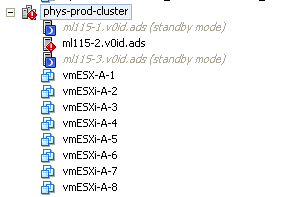
The screenshot below shows a 3-node cluster, with 4 running virtual machines (which are actually virtual ESXi hosts, but the principal also applies to normal VMs running on a cluster) note; one host is suspended because the workload is “light”.

If I power on another 4 virtual ESXi hosts, the cluster realises it wants more resource and asks the node in standby mode to start-up.



In my environment it takes approx 3-5 minutes for a host to power back on and be admitted back into the cluster.

Then, DRS will kick in and do it’s thing to balance the VMs across the newly (dynamically) expanded cluster.

If I power down those VMs again (taking the total cluster load to zero VMs)within 5mins it puts 2 of the hosts into stand-by mode again (thus saving the power consumption for 2 hosts)

Even if you don’t want to turn on the automation settings, you can use this feature to remotely power on/off some of your home lab (assuming you have VPN access and more than one host) What impressed me more than anything is that this just worked out of the box with the ML115 G5.
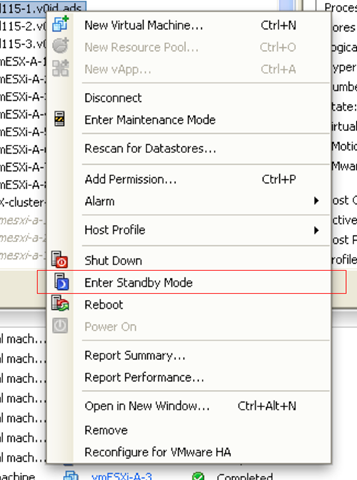
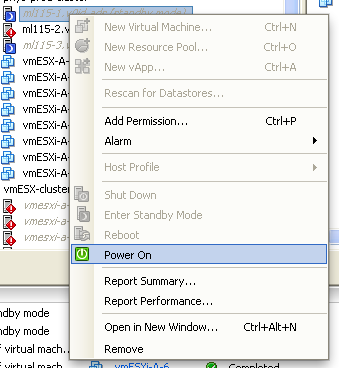
If you want more tips on power-saving with the ML115 range it’s worth checking out this post on Techhead to see what you can do with the more advanced range of CPU settings on a per-host basis.
No Response from vCD Web Interface
Posted by on September 21, 2010
I encountered a problem recently in my vCD lab environment where the cell server wasn’t responding to any HTTP requests following some re-configuration work.
After some investigation I found my Oracle back-end DB server had fallen over (this was because it’s a VM and I un-presented its storage which BSOD’d the OS (caveat:Lab setup!) so I rebooted it and not being an Oracle DBA, it looked like the Oracle services had all started correctly but my cell still wouldn’t initialize.
For reference the /opt/vmware/cloud-director/logs/cell.log file looks like this when it isn’t happy (IP’s changed to protect the innocent – me :));
|
[root@cloud ~]# tail /opt/vmware/cloud-director/logs/cell.log *DEBUG* Running task Update: pid=org.apache.servicemix.features *DEBUG* Scheduling task Fire ConfigurationEvent: pid=org.apache.servicemix.features *DEBUG* Running task Fire ConfigurationEvent: pid=org.apache.servicemix.features *DEBUG* Scheduling task Update: pid=org.ops4j.pax.url.mvn *DEBUG* Running task Update: pid=org.ops4j.pax.url.mvn *DEBUG* Scheduling task Fire ConfigurationEvent: pid=org.ops4j.pax.url.mvn *DEBUG* Running task Fire ConfigurationEvent: pid=org.ops4j.pax.url.mvn Application startup begins: 9/21/10 9:54 AM Successfully bound network port: 80 on host address: 192.168.xx.241 Successfully bound network port: 443 on host address: 192.168.xx.241 [root@cloud ~]# service vmware-vcd restart |
The basic test is to check that the cell server can talk to the Oracle DB where the configuration is stored (the cell server is essentially a stateless web-app in the vCD architecture), this goes over port 1521/tcp – so a quick telnet check from the cell server to the back-end DB proved that this wasn’t working
|
[root@cloud bin]# telnet mgt-db01.v0id.ads 1521 |
When looking at my Oracle server, (which is on Windows in my lab (sorry!)) the OracleOraDB11g_home1TNSListener service didn’t start up correctly and wasn’t running.
I did a manual start of this service, then restarted the vmware-vcd service on my cell server
|
[root@cloud bin]# service vmware-vcd start |
and then checked the cell.log file, this time I saw more progress until it started correctly (successful initialization shown below)
|
[root@cloud bin]# cd /opt/vmware/cloud-director/logs/ [root@cloud logs]# cat cell.log *DEBUG* Scheduling task ManagedService Update: pid=org.ops4j.pax.url.mvn *DEBUG* Scheduling task ManagedService Update: pid=org.ops4j.pax.url.wrap *DEBUG* Running task ManagedService Update: pid=org.ops4j.pax.url.mvn *DEBUG* Running task ManagedService Update: pid=org.ops4j.pax.url.wrap *DEBUG* Scheduling task ManagedServiceFactory Update: factoryPid=org.apache.servicemix.kernel.filemonitor.FileMonitor *DEBUG* Running task ManagedServiceFactory Update: factoryPid=org.apache.servicemix.kernel.filemonitor.FileMonitor *DEBUG* Scheduling task Update: pid=org.apache.servicemix.management *DEBUG* Running task Update: pid=org.apache.servicemix.management *DEBUG* Scheduling task Fire ConfigurationEvent: pid=org.apache.servicemix.management *DEBUG* Running task Fire ConfigurationEvent: pid=org.apache.servicemix.management *DEBUG* Scheduling task Update: pid=org.apache.servicemix.transaction *DEBUG* Running task Update: pid=org.apache.servicemix.transaction *DEBUG* Scheduling task Fire ConfigurationEvent: pid=org.apache.servicemix.transaction *DEBUG* Running task Fire ConfigurationEvent: pid=org.apache.servicemix.transaction *DEBUG* Scheduling task Update: pid=org.apache.servicemix.shell *DEBUG* Running task Update: pid=org.apache.servicemix.shell *DEBUG* Scheduling task Fire ConfigurationEvent: pid=org.apache.servicemix.shell *DEBUG* Running task Fire ConfigurationEvent: pid=org.apache.servicemix.shell *DEBUG* Scheduling task Update: pid=org.apache.servicemix.features *DEBUG* Running task Update: pid=org.apache.servicemix.features *DEBUG* Scheduling task Fire ConfigurationEvent: pid=org.apache.servicemix.features *DEBUG* Running task Fire ConfigurationEvent: pid=org.apache.servicemix.features *DEBUG* Scheduling task Update: pid=org.ops4j.pax.url.mvn *DEBUG* Running task Update: pid=org.ops4j.pax.url.mvn *DEBUG* Scheduling task Fire ConfigurationEvent: pid=org.ops4j.pax.url.mvn *DEBUG* Running task Fire ConfigurationEvent: pid=org.ops4j.pax.url.mvn Application startup begins: 9/21/10 2:33 PM Successfully bound network port: 80 on host address: 192.168.xx.241 Successfully bound network port: 443 on host address: 192.168.xx.241 Application Initialization: 9% complete. Subsystem ‘com.vmware.vcloud.common.core’ started Successfully connected to database: jdbc:oracle:thin:@mgt-db01.v0id.ads:1521/cloud Successfully bound network port: 443 on host address: 192.168.xx.242 Successfully bound network port: 61616 on host address: 192.168.xx.241 Successfully bound network port: 61613 on host address: 192.168.xx.241 Application Initialization: 18% complete. Subsystem ‘com.vmware.vcloud.common-util’ started Application Initialization: 27% complete. Subsystem ‘com.vmware.vcloud.consoleproxy’ started Application Initialization: 36% complete. Subsystem ‘com.vmware.vcloud.vlsi-core’ started Application Initialization: 45% complete. Subsystem ‘com.vmware.vcloud.vim-proxy’ started Successfully verified transfer spooling area: /opt/vmware/cloud-director/data/transfer Application Initialization: 54% complete. Subsystem ‘com.vmware.vcloud.backend-core’ started Application Initialization: 63% complete. Subsystem ‘com.vmware.vcloud.ui.configuration’ started Application Initialization: 72% complete. Subsystem ‘com.vmware.vcloud.imagetransfer-server’ started Application Initialization: 81% complete. Subsystem ‘com.vmware.vcloud.rest-api-handlers’ started Application Initialization: 90% complete. Subsystem ‘com.vmware.vcloud.jax-rs-servlet’ started Application initialization detailed status report: 90% complete com.vmware.vcloud.backend-core Subsystem Status: [COMPLETE] com.vmware.vcloud.ui.configuration Subsystem Status: [COMPLETE] com.vmware.vcloud.consoleproxy Subsystem Status: [COMPLETE] com.vmware.vcloud.vim-proxy Subsystem Status: [COMPLETE] com.vmware.vcloud.common-util Subsystem Status: [COMPLETE] com.vmware.vcloud.ui-vcloud-webapp Subsystem Status: [WAITING] com.vmware.vcloud.rest-api-handlers Subsystem Status: [COMPLETE] com.vmware.vcloud.common.core Subsystem Status: [COMPLETE] com.vmware.vcloud.vlsi-core Subsystem Status: [COMPLETE] com.vmware.vcloud.jax-rs-servlet Subsystem Status: [COMPLETE] com.vmware.vcloud.imagetransfer-server Subsystem Status: [COMPLETE] Application Initialization: 100% complete. Subsystem ‘com.vmware.vcloud.ui-vcloud-webapp’ started Application Initialization: Complete. Server is ready in 2:35 (minutes:seconds) Successfully initialized ConfigurationService session factory Successfully started scheduler Successfully started remote JMX connector on port 8999 [root@cloud logs]# |
And I could now log in to the web UI of my vCD cell.
Top Virtualization Blog Voting Time
Posted by on September 14, 2010
Eric Siebert is looking for votes for the top virtualization blogs on vsphere-land.com. I met Eric in the flesh a couple of weeks ago at VMworld when we did a joint session on home-lab environments, featuring the vTARDIS (demo videos will be uploaded this week hopefully).
If you feel like voting for me, feel free to follow this link 🙂

Please bear in mind, that whilst I now work for VMware, all of these posts were written way before that was even an option, and I’ll keep on blogging despite being borg’d 🙂
Here’s a quick sample of the posts I have written up this year that I thought were interesting, I like to think I provide some interesting food for thought, if nothing else 🙂 I was quite surprised how many posts I have done this year when looking back through WordPress, that would certainly explain where my evenings went this year..!
The vTARDIS
Hardware Emulators… please
https://vinf.net/2010/04/26/hardware-vendors-release-the-emulators-to-the-masses-please/
Where next for VMware Workstation?
https://vinf.net/2010/04/28/where-next-for-vmware-workstation/
Augmented Reality
https://vinf.net/2010/04/29/augmented-reality-tftlondon/
My VCE/VCD310 Exam Experiences
https://vinf.net/2010/06/22/vce310-and-vcd310-and-the-path-to-vcdx-exam-experiences/
Software Licensing for vCloud (note: written before I started at VMware’s cloud team :))
https://vinf.net/2010/03/29/vmware-licensing-for-the-vcloud/
PowerShell to create lots of sequentially named linked clones
FusionIO Solid State Drive and VMs

 Virtualization, Cloud, Infrastructure and all that stuff in-between
