Virtualization, Cloud, Infrastructure and all that stuff in-between
My ramblings on the stuff that holds it all together
Attending #TechFieldDay if you aren’t at #TechFieldDay
Posted by on April 9, 2010
Steve Foskett of GestaltIT is currently running an invite-only event for bloggers with presentations from companies like vKernel, EMC, Cisco and HP in Boston.
I wasn’t lucky enough to be invited but rest assured there is already a strong contingent of the London Simons present on-site (Seagrave and Long).
You can follow the attendees on twitter by watching the #TechFieldDay hashtag or, Simon Seagrave (of Techhead fame) is streaming live video from the events where possible here, the videos seem to be archived and there is a session from Chad Sakac
Installing vCenter on Windows 2008 R2 x64 – There is No DSN which can be used
Posted by on April 5, 2010
It’s well documented that if you want to install vCenter on an x64 Windows 2008 OS you need to create a 32-bit DSN rather than he normal x64 DSN, Jason has a post on this over at his site.

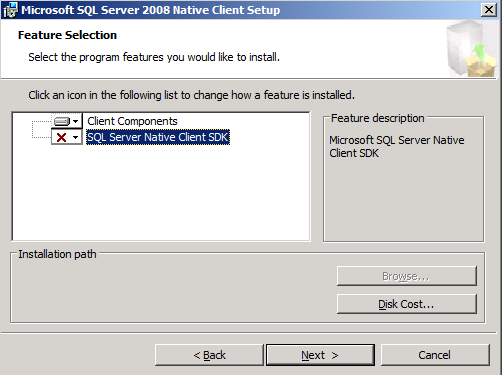
However – on a clean install of Windows 2008 R2 x64 you don’t get the drivers for the SQL Native Client out of the box so whatever you do, you can’t create a compatible DSN
If you have a separate VC server from the SQL server you need to install the SQL native client on your VC server otherwise it won’t work.
You can download it from this page as part of the SQL 2008 Feature pack; the direct download links are below
Microsoft SQL Server 2008 Native Client
- Microsoft SQL Server 2008 Native Client (SQL Native Client) is a single dynamic-link library (DLL) containing both the SQL OLE DB provider and SQL ODBC driver. It contains run-time support for applications using native-code APIs (ODBC, OLE DB and ADO) to connect to Microsoft SQL Server 2000, 2005, or 2008. SQL Native Client should be used to create new applications or enhance existing applications that need to take advantage of new SQL Server 2008 features. This redistributable installer for SQL Native Client installs the client components needed during run time to take advantage of new SQL Server 2008 features, and optionally installs the header files needed to develop an application that uses the SQL Native Client API.
Audience(s): Customer, Partner, Developer
- X86 Package (sqlncli.msi) – 4549 KB
X64 Package (sqlncli.msi) – 7963 KB
IA64 Package (sqlncli.msi) – 11112 KB
You can then install this package on your vCenter server

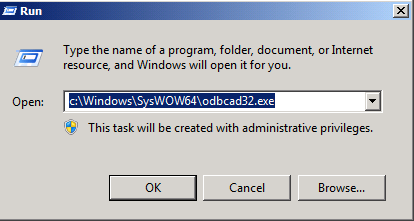
You can then follow the steps in Jason’s post to run odbcad32.exe and configure a 32-bit DSN


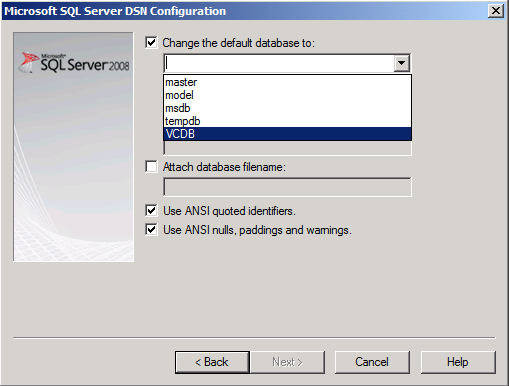
Scroll to the end and select SQL Native Client (not “SQL Server”) and configure the client as required (remember to change the default database setting to the vCenter DB you created (see install guide)
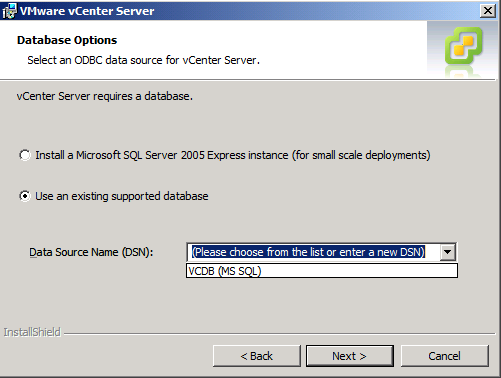
Then restart the vCenter installation process and you will be able to select the DSN you created
The v.T.A.R.D.I.S is going to BriForum
Posted by on April 1, 2010
I’m pleased to announce that I have been chosen to present at BriForum Chicago in June, I’ll be delivering an updated version of my v.T.A.R.D.I.S session (original Blog post here and here) and general home-lab geekiness.
If you’ve not heard about BriForum before, it’s run by Brian Madden and has been running for a number of years – I went to the last European event in 2007 and in fact this blog was created during one of the lunch breaks, so it’s a great honour to be invited to attend and present! I can honestly say I found BriForum to be one of the best conferences I’ve ever attended, its more like a super user-group meeting but with sessions from the top talent in the SBC and desktop virtualization business and no vendorspam/bias – it’s definitely warts ‘n all!
You can see more details of the current session list here and early-bird discounted registration is running until April 2nd – they even offer a money-back guarantee, so you can’t go wrong!
Now, I need to find a way to transport the v.T.A.R.D.I.S on a plane without getting it impounded 🙂

Resources for HP c-class blade and EVA Design for vSphere 4
Posted by on March 30, 2010
I am currently working on a design for a vSphere 4 platform on HP’s EVA SAN and c-class blade chassis. In order to provide flexible network connectivity we are leveraging the new Flex 10 Virtual Connect Modules as well as VC Fibre Channel modules to simplify administration
Because finding things on the HP site can sometimes be a bit hit & miss, this post serves as a bookmark to the more useful resources I found.
Hardware Configurator – Generate Bill of Materials (BoM)
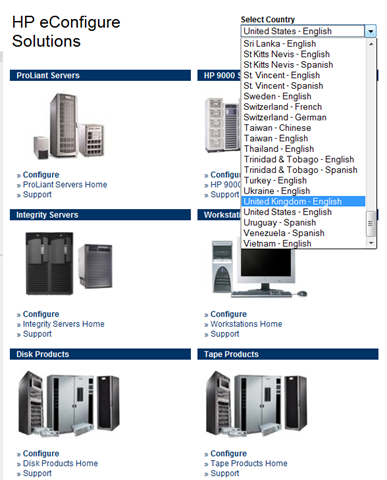
HP eConfigurator online tool to configure and cost blades and chassis options and produce a validated bill of materials – be sure to select your country to ensure you get the correct power options and list prices
Virtual Connect
HP Virtual Connect cookbook – updated for Flex 10 (Feb 2010)
Virtual Connect Webinar series
How does a Virtual Connect FC Module work? (warning – old and outdated with current firmware)
Flex10 Links
Virtualised Reality (Barry Coombs)
http://www.wooditwork.com/2011/02/18/scripting-flex-10-esx-design-with-powercli/
http://www.wooditwork.com/2011/02/17/flex-10-esx-design-with-simplicity-and-scalability-part-1/
http://www.wooditwork.com/2011/02/17/flex-10-esx-design-with-simplicity-and-scalability-part-2/
http://www.wooditwork.com/2011/01/17/hp-flex-10-esx-and-broadcom-fun-continues/
EVA Storage
Best Practices for HP Storageworks EVA with vSphere [Whitepaper]
Best Practices for HP StorageWorks Enterprise Virtual Array with VMware vSphere 4 [WEBINAR]
vSphere Installation
HP-Specific ESXi Installable Download (HP Passport Account Required)
Power
HP Power Calculator Spreadsheets (BL, DL, PL, EVA) in .xls format (Office 2010 users need to “Enable Editing” to take it out of protected mode in order for the links to work
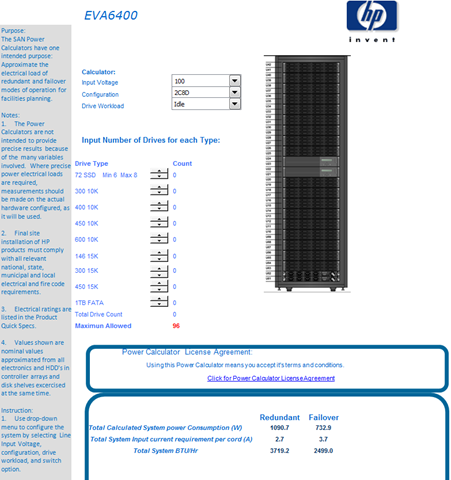

HP Blade Power Sizing Utility (can be a bit buggy and slow – but works) – and can export in a number of different formats including Word (Example Doc)

Firmware Maintenance CD Download
https://vinf.net/2010/04/15/latest-hp-firmware-maintenance-cd-v9/
Links Updated & Section reorganised 23rd Feb 2011
HP Virtual Connect Technical Webinar Series
Posted by on March 30, 2010
HP are running a free series of technical webinars around their virtual connect technology, if like me you are trying to get your head around the VC technology, this is for you.
Visit the following URL and sign-up, there are a range of free local dial-in numbers for the audio – note, I couldn’t get it to work in Firefox so you may need to use IE like I did.
https://h30406.www3.hp.com/campaigns/2010/events/VirtualConnect/index.php
Seems that there was a timezone/daylight saving problem between the US and Europe for the 1st in the series which is being repeated now.
The sessions are being recorded and will be available online to replay at www.hp.com/go/VirtualConnectWebinars
A quick peek at the Flex-10 session is shown below, I’ve not seen a marketing/RoI slide yet so looks good to me 🙂


VMware Licensing for the vCloud..
Posted by on March 29, 2010
I have been involved with VMware’s vCloud programme since it was announced late 2008, I was part of getting involved as one of a handful of partners on the launch-day and I have been doing private cloud work with customers since early 2008.
Whilst I was somewhat disappointed that as a smaller partner we were left out as VMware pressed on with the major partners and availability of information and tools were limited, it did eventually evolve into a set of emerging technology and products that we got access to.
One part of this that has troubled me for some time is licensing of VMware products for cloud/IaaS offerings, as an accredited VMware hosting provider we have access to service provider licensing (SPLA) for VMware products.
The concept of SPLA is simple, it’s a monthly rental of a product – the core VMware products being ESX and vCenter; the hoster pays VMware a monthly fee based on the peak number of virtual machines running in that month regardless of how many ESX installations/sockets/cores there are – this is a simple cost model for a hoster as the general unit of charging for an end-customer is a virtual machine over a period of time (the cost of which is made up of a slice of the supporting hardware/software/service-level).
As a service provider you want to minimise capital expenditure wherever possible, particularly when it comes to a cloud/IaaS model as there is often no long-term contractual commitment for a customer, if they need 100 VM’s one month and 2 the following it’s your burden as a service provider to provide {via investment} that infrastructure and software; for smaller/niche/private cloud players this is an issue – unless you have a large-scale and diverse customer base this is a risky operation and often breaks the cloud business case for the end-customer as the provider has to build in recovery of investment.
Amazon do well in this space with EC2 because they have massive scale and diversity of customers across all industry sectors so most peaks and troughs of demand average out in the bigger picture (see: commoditization and utility – Nicholas Carr’s book “The big switch” covers this well, as does Cannonical’s Simon Wardley at various Cloudcamps)
In my experience this is a problem right now for service providers looking to build cloud services on vSphere/vCloud as very few of VMware’s ancillary products are available on their hosted/SPLA licensing scheme, last time I enquired it it is limited to ESX, View, vCenter and I believe SRM has recently been added.
Also, companies looking to build internal cloud services can only leverage this SPLA type of licensing when the service is hosted and resold from a service provider’s own data centre & infrastructure, rather than customer hosted equipment – this protects the revenue stream of service providers, but does it harm the longer term private cloud prospect, particularly with customers that have a regulatory or security need that prevents traditional outsourcing/hosting?
There are a number of products that would be ideal for cloud/IaaS providers to better manage and control their services, but these are currently only available on a perpetual basis with traditional per CPU socket licensing – this perpetual model is hard for smaller/niche service providers where the capacity planning cycle continually looks for ways to deliver the required service with less infrastructure or have requirements to re-provision servers between physical and virtual instances, or where kit is leased/rented to cover short-term projects and demands.
The products that I see being ideal for service providers, if they could be offered on a SPLA basis rather than perpetual are;
- AppSense – this is almost a no-brainer; its a great way to manage end-end SLA for application delivery in a cloud platform.
- Cisco NX1000V – most service providers have big, highly skilled network teams and complex multi-customer environments to manage; this is ideal Nexus territory
- Chargeback – although I understand this is being built into the vCloud billing services, this has been available now for a while, and is a workable product to build billing systems.
- Lab Manager – some of the tech seems to be getting merged into the vCloud services at some level, but self-service lab environments in a private-cloud scenario with some control over VM lease/retention is something people have been asking for.
- CapacityIQ – designed for balancing load and capacity, important to a multi-tenant environment
- ConfigControl (licensing not announced) – but you can definitely see the need for this in a large multi-tenant environment
Microsoft, to their credit have this absolutely nailed; their SPLA licensing model is very mature and has all the products from their vast catalogue, even if the Service Provider Usage Rights (SPUR) documents can get a bit complicated to read/digest, VMware have moved to a similar contractual model via resellers for the latest iteration of their hosted license agreement with a more flexible model to add products; but it’s not there yet.
Whilst from a commercial point of view SPLA licensing doesn’t have the “big deal” values in terms of upfront revenues to VMware’s sales force it’s a constant revenue stream, and generally everyone accepts that SPLA will be more expensive than perpetual licensing over a given period; but the increased cost reflects the flexibility/lack of commitment advantage.
Interestingly, it also makes it easier for service providers (and thus customers) to deploy VMware products in their own hosting platforms – easier to build a business case, less upfront sizing/capacity planning & forecasting, costs for growth are incremental and pure op-ex (it’s almost like a cloud within a cloud!).
So, by way of conclusion – whilst a lot of the products I’ve previously desired on SPLA (lifecycle manager, lab manager, Chargeback etc.) are being merged into the vCloud “product” for service providers VMware should consider offering everything on a SPLA basis to hosters, and maybe even consider such a licensing scheme for customers own internal usage to bolster the private cloud model.
Bring your own Windows license for EC2, but where are Microsoft?
Posted by on March 25, 2010
This is interesting, Amazon have announced a pilot scheme to allow customers with a Microsoft Enterprise agreement to port their Windows licenses to EC2, which they say reduces the average cost of a Windows EC2 instance by up to 41% (interesting to see where the infrastructure/software cost split is – maybe this is why open source tech is generally more popular in the cloud)
I’ve looked at this a fair bit – Microsoft have their SPLA service provider licensing, which is a monthly rental that EC2 must leverage for their licensing, and customers can obtain this sort of licensing from any accredited service provider as long as the license is used on and in provider owned equipment and datacentres – you can’t legally take those SPLA licenses and run them in-house, you need to re-license under a traditional Microsoft license agreement.
If you have a reasonably fixed Windows server footprint that you want to run on EC2 this is a good idea, or maybe lots of spare Windows licenses left over following an internal consolidation/virtualization programme.
If you need to scale up and down on a monthly basis (which is more akin to the typical EC2 use-case, although the minimum unit of purchase for SPLA is 1 month, EC2 works on the basis of hours) – SPLA is still probably more cost-effective as SPLA typically works out more expensive than a perpetual/EA type Windows license over 3 years, so you pay for that flexibility.
This is another offering in Amazon’s arsenal, combined with boot from EBS to tempt corporate customers into it’s IaaS platform. most enterprises don’t necessarily need all the “clever” EC2 features like automated scale-up and down but want somewhere easy and reliable to store their corporate systems.
You can see an interesting market opening up for IaaS cloud services between EC2 and vCloud resellers for enterprise Windows customers, but the big question is, where are Microsoft?
Do they have to have some kind of offering in the IaaS space in the pipeline (Azure is pure SaaS/PaaS at this stage); I’ve not seen Microsoft do any real GTM effort with partners around building this sort of cloud service like VMware have done with vCloud.
Microsoft have all the tools/software/frameworks in place in terms of Hyper-V/SCVMM but lack a productized offering and marketing back-up to partners (like BDD, but for servers & cloud) are they are starting to miss the boat?
Subscribe to VMware Communities Roundtable Podcast in iTunes
Posted by on March 16, 2010
I have been listening to some of the recent VMware communities roundtable podcasts, they are great for getting up to date with things in the car or on the train – but I could never find them via iTunes so I could automatically subscribe to it so was downloading via the TalkShoe page.
Fear not – this link will take you to a page where you can subscribe in iTunes with one button
Free Windows Crash Dump Analysis and Performance Analysis Session from the WSUG in London
Posted by on March 9, 2010
The Windows Server User Group have announced another free evening session during the UK Tech Days week in London.
Blurb pasted from the WSUG site below;
The [WSUG] Windows Server User Group has the pleasure of hosting Dan Pearson, from David Solomon’s Expert Seminars, http://www.solsem.com/ Dan is in London teaching the week of TechDays UK and has kindly agreed to present on the evening of Tuesday 13th April (18:30-21:00 at Microsoft, Cardinal Place, London) to the community. There will be a social gathering afterwards.
Registration: Chick Here (NOTE even though the event says GMT it is BST).
Windows Crash Dump Analysis
While Windows crashes are rarer these days, when they do occur, you need to know how to isolate their root cause. This session explains why Windows crashes to protect the system, the types of crash dumps you can configure, and how to analyze them with the Microsoft Debugging Tools. Also covered are how to deal with hung systems and systems that crash without taking a dump. Several real-life case studies are presented.
Windows Performance Troubleshooting and Analysis
Performance is a fundamental metric representing system responsiveness and productivity and can be directly tied to customer satisfaction. This session details the use of several built-in performance monitoring tools, as well as those from Sysinternals and the Windows Performance Toolkit, to aid with the troubleshooting and diagnosis of performance-related issues. Also covered is the analysis and interpretation of the data collected by each of the tools and the presentation of several useful techniques that can be applied to troubleshooting. Several real-life case studies are presented
About Daniel Pearson
Formerly a Senior Escalation Lead at Microsoft, Daniel worked in the Windows Base OS team supporting Microsoft customers. He performed crash dump analysis and system level debugging, spending the majority of his time either in a debugger or reading through Windows source code. Daniel also worked in the Mobile Internet sustained engineering team that released hot fixes and service packs for Microsoft’s Mobile Information Server product. He has presented sessions on Windows internals at Microsoft sponsored conferences and user groups.
Prior to joining Microsoft, Daniel worked at Digital Equipment Corporation on both Intel and Alpha systems running Windows NT doing system software support for enterprise customers.
Dan Pearson is speaking in March at Microsoft’s Tech Days in Finland and Belgium.
Windows Server User Group London – BranchCache and W2k8 R2 Migration
Posted by on March 3, 2010
The Windows Server User Group are holding a talk on the evening of April 12th at Microsoft’s London offices near Victoria.
This event compliments Microsoft’s tech-days week which I previously mentioned here.
The agenda is as follows and you can register here
BranchCache (Deep Dive)
BranchCache is a new Feature in Windows Server 2008 R2 and Windows 7 that helps reduces the bandwidth consumed and improves end user experience while accessing intranet-based HTTP and SMB content. This session introduces challenges in network performance often faced by remote branch offices which accessing content stored in servers located in datacenters across trans-continental Wide Area Networks, and how BranchCache helps in addressing these challenges.
You will learn in depth how BranchCache works and see a demonstration of this new feature in Windows Server 2008R2 and Windows 7, as well as learn how to configure BranchCache.
Windows Server Migration (Deep Dive)
Presentations and live demonstrations on how the new Windows Server 2008 R2 migration tools can simplify the migration of Windows Server roles.
Joey will provide a detailed insight to the Windows Server 2008 R2 Server Migration Tools; The session will include migrating file services, DNS and DHCP to Windows Server 2008 R2.
Hope to see you there.

 Virtualization, Cloud, Infrastructure and all that stuff in-between