Virtualization, Cloud, Infrastructure and all that stuff in-between
My ramblings on the stuff that holds it all together
Windows 7 and the Intel 855 video driver problem
Posted by on October 21, 2009
Judging by the several hundreds of hits that this post on my blog gets every day since January I would say there is a *serious* demand from the general internet community to use laptops with the Intel 855 family video chipset with Windows 7, and it’s not even been released to the general public until now!
Whilst this may be an “older” chipset; in reality those laptops aren’t beyond serviceable life – and if anything the performance increases in Win7 will make them more usable and extend their life a bit further.
Nobody realistically expects fantastic 3D/Aero graphics from this combo, but a driver that supports the panel’s native resolution would be more than adequate for browsing/word processing etc. no doubt these ex-corporate laptops are being cycled around family members/students for some time to come rather than forcing people to squint at standard VGA.
There are ways to get the Vista driver bodged into Win7 (see this post and it’s comments), but it’s far from ideal or stable
Please Intel/Microsoft – surely you must be able to produce a basic/compatible driver by today! otherwise I’m sure some of the Windows launch parties could be something of a disappointment!
if it goes by way of evidence – this is the number of hits my original blog post about this problem has had in the last 10 months, it will be interesting to see what it does from launch day onwards!

BlackBerry app for WordPress
Posted by on October 15, 2009
I must be a bit behind the times, but I have just stumbled across the beta version of a blackberry app that let’s you publish and manage your blog directly from your phone, there is also an iPhone version
Very cool, you can now all look forward to accidental posts from my pocket and I can look forward to RSI from my blackberry Pearl 🙂
If you are interested you can download it OTA from httphere
Incidentally it also supports the builtin camera, and this post was typed on on a blackberry 8120 pearl.
Can’t see a way of viewing stats yet, which would be a nice addition.

VMware AppSpeed Probes and more 2% Maintenance Mode Problems
Posted by on October 14, 2009
Following on from my last post on problems entering maintenance mode with FT-enabled VMs, I seem to have found another one – if you have the rather excellent AppSpeed product deployed on an ESX cluster and you want to put a host into maintenance mode it gets stuck at 2% as it can’t move the AppSpeed probe VM onto an alternative host

If you try to manually vMotion the problematic probe off to another host in the cluster you get the following error
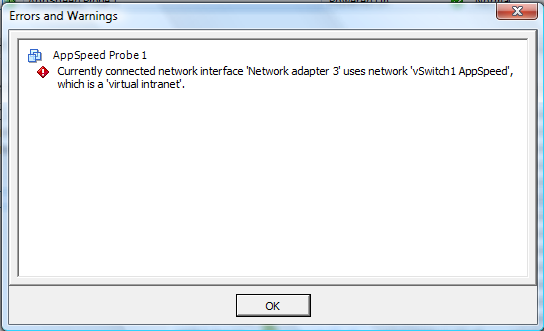
If you shutdown or suspend the AppSpeed probe VM then the switch to maintenance mode continues as expected.

This would make sense as it plugs directly into a dedicated vSwitch on that host to monitor network traffic so vMotioning it off wouldn’t be of any use – assuming the other nodes in the cluster are also running AppSpeed probes.
However it would be great if there was a more automated way to handle this? guess it’s tricky as on one hand its great that AppSpeed doesn’t rely on any ESX-host agents and is essentially self-contained with probes running as VM appliances but on the other hand the probe doesn’t know the guest is being put into maintenance mode so should be shut down/suspended rather than vMotioned to an alternative host.
There is integration with the vCenter server via a plug-in so maybe in future versions that could trap a maintenance mode event and initiate (or suggest) shutting down the AppSpeed probes.
VMware FT, 2 Nodes and stuck on 2% entering maintenance mode
Posted by on October 14, 2009
I have a 2 node vSphere cluster running on a pair of ML115g5 servers (cheap ESX nodes, FT compatible) and I was trying to put one into maintenance mode so I could update its host profile, however it got stuck at 2% entering maintenance mode, it appeared to vMotion off the VMs it was running as expected but never passed the 2% mark.

After some investigation I noticed there were a pair of virtual machines still running on this host with FT enabled – the secondary was running on the other server ML115-1 (i.e not the one I wanted to switch to maintenance mode)


I was unable to use vMotion so that the primary and secondary VMs were temporarily running on the same ESX host (and that doesn’t make much sense anyway)
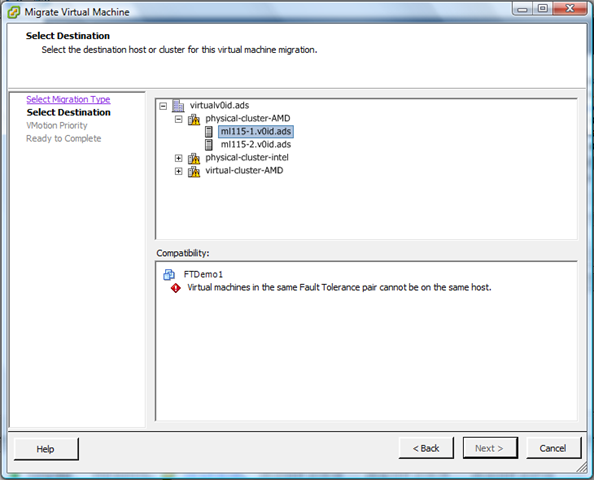
That makes sense, the client doesn’t let you deliberately do something to that host that would break the FT protection as there would be no node to run the secondary copy. incidentally this is good UI design – you have to opt-in to break something – so you just have to temporarily disable FT and should be able to proceed.
If I had a 3rd node in this cluster there wouldn’t be a problem as it would vMotion the secondary (or primary) to an alternative node automatically (shown below is how to do this manually)
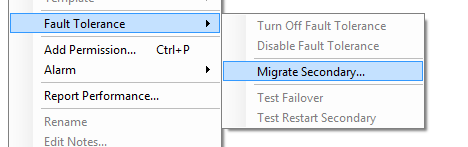
However in my case all of the options to disable/turn-off FT were greyed out and you would appear to be stuck and unable to progress.
the fix is pretty simple and you just need to cancel the maintenance mode job by right-clicking in the recent tasks pane and choosing cancel, which then re-enables the menu options and allows you to proceed. Then turn-off (not disable – that doesn’t work) fault tolerance for the problematic virtual machines



The virtual machine now doesn’t have FT turned on, if you just disable FT it doesn’t resolve this problem as it leaves the secondary VM in-situ, you need to turn it off.
So, moral of the story is – if you’re stuck at 2% look for virtual machines that can’t be vMotioned off the host – if you want to use FT – a 3rd node would be a good idea to keep the VM FT’d during individual host maintenance; this is a lab environment rather than an enterprise grade production system but you could envision some 2-node clusters for some SMB users – worth bearing in mind if you work in that space.
Designing Active Directory – Talk by Brian Desmond in London
Posted by on October 13, 2009
If you’re in the UK and are interested in Active Directory – Brian Desmond (an MVP for AD) will be giving a talk on Active Directory design on 29th October in London.
Details here on the ADUG website here and – registration is free.
I’ve been working with Active Directory for a long time but it’s always refreshing to have some Q&A with industry peers, so if you can make it it promises to be an interesting evening.
Not sure if it will be recorded/streamed for people that can’t make it – if not can I make that suggestion to the ADUG team- I can bring some recording equipment if you need it.
Performance Update on Cheap vSphere Server
Posted by on October 7, 2009
My home lab has a pair of HP ML110 servers with 8Gb of RAM running vSphere 4 (more info here) it’s configured in a cluster with iSCSI storage running from an old HP D530 PC with a 1Tb hard disk running OpenFiler. it performs pretty well and meets most of my needs, I thought I’d do a quick couple of screenshots of the average performance I have seen on it over the last 3 months.

it’s running a constant load of about 17 mostly Windows virtual machines and a varying load of test environments which are suspended to disk – think the most I have ever had running on the 2-node cluster at one time was about 45 VMs and performance was ok – trying to use VUM to patch all those VMs at the same time killed things though, as all the VMs are running from a single 1Tb SATA disk over OpenFiler.
This is a list of all the VMs, you can create your own html list as follows, or you can also save it as a CSV to import into Excel to manipulate.


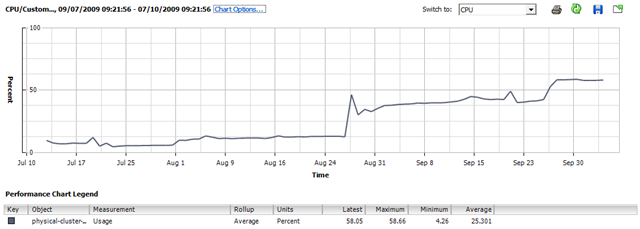
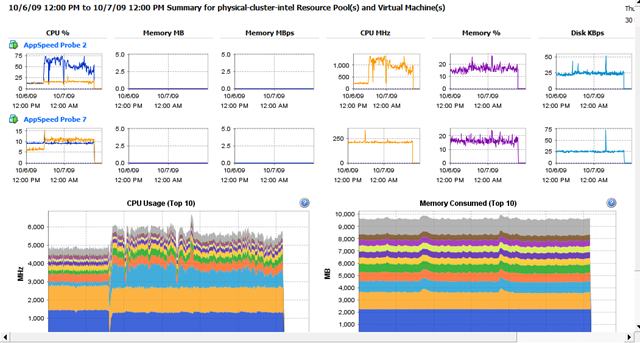
the following screenshots show the last 3 months of performance stats from vCenter as the number of VMs has increased and decreased as I’ve provisioned and removed VMs for testing.
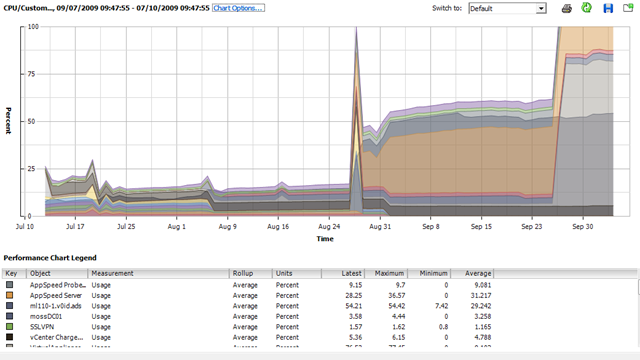
Overall CPU usage for the cluster
vMotion and VM Reconfiguration activities

Cluster Memory consumption

The new overview page feature can show you a quick summary of virtual machine performance
Drilling down into the performance tab on each host gives more information on specific performance like disk and network


You can also produce a stacked graph showing guest CPU usage of each VM on a host
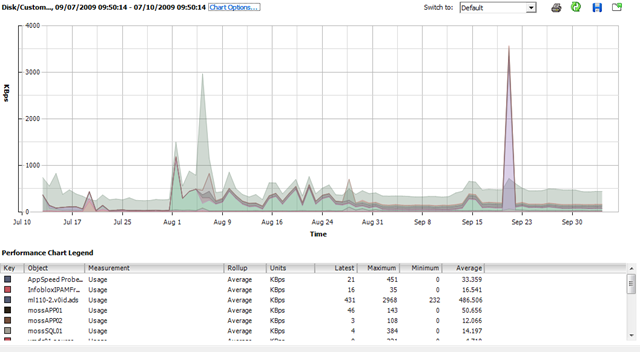
or identify which VMs have the busiest virtual disks

You can also view a stacked (per VM) graph showing on a per-host basis how much physical RAM the guests are consuming, relative to each other over time.

My Technical Book Reading List
Posted by on October 6, 2009
I work as a technical architect in a consultancy role in the Windows Infrastructure & Virtualization space, and as such I’m paid for my experience and opinion, but it’s also an important part of my job to proactively keep on to top of industry trends and investigate new technologies that may solve customer problems, even problems they don’t know they have {yet}.
Twitter and blogs are a useful resource for current and less formal or structured information if used carefully, but it’s all too easy to be distracted from the job at hand by the latest shiny tech or flamewar so you need to measure the amount of time you spend there and they are no substitute IMHO for traditional study and hands-on “playing” time.
Like many I’m currently studying for my VCP4 exam, and have recently upgraded my MCSE to the current MCITP:EA 2008 certification so I thought I would publish a reading list for anyone else looking to do the same as well as general industry books I have been reading recently.
Maintaining a balance between this study/pro-active time and staying a well utilised/billed out resource is hard and I find it often spills into my own personal time so you need to have a good level of personal interest/dedication otherwise you will struggle – I’m a geek at heart and I look upon this as investing in my career but it’s more important that your kids remember what you look like!
This is one area where travelling for work via public transport rather than driving works well – plenty of study time to be had with a good pair of headphones
|
ASIN: B000POGDVG |
 Shure Se210 Sound Isolating Earphones- White: Electronics & Photo
(i.e not the rubbish ones that ship with the iPod), a good list of tunes to block everyone else out and a book/laptop with VMs.
Maintaining a good home lab environment is also critical for me, and I run all the services for my demanding demo environments as well as my home users (read: wife & kids) there and that really does teach you something about availability :) I wrote some details of my lab setup here but I have an updated post in the pipeline as there have been some significant changes to support my vSphere study.
Anyways, enough rambling and on with the list..
VCP4 Upgrade
|
ISBN: 0470481382 |
 Mastering VMware VSphere 4: Scott Lowe: Books
You can’t go far wrong with the Lowe, this is the definitive vSphere book at the moment.
VCP4 practice exams online at the SLOG here
VCP4 resource list here
if you wanted a similar book for VI3 I would recommend this one;
|
ISBN: 0971151083 |
 VMware Infrastructure 3: Advanced Technical Design Guide and Advanced Operations Guide: Scott Herold, Ron Oglesby, Mike Laverick: Books
Microsoft Certified IT Professional (MCITP)
Windows 2008 MCITP Core Exams study guide
|
ISBN: 0735625727 |
 MCITP Self-Paced Training Kit Exams 70-640, 70-642, 70-643, 70-647 : Windows Server® 2008 Enterprise Administrator Core Requirements: Windows … Core Requirements PRO-Certification: Nelson Ruest, Danielle Ruest, Tony Northrup, J.C. Mackin, Anil Desai, Orin Thomas, John Policelli, Ian McLean, P. Mancuso, and D.R. Miller Dan Holme: Books
This is a comprehensive set of books for the 4 core exams, not as dry as previous versions and lots of practical lab excercises, as usual good set of practice tests on the included CD
|
ISBN: 0735623902 |
 MCTS Self-Paced Training Kit Exam 70-620 : Configuring Windows Vista™ Client: Configuring Windows Vista Client Self Paced Training Kit 70-620: Ian McLean and Orin Thomas: Books
For the client component of the MCITP:Enterprise Administrator cert
MOSS 2007 Exam
|
ISBN: 0470226633 |
 MCTS – Microsoft Office SharePoint Server 2007 Configuration Study Guide: Exam 70-630: James Pyles: Books
Not the most exciting product for me, but it does cover the exam requirements – seems to spend a lot of time explaining what each menu item is within the MOSS UI, which was a bit frustrating.
|
ISBN: 0735625387 |
 Microsoft Office SharePoint Server 2007 Best Practices: Bill English Ben Curry, Daniel Webster, SharePoint Product teams: Books
Very good book, puts a lot of real world around MOSS deployments
General Good Books to Read
Cisco UCS
|
ISBN: 0557057396 |
 Project California: a Data Center Virtualization Server – UCS Unified Computing System: Silvano Gai, Tommi Salli, Roger Andersson: Books
Good book covering what Cisco’s new UCS blade system and consolidated I/O model is; not much information available elsewhere at the moment, although 1/2 the book is spent discussing the various CPU/memory bus architectures which is a good update to your knowledge but would have liked to have seen more time dedicated to how UCS works and some example configurations
|
ISBN: 158705888X |
 I/O Consolidation in the Data Center: A Complete Guide to Data Center Ethernet and Fibre Channel Over Ethernet Networking Technology: IP Communications: Silvano Gai, Claudio DeSanti: Books
General computing/tech
|
ISBN: 0596102356 |
 Building Scalable Web Sites: Building, scaling, and optimizing the next generation of web applications: Cal Henderson: Books
An excellent book, with a focus on open source technologies and a lot of practical insight from the building of Flickr – good for briding the infrastructure/application divide.
|
ISBN: 0393333949 |
 The Big Switch: Rewiring the World from "Edison" to "Google": N Carr: Books
If you don’t get cloud computing or understand where things could go, you need to read this book, brilliant and not a long, drawn-out read and not that technical.
|
ISBN: 0596515812 |
 Programming Amazon Web Services: S3, EC2, SQS, FPS, and SimpleDB: James Murty: Books
Aimed more at developers rather than infrastructure people but if you want to try things out for yourself it has some easy to understand examples.
I hope you found this list useful, you may notice that these are affiliate links – should you wish to purchase any of these books Amazon will pay me a nominal commission which I can use towards the normally ad-free funding of this site and my time, although you are entirely able to go and purchase any of these books directly from the Amazon site.
Baby and non-IT related books
We recently had our 2nd child and it reminded me of these great books for all fathers to-be 🙂
|
ISBN: 140190288X |
 The Bloke’s Guide to Pregnancy: Jon Smith: Books
|
ISBN: 1844250598 |
 The Haynes Baby Manual: Conception to Two Years: Ian Banks: Books
|
ISBN: 1931686238 |
 The Baby Owner’s Manual: Operating Instructions, Trouble-shooting Tips and Advice on First-year Maintenance: Louis Borgenicht, Joe Borgenicht: Books
Redesigning Active Directory for 2010 and on..
Posted by on October 3, 2009
Active Directory has been implemented as part of Windows since approx 1998 when the betas of the initial Windows 2000 version were circulating. At the time directory services was Microsoft’s answer to all NT4 scalability woes and the superior management that Novell offered in Netware 4.x, that was a radically different IT world {cue Waynes world flash back}
- Most people worked in a set of fixed locations, mobile workers were by far the minority
- Those fixed locations had full all-ports network access to corporate resources internal network and/or personal firewalls were unheard of.
- People who needed remote access to the network came in by dial-up or VPN type access with token or user/password type authentication
- Starbucks was NOT your office 🙂
- your PC/laptop was owned by the company and you had less need to keep your personal on-line life running during work time or using work-resources (you shopped in real shops and people still used the phone to communicate)
- Viruses were there but the most prevalent forms propagated by infected documents and emails.
- Network connectivity was slow and/or expensive from remote locations
I’ve worked with Active Directory in a lot of depth during this time and it’s an excellent and flexible tool, however it’s now 2009 and whilst Active Directory has been enhanced over this time it isn’t radically different in terms of supporting the way we work today.
There is still a very tight integration* between a workstation (domain member) and the Domain/Forest – this relies on periodical machine account password changes.
- All authentication and group policy type activities like interactive logon, policy downloads etc. still require a large number of ports and RPC services to function – this makes firewalls like swiss-cheese, and doesn’t work well in locations with latent or slow network connections (although there are tweaks; most of these involve turning off GPO processing on slow links).
- To provide remote access to domain and corporate services a VPN layer is required to provision access, this is ok but a large part of the Windows interactive logon process still requires access to a domain controller at the CTRL-ALT-DEL logon screen – support for this is hacky at best when you are not on a full all-ports open network connection to the corporate domain – 3rd parties have custom GINA code that allows you to initiate a VPN connection before the logon is processed but it’s not a one-stop shop and users still *just don’t get it*.
- Disconnected machines (like roaming sales people) rely heavily on cached credentials, these credentials are only refreshed when you make an interactive logon to the corporate network – which requires VPN, large number of port rules; machine hygiene routines etc.
- User profiles/folder redirections don’t work particularly well in long-term disconnected scenarios and it’s difficult to maintain a consistent user profile environment for these users.
If you’ve ever had to re-build a user’s machine whilst disconnected from the network this can be a real issue.
*Machines can only be part of one domain at a time, they rely heavily on it for authentication and control.
Building standalone/workgroup machines is one answer but you have no way of managing any of the machines, tracking them, distributing configurations etc. – there is too much all or nothing and there is no middle ground in Active Directory at present – and this also makes multi-tier firewalled application platforms problematic – do you put in multiple domains to support tiers/DMZ’s or compromise security and use a single domain and wider firewall rules? if you put in workgroup machines manging security across all of them is problematic, some Microsoft products (Exchange, etc.) require an Active Directory domain and change is difficult.
In addition, high-speed Internet access is now very common and the move to “the cloud” is underfoot, with end-user devices being little more than very clever terminals.
Microsoft have made moves to support single sign on through web applications with the Active Directory Federation Services (AD-FS) in Windows 2008 but this is still geared at web applications rather than the core authentication and application services Microsoft’s desktop and server OS relies on for normal operations.
This is a list of the things I would like to see in future Active Directory and/or add-on endpoint security checkers to better support the upcoming generations of users who won’t always be on the corporate LAN, or purchase and use their own PC/laptop as well as the needs that virtualization and dynamic scaling infrastructure requires.
- Move authentication services to HTTP/S interfaces and away from RPC and dynamic ports.
- Make the group policy services available over the same HTTP/S interfaces
- This has already been done for Outlook/Exchange via the RPC over HTTP/S interface – Active Directory could use a similar concept for allowing access from external/edge services.
- Introduce a further class of machine to compliment the traditional “computer” account; an “external managed machine” (or similar) – where it isn’t necessarily a direct member of the domain but you allow a degree of trust – maybe leveraging the AD Federation Services, no local passwords held but hashed with the core AD service with an intermediate service (or core-OS component) to facilitate authentication between applications and the AD to maintain backwards compatibility for anything that runs locally and relies on traditional Windows authentication.
- Allow all communication between these external managed devices and core infrastructure over HTTP/S – so as to be tolerant of latent connections and carried over common network services.
- Allow those managed external machines to be locally administered/installed/maintained etc. (think of the Windows Mobile Phone or iPhone model that is used to allow access to Exchange email but give it a representative object in Active Directory that can be managed through policies or even disabled – even if that object is just a certificate for the device or some other representation it should be accessible through the AD tools and scripting interfaces.
- Add support for configuration compliance scanning for external managed devices (end-point security) and centralised reporting – some of this is in next gen ISA tools.
- Support for transient (often virtual..) machines that are dynamically added to a domain and removed – think of the VDI model where hundreds of machines could be created and destroyed automatically – leaving hundreds of “dead” machine accounts and reboots to support the domain join operations.
- Support and manage a corporate PC “out on the Internet" as if it were in the office (..using web services/HTTP wrappers) much like we can with Outlook 2003+ and Exchange 2003+ using RPC over HTTP/s – no complicated and difficult to use local VPN client
What would you like to see?
As an addendum; Apologies for the lack of posting recently on vinf.net which has been due to the arrival of our second child, which as you might imagine has taken up a lot of my blogging time! hopefully will get a bit more time in the coming months to support my habit!
VMworld 2009 Link Round-up at Yellow-Bricks
Posted by on September 8, 2009
Duncan (VCDX007) has a great list of all the links for VMworld 2009 SF on this post – check it out, especially useful if you weren’t able to make it in person.
He also has a list of posts from around the Internet for the European VMworld earlier this year here and on this post from vmware.com here
Roger Lund also has a list of links to videos and write-ups on his blog here
If you were an attendee, or have a VMworld subscription the recorded sessions and slides should be available on-line by 14th September according to John Troyer.
Attending VMworld without Travelling to San Francisco
Posted by on September 1, 2009
Travel is sometimes great, but it’s not always possible and there is expense/loss of family time etc. to consider. If, like me you can’t be at VMworld in person this year, here are some tips for feeling like you are “virtually there”
Keep Twitter open and watch the #vmworld hashtags; Tweetdeck is particularly good at this watch the usual VMware Twitterati (list here)
Keep an RSS reader open and watch the v12n feeds
Watch the daily keynotes online (8am PDT), live at this link (registration required)
None of this gets you access to the actual session content..
there is a list of freely available content here
And you can purchase a subscription to the break-out session content here for $699/year

 Virtualization, Cloud, Infrastructure and all that stuff in-between