Virtualization, Cloud, Infrastructure and all that stuff in-between
My ramblings on the stuff that holds it all together
Category Archives: Virtualization
Misc bits of Useful, Recent VMWare News
Posted by on May 12, 2008
I’ve been really busy the last couple of weeks and I’ve had to trim down my incoming RSS feeds, as there was too much noise and I was missing important things like the following;
- Scott Lowe’s summary of sessions from VMWare’s partner Exchange, some useful information on Site Recovery Manger
- The new VMWare Certified Design Expert (VCDX) certification – next step up from VCP, will have to have a look into it now I’ve finally managed to re-schedule my cancelled QA course – official VM announcement here.
- Official Microsoft Clustering Support with ESX 3.5 Update 1 here
- Some workarounds for deploying Windows Server 2008 with virtual center here – would have been nice if support was in an official update from VMWare soon; it’s not like it’s been beta’ing for a while is it (errr!)
Lifecycle Manager, Site Recovery Manager and Stage Manager Released
Posted by on May 12, 2008
Linkage here.
VMWare are shaping up to have a really good set of management tools – lab and site recovery manager are of particular interest to me for several projects I’m working on.
VMWare Server Performance – A Practical Example
Posted by on April 19, 2008
The following screen dump is from an HP DL380G5 server that runs all the core infrastructure under VMWare Server (the free one) for a friend’s company which I admin sometimes.
It is housed in some co-lo space and runs the average range of Windows servers used by a small but global business, Exchange SQL, Windows 2003 Terminal Services.
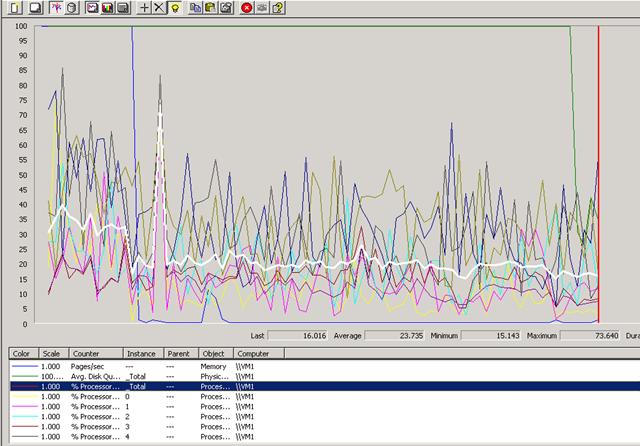
As a result of some planned (but not very well communicated!) power maintenance the whole building lost power earlier today, when it was restored I grabbed the following screenshot as the 15 or so Virtual Machines automatically booted.
interesting to note that all the VM’s had been configured to auto-start with the guest OS, meaning there wasn’t any manual intervention required, even though it was a totally dirty shutdown for both the host and guest OS’es (No UPS, as the building and suite is supposed to have redundant power feeds to each rack – in this instance the planned maintenance was on the building wiring so required taking down all power feeds for a 5 yearly inspection..)
There are no startup delay settings in the free version of VMWare Server so they all start at the same time, interesting to note the following points..
The blue line that makes a rapid drop is the pages/second counter, and the 2nd big drop (green) is the disk queue length. the hilighted (white) line is the overall %CPU time, note the sample frequency was 15 seconds on this perfmon.
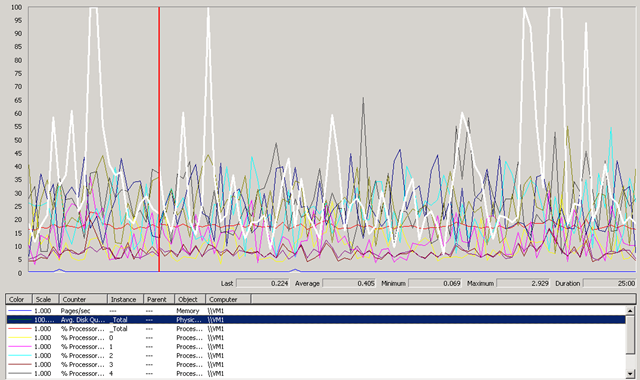
After it had settled down, I took the following screenshot, it hardly breaks a sweat during its working day. there are usually 10-15 concurrent users on this system from around the world (access provisioned via an SSL VPN device) and a pretty heavily used Exchange mail system.
The box is an HP DL380 G5 with 2 x quad core CPUs (8 cores in total) and 16Gb of RAM, it has 8 x 146Gb 15k HDDs in a single RAID 5 set + hot-spare, it was purchased in early 2007 and cost c.£8,000 (UK Prices)
It runs Windows 2003 Enterprise Edition x64 edition with VMWare Server 1.0.2 (yes, its an old build.. but if it ain’t broke..) and they have purchased multiple w2k3 ent-edition licences to take advantage of the virtualisation use-rights to cover the installed virtual OS’es.
It’s been in-place for a year and hardly ever has to be touched, its rock-solidly available and the company have noticed several marked improvements since they P2V’d their old servers onto this platform, as follows;
- No hardware failures – moving from lots of low-end servers (Dell) and desktops to a single box (10:1 consolidation)
- The DL380 has good redundancy built in, but it’s also backed up with a h/w maintenence contract, and they also have a spare cold-standby server to resume service from backups if data is lost.
- Less noise, the old servers were dotted around their old offices in corners, racks etc – this is the main thing they liked!
- Simple access anywhere – using a Juniper SA2000 SSL VPN, its easy to get secure access from anywhere
- Less reliance on physical offices and cheap DSL-grade data communications, now the servers are hosted on the end of a reliable, data centre class network link with an SLA to back it up. if an individual office looses its ADSL connection, no real issue – people pick up their laptop(s) and work from home/starbucks etc.
- Good comms are cheaper in data centres than in your branch offices (usually)
Hopefully this goes to show the free version of VMWare’s server products can work almost as well if budget is a big concern, ESX would definitely give some better features and make backup easier, they are considering upgrading and combining with something like Veeam Backup to handle failover/backup.
How to Convert Virtual Center from Evaluation to Licensed Version
Posted by on April 10, 2008
or “How to convert virtual centre from evaluation to licenced version”… for us Brits… the “American English” is to help the international Googlers 🙂
I can’t believe I missed this, on a couple of platforms I’ve built I’ve had to start with an eval licence and then move to a proper licence but could never find how to change virtual center from eval to licenced mode.
ESX itself was fine you can do that via the VC GUI (below)
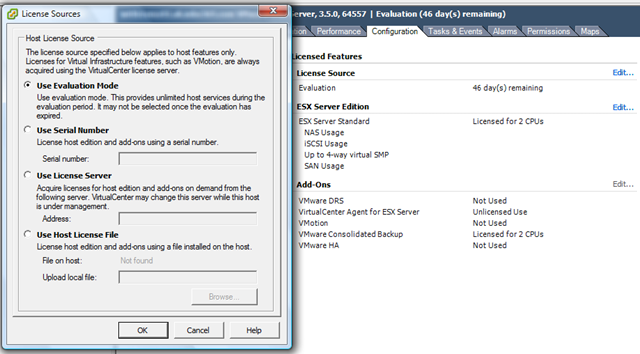
But despite a lot of googling I could never find out how to set Virtual Centre itself to use a licence server – so I ended up reinstalling/repairing and then selecting the option to use a licence server, my bad – it’s actually in the VI client GUI d’oh as Homer would say!
for my own reference, and for anyone else who has missed and is searching for how to convert Virtual Center from evaluation to licensed..
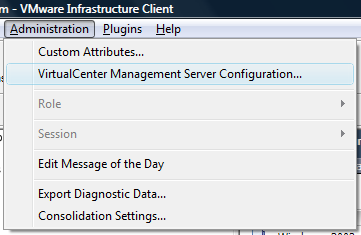
and then configure the setting here to point it at a proper licence server to enable full VC.
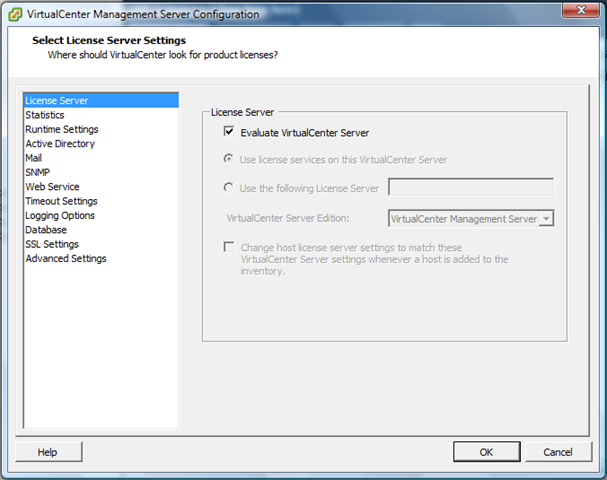
D’oh!!!
VMWare Workstation 6.5 Beta Open Now
Posted by on April 2, 2008
As of 1st April (not an April fools joke!) you can register for, and download the VM Worksation 6.5 beta programme here..
Main new features are;
- Use Unity to integrate your guest apps with your host
- More Powerful VM Record and Replay
- Support for Smart Cards & Smart Card Readers
- Enhanced ACE Authoring
- Link State Propagation Networking
- Improved 3D graphics Support
I’m most looking forward to being able to use Unity… very cool, have used it on the Mac with Fusion and Parallels equivalent, maybe now I will be able to run 2 instances of full-fat Outlook 2007 side by side, plugged into different Exchange mailboxes and orgs (maybe a bit overkill – but I have my reasons!)
How to Monitor VMWare ESX Servers from Microsoft System Center Operations Manager 2007 (SCOM)
Posted by on March 26, 2008
Useful Document for getting your Network Teams up to Speed with VMWare and it’s Virtual Networking
Posted by on March 18, 2008
Doc from Cisco Here.
More Cheap ESX Servers
Posted by on March 14, 2008
Techhead has posted a nice article on his ML110 ESX test server, nice alternative to my D530 approach, he’s got a few more disks than I have.
Cisco ASR is Virtual to the Core, all 40 of them!
Posted by on March 14, 2008
Interesting article here on how Cisco have made heavy use of virtualization within their new ASR series router platform, Linux underneath and 40 core CPUs!
This type of approach does make me wonder if we will get to the stage of running traditional “network” and “storage” services as VM’s under a shared hypervisor with traditional “servers”.. totally removing the dependency on dedicated or expensive single-vendor hardware.
Commodity server blade platforms like the HP or Sun blade systems are so powerful these days, with flexible interconnect/expansion options this type of approach makes a lot of sense to me and is totally flexible.
Maybe one day it will go the other way and all your Windows boxen will run inside a Cisco NX7000 lol!
On reflection maybe all those companies have too much of a vested interest in vendor lock-in and hardware sales to make this a reality!
Performance Expectations on a Shared Virtual Platform
Posted by on March 12, 2008
Some interesting discussion linked-to within this article on Storagezilla. people using Amazon’s EC2 platform are complaining because they feel they are getting less performance than they should.
Always an interesting point to bear in mind and useful in expectation setting for developers. You may want a dedicated CPU/core – but do you really need all of that CPU all of the time? in most cases I would guess not; and if you do need that level of performance – shouldn’t you be considering a physical platform rather than a virtual one?

 Virtualization, Cloud, Infrastructure and all that stuff in-between