Virtualization, Cloud, Infrastructure and all that stuff in-between
My ramblings on the stuff that holds it all together
vApp sprawl in the cloud
Posted by on September 1, 2010
This question came up in a session at VMworld, if vApps are being used to deploy entire self-contained and silo’d application stacks won’t that lead to massive VM sprawl. Because cloud deployments are less considered and are a result of quick instant gratification provisioning in the private/public cloud by business units who don’t necessarily understand IT services and the burden of operations, integration, etc.
Well, yes – and that’s an interesting point for a number of reasons which apply equally to private and public cloud;
vApps encourage less shared application services
This is both a good and a bad thing, good in the sense that less shared typically means higher SLA’s are possible and change is simpler because there are less interdependencies to consider. But, bad in the sense that it increases the overall number of machine instances required to support all of your IT services.
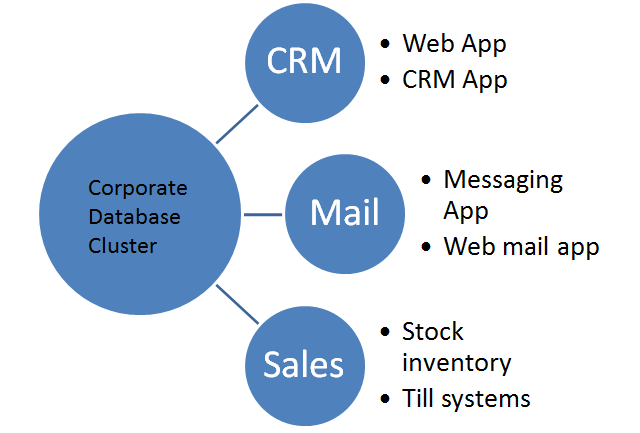
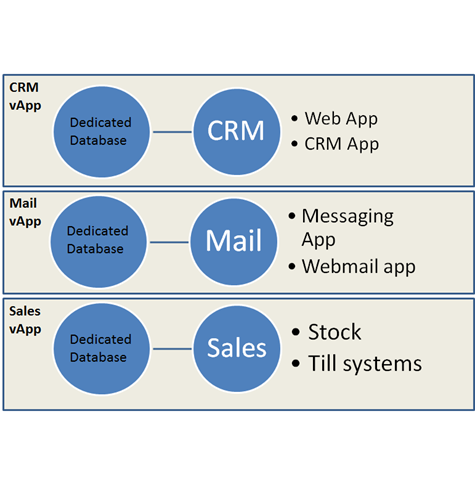
Traditional Shared application Services vs. vApp
Guest Software Licensing Increase
When you consider you will normally have to license the software running in each vApp, providing a shared corporate database cluster is typically a way of providing an HA Oracle or SQL database service in a cost-effective manner because those applications are expensive and more cost-effective to license by CPU in larger environments.
Software licensing needs to change for the cloud, the move to a more consumption/rental based model is underway for most major vendors; those that don’t will die.
Guest Management overhead
Now a vApp may have it’s own DNS, domain controllers, databases, web services, applications VMs each of these will need to be patched, maintained, monitored etc.
Automation solves a lot of this and is the holy grail but particularly when VUM is going to have it’s guest patching functionality removed in future releases this could be a concern.
However…
If you think about it the costs in the vApp model are more controllable and accountable – yes you may have more machine instances than you did in the more traditional IT world but you know exactly who is using it, how much of it they are using (the charge units are more easily quantifiable) and they can easily stop using it or move it to a lower SLA tier if it’s costing too much.
The control/decision of cost/benefit is back with the consumer (internal business unit) rather than being dictated as a fixed fact by IT – moving the consumer to a different service tier is MUCH harder to do with traditional shared services, in the cloud world it’s configuration from a shared pool of infrastructure.
if a vApp isn’t used anymore it’s easier to archive the data and destroy it, it’s much harder to disentangle a tenant from a traditional shared application service like CRM or an intranet where customisations or extra components may have to remain in-situ because just uninstalling them poses a risk to overall service.
It also has the advantage of potentially providing a higher net SLA, there are less inter-dependent parts across the enterprise so less scope for things to break as a result of subtle incompatibilities.
Likewise you can clone an entire vApp in-situ to a test or DR environment with data and configuration in-place and run it in isolation from the production copy to fully test changes, this is much harder with traditional IT shared application services.
So in conclusion; Yes it could lead to some degree of silo’ing of application services which is somewhat at odds of what virtualization has done in breaking down and consolidating these silos from an infrastructure perspective. Strategically, software architecture frameworks will make applications move to a different deployment model that is more “cloud friendly” and less tied to machines, operating systems and infrastructure.
The net benefit is choice and cost control for the end-user.
vApps moving centre-stage
Posted by on September 1, 2010
vApps were introduced as part of the vSphere 4 release but were largely a forgotten area of functionality until now.
The concept of a vApp is as a bar-code for an IT service, where that service consists of a number of inter-dependent virtual machines containing applications that provide a service – for example a website. the vApp contains a number of virutal machines and is tagged with required levels of service and other pertinent information like start-up order, dependencies and required networks etc. to allow them to run successfully.
For example a corporate Sharepoint service could be grouped and deployed as a vApp containing relevant domain controllers, DNS, SQL and MOSS VMs to allow it to run – from a VMware perspective you manage and deploy the servers as a whole vApp rather than individual VMs.
With the vCloud Director (vCD) announcements it’s clear what VMware’s intention was; vApps are core to the service catalog concept for vCD, you don’t just pick virtual machines you can pick ready-to-use and self-contained application stacks to deploy and un-deploy.
However, if you think about it, it’s not as simple as it might seem once you go beyond the infrastructure level as you’ll still need to do in-guest engineering and automation to make this sort of deployment model successful but it’s a good foundation to work from.
This type of rapid provisioning and the level of in-guest automation required to make it useful can be problematic with Windows guest OS’es – there are still tight dependencies on domain controllers, forests and domain SIDs to get around for many applications. As more and more Microsoft applications move to PowerShell at the core this becomes more feasible but architecturally speaking it’s a problem for anything other than trivial applications.
The guest automation story is much better for Linux VMs deployed as part of vApps as scripting and automation is at the core of Linux deployment and always has been but it’s not done for you, vCD just handles the {virtual} infrastructure provisioning; tailoring and automating the resultant guest OS images is up to you but there is much more precedent on this space.
Strategically, Springsource makes a lot of sense for these sort of container deployments, the use of application frameworks breaks the dependencies on the underlying OS and makes applications much more flexible and portable, but this is an evolution away from current enterprise applications.
VMworld 2010 SF – Day 1
Posted by on August 31, 2010
I took a different approach to VMworld this year, usually I try to cram in as many sessions as possible and don’t usually spend much time on the hands-on labs. – this year I am planning to do a 60/40 mix of labs and sessions. Because the sessions are audio recorded I can review them at a later date and make the most of the hands-on labs whilst I’m on-site.
From what I saw today queues for sessions can be big, although if you get there early it’s not too bad, but this isn’t a new problem for VMworld I don’t think they’ll solve it unless they start to move to Tech-Ed scale venues. with 16k attendees at this VMworld in the US maybe the tipping point is coming, although they have added Moscone West to the facility this year which has helped a lot.
Whilst session queues may have been long the hands-on labs have been pretty quiet in Moscone West with no major queues and it’s open 8am until 10pm Monday and Tuesday so I think I’ll focus on that.
There wasn’t a main keynote on day 1, I quite like this as in VMworld’s of old there was a general keynote on day 1 which was more marketing/product announcements with the more interesting technical keynote and demos on Tuesday.
I did all of the labs for an upcoming cloud related product that cannot be named until tomorrow – which is funny as you can take the cloud director (oops :)) labs today, which is going to be useful as I’ll be working with it when I start at VMware next week 🙂
I also did my joint session with Eric Siebert and Simon Seagrave, we ran out of time for most of the demos I had lined up so I’m going to upload them to YouTube in the next couple of days and post them on my blog if you are interested to see how the vTARDIS performs and is configured.
I look forward to the keynote tomorrow and will try and blog as much as possible – although there are certainly a lot of people doing twitter this year, so maybe just click this link and watch the #vmworld hashtag 🙂
Come see the vTARDIS at VMworld on Monday
Posted by on August 30, 2010
I am presenting a joint session on affordable lab/SMB environments with Eric Siebert and Simon Seagrave on Monday at 12:00pm, Moscone West room 2007 (V18328: Building an affordable vSphere environment for a lab or small business).
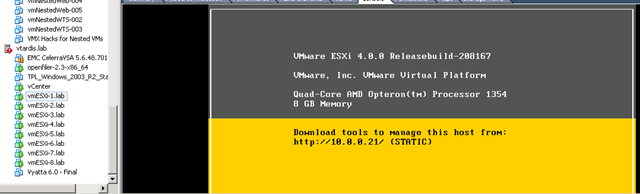
I am covering nested ESX functionality, whilst I haven’t physically transported the vTARDIS all the way to the US this time I am doing demos (hopefully live), so if you want to see how to build an 8 node cluster with shared storage and layer 3 networking on a single low-cost server this is the session for you
This nested ESX functionality that in in vSphere 4 (unsupported as far as I know.. but it works) is what enables most of the hands-on labs.
vTARDIS screenshot – each vmesxi-nn.lab node is really a virtual machine (see the manufacturer field below), but vCenter doesn’t care, and they are all running on a single $600 PC server with just 8Gb of physical RAM (over commit – yeah!)

If you want to see how to do this cool stuff and a whole lot more, come to the session 🙂
VMworld 2010 Hands-on Labs
Posted by on August 29, 2010
Along with a number of other bloggers I was lucky enough to get a sneak preview of the VMworld 2010 labs setup today.
Wow, the setup is impressive, there is a massive self-paced labs room in Moscone West, offering 480 multi-lab seats, unlike previous years there are no specific areas for each lab, each workstation is self-contained and connects you your chosen lab from the "Lab Cloud" – which will be much better in managing the load and waiting times for popular labs.
You will have to register at the entrance and your session will be allocated to your badge number, there is a comfortable waiting area whilst you are called forward to do your labs; combined with the fact that each seat can be for any lab this is a great idea for managing foot-fall and waiting times.
There are a number of labs sessions pre-provisioned and ready to go and some will be provided on-demand when you are logged on, the ops team will be keeping a close eye on demand and can dynamically adjust the number of pre-provisioned labs to reduce start-up times for popular labs.
There are also labs upstairs where a subject matter expert (or “lab captain”) will run an audience through a presentation of the lab session and will be able to take Q&A and provide more information on the background.
The lab cloud is a heavily customised Lab Manager/vSphere environment offering up 30 different lab setups – each lab session runs from a dedicated vPod – a group of virtualized ESX, AD, vCenter hosts built from a totally automated template and accessed by a thin-client; making heavy use of virtualized ESX hosts (ala vTARDIS, but on a massive scale :))
The back-end infrastructure providing the lab cloud is split across 3 sites, 2 external DC’s and an on-site facility – the lab is closely monitored and automation deals with distributing load across the 3 facilities with resilience – the same infrastructure will be scaled down and will support VMworld Europe, although VMworld Europe 2010 will only have approx 1/2 the number of self-paced lab seats.
As you’ll see from the picture below the self-paced labs room is large, the podium in the middle is the operations centre where VMware staff co-ordinate and manage the labs environment, statistics will be relayed on realtime on the large projection screens.
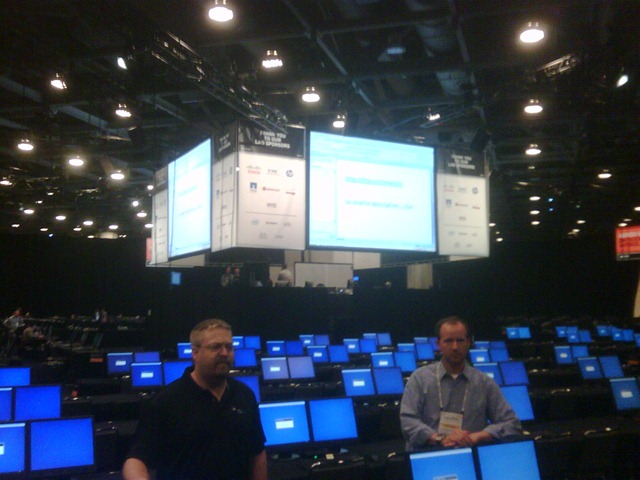
Each lab workstation has a help button where you can request help from the on-site subject matter experts, I like this model better as it means the SMEs can be dispatched anywhere in the room to help out whilst allowing the maximum number of seats to be balanced across the available labs "on-demand"
I’d strongly encourage you to check out the labs, remember the normal presentation sessions are audio recorded (keynotes are usually video’d) and slides are available post-VMworld but labs are not, so this is your only chance to go hands-on – although the team know this is high on the list of "wants", the .PDF lab manuals will also be made available for download post-VMworld.
Interesting stat of the day, the environment will be creating/destroying about 5,000 virtual machines per HOUR, and over the course of the week they expect to handle 75-100,000 virtual machine create/destroy operations.
Career vMotion
Posted by on August 20, 2010
Apologies, my blog has been a bit quiet of late, some of this is due to a much overdue holiday but mainly because I have been nearing the end of my time with my current employer and have been very busy finishing up projects and documentation.
Ok, so here it is – I am going to work for VMware ! – yes, another blogger is going to a vendor! This wasn’t a simple decision for me but the chance was too good to pass on. I have been in my current role at ioko for 10 years (almost to the day) and it’s been great, I honestly have no serious complaints and have worked on some very interesting projects with great customers. We are parting company on excellent terms and I wish them well but it’s time for something different for me.
The next phase of my life will be working as a Senior Consultant within the VMware vCloud EMEA team on some very exciting technology. As my regular readers will know I’ve had a keen interest in all things cloud for some time and have been doing some practical work with the vCloud concept as a VMware customer for some time, now I’m making the wholesale transition to be closer to the technology by being part of VMware helping other people to implement it now, for real, in production.
It’s been interesting over the last year to watch the transition of so many people that I know within the virtualization community to work for VMware, EMC and other vendors, this is evidence of a real industry-wide demand for people that are motivated and able to learn technologies quickly but also those that have a good level of inter-personal and business skills.
In my experience those people are the ones who don’t just see it IT as a job, they are personally interested and thus motivated to learn through research, play and doing, many of those people keep blogs as a personal reference and a way of sharing their work with the community – I definitely fall into this category and it’s been great to see the explosion of people blogging about virtualization and associated technologies over the last 3 years.
There is a lot of consolidation going on within the industry and because things are moving so quickly the vendors are quickly becoming the place to be if you want to be working with the latest stuff or the most cutting-edge projects, significantly more so than it has been in the past.
Getting a position at VMware certainly isn’t an easy ride and as a side-result I actually feel better-prepared for my VCDX defence panel. I had a *lot* of interviews through the process and a mix of presentation, technical and hands-on scenario work, the fact that I have a blog didn’t get me the job, I had to work hard for it and I have a lot of real industry experience behind me which stood in my favour. There is no space for complacency if you want to work with the best 🙂
I won’t officially start at VMware until after VMworld SF, so I’ll still be in SF under my own steam and expense, I’ll be blogging as much as possible and will be at the usual events during my time there. You can even come and see the vTARDIS in action in the session I am sharing with Eric Siebert and Simon Seagrave V18328 "Building an Affordable vSphere Environment for a Lab or Small Business".
In closing, this certainly isn’t’ the end of vinf.net and I’d like to refer you to this post’s title if there is any doubt – I see this as vMotioning my career from one provider to another whilst maintaining a business as usual service – I hear VMware have a product that does that sort of thing 🙂
I’ll definitely keep blogging and I now have the advantage that I will be able to write about vCloud stuff once it’s GA’d, within the usual bounds of customer/project confidentiality – in exactly the same way I worked pre-VMware – this isn’t an official VMware blog/mouthpiece and it won’t become one – but it will definitely get more interesting! 🙂
Thanks for reading. and here’s to things to come 🙂

Park your own Azure Cloud in your Carpark with Microsoft
Posted by on July 12, 2010
I noted with interest that Microsoft have announced some details of the Azure platform appliance, a way of running the components of their Azure cloud service in your own data centre.
It reads from the article that this will be based around a container/pod type architectural unit of many servers, rather than a single hardware appliance;
“We call it an appliance because it is a turn-key cloud solution on highly standardized, preconfigured hardware. Think of it as hundreds of servers in pre-configured racks of networking, storage, and server hardware that are based on Microsoft-specified reference architecture.”
I mentioned this concept back in 2008, licensing out appliances of cloud IPR goodness (now known as PaaS/SaaS) to run on-site (see comments of my post here) is a great way to build confidence and gain market penetration for the cloud-sceptic organisation. Or just to help those people that can’t move their data and services into the public cloud to leverage highly scalable PaaS technologies.
Interesting times, will we see Amazon and Google start to offer EC2/AWS and AppEngine pods that you can run on-premise?
Of course, you can do this sort of thing at an IaaS level now with VMware and their vCloud partners – VMware are moving up the stack with their PaaS (Springsource) and SaaS (Zimbra) acquisitions and a hybrid of on and off-premise would be easily achievable for them.
London VMware User Group Thursday 15th July
Posted by on July 5, 2010
Quick heads-up the next London VMware User Group (VMUG) meeting is on Thursday 15th July.
I’ll be giving a short talk my on VCDX preparation, I’ve not finished it yet… but I’ll cover my exam experiences and the application process – I promise this will be the last time I speak at a VMUG for a while, Al asked me, I didn’t volunteer honest! 🙂
The Steering Committee are pleased to announce the next UK London VMware User Group meeting, kindly sponsored by EMC to be held on Thursday 15th July 2010. We hope to see you at the meeting, and afterwards for a drink or two, courtesy of VMware.
Our meeting will be held at the Thames Suite, London Chamber of Commerce and Industry, 33 Queen Street, London EC4R 1AP, +44 (0)20 7248 4444. The nearest tube station is Mansion House, location information is available here. Reception is from 1230 for a prompt 1pm start, to finish around 5pm. Our agenda looks something like this:
1100 – 1200 (Optional) Interactive PowerCLI / Powershell workshop – Alan RenoufNote: If you would like to participate in Alan’s workshop, please bring a laptop, preferably with the most current PowerCLI and PowerShell binaries installed.
12:30 – 13:00 Arrive & Refreshments
13:00 – 13:20 Welcome & News – Alaric Davies13:20 – 14:00 Sponsor Presentation, Why EMC for VMware? – Alan Renouf, Simon Seagrave
Thin Storage in a Virtual World – Chris Evans, ‘The Storage Architect’
Towards a Virtual Desktop – Stuart McHugh, Withers Worldwide
Experiences with Hyper-V – Mike Laverick, RTFM Education
15:00 – 15:20 Refreshment break
- Preparation steps towards the VCDX – Simon Gallagher, Ioko
- ESX in the DMZ – Steve Bruck, Associated News and Matt Northam, VMware
- vSphere 4.1 new features – James Smith, VMware
16:45 – 17:00 Close
17:00 – Pub
To register your interest in attending, please email londonvmug@yahoo.com with up to two named attendees from your organisation. If you do not receive a confirmation mail, please don’t just turn up since we will not be able to admit you to the meeting. Please separately mention if you intend attending Alan’s PowerCLI workshop at 1100. Content from the meetings will continue to be uploaded to www.box.net/londonug,NDA permitting.
Hope to see you there
VCE310 and VCD310 and the path to VCDX Exam Experiences
Posted by on June 22, 2010
A couple of weeks ago I took and passed both my VMware Enterprise Administrator and Design exams, so I thought I would post up my thoughts.
Firstly, I was totally unprepared for the Enterprise Admin exam (VCE310) and this was reflected in my score. A bit of a scheduling SNAFU on my part meant that I found I had just 1hr5min to get to the testing centre – and I was at least 1hr away on a good day.
Because there was limited availability for the exam and I had a pretty busy work schedule I had to book a couple of months in advance and for whatever reason it went into my calendar as being on 18th June, when in fact it was actually booked for 18th May. I probably entered it on my BlackBerry so guess I fat-fingered it, memories of specific dates then disappeared into the great brain cloud so I was working to my calendar which is usually de-facto when it comes to my schedule, or not in this case! – A great argument for the PearsonVue site to send a calendar entry attachment like so many other event scheduling sites.
So, it was purely by chance that whilst I was looking up reference material at what I thought was a month ahead of the exam that I came across the booking email – and noticed that it was booked for today!
It was too late to re-arrange/book the exam (I tried) but I figured that being as I had paid for it, I may as well have a go even if I was expecting to fail – I have several years experience of tinkering and designing with VI3 although I thought my CLI skills would let me down as the exam curriculum seemed to focus heavily on that.
I also thought there would be a similar set of config minimum/maximum questions like there are for the VCP track – I historically have a bit of a problem with these as I’m not great at memorising this sort of information – and to be honest they often seem to change between updates so I just look them up as and when I have to, rather than learn them parrot fashion.
I had just 1hr5 min to dash to the test! and dash I did indeed! luckily London’s public transport was kind to me that day.
1st thing to notice was that the exams were held in a PearsonVue Professional testing centre, which are more advanced than the usual testing facilities for previous Microsoft and VMware exams – they also take signatures and photos for authentication and ID verification, 2 forms of photo ID etc.
Whilst I can’t disclose contents or details of the exam due to the understandable NDA I can say that it’s a mix of formal multi-choice questions (similar to the VCP) and a live-lab where you get VI client access to a real VI3 environment.
In the lab portion you are given a number of scenarios to configure or problems to resolve, there were some screen glitches/oddities – I assume because it’s being hosted remotely but you have access to everything in the UI and if you can’t remember the exact syntax you can find your way to it just as you would in the real-world.
You don’t get a score at the end as the lab and questions need to be scored offline – I suspect this is because they can record what you do within a session – so if you don’t complete one of the lab scenarios properly or missed a step they can review what you did, or at least the steps you took to figure out how to do something, it doesn’t say it specifically but I guess if you found the solution in the online help it would decrease your score :).
It was a rather painful 10-12 business days to get the result via email – but I did pass, not by a huge margin, but considering how unprepared I was I was pretty pleased – I think this owes a lot to the lab portion, I don’t know what ratio of marks are allocated to the lab, but I’d like to think my hands-on skills made up for any questions I didn’t answer correctly on the day due to my unpreparedness.
As soon as you get the VCE310 results you have to wait a further couple of days until you are able to register for the VCD310 design exam – you do this online with PearsonVue, rather than via a VMware certification agent like I did for the VCE310 exam, there must be a background process to update the PerasonVue profile as it took about 5 days before I could see the VCD310 exam as available for scheduling.
Whilst I was in Chicago last week I was cleared to take the VCD310 exam and I had a free morning before I got my flight back to the UK, so I booked an 8am slot, my job mainly involves architecting solutions, rather than hands-on/operations these days so I felt I was well prepared for the test.
Again, it was at a PearsonVue professional testing centre, if you are going to do these exams I would suggest getting there earlier than a normal testing centre as in my experience there are long queues to get registered and authenticated for early morning slots.
These centres do testing for all kinds of industries, for example at the US testing centre I attended for my VCD310 exam there were about 20 people in front of me to take emergency medicine / paramedic type certifications, and they had to be fingerprinted etc. so it’s not just geeks queuing up for their MCPs and CCNAs. As a side-note I feel for the non-IT test takers, they had to write full-on essays within their tests – which is why all participants in the room are given ear-plugs or noise cancelling headphones at that particular centre.
Again, I can’t disclose specific content but the VCD310 exam was split into two sections
the 1st section was a pretty straightforward multi-choice questions, with more of a design focus, capacities, HA, best solution for problem X within a particular constraint, important thing is to read the question and understand what is being asked, maybe not everything provided is relevant.
Whilst the questions required more than average brain-power to answer they were fairly straightforward and I finished within time.
The 2nd section was hard, not due to what is being asked, but because of the short amount of time allocated to read a customer requirement and produce a diagram to outline a solution that will meet the customer requirements.
It took me almost 50% of the time allotted to read the requirement and note down anything I thought was relevant but getting it drawn with the frankly rather annoying diagramming tool was very difficult and I ran out of time before I had completed the solution.
I liked that this section was very much real-world like (if only all customers could express their requirements so clearly! :)), but the tool took a bit of getting used to, the low screen-resolution also meant I spent a lot of time scrolling up and down the requirement doc and switching between that, my notes and the diagram that I was building.
With that I finished, leaving a few comments with the above remarks.
Unlike the VCE310 exam you get an instant result, and I’m pleased to say I passed this one too, but I suspect I did well on the questions but dropped a lot of marks on the 2nd part because I didn’t complete the diagram in time.
People think I’m weird, but I do quite enjoy taking these tests, and these two were no exception, a lot of it is about understanding the question and what the intended goals are, they are not cheap – from memory about £250-£300 GBP, compared to typical MS/VCP exams which are about £100 GBP.
So, that’s the exam requirement out of the way for VCDX3 so I am working on my application form with the hope of doing the defence sometime soon.
Just after I booked my VCE310 exam the information on the newer VCAP/VCDX4 track was released.
by this point I had already booked VCE310 and the availability of the new vSphere Enterprise Admin & Design exams were a way off and didn’t fit with my with my goal to complete this in Q3/4 2010, so based on this diagram from this page my plan is to do my VCDX3 certification then upgrade this to VCDX4 with the VCAP4-DCD exam, I already have my VCP4 exam so this is the quickest route for me and would result in gaining both VCDX 3 & 4 certification without having to do two defences, or wait until 2011 to get it done.

If you are planning to go down this track, it’s worthwhile bearing in mind that you need to have the VCE310, VCD310 exams completed before you can submit your application, which must then be accepted before you can be scheduled for your defence session, and the VXDX application looks to be a pretty onerous document.
Also worth noting that it seems that for the newer VCDX4 track they have removed the requirement to pass the Enterprise Admin exam before you can take the design exam as it was with the VCDX3 track I have been following – so that should help speed up the process for some people as you can do them in a different order.
Carolina VMware User Summit in Charlotte, NC
Posted by on June 12, 2010
Bit of a change of location for this week as I find myself at the Carolina VMware User Summit (VMUG) meeting in Charlotte, NC. (for anyone else not from here; you can familiarise yourselves with NC at Wikipedia like I did :)).
First impressions for this event are that wow, it’s BIG – for any London VMUG’ers this is at least 10 times at big probably more. If it helps frame the session for us Europeans, if you’ve ever been to TechEd Europe in recent years- the main hall and seating is probably the same size as the lunch halls in Barcelona with a bunch of break-out rooms.
There was a great turn-out with a number of vendors sponsoring and exhibiting as well as a number of well respected industry experts, as I think Chad Sakac pointed out, this is almost a mini-VMworld!
The opening keynote by Scott Davis, CTO Desktops at VMware covered view and VMware’s aspirations for enabling desktop as a Service (DaaS) with VMware view, there was nothing new here, but it was good to get it laid out
One point that I did pick up on I that there still won’t be any offline Mac support in view 4.5, this seems like a high-demand feature to me, given the number of Macs I see in corporate environments these days is multiplying exponentially, Fusion VMs still lack a centralised command and control infrastructure outside of normal AD and Group Policy for "corporate" Windows VMs.
Then Nexus 1000v Architecture and Deployment Jason Nash from varrow his blog is here and he has some excellent articles on implementing the Nexus 1000v (NX1k)
Varrow have done a number of deployments of the NX1k, and some interesting points and gotchas I noted from the presentation as are follows;
Why are people implementing the NX1k? The typical use-case is for your network team to be able to use familiar tools to manage, configure and maintain the environment.
However an interesting operational point for non NX1K environments is that if you need to do a packet-level debug of a problem or have a packet-level IPS type device that works via a span-port on a traditional vSwitch in a DRS cluster you will loose visibility of the traffic if your VM moves to an alternative host through vMotion or HA, in the NX1K world everything moves with the VM.
Upstream physical Cisco switches are not absolutely required for the NX1k to function but it enables useful functions like CDP which are really useful where there are multiple layers of abstraction.
There are essentially 2 components of the NX1k both of which are implemented as virtual machines
Virtual Supervisor Module (VSM), typically 2 for redundancy in an active/passive configuration – these control configuration and management of the virtual Cisco switches, analogous to Cisco Supervisor line-cards for the Catalyst range of chassis switches. Most people implement these as DRS/HA enabled virtual machines.
Virtual Ethernet Module) one instance runs on each ESX node participating in a cluster with a NX1K dvSwitch
There is also a physical appliance for running the VSM, the Nexus 1010 which is a re-branded Cisco UCS200 rack server that can run up to 4 instances of a VSM, and there is likely to be a future implementation that fits into a chassis type switch as a blade, however the majority of customer implementations have been using VSMs running on a DRS/HA enabled vSphere cluster as the actual resource/supportability requirements don’t typically require a dedicated appliance.
One of the most common problems seen "in the field" come from a loss of control traffic between the VSM and VEM,which can result in modules going offline or "flaky" functionality
VSM<—>VEM comms – uses 2 x L2 VLAN to work they can both live on same VLAN but this isn’t best-practice
Control = heartbeat between VSM and VEM
Packet = CDP, IGMP, SNMP, netflow/span
Both need to be trunked across ALL switches.
In the UI and command-line "ethernet" denotes a physical network connection, "vethernet" surfaces in vSphere as a port-group with associated QoS policy.
The VEM can be patched using VMware Update Manager (VUM) but it sometimes NX1k releases don’t appear on the VUM list for several days after release, so be sure to check.
Many customers keep non-VM access networks, such as COS, vMotion on traditional non-NX1KV switches to remove any scope for a configuration error totally knocking out access – something I’ve written about before on this post
Next up was Mike DiPetrillo (Global Cloud Architect with VMware twitter/Blog – “All about VMware vCloud”
Mike covered off the key concepts behind cloud and VMware’s view; I’ve written about this before so I won’t recount it here again.
Some interesting points I noted;
There is a different/hybrid skill-set for people working with cloud, it’s less about silo’ing and people need to evolve or be left behind
Networking – it all needs to be plumbed together, automation is needed
Storage – to design and operate at scale in a flexible manner
Programming/Automation – to create/maintain automation at scale
Servers – manage/maintain at scale
Virtualization – to enable flexibility
People are moving to “cloud” in the same way they moved to server virtualization, test & development first, gaining comfort before moving to production, this is something I’ve definitely seen played out in my line of work.
The technical “stuff” behind cloud is pretty easy, it’s servers, storage, virtualization. networking – the hard stuff is gluing it all together and automating it to achieve the self-service type functionality (either internally or for the public) – this “orchestration” is the complicated part.
There was then a vExpert Panel discussion between the following luminaries,
Mike Laverick (Independent) Blog/Twitter
A lot of the chat was pretty much storage focused with Chad [EMC] and Vaughn [NetApp] although it didn’t end up in a fight, the general consensus was that deep-array integration is a good thing to make things easier to operate and manage and EMC and NetApp are leading the way with their code and vStorage API Integration.
It was interesting although, I would like to have seen a wider discussion but those were the questions posed. I also think storage choice is not just a black or white decision (shirt-colour pun intended :))
And, finally Chad Sakacc did a great session titled “Infrastructure Technologies for VMware and the Private Cloud”
Chad’s a great presenter and this has been covered elsewhere on the Internet by a lot of the vSpecialist team but the key points for me were.
EMC plug-ins for EMC array’s are freely downloadable for EMC customers and partners, if you use the Celerra VSA you can play with this yourself now, on your own laptop – see Nick’s Uber VSA here the coolest part was that using the plug-ins you can configure LUNs and storage on your array from within vCenter- handy for a lab or smaller shop where you may not have a dedicated “storage guy”. – you can see some demos and get more info on these plugins on Chad’s blog here
One thing I like about Chad is he is a geek, so understands people want to see demos, not just slides and he had a good deck of pre-recorded demo’s of the cooler EMC technologies like the VM teleporter and the “upcoming, soon to be released super-secret, VMware vCloud product that cannot be named, but has been” 🙂
There was also a demo of the an upcoming release of the EMC Ionix product, which allows auto-discovery of vBlock infrastructure and “a single pane of glass” for administering all aspects of a vBlock – UCS blades (via service profiles), storage and networking.
Ionix + upcoming secret VMware vCloud product seem to solve some of the orchestration and provisioning difficulties that Mike DiPetrillo alluded to in his session and from what I see I now get it, very clever.
In summary, it was an enjoyable day and I had some great conversations with people in the “meet the experts” room, Next up for me is BriForum – and if I get time I’m going to get those EMC plug-ins configured with a Celerra VSA to show in my BriForum session next week.
**edited to fix some embarrassingly obvious typos! – I claim jetlag :)**

 Virtualization, Cloud, Infrastructure and all that stuff in-between