Virtualization, Cloud, Infrastructure and all that stuff in-between
My ramblings on the stuff that holds it all together
Carolina VMware User Summit in Charlotte, NC
Posted by on June 12, 2010
Bit of a change of location for this week as I find myself at the Carolina VMware User Summit (VMUG) meeting in Charlotte, NC. (for anyone else not from here; you can familiarise yourselves with NC at Wikipedia like I did :)).
First impressions for this event are that wow, it’s BIG – for any London VMUG’ers this is at least 10 times at big probably more. If it helps frame the session for us Europeans, if you’ve ever been to TechEd Europe in recent years- the main hall and seating is probably the same size as the lunch halls in Barcelona with a bunch of break-out rooms.
There was a great turn-out with a number of vendors sponsoring and exhibiting as well as a number of well respected industry experts, as I think Chad Sakac pointed out, this is almost a mini-VMworld!
The opening keynote by Scott Davis, CTO Desktops at VMware covered view and VMware’s aspirations for enabling desktop as a Service (DaaS) with VMware view, there was nothing new here, but it was good to get it laid out
One point that I did pick up on I that there still won’t be any offline Mac support in view 4.5, this seems like a high-demand feature to me, given the number of Macs I see in corporate environments these days is multiplying exponentially, Fusion VMs still lack a centralised command and control infrastructure outside of normal AD and Group Policy for "corporate" Windows VMs.
Then Nexus 1000v Architecture and Deployment Jason Nash from varrow his blog is here and he has some excellent articles on implementing the Nexus 1000v (NX1k)
Varrow have done a number of deployments of the NX1k, and some interesting points and gotchas I noted from the presentation as are follows;
Why are people implementing the NX1k? The typical use-case is for your network team to be able to use familiar tools to manage, configure and maintain the environment.
However an interesting operational point for non NX1K environments is that if you need to do a packet-level debug of a problem or have a packet-level IPS type device that works via a span-port on a traditional vSwitch in a DRS cluster you will loose visibility of the traffic if your VM moves to an alternative host through vMotion or HA, in the NX1K world everything moves with the VM.
Upstream physical Cisco switches are not absolutely required for the NX1k to function but it enables useful functions like CDP which are really useful where there are multiple layers of abstraction.
There are essentially 2 components of the NX1k both of which are implemented as virtual machines
Virtual Supervisor Module (VSM), typically 2 for redundancy in an active/passive configuration – these control configuration and management of the virtual Cisco switches, analogous to Cisco Supervisor line-cards for the Catalyst range of chassis switches. Most people implement these as DRS/HA enabled virtual machines.
Virtual Ethernet Module) one instance runs on each ESX node participating in a cluster with a NX1K dvSwitch
There is also a physical appliance for running the VSM, the Nexus 1010 which is a re-branded Cisco UCS200 rack server that can run up to 4 instances of a VSM, and there is likely to be a future implementation that fits into a chassis type switch as a blade, however the majority of customer implementations have been using VSMs running on a DRS/HA enabled vSphere cluster as the actual resource/supportability requirements don’t typically require a dedicated appliance.
One of the most common problems seen "in the field" come from a loss of control traffic between the VSM and VEM,which can result in modules going offline or "flaky" functionality
VSM<—>VEM comms – uses 2 x L2 VLAN to work they can both live on same VLAN but this isn’t best-practice
Control = heartbeat between VSM and VEM
Packet = CDP, IGMP, SNMP, netflow/span
Both need to be trunked across ALL switches.
In the UI and command-line "ethernet" denotes a physical network connection, "vethernet" surfaces in vSphere as a port-group with associated QoS policy.
The VEM can be patched using VMware Update Manager (VUM) but it sometimes NX1k releases don’t appear on the VUM list for several days after release, so be sure to check.
Many customers keep non-VM access networks, such as COS, vMotion on traditional non-NX1KV switches to remove any scope for a configuration error totally knocking out access – something I’ve written about before on this post
Next up was Mike DiPetrillo (Global Cloud Architect with VMware twitter/Blog – “All about VMware vCloud”
Mike covered off the key concepts behind cloud and VMware’s view; I’ve written about this before so I won’t recount it here again.
Some interesting points I noted;
There is a different/hybrid skill-set for people working with cloud, it’s less about silo’ing and people need to evolve or be left behind
Networking – it all needs to be plumbed together, automation is needed
Storage – to design and operate at scale in a flexible manner
Programming/Automation – to create/maintain automation at scale
Servers – manage/maintain at scale
Virtualization – to enable flexibility
People are moving to “cloud” in the same way they moved to server virtualization, test & development first, gaining comfort before moving to production, this is something I’ve definitely seen played out in my line of work.
The technical “stuff” behind cloud is pretty easy, it’s servers, storage, virtualization. networking – the hard stuff is gluing it all together and automating it to achieve the self-service type functionality (either internally or for the public) – this “orchestration” is the complicated part.
There was then a vExpert Panel discussion between the following luminaries,
Mike Laverick (Independent) Blog/Twitter
A lot of the chat was pretty much storage focused with Chad [EMC] and Vaughn [NetApp] although it didn’t end up in a fight, the general consensus was that deep-array integration is a good thing to make things easier to operate and manage and EMC and NetApp are leading the way with their code and vStorage API Integration.
It was interesting although, I would like to have seen a wider discussion but those were the questions posed. I also think storage choice is not just a black or white decision (shirt-colour pun intended :))
And, finally Chad Sakacc did a great session titled “Infrastructure Technologies for VMware and the Private Cloud”
Chad’s a great presenter and this has been covered elsewhere on the Internet by a lot of the vSpecialist team but the key points for me were.
EMC plug-ins for EMC array’s are freely downloadable for EMC customers and partners, if you use the Celerra VSA you can play with this yourself now, on your own laptop – see Nick’s Uber VSA here the coolest part was that using the plug-ins you can configure LUNs and storage on your array from within vCenter- handy for a lab or smaller shop where you may not have a dedicated “storage guy”. – you can see some demos and get more info on these plugins on Chad’s blog here
One thing I like about Chad is he is a geek, so understands people want to see demos, not just slides and he had a good deck of pre-recorded demo’s of the cooler EMC technologies like the VM teleporter and the “upcoming, soon to be released super-secret, VMware vCloud product that cannot be named, but has been” 🙂
There was also a demo of the an upcoming release of the EMC Ionix product, which allows auto-discovery of vBlock infrastructure and “a single pane of glass” for administering all aspects of a vBlock – UCS blades (via service profiles), storage and networking.
Ionix + upcoming secret VMware vCloud product seem to solve some of the orchestration and provisioning difficulties that Mike DiPetrillo alluded to in his session and from what I see I now get it, very clever.
In summary, it was an enjoyable day and I had some great conversations with people in the “meet the experts” room, Next up for me is BriForum – and if I get time I’m going to get those EMC plug-ins configured with a Celerra VSA to show in my BriForum session next week.
**edited to fix some embarrassingly obvious typos! – I claim jetlag :)**
vinf.net On-Tour 2010, Planes, Trains and Bicycles
Posted by on June 8, 2010
It’s going to be a busy couple of weeks, I am visiting what has been termed as mini-VMworld in Charlotte, NC later on this week, it looks to be much bigger than anything we have seen in the UK and has an “all-star” line-up so I look forward to that and jet-lag permitting I will be writing up some blog posts.
Then it’s on to BriForum in Chicago where I will be delivering a presentation on my low-cost/cheap home lab setup using the vT.A.R.D.I.S

Then to add to the complexity I fly back to the UK on Friday, and then have Saturday to recover before doing the London to Brighton bike ride on Sunday, still open to sponsorship via my justgiving page here – donate to encourage the fat, jet-lagged man to cross the finish line (with or without pulse! :)).

And the following week I will be presenting at The Fantastic Tavern London “Blue Sky Thinking for the Cloud”, if you’re not familiar with the TFT format – see my previous reviews here and here

And in between all of that I need to keep up with work, holiday and family commitments… it’s going to be busy people!
Are you running SRM? want to make the world a better place, and get a free copy of Mike Lavericks finest?
Posted by on June 1, 2010
VMware are running a survey for SRM customers and donations will go to Mike’s chosen charity, UNICEF, all help appreciated – and you get a free PDF book, what more could you want? 🙂
Dear VMware Customer,
The VMware vCenter Site Recovery Manager (SRM) product team is looking for product feedback on SRM deployments. If you have purchased SRM, we would like to hear from you. Your participation will be very valuable to us and the information you provide will be used to improve the SRM product going forward.
The survey should take approximately 15 minutes. Upon completion of the survey, if you are among the 1st 1000 respondents, VMware will donate $10 per response to charity. You will also receive a link to download the electronic copy of Mike Laverick’s book "Administering VMware Site Recovery Manager 4.0" upon completion of the survey.
We appreciate you taking the time to provide us with your valuable feedback.
Thank you,
The VMware SRM Team
Go to the survey here
And read more information at these fine blogs;
http://www.gabesvirtualworld.com/vmware-srm-customer-survey/
http://www.yellow-bricks.com/2010/05/28/vmware-srm-customer-survey/
Matching an HP FlexNIC in ESXi to Chassis Flex10 Bay and Port Number at Install Time.
Posted by on May 28, 2010
When you are setting up an HP blade with ESXi you’ll want to ensure the administration interface is setup on the correct FlexNICs so you can add it to vCenter and continue the configuration – this can be confusing as there can be a large number of NICs presented. Up to 4 per Flex10 module, and in this case we have 2 Flex10 modules in the chassis, giving a maximum of 8 FlexNICs per blade.
At this stage I found that the Easiest way to match up which FlexNICs you have mapped on the Virtual Connect administrator to how they show up in the ESXi (as vmnicX) is as follows;
iLo to the ESXi installation, Hit F2/Configure Management Network/Network Adapters
Compare this with the Port mapping feature via the OA (shown below) and you can map the MAC addresses for each vmnic against the FlexNIC LOM:x-y entry so it quickly becomes obvious which is which.
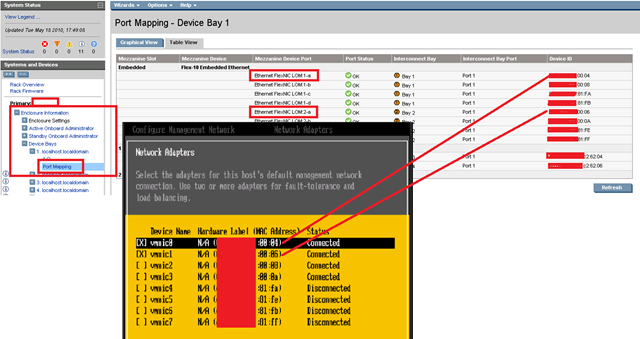
You can also look in the server profile assigned to the blade if you need more information about which VLAN a FlexNIC maps to.

HP Blade iLo and Internet Explorer 8 Problems
Posted by on May 26, 2010
Whilst HP kit is still very good and despite the disappointing iLo performance I have noticed a further annoyance, there seem to be a number of incompatibilities between the HP Blade iLo’s, blade chassis virtual connect modules and Internet Explorer 8, they all work ok on IE7, so hopefully an update will be coming soon
Blade iLo – if you need to use the Fxx keys like F2 to configure an ESXi host or F12 to shutdown it doesn’t map into the iLo session but either doesn’t work or is trapped by the local IE8 browser – you can work around this by going into the iLo web-administration page and mapping hot-keys manually for now.

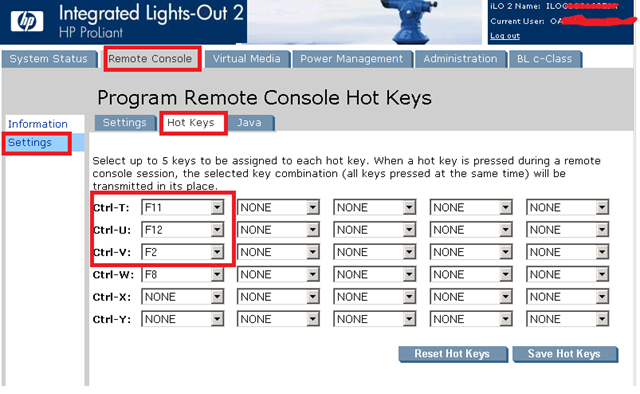
However, the mouse-over/help items don’t work at all in Virtual Connect Manager with IE8, works fine on IE7; not a major issue but it is a bit of a pain.

I noticed all of this on the following OA hardware/firmware revisions – hopefully there will be an update soon

BL460c G6 iLo

So for now I would suggest using IE7 wherever possible, if you need to update your firmware then this link is useful and I have this page with general HP c-class and EVA information
Want to see the Uber vT.A.R.D.I.S at VMworld?
Posted by on May 25, 2010
This year VMware have changed the way they are planning the VMworld sessions, this year there is a list of sessions that are open to a public vote, Mark has a great post on the selection process here – I think it’s a great way to get the most wanted content at the event.
I submitted a session around my work with solid state storage for VMs and my popular vT.A.R.D.I.S lab environment which I’m happy to see has been opened up to public voting,
If you would like to see some live no-safety-net demos of the Uber vT.A.R.D.I.S (20 node virtual ESX clusters, 120 running nested virtual machines on 2 cheap physical boxes with replicating virtual SAN, and virtual layer 3 networking!) then feel free to vote 🙂
You can vote at this page (you’ll need a VMworld.com account which you can get here) I have submitted two sessions.

Details of my proposed sessions are;
Technology and Architecture
Title: Building a low-cost home lab, the virtual way
Session Id:TA6980
Abstract:
Ever wondered how you can run all that enterprise-scale goodness in your house in a way that others won’t complain about it? Then you need this session. Learn about how to use VMware vSphere and open source tech to build a lab with shared storage, layer 3 networking, replicating SANs and as many virtual hypervisors as you need for less than $1k USD. Want to build a 20 node ESXi cluster on 2 physical boxes? Or test out VDI scenarios, scripts and provisioning processes? Attend this session to find out how!
Type: Breakout Session
Track: Technology and Architecture
Speaker Detail: Speaker: Simon Gallagher

My second proposed session is around using consumer solid-state storage with some clever software to build highly performant solid-state virtual SANs, based around my work with the FusionIO cards, RAM disks and other consumer-grade SSD
Technology and Architecture
Title: Spinning disks are sooo 1970s – solid state is the future people!
Session Id: TA6981
Abstract:
“This is the future people, spinning disks are power hungry, slow and sooo 1970. It’s not just for enterprise-grade IT, see how to use software based vSAN, NAS and iSCSI technology to leverage consumer-grade solid-state DAS as shared cluster storage – use software features to creare your own low cost storage tiering and even replication. See live demonstrations of running virtual workloads from consumer-grade cost solid state storage; Including FusionIO, HP Lefthand VSA, OpenFiler”
Type: Breakout Session
Track: Technology and Architecture
Speaker Detail: Speaker: Simon Gallagher Company: vInf
It would be great to have the opportunity to take a bigger and better vT.A.R.D.I.S out on tour again and all of the proposed sessions in the various tracks look great, there are several that I look forward to seeing.
Maybe just vote to laugh at me trying to explain why I need all that kit whilst trying to get through airport security 🙂
HP Blade iLo – it’s 2010 and disappointingly still using a 100Mb NIC?
Posted by on May 20, 2010
I wrote this original post over 2 years ago when I first had to build a set of HP blades in a c7000 chassis, having just taken delivery of another c7000 I had hoped that technology in the onboard administrator (OA) modules had progressed a bit further than it has.
For some reason they still only have 100Mb/s on board NICs, despite all other parts of this chassis using the all-singing and dancing Flex10 10Gb technology.
iLo/OA NIC Settings

Blade Chassis Interconnect Bays – high speed goodness
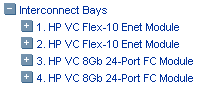
Whilst I realise PXE and Altiris etc. are the preferred method for building out large numbers of blades, it doesn’t work for everyone and particularly when it’s the 1st chassis in a Greenfield environment you need to get an OS on a blade before you can even start to setup a PXE server – Windows 2003 over iLo takes about 4 hours to install, 2008 is even worse – or have someone use a USB attached CD to install the 1st blade an OS physically in the DC.
I accept that the iLo is for out of band, emergency type access where the blade OS isn’t accessible – but in my experience there are a large number of scenarios where you need to use tools that boot from DVD/CD .ISO images in a hurry like data recovery, forensic analysis, bare-metal OS restore tools, P2V tools etc. and 100Mb/s just doesn’t cut it these days.
Also if you work in a secured environment then getting clearance to run great and useful tools like DHCP/PXE on networks that could be routed to/from outside the DC is hard, sometimes virtual .ISO media over an isolated and secured OoB network or a person on-site in the DC with physical media is the only acceptable method for moving data.
Gigabit networking is such a ubiquitous technology these days, and with the OA modules for a blade chassis costing around £1k GBP each (2 generally required for redundancy) you would think there is enough budget to go for Gigabit on-board and make the excellent virtual media features really usable in all scenarios

On the plus-side, they have a fancy new BIOS splash screen 🙂

…or is it just me?
Windows 7 Remote Desktop Client – Nice Touch
Posted by on May 19, 2010
You can download and install the new, updated RDC 7.0 client for free for any OS from Windows XP SP3 and later (it ships with Windows 7) known issues here and detailed feature comparison per OS here and downloads for various client OS’es are below
Update for Windows Vista, x86-based versions
 Download the Update for Windows Vista for x86-based systems package now.
Update for Windows Vista, x64-based versions
Download the Update for Windows Vista for x64-based systems package now.
Update for Windows XP, x86-based versions
Download the Update for Windows XP for x86-based systems package now.
A nice touch that i discovered by accident is that you can move the top title bar along the top of a full-screen RDP session by clicking and dragging, this is really handy if you work on multiple full screen RDP sessions inside another RDP session – for example a jump-off box to a protected subnet or when you have a full-screen application.


AkA Terminal Services client, Remote Desktop Protocol Client, RDS Client, Remote Desktop Client, RDC, RDP, RDS 🙂
Enjoy
The End of Spinvox
Posted by on May 18, 2010
I have been using SpinVox’s voicemail to email/text service for nearly 2 years and it’s been really useful to my daily workflow as I can tag/flag emailed voicemails to ensure they are dealt with. I just abruptly got a text saying the service will be finishing in 7 days.
Dear customer, we regret to inform you that SpinVox is no longer supporting free accounts and your service will expire in the next several days. For other options, please visit www.spinvox.com or call your mobile network provider should you wish to re-enable standard voicemail service. We thank you for your support and apologize for any inconvenience
Whilst the quality of translations has definitely declined over the last year; this seems to have been an unfortunate part of their aggressive translation off-shoring strategy – talk of “the brain”, the much feted automated translation engine seems to have been mostly wishful thinking.
Shame, I will have to try and find something else now… but I’m pretty sure they used to reverse SMS bill be £5/month!
It seems Spinvox’s technology has been merged into a telco-only service from Nuance, so you can’t directly subscribe to it.
More details for existing subscribers here – when it finishes you will need to reset your voicemail settings, as it won’t happen automatically
When the SpinVox voicemail-to-text service expires does my phone automatically return to voicemail mode?
No. Users will need to remove their mobile phone’s divert settings to the SpinVox voicemail-to-text service or update the divert number to their new voicemail, as appropriate for the user’s voicemail plan.
In the UK, you can reactivate standard voicemail by entering the following code and pressing call:
Vodafone: 1211
O2: 1750
All others: ##004#
Bloggers, keep an eye on your RSS feed validity
Posted by on May 15, 2010
I had an issue recently where my RSS feeds were not being picked up correctly by the PlanetV12n aggregator, I have never really had any problems in the past but as of a post last week it stopped passing through the article title to the PlanetV12n and thus it’s twitter feed(s).
I had not made any changes recently other than publishing content but I guess somewhere down the line between my blog and feedburner more strict validation settings had been turned on – had I not spotted the problem via twitter it would probably have continued without my knowledge.
If you are a Feedburner customer I would recommend checking out and subscribing to the FeedMedic and FeedBulletin features which will alert you straight away to any problems in processing your feed, if like me you no longer have much time in your daily workflow to work through your RSS feeds you may be interested in http://www.feedmyinbox.com which is a free online service that emails contents of RSS feeds to your email address (which in my case doubles to my mobile phone) – you can point this as the unique URL of your FeedBulletin service to be alerted to any problems via email as soon as they are picked up.
You can also manually check the validity with this online tool FeedValidator.org
As an aside, I was pleased to see that several hundred people subscribe to my FeedBurner RSS feed, as it’s a while since I last checked and apologies for the interruption to service.
normal service should now be resumed (hopefully)…


