Virtualization, Cloud, Infrastructure and all that stuff in-between
My ramblings on the stuff that holds it all together
Exchange Outlook Feature Request: Where’s Waldo?
Posted by on August 18, 2011
There was recently some discussion at a customer about the use of Outlook/Exchange’s calendaring functionality, this is a commonly deployed solution in businesses yet few people seem to “get” how useful the calendaring functionality can be or how to use it properly.
I almost see it as a democratic process for keeping control of your own schedule and agenda, I often get requests for “access to my calendar” – for most people you don’t need this; your Exchange server publishes free/busy data for your calendar, so people who request a meeting can see if you have a gap in your schedule and request to fill it, they don’t need to see the detail of what is in your calendar and you retain control of your schedule, choosing what you are able to participate in – you can either choose to accept it, reject it or propose another time.
In my experience this is a much abused feature – too many people decline because they can’t make a proposed date/time/location – but they should only really decline if they have no interest in meeting with you (maybe I’m just really unpopular  ) otherwise they should suggest a new time.
However, if you work in a modern business where you are often working from a different site, or even different continent there is a gap in this functionality – you have no real way of showing people which office you are planning to be in on a particular day so they can schedule the meeting intelligently – I think there should be a where’s Waldo feature that works as follows…
It would be handy if you had a way to mark in your Outlook calendar in advance with which location you are planning to be in on a particular date – some kind of drop-down property for a day/week/period like Working from Home (online only, Office Y, office X, etc.) and likewise have an option for vacation in this which auto declines meeting requests and suggests an alternative (depending on a preference you set).
This would require your Exchange server to have a concept of location, a list of your company offices, campuses, buildings from which you would select where you are planning to be, likewise other online or virtual locations like WebEx sessions, conference bridges could be specified.
When a user requests a meeting they could select a meeting room or general location like a campus (if it’s face to face) – your server can use this to query against the invitees expected location (assuming Exchange is told which campus/building a meeting room is in) – given appropriate mapping data it could also calculate the most appropriate location with availability and facilities (projector yes/no, conference phone yes/no) for the number of invitees, take this a step further and it could feasibly provide walking/travelling time from the previous session/location to the chosen venue and add travelling time into the request (as well as insert directions into the invite).
Take this a step further and the basic presence information now finding its way into mobile devices and web services/IM could be used to integrate further – give advance warning that an attendee is likely to be late as they are stuck in traffic 50 miles away for a meeting that starts in 5mins and suggest a dial-in if available, or if all the attendees are still in another meeting and are unlikely to be able to travel to the next meeting in-time it could notify the onward requestor and provide dial-in details or suggest a re-schedule.
Anyways, just a quick idea – Outlook hasn’t had that many major innovations (except cloured calendar entries) for a while and this calendaring functionality hasn’t had any major innovations since Outlook was 1st released – this would be amazing, get in quick before someone else like Google does it, Microsoft – all the building blocks are there.
Apologies for the radio silence
Posted by on August 12, 2011
Apologies to my regular readers for the lack of content recently, this is going to be one of those “I’ve been really busy so not had time to blog” type of posts I’m afraid.
Since leaving VMware’s cloud practice earlier this year my freelance career has taken off nicely and I’m currently engaged with a large service provider on some large-scale transformation projects so that’s currently taking a lot of my time.
But, not to fear… there will be plenty coming in a few months
- vTARDIS.next – more technical details following on from the initial post once I get GA code
- Hopefully vTARDIS.next and the iTARDIS will be making an appearance at an upcoming UK VMUG
- Secret Project No.2 – suffice to say it’s very cloudy and is taking a lot of my blogging time at the moment – expect more detailed news about this towards the end of 2011 as it’s a slow, but full-on process!
- I will be at VMworld 2011 in Las Vegas, I’ll try to blog as much as I can whilst I’m there
Register for VMworld sessions ASAP or miss out
Posted by on July 20, 2011
This year VMware are enforcing session registration for VMworld, my understanding is that if you don’t register and a session is full, you wont get in!!
this is a good thing IMHO, in previous years there have been long queues (although I hope they have better badge-scanners than in the past, otherwise there are mad queues!) and this has led to missed sessions, but the downside is that you’ll need to book, pay for and plan out your schedule early on.
So, to avoid missing out logon to the portal at http://www.vmworld.com and choose schedule builder – it’s pretty quick to do.
I have completed my registrations this evening but I’ve also seen a couple of sessions that are “sold-out” already, so get in quick!
July London VMware User Group Meeting
Posted by on June 15, 2011
Quick heads-up it’s not long now until the next London VMware User Group (VMUG) meeting on 14th July, I’m also pleased to announce that I have joined the steering committee and will be helping out with finding useful and content. We are always open to suggestions and VMUG is all about the User so don’t be shy, particularly if you have ideas for hands-on labs or topics you would like to see covered – leave a comment with an idea, or drop me a mail (details on my about page) – you don’t have to be running the largest infrastructure in the world or have a brain the size of a planet, bring your ideas, your woes, your experiences and share them with the community.
If you’ve never been before – now is the time to make time.
London VMUG Meeting
Thursday, July 14, 2011
Meeting: 10:00 a.m. – 17:00 p.m.
Networking Reception: 17:00 p.m.
London Chamber of Commerce and Industry
33 Queen Street
London, EC4R 1AP
Click here for directions
Networking Reception
Pavilion End
23 Watling Street, EC4M 9BR
The London VMUG Steering Committee are delighted to invite you to our next event. Following on from the success of the new format unveiled at the May 12th VMUG, we will continue with multiple tracks and a vCOPS focused lab, along with a Genius Bar from VMware GSS to answer any burning issues you might have. Details are below and we are grateful to our sponsors – Arista Networks, Embotics and Vision Solutions.
Please Note: If you wish to participate in the lab, you MUST bring your own laptop/client device please! You will need View 4.6 client installed (or admin rights to install it).
Agenda
Plenary sessions in Capital
10:00 a.m. – 10:15 a.m. – Welcome, Alaric Davies, Chairman
10:15 a.m. – 11:00 a.m. – Cloudvision for the Virtualised Environment, John Peach, Arista Networks, Sention System Architect
11:00 a.m. – 11:45 a.m. – Private Cloud Management Made Simple, Martin Sajkowski, Embotics, EMEA Operations & Colin Jacks Senior Solutions Specialist
11:45 a.m. – 12:15 p.m. – Break in Sponsor Expo
12:15 p.m. – 13:00 p.m.– Double-Take by Vision Solutions – Christian Willis, Technical Director: Meeting the Availability Challenges of physical, Virtual and Geographically Dispersed Systems
13:00 p.m. – 14:00 p.m.– Lunch in Sponsor Expo
Track 1
14:00 p.m. – 14:50 p.m. – vCOPS Advanced, Mark Stockham, VMware
15:00 p.m. – 15:50 p.m. – SRM Futures, Mike Laverick
16:00 p.m. – 16:50 p.m.- Cloud: Can You Compete? Mark Craddock
Track 2
14:00 p.m. – 14:50 p.m. – Thinking, Building & Scripting Globally, Julian Wood
15:00 p.m. – 15:50 p.m. – Managing IT as We Evolve to Cloud Computing, Colin Fernandez, VMware
16:00 p.m. – 16:50 p.m. - How to Save your Time With PowerCLI, Jonathan Medd
17:00 p.m. – Close
17:00 p.m. – Onward Drinks at Pavilion End
Please note the agenda is subject to change
Thank you to our meeting sponsor:
Register Today to join us for this free informative event.
Please note: You will need to log into the VMUG web site to register for this meeting. If you have not already obtained your VMUG login credentials, please visit the Username and/or Password Help page to request your username and password.
vTARDIS.next runs on vSphere 5.0
Posted by on May 27, 2011
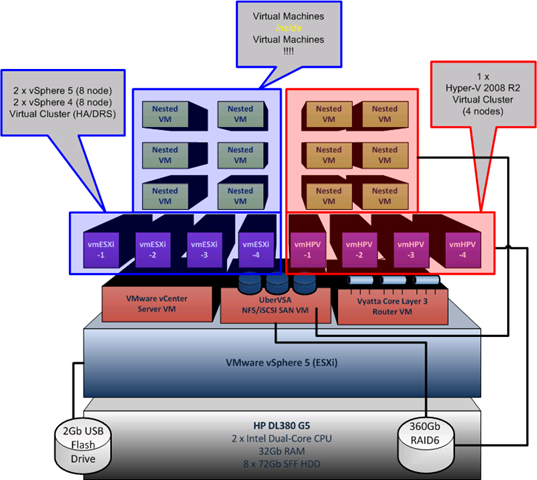
I have been working furiously on an updated version of the vTARDIS based around vSphere 5, and now it’s in the open (I was on the heavily NDA’d beta programme) the goal is the same: lowest cost possible physical hardware, but the ability to build complex production like ESX environments and run large amounts of virtual ESX hypervisors and guests.
This time round, and due to some VERY cool [UNSUPPORTED] features of ESX 5 you can run more than just clusters of nested ESX virtual machines as I did in the original vTARDIS, but you can also run all the following on a SINGLE physical server running vSphere 5 – this is seriously cool IMHO
- Run 64-bit guests inside an ESX virtual machine (you couldn’t do this previously as it didn’t pass through the x64 extensions)
- Run HyperV under ESX as a virtual machine,
and allow it to run nested guests*and even build clusters of Hyper V servers - Run XenServers under ESX as a virtual machine
and allow it to run nested guests –to be tested - Fully stateless deployment of ESX guests using my former colleague’s amazing PXE Manager so no need to configure lots of hosts
- Run large vSphere clusters
- Multiple Virtual Storage Appliances
*I have had problems with the guests inside virtual Hyper-V nodes, more on this soon as I think it was just a config problem
Hardware
In the past I used the HP ML1xx range of PC-servers, they’re great bits of kit but I was starting to run into challenges with the 8Gb RAM limit, so I have branched out a bit and gone for an HP DL380 G5 – yes it’s not quiet enough to put under your bed 😉 but they are reasonably cheap 2nd hand on eBay and more importantly they take up to 32Gb of RAM. and in day to day use it’s not too noisy
Total acquisition cost of this server as follows (all from eBay and out of my own pocket)
| HP DL380 G5, 2 x dual core Xeon 2.0GHz, 8Gb RAM, 2 x 72Gb SAS disks, P400 array controller, redundant PSU, iLo advanced license. | £550 (Refurbished) |
| 6 x 72Gb 10k RPM SAS HP Disks | £270 (Refurbished) |
| 32Gb RAM | £520 (!) ouch new. |
| Sold supplied 8Gb RAM kit from server | -£150 |
| Total Cost | £1,190 |
This box has a good pedigree as you’ll see because it’s former owners didn’t erase the iLo settings before they decommissioned it (oops).

Whilst it’s noisy as hell, it seems surprisingly frugal when it comes to power consumption with approx 50% CPU load on the physical host

Storage
Local DAS array of 8 x 72Gb SFF hot-plug HP drives, I’m also backing them up to my Iomega NAS using Veeam Backup and Replication 5.
Hypervisor
I did this work with the beta and Release Candidate (RC) builds of ESX and vCenter, I used the Windows vCenter installation rather than the appliance.
Next… The iTARDIS* more soon!

*Don’t try this at home.. you won’t be able to make it work (yet), there are some firmware issues that stop it working on a Mac Mini – but I had access to some internal resources whilst working at VMware to get around it
Stay tuned for step-by-step instructions
Shortcut key for CTRL-ALT-DEL on a Mac for a Fusion VM
Posted by on April 19, 2011
Apologies if this is old-hat or obvious but I didn’t realize you could do this until recently – if you have a Windows VM and want to press CTRL-ALT-DEL to logon or bring up the lock screen etc. there isn’t an obvious shortcut key as the Mac doesn’t have a physical DEL key like a normal PC keyboard, so if you’re a Fusion user you can hit the Fusion bar and choose to send CTRL-ALT-DEL to the guest OS.
However if you hit Fn-CTRL-ALT and Backspace on the Mac keyboard it has the same effect and sends CTRL-ALT-DEL to the guest (a 4-finger salute, rather than the traditonal 3-finger salute  ).
).

Next London VMware User Group is on May 12th Register NOW
Posted by on April 11, 2011
The next London VMware User group is open for registration, with a rather cloudy-theme and for the 1st time ever – live labs and multiple tracks!
Thursday, May 12, 2011
London Chamber of Commerce and Industry
33 Queen Street
London, EC4R 1APThe London VMUG Steering Committee are delighted to invite you to our next event and to unveil a new format to our previous VMUGs taking place on Thursday, May 12, 2011. In response to your feedback and suggestions, we will have multiple tracks, multiple sponsors and labs. Our theme for this VMUG is “Your Journey to the Cloud” and to deliver our comprehensive agenda, the day will now start at 10am! Details are below and we are grateful to our sponsors – COLT, EMC and Quest.
Registration is open and included as part of member benefits for all VMUG members. Please note, in order to register for this meeting we ask that you sign up for a complimentary VMUG membership. Click login below to sign up today.
Agenda:
Plenary sessions in Capital
10.00 – 10.20 – Welcome, Alaric Davies, Chairman
10.20 – 11.00 – presententation & demo the vCloud1 -Greg Branch, Director of Architecture, Colt and Dan Senior, Virtualisation Architect, Colt
1.00 – 11.45 – Paul Martin, Quest – Private Cloud – Build for Success by Planning for Failure, with Quest Software
11.45 – 12.15 – Break in Thames where our sponsors will be exhibiting
12.15 – 13.00 – EMC
13.00 – 14.00 – Lunch in Thames where our sponsors will be exhibiting
TRACK 1
14.00 – 14.50 Massimo re Ferre, Making sense of vShield & vCD for the “average Joe”
15.00 – 15.50 Jason Miles, Automation in the Cloud
16.00 – 16.50 Mark Craddock
TRACK 2
14.00 – 14.50 Stuart Radnidge, Rethinking Infrastructure
15.00 – 15.50 Tom Brand, Cloud topic
16.00 – 16.50 Cloud topic TBA
17.00 – Close
17.00 – Networking Reception at Pavilion End, 23 Watling Street, EC4M 9BR
Labs
These will be running simultaneously from 10:20 a.m. and you will need to register upon arrival to book your lab session.
The VMUG are providing VMware vCloud Director Labs for all UG members to get a look and feel for the product. COLT has very kindly agreed to host the labs ontheir infrastructure in the Cloud. COLT are a certified VMware vCloudDatacenter Services Provider and the first in EMEA to provide this service. The COLT team along with VMware vCloud Architects have provided two types of labs to provide the best experience possible.
Lab A – Consuming Cloud resources from VMware vCloud Director
This lab is tailored to provide a user’s view of consuming compute resource from the cloud. It provides an insight into the ability provide resources via a self-service portal deploying virtual machines via vApps within private virtual datacenters.Lab B – Administrating VMware vCloud Director
This lab provides the administrators view of vCloud Director. The lab contains a virtual center server, vCloud Director server and an ESX host to create compute resources within the cloud. It provides the ability to define different compute services in the form of vApp’s which can then be published within the vCloud Catalogue. This also enables the administrator to define different
I am running the admin-track of the cloud labs so will be on-hand to answer any queries
Click on this link to register – register now, as I’m pretty sure this one is going to “sell out” quickly
Where is the wireless iTunes Sync?
Posted by on March 31, 2011
A lot of i* devices from Apple have turned up in my household over the last few years, it started with iPods until we all had one (or more!) then an iPad, an iPhone, a MacBook pro and most recently an AirPort Express and most likely an Apple TV in the future (for streaming music in the family room and/or kitchen).
But there is still one Achilles heel for these device; iTunes – they all rely on this awful application to update their content, sync photos, music etc. from my own collection. I own a lot of music CD’s and I have lots of DVDs ripped to MP4 format – I don’t buy everything online (despite Apple’s best efforts).
Why, when almost all of these devices have built in WiFi do I still have to sync them via a USB cable with iTunes, particularly as my iPad has 64Gb of storage, that takes ages to sync over USB.
Apple has had all this chatty bonjour p2p networking stuff in the products for year and home-sharing was a long over-due feature but still nothing in the iPad 2 and most recent OS updates.
I can see this being integrated into MobileMe; but for people like me with a *large* multi-TB media collection that’s going to be an expensive (and for many folks) impossible solution.
Come on, Apple – your stuff is generally great but this is rapidly becoming a pain point!
Excellent Book about Cybercrime
Posted by on March 17, 2011
A colleague recommended Kingpin by Kevin Poulsen to me for a recent business trip, so I duly purchased the Kindle edition at the airport and haven’t put it down since.

It’s an easy read and provides a fascinating insight into how an American teen got into the computer underground and latterly bigger business crime and credit-card fraud, even staging hostile take-overs of rival criminal forums.
If, like me you were in the industry in the 90’s/2000’s and/or have ever had your credit card cloned this stuff makes for fascinating reading about the darker edges of the Internet and how shockingly easy it really was.
Highly recommended.
Upgrading to vCloud Director 1.0.1 from GA
Posted by on March 10, 2011
A couple of people have asked recently how complicated it is to upgrade from the GA 1.0 release of vCloud Director to 1.0.1 which was released recently – this is a post of my notes, and I will add as I find new things – I will be doing this in the coming weeks on my lab.
vCloud Director Cells
Luckily, it’s pretty simple – it’s just a case of upgrading the cell servers, downtime is required if you have a single cell, if you have a multi-cell deployment you can do a rolling upgrade by taking one cell offline at a time
You can find the upgrade steps and a list of changes and known issues in the release notes here
No database changes are required, and it has the same minimum system requirements as the 1.0 GA build although 1.0.1 adds support for vSphere 4.1 U1
Chargeback
There is also an updated build of Chargeback (v1.6) – release notes here – note there is no in-place upgrade if you have 1.5 you need to uninstall 1.5, keeping the database intact and install 1.6 connecting it to the same database.
vShield
I am investigating the impact for vShield but as I understand it the 1.0.1 download does not absolutely require an upgrade to the vShield appliance.
Licensing
I have not personally confirmed this, but my understanding is that this is a maintenance release and v1.0 and v1.0.1 serial numbers are the same.

 Virtualization, Cloud, Infrastructure and all that stuff in-between