Virtualization, Cloud, Infrastructure and all that stuff in-between
My ramblings on the stuff that holds it all together
LonVMUG Best Community Presentation of 2011 Awards
Posted by on January 30, 2012
If you are a London VMware User Group attendee, you’ll already be aware of the fantastic quality of presenters we have had from the community over the last few years. As such, we wanted a way to reward those that have spent many hours of their own personal time honing their content.
I know from experience how much time this takes, so we (the LonVMUG committee) presented the catchily titled inaugural LonVMUG Best Presentation of 2011 Awards (or, as maybe we should have called it vBAFTAs) at our first 2012 event looking back at the best community presentations from 2011 and we are aiming to make this an annual event.
Sponsors and VMware staff are obviously important to our events, and they also deliver some excellent content for our attendees but members from the community stepped way out of their day jobs and family commitments to share their experiences.
The list of nominees are as follows..
- Scott Vessey – VMware Certification, Preparing for Success
- Gabrie van Zanten – Cheap Disaster Recovery using PowerShell scripts
- Chris Dearden – Transatlantic Datacentre migration
- Tom Brand – Private vs Public cloud
- Stuart Radnidge – Rethinking infrastructure
- Mike Laverick – SRM Futures
- Mark Craddock – Cloud: Can you compete?
- Julian Wood – Thinking, building & scripting globally
- Jonathan Medd – How to Save Your Time with PowerCLI
- Simon Gallagher – vTardis5
- Simon Gallagher – VCDX defence
- Jonathan Medd – PowerCLI workshop
- Mike Laverick – Bumps in the Road
- Julian Wood – Upgrading vSphere 4 to 5
…and the following are the winners for the best LonVMUG Community Presentation were… (virtual drum-roll)…
Third prize – Stuart Radnidge (Rethinking Infrastructure) – Winning a £100 Amazon.com voucher
Second prize – Jonathan Medd (How to Save Your Time with PowerCLI) – Winning a £150 Amazon.com voucher
First prize – Julian Wood (Upgrading vSphere 4 to 5) – Winning a £250 Amazon.com voucher
If you are not a regular speaker in your personal or professional life, it doesn’t matter – nor do you have to manage a data centre the size of a small city or be CEO of Amazon to have something interesting to say. your demo’s don’t have to even work every time (believe me, mine didn’t!). it’s a very friendly crowd and even if you feel a little nervous or stumble we are always on-hand to help you out, we are all volunteers and nobody gets paid to run the London VMware User Group, we’re all about the content rather than the glitz.
If you want to see what people have presented at previous events you can browse most of the presentations at http://box.com/londonug likewise, if you’re curious about what happened on the day you can check out Alaric’s slide deck here.
If you have an idea for a future session feel free to drop me an email (address on the about page) with a brief abstract and bio and we’ll be in touch – our upcoming events are;
- May 17th – London
- July 19th – London
- November – National VMUG, date & venue TBC
PowerCamp–weekend PowerShell Training Course
Posted by on January 23, 2012
I came across this today on my Twitter feed, Thomas Lee is running a weekend course in PowerShell in London this April, the agenda is as follows..
What is A PowerShell PowerCamp?
This fast paced weekend event covers all the key aspects of Windows PowerShell – from the command line and writing production-oriented scripts. We start with the basics including installation and configuration, formatting and providers and remoting. We then look at scripting, managing script libraries using modules, using objects, and finishing with the PowerShell features added into Windows. We finish with a look at PowerShell in the cloud and what’s coming with PowerShell V3.
The PowerCamp event is all lecture plus Q&A, with the opportunity to type along with the tutor. There are no formal labs.
What is the Agenda?
Day 1 – The Basics
• PowerShell Fundamentals – starting with the key elements of PowerShell (Cmdlets, Objects and the Pipeline) plus installation, setup, and profiles
• Discovery – finding your way and learning how to discover more
• Formatting – how to format output nicely – both by default and using hash tables and display XML
• Remoting – working with remote systems using PowerShell’s remoting capabilities
• Providers – getting into OS data stores via PSProviders
Day 2 – Diving Deeper
• Scripting Concepts – automating everyday tasks including PowerShell’s language constructs, error handling and debugging (both from the command line and using an IDE)
• Modules – managing PowerShell script libraries in the enterprise
• .NET/WMI/COM Objects – working with native objects
• PowerShell and Windows Client/Server – how you can use built in PowerShell cmdlets
• PowerShell in Key Microsoft Servers – a look at PowerShell today in SQL, SCVMM plus a look forward to the future with SharePoint 2010
• PowerShell and the cloud – this module looks at PowerShell in the cloud and how you can use PowerShell to manage cloud computing.
• PowerShell V3 – this final module shows you what’s new in PowerShell V3.
I am planning to attend, the cost is £200; which is an absolute bargain IMHO, and especially so if (like me) you are a contractor and can do this over a weekend. I’ve attended a Microsoft deployment course taught my Thomas in the past and I can vouch that he’s an excellent instructor.
It looks like an excellent way for a relapsed coder like myself to get re-immersed, if you’re a frequent LonVMUG’er this is a good complement to Alan Renouf’s PowerCLI sessions.
For more info and the full agenda click here
London VMware User Group Jan 26th 2012
Posted by on December 14, 2011
We (the steering committee) are pleased to announce that the agenda for the next London VMware User Group is now online and registration is open.
The full agenda is available in this handy PDF file and you can register using this link
We have a great agenda lined up with hands-on labs from Embotics (who you may remember from a previous event) and we hope you enjoy the multi-track layout.
Usual place, usual time.
Thursday, 26 January 2012
Main event 10:00 – 17:15
Networking Reception 17:15
Meeting Location
London Chamber of Commerce and Industry 33 Queen Street
London, EC4R 1AP (map)
Hope to see you there!
16Gb RAM upgrade for MacBook Pro
Posted by on December 13, 2011
I have a 2011 13” MacBook Pro (Thunderbolt model) which is my main workhorse machine, I wanted a highly specified machines that was very portable and this absolutely fitted the bill (if it was VERY expensive) – buy the best, or buy twice as someone I know always says, and I’ve come round to his way of thinking!
When I ordered it the maximum amount of RAM you could order was 8Gb, Crucial have since released a 16GB upgrade (2 x 8GB SODIMM modules) – you can find out if your MBP can take it from this link
The following is what I ordered..
- CT2625478 16GB kit (8GBx2), 204-pin SODIMM Upgrade for a Apple MacBook Pro (13-inch, Late 2011) System £242.99 (Ex. VAT)
- CTSCRDRVRPH0 Screwdriver for Upgrading Notebook Memory £2.49 (Ex. VAT)
Obviously you don’t have to order the screwdriver but I needed a new one and it perfectly fitted the small screws to remove the underside of the case.
It’s very simple to fit, just remove the screws from the underside, making sure you note which hole they match up to as there are two different lengths, pop out the existing modules and screw it back together. done.
And, the finished result..
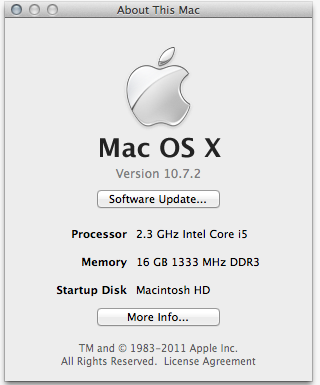
Very cool as I can now use Fusion 4 to run a multi node nested ESXi cluster (ala vTARDIS), Hyper-V and my normal Windows 7 VM all on a single machine, mine also has an SSD so it’s about as fast as it can get with that workload.
Crucial probably isn’t the cheapest place to get these from, but by the time you factor in your effort tracking down cheaper modules and running the risk that you may have to return them if they turn out to be incompatible just isn’t worth the bother IMHO.
They seem to have a 5% discount offer which may or may not work in your country – the code is BOOKFIVE which applies to DRAM, solid-state drives and a variety of accessories.
This sticker was part of an overall upgrade process, and was secondary in importance to the following sticker for anyone who regularly reads pistonheads.com 

UK School Holidays and the 21st century
Posted by on October 9, 2011
I am a parent of a 5 and 2 year old, the eldest has just started her 2nd year of primary school here in the UK.
One thing we found quite quickly last year is that it’s now pretty impossible to take a family holiday once one of the children have started school as you are beholden to the school calendar for those parents that work there is also the added complexity that pretty much all school holidays in the UK are on the same dates so employees (and thus employers) have a difficult situation ensuring business as usual cover as all the staff when all parents are forced to take the same periods of time off to attempt a family holiday.
All the holidays in the school holiday period are also at least twice as expensive because of the demand, and in the current economic climate many parents can’t simply afford to travel with their children, thus children lose out on an important part of their non-formal education.
Because of this many parents just take their kids out of school anyway to avoid the cost and risk legal action. Some schools are quite pragmatic about this, and authorise leave “on an exceptional basis” but as schools are all now driven by government targets for attendance this leaves them in a difficult position with regards to securing funding and rankings based on this performance. In fact, when we looked at schools for our daughter they said they were quite pragmatic about this sort of thing; although in reality they have since cracked down because they “need” to improve their attendance figures to support their application for academy status, which was a somewhat disappointing and short-notice U-turn.
I would like to propose a more pragmatic approach that is in-line with the current world (and not the 1900’s where a majority of children were needed to help with the farm harvest etc.).
Rather than give a 6-7 week break in the summer, reduce this to 2-3 weeks, likewise making all the other 1/2 term, easter etc. holidays a maximum of 1 week compulsory holidays to allow teachers to gain some ability to plan schedules and learning plans for all the children etc.
Then take the remaining balance of holiday and allow parents to apply for leave, with an appropriate advance-notice period (3 months), maximum of 2 concurrent weeks at a time, and on the condition that they arrange homework or similar to cover any items missed to allow children to catch-up (with appropriate afterschool support if required) as any responsible parent would do anyway.
This would be a much better fit for the current way we all work, and gives the children the benefit of learning how this sort of thing works when they get into the real world of work and possibly allow them to experience more of the world. Work/life balance is important and it should also begin at school.
Get to VMworld Europe at an EMC discounted price
Posted by on October 5, 2011
You can register for VMworld EMEA at the early bird discount price now using the link in this article https://community.emc.com/community/connect/everything_vmware/blog/2011/09/14/get-the-early-bird-discount-for-vmworld-europe–even-at-the-last-minute
You can still get this ticket at a discounted price courtesy of EMC… travel isn’t too bad at present either, there still seems to be good availability of both official and non-conference hotels in Copenhagen.
I was able to price out a 2 day, 4 night trip (fly out Monday night after work –>conference Tues/Weds –> fly back on an early AM flight Thursday) with direct flights (SAS) and hotel (CABINN City) from a London airport (LHR) for approx. £380 – it means you miss the last day of the conference, but it gets you back into London around 9am to get to the office (assuming you work near LHR).
Taking this approach you also can make the best parties (Veeam and official VMworld party). My advice = do as may hands-on labs as possible while you are on-site at the conference and take advantage of the interactive group discussions, meet the expert sessions etc. you can catch up on the presentations as you get access to most of content on-line (slide/video/audio) post-event so you can catch any sessions you miss with the compressed timescales.
Great deal if you are tight on time away from the office and you couldn’t make it to VMworld US earlier in the year
Good on EMC for providing this sponsored registration link (c.£683 after discount), which should equate to a trip cost of approx £1k (for 2 days training/networking) – you’d be hard-pressed to find a formal training course for that in the UK with equivalent deep dive content without taking you out of the office for an entire week.
HP ML115 G5 fans noisy following firmware upgrade
Posted by on October 4, 2011
As part of my UK VMUG tour preparation I am rebuilding the vTARDIS to the GA build of vSphere, part of this required updating the firmware of my ML115 G5 server.
You can download the latest BIOS upgrade here (I had to use the USB key method) as I don’t have a compatible OS installed to allow the online ROM flash process.

Now if you do just this the fans will stay at 100% and it’s very noisy!
To fix this you need to install the following BMC (Baseboard Management Controller) upgrade
Upgrade BMC firmware

And that should sort it out
vTARDIS 5 at a VMUG near you…
Posted by on October 3, 2011
I am pleased to announce that I will be giving a session on my updated vTARDIS 5 home lab environment at two upcoming VMUGs in the UK (for more background vTARDIS 5 page here)
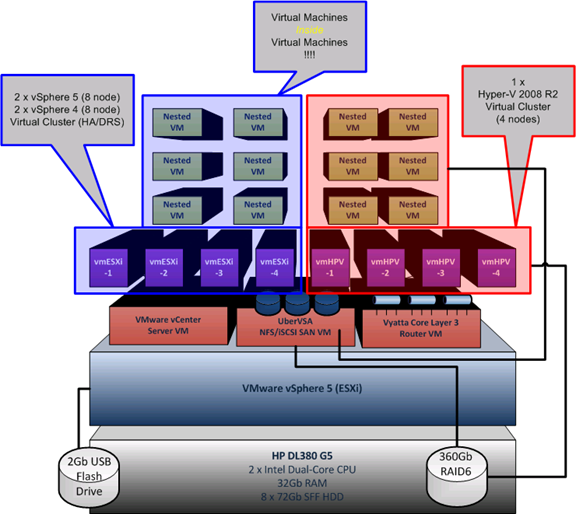
Dates and links for registration as follows if you want to come an see it in action, I’ll be doing plenty of demos and Q&A and minimal PowerPoint
11th October – Virtual Machine User Group, Mint Hotel, Leeds
Virtualisation user group with a multi-vendor slant, presentations from Andrew Fryer (Microsoft), Veeam and a number of independent consultants and community members
3rd November UK National VMware User Group, National Motorcycle Museum, Solihull
With sessions from Duncan Epping & Frank Denneman, Joe Baguley (VMware) , a number of independent consultants, community members, vendor sponsors
VCDX Peer defence panel – a 1st for VMware User Groups, dry-run your VCDX defense presentation in front of a group of peers; maybe also including some former real VCDX panellists.
see this post for more information and drop me an email (details on about page) to register your interest.
Hope to see you there, if you’re interested in a repeat of these sessions at your own local VMUG drop me a line, have case can travel (in the past it’s been to BriForum Chicago and VMworld SF) 
Peer to Peer VCDX Defense Workshop at UK VMUG
Posted by on September 1, 2011
I have an idea for a side-workshop/session at the upcoming UK VMUG in November for people that are actively following the VCDX4/5 track thus I am polling for interest via this post…
The format would be that participants get a 15-20min slot to present their design defence to a “panel” comprising of other VMUG members. including some of whom have taken (and failed) the actual defense process with a view to providing feedback and some questioning.
We don’t have any VCDX secret-sauce to share or special VMware info that you can’t find on the web, but the goal is to allow you to dry-run your presentation in-front of a friendly audience of like-minded community members before you brave it for real.
You would need to commit to come prepared with a Powerpoint version of your defence presentation, the panel won’t have seen your full design documents, and won’t be reviewing them.
I have created a poll, so if you’re interesting in participating, and will be attending the UK VMUG in November (details here) then please let me know via the poll below so I can estimate interest and seek panel members from the community.
Because we will need to arrange logistics I would ask that you only express an interest if you are planning to attend the UK VMUG and will have something to present, a significant number of no-shows will make it difficult to justify putting this on.
Please vote below (Poll is open until the end of September)
Cannot login to WordPress and password reset mail not working
Posted by on August 30, 2011
I have had a problem recently which has prevented me from accessing the admin pages on this blog, or indeed posting anything – which is a shame as it’s VMworld week and I’m “sure” you all want to know what I think  .
.
This blog is hosted on wordpress.com – the free online service, it works for me as I generally don’t have time manage the WordPress patches etc. so it’s all handled “in the cloud” for me (see, that VMworld effect!)
I was recently asked to reset my WordPress password due to a possible security compromise (see this link) which I duly did, however I was then unable to login again, so I figured maybe I had fat-fingered the password – no problem I can just reset the password and click a link in an email in the usual manner.
Umm, nope.
No matter how many times I tried this wouldn’t work – I didn’t receive any email allowing me to change my password which meant I was locked out.
I spent ages messing with my mail account to see if it was a spam issue – it wasn’t ; I had another WordPress.com blog – I could reset the password on that perfectly which eventually ruled out a mail problem.
I logged a support ticket with WordPress, after a while they came back to me but couldn’t find the email address that should be associated with my blog.
The root cause? I had used an alias for my email account when I created my blog, rather than my normal e-mail account simon@mydomain.com rather than firstname.surname@mydomain.com which I normally use as my email address.
I recently moved mail service and it seems the simon@ alias was dropped in the process, thus the password reset emails were lost in the process – it was easy enough to re-add the mail aliases on my mail provider’s systems and I could then receive the password reset emails.
So, moral of the story – be consistent in the email address you use when setting up online services (or at least keep a record, and keep them working forever) – not entirely sure why I chose to use a non-standard alias, but I did.
Duh!
Normal service has now been resumed.

 Virtualization, Cloud, Infrastructure and all that stuff in-between