Virtualization, Cloud, Infrastructure and all that stuff in-between
My ramblings on the stuff that holds it all together
vSphere App for iPad Download
Posted by on October 26, 2010
Whilst we all await the “official” vSphere administration app for the iPad, as previewed at VMworld I found myself needing something to control my home vSphere lab environment from my shiny new iPad.
The iPad has now integrated itself as the device of choice with my wife & kids and is in regular use as a web-browser and media-player in the living room at home rather than laptops so this seemed like a logical extension
A quick browse of the iTunes store turned up iDatacenter, whilst not cheap at 8.99 GBP it works well in my testing as a basic administration interface to my lab and allows me to reboot guests/hosts as well as kick off vMotion and storage vMotion tasks.
It doesn’t offer a remote console or any historical performance graphing but it is good for basic administration tasks and looking at current statistics like CPU, memory and disk space – which is handy as my home lab currently has 21 ESX hosts and 54 “production” virtual machines 
The following photo shows a quick view of the interface, my only minor gripe is that it doesn’t seem to recognise clusters as a management object – just individual ESX hosts or virtual machines and it can be a little bit slow at times, but those aside it’s worth checking out if you have this sort of requirement.
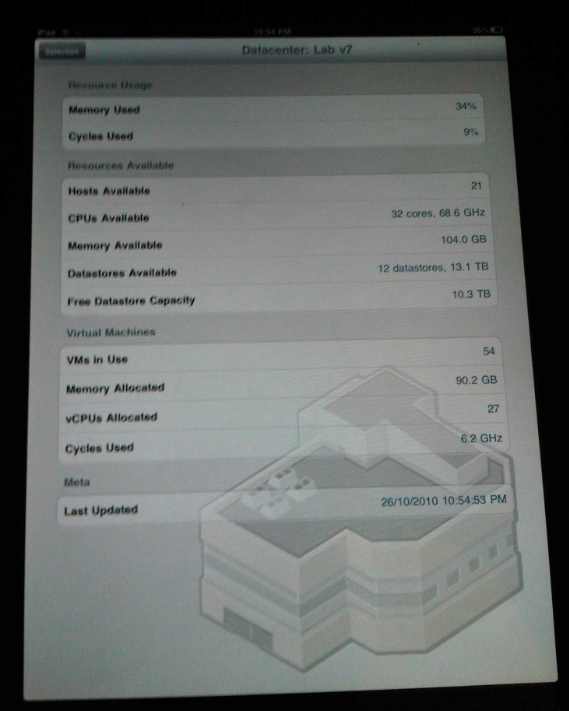

The application home-page is here http://nym.se/idatacenter/ and there is a video demonstrating the key features.
vTARDIS wins Best of Show at VMworld Europe 2010
Posted by on October 14, 2010
Wow, what can I say, my vTARDIS project has won 2 awards at VMworld Europe 2010 in the following user categories;
There is some good coverage of the VMworld event on the the searchVirtualDataCentre.co.uk site here

I’d like to thank <#insert <paltro/gwenneth.h>.. 🙂
But seriously I appreciate this recognition for the vTARDIS project which has burnt many of my brain-cells and personal-time over the last 12-months, as well as airport-stress as I had to convince the TSA that I wasn’t some 24-inspired nut-job shipping a suitcase-nuke round the US with me for BriForum, the Charlotte(US) VMUG and various London, UK VMUGs.
Here is a picture of it in it’s off-the-shelf Marks & Spencer shipping container (a.k.a suitcase) note:

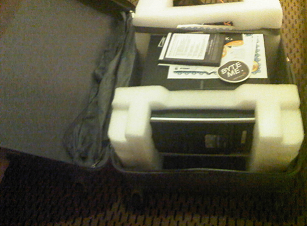
Note cool “my datacenter is bigger than yours” sticker courtesy of Solarwinds
Trying to understand what vTARDIS is is hard for many people, and it’s even harder to explain sometimes, but the concept is basically trying to build a complex, enterprise type vSphere implementation on as little hardware as possible for testing/training, but hopefully the following diagram (and the original post) explain it better at a technical level

That-said, I particularly like how TechTarget (who sponsor the awards) phrase it..
"This is the kind of bonkers-crazy stuff that has made the virtualisation community the bedrock of innovation. The only limitation is people’s imagination, and Gallagher’s vTARDIS demonstrates imagination in spades."
Winner: vTARDIS (Transportable Awfully Revolutionary Data Centre of Invisible Servers)
IT project owner: Simon Gallagher
Vendors and technology used: VMware Inc. vSphere 4.0 and 4.1
Vyatta Core
Openfiler
Microsoft Windows Server 2008 R2
Hewlett-Packard Co. ML115 G5
Advanced Micro Devices Inc. (AMD) quad-core processors
IT project: Gallagher’s lab features low storage latency and solid performance. Gallagher’s configuration also pushes beyond the "official" use of VMware technology by using solid-state drives to reduce disk I/O and "nested VMware ESX" instances, which give the appearance of owning many ESX hosts when the entire infrastructure actually sits on one physical box. His configuration runs eight virtual ESX hosts and nearly 60 virtual machines on just the one physical server, rather than multiple PCs and storage appliances.
What the judges said: "No other entry showed the same degree of doing a lot with so little."
I hope it stands as an example of how flexible VMware technology is and what you can do with a bit of imagination and some good, hard-graft.
But things don’t stand still in the IT world, and nor do they in my mad-scientist home-lab, look out soon for posts on further developments which are running now;
vTARDIS v2 : 20 node PXE booting, DHCP configured ESXi cluster with powershell provisioning script on a single physical 500GBP server.
vTARDIS.cloud : 3 x 20 node ESXi cluster, DPM enabled, VMware vCloud Director, Chargeback, EMC Celerra VSA, on 3 x physical 300GBP hosts plus iomega IX4-200, 2-node Management cluster pod.
Whilst in the last couple of weeks I started working directly for VMware in the cloud practice, my vTARDIS project was started about a year ago and was demonstrated at many VMUGs and events (including VMworld SF 2010) in that time.
All of the equipment, power, space, brainpower and cooling for this project have been paid for entirely out of my own pocket/cranium, I do not receive any kind of sponsorship for this work from my current or previous employers, and it has been completed on my own (personal) time, so to invoke the Paltro convention I’d definitely like to thank my family for their tolerance and patience whilst I have gnashed my teeth at powershell and danced way beyond edges of supportability, and in many cases physics!
Stay tuned, so much more arcane geekery to come…!
Importing a PST file into Outlook 2011 for Mac
Posted by on October 4, 2010
I have been a long-term Outlook user and I’m a serial information hoarder 🙂 so I have a calendar and contact set that goes back a LONG way in time, in a previous life I was also an Exchange/AD consultant so I see the benefits of a server-side mailbox store (centrally held data with local disposable replicas, search, access anywhere etc.).
As well as my work schedule it has all my regular personal appointments, kids school schedules etc. – for simplicity’s sake I only keep one calendar, I don’t have a separate work and personal calendar – your mileage may vary, but this is the way I work.
Having recently moved companies and moved from Wintel/Office to a Mac with the new Outlook 2011 I needed a way of importing my PST-archived calendar to my new Exchange store (calling it a mailbox doesn’t seem to do it justice anymore as it contains calendar, contacts, etc as well now).
I also use a BES-connected Blackberry so I want it to sync my calendar to my device via the BES and a server-side calendar means it’s accessible using OWA from any PC.
This is pretty straightforward for normal Windows Outlook as you just import the .PST and choose the new server-side store/calendar as the target.
However, it seems that the built-in import function in Outlook 2011 won’t import calendar data from a .PST file directly to an Exchange server-side store, it will import it but it only keep it in a separate locally held calendar, nor can you cut & paste or sync or do anything to move the contents from “calendar – on my computer” into the server-side calendar.
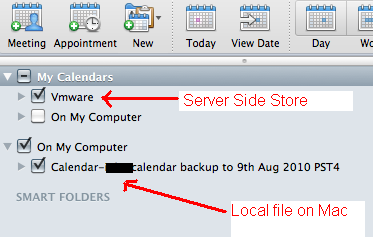
My “VMware calendar” (note: not my capitalization :)) is the server-side one but I can’t import directly to it, it always goes into “On my computer” which I can only assume is held somewhere client-side.
Whilst I can select both (as shown above) and they get overlaid on the calendar view this is only accessible when I use my Mac and thus won’t be available via OWA, or on my Blackberry.
So – the only solution I found was to use a Windows VM under Fusion with Office 2010 installed and use it to import my calendar contents, thus it synced back down to my Outlook 2011 offline store and onwards to my Blackberry via the BES.
This seemed a sort of backwards process so I would love to know if anyone has found a better native way to do this….?
No Response from vCD Web Interface
Posted by on September 21, 2010
I encountered a problem recently in my vCD lab environment where the cell server wasn’t responding to any HTTP requests following some re-configuration work.
After some investigation I found my Oracle back-end DB server had fallen over (this was because it’s a VM and I un-presented its storage which BSOD’d the OS (caveat:Lab setup!) so I rebooted it and not being an Oracle DBA, it looked like the Oracle services had all started correctly but my cell still wouldn’t initialize.
For reference the /opt/vmware/cloud-director/logs/cell.log file looks like this when it isn’t happy (IP’s changed to protect the innocent – me :));
|
[root@cloud ~]# tail /opt/vmware/cloud-director/logs/cell.log *DEBUG* Running task Update: pid=org.apache.servicemix.features *DEBUG* Scheduling task Fire ConfigurationEvent: pid=org.apache.servicemix.features *DEBUG* Running task Fire ConfigurationEvent: pid=org.apache.servicemix.features *DEBUG* Scheduling task Update: pid=org.ops4j.pax.url.mvn *DEBUG* Running task Update: pid=org.ops4j.pax.url.mvn *DEBUG* Scheduling task Fire ConfigurationEvent: pid=org.ops4j.pax.url.mvn *DEBUG* Running task Fire ConfigurationEvent: pid=org.ops4j.pax.url.mvn Application startup begins: 9/21/10 9:54 AM Successfully bound network port: 80 on host address: 192.168.xx.241 Successfully bound network port: 443 on host address: 192.168.xx.241 [root@cloud ~]# service vmware-vcd restart |
The basic test is to check that the cell server can talk to the Oracle DB where the configuration is stored (the cell server is essentially a stateless web-app in the vCD architecture), this goes over port 1521/tcp – so a quick telnet check from the cell server to the back-end DB proved that this wasn’t working
|
[root@cloud bin]# telnet mgt-db01.v0id.ads 1521 |
When looking at my Oracle server, (which is on Windows in my lab (sorry!)) the OracleOraDB11g_home1TNSListener service didn’t start up correctly and wasn’t running.
I did a manual start of this service, then restarted the vmware-vcd service on my cell server
|
[root@cloud bin]# service vmware-vcd start |
and then checked the cell.log file, this time I saw more progress until it started correctly (successful initialization shown below)
|
[root@cloud bin]# cd /opt/vmware/cloud-director/logs/ [root@cloud logs]# cat cell.log *DEBUG* Scheduling task ManagedService Update: pid=org.ops4j.pax.url.mvn *DEBUG* Scheduling task ManagedService Update: pid=org.ops4j.pax.url.wrap *DEBUG* Running task ManagedService Update: pid=org.ops4j.pax.url.mvn *DEBUG* Running task ManagedService Update: pid=org.ops4j.pax.url.wrap *DEBUG* Scheduling task ManagedServiceFactory Update: factoryPid=org.apache.servicemix.kernel.filemonitor.FileMonitor *DEBUG* Running task ManagedServiceFactory Update: factoryPid=org.apache.servicemix.kernel.filemonitor.FileMonitor *DEBUG* Scheduling task Update: pid=org.apache.servicemix.management *DEBUG* Running task Update: pid=org.apache.servicemix.management *DEBUG* Scheduling task Fire ConfigurationEvent: pid=org.apache.servicemix.management *DEBUG* Running task Fire ConfigurationEvent: pid=org.apache.servicemix.management *DEBUG* Scheduling task Update: pid=org.apache.servicemix.transaction *DEBUG* Running task Update: pid=org.apache.servicemix.transaction *DEBUG* Scheduling task Fire ConfigurationEvent: pid=org.apache.servicemix.transaction *DEBUG* Running task Fire ConfigurationEvent: pid=org.apache.servicemix.transaction *DEBUG* Scheduling task Update: pid=org.apache.servicemix.shell *DEBUG* Running task Update: pid=org.apache.servicemix.shell *DEBUG* Scheduling task Fire ConfigurationEvent: pid=org.apache.servicemix.shell *DEBUG* Running task Fire ConfigurationEvent: pid=org.apache.servicemix.shell *DEBUG* Scheduling task Update: pid=org.apache.servicemix.features *DEBUG* Running task Update: pid=org.apache.servicemix.features *DEBUG* Scheduling task Fire ConfigurationEvent: pid=org.apache.servicemix.features *DEBUG* Running task Fire ConfigurationEvent: pid=org.apache.servicemix.features *DEBUG* Scheduling task Update: pid=org.ops4j.pax.url.mvn *DEBUG* Running task Update: pid=org.ops4j.pax.url.mvn *DEBUG* Scheduling task Fire ConfigurationEvent: pid=org.ops4j.pax.url.mvn *DEBUG* Running task Fire ConfigurationEvent: pid=org.ops4j.pax.url.mvn Application startup begins: 9/21/10 2:33 PM Successfully bound network port: 80 on host address: 192.168.xx.241 Successfully bound network port: 443 on host address: 192.168.xx.241 Application Initialization: 9% complete. Subsystem ‘com.vmware.vcloud.common.core’ started Successfully connected to database: jdbc:oracle:thin:@mgt-db01.v0id.ads:1521/cloud Successfully bound network port: 443 on host address: 192.168.xx.242 Successfully bound network port: 61616 on host address: 192.168.xx.241 Successfully bound network port: 61613 on host address: 192.168.xx.241 Application Initialization: 18% complete. Subsystem ‘com.vmware.vcloud.common-util’ started Application Initialization: 27% complete. Subsystem ‘com.vmware.vcloud.consoleproxy’ started Application Initialization: 36% complete. Subsystem ‘com.vmware.vcloud.vlsi-core’ started Application Initialization: 45% complete. Subsystem ‘com.vmware.vcloud.vim-proxy’ started Successfully verified transfer spooling area: /opt/vmware/cloud-director/data/transfer Application Initialization: 54% complete. Subsystem ‘com.vmware.vcloud.backend-core’ started Application Initialization: 63% complete. Subsystem ‘com.vmware.vcloud.ui.configuration’ started Application Initialization: 72% complete. Subsystem ‘com.vmware.vcloud.imagetransfer-server’ started Application Initialization: 81% complete. Subsystem ‘com.vmware.vcloud.rest-api-handlers’ started Application Initialization: 90% complete. Subsystem ‘com.vmware.vcloud.jax-rs-servlet’ started Application initialization detailed status report: 90% complete com.vmware.vcloud.backend-core Subsystem Status: [COMPLETE] com.vmware.vcloud.ui.configuration Subsystem Status: [COMPLETE] com.vmware.vcloud.consoleproxy Subsystem Status: [COMPLETE] com.vmware.vcloud.vim-proxy Subsystem Status: [COMPLETE] com.vmware.vcloud.common-util Subsystem Status: [COMPLETE] com.vmware.vcloud.ui-vcloud-webapp Subsystem Status: [WAITING] com.vmware.vcloud.rest-api-handlers Subsystem Status: [COMPLETE] com.vmware.vcloud.common.core Subsystem Status: [COMPLETE] com.vmware.vcloud.vlsi-core Subsystem Status: [COMPLETE] com.vmware.vcloud.jax-rs-servlet Subsystem Status: [COMPLETE] com.vmware.vcloud.imagetransfer-server Subsystem Status: [COMPLETE] Application Initialization: 100% complete. Subsystem ‘com.vmware.vcloud.ui-vcloud-webapp’ started Application Initialization: Complete. Server is ready in 2:35 (minutes:seconds) Successfully initialized ConfigurationService session factory Successfully started scheduler Successfully started remote JMX connector on port 8999 [root@cloud logs]# |
And I could now log in to the web UI of my vCD cell.
Top Virtualization Blog Voting Time
Posted by on September 14, 2010
Eric Siebert is looking for votes for the top virtualization blogs on vsphere-land.com. I met Eric in the flesh a couple of weeks ago at VMworld when we did a joint session on home-lab environments, featuring the vTARDIS (demo videos will be uploaded this week hopefully).
If you feel like voting for me, feel free to follow this link 🙂

Please bear in mind, that whilst I now work for VMware, all of these posts were written way before that was even an option, and I’ll keep on blogging despite being borg’d 🙂
Here’s a quick sample of the posts I have written up this year that I thought were interesting, I like to think I provide some interesting food for thought, if nothing else 🙂 I was quite surprised how many posts I have done this year when looking back through WordPress, that would certainly explain where my evenings went this year..!
The vTARDIS
Hardware Emulators… please
https://vinf.net/2010/04/26/hardware-vendors-release-the-emulators-to-the-masses-please/
Where next for VMware Workstation?
https://vinf.net/2010/04/28/where-next-for-vmware-workstation/
Augmented Reality
https://vinf.net/2010/04/29/augmented-reality-tftlondon/
My VCE/VCD310 Exam Experiences
https://vinf.net/2010/06/22/vce310-and-vcd310-and-the-path-to-vcdx-exam-experiences/
Software Licensing for vCloud (note: written before I started at VMware’s cloud team :))
https://vinf.net/2010/03/29/vmware-licensing-for-the-vcloud/
PowerShell to create lots of sequentially named linked clones
FusionIO Solid State Drive and VMs
vApp sprawl in the cloud
Posted by on September 1, 2010
This question came up in a session at VMworld, if vApps are being used to deploy entire self-contained and silo’d application stacks won’t that lead to massive VM sprawl. Because cloud deployments are less considered and are a result of quick instant gratification provisioning in the private/public cloud by business units who don’t necessarily understand IT services and the burden of operations, integration, etc.
Well, yes – and that’s an interesting point for a number of reasons which apply equally to private and public cloud;
vApps encourage less shared application services
This is both a good and a bad thing, good in the sense that less shared typically means higher SLA’s are possible and change is simpler because there are less interdependencies to consider. But, bad in the sense that it increases the overall number of machine instances required to support all of your IT services.
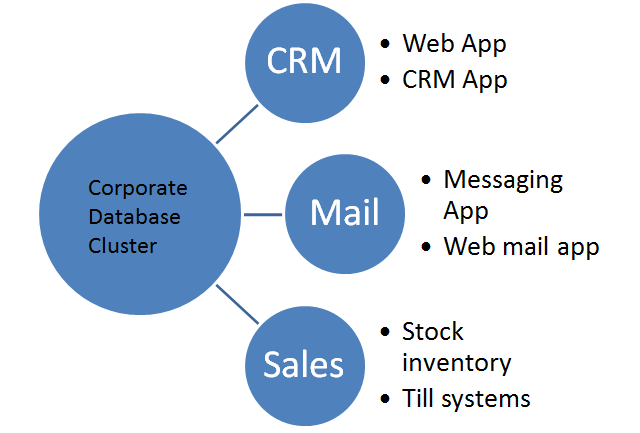
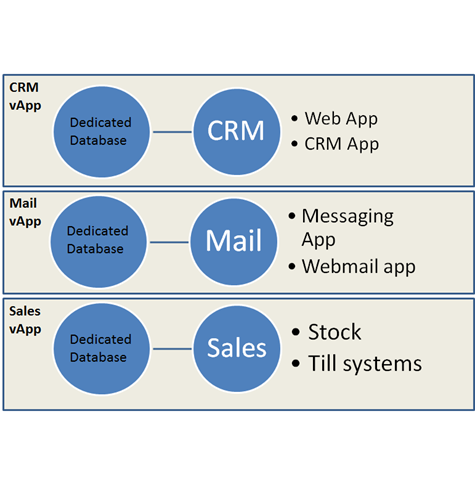
Traditional Shared application Services vs. vApp
Guest Software Licensing Increase
When you consider you will normally have to license the software running in each vApp, providing a shared corporate database cluster is typically a way of providing an HA Oracle or SQL database service in a cost-effective manner because those applications are expensive and more cost-effective to license by CPU in larger environments.
Software licensing needs to change for the cloud, the move to a more consumption/rental based model is underway for most major vendors; those that don’t will die.
Guest Management overhead
Now a vApp may have it’s own DNS, domain controllers, databases, web services, applications VMs each of these will need to be patched, maintained, monitored etc.
Automation solves a lot of this and is the holy grail but particularly when VUM is going to have it’s guest patching functionality removed in future releases this could be a concern.
However…
If you think about it the costs in the vApp model are more controllable and accountable – yes you may have more machine instances than you did in the more traditional IT world but you know exactly who is using it, how much of it they are using (the charge units are more easily quantifiable) and they can easily stop using it or move it to a lower SLA tier if it’s costing too much.
The control/decision of cost/benefit is back with the consumer (internal business unit) rather than being dictated as a fixed fact by IT – moving the consumer to a different service tier is MUCH harder to do with traditional shared services, in the cloud world it’s configuration from a shared pool of infrastructure.
if a vApp isn’t used anymore it’s easier to archive the data and destroy it, it’s much harder to disentangle a tenant from a traditional shared application service like CRM or an intranet where customisations or extra components may have to remain in-situ because just uninstalling them poses a risk to overall service.
It also has the advantage of potentially providing a higher net SLA, there are less inter-dependent parts across the enterprise so less scope for things to break as a result of subtle incompatibilities.
Likewise you can clone an entire vApp in-situ to a test or DR environment with data and configuration in-place and run it in isolation from the production copy to fully test changes, this is much harder with traditional IT shared application services.
So in conclusion; Yes it could lead to some degree of silo’ing of application services which is somewhat at odds of what virtualization has done in breaking down and consolidating these silos from an infrastructure perspective. Strategically, software architecture frameworks will make applications move to a different deployment model that is more “cloud friendly” and less tied to machines, operating systems and infrastructure.
The net benefit is choice and cost control for the end-user.
vApps moving centre-stage
Posted by on September 1, 2010
vApps were introduced as part of the vSphere 4 release but were largely a forgotten area of functionality until now.
The concept of a vApp is as a bar-code for an IT service, where that service consists of a number of inter-dependent virtual machines containing applications that provide a service – for example a website. the vApp contains a number of virutal machines and is tagged with required levels of service and other pertinent information like start-up order, dependencies and required networks etc. to allow them to run successfully.
For example a corporate Sharepoint service could be grouped and deployed as a vApp containing relevant domain controllers, DNS, SQL and MOSS VMs to allow it to run – from a VMware perspective you manage and deploy the servers as a whole vApp rather than individual VMs.
With the vCloud Director (vCD) announcements it’s clear what VMware’s intention was; vApps are core to the service catalog concept for vCD, you don’t just pick virtual machines you can pick ready-to-use and self-contained application stacks to deploy and un-deploy.
However, if you think about it, it’s not as simple as it might seem once you go beyond the infrastructure level as you’ll still need to do in-guest engineering and automation to make this sort of deployment model successful but it’s a good foundation to work from.
This type of rapid provisioning and the level of in-guest automation required to make it useful can be problematic with Windows guest OS’es – there are still tight dependencies on domain controllers, forests and domain SIDs to get around for many applications. As more and more Microsoft applications move to PowerShell at the core this becomes more feasible but architecturally speaking it’s a problem for anything other than trivial applications.
The guest automation story is much better for Linux VMs deployed as part of vApps as scripting and automation is at the core of Linux deployment and always has been but it’s not done for you, vCD just handles the {virtual} infrastructure provisioning; tailoring and automating the resultant guest OS images is up to you but there is much more precedent on this space.
Strategically, Springsource makes a lot of sense for these sort of container deployments, the use of application frameworks breaks the dependencies on the underlying OS and makes applications much more flexible and portable, but this is an evolution away from current enterprise applications.
VMworld 2010 SF – Day 1
Posted by on August 31, 2010
I took a different approach to VMworld this year, usually I try to cram in as many sessions as possible and don’t usually spend much time on the hands-on labs. – this year I am planning to do a 60/40 mix of labs and sessions. Because the sessions are audio recorded I can review them at a later date and make the most of the hands-on labs whilst I’m on-site.
From what I saw today queues for sessions can be big, although if you get there early it’s not too bad, but this isn’t a new problem for VMworld I don’t think they’ll solve it unless they start to move to Tech-Ed scale venues. with 16k attendees at this VMworld in the US maybe the tipping point is coming, although they have added Moscone West to the facility this year which has helped a lot.
Whilst session queues may have been long the hands-on labs have been pretty quiet in Moscone West with no major queues and it’s open 8am until 10pm Monday and Tuesday so I think I’ll focus on that.
There wasn’t a main keynote on day 1, I quite like this as in VMworld’s of old there was a general keynote on day 1 which was more marketing/product announcements with the more interesting technical keynote and demos on Tuesday.
I did all of the labs for an upcoming cloud related product that cannot be named until tomorrow – which is funny as you can take the cloud director (oops :)) labs today, which is going to be useful as I’ll be working with it when I start at VMware next week 🙂
I also did my joint session with Eric Siebert and Simon Seagrave, we ran out of time for most of the demos I had lined up so I’m going to upload them to YouTube in the next couple of days and post them on my blog if you are interested to see how the vTARDIS performs and is configured.
I look forward to the keynote tomorrow and will try and blog as much as possible – although there are certainly a lot of people doing twitter this year, so maybe just click this link and watch the #vmworld hashtag 🙂
Come see the vTARDIS at VMworld on Monday
Posted by on August 30, 2010
I am presenting a joint session on affordable lab/SMB environments with Eric Siebert and Simon Seagrave on Monday at 12:00pm, Moscone West room 2007 (V18328: Building an affordable vSphere environment for a lab or small business).
I am covering nested ESX functionality, whilst I haven’t physically transported the vTARDIS all the way to the US this time I am doing demos (hopefully live), so if you want to see how to build an 8 node cluster with shared storage and layer 3 networking on a single low-cost server this is the session for you
This nested ESX functionality that in in vSphere 4 (unsupported as far as I know.. but it works) is what enables most of the hands-on labs.
vTARDIS screenshot – each vmesxi-nn.lab node is really a virtual machine (see the manufacturer field below), but vCenter doesn’t care, and they are all running on a single $600 PC server with just 8Gb of physical RAM (over commit – yeah!)

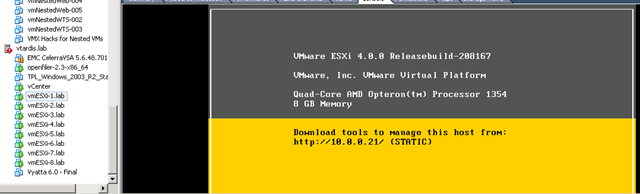
If you want to see how to do this cool stuff and a whole lot more, come to the session 🙂
VMworld 2010 Hands-on Labs
Posted by on August 29, 2010
Along with a number of other bloggers I was lucky enough to get a sneak preview of the VMworld 2010 labs setup today.
Wow, the setup is impressive, there is a massive self-paced labs room in Moscone West, offering 480 multi-lab seats, unlike previous years there are no specific areas for each lab, each workstation is self-contained and connects you your chosen lab from the "Lab Cloud" – which will be much better in managing the load and waiting times for popular labs.
You will have to register at the entrance and your session will be allocated to your badge number, there is a comfortable waiting area whilst you are called forward to do your labs; combined with the fact that each seat can be for any lab this is a great idea for managing foot-fall and waiting times.
There are a number of labs sessions pre-provisioned and ready to go and some will be provided on-demand when you are logged on, the ops team will be keeping a close eye on demand and can dynamically adjust the number of pre-provisioned labs to reduce start-up times for popular labs.
There are also labs upstairs where a subject matter expert (or “lab captain”) will run an audience through a presentation of the lab session and will be able to take Q&A and provide more information on the background.
The lab cloud is a heavily customised Lab Manager/vSphere environment offering up 30 different lab setups – each lab session runs from a dedicated vPod – a group of virtualized ESX, AD, vCenter hosts built from a totally automated template and accessed by a thin-client; making heavy use of virtualized ESX hosts (ala vTARDIS, but on a massive scale :))
The back-end infrastructure providing the lab cloud is split across 3 sites, 2 external DC’s and an on-site facility – the lab is closely monitored and automation deals with distributing load across the 3 facilities with resilience – the same infrastructure will be scaled down and will support VMworld Europe, although VMworld Europe 2010 will only have approx 1/2 the number of self-paced lab seats.
As you’ll see from the picture below the self-paced labs room is large, the podium in the middle is the operations centre where VMware staff co-ordinate and manage the labs environment, statistics will be relayed on realtime on the large projection screens.
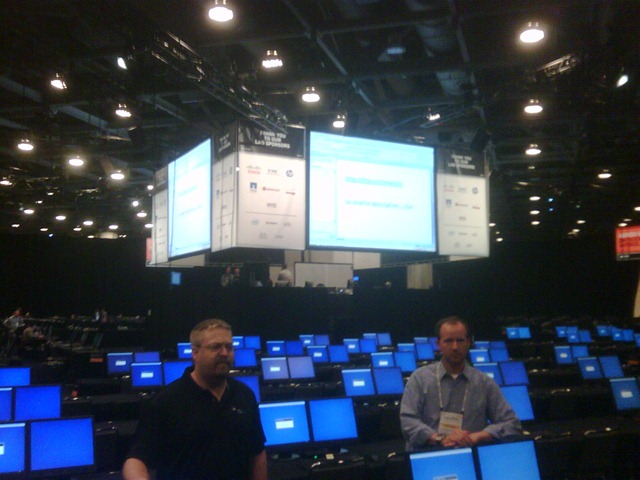
Each lab workstation has a help button where you can request help from the on-site subject matter experts, I like this model better as it means the SMEs can be dispatched anywhere in the room to help out whilst allowing the maximum number of seats to be balanced across the available labs "on-demand"
I’d strongly encourage you to check out the labs, remember the normal presentation sessions are audio recorded (keynotes are usually video’d) and slides are available post-VMworld but labs are not, so this is your only chance to go hands-on – although the team know this is high on the list of "wants", the .PDF lab manuals will also be made available for download post-VMworld.
Interesting stat of the day, the environment will be creating/destroying about 5,000 virtual machines per HOUR, and over the course of the week they expect to handle 75-100,000 virtual machine create/destroy operations.

 Virtualization, Cloud, Infrastructure and all that stuff in-between