Virtualization, Cloud, Infrastructure and all that stuff in-between
My ramblings on the stuff that holds it all together
Cohesity at vRetreat
Posted by on March 18, 2017
Last month I had the luck to be invited to the vRetreat event put together by Patrick Redknap, this was a day to get some bloggers face to face with some presenters looking at some cool, new tech.
In the interests of disclosure I should point out that there was a Porsche track day, food and a hotel involved. On the day we were very privileged to have 1:1 instruction around the purpose built track at Silverstone race course (you can pay a visit for this yourself http://www.porsche.com/silverstone/). There is no directive on what content I have to write or pressure to write something positive. Evidence of this is that it was over a month ago and work commitments have meant I’ve not had chance to write a blog post about the event until now, Patrick was very cool about it.
This delay did, however give me some time to give some serious thought to the info we received during the day, Veeam, Zerto and Cohesity presented on the day. I’ve worked hands-on with Zerto and Veeam before but Cohesity were new to me and it piqued my interest – the delay in writing this blog post meant I thought about some very cool real-world use-cases.
As a side note; Zerto also demonstrated something very cool, they have a ready to use appliance in Azure, I’ve been doing a lot of experimentation with Azure recently and whilst they were explaining some of the finer points I managed to deploy it before the end of the session! Now that’s the real power of the cloud! A little disappointing that the Azure ready to run appliance at the time was a Windows VM with some links, but I understand this has was due to some license constraints and the full appliance will be ready to download from Azure soon.
Anyways, back to Cohesity, who bill themselves as a Hyperconverged platform for secondary storage. I have to say I rolled my eyes a little at the mention of “another” hyperconverved platform, it’s secondary storage – everyone de-dupes etc. Jam in more capacity and shove some data on it to forget about it, or let it rot. We spent a lot of time talking about storage functionality that to be honest is plain storage, But I have to say regardless of how their magic is served up software or hardware offering – the last 5mins were the coolest part; it has a very cool plug-in architecture to allow Java apps to run on the appliance itself, just think about that analytics, search, applications themselves running on the storage itself. Now that is the cool bit, and it’s USP as far as I’m concerned, it’s new and still being developed, but bear with me..
A long time ago I worked for a company that did video on demand solutions, about 10 years ago one of the most interesting (but now defunct) vendors I worked with had scale-out storage solution (think cheap, x86 pizza boxes with very clever software way ahead of its time) that could store large amounts of video content but also transcode it to different formats at the same (or near-realtime) something that is very computationally expensive; storage is boring (sorry, but it is..) but if you can make it do something with the data it holds at the same time then to me, it’s very clever.
Cohesity offers this with its plugin and analytics plug-ins, what if you have a compliance use-case and you need to prove to regulators that all your data doesn’t contain credit-card numbers or other Personally Identifiable Information (PII); scanning large volumes of data with an application can only run a) periodically on a schedule, and b) at the speed of NFS/SMB etc. as data has to be read off the array, scanned, and in some cases written back. in this case the storage can do it efficiently on the array itself using all that spare CPU power.
Plug that together with an API on the Cohesity array or via the plug-in application and you not only have a really powerful scale-out storage device, but you have an application with vast amounts of data adjacent and on-tap (sorry, rubbish NetApp joke).
I like to think I maintain an even, unbiased professional line and I guess like me you’ll eye start-up storage vendors with the evil-eye as there is a risk that they go belly-up leaving you with an un-supportable storage headache that you need to replace at massive cost and migrate off, but I think this one has legs and something that nobody else on the market has, and to me that’s a reasonable bet they’ll get snapped up or live on their own.
Anyways, back to the Porsche bit. As a life-long Porsche fan the Porsche Experience is a great day out and you get to do some cool stuff like skidding about and a wet skidpan to test your driving skills (verdict: needs work!). I’ve always been a sceptic of those new fangled J pretend automatic/sort of manual gearboxes in sports cars after a bad investment in a BMW e46 M3 with an SMG gearbox (don’t do it kids). But a couple of hours of proper driving with a PDK gearbox is starting to convert me. My wife said specifically to me when I left the house for this event to not come back wanting to change my car, err..
Also got a ride in Joe Baguley’s Tesla Model X… those things are like rocket ships!
Sad post-note: Several days of very creative man-maths have not yet resulted in me being able to buy one, back to the grind-stone Gallagher.
if you want to get a flavour of what went on, check out this video
Press F8 to enter CIMC configuration does not work on Cisco c-class rack mount server
Posted by on September 18, 2014
I encountered this today, on a system that is not managed by UCS manager, to setup the CIMC (HP iLo equivalent) you need to connect to the physical console with a screen and keyboard to set the initial IP address.
You do this by pressing F8 at the BIOS screen, however I couldn’t get this to work
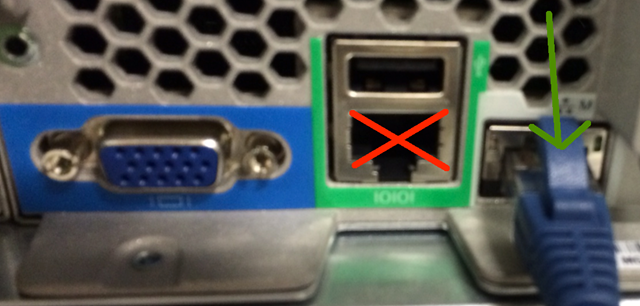
the fix was simple, if a bit weird – I had accidentally cabled the management NIC to the serial console port on the back of the server, if you do this – it recognises you pressing F8 but then boots to a flashing prompt – I assume this is because it switches to some sort of serial console interface unstead of displaying the UI on the screen.
for reference – connect the Ethernet management cable to the correct NIC! as below
Do you want to know what VMware has planned for its next release?
Posted by on July 10, 2014
Then you need to come to the London VMUG on July 17th (in London, UK), we are very lucky to be one of the few VMUGs that are able to deliver NDA content to VMware customers.
As this is NDA type content There are some caveats as to who can attend – as listed below, but for those that aren’t eligible we have something else planned that will definitely be of interest.
And, we also have the usual array of awesome COMMUNITY, VMware and sponsor technical content. e.g no sales spin, no men in shiny suits and bonus schemes, real. interesting. relevant. technical content for YOU (ok, and me too!).
Sign up and view the full agenda here: http://www.vmug.com/p/cm/ld/fid=6757
As I’m sure you understand VMware closely guard their roadmap and NDA content, we are very lucky to be able to deliver it at a VMUG, but there are some rules to prevent NDA material being leaked. If this happens VMware won’t be willing to help us deliver this content in future – so it’s in your interest to help safeguard the content – please respect this and the community spirit VMUG represents. You will have to sign a one-way personal NDA prior to being allowed entry to the NDA session.
All official VMware partners can request the content via their account manager at VMware, but to help make it clear we’ve put together an FAQ as follows.
- I am an employee of a commercial or public sector organisation and we buy VMware products, or plan to, can I go the NDA session? Yes.
- I’m a contractor and I work for a customer/consultancy, can I go to the NDA session? Yes
- I work for a storage/network/server vendor, and am a VMware partner can I go to the NDA session? No. but you can request a private session via your VMware partner manager.
- I work for a software vendor, and we are a VMware partner; can I go to the NDA session? No, but you can request a private session via your VMware partner manager.
- I work for a reseller/consultancy who are a VMware partner, can I go the NDA session? No, but you can request a private session via your VMware partner manager.
- I work for a cloud/managed/hosting service provider and we are VMware partners, can I go to the NDA session? No, but you can request a private session via your VMware partner manager.
This list isn’t exhaustive, if in-doubt of your status, bring a business card on the day andVMware can make a call, but please don’t be disappointed if we can’t admit you; we have an interesting update on VMware’s vision and strategy.
How to Remove LinkedIn contact birthdays from your iPhone Calendar
Posted by on May 2, 2014
Contacts of LinkedIn, I love you all. honestly I do – but there are a lot of you.
When I added the LinkedIn app to my iPhone it “helpfully” populated by iPhone calendar with everyone’s birthday – which is kind of a problem when you’re challenged for screen estate on the iPhone, and frankly as much as I would love to send you all a card and gift it’s not going to happen, so it’s a bit annoying.
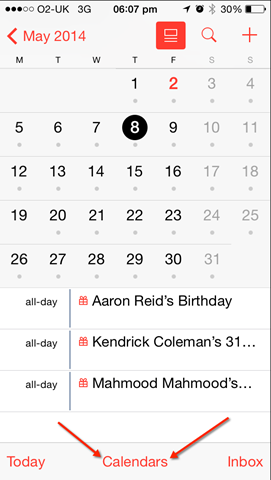
You can remove these by tapping on Calendars at the bottom of the Calendar display.
Then scroll down past you usual calendar settings, look for “other” and uncheck Birthdays.
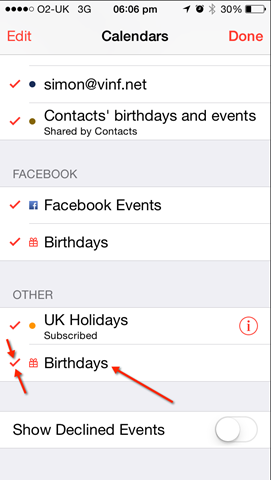
And presto, they’re gone.
*PS Kenny – I’ll buy you a bourbon next time I see you instead 🙂
Make a Windows application use OS X full screen mode when using Coherence Mode in Parallels
Posted by on April 22, 2014
This has been bugging me for ages.. but it turns out it was there all the time! I have a Mac with the latest version of Parallels desktop (sorry VMware, Fusion + unity was getting too buggy for me).
I use coherence mode so I can run windows apps and OS X apps seamlessly side by side, but ever since Lion came out with the OS X full screen mode (and then mountain Lion actually made it useful) I have been using full screen mode for certain OS X apps when not using my external screens as it makes the most of my 13” screen.
However, I couldn’t quickly figure out how to make Windows apps go OS X full screen (and thus be visible in Mission Control/expose or whatever it is called now) so still got the task bar at the top and couldn’t 3-finger swipe between them (very handy feature) also a maximised Windows application covered over OS X apps on my primary desktop so I had to tab around to find it.
You can actually make individual Windows apps use OS X full screen with Parallels using a key-combination. When you have the Windows application active press CMD-CTRL + F and presto it’s using OS X full screen and you can see it in Mission Control and 3-finger swipe between them (the Outlook Window in the screenshot is a Windows app in coherence mode) or you can use the view menu as shown below to switch in/out of individual applications.


Is your local VMUG your launchpad to a VMworld session?
Posted by on April 10, 2014
My main role in helping to run the UK & London VMware User Group (VMUG) is finding, arranging, press-ganging and cajoling people into giving sessions at one of our quarterly VMUG meetings – I look for primarily for solid, interesting content, especially if it’s “outside of the box” and secondly a professional speaker – I don’t care who you are or if the last presentation you delivered was when you played the carrot in the cub scout christmas play aged 8 (yes, that was me – before you ask!).
You’ll get a lot out of presenting at a VMUG – even if you’re nervous, or new to presenting we can help to coach you through to a successful session and VMUG audiences, even helping you to find a co-presenter to help you out – the #FeedForward initiative is also a massive supporter of YOU and the audience are ALWAYS friendly and like-minded.
You don’t have to be captain of a datacentre the size of the starship enterprise to have something interesting to say, my 1st VMUG presentation 5 years ago was on my 2-host lab environment, and ever since I’ve iterated that vTARDIS presentation and delivered sessions on it at VMworld and VMUGs and other conferences around the world (Melbourne, Copenhagen, Chicago) and it even won the VMworld best of show award – it’s been a hugely rewarding and enjoyable experience and I would encourage you all – no matter how timid or insignificant you think your experiences are to get in touch with your local VMUG and volunteer to do a presentation – VMUGs are about community and content – and we (the UK/LDN committee) work VERY hard to ensure the right balance between VMware, sponsor and COMMUNITY content.
In recent London VMUG’s we’ve started doing a slot for lightning-talks where you deliver a short, sharp & to-the-point 5-15min presentation on a topic of your choosing, these are a great way to jump-start your presenting career locally, and maybe even globally as they’re much less daunting than a normal 45-60min slot and are an excellent way to dip your toe in the water, there are also panel & round-table discussions that are a good way to get involved.
Being able to present, articulate a point and hold a confident discussion on a topic is a critical career skill if you want to stand out from the crowd, or keep your seat in a world of increasing off-shoring and out-sourcing.
So, in short get in touch (details on about page), present something, go LARGE by submitting your talk for VMworld via the call for papers process – Let’s be realistic, VMworld sessions are traditionally hard to get accepted for unless you’re a sponsor or a well recognised name and there is a LOT of competition, on the other hand VMUGs sometimes struggle to find people willing to present, a lot of those recognised names started their vSpeaking career by getting involved at a local VMUG first – you do the maths, literally what have you got to lose?
BTW Next London VMUG meeting (#LonVMUG on twitter) is 15th May 2014.
Where are the vCAC log files
Posted by on April 10, 2014
I’ve had some SRs open with VMware GSS lately on some vCAC issues, and the first thing they usually ask for is logs – to save yourself (and GSS) some time it’s worth gathering up the following logs and providing them immediately when you open your SR (using the upload tool) – this helps GSS to hit the ground running with your issue
| Log description | Log File Name | Default Location |
| vCAC Installation log | MMDDYYHHMMSS.txt | c:\vcacLog |
| vCAC Server (everything) log | All.log | C:\Program Files (x86)\VMware\vCAC\Server\Logs |
| vCAC Server (errors only) log | Error.log | C:\Program Files (x86)\VMware\vCAC\Server\Logs |
| vCAC Agent logs | vSphereAgent.log (name based on Agent type) | C:\Program Files (x86)\VMware\vCAC\Agents\<AgentName>\logs |
| vCAC DEM Orchestrator (everything) log | DEM Orchestrator Name_All.log | C:\Program Files (x86)\VMware\vCAC\Distributed Execution Manager\<DEM-OrchestratorName>\Logs |
| vCAC DEM Orchestrator (errors only) log | DEM Orchestrator Name_Errors.log | C:\Program Files (x86)\VMware\vCAC\Distributed Execution Manager\<DEM-OrchestratorName>\Logs |
| vCAC DEM Worker (everything) log | DEM Worker Name_All.log | C:\Program Files (x86)\VMware\vCAC\Distributed Execution Manager\<DEM-WorkerName>\Logs |
| vCAC DEM Worker (errors only) log | DEM Worker Name_Errors.log | C:\Program Files (x86)\VMware\vCAC\Distributed Execution Manager\<DEM-WorkerName>\Logs |
| vCAC DEM logs – Additional logging | Windows Event Viewer | N/A |
| vCAC Repository logs | Repository.log | C:\Program Files (x86)\VMware\vCAC\Server\Model Manager Web\Logs |
| vCAC Website logs | Windows Event Viewer | N/A |
How to monitor what your vCAC IaaS Server is doing in real-time
Posted by on April 7, 2014
vCAC is a complex product with a lot of moving parts, it’s a pain to have to switch back & forth between monitoring views in the UI.
The IaaS server is a Windows box, and does most of the heavy lifting so you can’t just SSH in and tail a log file (well, you sort of could… but)
I like to have all this info on a secondary monitor scrolling past in realtime, mainly so I can look like I am in the Matrix but it’s useful when you’re trying to debug a weird edge-case that only happens in real-time, I achieve this by..
Using mTail on my Windows administrative workstation.
Mapping a drive to the C$ share on my IaaS server
Open the following log files in mTail and put it on a secondary monitor so I can watch what’s going on in real-time (don’t forget to hit start to monitor the file)
\\IaaSserver\c$\Program Files (x86)\VMware\vCAC\Agents\<NAME OF YOUR AGENT(S)>\logs\vSphereAgent.log
\\IaaSserver\c$\c$\Program Files (x86)\VMware\vCAC\Server\Logs\All.log
For good measure you can also open your vCenter log files in the same way if you want to.
Handy hint – if you are tryign to catch a specific errror in the noise of the logs, check the Filter box and put the search expression in – then it will only show when that message occurs in the logs (like doing tail –f <file> | grep “string” in *NIX). you can use the following strings to limit to certain message categories.
[Info]
[Debug]
[Trace]
Unable to launch the application when trying to connect to vCO client
Posted by on March 21, 2014
if you’re using the vCAC vCenter Orchestrator (vCO) client to customise a workflow it uses a Java client.
If you recently updated or downloaded Java to your machine then you’ll see the following error message..
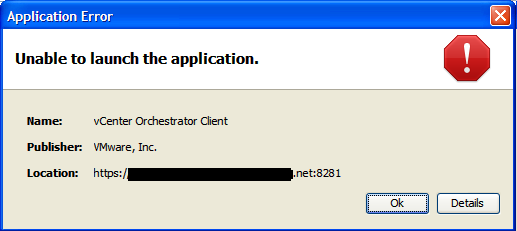

This is because it is using a self-signed certificate, and the latest Java builds prevent this as a security measure, reasonable I guess.
You’ll need to add your vCAC appliance URL to the exception list, note you need to specify the port number, or it won’t work. you can set this ON YOUR CLIENT WORKSTATION via Control Panel –> Java / Security on a Windows machine.

And you will now be able to connect, albeit with some warnings from the Java client.. (as shown below)

The moral of the story is, Java may run on 3 billion devices, but all of them break in subtle ways, each & every time when you update something 🙂
Microsoft Retiring TechNet Subscriptions
Posted by on July 2, 2013
Microsoft yesterday made the announcement that they are going to retire TechNet subscriptions as of the end of August 2013.
If you’re an IT pro home-labber, this is likely to be a big problem for you. I’ve long taken advantage of the subscriptions to keep my Microsoft skills up to date (I run SQL, AD, Exchange, IIS etc. at home) and it supports my vSphere lab and other learning activities.
Just as VMware are looking to re-instate their VMTN subscription (hopefully) this is a bit of a blow for those wanting to get hands on and dirty with Microsoft tech.
the equivalents they suggest, whilst perfectly good are not the same as “dog-fooding” Microsoft products day to day at home or in your work lab – 30 day evals, pre-built labs and VMs just aren’t as good for learning as they are a very artificial environment.
Bad move Microsoft, I hope VMware manage to remove their Windows dependencies in the next 12 months.

 Virtualization, Cloud, Infrastructure and all that stuff in-between