Virtualization, Cloud, Infrastructure and all that stuff in-between
My ramblings on the stuff that holds it all together
Category Archives: Uncategorized
Finding Nexentastor CE IP address from the Command Line
Posted by on January 13, 2011
I found that I had a problem with my Nexentastor CE appliance build and needed to do some configuration by the command line – the quickest way to do this is to logon as root (using the password you specified during the installer)
Then type setup, that gives you a quick access way to move through the various configuration options and look at parameters.
You can also reboot/shutdown from here.

Note if you are trying a DHCP configuration it doesn’t seem to allow ifconfig commands even if you specify the bge0 interface, but you can view the properties from the setup utility, or as a quick short-cut type
setup network interface show
nmc@v0idsan2:/$ setup
Option ? network
Option ? interface
Option ? show
==== Interfaces ====
lo0: flags=2001000849<UP,LOOPBACK,RUNNING,MULTICAST,IPv4,VIRTUAL> mtu 8232 index 1
inet 127.0.0.1 netmask ff000000
bge0: flags=1004843<UP,BROADCAST,RUNNING,MULTICAST,DHCP,IPv4> mtu 1500 index 2
inet 192.168.2.4 netmask ffffff00 broadcast 192.168.2.255
ether 78:e7:d1:b1:44:1f
lo0: flags=2002000849<UP,LOOPBACK,RUNNING,MULTICAST,IPv6,VIRTUAL> mtu 8252 index 1
inet6 ::1/128nmc@v0idsan2:/$ setup network interface show
==== Interfaces ====
lo0: flags=2001000849<UP,LOOPBACK,RUNNING,MULTICAST,IPv4,VIRTUAL> mtu 8232 index 1
inet 127.0.0.1 netmask ff000000
bge0: flags=1004843<UP,BROADCAST,RUNNING,MULTICAST,DHCP,IPv4> mtu 1500 index 2
inet 192.168.2.4 netmask ffffff00 broadcast 192.168.2.255
ether 78:e7:d1:b1:44:1f
lo0: flags=2002000849<UP,LOOPBACK,RUNNING,MULTICAST,IPv6,VIRTUAL> mtu 8252 index 1
inet6 ::1/128nmc@v0idsan2:/$
Passed VCAP-DCD Exam
Posted by on January 12, 2011
After a bit of confusion and receiving the wrong exam results via email I got a nice email with a PDF copy of my scope report this morning, so I have now passed my VCAP-DCD 411 exam, with a mid-300’s score.
I did the beta exam (and because of availability and my schedule I had to go to Berlin to do it) it was about 4 hours long and off of the questions I had to rush a bit, which I would like to think which probably accounts for my score.
I did the version 3 design exam last year and I think the scenarios were better laid out in the v4 exam and weren’t as long which made them much more achievable in the allotted time.
They fixed the diagramming tool – there is a Visio-like diagramming tool which you can use to sketch out designs based on a given scenario by dragging & dropping servers, storage and links.
The exam I did was a good mix of scenarios/multiple-choice type questions and drag and drop process questions, all of which I guess will make it into the final version of the exam.
The final exam is now available for scheduling – you can find details here.
I did the vSphere 4 Design course the week before, although it was useful for the my VCDX prep in terms of helping to understand the blessed VMware design process but I don’t think it’s that helpful for the exam as the exam has a more technical focus so as long as you understand cluster design you should be in good stead.
I will also do the VCAP-DCA in a couple of months so will report back on my experience, in the meantime – Gregg has a great set of links and information on his blog here
New year, New Look for vinf.net
Posted by on January 8, 2011
This blog is hosted on WordPress.com, rather than a dedicated WordPress instance – there are a number of reasons for this, but the main one is that it’s free. I also wanted to keep this site to do with content, being on wordpress.com limits what you can do in terms of plug-ins, themes etc. but that simplicity means less temptation to fiddle with things rather than write content and it means that someone else has to keep up with patching wordpress.
Anyway – I finally found some time to update the look and feel of the site, I quite like the new theme, it’s a bit sparse – but that’s not a bad thing, I even managed to knock up a logo of sorts… I did A-Level art you know*
Anyways, hope you like it – if not comments are below, feel free 
* “did A-Level art” does not imply that Simon passed with a good grade or possesses any artistic talent at all, but he did attend most of the lessons.
Cannot Logon to vCD guest with Auto-generated Password
Posted by on December 20, 2010
vCD by default will customize Windows 200x guests using Sysprep (see administrators guide, page 12 for how to create the sysprep packages) to generate a new SID, password, etc.
One problem I have noticed is that the auto-generated password often includes the hash/pound character.
When the sysprep process is executed during VM boot the regional settings are reset to US and any regional customization’s you’ve made in the guest are overridden.
If, like me you live in the UK (and I would assume the rest of the world) our keyboards are slightly different from US ones;
On US keyboards the # (pound/hash) key is above the number 3, on UK keyboards this space is reserved for the £ (GBP) currency character.
When you try and logon for the 1st time using the auto-generated password sometimes you won’t be able to enter the correct password and logon. this is because the auto-generated password sometimes includes a hash symbol “#” because the sysprep’d guest now VM has a US keyboard set you need to press shift-3 (£) where it wants a # symbol.
For now, within the vCD guest customization options (below) there are no options to set the regional settings for a VM in the catalog at customization time.
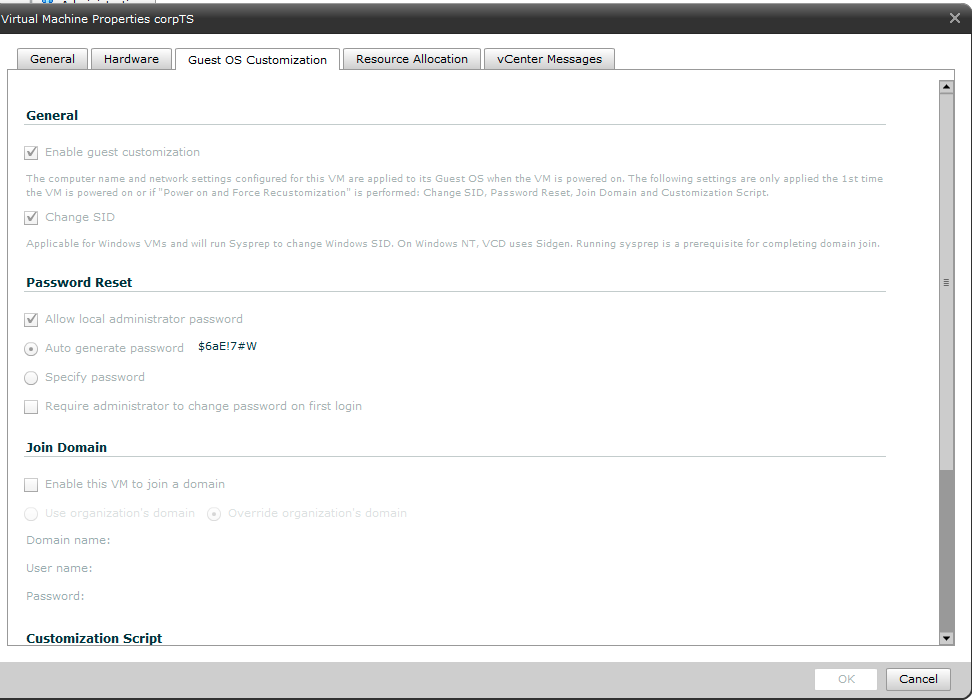
The work-around is to remember this # key issue when you logon to the VM 1st time, and if appropriate manually set the guest VM regional settings to what you require, or (less fun) re-map your client workstation to use a US keyboard.
Distributed Power Management (DPM) for your Home Lab
Posted by on September 28, 2010
I am in the middle of rebuilding and expanding my vTARDIS home lab environment (look out for an update soon) but as I’m adding more physical vSphere hosts I’ve been looking at ways to reduce the overall power consumption as my lab has now overtaken the idle power consumption of the rest of my house (measured using one of these – get one they are great, and Google Powermeter integration coming soon for online monitoring).
Distributed Power Management (DPM) was 1st introduced in experimental form in ESX 3.5 and has since gone into supported use with vSphere 4.0, it’s an interesting technology that allows you to consolidate workloads within a cluster to as few physical hosts as possible using vMotion/DRS and put the idle hosts into stand-by, thus reducing the overall power consumption. DPM can automatically make them resume when demand increases and use DRS to re-distribute hosts across the cluster – essentially making the physical host layer somewhat elastic.
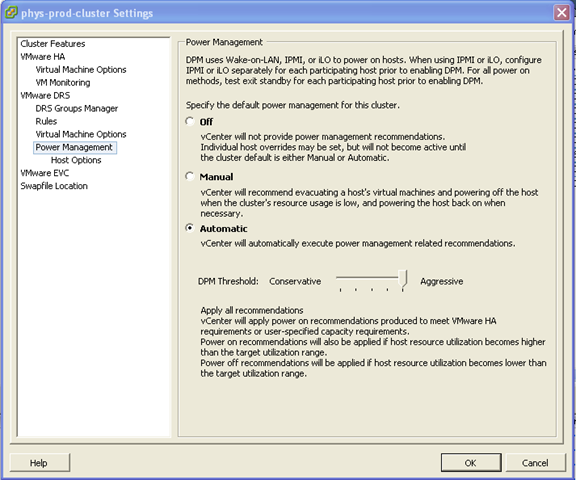

Whilst maybe production use-cases are more limited as most DC managers hate varying power loads in the datacentre (they are much harder to plan for) I have definitely found a use for it in my lab.
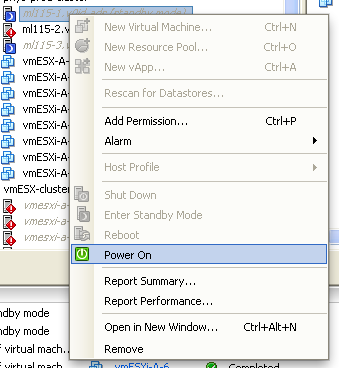
Out of the box, the ML115 g5 (I have only tested this on the AMD quad-core versions) it “just works” using the onboard BMC and doesn’t seem to require the expensive iLO add-on, I assume it’s using Wake on LAN (WoL) magic packets to wake up the hosts – but in my testing it works fine and reliably suspends/resumes hosts as demand changes (your mileage may vary)
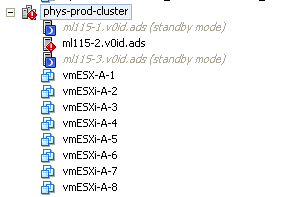
The screenshot below shows a 3-node cluster, with 4 running virtual machines (which are actually virtual ESXi hosts, but the principal also applies to normal VMs running on a cluster) note; one host is suspended because the workload is “light”.

If I power on another 4 virtual ESXi hosts, the cluster realises it wants more resource and asks the node in standby mode to start-up.



In my environment it takes approx 3-5 minutes for a host to power back on and be admitted back into the cluster.

Then, DRS will kick in and do it’s thing to balance the VMs across the newly (dynamically) expanded cluster.

If I power down those VMs again (taking the total cluster load to zero VMs)within 5mins it puts 2 of the hosts into stand-by mode again (thus saving the power consumption for 2 hosts)

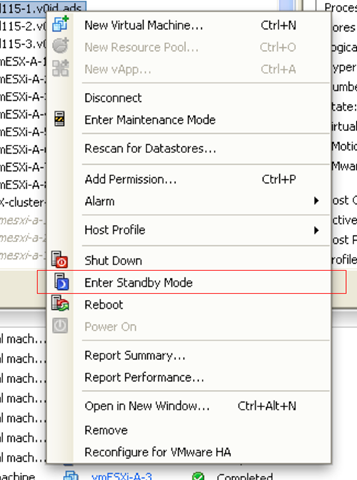
Even if you don’t want to turn on the automation settings, you can use this feature to remotely power on/off some of your home lab (assuming you have VPN access and more than one host) What impressed me more than anything is that this just worked out of the box with the ML115 G5.
If you want more tips on power-saving with the ML115 range it’s worth checking out this post on Techhead to see what you can do with the more advanced range of CPU settings on a per-host basis.
HP Blade iLo and Internet Explorer 8 Problems
Posted by on May 26, 2010
Whilst HP kit is still very good and despite the disappointing iLo performance I have noticed a further annoyance, there seem to be a number of incompatibilities between the HP Blade iLo’s, blade chassis virtual connect modules and Internet Explorer 8, they all work ok on IE7, so hopefully an update will be coming soon
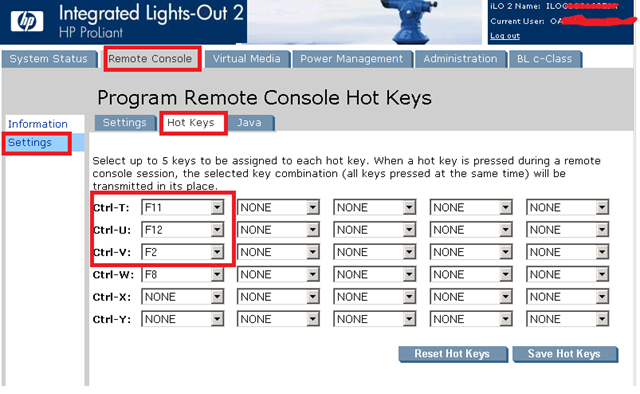
Blade iLo – if you need to use the Fxx keys like F2 to configure an ESXi host or F12 to shutdown it doesn’t map into the iLo session but either doesn’t work or is trapped by the local IE8 browser – you can work around this by going into the iLo web-administration page and mapping hot-keys manually for now.

However, the mouse-over/help items don’t work at all in Virtual Connect Manager with IE8, works fine on IE7; not a major issue but it is a bit of a pain.

I noticed all of this on the following OA hardware/firmware revisions – hopefully there will be an update soon

BL460c G6 iLo

So for now I would suggest using IE7 wherever possible, if you need to update your firmware then this link is useful and I have this page with general HP c-class and EVA information
Bloggers, keep an eye on your RSS feed validity
Posted by on May 15, 2010
I had an issue recently where my RSS feeds were not being picked up correctly by the PlanetV12n aggregator, I have never really had any problems in the past but as of a post last week it stopped passing through the article title to the PlanetV12n and thus it’s twitter feed(s).
I had not made any changes recently other than publishing content but I guess somewhere down the line between my blog and feedburner more strict validation settings had been turned on – had I not spotted the problem via twitter it would probably have continued without my knowledge.
If you are a Feedburner customer I would recommend checking out and subscribing to the FeedMedic and FeedBulletin features which will alert you straight away to any problems in processing your feed, if like me you no longer have much time in your daily workflow to work through your RSS feeds you may be interested in http://www.feedmyinbox.com which is a free online service that emails contents of RSS feeds to your email address (which in my case doubles to my mobile phone) – you can point this as the unique URL of your FeedBulletin service to be alerted to any problems via email as soon as they are picked up.
You can also manually check the validity with this online tool FeedValidator.org
As an aside, I was pleased to see that several hundred people subscribe to my FeedBurner RSS feed, as it’s a while since I last checked and apologies for the interruption to service.
normal service should now be resumed (hopefully)…
Hardware Vendors… release the emulators to the masses PLEASE!!
Posted by on April 26, 2010
If you are a consultant or are an end-user trying to teach/learn new technology it’s not easy to constantly have access to lab and demo kit, most vendors can lend you evaluation hardware for your lab but there is generally a finite supply and you don’t have it for long – if you are busy it’s hard to dedicate time to this, most people are only able to dip in and out every now and then and physical kit means it has to be hosted somewhere so requires remote access.
I’m a hands-on person and I find I learn/understand things much better if I can concrete my reading with “fiddling” with the UI or mocking up configurations rather than just reading the whitepapers.
If you are primarily a hardware vendor like EMC, HP or Cisco you should want people to play with your kit around their own time, whilst this doesn’t always mesh with a traditional sales-force driven model where there is a structured qualification, sales and follow-up model let’s be honest this is 2010, I’m clever 🙂 I don’t really need a sales drone to hold my hand in spending my own {employers’} money or take me golfing – if your product is good and I need it I will buy/spec it once I’ve seen what it can do in MY environment on MY terms.
This definitely isn’t to say there is no place for sales or tech pre-sales in the modern world, far from it – I will probably need someone with product specific knowledge for technical help, or someone to help me price out a solution and options – but I don’t need a sales person’s commission or end of quarter figures driving MY evaluation or purchase process – incentives to buy in a certain timeframe are perfectly acceptable as they help the end-user evaluator focus their priorities, but it’s not the start of the process.
As I’ve written before simulators/emulators/Virtual Machines are ideal as a pre-sales tool, no complicated pre-sales process, just get your tech in the hands of people who can then internally demonstrate its capability to those that sign the cheques.
It just means a bit of registration for a download which gets passed to your pre-sales people so they can follow-up with the potential customer – but you’ve empowered the end-user to do your marketing “foot in the door” with the people that matter for you– and it’s essentially “free”.
Additionally one of the primary concerns with infrastructure technologies is management, you often don’t really know how well you can manage or integrate with your existing management toolsets without actually trying it – VM/Emulators are an almost (financially) risk-free way to try this out.
Most enterprise hardware (blade chassis, SAN’s, switches) are moving to use virtualization and commodity hardware under the hood this opens up some interesting possibilities to distribute packaged up Virtual Machine .OVF versions of your “hardware”/firmware product that people can download and run on VMware Workstation/Player etc.
Most already vendors have these internally for development teams, afterall this is cheaper and more practical than giving each developer a but of hardware to develop against.
This is the list of people that “get it” IMHO …
EMC are streets ahead of the game with this, and have had the Celerra VSA available for some time, CLARiiON coming soon and with the V-MAX being based around commodity Xeon CPU hardware it has to be on the cards.
Zeus produce an amazing traffic manager product which has been available as a virtual machine or hardware appliance for ages – with a free/quick download VM trial.
HP have a time-limited version of the LeftHand VSA and the EVA simulator (accredited partners only) but could go significantly further, why not a VM version of the EVA controllers accessible over iSCSI or FCoE? they may be based on custom ASIC type hardware but I would assume some sort of emulation from x86 is possible (see my idea for VMware Workstation later on).
I have also been reliably informed that there is a version of the HP Virtual Connect “firmware” used internally at HP that runs inside VMware Workstation – making this available to the public (even with pre-sales registration) would be a great way for people to quickly understand how VC technology works and could integrate into their environments.
NetApp have the ONTAP simulator (partners only), I’m not familiar with the product but it does appear to emulate real NetApp hardware and management interfaces
Cisco have recently released a beta of the UCS platform emulator to developers – from the screenshot Steve Chambers posted this looks like an excellent idea with significant scope for use as a pre-sales tool as well.

With the recent announcement around the death of Dynamips maybe Cisco should better leverage their relationship with VMware and produce a hardware emulator layer to allow IOS or CatOS to run on x86 under VMware Workstation, it’s been reported that the Nexus range runs under a native hypervisor and the NX1000V is already out there.
The 6500 ACE modules would also be a welcome offering as a VM!
Now, there needs to be some expectation setting, I’m not asking for production ready/supported virtual machines of your IPR and hardware margin – that won’t always make sense but availability for learning, pre-sales, training or testing/development is an excellent use-case.
I have previously heard people voice concerns over this sort of model as it allows your technology and IPR to easily walk into the hands of your competitors to allow them to reverse engineer it and steal your ideas, I don’t buy this – I’m pretty sure “the competition” are 1st on the list to buy your hardware when it becomes generally available, either directly or via an anonymous 3rd party – infact HP seemed to have a pretty good stock of UCS hardware :).
Lost access to VM Network and Service Console when Playing with dvSwitch?
Posted by on February 23, 2010
I have been doing some tweaking in my vTARDIS demo lab for the next London VMUG to make it work with the dvSwitch – this all works fine inside the virtualized ESXi hosts however, I tried adding the physical host to the dvSwitch and it blew up and I lost access to my vCenter VM (VM being the key issue here) because the box only has a single NIC (I also probably ignored a couple of warning dialog boxes as I was distracted doing something else (! pay attention to these things !)
The vCenter node was communicating over the VM Network to my client. which now couldn’t connect into the dvSwitch as I had moved the uplink to the dvSwitch there were no physical NICs to connect with so I was kind of stuck. Connecting directly to the physical ESX host using the VI client worked so I had service console access but it wouldn’t let me remove the pNIC from the dvSwitch and add it back to the traditional vSwitch as I only had a single pNIC. So in the end I had to break out the command line to get access back.
Unlink the pNIC from the dvSwitch: (your vmnic/PortID and dvSwitch names may be different)
esxcfg-vswitch –Q vmnic0 –V 265 dvSwitch
(note there is no -Q=vmnic as the help file would suggest on 1st glance, use a space and not an ‘=’ my esxcfg-* command line-fu was a bit rusty so that caught me out for a while :))
Re-link it to a normal vSwitch
esxcfg-vswitch –L vmnic0 vSwitch0
within about 30 seconda all the VM networking came back so I could connect to the vCenter box again.
I then removed the dvSwitch entirely from the host; to do this I had to connect directly to the ESX host using the VI client as there are no options to do it via the UI when connected to vCenter.
Looks like Joep Piscaer had the same problem here and has a more detailed post on his blog
The Computing Super-Powers are Aligning Their Stacks
Posted by on February 18, 2010
I noted with interest the rumours today of Cisco ceasing a long-standing partner arrangement with HP (more here); essentially locking HP out of special pricing and insider product information and roadmaps.
For a long-time HP have offered Cisco components for their c-class blade chassis like the 3020 catalyst blade switch; to infrastructure people like myself this offered the best of both breeds (compute and networking) in a nicely integrated blade solution.
With HP’s recent acquisition on 3Com and their existing HP ProCurve range I would hazard a guess that they will stop selling Cisco blade switches in future – I also note from an email that all HP partners got this week that all Cisco manufactured blade switch components were facing supply issues, stoking the fires somewhat to resellers to push the HP product with some choice anti-Cisco FUD which I won’t repeat here.
 Integrated is the key point for me, if you are building infrastructure solutions you want something that has been thoroughly tested together, even if bits come from different manufacturers and follow “industry standards” you can’t beat a pre-packaged solution with proven support processes and management toolsets.
To my mind this is why Apple have always been so much more successful in the consumer space than Microsoft have; aspiration brand arguments aside, Apple have always maintained a tight grip on the end-end quality of components that go into their products (software, firmware, hardware, accessories) whereas Microsoft were born out of the opposite*;
*let’s leave aside Microsoft’s later leverage and downright abuse of closed and proprietary formats and API’s to wield their market share weight – that’s a whole different argument..
Microsoft took the x86 PC out of the grip of it’s one-vendor supplier and inventor (IBM) in the 80’s and allowed it’s software to run on a wide variety of compatible, commodity hardware, providing API’s for thousands of independent software and accessory vendors to integrate their products with DOS and latterly the Windows OS.
Contrary to what many think (Apple included) Microsoft opened up the PC market to the masses by enabling competition – allowing the consumer to choose from devices that varied in quality and thus cost to match the needs and budget of the end-user – whilst Apple maintained a steady line of expensive/premium but excellent quality products.
In the longer-term Microsoft’s image suffered as a result of this “openness” because there was less (or no) quality control of what 3rd parties produced poor quality drivers, applications and hardware entered widespread use, and all that integration often ended up in a poor end-user experience; how many times have you been frustrated trying to get product X to work on PC Y with software from Z – you are relying on 3 different vendors, each with it’s own target market and user to all do their jobs properly, and to the standards they are given to work with (Win32 API etc.)
If you are a hardware company selling an optical mouse it’s a tight margin high-volume business so you don’t have a lot to spend on quality control or good coders – you want it “done” and shipped and get the profits in – or you may just be a fly by night company that wants to rip off consumers and make a quick buck, there is nothing really stopping you.
Microsoft took steps in recent years to address the poor-quality 3rd party stuff from tarnishing the mother OS’s image through the Windows Certified logo scheme, but they never took it as far as Apple; who refuse any code that is not blessed by their own quality control on devices like the iPhone – and look how it gets almost universal praise for it’s ease of use and reliability.
The ever increasing amount of crap-ware that PCs ship with is astounding – my new HP laptop ships with about 20 different 3rd party drivers and tools out of the HP box, Hawei 3G card, AuthenTec fingerprint scanner, ATI video card with it’s own software To boot, it would seem HP weren’t too diligent about their quality control either.
Now compare that to a MacBook Pro out of the box. Apple own the end-end process – you can only (legally) run THEIR OS X on it, sure they use things like Broadcom NICs and ATI video cards but because they control the OS as well as the underlying hardware they can ensure support is baked-in when it comes out of the box, as a result their test matricies are much simpler and the end-result is a much simpler and reliable end-user experience, they also reduce the bells and whistles to what people want (how many corporate IT departments really take advantage of the smartcard or biometrics support on modern PC hardware or the SD card readers, more often than not time is spent to disable such bells and whistles in the interest of support and not overwhelming end-users).
So, after that rather lengthy into back to my point – if you want something that is good quality and just works as a vendor you need a greater control of the whole “stack” – reduce the variance of components that make up each slice of the stack and the result is;
Simpler/smaller test matrix
Quicker time to market (less variance to test)
Simpler to support – less variance
Better scale of economies
smaller supplier portfolio to manage
There seems to be a fair bit of consolidation in the market place at the moment with the bigger players announcing grand partnerships or simply making massive acquisitions.
Maybe some of the open market, where you could run Linux, Microsoft or something else on your XYZ server is being replaced with a premium/preferred “stack” from a consortium of big-name vendors.
With all the talk of cloud computing this stack has gone well beyond the desktop, office or even corporate datacentre – You can buy the stack from a vendor consortium to run on-premise and offload some your infrastructure into their IaaS/PaaS/SaaS stack – with the promise of a more joined-up approach to support and services.
In the current landscape Microsoft are in an odd position; Ballmer is pushing them all the way into the cloud stack but at the lower levels they essentially have an open partner model, I would expect to see Microsoft partner with Dell (or even acquire, as has been rumoured for a while) to come up with a “premium”/integrated product line-up; but not entirely stop their traditional OEM arrangements with other hardware vendors.
Cisco would seem to have fired the first shot in this war at HP, maybe the gloves of co-operation will come off for the rest now that people don’t necessarily have to be seen to be playing nicely in the market.
The following table shows my take on the major players and the offerings they have; I’m a realist and a lot of these are recent acquisitions or products so I don’t honestly think in all cases they really do have fully integrated end-end sales, services and support but it looks to be the goal.


 Virtualization, Cloud, Infrastructure and all that stuff in-between