Virtualization, Cloud, Infrastructure and all that stuff in-between
My ramblings on the stuff that holds it all together
Category Archives: VMWare
Hot-Swap Datacentres
Posted by on February 11, 2008
There’s an interesting post over on Forrester research blog by James Staten. he’s talking some more about data centres in a container; making the data centre the FRU rather than a server or server components (Disk, PSU etc.).
This isn’t a new idea but it I’m sure the economics of scale currently mean this is currently suitable for the computing super-powers (Google, Microsoft – MS are buying them now!) – variances in local power/comms cost could soon force companies to adopt this approach rather than be tied to a local/national utility company and their power/comms pricing.
But just think if you are a large out-sourcing type company you typically reserve, build and populate data centres based on customer load, now this load can be variable; customers come and go (as much as you would like to keep them long-term this is becoming a commodity market and customer’s demand you are able to react quickly to changes in THEIR business model – which is typically why they outsource – they make it YOUR problem to service their needs).
It would make sense if you could dynamically grow and shrink your compute/hosting facility based on customer demand in this space – thats not so easy to do with a physical location as you are tied to it in terms of power availability/cost and lease period.
New suite build out at a typical co-lo company can take 1-2 months to establish networking, racks, power distribution, cabling, operational procedures etc. (and that’s not including physical construction if it’s a new building) – adopting the blackbox approach could significantly reduce the start-up time and increase your operational flexibility
Rather than invest in in-suite structured cabling, rack and reusable (or dedicated) server/blade infrastructures why not just have terminated power, comms and cooling connections and plug them in as required within a secured warehouse like space.

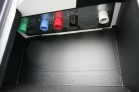
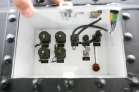
Photos from Sun Project Blackbox
You could even lease datacentre containers from a service provider/supplier to ensure there is no cap-ex investment required to host customers.
If your shiny new data centre is runs out of power then you could relocate it a lot easier (and cheaply) as it’s already transportable rather than tied to the physical building infrastructure; you are able to follow the cheapest power and comms – nationally or even globally.
As I’ve said before the more you virtualize the contents of your datacentre the less you care about what physical kit it runs on… you essentially reserve power from a flexible compute/storage/network “grid” – and that could be anything/anywhere.
Performance Update on Cheap ESX PC
Posted by on February 10, 2008
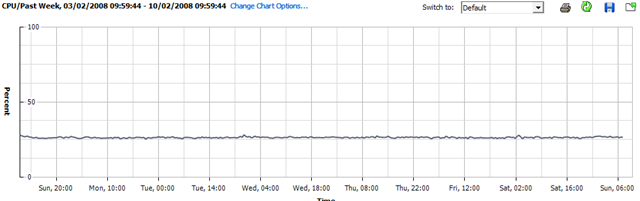
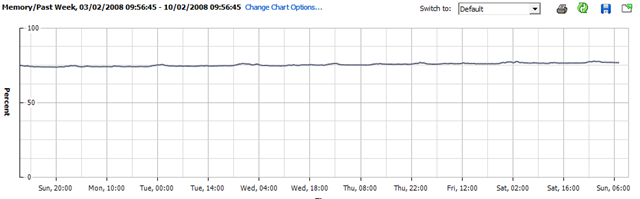
I’ve not done anything with my home ESX server this week as I’ve been busy with work; so this will be interesting – it’s been powered up all the time with all the VM’s spinning; but not doing very much.
CPU Utilisation
Memory Utilisation
Disk Utilisation
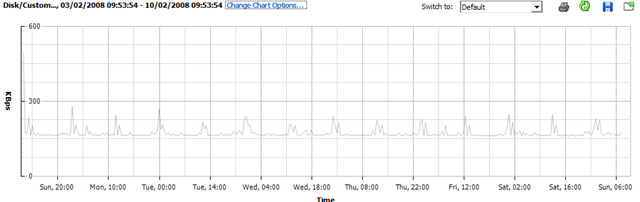
Whist running this set of VMs.. (the CPU stats for VMEX01 and VMEX02 are a bit skewed as I added this bit after the original post and they are both running seti@home (hence increased CPU)
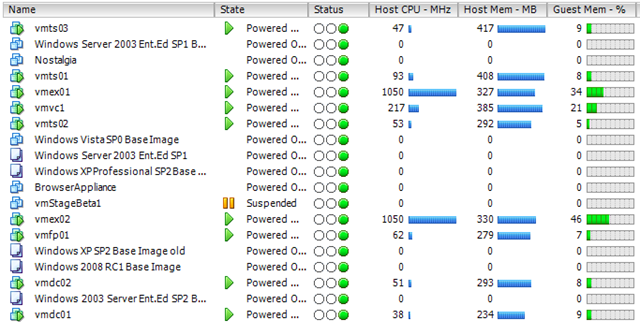
So, nothing interesting to see here – but might be worth bearing in mind for some kind of sizing estimate; this is a single core CPU (HT enabled) PC with 4Gb RAM and a single 500Gb SATA disk
Hopefully I will get some time this week to load up SETI@Home or Folding@Home and see what that does 🙂 it should be a good test to see how well the hypervisor manages CPU timesharing between hosts.
VMWare ESX on IBM Blades
Posted by on February 5, 2008
I’ve worked with HP c-class stuff recently, but this is a good article on the IBM equivalent and the post looks a lot simpler to read than all the official IBM docs!
In my book if you are virtualizing your infrastructure there is less of a religious argument on the underlying hardware – it’s a lot more flexible so do you care as much?
Thanks to Martins post on Bladewatch for the handy link
VLAN Tagging with ESX and HP Blade Virtual Connect Modules
Posted by on February 3, 2008
Making Something Run When a Windows PE 2.0 CD/DVD Starts.
Posted by on February 3, 2008
I need a DVD that automatically applies a .WIM image when WinPE boots – no prompts; just want to press F9 for the BIOS Boot menu and walk away until build is finished.
I built a WinPE 2.0 image the usual way, but I want to add files to it (easy with PowerISO) but I want it to do something when it starts up..
To do this I had to customise the BOOT.WIM file which you use to generate your WinPE ISO file, note you need to edit BOOT.WIM not the WinPE.WIM file.
I used the /MOUNTRW switch for imageX (more details here) to mount the BOOT.WIM file – if you look in it’s WINDOWS\SYSTEM32 directory there is a file called STARTNET.CMD – this is mostly the same as a batch file so you can put whatever commands you want in here, in my case I edited it as follows;
wpeinit
CALL D:\tools\buildPC.bat
wpeutil reboot
Once the changes are made you can save the changes back using the /UNMOUNT and /COMMIT switches – you’ll then need to rebuild the Windows PE .ISO using OSCDIMG.EXE.
You can then inject files into the .ISO file you’ve generated – you could put them in the BOOT.WIM as above but its quicker and easier to do this via PowerISO (or similar tool) if you are going to need to make changes, rather than recompiling the BOOT.WIM and .ISO files.
This is the BUILDPC.BAT batch file that STARTNET.CMD calls, it prepares the disk and deploys the image file to the local HDD.
@echo off
diskpart /s d:\sources\wipedisk.txt
d:
cd\tools
Echo applying image
imagex.exe /apply d:\sources\MasterImageFile.wim 1 C:
Echo Image Downloaded, rebooting.
Save the file and burn.. job done.
It’s a good idea to use a virtual machine to test the .ISO file out – and is cheaper than wasting lots of DVD/CD-R’s while you are fine-tuning!
Performance on a cheap ESX PC
Posted by on February 1, 2008
I thought I’d post some performance graphs from my cheap HP D530 ESX server using the Virtual Centre console (which incidentally, is good for getting this info quickly and simply).
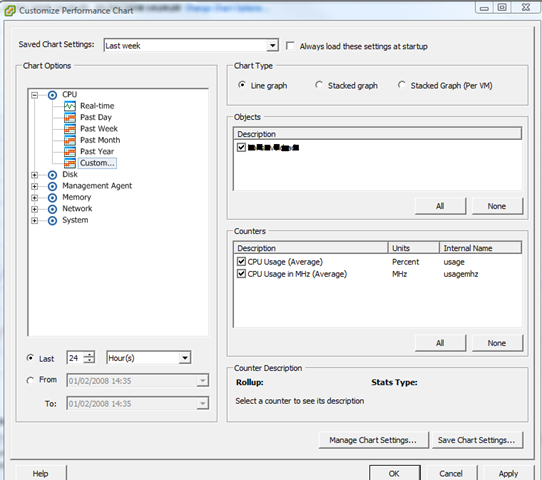
Screenshot of the UI for querying performance stats.
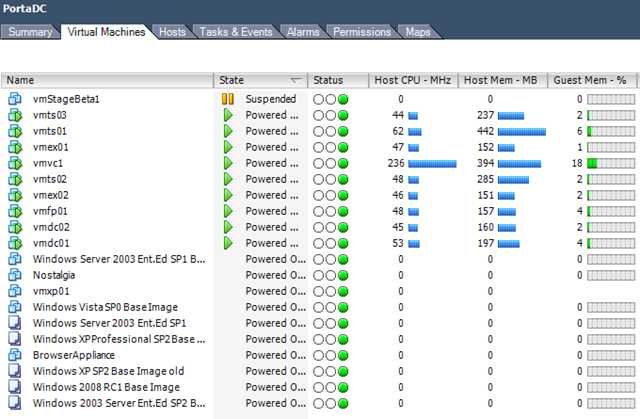
View of currently running VMs – a mix of Windows 2003/2008 VMs
Current Overall ESX Host statistics (with a clone from template going on)

As I noted elsewhere on my blog it has 4Gb RAM and a single 2.8GHz HT CPU – and with this VM load it gives an average CPU load of 25-30%. Almost all of these VM’s are idling but all respond in good time to network access/TS etc- not bad at all for a desktop PC!
CPU usage for the last 24 hours
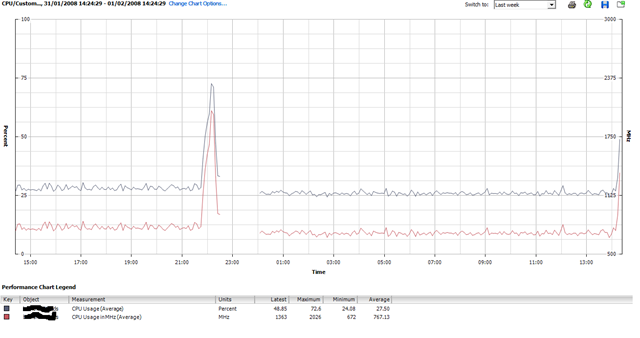
The big spike around 22:00 was when I cloned up a whole load more VM’s – seems to have upset the stats so need to try and have a look at that..
It’s also interesting to note that I added 4 Windows 2003 VM’s last night but that hasn’t actually increased the overall CPU average – ESX must be quite efficient at time-slicing all those idle VMs.
I had 3-4 “deploy from template..” operations going on at the same time and it really bogged down the performance of the VM’s (usable, but only just..) but it is just a single SATA disk drive so I can live with that.
Deploying 1 VM at a time had little or no impact – slight CPU spike to ~50% as you’ll see to the far right of the chart as I kicked off another one just now.
When i get time I’m going to drop some jobs into the VM’s that will tax the virtual CPUs a bit more and compare results – maybe some Folding@Home activity Mmmmm that would definitley tax it.
Update on the Cheap ESX Home Server
Posted by on January 31, 2008
All running well, we had a power cut the other day but the PC didn’t automatically power back on when power was restored; I wonder if there is a BIOS setting for that – PC’s always used to have something along those lines.
Bit of manual intervention to switch it on and it was back and running.. no ill effects and all the VM’s started up normally.
I’m hammering it a bit now and have some Windows Server 2008 RC1 templates setup as I need to try out the new Terminal Services functionality so I’m hoping to build a small 2008 TS farm under ESX – no customization wizard available yet for 2008 😦
Maybe will see how Windows built in NLB works under ESX Mmmm.
So, will see what performance is like when I have a lot more going on..
Lots of Useful Scripts to Automate VMWare
Posted by on January 22, 2008
http://www.ntpro.nl/blog/categories/10-VMware-PowerShell
Like this one … must have a go at this http://www.ntpro.nl/blog/archives/316-Create-multiple-VMs-using-PowerShell.html and http://www.ntpro.nl/blog/archives/279-My-first-VMware-PowerShell-script.html
Wonder if you can also use these against the Free VMWare Server?
VMWare Stage Manager – No P2V/V2P Integration
Posted by on January 22, 2008
Ah, show-stopper for me for most of my potential customers; as far as I can tell from the demo video the product is geared more towards a VM-only environment. Maybe I misunderstood the announcements but I had thought I would be able to clone physical production servers (P2V and V2P) into stage manager for doing staging/testing “stuff” before releasing back to production.
Looks like it’s geared more towards end-end lifecycle management for VM’s where dev/test VM’s are managed through to production.
Development->Test->Stage->Production and then around the prod->Stage loop for patches, updates etc.
Obviously nothing stopping you from P2V or V2P’ing VM’s at any stage in this lifecycle using other tools (VMConvertor, Platespin) etc. but it won’t be managed as part of the lifecycle by Stage Manager.
Yeah I know “physical is dead“… but we’ve not managed to convince the whole world virtualisation will fix everything – 3rd party vendor support for important production systems is still a grey area under virtualisation; vendors seem to be coming round as it gets market traction but the instant “we don’t support that under VMWare” get out of jail free card for vendor support teams is still a problem.
Ah well, gap for a 3rd party to add value – would be nice if Platespin were able to write a plug-in as P2V and V2P seem to be where their products win, or even MS with their multi hypervisor VM Management stuff.
Building a Better Test Lab
Posted by on October 22, 2007
This is the outline of a number of posts on building a {relatively} low-cost accurate test lab of your production systems using P2V, VMWare, ESX, custom scripted HP voodoo, HP MSA1500 SAN, Virtual Switch Tagging (VST), Checkpoint on Sun Firewalls and Cisco switches. in order to clone a complicated multi-tier Windows based production platform with lots of DMZ segments into a VMWare farm for use as a test/dev & development environment (and possibly a DR one too in future)
This is all based on some of my recent work with customers* and I hope will help someone else to navigate the pitfalls (both business and technological) I & my team encountered in delivering this idea.
The following is a list of titles or sections and will hopefully serve as an index, but please, don’t expect them all at once I do have a day job to do! 😉
Why do this?
The traditional approach to test labs & why I think it’s wrong
Pro’s
Con’s
Isn’t this all a bit too complicated/mad-scientist/far out?
Reload lab from production process – how often?
is change control important?
What do you want a test lab to do?
Scoping/Expectation Setting
Load Testing – is VMWare right for this
Dynamic/Grid based approach to load testing
Break/Fix analysis
Release Testing
Options for disaster recovery/production failover
What won’t it do?
Storage Design
“Big” SAN’s are always better if you have them, but what if you don’t?
HP MSA 1500 – it’s not big, but it’s clever
Disk/SAN bandwidth – my practical experiences
Server Design
ESX Node specification
The RAM per VM debate
Networking Design
VLAN tagging
VST vs. Guest Tagging etc.
Firewalls
Clone to test lab Process
P2V Tools – VMWare Convertor vs. the rest
Changing IP addresses
HP uninstall Scripts
Build-Out Steps
Build ESX environment
Scripted VMWare installations – automatically create custom Virtual NIC’s/LANs
Adjust install paths for SAN storage
Set administrator password/create accounts
Install Networking
Configure VLAN’ing
IP Load Balancing
Install Firewall(s)
Test Communications between virtual DMZ segments and across hosts
Import Production machines
VMWare Convertor
General issues found
P2V Windows 2003 Domain Controllers – Special Notes
P2V’ing entire Windows Cluster’s – not that easy but do-able
P2V Process over a WAN – issues found & workaround.
Fresh VM 1st boot, changing IP address etc.
HP tools removal
Some further problems caused by changing IP addressing.
Into the Future
Can you use this for disaster recovery?
VMWare Lab Manager
Total Automation – Platespin products?
*This article has been deliberately made anonymous & I’m afraid I can’t disclose the name of the customer or provide any further reference materials without a commercial engagement via my employer, you can contact me for more details on this via this blog.
This article & information contained within is provided entirely without warranty.
Technorati Tags: VMWare , ESX , HP , MSA1500 , Test Lab , P2V , production , clone , Sun , Checkpoint firewall , VLAN tagging , VST

 Virtualization, Cloud, Infrastructure and all that stuff in-between