Virtualization, Cloud, Infrastructure and all that stuff in-between
My ramblings on the stuff that holds it all together
vSphere Host cannot enter Standby mode using DPM and WoL
Posted by on February 10, 2011
I encountered this error in my lab recently, I previously wrote about how I was able to use DPM in my home lab, I’ve recently re-built it into a different configuration but found that I was no longer able to use just Wake on LAN (WoL) to put idle cluster hosts into standby.
I got the following error, vCenter has determined that it cannot resume host from standby.
Confirm that IPMI/iLO is correctly configured or, configure vCenter to use Wake-On-LAN.

1st thing to note is that there is nowhere in vCenter to actually configure Wake-on-LAN, however you can check to see which NICs in your system support Wake On LAN (not all do, and not all have WoL-enabled vSphere drivers)
My ML115 G5 host has the following NICs
- Broadcom NC380T dual port PCI Express card – which does not work with Wake on LAN
- Broadcom NC105i PCIe on-board NIC which does support WoL.
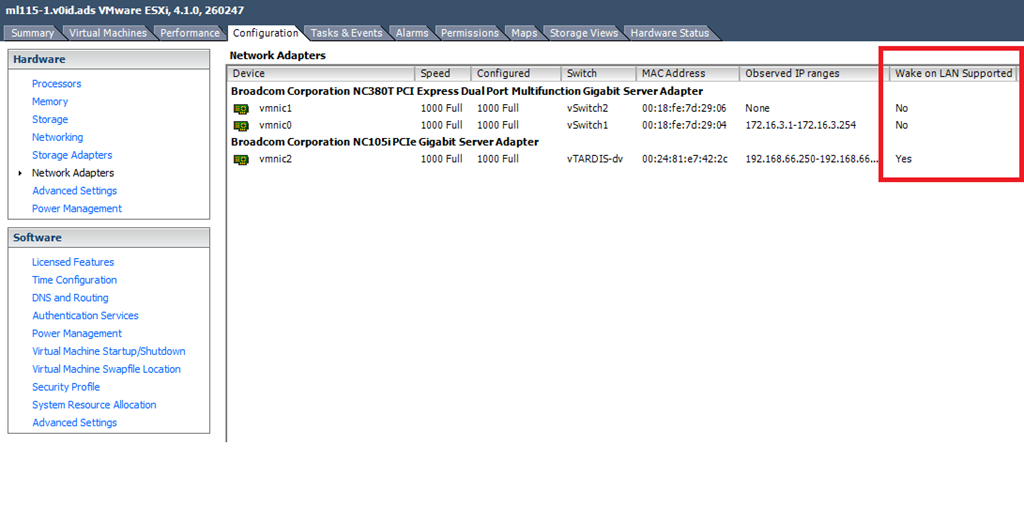
In my current configuration the onboard NIC is connected to a dvSwitch and is used for the management (vmk) interface

This seems to be the cause of the problem because if I move the vmk interface (management NIC) out of the dvSwitch and configure it to use a normal dvSwitch vSwitch DPM works correctly.
In a production environment a real iLO/IPMI NIC is the way to go as there are many situations that could make WoL unreliable. However, if you want to use DPM and don’t have a proper iLo you need to rely on Wake-On-LAN so you need to consider the following..
- you need a supported NIC
- you need a management interface on a standard vSwitch, connected to a supported NIC
Also, worth noting that if you are attempting to build a vTARDIS with nested ESXi hypervisors you cannot use DPM within any of your nested ESXi nodes, the virtual NICs (e1000) do support WoL with some other guest-types like Windows, so your VM guests can respond to WoL packets (via the following UI screens)
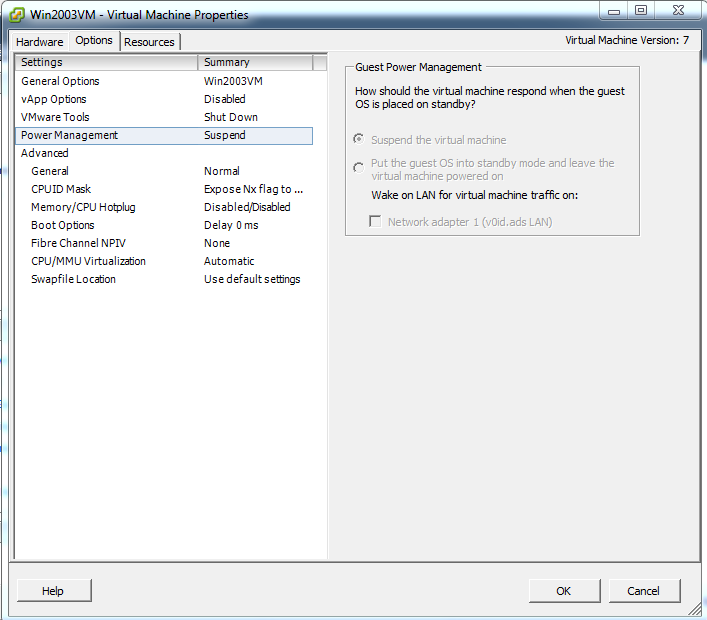
However the e1000 driver that ships with vSphere ESX/ESXi does not seem to implement the WoL functionality so you wont be able to use DPM to put your vESXi guests to sleep – kind of an edge-case bit of functionality and ESX isn’t an officially supported guest OS within vSphere so it’s not that surprising.
Cannot Access Shared Folder vmware-host Shared Folders My Desktop
Posted by on February 8, 2011
I encountered this error when a Windows 7 VM running under Fusion logs on, VM tools is mapping a drive to your OS X home directory and results in the following Windows error message
Cannot Access Shared Folder \\vmware-host\Shared Folders\My Desktop
I hit this error after I used Carbon Copy Cloner to clone my OS X installation from a SATA disk a new SSD drive and then decided to move my home directory back onto the SATA disk (I’m using one of these to mount 2 disks) to save space on the SSD (info on how to do that here), so the underlying file-system path had changed.
To fix this open the shared folders settings for your VM in Fusion (Virtual Machine/Settings/Sharing.

- Un-check each item in the “Mirrored Folders” section.
- Log off the Windows 7 VM (you will get a prompt for this inside the VM)
- Log back on to the VM
- go back into Virtual Machine/Settings/Sharing and re-check each item
- Log off the Windows 7 VM (you will get a prompt for this inside the VM)
- Log back on to the VM and it should now be resolved and the mirrored folders show up as actual folders in Windows Explorer

Hopefully that helps someone else out there who is scratching their head
VoxSciences no longer offering mobile phone billing
Posted by on February 4, 2011
I have been a long-term fan of speech to text voicemail systems – originally with the now defunct SpinVox and latterly with VoxSci.
When I logged on to my account today to change some settings I saw a notice that they would no longer be offering phone based billing (whereby the charge you for the service by a reverse SMS billing engine) and will now be wanting credit card details to cover the cost of the conversions.
I hadn’t seen any other notice of this – so this a quick heads up for other subscribers
Hardware is Hard, Software is Easy. is 2011 the year of the VSA?
Posted by on February 3, 2011
I have done a lot of lab-work with Virtual Storage Appliances, mainly because proper shared storage is hard to come-by for lab-time so I’ve used the following for the last few years running inside Virtual Machines
The more vendors that release software versions of their kit or emulators are high on my list of things to watch as IMHO it shows they are looking-ahead
Traditional storage vendors have made a very good living in the last decade selling custom, high-performance silicon – but this comes at a cost – designing custom ASICs and code takes time, because it involves high-tech fabrication technologies, even if these are outsourced it’s very expensive and time-consuming.
It’s also harder to “turn the ship” if the market moves as a vendor has significant resources committed to product development.
Mainframes have also maintained a similar position and have seen their market share eroded by commodity x86 hardware that combined with clever software delivers the same solutions with less hardware-vendor lock-in and typically a lower cost.
Software is easy – well, relatively easy to change when compared to hardware so R&D cycles can be shorter, more agile and respond quicker to market changes.
Changes/upgrades to custom chips have development lifecycles in multiple years, and once a chip is burnt/fabricated and shipped to the masses it’s harder to make changes if a problem is found – x86 builds up on a well-used and field-proven architecture typically adopting a scale-out architecture over standardised interconnects (Infiniband/Ethernet) to achieve higher performance – why re-invent the wheel?
There will always be edge-cases where ultra low-latency interconnects can only be provided over on-die CPU traces – but for general compute, network, storage – but as x86 and it’s ancillary interconnect technologies march ever faster, can equivalent functionality not be achieved using clever software on common hardware rather than raw physics and men in white-coats?
As this cycle continues – can storage vendors continue to make those margins, respond to customer requirements and keep ahead of the competition when they are tied to a custom silicon architecture – is it more advantageous to move to a commodity platform to deliver their solutions?
Using “clever” software like a hypervisor to abstract a commodity x86 hardware architecture means you can push storage functions like snapshots, cloning, replication higher up the stack and make them less specific to hardware vendor X’s track/cylinder or backplane protocol Y
Building in x86 also means you can be selective about how you deploy – on bare hardware, or with a hypervisor like ESXi – both use-cases are equally valid and the cost to change between the two is minimal (in development terms)
EMC are already committed to an x86 scale-out architecture for their platforms for this reason and even if the badge on the outside says EMC it’s just commodity kit with clever software, rather than custom firmware running on custom chips and I expect all the competition are considering if being a niche edge-case player or a high-performance general storage player is a better business play.
The Open-source community also have some excellent projects in this space which are being spun out into commercial products, traditional storage vendors beware!
Virtual Storage Appliances (VSA) are the next logical step in de-coupling storage services from hardware.
Disclosure: I work for VMware, of whom EMC are a majority shareholder – however this isn’t an advert – it’s my opinion and experience.
Of ITIL and Cloud
Posted by on February 1, 2011
I have been watching this conversation about ITIL, virtualization and cloud play out over the last year; some very enthusiastic bloggers loudly bash ITIL for how unsuitable it is in the modern cloud world, change control for vMotion? do you update your CMDB when you vMotion? lunacy? how? tools? methods? consultancy? snake-oil? £££?
I spent a good chunk of my role before VMware as a project-based architect with significant interfaces to an ITIL-heavy managed-services team, they embraced ITIL and took it to the core of the operations side of the business and had the scars as well as the trophies to show for it.
I have seen it help, and I have seen it hinder – but I think the core problem that people seem to have with ITIL is that they just don’t understand it or they are afraid it’s hard-work.
Wake-up; it is hard-work, but it’s hard work for a reason.
ITIL is not prescriptive, it doesn’t tell you how to do things so you change your business to fit around it; the truly successful ITIL organizations are those that understand that it’s a FRAMEWORK, you can pick & choose which parts apply or deliver benefit to their business and discard those that don’t.
ITIL also comes at a cost, ITIL is about best-practice, information sharing and planning and auditability/accountability; this means systems, software and people time to make that happen – but that cost is also about reducing risk and providing accountability/auditability, yes it does slow down your reaction time by adding a layer of process and approval but the trade-off is that when things do go wrong you know who did what, when, why and who said it was ok to do it (accountability) rather than an unmanaged mess.
What does that deliver…?
More expensive operations (people time = £££, tools = £££)
More informed operations and business (downtime, Intellectual property retained = £££)
The two functions of ITIL that I see raise the most heckles are Change Control (and the notorious Change Advisory Board (CAB) meeting) and the Configuration Management Database (CMDB) that I will tackle in-turn;
Change Control is about communications and planning, those CAB meetings are there to disseminate information about what is going to happen and gain buy-in of stakeholders, however obscure you may think your dependency on the change being implemented you have had your opportunity to air an opinion and contribute to the go/no-go based on your service requirements, it’s your responsibility to your service to engage with this process and not see it as a hindrance – neither IT or business stand still, nor should you.
ITIL also makes techies stand back and think about what they are doing to do before they do it – because you make them document it and explain it in English (or $LOCALE) to the people that matter (the stake-holders), not just allow them to get all Jackie-Chan with the CLI. As techies, it’s all too easy to believe in your own command-line fu and forget that you are fallible and may have missed a critical dependency or conveyed the gravity and risk of what you are going to do to that customer.
Sometimes as a techie, ITIL-induced CAB is your friend; this is your chance to convey the risk of something you have been asked to do, it’s your way of saying “you won’t spend £££ on redundant storage for this service migration, thus if this goes wrong you will be down for X hours at a cost of £Y”, that’s a very useful and practical way to put things in to perspective for the stake and budget-holder and lubricate the flow of extra contingency budget to avert a potential disaster, and if it does go wrong you’ve CYOA.
The CMDB is just a database (or in some cases many databases), so what if you don’t have a single all-seeing and all-knowing CMDB?, there may be very valid reasons to maintain multiple CMDB’s – for example some equipment may be owned/managed by service providers and some by internal IT – this isn’t new it’s an age-old business IT problem – in the real-world (i.e business) it’s solved by building interfaces, API’s and views – why not treat your mythical and so hard to manage CMDB as a meta-database, an index of where to go and find the relevant info (or better still build an API to do it for you).
And stop relying on people to populate the CMDB correctly – build tools to do it automatically, leverage that API and have hosts check themselves in and out of the cloud, or between clouds, or between clouds and internal infrastructure – this isn’t a problem with ITIL, this is a problem with doing things manually.
Evolution
I honestly don’t see ITIL as a blocker for cloud, systems and people just get smarter to support quicker change and deliver lower-cost of operations, for example;
- A list of pre-approved automated changes and a notification list when they are implemented – like adding more storage, adding hosts, vMotion, storage tiering etc. but that keep a detailed audit-trail.
- A budget of pre-approved changes/actions based on typical usage – this allows systems to trap/manage explosions of requests that could be caused by a problem
- Automated voting tools for change-approval/veto, rather than CAB conference calls/meetings and an agreed escalation process
- systems that register/de-register themselves in a CMDB when changes happen – rather than relying on someone to do it manually, implementing some sort of heartbeat to age-out hosts that die or are removed outside of the process.
Applications are changing for the cloud, application frameworks are freeing code from underlying infrastructure – great, maybe this means you don’t have to worry about infrastructure, servers, networks, storage in the great public cloud (it’s SEP), but you still leverage ITIL for things like release-management and change-control within the bits you manage/care about.
This doesn’t mean it isn’t the same old ITIL in the cloud – it’s just ITIL principals with tools/enlightened people.
Speed of Change and instant gratification are one of the much-touted benefits of cloud, but let’s put that into perspective, how often does your business really need a server/application NOW – i.e in 3 mins? and if you do – how well thought out is that deployment, how long before it becomes a critical but home-grown business app that you can’t un-weave from the rest of the business (how often have you seen spredsheet-applications and Access DB’s worm their way into your own business processes?
If you implement the sort of light-weight approval change/control I discuss here does it really matter if it takes an hour to go through an approval cycle and everyone knows what’s going on, approval could even be automated if you are given that level of pre-approved changes.
With that I’ll sign-off with a simple warning; bear in mind the more automated you make things, the easier it is for people to ignore them or feel disenfranchised from the activity. An electronic approval becomes a task rather than a face-face decision for which they were accountable in a meeting/CAB – people are still human after-all and it’s the stupid system’s fault isn’t it?
Home Labbers beware of using Western Digital SATA HDDs with a RAID Controller
Posted by on January 31, 2011
I recently came across a post on my favourite car forum (pistonheads.com) asking about the best home NAS solution – original link here.
What I found interesting was a link to a page on the Western Digital support site stating that desktop versions of their hard drives should not be used in a RAID configuration as it could result in the drive being marked as failed.
Now, this I far from the best written or comprehensive technote I have ever read however I wasn’t aware of this limitation, it appears that desktop (read: cheap) versions of their drives have a different data recovery mechanism to enterprise (read: more expensive) drives that could result in an entire drive being marked as bad in a hardware RAID array – the technote is here and pasted below;
What is the difference between Desktop edition and RAID (Enterprise) edition hard drives?
Answer ID 1397 | Published 11/10/2005 08:03 AM | Updated 01/28/2011 10:00 AMWestern Digital manufactures desktop edition hard drives and RAID Edition hard drives. Each type of hard drive is designed to work specifically as a stand-alone drive, or in a multi-drive RAID environment.
If you install and use a desktop edition hard drive connected to a RAID controller, the drive may not work correctly. This is caused by the normal error recovery procedure that a desktop edition hard drive uses.
Note: There are a few cases where the manufacturer of the RAID controller have designed their drives to work with specific model Desktop drives. If this is the case you would need to contact the manufacturer of that controller for any support on that drive while it is used in a RAID environment.
When an error is found on a desktop edition hard drive, the drive will enter into a deep recovery cycle to attempt to repair the error, recover the data from the problematic area, and then reallocate a dedicated area to replace the problematic area. This process can take up to 2 minutes depending on the severity of the issue. Most RAID controllers allow a very short amount of time for a hard drive to recover from an error. If a hard drive takes too long to complete this process, the drive will be dropped from the RAID array. Most RAID controllers allow from 7 to 15 seconds for error recovery before dropping a hard drive from an array. Western Digital does not recommend installing desktop edition hard drives in an enterprise environment (on a RAID controller).
Western Digital RAID edition hard drives have a feature called TLER (Time Limited Error Recovery) which stops the hard drive from entering into a deep recovery cycle. The hard drive will only spend 7 seconds to attempt to recover. This means that the hard drive will not be dropped from a RAID array. While TLER is designed for RAID environments, a drive with TLER enabled will work with no performance decrease when used in non-RAID environments.
There are even reports of people saying WD had refused warranty claims because they discovered their drives had been used in such a way, which isn’t nice.
This is an important consideration if you are looking to build or are using a NAS for your home lab like a Synology or QNap with WD HDDs or maybe this even extends to a software NAS solution like freeNAS, OpenFiler or Nexentastor
It’s also unclear if this is just a Western-Digital specific issue or exists with other drive manufacturers.
Maybe someone with deeper knowledge can offer some insight in the comments, but I thought I would bring it to the attention of the community – these are the sort of issues are like the ones I was talking about in this post but, as with everything in life – you get what you pay for!
How to Configure a Port Based VLAN on an HP Procurve 1810G Switch
Posted by on January 27, 2011
I have a new switch for my home lab as I was struggling with port count and I managed to get a good deal on eBay for a 24-port version – it’s also fan-less so totally silent which is nice as it lives in my home office.
I am re-building my home lab again (I’m not sure I ever finish a build before I find something new to try, but anyway – I digress) now I have 3 NICs in my hosts I want a dedicated iSCSI network using a VLAN on my switch.
My NAS(es) are physical devices and I want to map one NIC from each ESX host into an isolated VLAN for iSCSI/NFS traffic, this means nominating a physical switch port to just be part of a single VLAN (103) and take it out of the native VLAN (1) – Cisco call this an access port and other switches call it a Port Based VLAN (PVLAN) – this is the desired configuration

The configuration steps weren’t so intuitive on this switch so I have documented it here;
- 1st create a VLAN – in my case I’m using 103 which will be for iSCSI/NFS
- You need to check the “create VLAN” box and type in the VLAN number
- press Apply
- Check the set name box next to the VLAN you created
- type in a description
- click apply

Then go to VLANs—> Participation/Tagging
- You need to clear the native VLAN (1) from the ports you will be using
- select VLAN 1 from the drop down box
- click each port (in this case 13,14,15,16,17,18 and 21) until it goes from U to E (for Exclude)
- click apply (important!)

- Note 13,15,17 are used for my vMotion VLAN – but the principal is the same)
- select your VLAN from the drop down – in this case 103
- Now allocate each port to your storage VLAN by clicking on it until it turns to U (for Untagged)
- click apply (important!)

Now you should have those ports connected directly to VLAN 103 and they will only be able to communicate with each-other – easiest way to test this is to ping between hosts connected on this VLAN.
You can manually check you have done this correctly by looking at VLANs—>VLAN Ports
- Drop down the Interface box and choose a port that you have put into the PVLAN
- The read-only PVID field should say 103 (or whatever VLAN ID you chose) if it says 1 or something else check your config as it’s in the wrong VLAN.

You won’t be able to get into this VLAN from any other VLAN or the native VLAN (because we excluded VLAN 1 from these ports) if you want to be able to get into this VLAN you’ll need to dual home one of the hosts or add a layer 3 router, I unusually use a Vyatta virtual machine – post on this coming soon.
I’ll also be adding some trunk ports to carry guest network VLANS in a future post.
Be your own Big Brother
Posted by on January 25, 2011
During my work and personal life I’ve travelled around a lot – sometimes by car sometimes flying, I’ve always held an odd fasincation in being able to visualise where I have been over time and tot up just how far I’ve travelled in a period.
When I started cycling again a couple of years ago I found a neat solution for my cycle routes – you can read a bit more about that here
I really like the Instamapper solution and the fact it has a Blackberry app (Android and iPhone too I believe) so when I recently got a new Blackberry with a built-in GPS, so I thought it would be an interesting experiment to track my movements 24/7 so I could see where I have been as I no longer had a dependency on an external bluetooth GPS.

It definitely impacts battery life, I get about 24-36hrs out of a single charge on my BB with it running compared to at least 60 without it running.
It automatically starts the GPS at boot so you won’t forget to switch it on, which is a handy feature.
The Instamapper website is great; it lets you export tracks in a format that works with Google Earth and includes timestamps so you can use the replay feature to watch a sped-up version of your trip – especially funny if you got lost somewhere in the car as you can gradually watch you circling and missing your destination 

the web-service simply logs GPS co-ordinates, speed and timestamps from your device and you can split them down into individual “tracks” if you know the start/end times of your journey – I use a 5min sample frequency and the updates to the web-service are buffered if you don’t have a network connection.
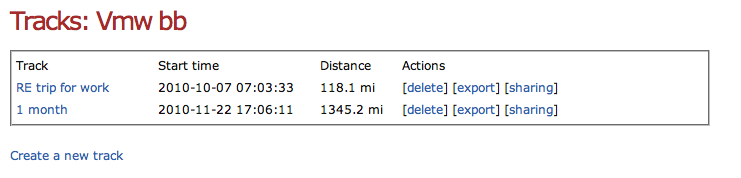
Below are some example tracks; the top one is across a month and included a family holiday to Euro Disney via Eurostar, multiple trips to and from customers and the office and a trip to Derry in Ireland.
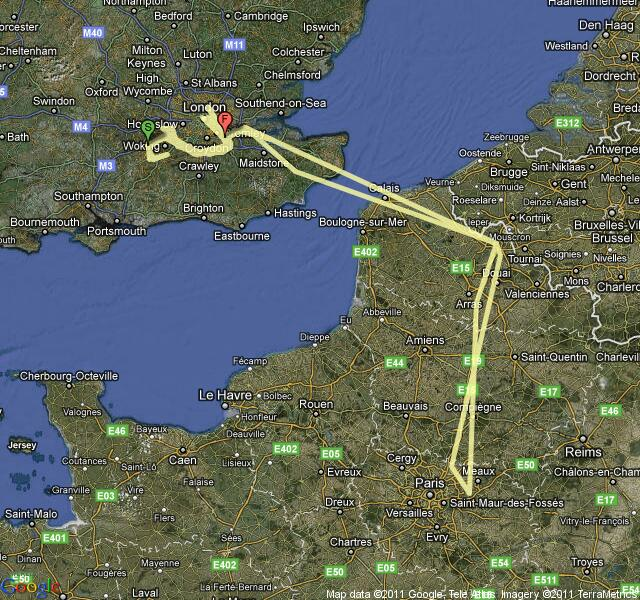
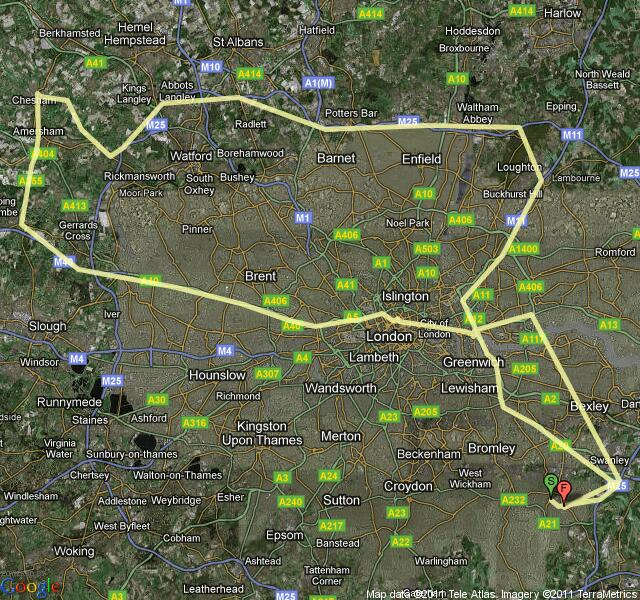
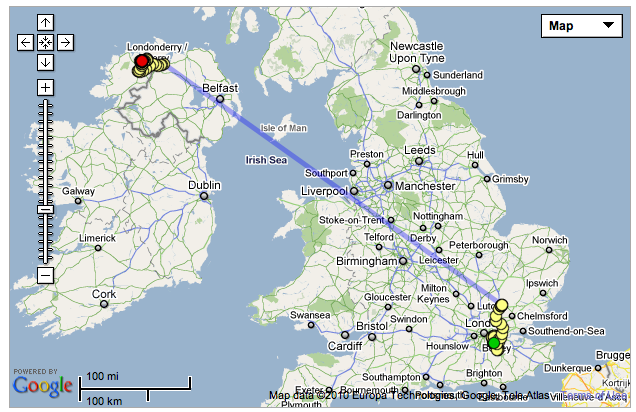
(Phone was switched off on the plane, but maybe leaving the GPS running might be an interesting, if illegal experiment )
If you are similarly minded I’d encourage you to check out Instamapper, and best of all – it’s FREE!
Presenting at Cloud Expo Europe 2011
Posted by on January 24, 2011
I will be presenting with another VMware colleague, Aidan Dalgleish at Cloud Expo Europe 2011 which is being held in London on the 2nd-3rd February.
Our session is on 2nd Feb at 11.30 – you can find the full schedule here and there is more information about the event here, it’s free if you register before 1st Feb and you can do that here.
We will be demonstrating VMware vCloud Director and talking about hybrid-cloud use-cases so if you’re interested to see it in action come along, we’ll also be hanging around to answer any cloudy questions that you may have.
Hope to see you there.
Silent Data Corruption in the Cloud and building in Data Integrity
Posted by on January 20, 2011
I was passed a link to a very interesting article on-line about silent data corruption on very large data sets, where corruption creeps undetected into the data read and written by an application over time.
Errors are common in reading from all media and this would normally be trapped by storage subsystem logic and handled lower down the stack but as these increase in complexity and the data they store vastly increases in scale this could become a serious problem as there could be bit-errors not being trapped by disk/RAID subsystems that are passed on unknown to the requesting application as a result of firmware bugs or faulty hardware – typically these bugs manifest themselves in a random manner or by edge-case users with unorthodox demands.
All hardware has a error/transaction rate – in systems up until now this hasn’t really been too much of a practical concern as you run a low chance of hitting one, but – as storage quantities increase into multiple Tb of data this chance increases dramatically. A quick scan round my home office tallys about 16Tb of on-line SATA storage, by the article’s extrapolation on numbers this could mean I have 48 corrupt files already.
This corruption is likely to be single-bit in nature and maybe it’s not important for certain file formats – but you can’t be sure, I can think of several file formats where flipping a single bit renders them unreadable in the relevant application.
Thinking slightly wider, if you are the end-user “victim” of some undetected bit-flipping what recourse do you have when that 1 flips to a 0 to say your life insurance policy doesn’t cover that illness you have just found you have – “computer says no”?
This isn’t exclusively a “cloud problem” it applies to any enterprise storing a significant amount of data without any application level logic checks, but it is compounded in the cloud world where it’s all about a centralised storage of data, applications and code, multi-tenanted and highly consolidated, possibly de-duplicated and compressed where possible.
In a market where cost/Gb is likely to be king providers will be looking to keep storage costs low, using cheap-er disk systems – but making multiple copies of data for resilience (note, resilience is different from integrity) – this could introduce further silent bit corruptions that are propagated across multiple instances as well as increasing the risk of exposure to a single-bit error due to the increased number of transactions involved.
In my view, storage hardware and software already does a good job of detecting and resolving these issues and will scale the risks/ratios with volumes stored. But, if you are building cloud applications maybe it’s time to consider a check summing method when storing/fetching data from your cloud data stores to be sure – that way you have a platform (and provider)-independent method of providing data integrity for your data.
Any such check summing will carry a performance penalty, but that’s the beauty of cloud – scale on demand, maybe PaaS providers will start to offer a web-service to offload data check summing in future?
Check summing is an approach for data reliability, rather than security but at a talk I saw at a Cloudcamp last year; a group were suggesting building DB field-level encryption into your cloud application, rather than relying on infrastructure to protect your data by physical and logical security or disk or RDBMS-level encryption (as I see several vendors are touting) build it into your application and only ever store encrypted assets there – then even if your provider is compromised all they hold (or leak) is already encrypted database contents – you as the end-user still retain full control of the keys and controls.
Combine this approach with data reliability methods and you have a good approach for data integrity in the cloud.

 Virtualization, Cloud, Infrastructure and all that stuff in-between