Virtualization, Cloud, Infrastructure and all that stuff in-between
My ramblings on the stuff that holds it all together
Nexentastor CE performance not as good as expected with SSD Cache check it is actually working
Posted by on January 19, 2011
I encountered this problem in my lab – I have the following configuration physically installed on an HP Microserver for testing (I will probably put it into a VM later on however)
1 x 8Gb USB flash drive holding the boot OS
And the following configured into a single volume, accessed over NFSv3 (see this post for how to do that)
1 x 64Gb SSD Drive as a cache
4 x 160Gb 7.2k RPM SATA disks for a raid volume in a raidz1 configuration
A quick benchmark using IOmeter showed that it was being outperformed on all I/O types by my Iomega IX4-200d, which is odd, as my Nexentastor config should be using an SSD as cache for the volume making it faster than the IX4 So I decided to investigate.
If you look in data management/Data Sets and then click on your volume you can see how much I/O is going to each individual disk in the volume.

In my case the SSD c3d1 had no I/O at all – so if you click on the name of the volume shown in green (in my case it’s called “fast”) then you are shown the status of the physical disks.
So, from looking at the following screen Houston we have a problem – my SSD is showing as faulted (but no errors are recorded either) – so I need to investigate why (and hope it’s still under warranty, if it has actually failed this will be the 2nd time this SSD has been replaced!)
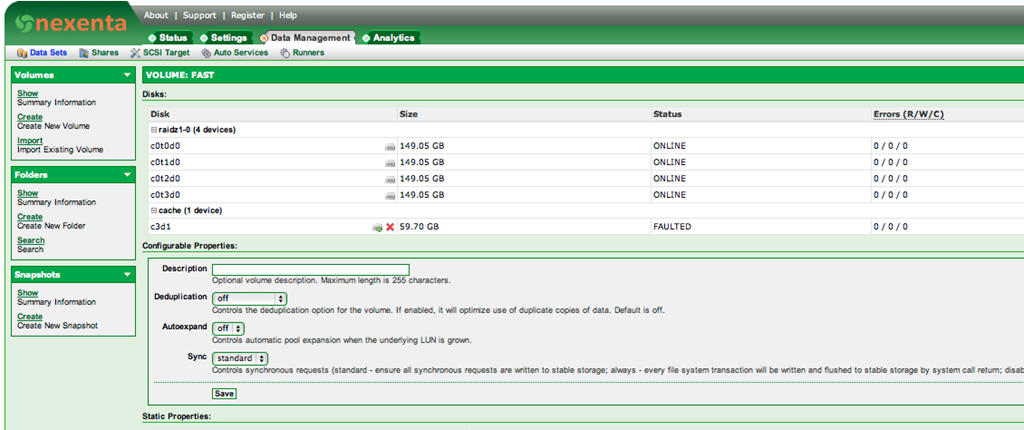
Attempts to manually online the disk return no error, but don’t work either so not entirely sure what happened there, I did have to shut down the box and move it so I re-seated all the connectors but it still wouldn’t let me re-enable the disk.
Worth noting that even with this fault the volume remained on-line; just without the cache enabled so I was able to storage vMotion off all the VMs and delete and re-create the volume (this time I re-created it without any mirroring for maximum performance.
Once I had storage vMotioned the test VM back (again, no downtime – good old ESX!) I ran some more Iometer tests and performance looked a lot better (see below)

I’ll be posting some proper benchmarks later on, but for now it was interesting to see how much better it could perform than my IX4 (although remember there is no data-protection/RAIDZ overhead so a disk fault will destroy this LUN – good enough for my home lab though, and I plan to RSYNC the contents off to the IX4 for a backup ).
Fingers crossed this isn’t a fault with my SSD… time will tell!
Nexentastor, When 1Gb just isn’t enough
Posted by on January 18, 2011
I have been trying to get my Nexentastor SSD/SATA hybrid NAS working this last week and I’ve found that the web UI grinds to a halt sometimes for me, I couldn’t find a UNIX ‘top’ equivalent quickly but the diagnostic reports that you can generate from the setup menu command line did indicate that it was short of RAM.
The HP Micro server I am using shipped with 1Gb of RAM, and normally that would be fine for a file-server/NAS but I’m thinking that Nexentastor does a fair bit more and is based on OpenSolaris rather than a stripped down Linux or BSD; the eval guide says 768Mb is enough for testing, 2Gb better 4Gb ideal so I was already pushing my luck with 1Gb for any real use.
So, I bit the bullet and ordered 8Gb of RAM for the server, which is the maximum you can install – ironically this cost the same amount as I paid for the whole Microserver in the 1st place (after the cash-back deal) but that’s reflective of the fact it only has 2 memory slots so I had to opt for the more expensive 4Gb chips.
I went for 8Gb as at some point I will probably re-run my experiments under ESXi and deploy this host as a part of my management cluster for the vTARDIS.cloud.
I am also booting the OS from a USB flash-drive – I had several 2Gb units but it wouldn’t install to them as they didn’t have quite enough space, so I’m using an 8Gb flash drive to hold the OS – this isn’t the most performant drive either so any swapping will be further impacted by the USB speed.
I’m Pleased to report that the 8Gb RAM upgrade has resolved all the problems with navigating the UI, and should also yield further I/O performance as the Nexentastor software uses the extra RAM as extra cache (ARC) as well as the SSD (L2ARC) – there is a good explanation of that on this blog post.
I’m going to post up my I/O benchmarking when I have some further wrinkles ironed out – in the meantime there is an excellent post here with some example benchmarks running Nexentastor in a VM on a slightly more powerful HP ML110 server.
London VMware User Group VMUG Feb 10th 2011
Posted by on January 17, 2011
It’s that time again, if you are in the UK – or anywhere nearby then register and get yourself over to the London VMUG.
I’m not sure if I can make this one, due to work commitments and this will be the 1st VMUG for about a year and a half where I won’t be presenting anything – so it’s safe to come out from behind the sofa! 
The Steering Committee are pleased to announce the next UK London VMware User Group meeting, kindly sponsored by Veeam is to be held on Thursday 10th February 2011. We hope to see you at the meeting, and afterwards for a drink or two, courtesy of VMware.
Our meeting will be held at the Thames Suite, London Chamber of Commerce and Industry, 33 Queen Street, London EC4R 1AP, +44 (0)20 7248 4444. The nearest tube station is Mansion House, location information is available here. Reception is from 12.30 for a prompt 1pm start, to finish around 5pm. Our agenda is below and is subject to change (but hopefully not too much!)
10.00 – 12.00 Roundtable Strategy Session with Martyn Storey and Mark Stockham; Enterprise Management – optional (spaces limited)
11:00 – 12:00 PowerCLI session with Alan Renouf – optional
12:30 – 13:00 Arrive & Refreshments
13:00 – 13:20 Welcome & News (Alaric)
13:20 – 14:00 Sponsor presentation (Veeam Systems)
14:00 – 14:30 VMware Certification – Preparing for Success (Scott Vessey)
14:30 – 15:00 Cheap Disaster Recovery using PowerShell scripts (Gabrie van Zanten http://www.gabesvirtualworld.com/)
15:00 – 15:20 Refreshment break
15:30 – 16:00 Advanced vCenter Alarming and Automation (Simon Long, VMware)
16:00 – 16:30 Transatlantic Datacentre migration (Chris Dearden, JFVI)
16:30 – 16:45 Close
17:00 Pub
Notes:
If you would like to participate in Alan’s workshop, please bring a laptop, preferably with the most current PowerCLI and PowerShell binaries installed.
To register your interest in attending, please email londonvmug@yahoo.com with up to two named attendees from your organisation. If you do not receive a confirmation mail, please don’t just turn up since we will not be able to admit you to the meeting. Please separately mention if you intend attending Alan’s PowerCLI workshop at 11.00 or would like to be considered to attend the Enterprise Management roundtable strategy session at 10.00. Content from the meeting will be uploaded to http://www.box.net/londonug, NDA permitting.Sincerely, and with regards,
The London VMUG Steering Committee
Finding Nexentastor CE IP address from the Command Line
Posted by on January 13, 2011
I found that I had a problem with my Nexentastor CE appliance build and needed to do some configuration by the command line – the quickest way to do this is to logon as root (using the password you specified during the installer)
Then type setup, that gives you a quick access way to move through the various configuration options and look at parameters.
You can also reboot/shutdown from here.

Note if you are trying a DHCP configuration it doesn’t seem to allow ifconfig commands even if you specify the bge0 interface, but you can view the properties from the setup utility, or as a quick short-cut type
setup network interface show
nmc@v0idsan2:/$ setup
Option ? network
Option ? interface
Option ? show
==== Interfaces ====
lo0: flags=2001000849<UP,LOOPBACK,RUNNING,MULTICAST,IPv4,VIRTUAL> mtu 8232 index 1
inet 127.0.0.1 netmask ff000000
bge0: flags=1004843<UP,BROADCAST,RUNNING,MULTICAST,DHCP,IPv4> mtu 1500 index 2
inet 192.168.2.4 netmask ffffff00 broadcast 192.168.2.255
ether 78:e7:d1:b1:44:1f
lo0: flags=2002000849<UP,LOOPBACK,RUNNING,MULTICAST,IPv6,VIRTUAL> mtu 8252 index 1
inet6 ::1/128nmc@v0idsan2:/$ setup network interface show
==== Interfaces ====
lo0: flags=2001000849<UP,LOOPBACK,RUNNING,MULTICAST,IPv4,VIRTUAL> mtu 8232 index 1
inet 127.0.0.1 netmask ff000000
bge0: flags=1004843<UP,BROADCAST,RUNNING,MULTICAST,DHCP,IPv4> mtu 1500 index 2
inet 192.168.2.4 netmask ffffff00 broadcast 192.168.2.255
ether 78:e7:d1:b1:44:1f
lo0: flags=2002000849<UP,LOOPBACK,RUNNING,MULTICAST,IPv6,VIRTUAL> mtu 8252 index 1
inet6 ::1/128nmc@v0idsan2:/$
Passed VCAP-DCD Exam
Posted by on January 12, 2011
After a bit of confusion and receiving the wrong exam results via email I got a nice email with a PDF copy of my scope report this morning, so I have now passed my VCAP-DCD 411 exam, with a mid-300’s score.
I did the beta exam (and because of availability and my schedule I had to go to Berlin to do it) it was about 4 hours long and off of the questions I had to rush a bit, which I would like to think which probably accounts for my score.
I did the version 3 design exam last year and I think the scenarios were better laid out in the v4 exam and weren’t as long which made them much more achievable in the allotted time.
They fixed the diagramming tool – there is a Visio-like diagramming tool which you can use to sketch out designs based on a given scenario by dragging & dropping servers, storage and links.
The exam I did was a good mix of scenarios/multiple-choice type questions and drag and drop process questions, all of which I guess will make it into the final version of the exam.
The final exam is now available for scheduling – you can find details here.
I did the vSphere 4 Design course the week before, although it was useful for the my VCDX prep in terms of helping to understand the blessed VMware design process but I don’t think it’s that helpful for the exam as the exam has a more technical focus so as long as you understand cluster design you should be in good stead.
I will also do the VCAP-DCA in a couple of months so will report back on my experience, in the meantime – Gregg has a great set of links and information on his blog here
Building a Fast and Cheap NAS for your vSphere Home Lab with Nexentastor
Posted by on January 11, 2011
My home lab is always expanding and evolving – no sooner have I started writing up the vTARDIS.cloud configuration than something shiny and new catches my eye! fear not I will be publishing the vTARDIS configuration notes over the next 2 months, however in the meantime I have noticed that my IX4-200d NAS has been bogging down performance a bit recently – I attribute this to the number of VMs I am running across the 5 physical (and up to 50) vESXi hosts.
The IX4 is great and very useful for protecting my photos and providing general media storage but I suspect it also uses 5.4k RPM disks and in a RAID5 configuration it performs /ok/ but I feel the need, the need for speed 
With the sub-£100 HP MicroServer deal that is on at the moment I spotted an opportunity to combine it with some recycled hardware into a fast NAS box, using some new software – the NexentaStor Community Edition, I’ve used OpenFiler and the Celerra VSA a lot in the past but this has some pretty intriguing features.
Nexentastor allows you to use SSD as a cache and provides a type of software RAID using Sun’s ZFS technology – you can read a good guide to configuring it inside a VM on this excellent post
I already have a number of ML115 and ML110 servers, which all boot from 160Gb 7.2k RPM SATA disks; most of the time they do nothing so an idea was born, I will switch my home lab to boot from 2Gb USB sticks (of which I have a plentiful supply) and re-use those fast SATA disks in the HP MicroServer for shared, fast VM storage
I also have a spare 64Gb SSD from my orginal vTARDIS experiments which I am planning to re-use as the cache within the MicroServer
So, the configuration looks is like this;
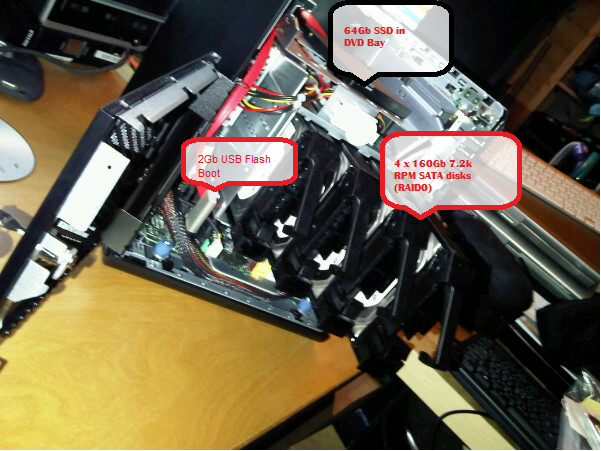
Because I want maximum performance and I don’t care particularly about data protection for this NAS I’m just going to try striping data across all the SATA disks for best performance and I hope the SSD will provide a highly performant front-end cache for VMs stored in it (if I understand how it works correctly).
Most of the VMs it will be storing are disposable or easily re-buildable but I can configure RSYNC copies between it and my IX4 for anything I want to keep safe (or maybe just use one of the handy NFR licenses Veeam are giving out)
I did consider putting ESXi on the HP MicroServer and running Nexentastor as a VM (which is supported) but I haven’t yet put any more RAM in the MicroServer, although I may do this in future and add it to my existing management cluster.
I’ll post up some benchmarks when I’m done.
New Storage Benchmarking Tool from VMware Labs
Posted by on January 10, 2011
To quote the site..
IOBlazer is a multi-platform storage stack micro-benchmark. IOBlazer runs on Linux, Windows and OSX and it is capable of generating a highly customizable workload. Parameters like IO size and pattern, burstiness (number of outstanding IOs), burst interarrival time, read vs. write mix, buffered vs. direct IO, etc., can be configured independently. IOBlazer is also capable of playing back VSCSI traces captured using vscsiStats. The performance metrics reported are throughput (in terms of both IOPS and bytes/s) and IO latency.
IOBlazer evolved from a minimalist MS SQL Server emulator which focused solely on the IO component of said workload. The original tool had limited capabilities as it was able to generate a very specific workload based on the MS SQL Server IO model (Asynchronous, Un-buffered, Gather/Scatter). IOBlazer has now a far more generic IO model, but two limitations still remain:
The alignment of memory accesses on 4 KB boundaries (i.e., a memory page)
The alignment of disk accesses on 512 B boundaries (i.e., a disk sector).
Both limitations are required by the gather/scatter and un-buffered IO models.A very useful new feature is the capability to playback VSCSI traces captured on VMware ESX through the vscsiStats utility. This allows IOBlazer to generate a synthetic workload absolutely identical to the disk activity of a Virtual Machine, ensuring 100% experiment repeatability.
You can download it and find more information here – I’m going to try and use this in my upcoming NexentaStor NAS project.
New year, New Look for vinf.net
Posted by on January 8, 2011
This blog is hosted on WordPress.com, rather than a dedicated WordPress instance – there are a number of reasons for this, but the main one is that it’s free. I also wanted to keep this site to do with content, being on wordpress.com limits what you can do in terms of plug-ins, themes etc. but that simplicity means less temptation to fiddle with things rather than write content and it means that someone else has to keep up with patching wordpress.
Anyway – I finally found some time to update the look and feel of the site, I quite like the new theme, it’s a bit sparse – but that’s not a bad thing, I even managed to knock up a logo of sorts… I did A-Level art you know*
Anyways, hope you like it – if not comments are below, feel free 
* “did A-Level art” does not imply that Simon passed with a good grade or possesses any artistic talent at all, but he did attend most of the lessons.
That was 2010 so what next
Posted by on January 6, 2011
I’m a bit late to the Internets with this post but happy new year to all my readers – and judging by my WordPress stats there are a lot of you! over 400k visitors this year!
So – what happened in 2010? for me, it was a strange year, I knew from the start of the year that I had chosen to leave the relative comfort of the position that I had held at ioko for the previous 10 years to do “something new” – and that it was that stark, a long notice period and nothing definite lined up so I took a bit of a leap of faith and it worked out as I joined VMware the day after I left.
However, there were plenty of projects to complete before I left ioko and I also cracked on with my blog in my limited spare time whilst also juggling a new-born baby and assortment of home DIY projects
- Presented several times at the London VMware User Group (VMUG) ok – I presented at *all* of the London VMUG’s in 2010

- Took the VMware Enterprise Administrator (VI3) Exam
- Took the VMware Design (VI3 Exam)
- Submitted my VCDX application package (fingers crossed)
- undertook lots of late-night development work on the vTARDIS
- The vTARDIS won the best of show award at VMworld Europe
- The vTARDIS travelled to BriForum and a bit of a US-tour
- I bemoaned the end of SpinVox and started using voxsci – which is almost exactly the same and slightly more accurate.
- I worked on a reasonably big vSphere 4 design for a customer project using HP’s new Flex10 technology – mostly went ok in the end and I posted the resources here
- I mused about the usefulness of vApps and some management problems they could pose if you take the traditional approach to guest management and don’t adapt your processes.
- I used an iPad to solve all my domestic scheduling problems
- I really wanted emulators for everything (come on vendors, get with the programme!)
- I complained about VMware’s licensing if you want to do “cloud”, some of these complaints still stand today (watch this space!)
- I wrote about how the computing super-powers were plotting to take over the world
- I did some interesting experiments with some solid-state storage for VMs
- I swapped from a Windows laptop to a Mac with OS X and quickly uninstalled Office 2011 and am using Office 2010 in a Fusion VM; heretic? meh.
So, what’s next…?
This year I would like to focus on the following;
- New layout and look for vinf.net – the default WP theme is getting a bit tired.
- Spend more time bridging development and infrastructure; these are two traditionally separate camps, and particularly with “cloud” there needs to be a much better integration across the two, devops is particularly of interest to me.
- Working with an “upcoming product” to unify the two camps for the cloud (see what I did there?
 ).
). - Learn to program again, it’s been a long time since I did any real hands-on development and its going to be very helpful in enabling this inf/dev bridge.
- Keep developing the vTARDIS and do not talk about fight-club
- Keep up with the presenting at user groups, conferences etc.
- Learn to play bass guitar properly at least a little bit
- Complete my VCDX on VI3 or VI4.
- Blog at least once a week, I’ve found twitter has replaced some of my “look at this, this is cool” type blog posts that I used to enjoy writing – but it’s hard to get any kind of objective opinion into 140 chars – so I’m going back to blog basics.
- Manage twitter distractions better, i.e close TweetDeck.
- London – Brighton bike ride with a better time than the heavily jet-lagged one I put in this year, and not to walk the beacon.
- London – Paris bike ride (either the 24hr race or 3 day ride)
- At least 1,500 miles cycled (oh and upgrade my road-bike, again..)
- Spend less of my own money on my home lab (donations accepted )…
Have a good one!
BriForum comes to London in 2011
Posted by on January 4, 2011
Brian Madden’s popular BriForum event is making a welcome return to Europe in 2011, and specifically to my home town of London
If you are in the server based computing space (Citrix, Terminal Services, VDI) then this is the place to be for no-vendor bull5h1t real-world information.
I’ve been to 2 previous BriForum events (2007 in Amsterdam in 2010 in Chicago, where I had the honour of presenting my vTARDIS).
there is currently a discount code available that will save you £200

 Virtualization, Cloud, Infrastructure and all that stuff in-between