Virtualization, Cloud, Infrastructure and all that stuff in-between
My ramblings on the stuff that holds it all together
Installing VMware Workstation on Windows 7
Posted by on October 27, 2009
You may recall I previously posted on problems installing VMware Workstation 6.5 on Windows 7, this problem seems to have been resolved with the upcoming VMware Workstation 7 which adds support for Windows 7 as a guest and as a host.
You can download the Workstation 7 RC build here Release Build here and see the full features list, I can confirm it installed perfectly on my Windows 7 Ultimate x64 machine.
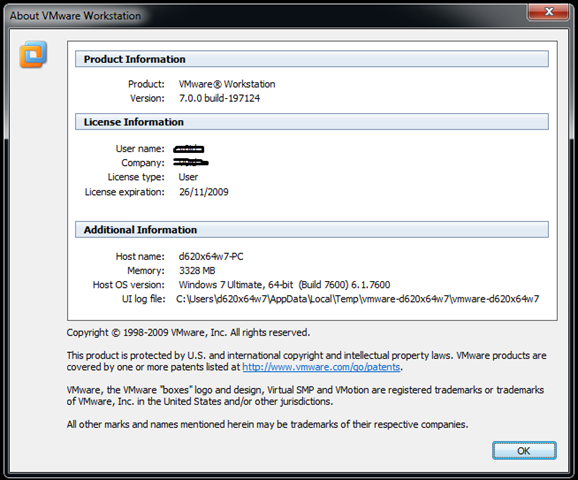 (Screenshot from RC build, see above link for RTM build)
Some new features include official support for Windows 7 *with Aero support!* (shown below)

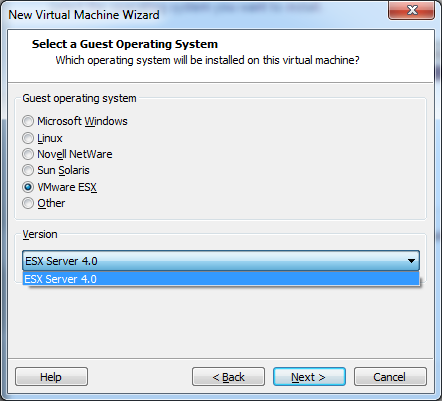
And best of all – it now provides "official support for ESX as a guest VM under Workstation (my previous posts on workarounds for Workstation 6.5 here)
As an aside I’m running Windows 7 on a machine with a 64-bit SSD hard drive, I’m hoping to make use of the linked clone functionality to save disk space as I often run VM’s which are built from a common base OS template (see this post here for more info on how I’ve managed linked images in the past)– performance so far has been great both for host and guest as I/O doesn’t get as bogged down as it does with traditional spindle based disks.
**UPDATE: ah, the perils of the scheduled post – as this article went live the final RTM build of Workstation 7 has been released, I’ve updated the links in this post**
Getting access to VMworld content if you couldn’t make it in person
Posted by on October 25, 2009
Now the noise around VMworld has calmed down I thought I would let you know that the vast amount of excellent technical content that was presented at the event itself is available to stream online or as an MP3 (audio only) or slide download (audio only).
As you’d expect, the catch is it’s not free to you unless you attended VMworld in-person. However, you can purchase a VMworld subscription which costs $699 USD per annum and gives you full access to stream and download content from the event, and all previous events back to 2004 – so if travel and time out of the office is not an option for you – how about you (or your employer) pay for a subscription to the content itself – which is obviously cheaper than attending in person.
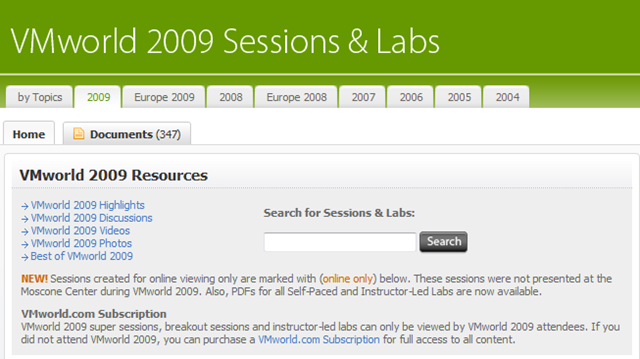
I have pasted a full list of all sessions from VMworld 2009 US below – please don’t ask me to post the sessions online, this is explicitly forbidden as you’d expect – if you want the content I’m afraid you’ll have to pay – click the graphic below (but it’s excellent value IMHO

Note: you’ll need a vmworld.com account to view the session details linked below (it’s free and can be done here)
Super Sessions
|
SS4880 |
NetApp: Clear up the Cloud – Key Infrastructure Requirements and Real-World Implementations |
|
SS5000 |
Dell: How to Get Ahead in the Cloud With Your Feet Planted Firmly on the Ground |
|
SS5001 |
VMware: Extending Your IT Beyond the Datacenter: The vCloud Initiative |
|
SS5081 |
Wyse: Desktop Virtualization / Cloud Computing: We Did It – Here’s How and What we Learned |
|
SS5082 |
Cisco and VMware: Delivering Innovation for Virtualization |
|
SS5120 |
IBM: What You Need to Know to Virtualize Today’s Data Center |
|
SS5121 |
Intel: Technology transformations central to the evolution of flexible computing |
|
SS5140 |
EMC: Infrastructure Architectures Purpose Built for the Virtual Datacenter |
|
SS5160 |
HP: Stop Virtualizing Servers, Start Virtualizing Infrastructure |
|
SS5220 |
Symantec: Complete the Promise of Virtualization |
|
SS5240 |
VMware, Cisco and EMC: Engineering Developments Enabling the Virtual Datacenter |
|
SS5241 |
|
|
SS5440 |
VMware: Enabling Better Business Outcomes with Policy-Driven Service Level Management |
Business Continuity & Disaster Recovery
Business Workshops
|
BW4740 |
|
|
BW4741 |
|
|
BW4742 |
|
|
BW4743 |
Desktop Virtualization
Enterprise Applications
Technology and Architecture
Virtualization 101
|
V11721 |
|
|
V12226 |
Building a High Availability and Disaster Recovery Solution with VMware |
|
V12644 |
Designing a Virtualization Infrastructure for the Small Environment |
|
V12789 |
VMware vCenter Converter 101 (online only)* |
|
V13100 |
The VMware Competitive Advantage – A Comparison of Server Virtualization Offerings |
|
V13226 |
|
|
V13227 |
|
|
V13229 |
|
|
V13395 |
Getting to Yes! Keys to Launching a Successful Data Center Virtualization Program |
|
V13478 |
Executing Enterprise Virtualization – Continuing Case Study with USMC |
|
V13496 |
VMware vSphere and VI Best Practices – Tips and Tricks (online only)* |
|
V13760 |
Virtualization Management
Instructor-Led Labs (PDFs only)
|
LAB01 |
|
|
LAB02 |
|
|
LAB03 |
|
|
LAB04 |
VMware vSphere 4 – Performance Optimization & Troubleshooting |
|
LAB05 |
VMware vSphere 4 – Security Hardening & Best Practices (vShield Zones) |
|
LAB06 |
|
|
LAB07 |
|
|
LAB08 |
|
|
LAB09 |
|
|
LAB10 |
|
|
LAB11 |
|
|
LAB12 |
Self-Paced Labs (PDFs only)
|
SPL13 |
|
|
SPL14 |
|
|
SPL15 |
|
|
SPL16 |
VMware vCenter Site Recovery Manager (SRM) Basic Install & Config |
|
SPL17 |
|
|
SPL18 |
|
|
SPL19 |
|
|
SPL20 |
|
|
SPL21 |
|
|
SPL22 |
|
|
SPL23 |
I wasn’t able to to go VMworld US in person this year because my wife and I were expecting a baby at that time, but luckily I received a VMworld subscription from VMware as a benefit of the vExpert programme; had I not I would have probably shelled out of my own pocket for one.
Justifying the spend
Whilst we seem to be slowly emerging from the economic apocalypse of the last 18 months it’s still very hard to get sign-off to attend such events in person and too many org’s treat VMworld/Tech-Ed as marketing type events – unless you are a vendor with a stand this couldn’t be further from the truth – these conferences are primarily technical training boot-camp camps, with some networking and general trade show features thrown in. However, they are what you make of them – the onus is on you to hunt down the sessions/track or people you are interested in – nobody drives your schedule but you – non self-starters need not apply.
I use the following analogy – which applies equally to Microsoft Tech-Ed and VMworld (..and I’m sure Oracle World, Apple World, etc.)
A typical 5-day technical training course on an individual product (Exchange, ESX, Windows 2008) in the UK will cost in the region of £1,500-3,000 GBP and those 5 days will be slow-paced (9.30 –> 4.30pm affairs). The course content and material has to cater to the lowest common denominator delegate, for a geek/experienced tech this can make for frustratingly slow progress and means you only cover a very narrow technical focus, or broad high-level overview – you can’t easily dive in and out of the bits that are relevant to you with a traditionally delivered course and even the best instructor in the world can’t dedicate that much time to you in a classroom environment.
So compare that training course is £2-3000 + travel + accommodation + time out of the office to VMworld (for example..), even at the most expensive register on-site on the day prices
- VMWorld Full Conference Pass* 1,260 EUR (£1,176 GBP at current exchange rate) (Tech-Ed 5 days c.£2000 full price* ticket)
- Travel (airfare from most of continental Europe, economy/flexible flight) c.£400**
- Hotel (normal business hotel, 4 nights) £900**
+Access to on-demand streamed and downloaded content following the conference (access allowed until the next VMworld) included
+Lunch/breakfast usually included
+Networking opportunities, access to product teams and managers included
+trade show with relevant vendors/suppliers included
+bag and pen included (ok, I’m struggling with that one! :))
note:
*Early registration attracts a large discount on the full conference pass – look for “early bird” tickets which can knock a significant percentage off the full price
**If you are prepared to “slum” it with budget airlines and hotels this is significantly cheaper.
Prices for reference:
With Microsoft Tech-Ed they usually give a complimentary Technet Direct subscription – which is worth hundreds of pounds on it’s own and gives you multiple copies of almost every Microsoft product for your own use.
So if you look at it pragmatically – VMworld/Tech-Ed give you the flexibility to tailor your content to what is important to you; as well as the ability to take all the information away with you to review online post-conference (even for the sessions you didn’t make in person)
With a training course you walk away with a nice certificate, some spiral bound manuals and if you are lucky – a pen 🙂
And they both come out to roughly the same price.
I’m not saying this is for everyone – you need to be a self-starter to make the most of these conferences, and if you do a limited scope day-job and that is all you are interested in doing, traditional training courses are probably your best bet but for those of us that work as consultants or want to broaden our horizons – go for it!
My write-ups of previous VMWorld and Tech-Ed events can be found at the following links:
Tech-Ed EMEA 2008
https://vinf.net/2008/10/31/off-to-microsoft-teched-emea-2008/
https://vinf.net/2008/11/04/teched-emea-2008-it-pro-day-1/
https://vinf.net/2008/11/04/teched-emea-2008-it-pro-day-2/
https://vinf.net/2008/11/06/teched-emea-2008-it-pro-day-3/
https://vinf.net/2008/11/06/teched-emea-2008-it-pro-day-4/
https://vinf.net/2008/11/07/teched-emea-2008-it-pro-day-5/
VMworld Europe 2009
https://vinf.net/2009/02/23/vmworld-partner-day-keynote/
https://vinf.net/2009/02/24/vmworld-partner-day-wrap-up/
https://vinf.net/2009/02/24/vmworld-europe-day-1-keynote/
https://vinf.net/2009/02/24/dc02-best-practices-for-lab-manager-vmworld-europe-2009/
https://vinf.net/2009/02/24/dc14-overview-of-2009-vmware-datacenter-products-vmworld-europe-2009/
https://vinf.net/2009/02/24/vmworld-europe-day-1-wrap-up/
https://vinf.net/2009/02/24/vmware-client-hypervisor-cvp-grid-application-thoughts/
https://vinf.net/2009/02/25/vmworld-europe-day-2-keynote/
https://vinf.net/2009/02/25/how-vmware-it-use-vmware-internally/
https://vinf.net/2009/02/26/hands-on-lab-01-vsphere-features-overview/
https://vinf.net/2009/02/26/hands-on-lab-12-cisco-nexus-1000v-switch/
Windows 7 and the Intel 855 video driver problem
Posted by on October 21, 2009
Judging by the several hundreds of hits that this post on my blog gets every day since January I would say there is a *serious* demand from the general internet community to use laptops with the Intel 855 family video chipset with Windows 7, and it’s not even been released to the general public until now!
Whilst this may be an “older” chipset; in reality those laptops aren’t beyond serviceable life – and if anything the performance increases in Win7 will make them more usable and extend their life a bit further.
Nobody realistically expects fantastic 3D/Aero graphics from this combo, but a driver that supports the panel’s native resolution would be more than adequate for browsing/word processing etc. no doubt these ex-corporate laptops are being cycled around family members/students for some time to come rather than forcing people to squint at standard VGA.
There are ways to get the Vista driver bodged into Win7 (see this post and it’s comments), but it’s far from ideal or stable
Please Intel/Microsoft – surely you must be able to produce a basic/compatible driver by today! otherwise I’m sure some of the Windows launch parties could be something of a disappointment!
if it goes by way of evidence – this is the number of hits my original blog post about this problem has had in the last 10 months, it will be interesting to see what it does from launch day onwards!

BlackBerry app for WordPress
Posted by on October 15, 2009
I must be a bit behind the times, but I have just stumbled across the beta version of a blackberry app that let’s you publish and manage your blog directly from your phone, there is also an iPhone version
Very cool, you can now all look forward to accidental posts from my pocket and I can look forward to RSI from my blackberry Pearl 🙂
If you are interested you can download it OTA from httphere
Incidentally it also supports the builtin camera, and this post was typed on on a blackberry 8120 pearl.
Can’t see a way of viewing stats yet, which would be a nice addition.

VMware AppSpeed Probes and more 2% Maintenance Mode Problems
Posted by on October 14, 2009
Following on from my last post on problems entering maintenance mode with FT-enabled VMs, I seem to have found another one – if you have the rather excellent AppSpeed product deployed on an ESX cluster and you want to put a host into maintenance mode it gets stuck at 2% as it can’t move the AppSpeed probe VM onto an alternative host

If you try to manually vMotion the problematic probe off to another host in the cluster you get the following error
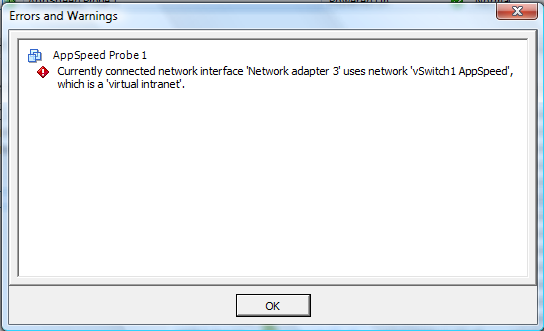
If you shutdown or suspend the AppSpeed probe VM then the switch to maintenance mode continues as expected.

This would make sense as it plugs directly into a dedicated vSwitch on that host to monitor network traffic so vMotioning it off wouldn’t be of any use – assuming the other nodes in the cluster are also running AppSpeed probes.
However it would be great if there was a more automated way to handle this? guess it’s tricky as on one hand its great that AppSpeed doesn’t rely on any ESX-host agents and is essentially self-contained with probes running as VM appliances but on the other hand the probe doesn’t know the guest is being put into maintenance mode so should be shut down/suspended rather than vMotioned to an alternative host.
There is integration with the vCenter server via a plug-in so maybe in future versions that could trap a maintenance mode event and initiate (or suggest) shutting down the AppSpeed probes.
VMware FT, 2 Nodes and stuck on 2% entering maintenance mode
Posted by on October 14, 2009
I have a 2 node vSphere cluster running on a pair of ML115g5 servers (cheap ESX nodes, FT compatible) and I was trying to put one into maintenance mode so I could update its host profile, however it got stuck at 2% entering maintenance mode, it appeared to vMotion off the VMs it was running as expected but never passed the 2% mark.

After some investigation I noticed there were a pair of virtual machines still running on this host with FT enabled – the secondary was running on the other server ML115-1 (i.e not the one I wanted to switch to maintenance mode)


I was unable to use vMotion so that the primary and secondary VMs were temporarily running on the same ESX host (and that doesn’t make much sense anyway)
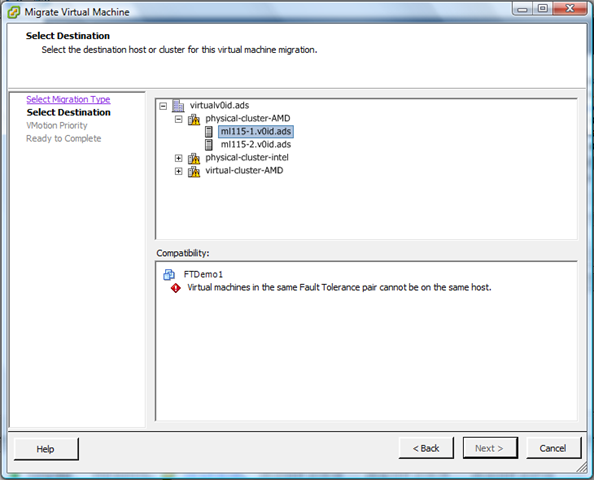
That makes sense, the client doesn’t let you deliberately do something to that host that would break the FT protection as there would be no node to run the secondary copy. incidentally this is good UI design – you have to opt-in to break something – so you just have to temporarily disable FT and should be able to proceed.
If I had a 3rd node in this cluster there wouldn’t be a problem as it would vMotion the secondary (or primary) to an alternative node automatically (shown below is how to do this manually)
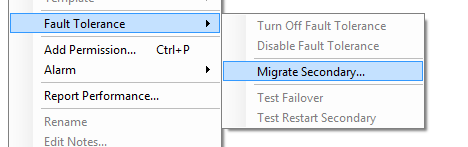
However in my case all of the options to disable/turn-off FT were greyed out and you would appear to be stuck and unable to progress.
the fix is pretty simple and you just need to cancel the maintenance mode job by right-clicking in the recent tasks pane and choosing cancel, which then re-enables the menu options and allows you to proceed. Then turn-off (not disable – that doesn’t work) fault tolerance for the problematic virtual machines



The virtual machine now doesn’t have FT turned on, if you just disable FT it doesn’t resolve this problem as it leaves the secondary VM in-situ, you need to turn it off.
So, moral of the story is – if you’re stuck at 2% look for virtual machines that can’t be vMotioned off the host – if you want to use FT – a 3rd node would be a good idea to keep the VM FT’d during individual host maintenance; this is a lab environment rather than an enterprise grade production system but you could envision some 2-node clusters for some SMB users – worth bearing in mind if you work in that space.
Designing Active Directory – Talk by Brian Desmond in London
Posted by on October 13, 2009
If you’re in the UK and are interested in Active Directory – Brian Desmond (an MVP for AD) will be giving a talk on Active Directory design on 29th October in London.
Details here on the ADUG website here and – registration is free.
I’ve been working with Active Directory for a long time but it’s always refreshing to have some Q&A with industry peers, so if you can make it it promises to be an interesting evening.
Not sure if it will be recorded/streamed for people that can’t make it – if not can I make that suggestion to the ADUG team- I can bring some recording equipment if you need it.
Redesigning Active Directory for 2010 and on..
Posted by on October 3, 2009
Active Directory has been implemented as part of Windows since approx 1998 when the betas of the initial Windows 2000 version were circulating. At the time directory services was Microsoft’s answer to all NT4 scalability woes and the superior management that Novell offered in Netware 4.x, that was a radically different IT world {cue Waynes world flash back}
- Most people worked in a set of fixed locations, mobile workers were by far the minority
- Those fixed locations had full all-ports network access to corporate resources internal network and/or personal firewalls were unheard of.
- People who needed remote access to the network came in by dial-up or VPN type access with token or user/password type authentication
- Starbucks was NOT your office 🙂
- your PC/laptop was owned by the company and you had less need to keep your personal on-line life running during work time or using work-resources (you shopped in real shops and people still used the phone to communicate)
- Viruses were there but the most prevalent forms propagated by infected documents and emails.
- Network connectivity was slow and/or expensive from remote locations
I’ve worked with Active Directory in a lot of depth during this time and it’s an excellent and flexible tool, however it’s now 2009 and whilst Active Directory has been enhanced over this time it isn’t radically different in terms of supporting the way we work today.
There is still a very tight integration* between a workstation (domain member) and the Domain/Forest – this relies on periodical machine account password changes.
- All authentication and group policy type activities like interactive logon, policy downloads etc. still require a large number of ports and RPC services to function – this makes firewalls like swiss-cheese, and doesn’t work well in locations with latent or slow network connections (although there are tweaks; most of these involve turning off GPO processing on slow links).
- To provide remote access to domain and corporate services a VPN layer is required to provision access, this is ok but a large part of the Windows interactive logon process still requires access to a domain controller at the CTRL-ALT-DEL logon screen – support for this is hacky at best when you are not on a full all-ports open network connection to the corporate domain – 3rd parties have custom GINA code that allows you to initiate a VPN connection before the logon is processed but it’s not a one-stop shop and users still *just don’t get it*.
- Disconnected machines (like roaming sales people) rely heavily on cached credentials, these credentials are only refreshed when you make an interactive logon to the corporate network – which requires VPN, large number of port rules; machine hygiene routines etc.
- User profiles/folder redirections don’t work particularly well in long-term disconnected scenarios and it’s difficult to maintain a consistent user profile environment for these users.
If you’ve ever had to re-build a user’s machine whilst disconnected from the network this can be a real issue.
*Machines can only be part of one domain at a time, they rely heavily on it for authentication and control.
Building standalone/workgroup machines is one answer but you have no way of managing any of the machines, tracking them, distributing configurations etc. – there is too much all or nothing and there is no middle ground in Active Directory at present – and this also makes multi-tier firewalled application platforms problematic – do you put in multiple domains to support tiers/DMZ’s or compromise security and use a single domain and wider firewall rules? if you put in workgroup machines manging security across all of them is problematic, some Microsoft products (Exchange, etc.) require an Active Directory domain and change is difficult.
In addition, high-speed Internet access is now very common and the move to “the cloud” is underfoot, with end-user devices being little more than very clever terminals.
Microsoft have made moves to support single sign on through web applications with the Active Directory Federation Services (AD-FS) in Windows 2008 but this is still geared at web applications rather than the core authentication and application services Microsoft’s desktop and server OS relies on for normal operations.
This is a list of the things I would like to see in future Active Directory and/or add-on endpoint security checkers to better support the upcoming generations of users who won’t always be on the corporate LAN, or purchase and use their own PC/laptop as well as the needs that virtualization and dynamic scaling infrastructure requires.
- Move authentication services to HTTP/S interfaces and away from RPC and dynamic ports.
- Make the group policy services available over the same HTTP/S interfaces
- This has already been done for Outlook/Exchange via the RPC over HTTP/S interface – Active Directory could use a similar concept for allowing access from external/edge services.
- Introduce a further class of machine to compliment the traditional “computer” account; an “external managed machine” (or similar) – where it isn’t necessarily a direct member of the domain but you allow a degree of trust – maybe leveraging the AD Federation Services, no local passwords held but hashed with the core AD service with an intermediate service (or core-OS component) to facilitate authentication between applications and the AD to maintain backwards compatibility for anything that runs locally and relies on traditional Windows authentication.
- Allow all communication between these external managed devices and core infrastructure over HTTP/S – so as to be tolerant of latent connections and carried over common network services.
- Allow those managed external machines to be locally administered/installed/maintained etc. (think of the Windows Mobile Phone or iPhone model that is used to allow access to Exchange email but give it a representative object in Active Directory that can be managed through policies or even disabled – even if that object is just a certificate for the device or some other representation it should be accessible through the AD tools and scripting interfaces.
- Add support for configuration compliance scanning for external managed devices (end-point security) and centralised reporting – some of this is in next gen ISA tools.
- Support for transient (often virtual..) machines that are dynamically added to a domain and removed – think of the VDI model where hundreds of machines could be created and destroyed automatically – leaving hundreds of “dead” machine accounts and reboots to support the domain join operations.
- Support and manage a corporate PC “out on the Internet" as if it were in the office (..using web services/HTTP wrappers) much like we can with Outlook 2003+ and Exchange 2003+ using RPC over HTTP/s – no complicated and difficult to use local VPN client
What would you like to see?
As an addendum; Apologies for the lack of posting recently on vinf.net which has been due to the arrival of our second child, which as you might imagine has taken up a lot of my blogging time! hopefully will get a bit more time in the coming months to support my habit!
VMworld 2009 Link Round-up at Yellow-Bricks
Posted by on September 8, 2009
Duncan (VCDX007) has a great list of all the links for VMworld 2009 SF on this post – check it out, especially useful if you weren’t able to make it in person.
He also has a list of posts from around the Internet for the European VMworld earlier this year here and on this post from vmware.com here
Roger Lund also has a list of links to videos and write-ups on his blog here
If you were an attendee, or have a VMworld subscription the recorded sessions and slides should be available on-line by 14th September according to John Troyer.
VMworld SF 2009 Coverage
Posted by on August 28, 2009
Unfortunately I won’t be at VMworld in San Francisco in person this year as I am about to become a father again.
I could probably have just squeezed it in but the prospect of an emergency flight back across the atlantic was a bit too much of a risk if proceedings started early 🙂 so I shall be watching from afar.
However there is a large contingent of bloggers and twitterers at the event including Techhead there will likley be a torrent of information over the next week so keep your eyes peeled – I have put some links below to keep an eye on:
Full list of all bloggers/twitterers
I have to wonder if there will be any “big” announcements at this event, I guess a fair chunk of it will be taken up on the Springsource acquisition, and I hear a rumour that they will be demonstrating a new I/O DRS feature on-stage, the last part of the keynote is often a demo of a new feature in a future version (when I went to SF in 2007 it was the first time the demonstrated the vSphere FT feature in public) so fingers crossed for something interesting.
For everyone’s sake I hope they have sorted the queue situation with the registered place system this year, VMworld 2007 was crazy and you had to leave sessions before they had finished to make sure you got into the next session – Microsoft have this problem sorted for Tech-Ed and maybe VMware will consider a bigger venue in future considering the attendance levels.
I’ll try to refrain from repeating information here and leave it to the people on the ground but will comment on anything I find interesting and I firmly have my fingers crossed for real vCloud information – I see there is an extra paid-for vCloud briefing before the main event but VMware need to communicate more of the tech around this programme.

 Virtualization, Cloud, Infrastructure and all that stuff in-between