Virtualization, Cloud, Infrastructure and all that stuff in-between
My ramblings on the stuff that holds it all together
Workload Portability: Ultimate Cloud Edition
Posted by on January 23, 2009
I like the PlateSpin range of products a lot, it really does let you take an OS instance + app stack (workload) and move it between different physical machines, hypervisors etc. in a low impact way – if you’ve not come across it before – read this post for more info I see this portability as one of the key infrastructure components if you are looking to build or manage your own internal cloud infrastructures.
This isn’t possible at present, but put your architect hat on and imagine if you could plug PlateSpin Migrate (previously known as PlateSpin PowerConvert) tool into Amazon’s EC2 cloud, or a VMWare vCloud based farm – then you could do whatever you like with your Windows and Linux servers.
By design AWS and vCloud are both supposed to be automatable with web services and APIs to control machine provisioning and control etc. EC2 seems to have all of this now (API docs and example) and vCloud is coming along. (more real details at VMworld I’m guessing).
Moving services between on and off-premise cloud infrastructures is a key concept of vCloud; but I’m guessing this will only be between vCloud based infrastructures, what if you wanted to take advantage of the capacity and scale/commodity pricing from big providers like EC2 (which is Xen based under the hood) to offload some of your internal services – to my mind, there are a couple of scenarios here that PlateSpin could fulfil;
- Disaster Recovery – using the cloud (EC2 or other) for DR capacity; pay per use – use PlateSpin Protect to sync your machine images off to Amazon S3 and have a “panic button” that converts the S3 hosted images to running AMI’s. Brent has a similar idea here around SQL, my proposition takes this to the next level and does it from the OS up; if you did have to move over to the EC2 hosted DR cloud, then you could use it to go back to physical hardware again once you’ve repaired/rebuild your internal infrastructure
- Data centre moves or serious maintenance – use a cloud like EC2 as “swing” capacity to run services whilst you pick up your DC hardware and move it somewhere else (rather than a kit refresh).
- Test & Development; the ability to sandbox new apps in EC2 could be attractive to some organisations where corporate policies hinder or prevent this type of innovation taking place in-house; What if you could do this externally then just bring the machine instances back in-house to put into internal production use (I’ve seen this happening at several customers) – of course IT security teams would probably not be to happy about it.
- Short-term Expansion Capacity; if you experience an occasional surge of demand or load for an internal service. For example; if you have an internal application that you know will get really hit for a promotion or project then you could clone instances of the relevant web/application servers off to EC2 and use some kind of very clever load balancing tech to selectively hand off load to EC2 hosted instances when internal servers start getting saturated – or vice-versa.
Maybe even if PlateSpin were to position their product as a web service itself with downloadable agents – a connector/conversion hub between clouds – now that’s an interesting proposition.
Hopefully this diagram explains some of this idea visually

Issues at present:
- PlateSpin doesn’t have an interface to EC2 (consider this my feature request :))
- There is no secure connectivity back to corp HQ – this is something that as far as I can see AWS has an issue with – out of the box there is no way to have say an IPSec VPN or dedicated private subnet managed and provided by EC2, complicated networking scenarios don’t seem to be possible – you could build your own using software based routers and firewalls on EC2 hosted server instances but this is host based – would be good if EC2 add this sort of service to the platform in future – that would definitely be a killer feature as far as I’m concerned – AWS team, consider this my feature request :))
- VM Persistence is something of an issue with EC2 and I don’t think the EC2 model currently deals with it; with EC2 you pay whilst an instance is running, if you terminate it; i.e switch it off, it’s gone – the data (and that includes OS/app configurations) that you build into the instance are lost. there is no way to archive/suspend/freeze an instance to S3 and “spin it up” as required – I’m guessing this would be feasible for Amazon to build into EC2/S3 – you pay per GB stored on S3 so there is a cost-model for it – again this would be a killer feature for me – there are ways obviously to make your instances “vanilla” and have them auto-install relevant code and data when they are created; examples here and here but that takes a lot of work and isn’t so simple for most corporate type apps.
- You can attach an EBS (Elastic Block Storage) volume to an instance, this is persisted (as long as you keep paying for it) and you can mount it to a single host as a block disk device – but the issue remains with the actual OS instance not being persisted. if its a Windows OS, this is a particular problem as the config is all held in the registry etc. which is part of the OS itself.
- This still doesn’t get you past the concerns/issues over data ownership and cloud security, there is no magic bullet in this respect, just risk management/mitigation.
Anyways. just an idea, feel free to comment and give me your feedback..
1 Month to VMworld Europe 2009
Posted by on January 21, 2009
It’s now almost one month until the start of VMworld Europe, this is the 2nd outing for the European event which is being held in Canne, France.
If you’ve never been to one of these events and work in a technical capacity I would heartily recommend it,with the current financial climate and awful GBP/EUR exchange rate it’s harder than ever to convince your employer to send you or to find the cash yourself, if it helps – this is a previous article I wrote about this sort of event and the benefit you’ll get from it. If you’re a VCP you also qualify for a significant discount as Mike has already covered here
I’ll be blogging from the event itself, and VMware are starting to post details of sessions here, there aren’t too many non-vmware/sponsor sessions posted up yet; hopefully that will happen soon – it’s always good to have a bit of an independent perspective and both VMware and Microsoft haven’t disappointed in this type of thing before.
I’ will also be attending for partner day and will post whatever I am able to (subject to any NDA’d material) – I’ll be following the technical track.
If you have 5 mins it’s definitely worth visiting the vmworld.com site – there will be lots of material posted up during the event if you aren’t able to make it in person and there is also a good community-focused site at vmworldunderground.com with it’s own social network.
CloudCamp London – March 12th
Posted by on January 19, 2009
Registration is open for the next CloudCamp event in London on March 12th, I’ve attended once before and I like the format – a set of a ‘lightning talks’ around cloud topics, some networking and some detailed breakout sessions.
It’s an excellent and informal event to discuss cloud developments with your peers as well as find out what’s going on in the industry – best of all it’s free!
Information here and registration link here; if you’re UK/London based I’d recommend it, drop me a line via the comments if you are planning to attend or would like to meet up.
if you’re not UK-based; rest of the world events are here
Easy to Understand Overview of Amazon Web Services (AWS)
Posted by on January 16, 2009
Brent Ozar has an excellent post here explaining how Amazon Web Services (AWS) can be used in a practical sense with a worked example.
It makes it easy to understand why you could use AWS if you’ve had trouble getting your head around what this could stuff is.
VMware vExpert Award Open for Nominations
Posted by on January 15, 2009
My my, it really is vEverything now isn’t it 🙂 anyways as has been widely reported over the last 24hours VMWare have announced the details of the VMWare vExpert programme, which is a way of recognising those that have contributed to the VMWare community along similar lines to Microsoft’s MVP programme.
Details and a nomination form, should you be feeling generous towards me 🙂 or indeed any other members of the blog/forum community are here.
Closing date is 6th Feb 2009, I’m guessing that the end of Feb decision on nominations may coincide with VMWorld? if so, I’ll be there blogging about it all so check back then if you want to know who won.
Here’s a quick list of my most popular posts (by hits) over the last 12 months if it helps to remind you 🙂
Running ESX & 3i under VMware Workstation
Running ESX on cheap PC hardware
Deploying a Virtual Machine from a Template with Virtual Center 2.5
Virtualization: the key to delivering cloud based architecture NOW
Public Transport Layer for Google Maps
Posted by on January 14, 2009
This is quite a cool idea, a 3rd party has created a Google Maps overlay for public transport for many major cities. I live in London and this is especially useful as a visual aid to getting about (although I do know my way around pretty well) as you can see the mix of tube routes overlaid onto the streets – as almost all trips will be a tube/walking combination it gives a quick way to visualise where you are going.
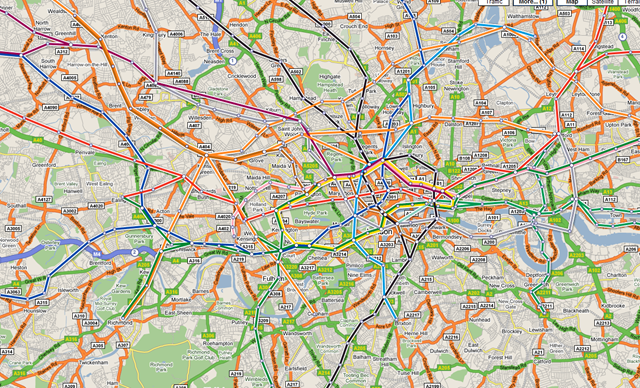
Would be especially useful if this would work with the Blackberry Google Maps application that I use all the time but I can’t see a way to do that, overground rail networks and maybe bus routes would also be useful – but that would need a bit of detailed input from TfL (Transport for London) I would guess.
Manually Upgrading a Blackberry Pearl to 4.5, BIS & BES
Posted by on January 14, 2009
I have a Blackberry 8100 Pearl, it’s a great phone and I use it for both my corporate email via BES and my personal email via BIS so I have everything I need coming to one place (if you don’t know how to do this your BB will probably have an e-mail setup wizard where you can attach a number of different email services to your carrier’s BIS – on newer devices BIS and BES can co-exist, IIRC there used to be a specific BIS /or/ BES firmware – this no longer seems to be the case).
Because its attached-to/”owned” by a corporate BES I cannot install the normal 4.5 OS upgrades from my carrier myself as the Blackberry desktop software refuses to allow the 4.5 upgrade and says I have to have an administrator do it on my behalf or provide it over the air (OTA). Now, they are busy chaps and have better things to do and I really wanted HTML email support on my BB ASAP so a bit of unsupported DIY was in order;
Note: I actually did this during the xmas break so this is re-constructed from my memory – remember you do this at your own risk, particularly if your BB is supported by your internal IS department.. don’t make their lives difficult if you don’t know how to help yourself – Also, I don’t profess to be a Blackberry expert but I know enough to get by and work things out.
-
- I located the downloadable OS upgrade from my carrier
- I did a full backup of up my blackberry using the BB desktop software
- As my own Blackberry desktop software recognises my BB as being owned by a BES it won’t allow the upgrade via USB to the new firmware.
- I found a 2nd computer and installed the Blackberry desktop suite 4.7 but didn’t pair it up with my Blackberry {yet}
- I did a wipe of my BB handheld (via the Options/Security Options/General Settings UI. – warning this does wipe everything and took about 2hrs on my BB – note on mine it didn’t erase the contents on my microSD memory card; your mileage may vary and if you enforce encryption on external cards via policy then you may be unable to access the contents so best to back it up as well. in my case it has just a few un-important photographs from the camera stored on it.
- At this point I plugged the clean BB Pearl into the 2nd computer and paired it and upgraded the firmware from 4.2 to 4.5, which was pretty straightforward but took a couple of hours to complete.
- Once upgraded it was a clean BB, for reasons I don’t quite understand it tried to do an enterprise activation but failed, I restored my backup over the top of the clean phone and all my apps and data came back and the BES enterprise activation succeeded.
- I now had HTML email support via BES (as the back-end supported it)
- to get HTML email support for my personal email account via BIS I had to use the provisioning applet to have my carrier re-send the BIS service books, once complete it worked perfectly (more discussion on this here)
Once completed I garnished with a fresh looking theme from here, and it’s been more stable than ever since and I have nice, HTML formatted email rather than a mess of URL’s!
Problem Installing VMWare Workstation on Windows 7
Posted by on January 13, 2009
I have tried to install the most recent build of VMWare Workstation (6.5.1 build 126130) on my Windows 7 beta (build 7000) machine, and it fails with an error 1935 An Error occurred during the installation of assembly component {0BAE132A2- etc. etc. etc. HRESULT: 0x8007054F


Ah well, it’s still beta – guess there will be an updated build from VMWare at some point. This will prevent me from running Windows 7 on my main machine without some dual-booting 😦
Works perfectly the other way round (Windows 7 running as a VM under VM Workstation) so that will do for now.
Windows 7 and the Intel 855GM Video Driver "Solution"
Posted by on January 12, 2009
I’ve been playing about with Windows 7 in a VM for a while now in a VM, but now the beta is out I wanted to install it on a physical machine, I’m not ready yet to upgrade my main laptop to Windows 7 (although I have a cunning plan to p2v my Vista install and convert to a VHD so I can dual-boot that way which is a neat trick)
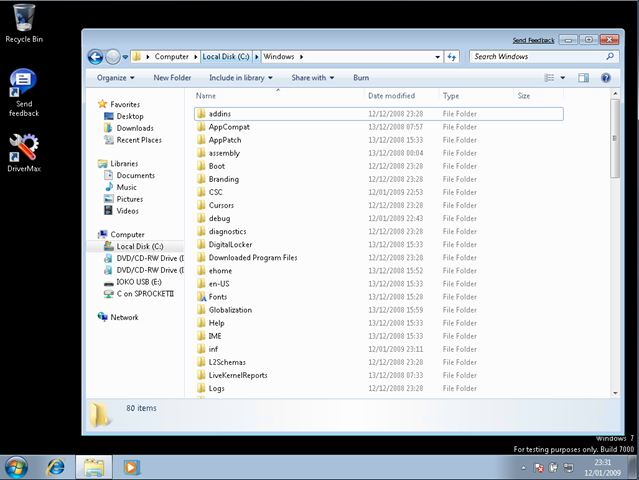
I have a Dell Inspiron 510m laptop that I use for testing things (I used it for my Patespin series) that I wanted to install Windows 7 on, it still gives pretty good performance and has 2Gb RAM – the installation itself went smoothly and quickly – less than 45mins from format to finished 1st boot, but it doesn’t detect the wireless or video card.
In my experience this isn’t that unusual for a Dell, although video did surprise me as Vista had a default driver for the Intel 855GM on-board video that worked well, there is no built-in driver in Windows 7 it would seem.
So, a bit of a problem – I’m stuck with 640×480 VGA mode which isn’t much use.
I tried several ways to hack the Vista version of the driver into my installation, all without success – it always defaulted back to the default VGA drivers, some discussion here if you are interested
In the end I came across a post suggesting that I use an application called DriverMax – this is capable of exporting and importing installed drivers, I’d not tried it before but decided to give it a go, I know Vista had a working 855GM driver so the plan was to export it from there, and import it into a Windows 7 installation as I was unsure of how to extract it from the Vista installation media.
This necessitated a format and reinstall of the Dell 510m with Vista, which was painless enough as I had an auto-install DVD that I’d previously built
Once Vista was installed there was a working video driver running – I used DriverMax to export the working driver from the running OS – no source or driver CD required via a couple of clicks in the UI to a .zip file on a USB drive.
I then formatted and reinstalled Windows 7 again and on the laptop and installed DriverMax again.
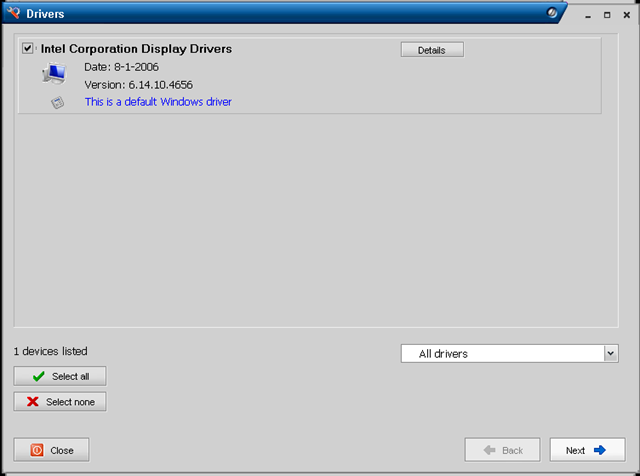
then I simply imported the driver from the .zip file
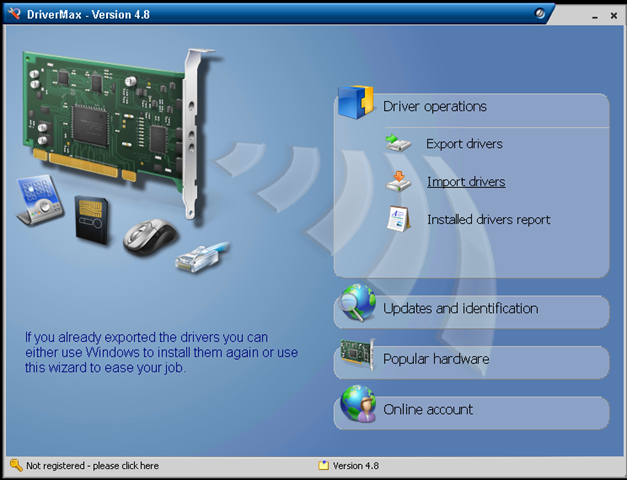
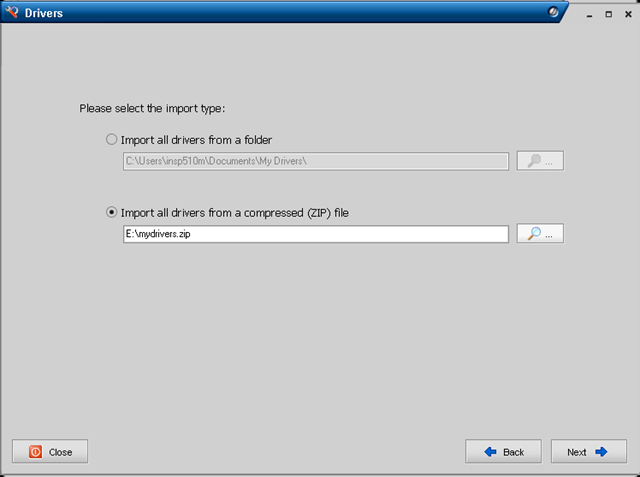
Note – it knows the driver I saved was a default Windows driver
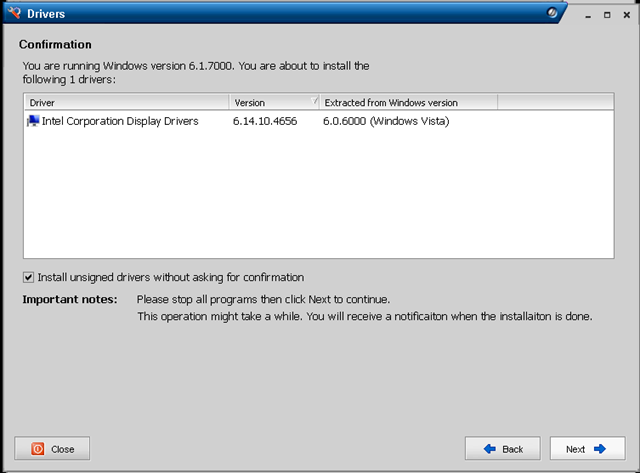
Summary screen – important to note it can install unsigned drivers if required
After a reboot the Windows 7 installation is running with a working (full-res) video driver.
I did find one slight problem with DriverMax that I had to work-around, with the default VGA video driver the buttons on the dialog boxes were inaccessible and I couldn’t resize or hot-key around it to progress, so in the end I had to do the process via remote desktop to the Win7 machine from another machine on my network over a wired LAN connection!
It’s not an ideal solution as you have to have a working Vista installation to extract the driver from and is probably totally unsupported, this is essentially Windows 7 running a Vista video driver – but it’s a beta anyway, hopefully MS or Intel will ship an 855GM driver again when Windows 7 goes RTM.
My initial impressions are that Windows 7 seems a lot more responsive than Vista, although to be fair it’s a vanilla installation thus-far. I have high-hopes for the beta, by my reckoning the change in the code-base isn’t as fundamental as it was between XP and Vista so it’s more focused on incremental features and performance improvements. I ran beta copies of Vista on my main work machine from Beta 1 through to RTM without too many problems, maybe I’ll be confident enough to do that again this time around – the VHD booting feature is certainly compelling for what I do.
Amazon EC2 Web Console
Posted by on January 12, 2009
I’ve been doing a bit of playing about with Amazon’s EC2 cloud services recently, this is just a quick post with some screenshots of the new beta web console they have launched.
Up until now you had to control it via command line, or a firefox plug in – now Amazon have launched their own… seems very easy to use and understand – available online here

You can browse the list of pre-configured AMI’s (Amazon VM Images) and choose which ones you want to spin up.

I’m writing up some posts on using EC2 for quick ‘n’ dirty test and development environments, but I can see a lot of potential for this service to provide automated overspill capacity for applications using the automation API and some clever management tools.

 Virtualization, Cloud, Infrastructure and all that stuff in-between