Virtualization, Cloud, Infrastructure and all that stuff in-between
My ramblings on the stuff that holds it all together
What is the Cloud..?
Posted by on January 8, 2009
Following on from some discussion on Scott Lowe’s blog around the lack of a clear definition of cloud computing, I offer this as my opinion… it’s just that; and I’d welcome comments. I’m an infrastructure chap by trade but my motto is there are no apps without infrastructure, and this cloud stuff is all about making things easier for developers to create useful stuff quickly and cheaply but it needs somewhere to run.
Sam Johnstone has also done some work on formalising this stack, but I offer the following up for discussion.
A cloud is just a pool of flexible/on-demand “resource” a way of abstracting the underlying complexities of how things are executed or stored, provisioned etc.
This is analogous to the way the modern  computer, OS and applications have developed over the last 20 years into multiple abstraction layers – meaning a developer no longer has to explicitly know how to control devices at a low level, for example; moving bits in and out of registers, reading/writing sectors to disks. They make API calls down a stack to BIOS, firmware, operating systems, drivers, code libraries (.DLL etc.) and more recently moving to web services at the top level interface.
Presently solution/infrastructure architects work with individual servers, roles and services on bits of dedicated hardware which are often bound to a specific location, ensuring that they architect the solution to deliver the required level of availability, serviceability etc.
I see “the cloud” as a way of providing the next level of abstraction – with an eventual goal of architects being able to design systems with no roles or services tied to specific servers/databases/hardware/datacentres/continents(!) where SOA-type applications and transactions are executed across one or more cloud platforms without having to have a detailed understanding of the underlying infrastructure.
In the interim the cloud can deliver a platform to quickly deploy and change infrastructure to deliver applications, right-sizing capacity based on actual usage rather than over-sizing done early into the development cycle of an application.
Fewer hard physical ties to the local infrastructure that supports application components, combined with adoption of virtualization of servers, networks etc. means that you can relocate services locally, nationally or globally through data and configuration migration rather than a traditional lift & shift of servers, switches, SAN’s racks etc. with the associated risk and downtime etc.
With standardisation or adoption of a common infrastructure architecture this could allow for a real market place to develop, where the customer can choose the most appropriate or cost-effective region or service provider to run their application(s) – either based on the cost of local power, comms, or response time, legal jurisdiction or SLA without being tied to a specific service provider or physical location.
For example; some of my previous posts on this sort of physical DC portability are here, if you combine this with a high level of virtualization and the cloud reference architecture you have a compelling solution for large infrastructures, Zimory also have an interesting proposition for brokering resources between multiple cloud providers
There are two fundamental things required to deliver this nirvana…
1) Flexible Infrastructure Architecture (do-able now with current tech )
This is where I see my cloud reference architecture sitting, you could have multiple instances of this architecture split between on/off/3rd party premise providers – this provides a layer of abstraction between the physical hardware/networking/site world and an “application” or server instance (as it’s encapsulated in a VM – which is just persisted as a file on some storage.
2) Distributed Runtime/Services Layer (work starting now, needs development and standardisation)
To enable the cloud to really distribute applications (and thus computing power) across the Internet means you have to build a distributed or entirely democratic/autonomous controller mechanism (almost an OS for the cloud) which acts as a compiler, API, interpreter, Job Controller etc. to execute and manage applications (code/apps/scripts) that developers produce
This distributed runtime /services layer runs on server instances hosted on/in a cloud infrastructure (see item 1) that are managed by a service provider, to my mind there is no other way to achieve this you can’t easily write an app and just have it run across multiple locations without some kind of underlying abstraction layer taking care of the complexities of state, storage, parallelism etc. this is where Microsoft’s Azure, Amazon AWS & Google have API’s for things like databases , payment gateways, messaging, storage across their distributed infrastructures.
However all of them are doing it in a proprietary way – Azure/AWS provide their own API rather than a standardised set of services that true cloud apps can be written to and then moved between various cloud infrastructures or providers.

It’s important to note that the two are not mutually exclusive, clouds based on this reference architecture can still run traditional static one server/one app type services, even desktop/VDI but it also maintains server instances that run the actual distributed runtime/services layer for applications that are written to take advantage of it – there is a common underlying platform.
This model and standardisation helps address the concerns of most businesses when they start to talk about clouds, data ownership and security by giving them the opportunity to selectively adopt cloud technologies and transition workloads between on/off-premise clouds as needs dictate.
And so begins 2009..
Posted by on January 5, 2009
Ok, well it was last week 🙂 apologies for the lack of postings in the last month which was due to a mix of well-earnt holiday and some very busy periods of work in the December run-down.
Anyways, I would like to wish all vinf.net readers a belated happy new year; I’ve been amazed at how much this blog has grown over the last year, since my last review its now topped 120k hits – and (un)interesting factoid; Thursdays are consistently the most busy day for traffic!
Rest assured I haven’t been idle in the month’s absence from blogging. I have a number of interesting posts in the pipeline, continuing my PlateSpin power convert series (with the new product names/line-up that was announced in the meantime!) and fleshing out my cloud reference architecture, VMWare vCloud, Amazon EC2 and some further work on cheap ESX PC solutions for home/labs.
In other news, VMWare have kindly offered* me a press pass to VMWorld Europe in Feb which I’m honoured to accept and will hopefully be following Scott’s example by blogging extensively before, during and after; although I’ll probably stick to a day by day summary like I did for TechEd last year and break out any specific areas of detailed interest into separate posts so that they get the attention and level of detail required.
I’ve also submitted for a number of presenter sessions so fingers crossed they’ll be accepted.
2009 looks to be a very interesting year for the virtualization industry with increased adoption and considering the current economic climate maybe the VI suite should be renamed the Credit Crunch Suite rather than vSphere as more and more companies consolidate and virtualize to save money 🙂
Cloud computing also looks to be big this year and I’m hoping to be very active in this area, building on the work I did last year taking a more practical/infrastructure position on adoption, hopefully I will have some exciting announcements on this front in the coming months.
*In terms of disclosure, VMWare have offered me a free conference ticket in exchange for my coverage – there is absolutely no stipulation on positive/biased content so I’ll be free as ever to give my opinion, my employer is likely to be covering my travel expenses for the event as I was going to be attending anyway.
Platespin PowerConvert Part 3: V2P
Posted by on December 1, 2008
Following on from the 2nd part of this series, I’ll now show how we can take the AD/Exchange virtual machine that we have created from a physical server via P2V and convert it back to a different physical machine (V2P) using PlateSpin PowerConvert.
The original source machine was a Dell Inspiron 510m laptop, and the target machine we will be using in this instance is a Dell Latitude D510; this wouldn’t typically work if we were to use a normal disk imaging approach as products like Ghost etc. can’t inject the correct boot time and drivers to make it work.
PowerConvert, however can which is very clever IMHO.
Note, for this part I will use the following convention:
Source Machine – virtual machine running on ESX (previously P2V’d from a physical machine)
Target machine – Dell Latitude D510 laptop
The following diagram shows my lab setup;

More specific details on the TCP/IP ports used by PlateSpin PowerConvert can be found here.
Because of where I am trying this I don’t have a wired connection back to my ESX box – so I am using the bridge connections feature of Vista on my laptop to provide the networking for the target machine – this is just a peculiarity of where my study is as I’ve not got round to getting a wired GigE connection here from my ESX rack.
To begin with we need to boot the target machine from a WinPE CD that PlateSpin PowerConvert prepares, these are downloadable from Platespin.com; In this instance I’m using the following downloaded .ISO file.
PlateSpin PowerConvert 7.0 Physical Target Take Control ISO For Low Memory Servers – [WINPE.ISO]
Use this ISO image for servers with low memory, between 256 MB and 384 MB.Currently, target physical servers must have at least 256 MB of RAM
The target machine only has 256Mb of RAM, so it won’t break any records for performance with Exchange & AD running and will need to use the low-memory version of the boot CD.
You boot the target machine from the CD, you are prompted to enter the URL to the powerconvert server which is in the format http://<servername>/powerconvert
And then some server credentials and IP address details, it will then contact the PowerConvert server and register itself (apologies for poor quality pic – cameraphone!)
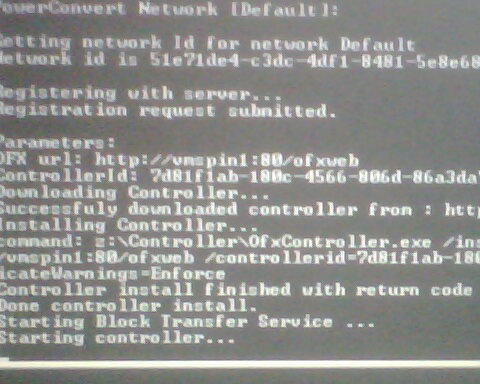
Once it’s registered itself with the PowerConvert server it will show up in the servers view as below.
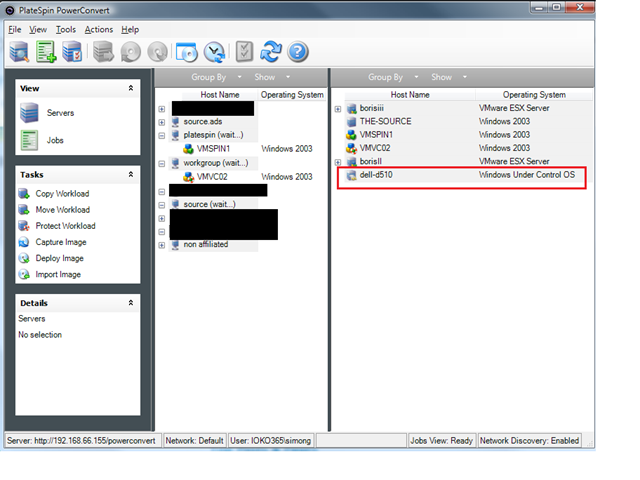
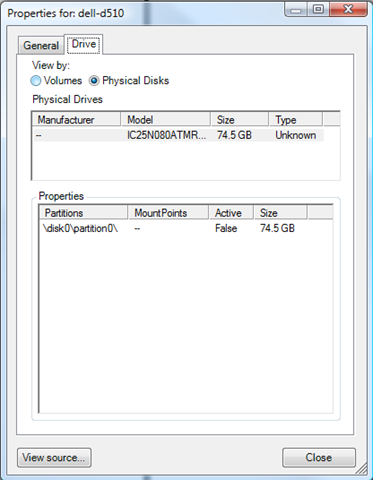
You can look at its properties as it’s been “discovered” as part of this process.

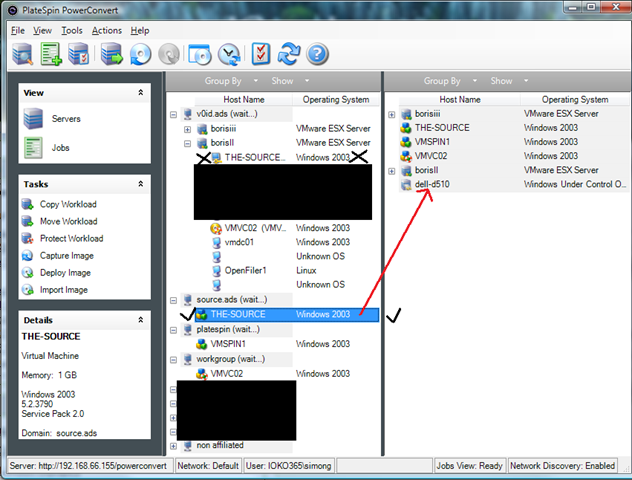
In this instance we want to move the installation from the source to the target – for example if we found performance under a VM was not satisfactory or had a software problem that the vendor will only support if it can be reproduced on physical hardware, this gives us the job setup displayed below (essentially the reverse of part 2 in this series – P2V).
Make sure you choose the discovered source OS (hint: refresh it if it’s still in the DB as a physical machine), rather than the VM under the ESX tree
The target machine can now have source machines (left hand pane) dragged and dropped onto it to start a new conversion job.
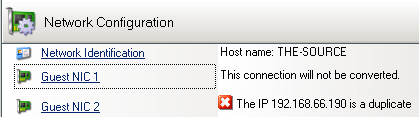
Clicking “Advanced” brings up the following screen, any red X means a setting needs to be changed before you can proceed.

Note – we want to do an online snapshot based transfer to minimise downtime and support moving the AD/Exchange installation as-is and shutdown the source machine (otherwise we will have IP address and name conflicts) when the target machine boots.

Ok, so here we go, nothing up this sleeve, nothing up this sleeve 🙂 Job submitted & running;
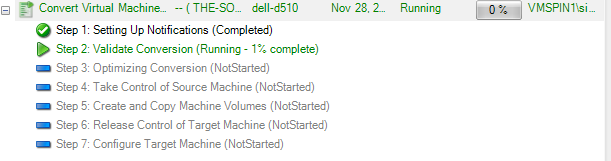
At this point I walked away and had some lunch 🙂 an hour later it was finished and the Dell laptop was running the Windows 2003 DC and Exchange server, all intact and totally hands-off – very impressive, this is the breakdown of job steps shown in the final report.

Once I’d logged on there were a few new hardware found dialogs for things like the on-board modem and video card as I’d not uploaded the drivers beforehand to let Platespin take care of it.
NIC IP settings, everything were applied to the new NIC and the laptop is now running the OS and app “workload” that was previously a virtual machine.

Very impressive – I’ve got some other spare hardware in the lab so I’m also going to try V2P to some even more different hardware – I have a quad CPU ML570g1 – so if I can get that going again (its been switched off since I migrated my VM labs to D530’s) I’ll give that a go too just to really push it; as I realise the source and target machines were sort of similar Dell models in this instance.

All in this conversion took less than an hour and considering the network transfer was bridging over a 54g wireless connection and the source VM was just running on a cheap D530 ESX box I think that’s pretty good going!
Next up we will take a look at Workload Protection, which leverages the X2X functionality we’ve seen so far to keep a sync’d up clone of a production server (VM or physical) to a virtual machine for disaster recovery.
Platespin PowerConvert Part 2: P2V
Posted by on November 26, 2008
Following on from the previous overview post, My goal here is to do a live P2V of a Windows 2003 Server installation on an old laptop into a virtual machine running on my D530 ESX farm, and just to make things “interesting” the laptop is also running Exchange 2003 🙂
And once this is completed I’ve got a 2nd laptop to which I want to convert the virtual machine onto (V2P).
I’ve implemented PowerConvert in a VM, and all hosts are connected over a gigabit ethernet switch (although the source laptop only has a 10/100 NIC.
I’m aiming to use the live transfer (with snapshot) feature which handles clean-snapshots of all the Exchange and AD databases using Windows Volume Shadow Services (VSS).
The initial screen is below, to get to this stage you need to discover hosts – which can be done via IP address, hostname or network discovery (via listening to broadcasts) – it’s recommended that you discover/refresh each source and target server before doing any migrations – the data is held in an internal MSDE database and is not automatically refreshed.

Select the source and right-click – or you can drag and drop it to the target (i.e physical server booted from a “Take Control” CD or host running a supported (and previously discovered) Hypervisor.

It detects that Exchange is installed on the source


Advanced view; note red X marks areas that need attention.
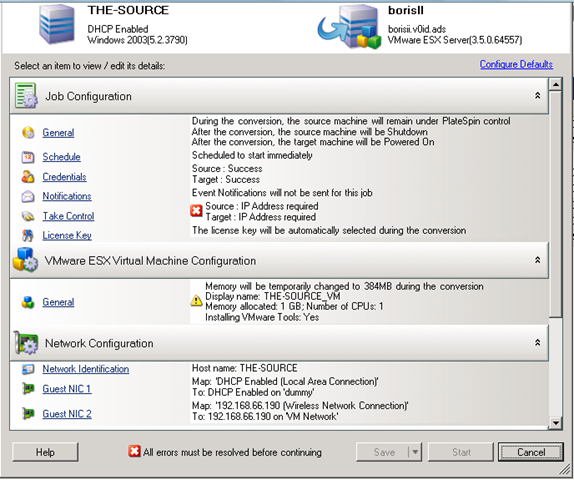
Choose which type of transfer
Take Control – “Cold clone” boot source from custom WinPE CD.
Live – File based (file by file copy, suitable for simple servers)
Live – Block Based (faster than file-copy)
Live – Snapshot (uses VSS, supported for applications like Exchange, SQL etc.)
Note the options for what to do with the source machine once the conversion has completed; if you are doing a move like we are you don’t want the source machine left on the network as you will have an IP/name conflict or worse users changing data – so shut it down.

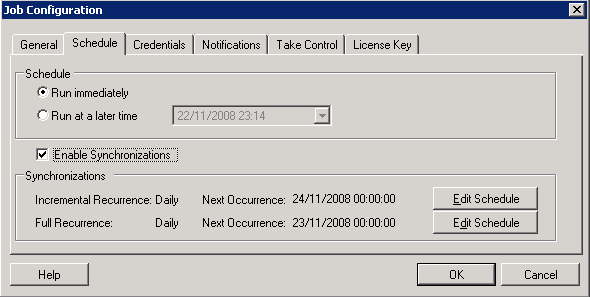
Synchronisation options, handy if you have a lot of data to migrate and want to prep the target some time ahead of a cut-over.
Also used by the workload protection feature (x2V DR) – which is very cool and will be the subject of a future post.
This is an annoying bit where it doesn’t automatically adjust the path to the VM files if you change the virtual machine name – so make sure you edit the path manually as required.

You can choose target resource pool on an ESX server; but as far as I can tell it’s not specifically aware of DRS, virtual centre or different clusters – it’s host only driven.

Moving from single CPU Physical box to dual CPU VM (and vice-versa) is just a check-box.

Note this will replace a file; which is the multiprocessor HAL due to the above option.

An option to sysprep/rename etc. the clone (not used here as we are “moving” i.e decommissioning the source machine)

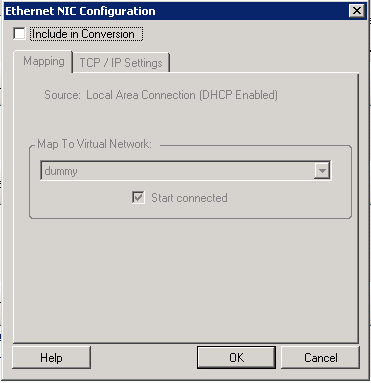
Picked up an unused NIC from the source laptop – chose to exclude from conversion

Options to choose/resize disks etc.

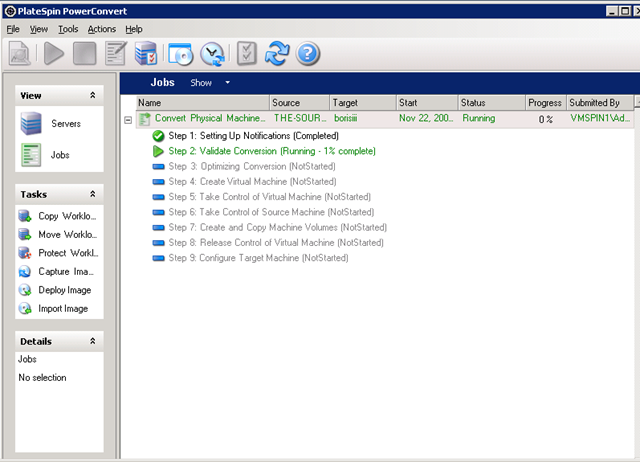
Job breakdown and monitor screen – this is where you can monitor the progress of the job – there is very little feedback on the console of either the source or target machines as part of this process.
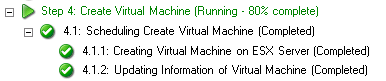
The PlateSpin controller talks to ESX and creates blank VM that will become the target machine

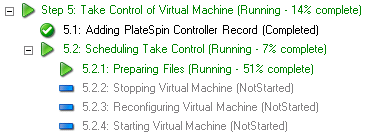
PlateSpin boots the target VM into WinPE
Open console on the VM Platespin has created and you’ll see what it’s doing.

At this stage it has copied a WinPE.iso file to the ESX host and mounted it in the VM and boots the VM from it…

Target (blank) VM booting up, starting networking etc.

WinPE app contacts PowerConvert server via HTTP and downloads its job info

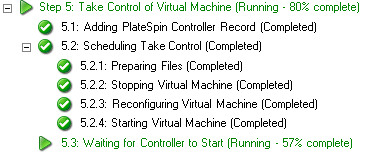


Once it’s finished copying data from the source to the target, it starts up in DS safe mode (as I’m P2V’ing a domain controller) – it seems to run some fix-up scripts in the background during this stage as it sits at the DS-safe mode logon prompt for a while before rebooting.


it’s done now, and rebooting out of DS safe mode.
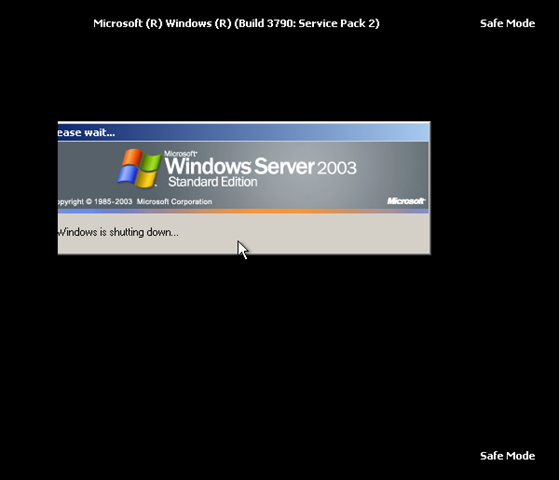
Note, it uses GRUB in the process to control what is booted – this is cleaned up in the final stage.

1st normal boot

Ta-Da, all running with all services, databases and applications intact.

Completed job screen on the PlateSpin PowerConvert Client.
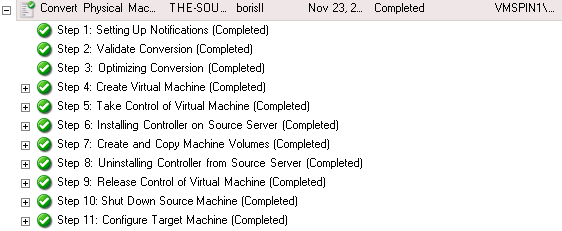
Note – that this “burns” one of the licences – you pay per conversion, unless you have a particular type of licence – full details and options here

The next post will be to take the virtual machine we have created via P2V and convert it back to a physical machine again (V2P). This is the clever bit that PlateSpin PowerConvert brings to the table over all other products on the market.
PlateSpin PowerConvert Part 1: Overview
Posted by on November 25, 2008
I sat the Certified PlateSpin Analyst (CPSA) course last week, and I have been experimenting with an evaluation version of PowerConvert 7.0 in my home lab so I thought I would write up a series of posts with a step by step guide on the P2V and V2P processes so you can see what this nifty application can do, in a later part I’ll look at the Workload protection feature for disaster recovery.
Platespin PowerConvert is now owned by Novell and the key thing to understand is its principal of “Workload portability”, where a “workload” is a server/application/data combination on a server or virtual machine.
PlateSpin use the term X2X to describe what it is capable of, and indeed it’s true it can do the traditional convert from a physical machine to a virtual machine (P2V) process like VMWare’s own convertor, but it can also go the other way and convert a virtual machine into an installation on a physical server (V2P) – it can accomplish this by maintaining a database of hardware and software specific drivers which are injected into the OS image when it is transferred to the target hardware.
You can add your own drivers, and it’s very simple to use – I verified this as I added some HP BL460c drivers to the database, you simply extract the driver package from the vendor (which usually consists of .inf .sys files) and locate it via the “upload drivers” option, its then automatically imported into the database.

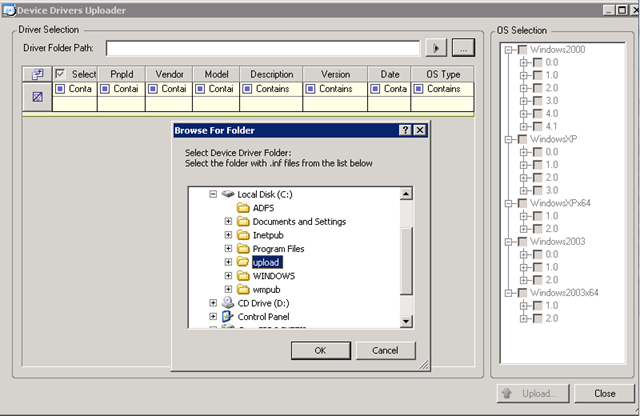
PowerConvert’s other party trick is V2V – where it can convert virtual machines between different hypervisors (VMWare ESX –> Xen or Microsoft Virtual Server –> ESX) this is useful if you maintain a heterogeneous environment.
All of this is achieved within the VM/OS itself; PowerConvert installs an agent inside the source and target machine or boots it from a WindowsPE/Linux boot CD (Cold Clone).
Once this process, known as “Take Control” has completed the PowerConvert server initiates a disk or file level clone of the source OS, applications and data direct from the source to the destination.
This is analogous to booting a virtual machine or physical server from a Linux/WinPE boot disk and running a disk imaging utility like Symantec Ghost, dd or ImageX – except rather than writing to an image file (although it does also support that too!) the image is written directly over the network to the disk of the target machine (virtual or physical) which is also booted into a Linux/WinPE boot disk.
During the transfer PowerConvert “injects” the appropriate hardware drivers into the OS image to support the target platform and removes the un-required drivers from the source server.
It is important to note that whilst PowerConvert can manipulate ESX servers directly to mount .ISO images to VMs it does not do anything directly with the .VMDK files; all the conversion occurs in-band within the virtual machine. This may seem a bit inefficient compared to VM Convertor but it is how it manages to achieved such flexibility in moving OS/App/Data images between so many different virtual and physical platforms.
It supports specific source/target OS’es – list here
PowerConvert and it’s sister product PowerRecon are key products in my internal cloud reference architecture as they are what enable you to be totally flexible in how you provision, change or decommission server instances by removing almost all dependencies on underlying hardware or hypervisor choices.

The next post will give a step by step guide to doing the P2V part of the conversion.
IBM BladeCenter S – Virtual DC in a Box
Posted by on November 24, 2008
There is a detailed post here from IT2.0 on the IBM BladeCenter S, it shows how the chassis itself can contain disks and RAID’ed SAS controllers and works with vMotion/HA etc. and could potentially run up to 100 VM’s within 7U (no mention of power – which is more interesting to me).
If I read it correctly, that means you can integrate your blade servers and storage fabric within the same modular IBM chassis and it doesn’t require any external SAN storage or the use of one or more traditional server blades to “head-end” the storage (via iSCSI/NFS).
The pitch is around the SMB market, but I can see a wider application; if you are building internal cloud type infrastructures you might not get the budget to implement enterprise-type storage from day 1 as it requires a large up-front capital expenditure in FC/iSCSI switches, high performance disk arrays etc. particularly if you need something that will scale vertically to the large capacities or bandwidth that large VM estates require.
This type of approach could be ideal for horizontal scaling in reasonably priced “chunks” of capacity. If IBM (or a 3rd party vendor) were to introduce a storage replication bridge between the storage in two or more of these units then you could well be into a modular architecture for virtualization that would scale out to google-esque levels of world-domination in small, bite-sized chunks.
So far I’ve not seen anything similar from HP for the c-class blades – just storage blades that map 1:1 to an individual server blade via the PCI backplane.
Platespin Power Convert – Installation problem – Error Running a Custom Action
Posted by on November 21, 2008
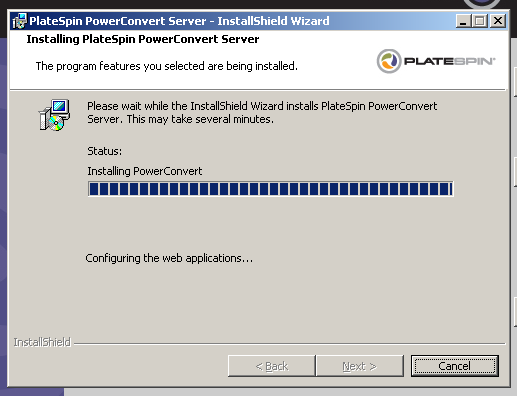
I’m working on a post around Platespin Power Convert, if you encounter the “Error running a custom action” message during installation (below) this post explains how to fix it.

first, make sure you have installed IIS and then .NET 2.0 (in that order, you will break it otherwise).
then if you get the above error you will likely have the following text in the PowerConvert_CustomActions.log file;
Updating IIS Script maps…
Setting security for the PowerConvert web directory
Configuring the web applications…
Error: System.Exception: Cannot connect to IIS with http or https…
at PlateSpin.Athens.Sdk.Server.ServerHelpers.GetAthensUrl(String athensName, CertificateWarnings certificateWarnings, String serverAddress)
at PlateSpin.Athens.Sdk.Server.ServerHelpers.GetLocalPowerConvertUrl(String powerConvertName, CertificateWarnings certificateWarnings)
at PlateSpin.Athens.Install.ProjectInstaller.setPowerConvertWebConfig(CertificateWarnings certificateWarning)
at PlateSpin.Athens.Install.ProjectInstaller.Install(IDictionary state)
Error: Cannot connect to IIS with http or https…
You need to enable the .Net 2.0 extensions (as per this thread)
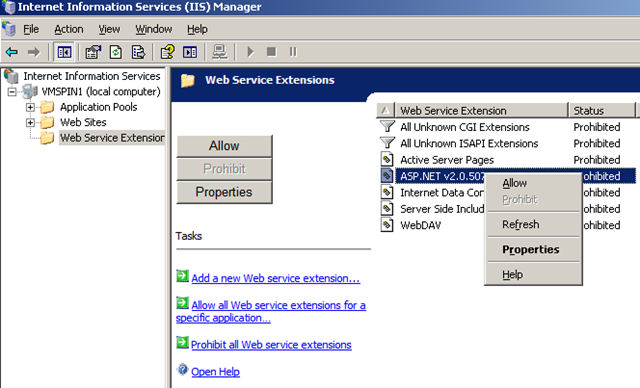

That makes the installer a bit happier – the install screen is pretty good at detecting the other pre-requisites, would be handy if it did that one too!

Also another tip to speeding up the installation, particularly if you are installing PowerConvert in a VM is to extract the PowerConvert installation to a directory on the host machine (or elsewhere); otherwise the installer extracts a temporary copy inside the VM and then installs from it, which is a bit inefficient on space, especially if you are installing an eval copy inside a VM with a growable .vmdk file.
You can extract it by running the downloaded .EXE file PowerConvertSetup.EXE with a -x parameter, then choose the directory to extract to; then present this extracted directory into your VM/host to install which should give a directory structure like this

New Blogger – clusterfunk.co.uk
Posted by on November 18, 2008
Please Welcome Antony Joyce to the blogsphere, a fellow ioko colleague – he’s got a whole bunch of stuff to share around virtualization, clustering and Zeus ZXTM load balancers and has some good posts around configuring an HP EVA linky here
TechEd EMEA 2008 IT Pro – Day 5
Posted by on November 7, 2008
Final day of this TechEd.
First-up a session with Mark Minasi on 2 of Vistas least understood security features, User Account Control (UAC) and Windows Integrity Levels (WIL)
Mark is another of the popular TechEd regulars and always gives a good show, he’s written many good books which I own 🙂
the key points for me were;
UAC – User Account Control
- much maligned but still a good protection tool, Mark did a good overview of how it works.
- Windows 95 is the root of all problems, the design principal that system/app configuration only went into HKEY_LOCAL_MACHINE and all per-user configuration should go into HKEY_CURRENT_USER was never adhered to by developers as there was no real requirements to do so, thus Windows has been lumbered with maintaining backward compatibility for generations so as not to upset the user experience.
- Interesting/geeky point for me was that when the screen grey’s for the UAC prompt it’s actually a terminal services based session that presents the UAC dialog and places a grey’d out screenshot of the users desktop as wallpaper.
- When running with UAC enabled, user accounts (even administrators) are run with least privelidge by splitting the authentication token in two, standard and administrative. this breaks some applications that need administrative access, so this is controlled by prompting for credentials (elevation) that run just that process with the required administrative credentials, this requires an application restart if it does not do it at start-up.
- you can manually specify which applications should run with Administrative rights, most built in Vista applications are provided with an compiled in manifest resource record that marks them as requiring UAC elevation.
- Your own or 3rd party apps that do not have this manifest available can be given the same functionality either by marking the file by looking at its compatability settings or using a corresponding .manifest file if you have to distribute the file (if you rename or move the .exe the former method stops applying).
- The built-in Administrator account never sees any UAC prompts regardless of how it’s configured.
WIL – Windows Integrity Levels (formerly Mandatory Integrity Controls)
- WIL was of much more interest to me – it is a core part of Vista protection and works on the basis of assigning integrity levels to files and processes, an integrity level overrides traditional ACL’s and permissions and is on the basis that you cannot change an integrity level unless you have an equal or higher integrity level.
- It was designed to prevent alteration of critical system components (and thus stability/security) even by inattentive administrators or malware that has tricked the user into running it with elevated permissions – it placed several hurdles that administrators must clear to make changes and discouraged casual/badly thought tinkering… which is one of my main bug-bears with Windows, the server OS looks too much like the desktop OS, familiarity breeds contempt in my book.
- It proved controversial/unpopular with the technical community during early betas and was removed at the RC stage; however as Mark put it “they took the sinks away but left the plumbing”, which means its still there and could be exploited by someone building root-kits/malware as it would be very hard to remove or detect without some expert knowledge.
- Mark hinted that he’s been flagging this with Microsoft security for a while and they’ve not made a satisfactory response or mitigation, so in the interest of no security through obscurity he’s giving an overview… positive sign that it made it onto the TechEd agenda I guess – but it’s “in the wild” now and Mark has already written a book covering this during the Vista beta phase.
- Process Explorer can show the Integrity level of a process and Mark Minasi’s tools here can manipulate & view settings
Next up was DS Geek notes from the field, this was a good technical session where Ulf ran through some interesting scenarios and issues he’s encountered working with Active Directory, I’ve seen a lot of these myself as well – but the key points for me were;
- 280 domain admins reduced to 3 with fully delegated model, always a difficult discussion to manage with customers and staff (I have scars to prove it!) his approach was to break each task out and ensure there is only 1 owner – this reduces ambiguity and ensures accountability – with the handy side-effect of demonstrating that 277 of those people didn’t really need to be domain admins to do their day-jobs
- If you accidentally change any properties of a site connection/replication object in AD Sites & Services it changes from being dynamically generated to static without a warning, 2008 now has a dialogue box warning of the change.
- You can change a static connection object back to dynamic by adjusting the “options” attribute for the object in ADSIEDIT from 0x4 (static) to 0x5 (dynamic) rather than deleting and re-creating.
- Virtual Machines are good for DS-Lag sites, where an AD site has one or more domain controllers but where the site replication connector is a day or so behind the rest of the AD, this allows for a simpler restore of deleted objects by marking the object as authorative on the lag site and forcing replication into the production AD – this will bring the object back.
- VM’s lend themselves to this as you can script enabling/disabling the NIC to avoid the situation where there is an accidental (or malicious) deletion followed by a forced replication across all sites.
- LDIFDE import/export can be used to bring back object attributes from a restored AD snapshot (nice functionality that Ulf discusses here).
- Ulf also had an interesting script based solution for a single site (and domain) DC restoration where there is a simple local PC infrastructure like a branch office; where rather than maintaining and copying over the WAN, large system state backups he leveraged LDIFDE in export mode to take a backup of AD and xcopy of files, restoring such a DC after failure can be end-end automated through an unattended OS onto new/replacement hardware and scripts to import and re-ACL the DS objects and file system and re-join machines to the new domain.
Next up was one of two further sessions with Mark Russinovitch, the case of the unexplained – as ever this was informative and he has good coverage of this on his blog which I’d encourage you to check out in hunting down bad/buggy 3rd party driver software which is at fault a large portion of the time, rather than core Windows itself – I have a number of thoughts on why this is the case and will blog those later.
- One useful tidbit that I didn’t know is that Process Monitor can show you what TCP/IP sessions a particular process is using – nice.
- and you can suspend individual threads whilst you investigate what they do or to see if that improves overall performance.
The 2nd of Marks sessions and the final session of TechEd 2008 was on Windows security boundaries; which Microsoft define as an access policy between code and data which describes what if anything is allowed to be shared between the two, anything that could allow access between the two is not a hard security boundary – it is capable of being exploited.
- Mark covered several of the technologies in Windows Vista and 2008 (PatchGuard, UAC, Protected mode IE etc.) and the conclusion is that the only real security boundaries are System & Java Virtual Machines, .NET Code Access Security (CAS) as they are deliberately architected not to allow communication between processes or users and data.
- Didn’t realise this but x64 PatchGuard can blacklist drivers from a list provided by Microsoft.
- As ever, it was an excellent technical session and Mark provided several demos of how the isolation technology works along with some exploits demonstrating why certain types of isolation technology are not hard security boundaries. There is a US version of his presentation which I would encourage you to check out here
All in, it was a good week at TechEd it does feel a bit scaled back from previous years but the technical content of sessions was better at the end of the week – I don’t know if that was deliberate.
One notable omission this year was an equivalent of Andrew Cheeseman’s session on how they built the TechEd infrastructure – this was always a fascinating and entertaining session, I note he has moved on since last year but an equivalent session would have got a good attendance.
As I’ve said many times over, it’s still excellent value for money and I would recommend it to anyone – if you want to know more about my experiences please comment away and I’ll try to answer whatever I can.
You may also want to visit Techhead as he has also been blogging extensively about the sessions this year as has Geert Baeke.
Hope you found these posts useful – feel free to feedback via the comments!
TechEd EMEA 2008 IT Pro – Day 4
Posted by on November 6, 2008
Penultimate day at TechEd, still get the feeling its scaled down this year, but still some good content and some of the best sessions so far today. It was a slightly earlier start and late finish due to the 2pm finish tomorrow, today’s hilights as follows.
Note to Microsoft – early start following the country drinks probably not the wisest move 🙂 1st sessions were pretty quiet this morning 🙂
First session was Migrating and co-existence with Microsoft Online; looking at the steps involved with integrating with Microsoft hosted Exchange services which were shown on Monday’s keynote
Key points for me were;
- This is for Microsoft’s hosted Exchange service only, other providers of managed Exchange like Fasthosts and 1&1 don’t have the same facilities
- Tools support import from a variety of sources, Exchange 200x, Domino, POP3/IMAP, Yahoo mail etc.
- Migration & co-existence tools and documentation are downloadable from the online configuration pages, the tools provided are modified versions of the Exchange Transporter/Migration suite.
- Push-based Dirsync to Microsoft online via dirsync tool which is a packaged up version of the ILM product.
- Co-existence is supported through the use of alias domains, disabled target objects and alternative recipients; basically the same method as the Quest tools use to do a cross-forest migration.
- Don’t have to move all – can operate a mix of local and hosted mailboxes.
- Because co-existence is basically cross-forest free/busy and delegation do not work across the internal/hosted boundary – Microsoft are hoping to address this; but it’s an inherent issue with this type of co-existence.
- Mailbox ACL’s delegates and rules and RSS feeds are not migrated – user will need to re-create.
- Passwords are not migrated/sync’d so users will need to create a new password via online sign-on wizard.
- Can choose to migrate all or a rule based subset of the mailbox contents
- Clients are not automatically redirected once it’s migrated – need to follow sign-on wizard via Microsoft online service which downloads a new MAPI profile to Outlook
Next up was a journey to the centre of a terminal server; a level 400 technical session on the internals of terminal server logons and processes; there was far too much technical information for me to blog so I’ll provide some links.
- Terminal services has now officially been renamed to Remote Desktop Services see here
- A comprehensive Whitepaper on tuning terminal services has been released here
- Terminal Services in Windows 2008 is much more modular with 3 component services, this separation enables much better separation of session management behind the scenes.
- New TS app analyser has been released, which can examine applications and determine their suitability for use on a terminal server looking for common permissions/file issues.
- One thing to watch with RemoteApp sessions is that a full desktop is rendered in the background, if that user profile or application spawns a window-less UI it can become a stuck zombie process when the user closes the RemoteApp session, Acrobat Reader updater (AcroTray) is a common culprit.
- There is a complicated issue with registry profile time stamps in a TS farm which to be honest I don’t fully understand – but Immidio have some free tools to assist with this, Tritsch is an excellent presenter and certainly knows his material
Next was Anatomy of a hack 2008 by Jesper Johansson, showing how malware is being pimped in the guise of anti-malware software!
key points were;
- It’s all about the money – organised crime running the same sort of bait and switch scams as they always did, but now on a massive, easy to do scale.
- Malware developers are getting good, and well organised with some innovative and well thought out lures.
- Some Malware now alter their behaviour if it detects that it is running inside a VM to avoid security researchers usual MO.
- Fraudulent transactions are going to Eastern Europe and infrastructure is distributed around the globe to handle transactions and Malware distribution
- They are definitely targeting layer 8 issues rather than technical steps to compromise systems through vulnerabilities; preying on the naive, careless or less informed.
- difficult to prevent, education and caution the key
Last session of the day was with Mark Russinovitch (of Sysinternals.com fame) on Windows 2008 R2 Virtualization and native VHD support.
How Mark manages to keep all the encyclopedic amount of internal Windows information inside his normal sized head I don’t know – but his sessions are always very detailed and thorough.
Key points for me were;
- This was the 1st session I attended that Windows 2008 Hyper V has been referred to as Hyper V 2.0.
- there are comprehensive power management improvements in R2 which are propagated through to Hyper V; allowing suspend “parking” of individual CPU cores and consolidating CPU core workload to the minimum required to provide service – thus reducing overall power requirements.
- Intel and AMD have EPT and NPT technology embedded into new CPUs which will handle shadow page table mapping in hardware delivering significant performance improvements and reducing host OS usage.
- VHD (Virtual Hard Disk format) is a strategic direction for Microsoft, intended to replace all other container formats (CAB, ZIP, WIM etc.).
- VHD is an open, documented file format – open to 3rd party solutions and integrations.
- Windows Backup in Vista and 2008 already write backup data out to a VHD file.
- Improved Windows 7 / Server 2008 R2 boot manager will support boot from VHD, BCEDIT is used to point at a file system mounted VHD file rather than the traditional partition.
- Pagefile and boot loader need to remain on a physical partition.
- This enables some highly flexible multi-boot scenarios and makes P2V, V2P much easier.
- Mark showed his laptop which was booting Windows 7 from a VHD file.
- Boot from VHD also supports differential disks, this enables some very cool scenarios where the root disk is a known good/safe image with all changes being written into a differential VHD – allows for neat roll back to a standard condition (Internet kiosk type scenario) or protection from patching etc.
- Also allows for offline servicing of OS through patching too.
- Allows ISV’s to deliver apps or even whole OS/VM installations ready to use (appliances).
- nesting VHD files inside each other is not recommended and >2 levels is not supported.
A final thought from me on this is that if they were to integrate the SIS (Single Instance Storage) features of the .WIM format into VHD files then that would be a very compelling solution for VDI farms, VM terminal servers, and would make the download/streaming of VM images (via MED-V) very efficient, you could distribute a single VHD with multiple variations of a Vista or XP OS build in a very storage efficient manner.
Ok, so that was day 4 – last day tomorrow!

 Virtualization, Cloud, Infrastructure and all that stuff in-between