Virtualization, Cloud, Infrastructure and all that stuff in-between
My ramblings on the stuff that holds it all together
TechEd EMEA 2008 IT Pro – Day 3
Posted by on November 6, 2008
3rd day out at TechEd, sorry for the delay in posting – have had lots of session time and work to slot in either side, plus it takes quite a long time to write this up, I hope you’re finding it useful.
I attended a number of sessions around SCVMM and Hyper V today, as well as some good chats with some people from the product teams. – the “ask the expert” booths are brilliant for this kind of thing as they are usually well staffed with people from the development or PS teams so you can usually get an answer to a complicated question; or be pointed in the right direction.
First session was Windows vista to Windows 7 desktop virtualization roadmap with Fei Lu, key points for me were;
- Microsoft are investing significant effort in application and desktop virtualization, the driver for this is that it makes it easier for people to deploy newer OS’es by de-coupling/virtualizing the integration between hardware/OS/applications/data – the pay-off for Microsoft is that they sell more licences and speed up adoption, to my mind this helps keep the traditional rich OS/app desktop in the game with adopters of Web 2.0 type on-line applications
- Wide range of products in this space now, Terminal Service/Desktop VM/central VDI and application virtualization which can all be mixed & matched to provide the required solution.
- Folder redirection/roaming profiles with good off-line caching is being positioned as data virtualization.
- VM Mobility and DR are popular scenarios for MS customers
- Windows 7 will provide even more off-line caching features for data and settings – data virtualization.
- The Kidaro acquisition becomes MED-V “Microsoft Enterprise Desktop Virtualization” which manages distributing VMs to PCs and provides offline use and desktop integration (more on this in a later session)
- VDI is also a popular scenario, Microsoft will not write an enterprise scale connection broker, they have partnered with Citrix to deliver this, Microsoft may provide a small scale connection broker in future.
- VDI and APP-V is nice solution for simple centralised desktop management, (I did hear later than there is no x64 support for APP-V as far as I know though)
- New VDI scenarios with Windows 7 RDP protocol support multi-monitor and bi-directional audio.
- Fei ran a very brave demo of speech recognition over RDP to a beta version of a Windows 7 VDI farm.. worked pretty well, and also played back some HD quality video which was pretty impressive (no details on bandwidth available/used though).
- In future Microsoft are considering a pure hypervisor based client device, and the ability to download a VM image and run it and support portability of the image to/from a VDI farm.
- Windows 7 will be able to boot a VHD directly, which must use the same code/logic as Server 2008 and Hyper V use to manage the parent partition.
Next up was a more detailed look at MED-V (Microsoft Enterprise Desktop Virtualization) this is the Kidaro product, integrated as part of the MDOP licencing programme, key points.
- It Manages and distributes virtual machines to client devices for local execution (think: running Virtual PC on a Vista machine with centralised management and distribution of the .VHD files.
- PC needs MED-V client (.MSI installer).
- Integrates start menu and seamless windows from the guest OS to the host like you get with VMWare Workstation’s Unity feature
- capable of distributing VMs over the network (delta based replication) or on media like USB/DVD.
- Policy control for expiry of a provided virtual machine; managing when it can be used etc.
- Maps printers back to local host
- Didn’t mention clipboard redirection explicitly but I assume it’s there?
- Configure which guest OS applications are published to the host OS start menu (nice)
- Integrated support for sysprep and setup scripts for things like domain membership if you have transient or persistent VMs.
- A very clever feature can redirect a MED-V presented IE window back to the guest OS instance of IE via an internal VPN tunnel (pretty sure that was what was said); based on the URL they are trying to reach. Which is good for a scenario where you are using a company supplied and secured MED-V VM on a home PC – ensuring that personal browsing does not traverse a company VM or VPN connection.
- MED-V isn’t available yet; beta out early Q1 2009 and RTM likely to be available 1st half of 2009.
Next up was a session on System Center Virtual Machine Manager (SCVMM) which is used to manage virtual machines on both Hyper-V hosts and VMWare ESX (Xen maybe too in the future)
- VMWare Virtual Center is required to manage ESX hosts and clusters, SCVMM proxies control requests for ESX hosts via virtual center (using the API and PowerShell it would seem).
- SCVMM can manage multiple VMWare Virtual Center instances as well as Hyper-V and present a single pane of glass across the whole estate with centralised provisioning etc.
- SCVMM provides a Performance & Resource Optimisation feature (PRO) which is similar to VMWare’s DRS functionality
- PRO Can distribute VM load across multiple Virtual Center instances; which VMWare VC can’t do itself (but assume can’t vMotion this way so would have to shutdown and move).
- Can only use DRS or PRO – not both as they will fight each other.
- Can use SCVMM without SCOM but it can’t do the PRO stuff without SCOM as it doesn’t have performance data.
- There SCVMM is available now will be a new release to support Server 2008r2 and Hyper-V quick migration (vMotion equivalent).
- All in, looks to be a good product with some nice integrations but until Hyper-V is more prevalent managing mixed environments isn’t a huge requirement (to me) it’s not necessarily anything you can’t do out of the box now with VMWare Virtual Centre and some Windows VM monitoring via SCOM but definitley worth having in the arsenal for when Server 2008r2 brings live migration to Hyper V as adoption will pick up.
Next session was on connecting Active Directory to cloud services; this focused on the work Microsoft have done to build a hub and spoke federation architecture to allow cross-authentication between internal directory services (in this case Active Directory) and external service providers.
- the core of this is Microsoft Live ID, this service is essentially a broker hub for passing around authentication tokens and requests.
- Will be released in 2009; CTP available now, beta early 2009.
- Built on “Geneva” technology which seems to be a wider development of AD-FS
- Key point is tokens/claims are passed around the cloud and your service providers but authentication is always done via your home directory (i.e AD)
- Wizard based setup to enroll users/groups to the Federated Hub service.
- Release will be targeted at Active Directory as the authentication source, but framework is open so other vendors could write providers (Netware, Linux etc).
- Need to find out more about “Geneva” which is geared to complex enterprise scenarios.
- Will maybe build in more granular control for your administrators to specify what service providers your credentials can be used on, you never send passwords etc. just tokens but you may not want your internal users using this service to authenticate to non-business (i.e dating/social networking) sites that also participate in the Live ID federation hub.
Last session of the day was on the new Server 2008r2 Cluster Shared Volume (CSV) feature.
- Disks on traditional windows clusters could only be owned and accessed by one host over the storage area network (FC/iSCSI etc.) at a time; if other nodes try to mount the disk they can’t and there can be a risk of corruption.
- This is a multi-access shared disk volume, a bit like VMFS or ZFS.
- Hyper V is the only supported workload (but others may work)
- This is how they will enable live migration in Server 2008 R2 Hyper V
- 1 co-ordinator node manages access to the CSV and owns it.
- nodes send their read/write data to the CSV volume by the most efficient path (determined by the controller node?) this can be down the storage path or over a Ethernet network between the nodes (using faster Win2008 R2 SMB protocols)
- Can provide an extra degree of fault tolerance for access to the volume if a FC-path or network fails as it can route around it.
- you can assign priorities to certain paths to the storage.
- It’s still NTFS, all the tools chkdsk etc. still work and ACL’s etc.
- Supports MPIO, Fibre channel, iSCSI.
- This looks promising but I’m not sure about this data routing idea – surely you’d rather keep your server, storage and networking separate for security and performance reasons… but it is a clever idea and I can see that it could provide burst capacity if you were to saturate a storage path on an individual host, you could hand it off to another host to proxy it for you via an alternative path.
During the day we also got to speak to some of the Ask the Expert people around Hyper V – we discovered
- They’re unsure if Hyper V supports Windows Network Load Balancing
- You can’t do NIC trunking with Hyper V like you can with ESX; it’s 1 NIC — 1 vSwitch which means you can’t consolidate your VM network traffic into a pool.
That wrapped up day 3 and was followed by the UK TechEd party at Opium Cinema; it was a pretty good turn-out and the drinks flowed into the small hours.
TechEd EMEA 2008 IT Pro – Day 2
Posted by on November 4, 2008
Today was a full compliment of sessions, with some good sessions on Hyper V, Windows 2008 failover clustering and Forefront.
Steve Riley started off the day with a session on virtualization and security, whilst pretty high-level without getting into too many specifics he did a good job of expressing Microsoft’s view on Hyper V security.
the key points for me were;
- Each VM has a 1:1 connection to the hypervisor; there is no sharing of memory or VM-bus connections.
- Microsoft will not be opening the hypervisor kernel to 3rd party developers to provide IPS/IDS/malware type functionality as other vendors are (i.e VMWare) as they believe this to be a more flexible approach (despite being panned by analysts over this).
- The interfaces to/from enlightenments are well documented and public, no security by obscurity.
Then there was a session on Hyper V architecture, where Jeff Woolsey demonstrated building virtual machines.
There were some cost comparisons between VMWare and Hyper V; I’ve skipped over these as like any vendor the numbers were somewhat skewed.. you can easily make your own comparisons, Hyper V will probably be cheaper – but when you pick the numbers apart they’re not as far away as Microsoft say – VMWare are just as guilty of doing this, so I’ll move on.
Key points for me were;
- IDC say by 2010 there will be just 17% virtualized servers in the world, Microsoft want to drastically increase this
- HyperV comes with Win2008 x64 edition only (std/ent/DC all have the same Hyper V instance – only difference is the RAM/CPU limits in the host OS)
- 1Tb physical memory supported, 64Gb per VM (x64)
- supports 24 logical CPUs and 192 running VMs on a single server
- Hardware AMD-V/HT/DEP is required to run Hyper V
- TAP/RDP/MSIT customers are all running Hyper V – “the red phone never rang” and they didn’t have any critical issues; I’ve participated in TAP programmes in the past and true to their word Microsoft provide excellent, direct developer support to TAP participants.
- Hyper V is running 50% of current microsoft.com; and in middle of HW refresh to complete the change over – 1Bn hits/day that’s impressive.
- MSIT now have a VM 1st policy previous 10-14 day SLA for server provision is now down to minutes/hours – storage provisioning is the only delay internally.
- TechNet.microsoft.com is 100% Hyper V since beta 1M hits/day
- MSDN, 100% Hyper-V 3M hits/day
- Hyper V role – swaps boot WinOS for Hypervisor (slides underneath)
- Hyper V supports standard windows driver model for HV (better than ESX) and more flexible.
- WMI providers for management built in allows remote mmc’s and SCVMM etc.
- I/O is traditionally virtualization biggest headache (with Virtual PC, Virtual Server)
- No emulation for I/O (as per Virtual Server) anymore
- Driver enlightenment is the solution VMBus/Virtual Service Provider [VSP]/Virtual Service Client [VSC]
- VSC – guest OS enlightenment/driver
- VSP – server side driver/assistant
All in, an interesting session; I can see where Microsoft are going with the product and I like it – they have a good end-end solution with the System Centre integration and are heavily pushing this at the moment as the hypervisor is less established than VMWare.
VMWare have some other good complimentary tools like site recovery manager, lab manager, stage/lifecycle manager that Microsoft still have to catch up with, but they’re definitely getting there, for me an equivalent HA/DRS functionality is missing for hyper V in production now and by the time WS2008 R2 is out I would expect ESX4 to debut and move the game on further.
The lack of 3rd party direct integration to the hypervisor disappoints me, to my mind that would prevent some comprehensive IPS and networking solutions (like the Cisco NX1000 vSwitch) although it does keep control entirely in the Microsoft camp.
I attended a good technical session on Windows Server 2008 fail-over cluster troubleshooting, key points for me were;
- Support is now less driven by the HCL. but a configuration validator that ships with Windows, similar to other best-practice analyser tools (exBPA etc.) provides a supported/not support statement; there is a new FCCP programme which certifies vendor solutions for Win2008 clustering – which seems the same as the previous HCL approach. HP were missing from the list of partners, but it is being worked on. otherwise all the usual suspects were there.
- Full validation of a cluster requires downtime as it needs to take disks offline to analyse – which could be a bit of an issue; if you need to make a change you then need to schedule downtime to run the analysers and get the warm and fuzzy supported feeling.
- Microsoft are building a shared clustered file system like ZFS/VMFS
- No longer a requirement to power down/mask a node when adding disks – they don’t auto-mount/signature
- NIC teaming is supported on any interface
- cluster debug logs have moved to the Event Tracing for Windows (ETW) framework – binary format, queried by tools or event viewer.
- No event log replication; cluster manager aggregates log info
- 2008 R2 will supplement cluster.exe with a PowerShell equivalent, and that will be the way forward.
- Cluster Logs are always in local time (as determined by control panel) cluster logs are always in GMT – useful to know!
- configurable debug/informational levels for cluster service
- No cluster service account any more; runs as Local System – excellent.
Finally there was a technical session around the new developments in ForeFront for Exchange/Stirling.
Stirling is a codename for a development of the Antigen acquisition a few years ago into a full security suite – edge/internal protection although multiscan engines and SSL VPN type services, this session focused on the developments for Forefront for Exchange.
Key points for me were;
- Exchange hosted services to provide a MessageLabs equivalent type service – large distributed spam/AV scanning at the network edge, being extended to sync up with on-site Exchange services and infrastructure
- Microsoft are deploying infrastructures in several geographic locations, sometimes to meet local legal/compliance reasons – for example Germany/Canada
- Back-scatter protection – tagging legitimate outbound mail with a rotating cryptographic key, if NDR’s are received from spam sent illegitimately on your behalf they will not have this tag so will be dropped by the spam/AV filter.
- Can sync spam/AV policy between in-house/cloud/hosted Exchange services to keep a uniform protection policy
All in, a good 2nd day, looking forward to day 3.
TechEd EMEA 2008 IT Pro – Day 1
Posted by on November 4, 2008
Sorry for the delayed posting; I didn’t take my laptop on the 1st day and I twittered my thoughts thoughts the day – hopefully you can see them on my home page but here is a more considered version of my experiences so far..
The wireless is not as good this year – I’m struggling to get a connection and have had to resort to a wired connection in the work area which is a shame.
The keynote had a lot of Green IT and virtualization messages, VMWorld had almost exactly the same message (and a mature product 🙂 ) at VMWorld last year – there were some interesting parallels.
As usual, well organised and easy to move around the conference centre, good facilities – I note TechEd will be moving to Berlin next year, will be interesting as the Barcelona site seems ideal, Amsterdam was too big but this feels about right – but bit of variety can’t do any harm!
VMWare have a stand in the exhibitors hall, sadly they don’t have their ESX4 demo available – they are hoping to be able to have it running by Weds.
Reading between the lines from sessions like the keynote and OS deployment tool schedules – I strongly suspect that Windows 2008 R2 will be released with Windows 7 between June 09 and June 2010 – yeah, it’s a big window… but it seems to be consistent.
Windows Server 2008 R2 is currently under development, beta out shortly
Interesting new Server 2008 r2 features:
- Will support Hyper V live migration of VMs
- 2008 R2 will be x64 only, no x86 version
- Branch Cache – file and http cache for branch offices – hope to catch some more details on this, as I assume it needs client-side support – Windows 7 seems to be mentioned in conjunction with it
- BitLocker to go – encryption for removable volumes (HDD based backups etc.)
Interesting new tech from the keynote
- Exchange online – the ability to {seamlessly} migrate users from your internal Exchange 2007 server to one hosted within Microsoft’s cloud (is this Azure? – I’ll try to find out) works by setting up an AD sync job and then can move the mailbox out/back again – clever, launching spring 2009
- System Center Configuration Manager 2007 R2 will beta at the end of November 2009 – looks to bring good SLA and cross-platform (Linux etc.) support
- SQL Gemini – fast and flexible client side BI analysis tools – looked very clever from the demo
- App-V (think SoftGrid for servers) will be coming, more info in 2009 – virtualized Exchange/SQL etc. would be interesting
In general, it does seem a bit toned down from the last time I came in 2006, less big announcements but I think that’s a hangover from the lessons learnt around the Vista hype machine and still a lot of good technical content.
Off to Microsoft Tech-Ed EMEA 2008
Posted by on October 31, 2008
I’m on my way to Microsoft TechEd EMEA 2008 in Barcelona on Sunday, I’ll try and post some details of the interesting content as I go, but incase I don’t carry my laptop round with me all the time I’ve installed the Twitterberry client on my trusty BB Pearl and will be posting “tweets” as I go; they’re on the side-bar of this page or you can go directly to my twitter page here. I’ve never really used Twitter before so I’ll see how it works out.
I missed it last year due to work commitments, and I’m looking forward to it as there have been lots of good releases over the last year; Windows 2008, HyperV and information on upcoming releases like Azure and Windows 7.
If you’re not going to TechEd, or are still undecided I would direct you at some of my Tech-Ed related points on this post, I totally recommend it and if you have to do any kind of consulting job it’s a must IMHO. you can’t buy this level of training/content and it’s a bargain – even if you have to pay door-rates.
The wireless at TechEd is always excellent (unlike VMWorld..), I’ve not worked out my session schedule yet but will try and do that ahead of the start and give you an idea of the session content.
The primary areas I’m interested in are (in no particular order):
- SCVMM
- Hyper-V
- Windows 2008 Clustering
- SCOM
- Windows Deployment Services & Client deployment
- Azure/Cloud
- Windows 7
- Exchange 2007/Unified Messaging
- Windows 2008 Active Directory
I’ll be there with a couple of colleagues from ioko including Mr Techhead himself, leave a comment if you are interested in meeting up over the week.
Windows Azure under the hood
Posted by on October 30, 2008
There is a an excellent video interview with Manuvir Das from the Azure team on the MSDN Channel 9 site here.
 The interview is quite long, but I’ve tried to summarise it for infrastructure people/architects like me as follows;
Azure is an overall “OS” for the cloud, akin to VMWare and their VDC initiative but with a much richer re-usable services and applications framework layer.
In terms of describing the overall architecture diagram (below), Azure is sort of the”kernel for the cloud”, “Xbox for the cloud?” buy it in increments and (ab)use it – don’t worry about building the individual infrastructure components – you get all the tools in the box and the underlying infrastructure is abstracted so you don’t have to worry about it.
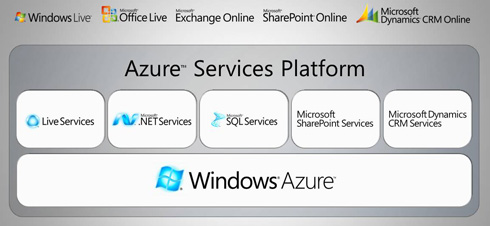

The services layer Microsoft provide on top of Azure are as follows
Live Services Mesh (high level user/data sync – will run as app on Azure, doing some now) will be migrated to run on Azure over time
.net services (Zurich) high level services to enable rich scenarios like authentication, Federation, liveID, OpenID, Active Directory Federation Services etc.
SQL – premium Database services in the cloud offering data warehousing, and I would assume massive scalability options – but I’m not sure how this would be implemented.
Sharepoint/Dynamics I understand are coming soon but would offer the same sort of functionality in the cloud.
It’s based around modified Windows with Dave Cutler’s involvement (no specifics offered yet) virtualized server instances are the base building blocks with an allocated and guaranteed amount of resource – 1×1.9GHz CPU, 2gb ram, 160gb disk) which is dedicated to your machine and not contended, which would mean MS are doing no over-subscription under the hood? that seems unlikely, and maybe wasteful to me; DRS anyone?
Dell have provided the underlying physical hardware hosted in Microsoft’s data centres with a customised server model, as noted here – and you can see a video tour inside one of the hosting data centres here from BBC news
There is an overall Fabric Controller which is essentially a resource manager, it continually monitors hosts, VMs, storage via agents and deploys/allocates/moves .net code packages around hosts.
to deploy your service to the Azure cloud;
You build your application as a code package (.net, others coming later)
You build a service model, this describes the number, type of hosts, dependencies etc.
The Azure storage layer a distributed, flat table-based storage system with a a distributed lock manager and keeps 3 copies of data for availability – it’s not SQL based (interesting) uses a REST API and is more akin to a file system so sounds like it’s been written from the ground up.
Interestingly it seems that the storage layer is deployed as a service on Azure itself and is controlled by the fabric manager, parts of the current live mesh services are using it now in production.
Interestingly Manuvir describes your service as containing routers, load balancers as well as traditional services so it sounds like they may have either built a complex provisioning framework for physical devices, or have implemented virtualized versions of such devices (Cisco Nexus type devices implemented as VM’s maybe?)
Azure can maintain staging and production platforms within the cloud, you can swap between production/stage etc. with an API command that re-points DNS.
There is a concept of an upgrade domain; where VMs are taken out of service for updates/deployments etc. – your service description I assume describes what are key dependencies and it works out the least-impact sequence?
No automatic paralellism, you can’t just issue a job and have it execute in a distributed fashion using all the Azure resources without being designed/built as such, which I think Amazon offer (but I may be wrong, as that does sound like something v.complicated to do)
Azure strategy for scale out is the traditional MS one, make the most use of individual resource allocation for your VMs (see above), scale out multiple independent instances with a shared nothing architecture
Azure is a programmable API, it’s not an end-user product, it’s a platform for developers to build services on.
There is no absolute requirement for asp.net will provide PHP/RoR/Python facilities over time and .net and visual studio integration out of the box – but can use other developer tools too.
A “Developer fabric” is available – it can run on a desktop, it mocks up the whole Azure platform on your desktop and behaves the same way so developers can understand how it works and debug applications on their desktops before pushing out to the cloud – this is an important shiny for Microsoft, as it’s a simple and quick way to get developers hands-on with understanding how to use Azure.
The cool part is that you can export your service model and code packages directly to Azure from your developer tool, akin to a compile and public option for the cloud. it’s part of SDK which can be downloaded here.
You can debug service copies locally using the SDK and developer fabric, no debugging in the cloud {yet} but provides an API to get logs and are working on an end-end transaction tracing API
Microsoft have made references to making Azure on-premise as well as in Microsoft’s own data centres in the same way that VMWare have with the VDC-OS stuff… but I would think that’s going to need some more details on what the Azure OS is to understand how that would be feasible.
As I concluded in an earlier blog post here, Microsoft could be poised to clean up here if they execute quickly and well – they have the most comprehensive offering for the corporate space due to having a very rich applications/services layer that is directly aligned to the desktop & application technology choices of the bigger customers (.net), they just need to solve the trust in the cloud issue first; and the on-premise piece of the puzzle is key to this… Maybe a server version of Windows 7 or MiniWin or Singularity is the enabler for this?
Microsoft Moves into the Clouds
Posted by on October 28, 2008
As you’ve probably seen and I mentioned here earlier Microsoft are laying out their vision for Microsoft-centric cloud computing this week at their Professional Developers Conference.
If you’re short of time to understand this there is a good quick overview here, here and here, apologies for lack of posting recently which has been due to the awful cold I’ve had and a backlog of “real” work to deal with.
I’m attending Microsoft TechEd next week in Barcelona, so I’m hoping to get more real information about how this will work in the real world and I’ll be blogging as much of that content as possible.
Not sure I can live up to the level of posts Scott managed earlier in the year at TechEd US but I’ll try 🙂
Cloud is the new Mesh 🙂
Windows OS Code Patching
Posted by on October 22, 2008
Interesting article here from the ntdebug blog on how hotfixes get integrated into the windows code-base and update mechanism.
There have been some excellent posts recently on this blog offering detailed insight into the internals of Windows, if you’re interested in this kind of thing (like me) and general innards of Microsoft I’d also recommend Raymond Chen’s blog.
Many people underestimate the complexity of getting Windows out the door and keeping it serviced, I have to wonder just how well Apple* would cope given a similar scale of operation, and not having the luxury of a single “blessed” hardware platform rather than having to service literally trillions of combinations of 3rd party hardware/software/firmware/drivers etc.
I’ve seen lots of “Windows is rubbish and my Mac is ace” discussions at work and socially recently, whilst Windows definitely has its flaws, a more detailed analysis of the persons problem usually reveals that its a 3rd party app/device/driver that has caused a problem, for example;
- Outdated DivX codec giving poor performance when browsing directories with thumbnails, or crashing – fix – updated codec
- Vendor supplied wireless driver/utilities causing issues with sleep or disabling network card – using default Windows driver was as performant and fixed all issues
Microsoft get a lot of bad press around this but it’s actually because they have a pretty open framework and set of ISV/IHV/partner schemes to allow 3rd parties to tightly integrate their products (and thus profit from the Windows cash-cow) they have their HCL/SCL process, but it’s not an absolute requirement for being allowed to install product X from ABC inc.
*Not wishing to start a Mac/PC war – I use + like both, before you flame me, although I have used OSX under VMWare, as well as on Apple hardware #naughty!
Cloud Computing Stack – formalised
Posted by on October 15, 2008
Sam Johnston has an interesting article here where he’s attempted to formalise the cloud computing stack into something like the OSI model and has an associated wiki for contributions.
I’ve not come across Sam’s blog before before but a quick review shows that Sam has some interesting architectural discussions around cloud computing – check it out.
Cloud Wars: VMWare vs Microsoft vs Google vs Amazon Clouds
Posted by on October 1, 2008
A short time ago in a data centre, far far away…..
All the big players are setting out their cloud pitches, Microsoft are set to make some big announcements at their Professional Developer Conference at the end of October and VMWare made their VDC-OS announcements at VMWorld a couple of weeks ago, Google have had their App Engine in beta for a while and Amazon AWS is pretty well established.
With this post I hope to give a quick overview of each, I’ll freely admit I’m more knowledgeable on the VMWare/Microsoft offerings… and I stand to be corrected on any assumptions I’ve made on Google/AWS based on my web reading.
So, What’s the difference between them…?
VMWare vCloud – infrastructure led play
VMWare come from the infrastructure space, to-date they have dominated the x86 virtualization market, they have some key strategic partnerships with storage and network vendors to deliver integrated solutions.
The VMWare VDC-OS pitch is about providing a flexible underlying architecture through servers, network and storage virtualisation. why? because making everything ‘virtual’ makes for quick reconfiguration – reallocating resource from one service to another is a configuration/allocation change rather than requiring an engineer visit (see my other post on this for more info)
because VMWare’s pitch is infrastructure led it has a significant practical advantage in that it’s essentially technology agnostic (as long as it’s x86 based) you, or a service provider have the ability to build and maintain an automated birth–>death bare ‘virtual metal’ provisioning and lifecycle system for application servers/services as there is no longer a tight dependency for everything on physical hardware, cabling etc
There is no one size fits all product in this space so a bespoke solution based around a standard framework tool like Tivoli, SMS, etc. is typically required depending on organisational/service requirements.
No re-development is necessarily required to move your applications into a vCloud (hosted or internal) you just move your VMWare virtual machines to a different underlying VDC-OS infrastructure, or you use P2V, X2V tools like Platespin to migrate to a VDC-OS infrastructure.
In terms of limitations – apps can’t necessarily scale horizontally (yet) as they are constrained by their traditional server based roots. The ability to add a 2nd node doesn’t necessarily make your app scale – there are all kinds of issues around state, concurrency etc. that the application framework needs to manage.
VMWare are building frameworks to build scale-out provisioning tools – but this would only work for certain types of applications and is currently reactive unless you build some intelligence into the provisioning system.
Scott Lowe has a good round-up of VDC-OS information here & VMWare’s official page is online here
Google AppEngine– pure app framework play
An application framework for you to develop your apps within – it provides a vastly parallel application and storage framework – excellent for developing large applications (i.e Google’s bread & butter)
Disadvantage is it’s a complete redevelopment of you applications into Google compatible code, services & frameworks. You are tied into Google services – you can’t (as I understand it) take your developed applications elsewhere without significant re-development/porting.
The Google AppEngine blog is here
Microsoft Cloud Services Hosted Application stack & Infrastructure play
An interesting offering, they will technically have the ability to host .net applications from a shared hosting service, as well as integrating future versions of their traditional and well established office/productivity applications into their cloud platform; almost offering the subscription based/Software+Services model they’ve been mooting for a long time.
Given Microsoft’s market current dominance, they are very well positioned to make this successful as large shops will be able to modify existing internal .net services and applications to leverage portions of their cloud offering.
With the future developments of Hyper-V Microsoft will be well positioned to offer an infrastructure driven equivalent of VMWare’s VDC-OS proposition to service and support migration from existing dedicated Windows and Linux servers to an internal or externally hosted cloud type platform.
David Chou at Microsoft has a good post on Microsoft and clouds here
Amazon Web Services – established app framework with canned virtualization
the AWS platform provides a range of the same sort of functionality as Google AppEngine with SimpleDB, SQS and S3 but with the recently announced ability to run Windows within their EC2 cloud makes for an interesting offering with the existing ability to pick & choose from Linux based virtual machine instances.
I believe EC2 makes heavy use of Xen under the hood; which I assume is how they are going to be delivering the Windows based services, EC2 also allows you to choose from a number of standard Linux virtual machine offerings (Amazon Machine Image, AMI).
This is an interesting offering, allowing you to develop your applications into their framework and possibly port or build your Linux/Windows application services into their managed EC2 service.
Same caveat applies though, your apps and virtual machines could be tied to the AWS framework – so you loose your portability without significant re-engineering. on the flip-side they do seem to have the best defined commercial and support models and have been well established for a while with the S3 service.
Amazon’s AWS blog is available here
Conclusion
Microsoft & VMWare are best positioned to pick up businesses from the corporate’s who will likely have a large existing investment in code and infrastructure but are looking to take advantage of reduced cost and complexity by hosting portions of their app/infrastructure with a service-provider.
Microsoft & VMWare offerings easily lend themselves to this internal/external cloud architecture as you can build your own internal cloud using their off-the-shelf technology, something that isn’t possible with AWS or Google. This is likely to be the preferred model for most large businesses who need to retain ownership of data and certain systems for legal/compliance reasons.
leveraging virtualization and commercial X2V or X2X conversion tools will make transition between internal and external clouds simple and quick – which gives organisations a lot of flexibility to operate their systems in the most cost/load-effective manner as well as retain detailed control of the application/server infrastructure but freed up from the day-day hardware/capacity management roles.
AWS/Google are ideal for Web 2.0 ,start-ups and the SME sector where there is typically no existing or large code-base investment that would need to be leveraged. For a greenfield implementation these services offer low start-up cost and simple development tools to build applications that would be complicated & expensive to build if you had to worry about and develop supporting infrastructure without significant up-front capital backing.
AWS/Google are also great for people wanting to build applications that need to scale to lots of users, but without a deep understanding of the required underlying infrastructure, whilst this is appealing to corporate’s I think the cost of porting and data ownership/risk issues will be a blocker for a significant amount of time.
Google Apps are a good entry point for the SME/start-up sector and startups, and could well draw people into building AppEngine services as the business grows in size and complexity, so we may see a drift towards this over time. Microsoft have a competing model and could leverage their established brand to win over customers if they can make the entry point free/cheap and cross-platform compatible, lots of those SME/start-ups are using Mac’s or Netbooks for example.
Workstation VMs loose network connectivity
Posted by on October 1, 2008
I’ve had a problem recently with VM Workstation on my laptop, both with previous beta versions and the current RTM build. My Windows XP Virtual machine that I use to run Outlook via Unity (and indeed all VM’s on my laptop) loose network connectivity via the host occasionally, this seems to affect VM’s configured for both Bridged and NAT mode – they just can’t ping anything. I do suspend/resume my Vista laptop quite a lot throughout the day, often with VM’s running so I guess this is one of the main reasons it gets upset.
The only fix I’ve found so far is to restart the VMWare NAT Service a couple of times, and sometimes it won’t stop so I have to kill the vmnat process via Task Manager (show processes for all users) and then restart the VMNat service via services under ‘Administrative Tools’ in control panel.

I’ve not managed to isolate this to a problem with specific VMWare or one of my 3rd party tools (AV/SSLVPN) yet, but will keep digging; let me know if you have similar problems.
I know of a similar, but different problem with the Trend OfficeScan Personal firewall service – but the workaround doesn’t resolve the problem and seems independent of it.

 Virtualization, Cloud, Infrastructure and all that stuff in-between