Virtualization, Cloud, Infrastructure and all that stuff in-between
My ramblings on the stuff that holds it all together
VMWare Workstation 6.5 Release
Posted by on September 30, 2008
I’ve been running the beta versions for a while and have been impressed with the new Unity feature; finally matching what Parallels for the Mac has had for ages.
my previous posts here and here and how it is particularly useful for running more than one version of Outlook.
As ever, clean uninstall of the beta and reinstall of the RTM code, performance is excellent now, and Unity seems to work very well.
Quick (content obscured) screen shot below of how well it integrates into the desktop, even works with the Flip-3D feature in Vista

Unity icon colour is configurable  and I notice there are a load of per-VM configuration settings for how you can mark Unity presented windows.

Good stuff – Unity is definitely the killer feature that allows you to seamlessly run apps on a single desktop, wonder is this available in ACE/Player and would be good if you could do this in future with Linux apps onto a Windows desktop.
VMWare vCloud
Posted by on September 15, 2008
The news is out, VMWare are building some very interesting technology frameworks to enable you to build your own cloud architectures, but also to be able to transition VMs from your environment to a service provider offering a hosted service and mix & match as required.
All very clever stuff, I’ve been working with VMWare on this for the last couple of weeks and it all links in nicely to an article I wrote a couple of months back on how VMWare can deliver this type of infrastructure now. nice to see it’s being “productized” and being explained as a concept to the world, I see Scott’s point and I also hope that people do realise it’s the underlying virtualization tech they are focusing on not some overarching end-end GoogleOS that does everything – although the clever bit is building management frameworks to allow another vendor to do this type of integration.
Read the vCloud page here and overview of the virtual data centre stuff here
VMWorld Week
Posted by on September 15, 2008
Well, it starts a bit later today in the US, I went last year and it was a very useful and educational week, my only gripe was about scale – there were too many people and the place was too small, crazy queues for every session.
It seems they’ve moved to somewhere much bigger this year and I hear the attendance is up on 14k people from 10k last year.
I couldn’t make it this year, but I am going to Microsoft Tech-Ed – I’ve been to both of these a couple of times in the last few years and in my opinion they’re brilliant value for money. It costs about £1.5k GBP +expenses to go for a week.
Yes, it’s away from home and there plenty of opportunities to jolly it up after work hours but, to put it in context a normal 1 week technical training course on VMWare or Microsoft stuff in the UK costs upwards of £2-3k. I find most courses frustratingly slow and plodding and they focus in a narrow set of a products functionality and only ever at a high level, never really drilling down into the intimate details of a product as courses are delivered by trainers who are divorced from the technology and delivering a training package.
Whereas with VMWorld or Tech-Ed you can drive your own schedule; you can pick from various deep technical or high-level sessions across a wide range of products and tech.
There is always a good attendance from technical members of the product and engineering teams and partners, over the years I’ve had lots of in-depth discussions with the people who wrote the code and have gained far more understanding than I could ever get from a training course.
Tech-Ed, VMWorld are the only way to get up to speed with their current products, if I were to put it into numbers I’d say a training course could give you maybe 5% of what you would get out of Tech-Ed/VMWorld – unless your day job has a very narrow focus to one task and one product which has been around for a while. If you’re a consultant or Architect tasked with making and implementing technology decisions there is no argument – best money you (or your employer) will ever spend.
So, for those of us that couldn’t be here tonight 🙂 here are my round up of links to the best “virtual event” coverage
Eric Sloof http://www.ntpro.nl/blog/
Scott Lowe http://blog.scottlowe.org/
VMWorld site http://vmworld.com/vmworld/index.jspa
Enjoy!
Edited for appalling spelling!
Mapping a drive to a VSS Snapshot & General DFS-R woes
Posted by on September 14, 2008
Microsoft’s volume snapshot service is pretty handy right? quick hardware independent snaps of a file system – all free and out of the box, well it’s now officially saved my bacon…. whilst it’s a bit klunky (more on this in a bit) it was damned useful.
I had a pain of a problem to deal with this weekend, helping out a friend doing some server re-organising (plan was to migrate these guys from VMWare Server 1.x to ESXi – but didn’t get that far due to some other Windows issues that took all of our time as we checked everything was ok before the move)
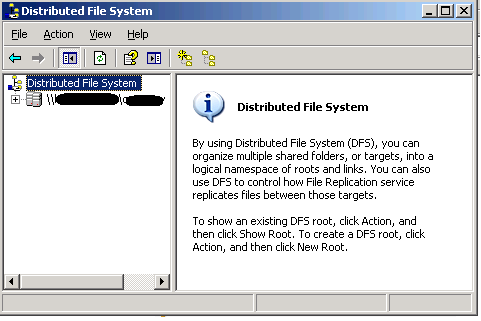
Firstly, if you use DFS-R (as comes with Win2003 R2) never, ever, ever, ever use the “distributed file system” applet to administer DFS, we needed to add a new replica of a large DFS-R set to another server and because (in our defence) the server was a fresh R2 install, we forgot to install the newer DFS-R components via control panel, but original DFS was still installed by default and we were in a hurry (read: not paying attention) we used the “Distributed File System” applet to add a new target, and followed the wizard which actually re-created the DFS volume (note to self – pay more attention when clicking!) from scratch.
It proceeded to delete all the contents of all the DFS shares and moved them to a folder called NtFrs_PreExisting___See_EventLog and started afresh, that wouldn’t be so bad except for some inexplicable reason it then purged the contents of that folder from all replicas so we had no quick cut & paste file copy solution.
This was not going to be a fun weekend.
Don’t use this one 

use this one!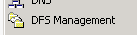
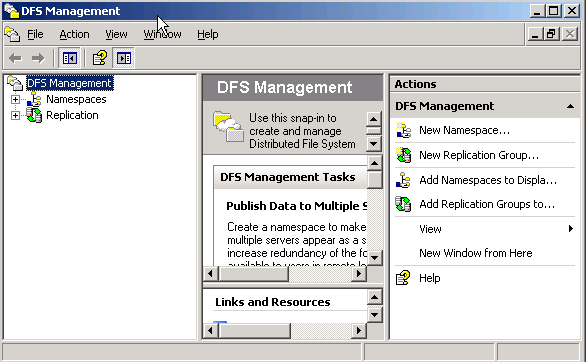

So, basically it was our (my) fault – but it was compounded by some weird corruption in one of the directories that looked like it had been there a while that meant recovery wasn’t going to be straightforward.
The data Backup was about 24hrs older than the last VSS snapshot on the central file server (hub & spoke replication topology) so as we now had a flat, deleted DFS volume with no data (thanks!) we decided to try and revert to the most recent VSS snapshot for the relevant directories.
But no dice, it just threw an error – can’t copy, I can view the files and see the contents and can drag and drop one or two a time, but any more and it would throw an error.
Not good, I can only assume that this was because of some logical corruption within the file system as there was one whole directory tree I couldn’t access (more on how I recovered this later).. there were over 60k files so I wasn’t going to do that by hand – so a command line was in order as at least XCopy can ignore errors etc. and just pull out the good data.
I found these excellent articles here and here and documentation here but some of them were more geared towards taking a snapshot and extracting data in-situ rather than from a persistent snapshot like you get with VSS.
so, none of them worked for me ; and even a lot of hacking with Vshadow and MOUNTVOL I couldn’t get the VSS Snap to mount at all and time was short
I did discover the following though, if you view a snapshot using the Previous Versions tab (remember this only works if you browse for files to restore via UNC path) it opens the snap in Explorer, but you can’t map a drive to it or run a command line copy against it…. or can’t you 🙂
When you open it in explorer this way it does create a sort of hidden temporary share – easiest way I found to expose the name of the share was to try and zip a file in the explorer session that is looking at the snapshot using WinZip, if you follow the wizard at some point it will expose a UNC path like \\SERVERNAME@GMT-DD-MM-YY-{GUID} if you can cut & paste that you can then map a network drive to it
NET USE * \\servername@gmt-dd-mm-yy-{guid}
And you can then run xcopy etc against that mapped drive to copy out all the good data – in reality we used SyncBackSE – which is great for complex file copies and we already had it installed.
All of these Windows servers were installed as VM’s in VMWare Server(s), so it actually made our lives a lot easier as we could quickly clone a known-broken server as-is (do no further harm) and then spin it up disconnected from the network to recover data using this method and also undeleted files using Get Data Back NTFS etc. and then use that data to re-seed the DFS-R volume – but much easier than if it were a physical box and at no real risk of making things worse.
So, in conclusion this was human error, rather than a 100% technical problem and should have been better planned and prevented by maintenance and a better recovery plan- but here it is, with the solution we found to get things back in all its gory details… and mainly as a footnote so I don’t make the DFS mistake again and in my defence this is a shoe-string charity operation rather than a blue-chip org with significant money and time to invest in such efforts.
This solution worked for us, but you need to have your own tried & tested solution – don’t rely on this as far as I can tell it’s unsupported, use at your own risk!
Microsoft now Officially support many of their products under ESX 3.5u2
Posted by on September 5, 2008
As noted here and here, VMWare have had ESX 3.5u2 certified under Microsoft’s SVVP programme, this is excellent news and will knock down one of the long standing barriers to greater adoption of virtualisation as I wrote about here – support.
Most notably for me this means blessed support of Exchange 2007sp1 running under ESX!
Excellent work to get this done so quickly – MS only announced the SVVP programme a short while ago.
Official list of MS products supported under VMWare is here.
Free VMWare Disaster Recovery Solution Book
Posted by on August 31, 2008
VMWare have made an excellent free book available online here. it goes into a lot of detail around the various DR scenarios that you can use VMWare for; even P2V DR and has lots of example configurations with various vendor’s server & storage equipment.
Some really good technical documentation coming out of VMWare & it’s partners recently like the Cisco doc.
Problem using Photosynth in Firefox?
Posted by on August 29, 2008
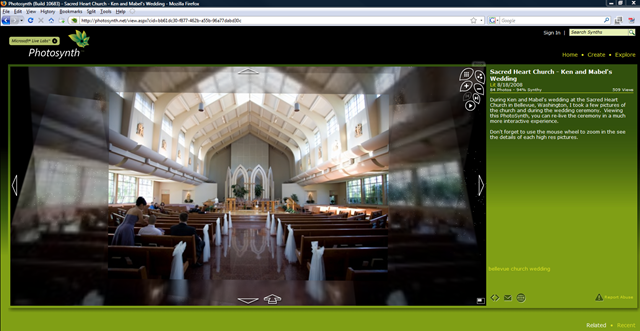
I’ve been playing with Photosynth since the first demo was available on the web; it’s a very cool visualisation project from Microsoft Live Labs (info here) and it’s recently gone ‘live’.
It also works under Firefox which is great as I’m a keen FF user, but since the recent updates I’ve not been able to use it under FF, it kept looping round and asking me to install the plug-in.
I also noted that the version I downloaded earlier in the week was 0.2Mb smaller than the build I downloaded today, so assume there have been some bugfixes or a bad build.

After some fiddling, this turned out to be because I had an older version of the plug-in which must have had some problem, I had to disable the older version and it then ran fine, steps to do so are below;
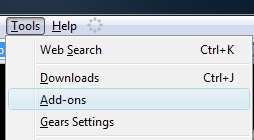
And choose to disable the older version of the plug-in (1.1.0.602) leaving 1.1.10683 enabled.

Then try again, no restart required (in my case anyway) and it works perfectly
Hope that helps someone else.
VMWare Workstation 6.5 Release Candidate Build 110068
Posted by on August 28, 2008
There is a new build available for VMWare Workstation, I’ve installed it on my Vista laptop; definitley seems a lot faster and unity is pretty slick now at screen refreshes.
Flawless uninstall/reinstall as per usual VMWare standards… it’s almost there!
Unity icon has now changed to a rather nasty pinkish colour 🙂

and

Exchange 2007 Automated Install & Documentation Template Resources
Posted by on August 21, 2008
The Exchange team Blog (EHLO) has a pointer to some good resources for building an automated Exchange 2007 installation here and here
it also has some templates for your server build documentation for Exchange servers, always better to start with something than start from scratch!
Automation is one of those great things in Microsoft products, almost all of the products support automated installation, but often unless you are setting up hundreds of them the time invested to get it up and working far exceeds the time it would take to deploy so any pre-build resources and guides are an excellent idea.
Install automation can ensure you have repeatable results – this is especially handy where you are factoring in a non-P2V disaster recovery situation or where you have labs/demo environments or are trusting local IT staff to deploy and manage enterprise applications in a distributed environment.
And you thought your ESX lab at home was big..
Posted by on August 7, 2008
Chad has an interesting article and set of photos here about the joint Cisco/EMC/VMWare lab they maintain to test v.large implementations.
Excellent stuff, makes any of my labs pale into insignificance, especially my garage geek temple.
I definitely agree with Chad that they should publish the details of solutions that didn’t scale too well as well as those that did; if only for the allies (EMC, VMWare, Cisco) 🙂 to get feedback on if the market wants those kind of solutions that didn’t work; or at least to show where there is room for improvement to focus dev/R&D effort – but validated.
11/8 Links fixed

 Virtualization, Cloud, Infrastructure and all that stuff in-between