Virtualization, Cloud, Infrastructure and all that stuff in-between
My ramblings on the stuff that holds it all together
Hey, I Broke Photosynth
Posted by on August 3, 2008
Lol, more sites should have error messages like this – this would be far more entertaining (but maybe less useful) than a PSOD or BSOD 🙂

Vista Mobility Centre
Posted by on July 27, 2008
Ironically, I’d never actually seen this screen before.. Windows Key – X and it pops up the following screen so I can get one place to find the Dell extensions and the MS normal control panel applets in one place that are relevant to “mobility”.
 Thanks to
James O’Neil‘s post on where Microsoft went wrong with Vista for the tip, maybe thats one of the areas 🙂
For the record my laptop flies with Vista, and I agree with James’s point about suspend rather than shutdown reboot with suspend/resume it’s ready in < 5sec .. so why continually shutdown etc?
I hardly ever reboot my laptop other than to (un)install some software and suspend/resume works flawlessly, (unless I try to do it with my laptop’s built in 3G cell modem connected to Vodafone – as it will fail 1/2 way though and slowly cook in my laptop bag – but that’s a driver issue I assume rather than the OS).
as Eileen Brown discusses here I also frequently use MSCONFIG.EXE to keep the startup crapware free and the services stripped down to bare minimum…although I think Vista should police this a bit better.
VMWare aims for the Clouds
Posted by on July 26, 2008
Interesting post by Dave Ohara here; looks like VMWare are gearing up for some big cloud-related product announcements at VMWorld in September.
This folds nicely into my previous post about how VMWare can enable you to build your own clouds
Looking forward to September.
ESX3i for Free
Posted by on July 24, 2008
VMWare ESXi (aka ESX 3i) is about to be available free, pricing kicks in 28th July and the attached doc shows an overview of the features in each edition as you step up.
Basic principal is you can start with ESX3i for free (rather than full ESX @$1k), then add licence keys to enable production features like VMotion, HA etc.
It’s useful for dev/PoC projects which could then move to production later on by adding licences but with a reduced upfront cost. It avoids having to use and migrate from the free Windows/Linux version of VMWare Server when moving into a production class system and this gives a further one-up on Microsoft’s Hyper-V release a couple of weeks ago.
You should note that ESX3i is currently a bit more limited than the normal base ESX installation as there is no service console so no ability to install host based HPSIM/backup/etc. agents. That said, it’s been speculated that the next major release of full–blown ESX (4.x) will move to this model as well.
ESX3i is available from some HW manufacturers as embedded boot from flash in specific server models or is a downloadable installer with a small disk footprint (c.32Mb).
I have to wonder if the name change is a bit OTT – VMWare ESXi said fast in an English accent is“VMWaresexy”? 🙂
Excellent Set of Resources for VMWare HA
Posted by on July 15, 2008
Free EMC Celerra for your Home/Lab
Posted by on July 9, 2008
Virtualgeek has an interesting post here about a freely downloadable VM version of their Celerra product, including an HA version. This is an excellent idea for testing and lab setups, and a powerful tool in your VM Lab arsenal alongside other offerings like Xtravirt Virtual SAN and OpenFiler.
I’ve been saying for a while that companies that make embedded h/w devices and appliances should try to offer versions of the software running their devices as VM’s so people can get them into lab/test environments quickly, most tech folk would rather download and play with something now, rather than have to book and take delivery of an eval with sales drones (apologies to any readers who work in sales) and pre-sales professional services, evaluation criteria etc. if your product is good it’s going to get recommended, no smoke and mirrors required.
As such VM appliances are an excellent pre-sales/eval tool, rather than stopping people buying products. Heck, they could even licence the VM versions directly for production use (as Zeus do with their ZXTM products); this is a very flexible approach and something that is important if you get into clouds as an internal or external service provider – the more you standardise on commodity hardware with a clever software layer the more you can recycle, reuse and redeploy without being tied into specific vendor hardware etc.
Most “appliances” in-use today are actually low-end PC motherboards with some clever software in a sealed box – for example I really like the Juniper SA range of SSL VPN appliances, I recently helped out with a problem on one which was caused by a failed HDD – if you hook up the console interface its a commodity PC motherboard in a sealed case running a proprietary secure OS – as it’s all intel based, no reason it couldn’t also run as a VM (SLL accelerator h/w can be turned off in the software so there can’t be any hard dependency on any SSL accelerator cards inside the sealed box) – adopting VM’s for these appliances provides the same (maybe even better) level of standard {virtual} hardware that appliance vendors need to make their devices reliable/serviceable.
Another example, the firmware that is embedded in the HP Virtual Connect modules I wrote about a while back runs under VMWare Workstation, HP have an internal use version for engineers to do some development and testing against, sadly they won’t redistribute it as far as I am aware.
PSOD – Purple Screen of Death
Posted by on July 8, 2008
Just incase you ever wondered what it looks like here is a screendump..
this is the VMWare equivalent of Microsoft’s BSOD (Blue Screen of Death)

I got this whilst running ESX 3.5 under VMWare Workstation 6.5 build 99530, it happened because I was trying to boot my ESX installation from a SCSI hard disk – which it didn’t like – I assume because of driver support, swapped for an IDE one and it worked fine…
update – actually the VM had 384Mb of RAM allocated and that’s what actually stopped it from booting.. upped to 1024Mb and it runs fine.
Its the first time I’ve seen one – all the production ESX boxes I’ve worked with have always been rock-solid (touch wood)
I’m preparing a blog post about unattended installations of ESX when I hit this, in case you were wondering.
Funky USB Device Entries After Using VM Converter..
Posted by on July 6, 2008
I’ve noticed this a couple of times, if you P2V a VM from VM Workstation to ESX using VM Converter – it brings across a virtual USB device which isn’t supported by ESX.. if you look at the properties you get the following amusing entries..

Now, I wish I really did have a funky USB dongle, or doohickey… sounds useful!
VMWare Workstation 6.5 Beta 2 – my experiences
Posted by on July 3, 2008
I’ve installed the updated build of 6.5 as Eric discussed here; first impressions Unity works much, much better – less screen jitter and flashes of guest desktop – performance definitely improved too and makes my multi Outlook setup much nicer to use.
 Also noted that the unity icon has changed colour from red to orange..
I’m always impressed at how well VMWare Workstation uninstalled and re-installs between Beta versions.. works 100% every time for me.. impressive considering how many drivers and helper services it installs into the host OS.
Don’t think it will be long until RTM now…
Handy Reference Chart for Microsoft Server Application Licences
Posted by on July 2, 2008
Taken from a download on the Microsoft Partner Licencing Specialist site, the following diagram makes for a useful quick reference chart for what licencing options are applicable to the big MS Server apps – far easier than having to check the product sites and documentation individually if you are trying to spec something up.
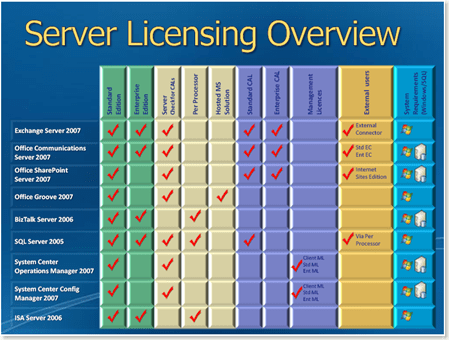
Also lots more useful information on this site – it’s designed to train people to become Microsoft licencing specialists (MLSS/MLSE) it’s mainly sales staff orientated training, but some useful/easy to digest reference material for techies/consultants alike if you’ve ever struggled to understand Microsoft licencing.
Useful links..
Revision Presentations – .PDF files to download https://partner.microsoft.com/UK/40033119
Training Videos – downloadable http://www.microsoft.com/uk/partner/learningpaths/?id=licensing.mlss

 Virtualization, Cloud, Infrastructure and all that stuff in-between