Virtualization, Cloud, Infrastructure and all that stuff in-between
My ramblings on the stuff that holds it all together
Speaking about Cloud Production & Delivery at IBC
Posted by on August 30, 2009
I am going to be speaking at the IBC conference in Amsterdam on 11th September on cloud production and delivery.
IBC is the event of the year for the broadcast and electronic media industry and I’m pleased to be representing ioko. Following my presentation I’ll be participating in a panel discussion with other industry experts.
Details of my session can be found here and I’ll be focusing on work I have been doing to apply cloud, and particularly private cloud concepts and technologies to the broadcast industry.
If you are going to the IBC show and want to meet to discuss in more detail, drop me a line via the comments.
VMworld SF 2009 Coverage
Posted by on August 28, 2009
Unfortunately I won’t be at VMworld in San Francisco in person this year as I am about to become a father again.
I could probably have just squeezed it in but the prospect of an emergency flight back across the atlantic was a bit too much of a risk if proceedings started early 🙂 so I shall be watching from afar.
However there is a large contingent of bloggers and twitterers at the event including Techhead there will likley be a torrent of information over the next week so keep your eyes peeled – I have put some links below to keep an eye on:
Full list of all bloggers/twitterers
I have to wonder if there will be any “big” announcements at this event, I guess a fair chunk of it will be taken up on the Springsource acquisition, and I hear a rumour that they will be demonstrating a new I/O DRS feature on-stage, the last part of the keynote is often a demo of a new feature in a future version (when I went to SF in 2007 it was the first time the demonstrated the vSphere FT feature in public) so fingers crossed for something interesting.
For everyone’s sake I hope they have sorted the queue situation with the registered place system this year, VMworld 2007 was crazy and you had to leave sessions before they had finished to make sure you got into the next session – Microsoft have this problem sorted for Tech-Ed and maybe VMware will consider a bigger venue in future considering the attendance levels.
I’ll try to refrain from repeating information here and leave it to the people on the ground but will comment on anything I find interesting and I firmly have my fingers crossed for real vCloud information – I see there is an extra paid-for vCloud briefing before the main event but VMware need to communicate more of the tech around this programme.
Private Connectivity to Amazon EC2 – your own Private Cloud, in the Cloud
Posted by on August 26, 2009
VPN connectivity and private networking within EC2 are now available, this is great news – I mused on the possibilities of this sort of thing previously in this post.
This is a key step to gaining corporate acceptance, and proves that there is definitely still a use case and demand for a private cloud,
This new offering provides better opportunities for integrating internal systems with large-scale commodity service from people like Amazon, extending your own address space into EC2 opens up interesting opportunities for selective offloading and “cloud-bursting” of services as well as DR.
Private or shared/dedicated cloud infrastructures take the principals of public cloud computing (on-demand, pay as you go, scalability) and apply them to private infrastructure (along these lines through the adoption of virtualization technology) some people see this as a bit of a cheat, or not “real” cloud computing… however, in the real world* they are very appealing where outsourcing to a commodity provider isn’t an option due to regulatory, compliance or security issues and it can provide extra assurance levels because you have the ability to “look the service provider in the eye” via a traditional business relationship, rather than an anonymous entity on the web.
I like the quote “virtualization is a technology, cloud computing is a business model” and to me that means that you can apply that “cloud” business model internally or externally (chargeback/leasing/outsourcing), it really doesn’t matter – it’s just how you do the sums, not the technology.
See this post from the AWS team for more details, and some analysis from the hoff here.
<flame>*I define real world as not in the land of whiteboards, workshops and architectural models, but in the non green-field land of doing business, making money and delivering service </flame>
ZXTM Virtual Appliance Flies on vSphere
Posted by on August 20, 2009
I wrote about my favourite software IP traffic Manager, the ZXTM in a previous post.
Zeus have just released a white-paper benchmarking their ZXTM virtual appliance running on vSphere.
Interesting to note that for plain HTTP traffic they noted a 25% performance increase over ESX 3.5u4 and were able to max out the 4Gb/s links configured to the VMs and host machine – indicating that there is a very low overhead for the vSphere 4 hypervisor layer in handling network traffic.
The ZXTM can rapidly serve items from it’s cache as well as handling load balancing/URL redirection/writing etc. – which in a production environment would mean offloading traffic from the web server itself with the net-result being fewer web-servers and consolidated ZXTM VMs.
Interestingly, multi vCPU configurations performed better than a native install of the OS, which would indicate the vSphere 4 hypervisor is more efficient at CPU scheduling than the native OS (x64 Ubuntu).
whilst there is a higher CPU overhead for handling SSL transactions as it needs to decrypt and process traffic on the CPU itself the improvements in multi-vCPU performance and low network overhead mean that if you were building a large-scale web platform you could treat the ZXTM as a scale-out SSL offload engine, but do it on commodity, virtualized or physical x64 hardware rather than specialized ASIC type hardware (Cisco ACE etc.), with the end-result being a more flexible architecture at a lower cost and no hardware-vendor lock-in; “it’s just software”.
The performance whitepaper is available from Zeus here; you can download an eval copy here and a colleague also has some interesting articles about ZXTM configurations on his blog here.
Zeus are a key part of my cloud reference architecture, and offer service-provider type licensing as well as full support for virtualization – including HyperV which play well to deliver flexibility either for private, public or hybrid cloud solutions.
Is your MS Application Supported under VMware, Hyper-V, Xen? – the DEFINITIVE Statement from Microsoft
Posted by on August 14, 2009
A colleague has just made me aware of a new tool on the Microsoft website, it is a wizard that can tell you if specific Microsoft App/OS/Architecture combinations are supported under the SVVP (Server Virtualization Validation Programme) – I previously wrote about the SVVP here, which promised to resolve many of the pains we were experiencing.
The output from the SVVP programme has been compiled into a great web based wizard that saves all the previous leg work of reading several (sometimes conflicting) whitepapers.. here you get it straight from the horses mouth (so to speak).
You can access the Wizard via this Link
http://www.windowsservercatalog.com/svvp.aspx?svvppage=svvpwizard.htm
The wizard lists all Microsoft products

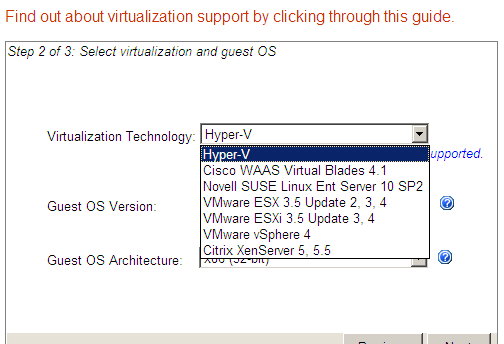
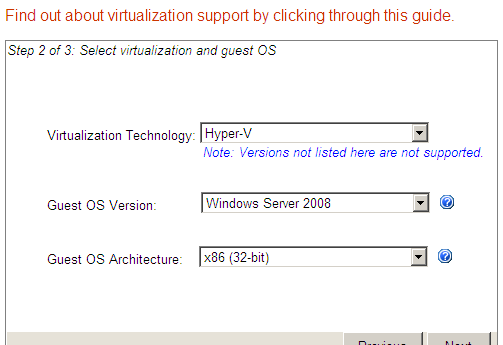
The list of hypervisor platforms supported is shown below, and you can choose the OS version (Windows 2000 and later) and the CPU architecture (x86, x64 etc.)
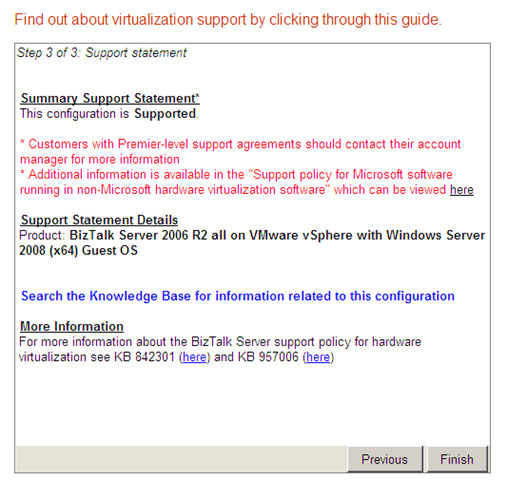
And, finally the most important part – a definitive statement on support for this combination
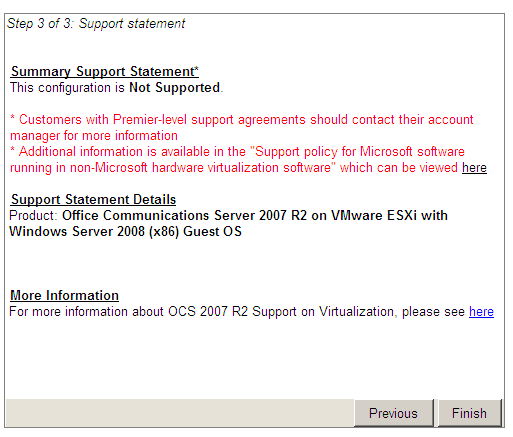
Excellent work Microsoft – come on other vendors (Oracle, Sun this means you…)
VMware ESX 5
Posted by on August 7, 2009
Ok, so vSphere (ESX4) has only just been released, but what would you like to see in the next major version? Hyper V R2 will be out soon, and I would expect it’s successor within a further 18 months. whilst vSphere is a technically better product now Microsoft are going to be throwing a significant amount of resource at building up the Hyper V product line so VMware need to keep innovating to be significantly ahead.
As the VMware vendor and partner ecosystem grows will it stifle growth in the core product? – I see this happening with Microsoft – they don’t want to produce an all singing and dancing core product as there are literally thousands of ISV’s that they don’t necessarily want to put out of business; so Microsoft core products are “good-enough” but for more advanced features you turn to an ISV (think Terminal Services & Citrix)
So, open question really – here’s my starter for 10 – What would you like to see in ESX 5?
Host Based Replication
SAN storage brings a single point of failure; even with all the best HA controllers and disk arrangements, it’s still one unit –human error or a bad firmware could corrupt all your disks – you can buy a 2nd one and do replication but that’s expensive (twice as expensive infact) and failover can require downtime (automated with SRM etc.).. and what if you need to physically move it to another datacentre? that’s a lot of risk.
In this previous post I proposed a slightly different architecture, leveraging the FT features for a branch office solution – that same model could mean a more distributed architecture with n+1, 2 or 3 x ESX nodes running FT’d VMs for high availability on cheap, commodity hardware – using DAS storage and replicating over standard IP networks.
if you look at companies like Amazon, Google etc. their cloud platforms leverage virtualization (Xen) but I would bet they don’t rely on enormous SANs to run them, they use DAS storage and replication, they expect individual (or even datacentre) failures and can work around them by keeping multiple copies of everything – but they don’t have an expensive storage model – they use cheap commodity kit and provide the HA in the software – with some enhancements the FT feature could provide an equivalent;
Host based replication also makes long-distance clustering more realistic – relying on plain old IP to do the replication, rather than proprietary SAN-SAN replication (previous thoughts on this here)
Microsoft have already moved in this direction with core products like Exchange and SQL, Exchange CCR and SQL Mirroring are pure-IP based replication technologies that address the issues with traditional single copy clusters
Now, with VMware being owned by EMC I could see this as being something of a problem but I hope they can see the opportunity here, you can achieve some of this using storage virtual machines (like Openfiler+Replication in a VM, or Datacore).
Stateless ESX Nodes
A mode where nodes can be PXE booted (or from firmware like ESXi) and have their configurations assigned/downloaded – no manual installs, all DHCP (or reserved DHCP) addressing
when combined with cheap, automatically provisioned and managed virtualization nodes with commodity DAS storage, you could envisage the following scenario..
- Rack a new HP DL360g7 with ESX 5i server on a USB key (or PXE booted), attach power, network and walk away
- it registers itself at boot time with a management node(s) downloads its configuration
- based on dynamically assigned HA policy it replicates copies of virtual machines from elsewhere in the ESX cloud, once up to speed it becomes a secondary or tertiary copy.
You can imagine a policy-driven intelligent load and availability controller (vCenter 5) which ensures there are always copies of a VM on at least 2 or 3 physical machines in more than one location
Distributed Processing
This is getting a bit sci-fi, but the foundations in infrastructure and technology are being laid now with high-speed interconnects like Infiniband…
With more operating systems and applications starting to optimize for multi-core and hot-add CPU and memory, a very advanced hypervisor scheduler combined with very fast host interconnects like Infiniband or 10GbE could see actual CPU load and memory access being distributed across multiple physical hypervisors;
For example; imagine a 24 vCPU SQL Server virtual machine with 1Tb of vRAM having it’s code executed across 10 quad-CPU physical hosts. effectively multi-core processing but across multiple physical machines – moving what currently happens within the a single physical CPU and bus across the network between disparate machines.
The advantage of this is that developers would only have to write apps that work within current SMP technology – the hypervisor masks the complexity of doing this across multiple hosts, CPUs and networks with a high degree of caching and manages concurrency between processes.
You could combine this with support for hot-add CPU and memory features for apps that could scale massively on-demand and then down again, without having to engineer complex layer 7 type solutions.
Anyway, and please note this is pure personal conjecture rather than anything I have heard from VMware or elsewhere – enough from me; what would YOU like to see…?
Example Report from vCenter Chargeback
Posted by on July 16, 2009
The linked .PDF file is an automatically generated report from my test installation of the new vCenter Chargeback product.
I have set a cost per unit of £1 for all items (GHz, GB disk, network etc.) at this rate I can make £1.7k per day from renting out my virtual server platform at home 🙂
See an example report from my lab here
Anyone interested in renting a virtual machine at that rate please drop me a line 🙂
Problem with Installing vCenter Chargeback – cannot configure with SQL Windows Authentication
Posted by on July 15, 2009
I am setting a trial of the new vCenter Chargeback product on my lab environment, and have followed the instructions to configure the SQL database (new DB and new account with database owner permissions) however when I try to configure the Windows application I get errors from the jdbc component as follows;
“The user is not associated with a trusted SQL Server connection”
If I try with the appliance version of the application it ignores the slash in the DOMAIN\USER syntax for the database permissions and puts in DOMAINUSER, which obviously doesn’t work.
for now I have configured it using SQL authentication and that works ok isn’t ideal from a management point of view, would be good to understand why this is, as the appliance issue looks like a bug to me.
modl.fault.MethodNotFound error when adding ESXi host to vCenter
Posted by on July 14, 2009
I have been gradually rebuilding my home lab and adding a new HP ML115 G5 server (which is capable of running the new FT feature) as I plan to build an ESX inside ESX cluster to run an FT implementation on a single box (info on how to do that here).
Once I had installed my virtual ESXi hosts I ran into a problem trying to add them into vCenter as hosts, I kept getting an error modl.fault.MethodNotFound and an error about SSL certificates.
I tried several reinstalls, re-creating the VM and even a clean install of vCenter to no avail, following some twitter suggestions I downloaded a newer build of ESXi (build 171294) – and it worked 1st time. the build I was using was the one I downloaded on GA day (build 140815), so moral of the story is that it’s always worth checking the website for updated builds.
When you do this, it’s also worth updating to the latest vSphere client, I found some oddities in the UI that resulted in a red cross while trying to enable a VMKernel port to act as the FT logging interface.
I also have some problems enabling the VUM plug-in on that machine so hopefully a client upgrade fixes that.
It looks like all of the products (ESX-classic, ESXi, vCentre) have significantly updated builds released since GA.
Screenshot showing 3 x physical hosts and 2 x virtual ESXi hosts in a cluster – all managed by a single vCenter instance

How to Deploy a Windows 2008 Server From a Template with vSphere
Posted by on July 9, 2009
With ESX 3.5 and Virtual Centre 2.5 you needed to copy a bunch of sysprep files to use the excellent template deployment functionality (step by step account here)
Now that vSphere supports all the newer versions I had to update my Windows 2008 templates

There has been some confusion over how you deploy Windows 2008/Vista from a template in vSphere Virtual Center 4.0 and have it sysprep’d ready for use. The good news is – you don’t need to do anything special; you don’t need to put sysprep in a particular directory on the VC box as in Windows 2008 & Vista as there is no longer a separate sysprep download, it’s built into the default Windows OS installation
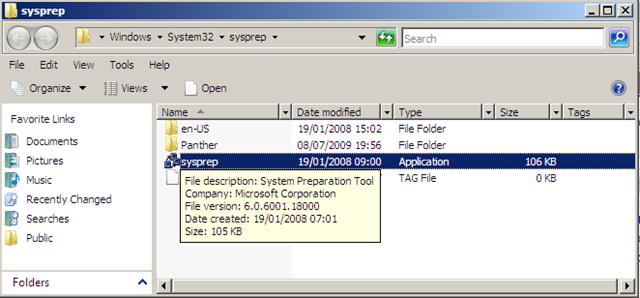
Just use the customization specification manager and it can even set the IP address of your new virtual machine as part of the template deployment.

Under the hood it injects a sysprep unattended/answer file into the OS as it boots and does all the customisations for you based on the specification you created/imported from vCenter 2.5
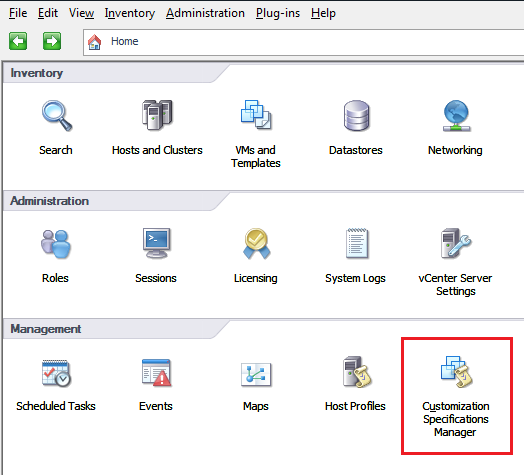
So all you need to do is get your master VM built with the OS, patched, VMtools installed and you can shut it down, convert to template and then just use the deploy from template wizard going forward.


 Virtualization, Cloud, Infrastructure and all that stuff in-between