Virtualization, Cloud, Infrastructure and all that stuff in-between
My ramblings on the stuff that holds it all together
Microsoft Moves into the Clouds
Posted by on October 28, 2008
As you’ve probably seen and I mentioned here earlier Microsoft are laying out their vision for Microsoft-centric cloud computing this week at their Professional Developers Conference.
If you’re short of time to understand this there is a good quick overview here, here and here, apologies for lack of posting recently which has been due to the awful cold I’ve had and a backlog of “real” work to deal with.
I’m attending Microsoft TechEd next week in Barcelona, so I’m hoping to get more real information about how this will work in the real world and I’ll be blogging as much of that content as possible.
Not sure I can live up to the level of posts Scott managed earlier in the year at TechEd US but I’ll try 🙂
Cloud is the new Mesh 🙂
Windows OS Code Patching
Posted by on October 22, 2008
Interesting article here from the ntdebug blog on how hotfixes get integrated into the windows code-base and update mechanism.
There have been some excellent posts recently on this blog offering detailed insight into the internals of Windows, if you’re interested in this kind of thing (like me) and general innards of Microsoft I’d also recommend Raymond Chen’s blog.
Many people underestimate the complexity of getting Windows out the door and keeping it serviced, I have to wonder just how well Apple* would cope given a similar scale of operation, and not having the luxury of a single “blessed” hardware platform rather than having to service literally trillions of combinations of 3rd party hardware/software/firmware/drivers etc.
I’ve seen lots of “Windows is rubbish and my Mac is ace” discussions at work and socially recently, whilst Windows definitely has its flaws, a more detailed analysis of the persons problem usually reveals that its a 3rd party app/device/driver that has caused a problem, for example;
- Outdated DivX codec giving poor performance when browsing directories with thumbnails, or crashing – fix – updated codec
- Vendor supplied wireless driver/utilities causing issues with sleep or disabling network card – using default Windows driver was as performant and fixed all issues
Microsoft get a lot of bad press around this but it’s actually because they have a pretty open framework and set of ISV/IHV/partner schemes to allow 3rd parties to tightly integrate their products (and thus profit from the Windows cash-cow) they have their HCL/SCL process, but it’s not an absolute requirement for being allowed to install product X from ABC inc.
*Not wishing to start a Mac/PC war – I use + like both, before you flame me, although I have used OSX under VMWare, as well as on Apple hardware #naughty!
Cloud Computing Stack – formalised
Posted by on October 15, 2008
Sam Johnston has an interesting article here where he’s attempted to formalise the cloud computing stack into something like the OSI model and has an associated wiki for contributions.
I’ve not come across Sam’s blog before before but a quick review shows that Sam has some interesting architectural discussions around cloud computing – check it out.
Cloud Wars: VMWare vs Microsoft vs Google vs Amazon Clouds
Posted by on October 1, 2008
A short time ago in a data centre, far far away…..
All the big players are setting out their cloud pitches, Microsoft are set to make some big announcements at their Professional Developer Conference at the end of October and VMWare made their VDC-OS announcements at VMWorld a couple of weeks ago, Google have had their App Engine in beta for a while and Amazon AWS is pretty well established.
With this post I hope to give a quick overview of each, I’ll freely admit I’m more knowledgeable on the VMWare/Microsoft offerings… and I stand to be corrected on any assumptions I’ve made on Google/AWS based on my web reading.
So, What’s the difference between them…?
VMWare vCloud – infrastructure led play
VMWare come from the infrastructure space, to-date they have dominated the x86 virtualization market, they have some key strategic partnerships with storage and network vendors to deliver integrated solutions.
The VMWare VDC-OS pitch is about providing a flexible underlying architecture through servers, network and storage virtualisation. why? because making everything ‘virtual’ makes for quick reconfiguration – reallocating resource from one service to another is a configuration/allocation change rather than requiring an engineer visit (see my other post on this for more info)
because VMWare’s pitch is infrastructure led it has a significant practical advantage in that it’s essentially technology agnostic (as long as it’s x86 based) you, or a service provider have the ability to build and maintain an automated birth–>death bare ‘virtual metal’ provisioning and lifecycle system for application servers/services as there is no longer a tight dependency for everything on physical hardware, cabling etc
There is no one size fits all product in this space so a bespoke solution based around a standard framework tool like Tivoli, SMS, etc. is typically required depending on organisational/service requirements.
No re-development is necessarily required to move your applications into a vCloud (hosted or internal) you just move your VMWare virtual machines to a different underlying VDC-OS infrastructure, or you use P2V, X2V tools like Platespin to migrate to a VDC-OS infrastructure.
In terms of limitations – apps can’t necessarily scale horizontally (yet) as they are constrained by their traditional server based roots. The ability to add a 2nd node doesn’t necessarily make your app scale – there are all kinds of issues around state, concurrency etc. that the application framework needs to manage.
VMWare are building frameworks to build scale-out provisioning tools – but this would only work for certain types of applications and is currently reactive unless you build some intelligence into the provisioning system.
Scott Lowe has a good round-up of VDC-OS information here & VMWare’s official page is online here
Google AppEngine– pure app framework play
An application framework for you to develop your apps within – it provides a vastly parallel application and storage framework – excellent for developing large applications (i.e Google’s bread & butter)
Disadvantage is it’s a complete redevelopment of you applications into Google compatible code, services & frameworks. You are tied into Google services – you can’t (as I understand it) take your developed applications elsewhere without significant re-development/porting.
The Google AppEngine blog is here
Microsoft Cloud Services Hosted Application stack & Infrastructure play
An interesting offering, they will technically have the ability to host .net applications from a shared hosting service, as well as integrating future versions of their traditional and well established office/productivity applications into their cloud platform; almost offering the subscription based/Software+Services model they’ve been mooting for a long time.
Given Microsoft’s market current dominance, they are very well positioned to make this successful as large shops will be able to modify existing internal .net services and applications to leverage portions of their cloud offering.
With the future developments of Hyper-V Microsoft will be well positioned to offer an infrastructure driven equivalent of VMWare’s VDC-OS proposition to service and support migration from existing dedicated Windows and Linux servers to an internal or externally hosted cloud type platform.
David Chou at Microsoft has a good post on Microsoft and clouds here
Amazon Web Services – established app framework with canned virtualization
the AWS platform provides a range of the same sort of functionality as Google AppEngine with SimpleDB, SQS and S3 but with the recently announced ability to run Windows within their EC2 cloud makes for an interesting offering with the existing ability to pick & choose from Linux based virtual machine instances.
I believe EC2 makes heavy use of Xen under the hood; which I assume is how they are going to be delivering the Windows based services, EC2 also allows you to choose from a number of standard Linux virtual machine offerings (Amazon Machine Image, AMI).
This is an interesting offering, allowing you to develop your applications into their framework and possibly port or build your Linux/Windows application services into their managed EC2 service.
Same caveat applies though, your apps and virtual machines could be tied to the AWS framework – so you loose your portability without significant re-engineering. on the flip-side they do seem to have the best defined commercial and support models and have been well established for a while with the S3 service.
Amazon’s AWS blog is available here
Conclusion
Microsoft & VMWare are best positioned to pick up businesses from the corporate’s who will likely have a large existing investment in code and infrastructure but are looking to take advantage of reduced cost and complexity by hosting portions of their app/infrastructure with a service-provider.
Microsoft & VMWare offerings easily lend themselves to this internal/external cloud architecture as you can build your own internal cloud using their off-the-shelf technology, something that isn’t possible with AWS or Google. This is likely to be the preferred model for most large businesses who need to retain ownership of data and certain systems for legal/compliance reasons.
leveraging virtualization and commercial X2V or X2X conversion tools will make transition between internal and external clouds simple and quick – which gives organisations a lot of flexibility to operate their systems in the most cost/load-effective manner as well as retain detailed control of the application/server infrastructure but freed up from the day-day hardware/capacity management roles.
AWS/Google are ideal for Web 2.0 ,start-ups and the SME sector where there is typically no existing or large code-base investment that would need to be leveraged. For a greenfield implementation these services offer low start-up cost and simple development tools to build applications that would be complicated & expensive to build if you had to worry about and develop supporting infrastructure without significant up-front capital backing.
AWS/Google are also great for people wanting to build applications that need to scale to lots of users, but without a deep understanding of the required underlying infrastructure, whilst this is appealing to corporate’s I think the cost of porting and data ownership/risk issues will be a blocker for a significant amount of time.
Google Apps are a good entry point for the SME/start-up sector and startups, and could well draw people into building AppEngine services as the business grows in size and complexity, so we may see a drift towards this over time. Microsoft have a competing model and could leverage their established brand to win over customers if they can make the entry point free/cheap and cross-platform compatible, lots of those SME/start-ups are using Mac’s or Netbooks for example.
Workstation VMs loose network connectivity
Posted by on October 1, 2008
I’ve had a problem recently with VM Workstation on my laptop, both with previous beta versions and the current RTM build. My Windows XP Virtual machine that I use to run Outlook via Unity (and indeed all VM’s on my laptop) loose network connectivity via the host occasionally, this seems to affect VM’s configured for both Bridged and NAT mode – they just can’t ping anything. I do suspend/resume my Vista laptop quite a lot throughout the day, often with VM’s running so I guess this is one of the main reasons it gets upset.
The only fix I’ve found so far is to restart the VMWare NAT Service a couple of times, and sometimes it won’t stop so I have to kill the vmnat process via Task Manager (show processes for all users) and then restart the VMNat service via services under ‘Administrative Tools’ in control panel.

I’ve not managed to isolate this to a problem with specific VMWare or one of my 3rd party tools (AV/SSLVPN) yet, but will keep digging; let me know if you have similar problems.
I know of a similar, but different problem with the Trend OfficeScan Personal firewall service – but the workaround doesn’t resolve the problem and seems independent of it.
VMWare Workstation 6.5 Release
Posted by on September 30, 2008
I’ve been running the beta versions for a while and have been impressed with the new Unity feature; finally matching what Parallels for the Mac has had for ages.
my previous posts here and here and how it is particularly useful for running more than one version of Outlook.
As ever, clean uninstall of the beta and reinstall of the RTM code, performance is excellent now, and Unity seems to work very well.
Quick (content obscured) screen shot below of how well it integrates into the desktop, even works with the Flip-3D feature in Vista

Unity icon colour is configurable  and I notice there are a load of per-VM configuration settings for how you can mark Unity presented windows.

Good stuff – Unity is definitely the killer feature that allows you to seamlessly run apps on a single desktop, wonder is this available in ACE/Player and would be good if you could do this in future with Linux apps onto a Windows desktop.
VMWare vCloud
Posted by on September 15, 2008
The news is out, VMWare are building some very interesting technology frameworks to enable you to build your own cloud architectures, but also to be able to transition VMs from your environment to a service provider offering a hosted service and mix & match as required.
All very clever stuff, I’ve been working with VMWare on this for the last couple of weeks and it all links in nicely to an article I wrote a couple of months back on how VMWare can deliver this type of infrastructure now. nice to see it’s being “productized” and being explained as a concept to the world, I see Scott’s point and I also hope that people do realise it’s the underlying virtualization tech they are focusing on not some overarching end-end GoogleOS that does everything – although the clever bit is building management frameworks to allow another vendor to do this type of integration.
Read the vCloud page here and overview of the virtual data centre stuff here
VMWorld Week
Posted by on September 15, 2008
Well, it starts a bit later today in the US, I went last year and it was a very useful and educational week, my only gripe was about scale – there were too many people and the place was too small, crazy queues for every session.
It seems they’ve moved to somewhere much bigger this year and I hear the attendance is up on 14k people from 10k last year.
I couldn’t make it this year, but I am going to Microsoft Tech-Ed – I’ve been to both of these a couple of times in the last few years and in my opinion they’re brilliant value for money. It costs about £1.5k GBP +expenses to go for a week.
Yes, it’s away from home and there plenty of opportunities to jolly it up after work hours but, to put it in context a normal 1 week technical training course on VMWare or Microsoft stuff in the UK costs upwards of £2-3k. I find most courses frustratingly slow and plodding and they focus in a narrow set of a products functionality and only ever at a high level, never really drilling down into the intimate details of a product as courses are delivered by trainers who are divorced from the technology and delivering a training package.
Whereas with VMWorld or Tech-Ed you can drive your own schedule; you can pick from various deep technical or high-level sessions across a wide range of products and tech.
There is always a good attendance from technical members of the product and engineering teams and partners, over the years I’ve had lots of in-depth discussions with the people who wrote the code and have gained far more understanding than I could ever get from a training course.
Tech-Ed, VMWorld are the only way to get up to speed with their current products, if I were to put it into numbers I’d say a training course could give you maybe 5% of what you would get out of Tech-Ed/VMWorld – unless your day job has a very narrow focus to one task and one product which has been around for a while. If you’re a consultant or Architect tasked with making and implementing technology decisions there is no argument – best money you (or your employer) will ever spend.
So, for those of us that couldn’t be here tonight 🙂 here are my round up of links to the best “virtual event” coverage
Eric Sloof http://www.ntpro.nl/blog/
Scott Lowe http://blog.scottlowe.org/
VMWorld site http://vmworld.com/vmworld/index.jspa
Enjoy!
Edited for appalling spelling!
Mapping a drive to a VSS Snapshot & General DFS-R woes
Posted by on September 14, 2008
Microsoft’s volume snapshot service is pretty handy right? quick hardware independent snaps of a file system – all free and out of the box, well it’s now officially saved my bacon…. whilst it’s a bit klunky (more on this in a bit) it was damned useful.
I had a pain of a problem to deal with this weekend, helping out a friend doing some server re-organising (plan was to migrate these guys from VMWare Server 1.x to ESXi – but didn’t get that far due to some other Windows issues that took all of our time as we checked everything was ok before the move)
Firstly, if you use DFS-R (as comes with Win2003 R2) never, ever, ever, ever use the “distributed file system” applet to administer DFS, we needed to add a new replica of a large DFS-R set to another server and because (in our defence) the server was a fresh R2 install, we forgot to install the newer DFS-R components via control panel, but original DFS was still installed by default and we were in a hurry (read: not paying attention) we used the “Distributed File System” applet to add a new target, and followed the wizard which actually re-created the DFS volume (note to self – pay more attention when clicking!) from scratch.
It proceeded to delete all the contents of all the DFS shares and moved them to a folder called NtFrs_PreExisting___See_EventLog and started afresh, that wouldn’t be so bad except for some inexplicable reason it then purged the contents of that folder from all replicas so we had no quick cut & paste file copy solution.
This was not going to be a fun weekend.
Don’t use this one 
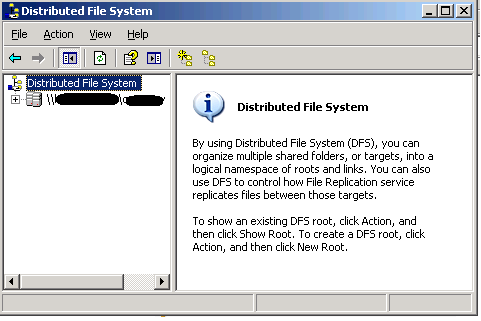

use this one!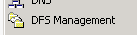
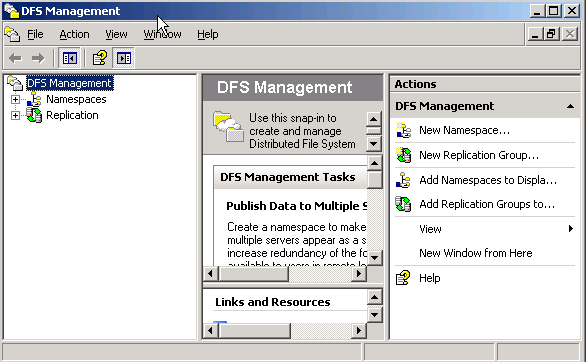

So, basically it was our (my) fault – but it was compounded by some weird corruption in one of the directories that looked like it had been there a while that meant recovery wasn’t going to be straightforward.
The data Backup was about 24hrs older than the last VSS snapshot on the central file server (hub & spoke replication topology) so as we now had a flat, deleted DFS volume with no data (thanks!) we decided to try and revert to the most recent VSS snapshot for the relevant directories.
But no dice, it just threw an error – can’t copy, I can view the files and see the contents and can drag and drop one or two a time, but any more and it would throw an error.
Not good, I can only assume that this was because of some logical corruption within the file system as there was one whole directory tree I couldn’t access (more on how I recovered this later).. there were over 60k files so I wasn’t going to do that by hand – so a command line was in order as at least XCopy can ignore errors etc. and just pull out the good data.
I found these excellent articles here and here and documentation here but some of them were more geared towards taking a snapshot and extracting data in-situ rather than from a persistent snapshot like you get with VSS.
so, none of them worked for me ; and even a lot of hacking with Vshadow and MOUNTVOL I couldn’t get the VSS Snap to mount at all and time was short
I did discover the following though, if you view a snapshot using the Previous Versions tab (remember this only works if you browse for files to restore via UNC path) it opens the snap in Explorer, but you can’t map a drive to it or run a command line copy against it…. or can’t you 🙂
When you open it in explorer this way it does create a sort of hidden temporary share – easiest way I found to expose the name of the share was to try and zip a file in the explorer session that is looking at the snapshot using WinZip, if you follow the wizard at some point it will expose a UNC path like \\SERVERNAME@GMT-DD-MM-YY-{GUID} if you can cut & paste that you can then map a network drive to it
NET USE * \\servername@gmt-dd-mm-yy-{guid}
And you can then run xcopy etc against that mapped drive to copy out all the good data – in reality we used SyncBackSE – which is great for complex file copies and we already had it installed.
All of these Windows servers were installed as VM’s in VMWare Server(s), so it actually made our lives a lot easier as we could quickly clone a known-broken server as-is (do no further harm) and then spin it up disconnected from the network to recover data using this method and also undeleted files using Get Data Back NTFS etc. and then use that data to re-seed the DFS-R volume – but much easier than if it were a physical box and at no real risk of making things worse.
So, in conclusion this was human error, rather than a 100% technical problem and should have been better planned and prevented by maintenance and a better recovery plan- but here it is, with the solution we found to get things back in all its gory details… and mainly as a footnote so I don’t make the DFS mistake again and in my defence this is a shoe-string charity operation rather than a blue-chip org with significant money and time to invest in such efforts.
This solution worked for us, but you need to have your own tried & tested solution – don’t rely on this as far as I can tell it’s unsupported, use at your own risk!
Microsoft now Officially support many of their products under ESX 3.5u2
Posted by on September 5, 2008
As noted here and here, VMWare have had ESX 3.5u2 certified under Microsoft’s SVVP programme, this is excellent news and will knock down one of the long standing barriers to greater adoption of virtualisation as I wrote about here – support.
Most notably for me this means blessed support of Exchange 2007sp1 running under ESX!
Excellent work to get this done so quickly – MS only announced the SVVP programme a short while ago.
Official list of MS products supported under VMWare is here.

 Virtualization, Cloud, Infrastructure and all that stuff in-between