Virtualization, Cloud, Infrastructure and all that stuff in-between
My ramblings on the stuff that holds it all together
Monthly Archives: February 2011
Using Outlook 2010 with More than One Exchange Account Crashes Regularly
Posted by on February 24, 2011
I quite liked the idea of a new feature in Outlook 2010, the ability to use more than one Exchange account at a time. People have been asking for this for years and it looked promising, in the past there was a work-around using virtualization but it was very resource intensive for most people’s machines. Since I ditched Office for Mac 2011 and went back to a Win7 VM on my Mac I thought I would give it a try as I hadn’t tried it out since the early beta builds of Office 2010 – sadly it seems things weren’t much better in the RTM build.
I have a corporate Exchange account, but my own personal email is also hosted on an Exchange server with Fasthosts – who as an aside I can’t really recommend anymore as they are still on Exchange 2003 and don’t seem to have any plans to upgrade the service to 2007, let alone Ex2010 althogh the service has been pretty reliable in the last 4 years I’ve used it.
However, I’ve found using Outlook in this dual-mailbox mode to be incredibly unreliable, it sets up fine – but within a couple of minutes Outlook locks up and becomes unresponsive – this seems to happen mainly when switching between inboxes – I’ve deleted and re-created profiles, .ost’s .pst’s – everything but I just can’t get it to work reliably.
I wonder if anyone out there has managed it – I’m using Windows 7 x64 with Office 2010 x86 (not the x64 version as per MS recommendations) they don’t seem to make much noise about this new feature – maybe this is why.
**Note: your corporate security policy may explicitly say you can’t do this – this is quite reasonable IMHO – I’ve done a lot of Exchange work in the past and whilst the Outlook security model is massively better these days a MAPI-savvy bit of Malware that you bring into Outlook via an external account could still potentially do bad things – remember the ILOVEYOU worm?**
If you want to try it out for yourself you need to totally quit Outlook (it won’t work if you have it open), go into Control panel and find the “mail” control panel applet

Click E-Mail Accounts
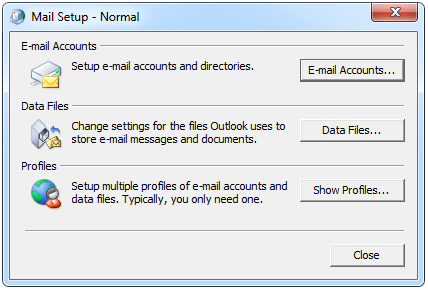
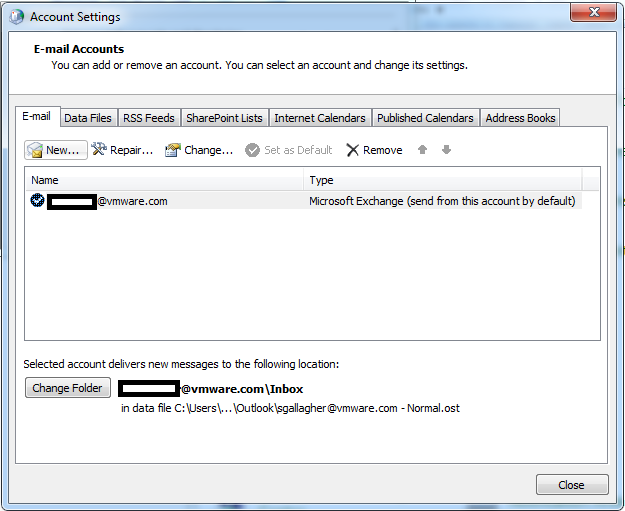
Click new, and follow the setup wizard, you’ll then have two Exchange accounts in your profile.
Fire up Outlook and once it’s finished “preparing your mailbox for first use” you’ll see two Exchange accounts with calendars, inbox etc. in the folder view of the UI.
However, in my experience that’s as good as it gets.. it locks up shortly after, shame as Office and in particular Outlook 2010 are pretty damned good otherwise – feel free to post your experiences..
Confused by HP Flex10 Design for vSphere
Posted by on February 23, 2011
HP have a very clever 10Gb Ethernet technology called Flex10, which is an evolution of the previous Virtual Connect modules, it allows you to carve a single 10Gb NIC into multiple FlexNICs of varying capacities; this is especially useful if you are looking to deploy vSphere on HP blades.
it can be tricky to visualise Flex10 without some pictures and simple explanations of how it’s put into practice, and I know I struggled with this when I first implemented it as well as various firmware/driver update issues - luckily Julian Wood (also in the UK) has an excellent set of posts on just this very subject – check out his blog here
Julian has some specific posts around Flex10 as below;
http://www.wooditwork.com/2011/02/18/scripting-flex-10-esx-design-with-powercli/
http://www.wooditwork.com/2011/02/17/flex-10-esx-design-with-simplicity-and-scalability-part-1/
http://www.wooditwork.com/2011/02/17/flex-10-esx-design-with-simplicity-and-scalability-part-2/
http://www.wooditwork.com/2011/01/17/hp-flex-10-esx-and-broadcom-fun-continues/
my HP, EVA, c-series blade resources can be found here and my original How does Virtual Connect Work? guide (now very out of date) is here
As an aside just before the Christmas break I did some work with a customer implementing the next-generation of Flex10 blade hardware which is called FlexFabric, essentially using the on-board 10Gb NICs in G7 HP blades as a converged network adapter (CNA) to do FCoE and Ethernet in a single device, it’s clever but I’ve seen a significant number of driver and firmware issues so some of the kinks are still being worked out in ESX/HP integration but it looks like they are getting there now.
Bad News My VCDX Design Defense Experience
Posted by on February 22, 2011
With apologies to all fellow Brits for the US spelling (Google, you know  ).
).
Following on from email with my good news… there was a further email with some less positive news..
As some of you know I made a stealth appearance at Partner Exchange in Orlando a week or so ago, I was there to do my VCDX defense – I didn’t announce it in a public sense, not from fear/risk of failure – but more because I didn’t really want people reminding me how tough it was, how low the pass rate is, how much I’ll be grilled until I bleed etc. as we in the Internet-space feel compelled to do  personally I like to just get on with difficult things, rather than navel gaze and consider the worst.
Not many people have posted on their experiences of not passing the VCDX, and that does seem a bit unbalanced considering the pass/fail ratio; that’s understandable as we don’t always like discussing things less positive about ourselves – but here it is, for the benefit of anyone else considering it, whilst my initial attempt at VCDX was unsuccessful I quite enjoyed the process and I think it’s a good learning experience for anyone.
I had been on the VCDX3 track for a while and already had my design well underway before I joined VMware, mine was a real design, done for a customer – anonymised as required and I considered this quite an important fact – whilst fictional designs are acceptable I think it’s better to use a real one as you have a much more realistic set of requirements and some real-world challenges to overcome.
I asked a lot of questions when I joined VMware in September, and am pleased to report that whilst I work with several well-known VCDX panelists, the process for VMware employees is exactly the same as it is for customers, partners and the public, there are no internal shortcuts or special favours for VMware staff –which was important to me as I didn’t want to feel being part of VMware “entitled” me in anyway, many VMware staff have passed the VCDX, but likewise many have failed too. My colleagues excused themselves from participating on my defence and this is normal practice across VMware to avoid any kind of personal involvement or accusation of favours.
With the PEX sessions being announced as the last chance for the VCDX3 track I ploughed on and submitted my documents. I had my pack returned twice for further materials – I was missing a BC/DR and operation procedures section in my package, this was because BC/DR was out of scope in this phase of my design project (although it was discussed at a high-level) and operational processes were established already, my project merely added some extra parts, I explained this fact in my original design submission.
To meet the requirements for the re-submission I had to build some documentation to embellish these parts of my design, adding detail where it was missing for the re-submission, yes I essentially made it up – this was a bit odd for me but is acceptable within the scope of the VCDX; many people are discussing the VCDX design submission in terms of it being a portfolio/show-case of your work which is a good analogy – build upon what was actually done but add to it to show the quality of what you could do (given ability to do so).
My design wasn’t exclusively vSphere, it involved a whole bunch of hardware, Windows, Firewalling and other items but I was lucky that the standard approach I use already broke out requirements, assumptions, risks etc. rather than focusing on the purely technical aspects as some people do – and that whole requirements vs. technical choice vs. justification is a key part of “architecture” – delivering a solution to business requirements rather than some clever technical-wizzery.
I found it quite a slog doing this final part of the process, I would estimate that I spent the following on my design;
- 30-40 hours on initial design – which was for a customer project and something I had to do during the course of my normal day-job.
- 5 hours on VCDX application form; cross-referencing, calling out requirements etc.
- 8-10 hours on tweaking/clarifying document for VCDX submission (this was post project completion so I could address some issues that were encountered during the implementation)
- 10 hours to provide further details on operational processes, installation procedures, clarification of a few technical points & re-doing cross-referencing with VCDX application form (resubmission 1, 1 week to resubmit)
- 15 hours to provide detailed operational processes, essentially a run-book for the platform, re-doing cross-referencing with VCDX application form (resubmission 2, 1 week to resubmit)
This point got my documents accepted and I was granted a date for a defence at PEX and I started my defence preparations.
I felt pretty well prepared and I’ve been a consultant/architect for a number of years so presenting, discussing and reviewing designs in front of customers is something I’m comfortable doing, I spent my time reviewing my design and building my presentation.
I hadn’t specifically addressed BC/DR in my design other than noting the risk and a manual rebuild process for phase 1; I spent some time building some slides that addressed the high-level BC/DR plan that was anticipated for later phases of my (real-world) project.
I estimate that my defence preparations were about the following
- 5-8 hours building Executive Summary Presentation, calling out key decision points and copies of the relevant diagrams in-case I needed to refer back to them during the defence session, making copious notes, references etc.
- 10-15 hours reviewing design document, checking against published materials – white papers and books etc
- I didn’t practice or dry-run my presentation, that doesn’t work for me but I made sure I knew the key points and what was where in my slide-deck.
I got to the session on-time and with plenty of time to spare, made sure I had lunch and was ready to go; there was a pretty lengthy delay before I got started due to some logistical issue and whilst I didn’t feel nervous this didn’t really help – I wanted to get going, and done.
I didn’t find my panel intimidating, they were all courteous and professional with a moderator from the certification team to handle timings, logistics etc. I gave my exec summary presentation and answered questions from the panel as they came – unfortunately for me this meant I didn’t get to parts of my presentation calling out key decision points and BC/DR etc. but I don’t know if this caused an issue in terms of overall scoring.
They dived into sections of my design covering all the typical functional elements of a vSphere design – asking me to whiteboard, explain and justify some decisions that were made – I dropped several klangers here, whilst I can’t go into details, I knew my design but I had some errors around storage and misunderstood some parts of my multi-pathing configuration, I had reviewed this a number of times before my defence and submission and had changed and muddled it in my head, which didn’t do me any favours when I was asked to detail it and explain.
The panelists weren’t personal or condescending about this, if anything they were more poker faced and gave me an opportunity to explain it as I saw it.
I completed the design defence part feeling that it hadn’t gone too badly, but expecting that my unclear thinking and explanation would hurt my overall performance.
After a short comfort break there was a design workshop scenario type session, given a number of requirements and some background information – I think I was a bit muddled on my dealing with this section although it’s something I’m used to doing in a professional sense – white-boarding and thinking on my feet is ok but I found it hard to come up with and clearly express a solution to the presented problem.
The final session was a troubleshooting exercise, again I was presented with a situation which was articulated via some prepared text, a presentation and some pre-prepared screen-grabs, whilst I didn’t get to the root cause I think I followed a reasonable troubleshooting path to get there, and eliminated some red-herrings.
For both the design and troubleshooting scenarios I understand it’s more about the journey than arriving at a conclusion – articulating your thought processes, rationale and goals – you have access to a whiteboard and are encouraged to use it – I found it particularly useful to make notes/”park” bits of information when given and to say what I was thinking rather than just going silent (even when my brain was actually empty ).
So, with that I had finished – I was relieved but didn’t have that “I’ve passed” gut-feeling so I parked it and got on with the other stuff I was doing, my results came through 7 working days after my defence but it does say to allow up to 10, unfortunately I hadn’t made it this time.
You are given some basic feedback on your performance via email, areas where they think you needed to do better on, I do however think this could be improved upon;
I understand the requirement not to give too much away about the marking schema but I would encourage the certification team to break it down into a score out of 10 for the key areas, it’s almost obvious (and logical) from the VCDX application form that marking is performed on areas like; Compute, Storage, Networking, Operational Procedures, security, BC/DR etc. I personally think it would be more constructive to give a rolled-up mark out of 10 for each of those areas and disclose an overall pass/fail ratio so you can gauge if it’s something you missed by a little or were way off and need to totally reconsider your approach – just like you get with the main VCP & VCAP certifications.
So, no VCDX 3 for me – luckily I’ve already done the required VCAP exams to allow me to submit a new vSphere4 design for a future defence on the VCDX4 track; I’m currently undecided on modifying and re-submitting or using a different project for my 2nd attempt.
There are some minor changes for the VCDX4 track, and I think Duncan has already mentioned that defence sessions won’t be co-located exclusively with events like VMworld anymore and the application form is a bit more streamlined.
So, in summary I quite enjoyed the process, shame I didn’t pass but I think I know where I went wrong and I know how to address it when I retry, my advice; don’t be too scared to give it a go, but be prepared for a lot of work!
Good News–Passed VCAP4-DCA Exam
Posted by on February 22, 2011
A couple of weeks ago I sat the VCAP4-DCA Exam, I got my results about 14 business days after sitting the exam (it says 10, but I guess the certification team were busy) and I’m pleased to say I passed with a reasonable score.
I liked this exam, like the VI3 version it’s a live-lab exam you’re given a bunch of questions/scenarios to configure and have access to a full vSphere 4 environment via an RDP session. It’s all real-world type stuff, but don’t expect to get a result at the end, your lab work is analysed and you’ll be notified by email if you pass or not.
I guess I can’t say too much about the content of the exam due to the NDA but I would work on the basis that you have access to the same sort of materials and documentation as if it were the real-world and you’ll be expected to cover most parts specified in the exam blueprint and resources you should know what to look for, and understand what you are doing even if you can’t memorise exact syntax of commands.
Like my DCD exam I didn’t do any real specific preparation other than reviewing the online resources – my personal opinion with this level of exams is that you either know it (or know how to look it up) from experience or you don’t – just like the real world where you don’t memorise the contents of the configuration maxims document.
Keep an eye on the time – I pretty much ran out of time and had to carefully manage which exams I would tackle/skip; it’s not a quick multiple choice type exam.
So I now have a full collection of VMware Certs..
- VCP 3 & VCP 4
- VI3 Enterprise Admin and Design
- VCAP4-DCD and VCAP4-DCA
So that only leaves one more…
Are Social Networks are Manipulating the Future?
Posted by on February 18, 2011
I’ve noticed a growing trend recently, I use LinkedIn to keep track of people I meet via work and it’s quite handy (and my organic memory is pretty useless at this) I also use Twitter to keep an eye out on what’s going on in my professional world as a lot of people use it and I use Facebook in a similar manner to stay in touch with friends and family in a slightly more closed way.
Several times in the last couple of months I’ve met people at work or out at customers, events and social occasions and have recognised their names (and maybe even their faces if I squinted enough) although I had never met them in-person or worked with their organisation before in my life.
I think I’ve just realised why – Most social networks have a “people you may know” feature and I think a lot of them have probably popped up on it at some point recently or been re-tweeted on Twitter, I’ve tracked 2 or 3 of these occurrences in the last couple of weeks.
LinkedIn obviously has some uber algorithm that looks at your networks and consults some kind of magic 8-ball to predict your future and who you are most likely to bump into – or, more sinisterly – are social networks really Skynet in the cloud and are they manipulating society to it’s own evil ends via a “social” network? engineering business and social relationships with people it deems suitable or beneficial to helping you achieve its own goals?
So, there you have it – Social Networks know the future, or they are all a giant cloud robot that will kill us all in the end, or maybe even there is a single Dr.Evil behind it all

..nurse, where are my tablets… /EOF
[normal scheduled programming will resume next week]
Download the Full VMware Documentation Set with one Script
Posted by on February 15, 2011
I was pointed at a handy utility by a colleague at VMware, Xtravirt have a small DOS batch script that will download all of the current VMware documentation in .PDF format from VMware.com
This is very handy if you are studying for your VCAP exams or doing some consulting with customers as you can take a copy all of the documents with you – I’m also syncing them onto my iPad via DropBox – and maybe my Kindle in future (more on this in a later post).
You can download it here (basic registration required)
Kindle 3 Rocks
Posted by on February 15, 2011
I recently received an Amazon Kindle 3 as a belated leaving present from my old team, which was very kind.
I’ve been using it for a couple of weeks now and I’ve been very impressed, I have been a long-term die-hard dead-tree book fan and have a lot of tech-books at home so I didn’t think I would easily convert to the electronic format.

I also have had an iPad for a while, and it’s transformed (dominated!?) the way my family use the Internet and computers at home so as a net-result I don’t take the iPad away with me on trips or in my bag as they would probably suffer withdrawal symptoms  .
.
The iPad is an excellent multi-media device and also has the Kindle application so can do as much as the dedicated Kindle device itself, however it’s also 4 times as expensive as a Kindle and I am that bit more conscious about breaking/losing it whilst chucking it around the country and the Kindle screen isn’t as reflective as the iPad.
I’m sure it’s not just novelty factor but I’ve actually read some fiction, non-related work books on it – which is something I’ve not managed with paper books for some time.
What I like about the Kindle;
- Very lightweight and small
- Cheap device
- Kindle software app for Mac, iPad, PC to access from multiple devices (and an eBook license to match)
- built-in 3G as a back-up (and no subscription required
- Calibre app for side-loading PDFs and converting eBook formats
- Lots of free classic eBooks on the Web
- very readable screen in all type of light
What I don’t like about the Kindle;
- More books need to be released to the Kindle, not everything has a Kindle option – I assume there is some rights, publisher issue here so isn’t entirely in Amazon’s control but Kindle with the built-in book store is good for impulse-buy of books, which I am sure publishers would like
- I would love a dead-tree + eBook Purchase version option, I’d happily pay an extra 20% over the cost of the paperback to have this, then I have a copy for my bookshelf and a copy to take on the road that I can start reading as soon as I purchase.
- It’s a bit slow, but I can take the trade-off against super-long battery life.
- You need a case for it, which adds to the cost, I’ve not bothered with one with a built-in light
- it’s almost criminal that Amazon want to charge a subscription to read blogs on the device, Calibre sort of seems to resolve that.
- It really needs an RSS reader app, leveraging the built-in 3G/WiFi (but maybe Amazon won’t allow that)
So, go and buy one… that’s my recommendation.
vSphere Host cannot enter Standby mode using DPM and WoL
Posted by on February 10, 2011
I encountered this error in my lab recently, I previously wrote about how I was able to use DPM in my home lab, I’ve recently re-built it into a different configuration but found that I was no longer able to use just Wake on LAN (WoL) to put idle cluster hosts into standby.
I got the following error, vCenter has determined that it cannot resume host from standby.
Confirm that IPMI/iLO is correctly configured or, configure vCenter to use Wake-On-LAN.

1st thing to note is that there is nowhere in vCenter to actually configure Wake-on-LAN, however you can check to see which NICs in your system support Wake On LAN (not all do, and not all have WoL-enabled vSphere drivers)
My ML115 G5 host has the following NICs
- Broadcom NC380T dual port PCI Express card – which does not work with Wake on LAN
- Broadcom NC105i PCIe on-board NIC which does support WoL.
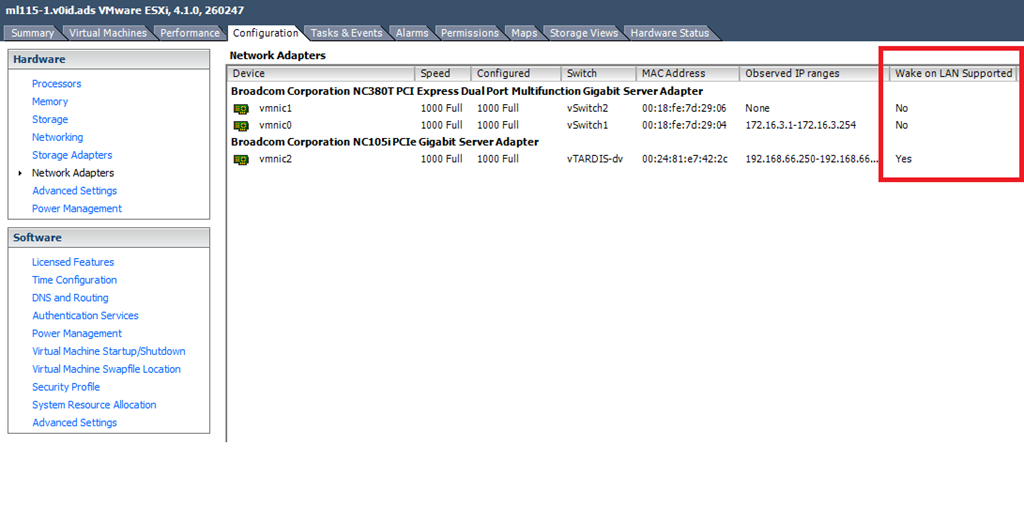
In my current configuration the onboard NIC is connected to a dvSwitch and is used for the management (vmk) interface

This seems to be the cause of the problem because if I move the vmk interface (management NIC) out of the dvSwitch and configure it to use a normal dvSwitch vSwitch DPM works correctly.
In a production environment a real iLO/IPMI NIC is the way to go as there are many situations that could make WoL unreliable. However, if you want to use DPM and don’t have a proper iLo you need to rely on Wake-On-LAN so you need to consider the following..
- you need a supported NIC
- you need a management interface on a standard vSwitch, connected to a supported NIC
Also, worth noting that if you are attempting to build a vTARDIS with nested ESXi hypervisors you cannot use DPM within any of your nested ESXi nodes, the virtual NICs (e1000) do support WoL with some other guest-types like Windows, so your VM guests can respond to WoL packets (via the following UI screens)
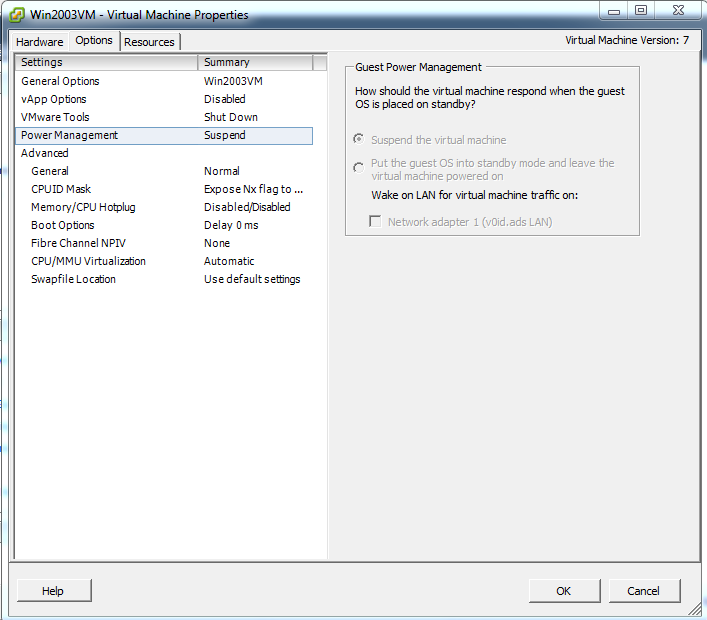
However the e1000 driver that ships with vSphere ESX/ESXi does not seem to implement the WoL functionality so you wont be able to use DPM to put your vESXi guests to sleep – kind of an edge-case bit of functionality and ESX isn’t an officially supported guest OS within vSphere so it’s not that surprising.
Cannot Access Shared Folder vmware-host Shared Folders My Desktop
Posted by on February 8, 2011
I encountered this error when a Windows 7 VM running under Fusion logs on, VM tools is mapping a drive to your OS X home directory and results in the following Windows error message
Cannot Access Shared Folder \\vmware-host\Shared Folders\My Desktop
I hit this error after I used Carbon Copy Cloner to clone my OS X installation from a SATA disk a new SSD drive and then decided to move my home directory back onto the SATA disk (I’m using one of these to mount 2 disks) to save space on the SSD (info on how to do that here), so the underlying file-system path had changed.
To fix this open the shared folders settings for your VM in Fusion (Virtual Machine/Settings/Sharing.

- Un-check each item in the “Mirrored Folders” section.
- Log off the Windows 7 VM (you will get a prompt for this inside the VM)
- Log back on to the VM
- go back into Virtual Machine/Settings/Sharing and re-check each item
- Log off the Windows 7 VM (you will get a prompt for this inside the VM)
- Log back on to the VM and it should now be resolved and the mirrored folders show up as actual folders in Windows Explorer

Hopefully that helps someone else out there who is scratching their head
VoxSciences no longer offering mobile phone billing
Posted by on February 4, 2011
I have been a long-term fan of speech to text voicemail systems – originally with the now defunct SpinVox and latterly with VoxSci.
When I logged on to my account today to change some settings I saw a notice that they would no longer be offering phone based billing (whereby the charge you for the service by a reverse SMS billing engine) and will now be wanting credit card details to cover the cost of the conversions.
I hadn’t seen any other notice of this – so this a quick heads up for other subscribers

 Virtualization, Cloud, Infrastructure and all that stuff in-between