Virtualization, Cloud, Infrastructure and all that stuff in-between
My ramblings on the stuff that holds it all together
Category Archives: ESX
HP Rapid Deployment Pack – PXE Settings for Deploying Windows OS
Posted by on April 17, 2008
The followign screens show a working configuration from the RDP 3.80 PXE Configuration Manager

Have had lots of problems with this deploying Windows OS’es and VMWare ESX 3.5 onto an HP c7000 Blade chassis, still not resolved all the problems, but this definitely works for deploying Windows!
The documentation reads like you should always use the Linux PE configuration and it handles switching between WinPE/LinuxPE depending on which OS job you drop on a target. in my experience this doesn’t work and you need to manually change the PXE configuration to default to LinuxPE or WinPE depending on the OS you want to target.
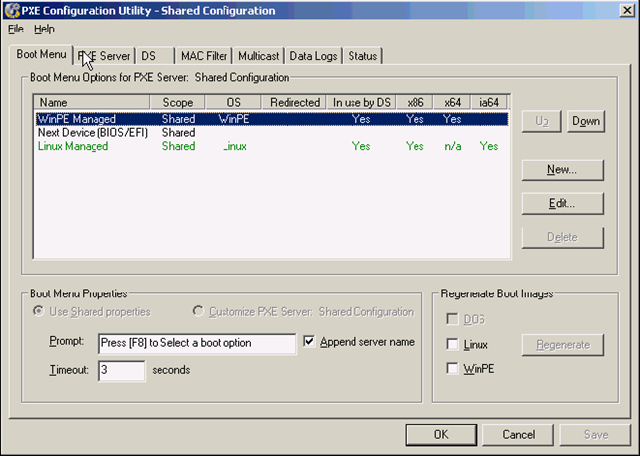
And
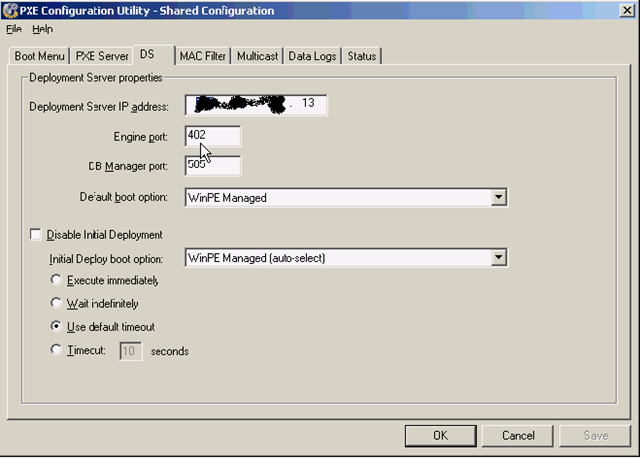
Still a work in progress as I have a c7000 to which I want to deploy a mix of Windows and ESX/Redhat OS’es….
I did get a previous installation to install ESX 3.5 by hacking the default ESX 3.02 job, but its since been re-installed and I can’t do it now
RDP 6.90 seems to list Windows 2008 and ESX 3.5 in the quickspecs, but I’ll be damned if I can find where to download it, going to have to call HP methinks!
As I’ve posted before installing via iLo is just a non-starter if you really do want a flexible and fast deployment configuration – so it has to be RDP.
More later…
VMWare Vulnerability during VMotion.. is it really?
Posted by on February 27, 2008
As the Hoff posts here and on VMTN here. the proposed vulnerability that you can manipulate and possibly compromise a VM during a VMotion process isn’t exactly major, it’s clever.. but – like anything if you don’t follow the best-practice recommendations then you expose yourself to these risks… same reason they recommend you lock your server room or don’t have blank passwords – this attack is akin to gaining physical access to the hardware or being able to sniff a physical switch port – in this instance, it’s “virtual” hardware.
VMWare have always recommended keeping the VMotion traffic on a separate VLAN or network.
the other vulnerability where VMTools can be compromised on is different, but again preventable.. and not enabled on server instances of VMWare.
Running Exchange 2007 on VMWare ESX Server
Posted by on February 26, 2008
Interesting article here on some stress testing VMWare have done running Exchange 2007 under virtualization on VI3.5.
It’s working.. .and working well, now – official support?
Support for Virtualized OS/Applications – an Open Debate..
Posted by on February 21, 2008
Martin’s post here prompted me to blog something I’ve been meaning to do for a while.
Virtualization projects and services are cool; we all understand the advantages in power/cooling and the flexibility it can bring to our infrastructures.
But what about support, if you are a service provider (internal or outsourcing) you normally need to be able to offer an end-end SLA on your services. typically this would be backed off against a vendor like Microsoft or Oracle via one of their premium support arrangements.
From what I see in the industry, with most software vendors especially Microsoft there is almost no way a service provider can underwrite an SLA as application/OS vendors give themselves significant scope to say “unsupported configuration” if you are running it under a hypervisor or other VM technology… Microsoft use the term commercially reasonable in their official policy – who decides what this is?
I would totally accept that a vendor would not guarantee performance under a hypervisor – that’s understandable and we have tools to analyse, monitor and improve (Virtual Centre, MOM, DRS, increase resources etc.). but too many vendors seem to use it as a universal “get out of jail free card”.

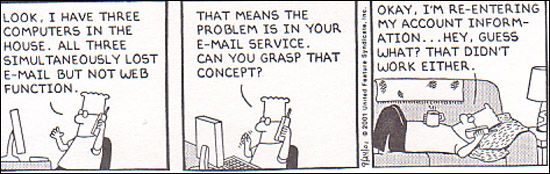
Issues of applications with dependency on physical hardware aside (fax cards, realtime CPU, DSP, PCI cards etc.) In my entire career working with VM technology I’ve only ever seen one issue that could be directly attributed to being caused by virtualization – and to be fair that was really a VMTools issue; rather than VMWare itself.
Microsoft have an official list of their applications that are not supported here – why is this? speech server I could maybe understand as it would probably be timer/DSP sensitive – but the rest? Sharepoint? I know for a fact ISA does work under VMWare as I use it all the time.
Microsoft Virtual Server support policy http://support.microsoft.com/kb/897613
Support policy for Microsoft software running in non-Microsoft hardware virtualization software http://support.microsoft.com/kb/897615/
Exchange is specifically excluded (depending on how you read the articles)
· On the Exchange Server 2007 System requirements page it only mentioned Unified messaging as being unsupportable in a virtual environment http://technet.microsoft.com/en-us/library/aa996719.aspx
· Yet on TechNet it is clear stated that “Neither Exchange 2007 nor Exchange 2007 SP1 is supported in production in a virtual environment” http://technet.microsoft.com/en-us/library/bb232170(EXCHG.80).aspx
Credit due to a colleague for pulling together the relevant Microsoft linkage
But I know it….
a) works fully – I do it all the time.
b) Lots of people are doing this in production with lots of users (many people at VMWorld US last year)
c) VMWare have a fully-supportable x64 hypervisor – It’s just MS that don’t
What is the industry going to do about this?, I asked this question of peers a lot at VMWorld and at BriForum; and to be honest everyone has the same concern but have a few different approaches;
Dont’ tell/ask – 99% of the time a tech support rep won’t know its running under VMWare/a.n.other hypervisor so why complicate matters by telling them – could of course back-fire on you!
Threaten – “If you won’t support under VMWare we’ll use one of your competitors applications”; however this only really works if you are the US govt. or Globocorp Inc. or operate in a very niche application market.
Mitigate – reflect this uncertainty in an SLA, best-endeavours etc. this would kill most virtualization efforts in their tracks for an enterprise customer.
The same support issue has been around for a long time; Citrix/Terminal Services, application packaging, automated installations, etc. are treated as “get out of jail free cards” by support organisations…
But whilst there are some technical constraints (usually only affecting badly written apps) with terminal services and packaging, virtualization changes the game and should make it simpler for a vendor to support as there is no complex runtime integration with a host OS + bolt-ons/hacks it’s just an emulated CPU/disk/RAM you can do whatever you like within it.
So – the open debate; what do you do? and how do you manage it?
Please comment…
P2V Backup & Disaster Recovery
Posted by on February 20, 2008
There is a new site here (disclaimer: it does seem to be promoting a commercial service, but has some useful information that has been put into the public domain); describing some methods to roll your own P2V backup approach; I’ve not read in detail yet; but looks like Frane Borozan has solved some of the challenges I’ve encountered in the past automating the Free VMWare Convertor tool.
When I get some time I will revisit my build a better test lab series (and update it!) I hope to be able to integrate some of Frane’s ideas.
Thanks to Techhead for passing on the link; we worked together on the platform underlying the Build a better test lab series and he did a lot of work on the P2V and post-P2V automation tasks – he’s got a lot of handy scripts for doing this on an HP platform
Virtualized DR is going to be big this year; I have a long line of customers with this high on their list of priorities… Both for cross site 100% VMWare implementations and for the ability to backup/restore physical platforms to VMWare grid in a DR situation.
It just makes so much sense; no delay whilst racking & stacking recovery kit or problems restoring to different hardware etc. your admin’s can even do it from home – which can have some significant advantages in the event of a natural disaster like Katrina or floods like we had over the last couple of years in the UK
PlateSpin Forge is something we are seriously looking at as well as Symantec Backup Exec System Recovery Server Edition (who win a prize for extending the longest, most annoying product name! despite acquiring it from Veritas).
Will be an interesting year; I’m sure Sungard and all those recovery centre facilities will be moving to a grid/resource rental model rather than pure rack/floor space and retained hardware on-contract.
Virtual Centre Plug-in Repository
Posted by on February 18, 2008
Hot-Swap Datacentres
Posted by on February 11, 2008
There’s an interesting post over on Forrester research blog by James Staten. he’s talking some more about data centres in a container; making the data centre the FRU rather than a server or server components (Disk, PSU etc.).
This isn’t a new idea but it I’m sure the economics of scale currently mean this is currently suitable for the computing super-powers (Google, Microsoft – MS are buying them now!) – variances in local power/comms cost could soon force companies to adopt this approach rather than be tied to a local/national utility company and their power/comms pricing.
But just think if you are a large out-sourcing type company you typically reserve, build and populate data centres based on customer load, now this load can be variable; customers come and go (as much as you would like to keep them long-term this is becoming a commodity market and customer’s demand you are able to react quickly to changes in THEIR business model – which is typically why they outsource – they make it YOUR problem to service their needs).
It would make sense if you could dynamically grow and shrink your compute/hosting facility based on customer demand in this space – thats not so easy to do with a physical location as you are tied to it in terms of power availability/cost and lease period.
New suite build out at a typical co-lo company can take 1-2 months to establish networking, racks, power distribution, cabling, operational procedures etc. (and that’s not including physical construction if it’s a new building) – adopting the blackbox approach could significantly reduce the start-up time and increase your operational flexibility
Rather than invest in in-suite structured cabling, rack and reusable (or dedicated) server/blade infrastructures why not just have terminated power, comms and cooling connections and plug them in as required within a secured warehouse like space.


Photos from Sun Project Blackbox
You could even lease datacentre containers from a service provider/supplier to ensure there is no cap-ex investment required to host customers.
If your shiny new data centre is runs out of power then you could relocate it a lot easier (and cheaply) as it’s already transportable rather than tied to the physical building infrastructure; you are able to follow the cheapest power and comms – nationally or even globally.
As I’ve said before the more you virtualize the contents of your datacentre the less you care about what physical kit it runs on… you essentially reserve power from a flexible compute/storage/network “grid” – and that could be anything/anywhere.
Performance Update on Cheap ESX PC
Posted by on February 10, 2008
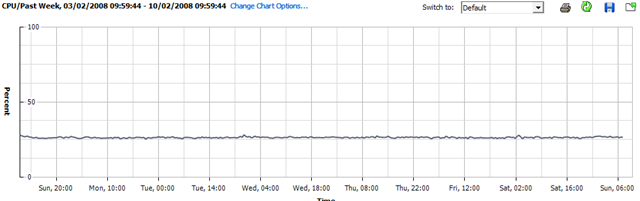
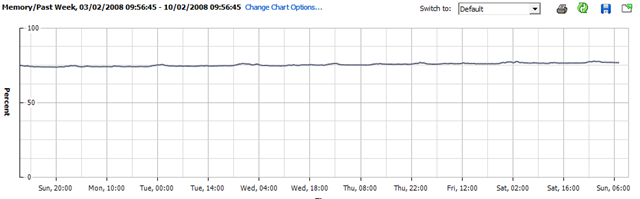
I’ve not done anything with my home ESX server this week as I’ve been busy with work; so this will be interesting – it’s been powered up all the time with all the VM’s spinning; but not doing very much.
CPU Utilisation
Memory Utilisation
Disk Utilisation
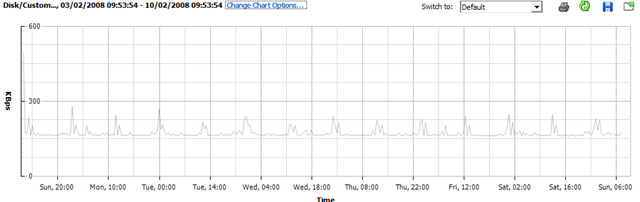
Whist running this set of VMs.. (the CPU stats for VMEX01 and VMEX02 are a bit skewed as I added this bit after the original post and they are both running seti@home (hence increased CPU)
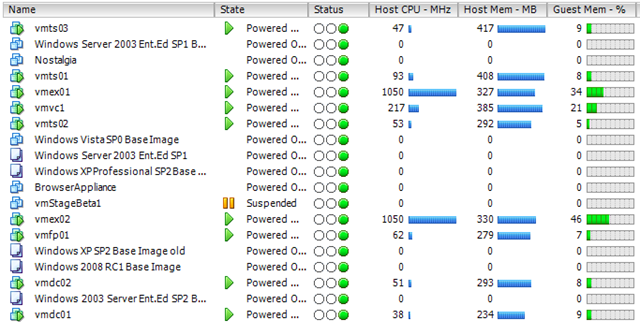
So, nothing interesting to see here – but might be worth bearing in mind for some kind of sizing estimate; this is a single core CPU (HT enabled) PC with 4Gb RAM and a single 500Gb SATA disk
Hopefully I will get some time this week to load up SETI@Home or Folding@Home and see what that does 🙂 it should be a good test to see how well the hypervisor manages CPU timesharing between hosts.
VMWare ESX on IBM Blades
Posted by on February 5, 2008
I’ve worked with HP c-class stuff recently, but this is a good article on the IBM equivalent and the post looks a lot simpler to read than all the official IBM docs!
In my book if you are virtualizing your infrastructure there is less of a religious argument on the underlying hardware – it’s a lot more flexible so do you care as much?
Thanks to Martins post on Bladewatch for the handy link
VLAN Tagging with ESX and HP Blade Virtual Connect Modules
Posted by on February 3, 2008

 Virtualization, Cloud, Infrastructure and all that stuff in-between