Virtualization, Cloud, Infrastructure and all that stuff in-between
My ramblings on the stuff that holds it all together
Category Archives: Microsoft
Hyper V Release Candidate is Available Today
Posted by on March 19, 2008
I’m at the Windows 2008 Launch event in the Birmingham, UK today. It has just been exclusively announced that the Hyper V Release Candidate is available for download from 5pm (UK time) Today, 19th March.
Go download and try it out… full RTM is still promised 180 days from the Feb RTM release of Windows 2008 which I blogged about here
Running Exchange 2007 on VMWare ESX Server
Posted by on February 26, 2008
Interesting article here on some stress testing VMWare have done running Exchange 2007 under virtualization on VI3.5.
It’s working.. .and working well, now – official support?
Support for Virtualized OS/Applications – an Open Debate..
Posted by on February 21, 2008
Martin’s post here prompted me to blog something I’ve been meaning to do for a while.
Virtualization projects and services are cool; we all understand the advantages in power/cooling and the flexibility it can bring to our infrastructures.
But what about support, if you are a service provider (internal or outsourcing) you normally need to be able to offer an end-end SLA on your services. typically this would be backed off against a vendor like Microsoft or Oracle via one of their premium support arrangements.
From what I see in the industry, with most software vendors especially Microsoft there is almost no way a service provider can underwrite an SLA as application/OS vendors give themselves significant scope to say “unsupported configuration” if you are running it under a hypervisor or other VM technology… Microsoft use the term commercially reasonable in their official policy – who decides what this is?
I would totally accept that a vendor would not guarantee performance under a hypervisor – that’s understandable and we have tools to analyse, monitor and improve (Virtual Centre, MOM, DRS, increase resources etc.). but too many vendors seem to use it as a universal “get out of jail free card”.

Issues of applications with dependency on physical hardware aside (fax cards, realtime CPU, DSP, PCI cards etc.) In my entire career working with VM technology I’ve only ever seen one issue that could be directly attributed to being caused by virtualization – and to be fair that was really a VMTools issue; rather than VMWare itself.
Microsoft have an official list of their applications that are not supported here – why is this? speech server I could maybe understand as it would probably be timer/DSP sensitive – but the rest? Sharepoint? I know for a fact ISA does work under VMWare as I use it all the time.
Microsoft Virtual Server support policy http://support.microsoft.com/kb/897613
Support policy for Microsoft software running in non-Microsoft hardware virtualization software http://support.microsoft.com/kb/897615/
Exchange is specifically excluded (depending on how you read the articles)
· On the Exchange Server 2007 System requirements page it only mentioned Unified messaging as being unsupportable in a virtual environment http://technet.microsoft.com/en-us/library/aa996719.aspx
· Yet on TechNet it is clear stated that “Neither Exchange 2007 nor Exchange 2007 SP1 is supported in production in a virtual environment” http://technet.microsoft.com/en-us/library/bb232170(EXCHG.80).aspx
Credit due to a colleague for pulling together the relevant Microsoft linkage
But I know it….
a) works fully – I do it all the time.
b) Lots of people are doing this in production with lots of users (many people at VMWorld US last year)
c) VMWare have a fully-supportable x64 hypervisor – It’s just MS that don’t
What is the industry going to do about this?, I asked this question of peers a lot at VMWorld and at BriForum; and to be honest everyone has the same concern but have a few different approaches;
Dont’ tell/ask – 99% of the time a tech support rep won’t know its running under VMWare/a.n.other hypervisor so why complicate matters by telling them – could of course back-fire on you!
Threaten – “If you won’t support under VMWare we’ll use one of your competitors applications”; however this only really works if you are the US govt. or Globocorp Inc. or operate in a very niche application market.
Mitigate – reflect this uncertainty in an SLA, best-endeavours etc. this would kill most virtualization efforts in their tracks for an enterprise customer.
The same support issue has been around for a long time; Citrix/Terminal Services, application packaging, automated installations, etc. are treated as “get out of jail free cards” by support organisations…
But whilst there are some technical constraints (usually only affecting badly written apps) with terminal services and packaging, virtualization changes the game and should make it simpler for a vendor to support as there is no complex runtime integration with a host OS + bolt-ons/hacks it’s just an emulated CPU/disk/RAM you can do whatever you like within it.
So – the open debate; what do you do? and how do you manage it?
Please comment…
More Useful Things You Can Do With ImageX
Posted by on February 12, 2008
James O’Neil has a good post here – an example of how he used ImageX to quickly build and maintain his own vista system image with his typical apps.
Also handy for reference as he shows how to split very large images across multiple CDs using the /split switch.
Make Your own Offline Windows Update CD/DVD
Posted by on February 12, 2008
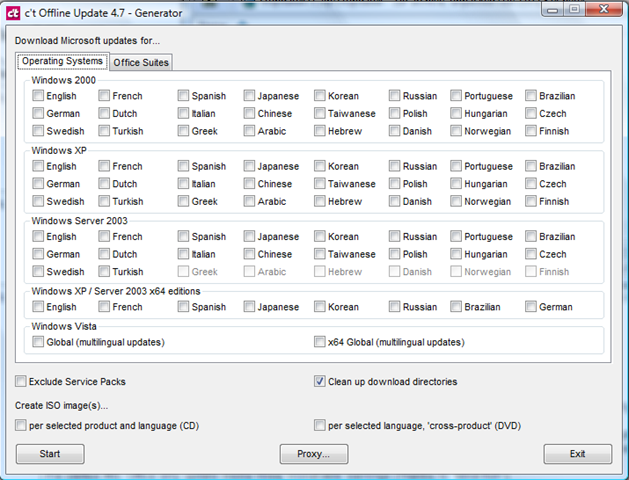
What a handy tool; if you download the app you can select which Microsoft OS/Applications you need patches for and it will download them all via the Windows online catalog to a source directory and then compile a script to auto install them all – it will even generate a .ISO file and handle dependencies and reboots – v.handy (and more efficient) if you need to quickly present it to a bunch of virtual machines with no Internet access or are on a site with slow internet access.
Excellent; now as far as I know Microsoft have no mechanism for doing this other than downloading all the patches manually… even with the Vista RTM images I built last week it had nearly 100Mb of OS patches alone!
Screenshot of the available options in the app – download it here here (updated 14th Sept’09)
OS Updates – multi-language too
Office Suite Updates too
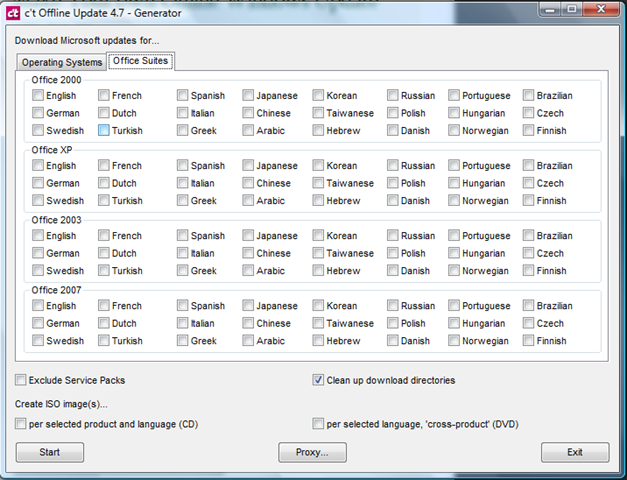
You can even get all the patches for everything and it will compile it into a DVD .ISO image – I’ll definitely be using this – hopefully you can use the info it downloads to slipstream update a vista .WIM image – will have to try that in a couple of weeks.
(original link from a post on slashdot)
Windows Server 2008 RTM’s Also…
Posted by on February 5, 2008
Must be the day for it! I’m looking forward to Server 2008 and have a couple of projects lined up to try and take advantage of the new terminal services functionality.
Hyper-V will follow within 180 days… MS have a long way to go to win ground from VMWare but will have the usual single-vendor support argument so it’s going to be an interesting 18 months.
Windows Vista SP1 RTM
Posted by on February 4, 2008
Windows team Blog post here says Vista SP1 has been released to manufacturing so not long to go now until it’s generally available.
I’ve been using Vista exclusively since it RTM’d and from Beta 2 before that. I got a new laptop with a core 2 Duo CPU and went up to 4Gb RAM from 2 and it made a world of difference – much faster and in the last year my Dell D620 has been rock solid.
The file-copy hotfix worked for me; and a recent video driver update (automatically offered via Windows Update..nice) fixed the annoying screen mix-up when I docked my laptop.
Mark Russinovitch has an in depth post on the SP1 improvements to file copying here.
Does make you wonder if MS wanted/did bring forward the SP1 date because of all the “wait for SP1” brigade… M-m-m-m, marketing!
Not looked yet but I wonder how large SP1 will be, on the Vista desktops build I did recently I had to download c.300Mb of Windows (c.98Mb) & Office 2007 Updates (c.200Mb. good think I have a fast connection – you’ve got no chance on a PSTN dial up anymore!
Problems Restoring a non-SysPrep Vista Image Using DiskPart & ImageX
Posted by on February 3, 2008
Goal: keep a single .WIM file, Multiple instances of the same build in the .WIM file
Build001 non-sysprep’d version for maintenence with all latest patches and corp apps
Build002 sysprep but no domain for home workers/3rd party
Build003 sysprep + domain joining and scripted OOBE for corp machines
Build004…etc. tweaks to the sysprep – for different domains/customers or OOBE settings like language etc.
Build a bootable WinPE DVD with ImageX and the large .WIM file stored on it so no network connectivity required to install (at this stage) just a single DVD.
Reboot from Win PE to start Vista MiniSetup/OOBE
I hit a problem as when I restored build001 to my reference machine it wouldn’t boot and immediatley gave a 0xc000000e error
This was because my automated build DVD runs diskpart with a scripted set of commands (WIPEDISK.TXT) which includes the clean command
WIPEDISK.TXT
select disk 0
clean
create partition primary
select partition 1
active
format fs=ntfs quick
assign letter=c
exit
This caused problems in this instance because The clean command erases the partition table ID.
If an image has not been-sysprep’d it still looks for the original partition table ID (which diskpart removed) hence the stop error at boot.
Sysprep’d images don’t have this problem as the “/generalize” switch resets this dependency on the partition table entries and mini-setup runs at 1st boot to fix it up.
So, if you need to do maintenance on a non-sysprep’d reference image then
- You need to restore it via imageX and your usual process (in my case a bootable PE DVD)
- It won’t be able to boot – it will give an 0xc000000e error
- Boot the reference machine from your original Vista install DVD and choose to repair
- This puts back the partition table ID and it will boot again
- Once it’s booted you can carry out any online maintenance, add extra software etc. to customise it
- Then sysprep /generalize /oobe /shutdown your reference machine
- Map a drive to your master .WIM file, or a USB disk etc.
- Append the changes to the master .wim file (remembering to use the /APPEND switch; if you just use /CAPTURE you will OVERWRITE your .wim file and be very sad.. Did it twice before I learnt to backup the .WIM file before hand!
- Then re-master your DVD – with the appropriate files – I just inject the .WIM file to the Windows PE DVD I made using PowerISO.
Rinse and repeat.
Thanks to this post http://forums.microsoft.com/TechNet/ShowPost.aspx?PostID=1099145&SiteID=17 and this post http://www.svrops.com/svrops/articles/winvistape2.htmI figured it out…eventually!
Performance on a cheap ESX PC
Posted by on February 1, 2008
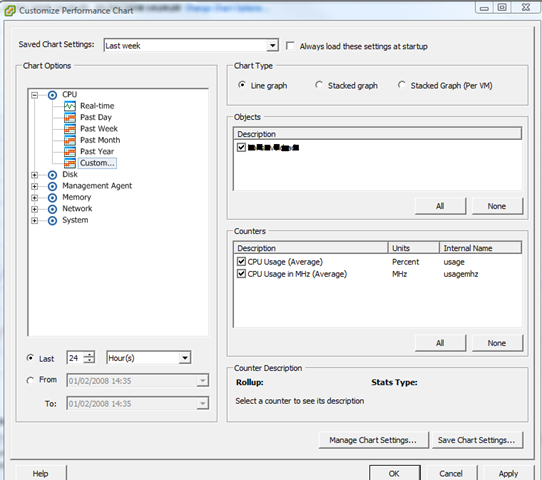
I thought I’d post some performance graphs from my cheap HP D530 ESX server using the Virtual Centre console (which incidentally, is good for getting this info quickly and simply).
Screenshot of the UI for querying performance stats.
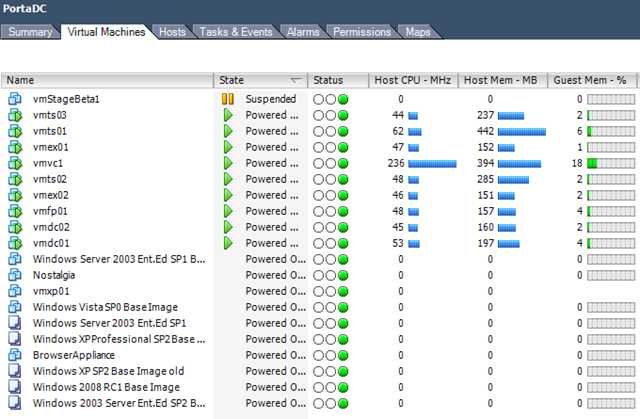
View of currently running VMs – a mix of Windows 2003/2008 VMs
Current Overall ESX Host statistics (with a clone from template going on)

As I noted elsewhere on my blog it has 4Gb RAM and a single 2.8GHz HT CPU – and with this VM load it gives an average CPU load of 25-30%. Almost all of these VM’s are idling but all respond in good time to network access/TS etc- not bad at all for a desktop PC!
CPU usage for the last 24 hours
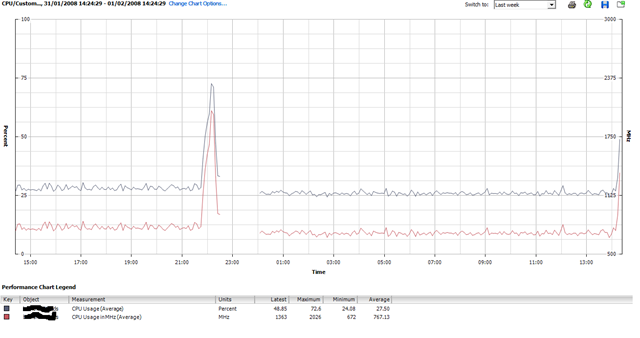
The big spike around 22:00 was when I cloned up a whole load more VM’s – seems to have upset the stats so need to try and have a look at that..
It’s also interesting to note that I added 4 Windows 2003 VM’s last night but that hasn’t actually increased the overall CPU average – ESX must be quite efficient at time-slicing all those idle VMs.
I had 3-4 “deploy from template..” operations going on at the same time and it really bogged down the performance of the VM’s (usable, but only just..) but it is just a single SATA disk drive so I can live with that.
Deploying 1 VM at a time had little or no impact – slight CPU spike to ~50% as you’ll see to the far right of the chart as I kicked off another one just now.
When i get time I’m going to drop some jobs into the VM’s that will tax the virtual CPUs a bit more and compare results – maybe some Folding@Home activity Mmmmm that would definitley tax it.
Update on the Cheap ESX Home Server
Posted by on January 31, 2008
All running well, we had a power cut the other day but the PC didn’t automatically power back on when power was restored; I wonder if there is a BIOS setting for that – PC’s always used to have something along those lines.
Bit of manual intervention to switch it on and it was back and running.. no ill effects and all the VM’s started up normally.
I’m hammering it a bit now and have some Windows Server 2008 RC1 templates setup as I need to try out the new Terminal Services functionality so I’m hoping to build a small 2008 TS farm under ESX – no customization wizard available yet for 2008 😦
Maybe will see how Windows built in NLB works under ESX Mmmm.
So, will see what performance is like when I have a lot more going on..

 Virtualization, Cloud, Infrastructure and all that stuff in-between