Virtualization, Cloud, Infrastructure and all that stuff in-between
My ramblings on the stuff that holds it all together
Exchange 2007 CCR Configuration Notes
Posted by on February 29, 2008
Once you’ve followed the installation process and have your active and passive nodes setup you may not actually be able to failover and mount the stores – it fails and logs an event 9317 from MSExchangeSA as below;

The fix is to register an SPN for each cluster node as per this KB article – why setup doesn’t do this for you I don’t know?
add-ADPermission -Identity “cn=exchange-cms,cn=computers,dc=mydomain,dc=com” -User “node-cl1$” -AccessRights WriteProperty -Properties “Validated-SPN”
You do this using the Exchange Management {Power}Shell Applet using the following command.
One thing to bear in mind – particularly if you are implementing a CCR cluster across mode than one physical site (single subnet required) you’ll need to wait for each node’s respective AD Domain Controller to replicate the changes.
Once that was completed I could fail over the cluster nodes perfectly.
Novell Acquire Platespin
Posted by on February 29, 2008
As noted here and here, they’ve done it – lets hope they don’t stuff it up – Platespin have a good roadmap in my book – particularly around virtual DR/BC with their Forge product.
Novell had, and to some extent still do have very good technical products but they just make such a mess of integrating them all and making it easy to deploy and support which is one of the reasons MS beat them in the server wars…. the virtualization wars are the current battleground!
Today, You Work For Nothing
Posted by on February 29, 2008
I hadn’t really thought about this, but as the BBC point out technically you are working today without pay..!
As if we didn’t already work enough unpaid overtime
Now, if I didn’t have this big pile of things to do today then….
😦
VMWare Vulnerability during VMotion.. is it really?
Posted by on February 27, 2008
As the Hoff posts here and on VMTN here. the proposed vulnerability that you can manipulate and possibly compromise a VM during a VMotion process isn’t exactly major, it’s clever.. but – like anything if you don’t follow the best-practice recommendations then you expose yourself to these risks… same reason they recommend you lock your server room or don’t have blank passwords – this attack is akin to gaining physical access to the hardware or being able to sniff a physical switch port – in this instance, it’s “virtual” hardware.
VMWare have always recommended keeping the VMotion traffic on a separate VLAN or network.
the other vulnerability where VMTools can be compromised on is different, but again preventable.. and not enabled on server instances of VMWare.
Impressive Facial Mapping Demo
Posted by on February 27, 2008
Cool site here of a company called image metrics, they produce systems to map facial expressions to computer models and graphics for films and games.
Cool stuff.
Firefox Download Window Stops Working
Posted by on February 27, 2008
I’ve had this problem for the last week where if you try to download a file in firefox the download status window doesn’t display although the file actually downloads.
you can fix this by going to %appdata%MozillaFirefoxProfiles and deleting the downloads.rdf file.
HP iLo Very Slow for Installing an OS
Posted by on February 27, 2008
A bit of a disappointment; we’re trying to do a WinPE 2.0 CD/DVD based installation for our Windows 2003/2008 standard blade servers in an HP c7000 enclosure.
Installing from a .ISO image presented to the iLo via the virtual media applet is dog-slow (5-10 times slower than from a physical CD/DVD- why is this? – surely its technically possible to make this access run faster and GigE chipsets are cheap-as these days. I’ve been through every combination of switching/duplex/port config and even via a cable directly into the Blade OA.
The same issue seems to manifest itself on traditional rack mount HP servers – the iLo just isn’t fast enough to make this a workable solution, unless you are really patient.
I know we could use the RDP and do it as a PXE type installation over the network to each blade, but this doesn’t really achieve what I want…
Most customers maintain an OoB (Out of Band) network to which all of the management interfaces (iLo, DRAC, etc.) are connected to. the reasoning for this is obvious; if you loose your main core switching network you can get access via a totally different physical network and path to assist in troubleshooting.
For this same reasoning I would like to use this method to build servers from a master boot CD/DVD image, you can present a .ISO image to a server via the virtual media applet on the iLo. We have a fully end-end build process that sets up the HP array controllers, flashes BIOS and installs the OS and drivers etc. from a CD/DVD.
We just update the boot CD .ISO file as required and its flexible and it doesn’t rely on any deployment infrastructure (PXE server, RDP server etc.) so we can port it between customers and data centres, VM’s and physical machines and do a bare-metal builds without requiring any build/network infrastructure in place.
This isn’t just limited to a Windows OS – I tried the same with an ESX installation; took over an hour (compared to 5-10 mins from a local CD)
New Blog Furniture
Posted by on February 27, 2008
Have been playing with a few new widgets, and I figured out how to add HTML code into the pages that wordpress.com hosts.
If you need to do it – just add a “Text” widget and then you can put any HTML code you like in that and it gets processed as part of the page load.
So, for now I’ve added clustrmaps – only takes a couple of mins – instructions here
I’ve also added Feedburner for my RSS feeds, I’ve seen a big spike in traffic to my blog over the last week
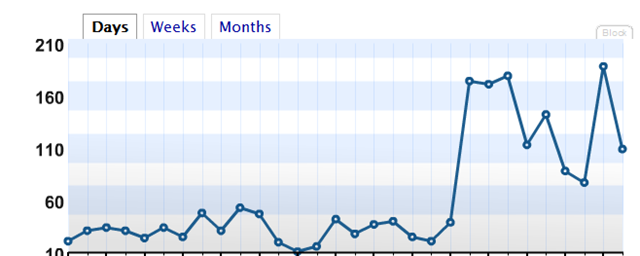
I’m trying to figure out where it is coming from… the default wordpress.com stats (where this site is hosted) don’t really go into much more detail than number of hits; and it doesn’t seem to tally up with the search-engine results or click referrals – so maybe that will shed some light on it.
Otherwise pop a comment on this post and let me know what you find interesting and I’ll try to tailor some content around your needs, the How to deploy a virtual machine from a template seems to be the most popular post so far.

Running Exchange 2007 on VMWare ESX Server
Posted by on February 26, 2008
Interesting article here on some stress testing VMWare have done running Exchange 2007 under virtualization on VI3.5.
It’s working.. .and working well, now – official support?
Disaster Recovery Resource for Exchange
Posted by on February 23, 2008
Stumbled across this site earlier; looks like there is some good practical information here if you are looking for how to handle Exchange backup and disaster recovery.
Sites like this are so much more valuable than the usual vendor white-paper approach as they show people’s real world experiences, mistakes, etc.
This is an employee from a commercial data recovery organisation, but this kind of resource is good for information sharing with the community…. and if it really goes wrong and you need to get into raw disk data recovery you have a level of confidence in their services and knowledge… an example of how blogs can deliver “business value”.

 Virtualization, Cloud, Infrastructure and all that stuff in-between