Virtualization, Cloud, Infrastructure and all that stuff in-between
My ramblings on the stuff that holds it all together
Support for Virtualized OS/Applications – an Open Debate..
Posted by on February 21, 2008
Martin’s post here prompted me to blog something I’ve been meaning to do for a while.
Virtualization projects and services are cool; we all understand the advantages in power/cooling and the flexibility it can bring to our infrastructures.
But what about support, if you are a service provider (internal or outsourcing) you normally need to be able to offer an end-end SLA on your services. typically this would be backed off against a vendor like Microsoft or Oracle via one of their premium support arrangements.
From what I see in the industry, with most software vendors especially Microsoft there is almost no way a service provider can underwrite an SLA as application/OS vendors give themselves significant scope to say “unsupported configuration” if you are running it under a hypervisor or other VM technology… Microsoft use the term commercially reasonable in their official policy – who decides what this is?
I would totally accept that a vendor would not guarantee performance under a hypervisor – that’s understandable and we have tools to analyse, monitor and improve (Virtual Centre, MOM, DRS, increase resources etc.). but too many vendors seem to use it as a universal “get out of jail free card”.

Issues of applications with dependency on physical hardware aside (fax cards, realtime CPU, DSP, PCI cards etc.) In my entire career working with VM technology I’ve only ever seen one issue that could be directly attributed to being caused by virtualization – and to be fair that was really a VMTools issue; rather than VMWare itself.
Microsoft have an official list of their applications that are not supported here – why is this? speech server I could maybe understand as it would probably be timer/DSP sensitive – but the rest? Sharepoint? I know for a fact ISA does work under VMWare as I use it all the time.
Microsoft Virtual Server support policy http://support.microsoft.com/kb/897613
Support policy for Microsoft software running in non-Microsoft hardware virtualization software http://support.microsoft.com/kb/897615/
Exchange is specifically excluded (depending on how you read the articles)
· On the Exchange Server 2007 System requirements page it only mentioned Unified messaging as being unsupportable in a virtual environment http://technet.microsoft.com/en-us/library/aa996719.aspx
· Yet on TechNet it is clear stated that “Neither Exchange 2007 nor Exchange 2007 SP1 is supported in production in a virtual environment” http://technet.microsoft.com/en-us/library/bb232170(EXCHG.80).aspx
Credit due to a colleague for pulling together the relevant Microsoft linkage
But I know it….
a) works fully – I do it all the time.
b) Lots of people are doing this in production with lots of users (many people at VMWorld US last year)
c) VMWare have a fully-supportable x64 hypervisor – It’s just MS that don’t
What is the industry going to do about this?, I asked this question of peers a lot at VMWorld and at BriForum; and to be honest everyone has the same concern but have a few different approaches;
Dont’ tell/ask – 99% of the time a tech support rep won’t know its running under VMWare/a.n.other hypervisor so why complicate matters by telling them – could of course back-fire on you!
Threaten – “If you won’t support under VMWare we’ll use one of your competitors applications”; however this only really works if you are the US govt. or Globocorp Inc. or operate in a very niche application market.
Mitigate – reflect this uncertainty in an SLA, best-endeavours etc. this would kill most virtualization efforts in their tracks for an enterprise customer.
The same support issue has been around for a long time; Citrix/Terminal Services, application packaging, automated installations, etc. are treated as “get out of jail free cards” by support organisations…
But whilst there are some technical constraints (usually only affecting badly written apps) with terminal services and packaging, virtualization changes the game and should make it simpler for a vendor to support as there is no complex runtime integration with a host OS + bolt-ons/hacks it’s just an emulated CPU/disk/RAM you can do whatever you like within it.
So – the open debate; what do you do? and how do you manage it?
Please comment…
P2V Backup & Disaster Recovery
Posted by on February 20, 2008
There is a new site here (disclaimer: it does seem to be promoting a commercial service, but has some useful information that has been put into the public domain); describing some methods to roll your own P2V backup approach; I’ve not read in detail yet; but looks like Frane Borozan has solved some of the challenges I’ve encountered in the past automating the Free VMWare Convertor tool.
When I get some time I will revisit my build a better test lab series (and update it!) I hope to be able to integrate some of Frane’s ideas.
Thanks to Techhead for passing on the link; we worked together on the platform underlying the Build a better test lab series and he did a lot of work on the P2V and post-P2V automation tasks – he’s got a lot of handy scripts for doing this on an HP platform
Virtualized DR is going to be big this year; I have a long line of customers with this high on their list of priorities… Both for cross site 100% VMWare implementations and for the ability to backup/restore physical platforms to VMWare grid in a DR situation.
It just makes so much sense; no delay whilst racking & stacking recovery kit or problems restoring to different hardware etc. your admin’s can even do it from home – which can have some significant advantages in the event of a natural disaster like Katrina or floods like we had over the last couple of years in the UK
PlateSpin Forge is something we are seriously looking at as well as Symantec Backup Exec System Recovery Server Edition (who win a prize for extending the longest, most annoying product name! despite acquiring it from Veritas).
Will be an interesting year; I’m sure Sungard and all those recovery centre facilities will be moving to a grid/resource rental model rather than pure rack/floor space and retained hardware on-contract.
Windows Server 2008 Posters..
Posted by on February 20, 2008
/CONSOLE switch Goes away in Windows 2008/Vista SP1/XPsp3 versions of MSTSC.EXE
Posted by on February 18, 2008
Post here on the terminal services team blog, about why they’ve changed this switch to /ADMIN in Windows 2008/Vista SP1/XPSP3.
This is the first I’ve heard of it, not a huge issue but I can see a potential problem where the /console switch is ignored, again not huge but a bit of an annoyance just to change a bit of syntax?
if you have device CAL’s and normally use the /console switch to remotely administer a machine to my understanding that doesn’t allocate a device CAL to your admin machine (or whatever machine you are admin’ing from at the time)
What if you use this method to administer terminal servers, doesn’t this silently ignoring just eat one of your device CALs (permanatly if you do it often enough from a machine)?
The article says:
The /console switch is silently ignored. You will be connected to a session to remotely administer the server.
The /console switch is silently ignored. You will be connected to a standard Remote Desktop session that requires a Terminal Services client access license (TS CAL).
Virtual Centre Plug-in Repository
Posted by on February 18, 2008
More Useful Things You Can Do With ImageX
Posted by on February 12, 2008
James O’Neil has a good post here – an example of how he used ImageX to quickly build and maintain his own vista system image with his typical apps.
Also handy for reference as he shows how to split very large images across multiple CDs using the /split switch.
Make Your own Offline Windows Update CD/DVD
Posted by on February 12, 2008
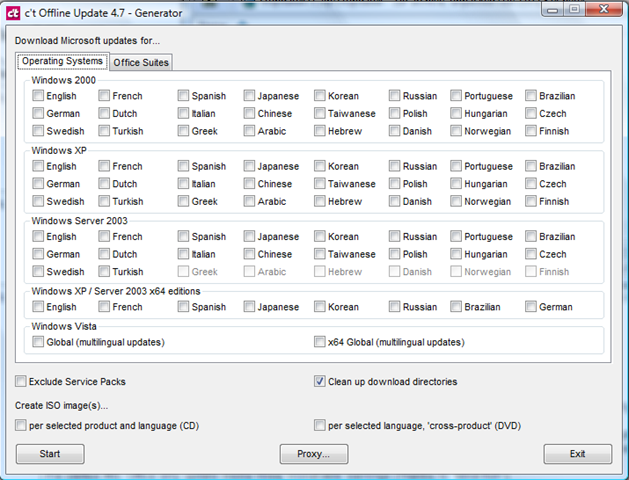
What a handy tool; if you download the app you can select which Microsoft OS/Applications you need patches for and it will download them all via the Windows online catalog to a source directory and then compile a script to auto install them all – it will even generate a .ISO file and handle dependencies and reboots – v.handy (and more efficient) if you need to quickly present it to a bunch of virtual machines with no Internet access or are on a site with slow internet access.
Excellent; now as far as I know Microsoft have no mechanism for doing this other than downloading all the patches manually… even with the Vista RTM images I built last week it had nearly 100Mb of OS patches alone!
Screenshot of the available options in the app – download it here here (updated 14th Sept’09)
OS Updates – multi-language too
Office Suite Updates too
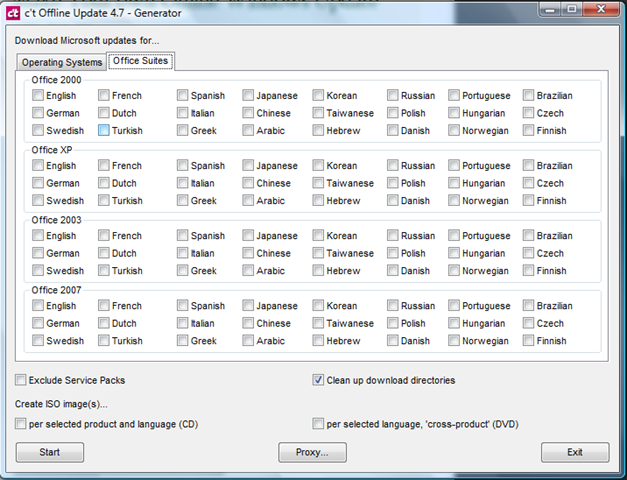
You can even get all the patches for everything and it will compile it into a DVD .ISO image – I’ll definitely be using this – hopefully you can use the info it downloads to slipstream update a vista .WIM image – will have to try that in a couple of weeks.
(original link from a post on slashdot)
Mmmm, Big, Really Big Cisco Switches
Posted by on February 11, 2008
Hot-Swap Datacentres
Posted by on February 11, 2008
There’s an interesting post over on Forrester research blog by James Staten. he’s talking some more about data centres in a container; making the data centre the FRU rather than a server or server components (Disk, PSU etc.).
This isn’t a new idea but it I’m sure the economics of scale currently mean this is currently suitable for the computing super-powers (Google, Microsoft – MS are buying them now!) – variances in local power/comms cost could soon force companies to adopt this approach rather than be tied to a local/national utility company and their power/comms pricing.
But just think if you are a large out-sourcing type company you typically reserve, build and populate data centres based on customer load, now this load can be variable; customers come and go (as much as you would like to keep them long-term this is becoming a commodity market and customer’s demand you are able to react quickly to changes in THEIR business model – which is typically why they outsource – they make it YOUR problem to service their needs).
It would make sense if you could dynamically grow and shrink your compute/hosting facility based on customer demand in this space – thats not so easy to do with a physical location as you are tied to it in terms of power availability/cost and lease period.
New suite build out at a typical co-lo company can take 1-2 months to establish networking, racks, power distribution, cabling, operational procedures etc. (and that’s not including physical construction if it’s a new building) – adopting the blackbox approach could significantly reduce the start-up time and increase your operational flexibility
Rather than invest in in-suite structured cabling, rack and reusable (or dedicated) server/blade infrastructures why not just have terminated power, comms and cooling connections and plug them in as required within a secured warehouse like space.


Photos from Sun Project Blackbox
You could even lease datacentre containers from a service provider/supplier to ensure there is no cap-ex investment required to host customers.
If your shiny new data centre is runs out of power then you could relocate it a lot easier (and cheaply) as it’s already transportable rather than tied to the physical building infrastructure; you are able to follow the cheapest power and comms – nationally or even globally.
As I’ve said before the more you virtualize the contents of your datacentre the less you care about what physical kit it runs on… you essentially reserve power from a flexible compute/storage/network “grid” – and that could be anything/anywhere.

 Virtualization, Cloud, Infrastructure and all that stuff in-between