Virtualization, Cloud, Infrastructure and all that stuff in-between
My ramblings on the stuff that holds it all together
Blogging from a Blackberry
Posted by on February 11, 2008
Performance Update on Cheap ESX PC
Posted by on February 10, 2008
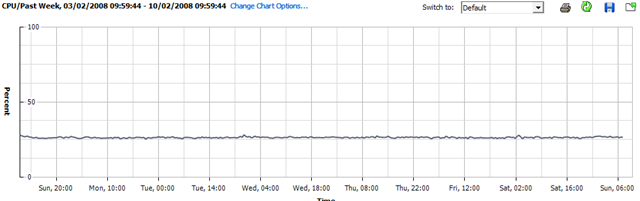
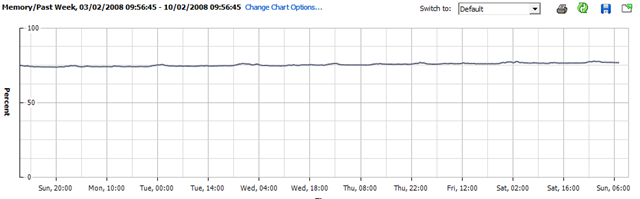
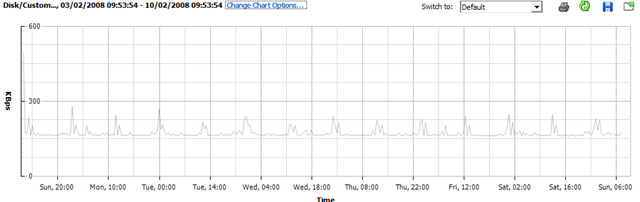
I’ve not done anything with my home ESX server this week as I’ve been busy with work; so this will be interesting – it’s been powered up all the time with all the VM’s spinning; but not doing very much.
CPU Utilisation
Memory Utilisation
Disk Utilisation
Whist running this set of VMs.. (the CPU stats for VMEX01 and VMEX02 are a bit skewed as I added this bit after the original post and they are both running seti@home (hence increased CPU)
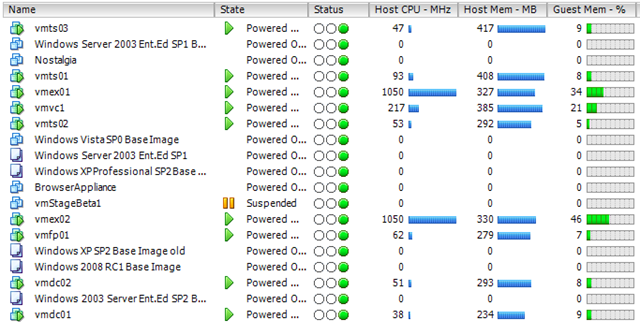
So, nothing interesting to see here – but might be worth bearing in mind for some kind of sizing estimate; this is a single core CPU (HT enabled) PC with 4Gb RAM and a single 500Gb SATA disk
Hopefully I will get some time this week to load up SETI@Home or Folding@Home and see what that does 🙂 it should be a good test to see how well the hypervisor manages CPU timesharing between hosts.
Split Screen Browsing with Firefox
Posted by on February 7, 2008
My home office setup has a 20″ widescreen Dell TFT which I use with my laptop an elevated docking station – my laptop has a rather low screen resolution as it’s quite small so this is a great dual monitor setup. The widescreen is handy for keeping a web browser open for referring to online documentation or and working on documents or large Visio diagrams.
The only gripe is that a lot of web pages (like the BBC) waste a lot of the widescreen real-estate as they format (or don’t re-format) for different screen resolutions.
The Split Browser Plugin for Firefox (my favourite browser) that allows you to essentially have multiple browser sessions and sub-tabs in one full-screen Window.
it has load of options – if the screen layout gets a bit confusing you can bring all the split pages back to one window with multiple tabs and vice-versa.
Screenshot
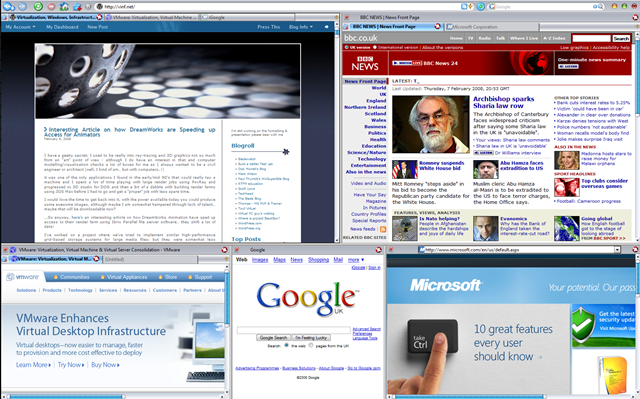
The (also useful) IETab plug in means some of those sub-pages can also be rendered using IE – but all within Firefox.
Firefox has such a good community of developers and I have always been able to find a plug-in that does exactly the odd-feature I “need”.
Brilliant.
Interesting Article on how DreamWorks are Speeding up Access for Animators
Posted by on February 6, 2008
I have a geeky secret; I used to be really into ray-tracing and 3D graphics not so much from an “art” point of view – although I do have an interest in that and computer modelling/visualisation checks a lot of boxes for me as I always wanted to be a civil engineer or architect (well, I kind of am… but with computers..!)
it was one of the only applications I found in the early/mid 90’s that could really tax a machine and I spent a lot of time playing with large render jobs using PovRay and progressed to 3D studio for DOS and then a bit of a dabble with building render farms using 3DS Max before I had to go and get a “proper” job with less spare time.
I would love the time to get back into it, with the power available today you could produce some awesome images, although maybe I am somewhat hampered through lack of talent… maybe that will be downloadable now?
….So anyway, here’s an interesting article on how DreamWorks Animation have sped up access to their render farm using Ibrix Parallel file server software… they shift a lot of data!
I’ve worked on a project where we’ve tried to implement similar high-performance grid-based storage systems for large media files; but they were somewhat less successful/undeveloped; this one looks promising.
I wonder if these kind of vendors will start moving into the virtualization space; it’s essentially the same principal.
Deliver large flat files (.VMDK), over cheap/scalable commodity media (GigE) as quick a possible
This would reduce the depende.ncy on expensive back-end fibre channel SANs, and you could invest more in flexible Ethernet – or maybe Infiniband to deliver networking and storage within a “virtual fabric”
If it’s “virtual” and “grid” based the quality/features of individual hardware devices (DL380, NAS device etc.) that make it up the overall grid are less important and a 100% software approach gives you the flexibility to pick & choose building blocks from the most appropriate/affordable manufacturer rather than be locked into a costly single vendor solution (HP EVA, EMC Clariion, DMX etc.)
Thanks to Martin at Bladewatch for the link.
VMWare ESX on IBM Blades
Posted by on February 5, 2008
I’ve worked with HP c-class stuff recently, but this is a good article on the IBM equivalent and the post looks a lot simpler to read than all the official IBM docs!
In my book if you are virtualizing your infrastructure there is less of a religious argument on the underlying hardware – it’s a lot more flexible so do you care as much?
Thanks to Martins post on Bladewatch for the handy link
Windows Server 2008 RTM’s Also…
Posted by on February 5, 2008
Must be the day for it! I’m looking forward to Server 2008 and have a couple of projects lined up to try and take advantage of the new terminal services functionality.
Hyper-V will follow within 180 days… MS have a long way to go to win ground from VMWare but will have the usual single-vendor support argument so it’s going to be an interesting 18 months.
Windows Vista SP1 RTM
Posted by on February 4, 2008
Windows team Blog post here says Vista SP1 has been released to manufacturing so not long to go now until it’s generally available.
I’ve been using Vista exclusively since it RTM’d and from Beta 2 before that. I got a new laptop with a core 2 Duo CPU and went up to 4Gb RAM from 2 and it made a world of difference – much faster and in the last year my Dell D620 has been rock solid.
The file-copy hotfix worked for me; and a recent video driver update (automatically offered via Windows Update..nice) fixed the annoying screen mix-up when I docked my laptop.
Mark Russinovitch has an in depth post on the SP1 improvements to file copying here.
Does make you wonder if MS wanted/did bring forward the SP1 date because of all the “wait for SP1” brigade… M-m-m-m, marketing!
Not looked yet but I wonder how large SP1 will be, on the Vista desktops build I did recently I had to download c.300Mb of Windows (c.98Mb) & Office 2007 Updates (c.200Mb. good think I have a fast connection – you’ve got no chance on a PSTN dial up anymore!
New Blade Blog
Posted by on February 3, 2008
As Scott points out, Aaron has made a promising start with his new Blade focused blog*
Welcome, Aaron – I’ve already found something useful on your site and may need to rethink one of my blade deployment plans slightly!
*Edited 10/2/08 to update link for Aaron’s new URL
VLAN Tagging with ESX and HP Blade Virtual Connect Modules
Posted by on February 3, 2008
Problems Restoring a non-SysPrep Vista Image Using DiskPart & ImageX
Posted by on February 3, 2008
Goal: keep a single .WIM file, Multiple instances of the same build in the .WIM file
Build001 non-sysprep’d version for maintenence with all latest patches and corp apps
Build002 sysprep but no domain for home workers/3rd party
Build003 sysprep + domain joining and scripted OOBE for corp machines
Build004…etc. tweaks to the sysprep – for different domains/customers or OOBE settings like language etc.
Build a bootable WinPE DVD with ImageX and the large .WIM file stored on it so no network connectivity required to install (at this stage) just a single DVD.
Reboot from Win PE to start Vista MiniSetup/OOBE
I hit a problem as when I restored build001 to my reference machine it wouldn’t boot and immediatley gave a 0xc000000e error
This was because my automated build DVD runs diskpart with a scripted set of commands (WIPEDISK.TXT) which includes the clean command
WIPEDISK.TXT
select disk 0
clean
create partition primary
select partition 1
active
format fs=ntfs quick
assign letter=c
exit
This caused problems in this instance because The clean command erases the partition table ID.
If an image has not been-sysprep’d it still looks for the original partition table ID (which diskpart removed) hence the stop error at boot.
Sysprep’d images don’t have this problem as the “/generalize” switch resets this dependency on the partition table entries and mini-setup runs at 1st boot to fix it up.
So, if you need to do maintenance on a non-sysprep’d reference image then
- You need to restore it via imageX and your usual process (in my case a bootable PE DVD)
- It won’t be able to boot – it will give an 0xc000000e error
- Boot the reference machine from your original Vista install DVD and choose to repair
- This puts back the partition table ID and it will boot again
- Once it’s booted you can carry out any online maintenance, add extra software etc. to customise it
- Then sysprep /generalize /oobe /shutdown your reference machine
- Map a drive to your master .WIM file, or a USB disk etc.
- Append the changes to the master .wim file (remembering to use the /APPEND switch; if you just use /CAPTURE you will OVERWRITE your .wim file and be very sad.. Did it twice before I learnt to backup the .WIM file before hand!
- Then re-master your DVD – with the appropriate files – I just inject the .WIM file to the Windows PE DVD I made using PowerISO.
Rinse and repeat.
Thanks to this post http://forums.microsoft.com/TechNet/ShowPost.aspx?PostID=1099145&SiteID=17 and this post http://www.svrops.com/svrops/articles/winvistape2.htmI figured it out…eventually!

 Virtualization, Cloud, Infrastructure and all that stuff in-between