Virtualization, Cloud, Infrastructure and all that stuff in-between
My ramblings on the stuff that holds it all together
Making Something Run When a Windows PE 2.0 CD/DVD Starts.
Posted by on February 3, 2008
I need a DVD that automatically applies a .WIM image when WinPE boots – no prompts; just want to press F9 for the BIOS Boot menu and walk away until build is finished.
I built a WinPE 2.0 image the usual way, but I want to add files to it (easy with PowerISO) but I want it to do something when it starts up..
To do this I had to customise the BOOT.WIM file which you use to generate your WinPE ISO file, note you need to edit BOOT.WIM not the WinPE.WIM file.
I used the /MOUNTRW switch for imageX (more details here) to mount the BOOT.WIM file – if you look in it’s WINDOWS\SYSTEM32 directory there is a file called STARTNET.CMD – this is mostly the same as a batch file so you can put whatever commands you want in here, in my case I edited it as follows;
wpeinit
CALL D:\tools\buildPC.bat
wpeutil reboot
Once the changes are made you can save the changes back using the /UNMOUNT and /COMMIT switches – you’ll then need to rebuild the Windows PE .ISO using OSCDIMG.EXE.
You can then inject files into the .ISO file you’ve generated – you could put them in the BOOT.WIM as above but its quicker and easier to do this via PowerISO (or similar tool) if you are going to need to make changes, rather than recompiling the BOOT.WIM and .ISO files.
This is the BUILDPC.BAT batch file that STARTNET.CMD calls, it prepares the disk and deploys the image file to the local HDD.
@echo off
diskpart /s d:\sources\wipedisk.txt
d:
cd\tools
Echo applying image
imagex.exe /apply d:\sources\MasterImageFile.wim 1 C:
Echo Image Downloaded, rebooting.
Save the file and burn.. job done.
It’s a good idea to use a virtual machine to test the .ISO file out – and is cheaper than wasting lots of DVD/CD-R’s while you are fine-tuning!
Build a Windows Vista Master PC Image
Posted by on February 1, 2008
I haven’t had to do this sort of thing for a while and it’s the first time I’ve done it with Vista so here is a list of things I found; mainly for my own memory but hopefully it helps you too.. I only had 24 hours to do this, 50+ new PC’s to deploy to and a lot of other work to do, so I didn’t take the 100% best-practice approach.. but it works.
I wanted to take advantage of the new WIM image format – this is a file based snapshot format that is the default for a new Vista install and allows you to keep several different instances of a Vista installation in the same media. but requires less overall space as it “single-instances” files – for example a traditional Ghost based approach would keep a whole copy of explorer.exe once for every clone; this method just keeps the file once and uses pointers.
My goal is to have the following stored within a single .WIM file; this gives a bit of flexibility as we will be using a variety of these builds – yes it might be a bit more sensible to use a server based software deployment tool like SMS for the apps but we need the ability to support a variety of configurations and off-line/remote use and build for this implementation.
| Build001 | Base Vista OS and hardware drivers for the HP PCs we will be deploying to with latest windows updates |
| Build002 | As above + Office 2007 Standard VL Version & latest updates |
| Build003 | As above + Misc Apps (Acrobat, Flash, AV Etc.) |
| Build004 | As Above but with an automated, domain joining Sysprep |
You’ll Need.
- Windows Automated Installation Kit (AIK) 1Gb! http://www.microsoft.com/downloads/details.aspx?familyid=C7D4BC6D-15F3-4284-9123-679830D629F2&displaylang=en
- Sidenote: I couldn’t get the AIK to install on my Vista laptop, the installer eventually timed out and didn’t install anything; instead i installed it on a Windows2003sp2 VM as that’s all I had handy at the time.
- Windows Vista DVD Physical media or .ISO download from your Microsoft licencing agreement site.
- A lot of Patience
- The following links
Tip: I found it much easier to try all this out using a virtual machine; rather than having to burn DVD’s just to get the config right – you can do this by mounting the .iso file within a disposable virtual machine and boot from the “virtual” CDROM/DVD.
This implementation is going to rely on the OEM licence’s supplied on PCs – but we need to use our own build rather than the rather stodgy one supplied by HP so we can’t script the product key/activation and the user will need to enter it within the 30-days grace period.
Automated Installation
I spent a while hacking away with autounattend.xml files using System Image Manager without much luck – this site and this site were handy in figuring out how it worked and I managed a working file once I’d changed the disk partitioning bit from this script
Image Based Installation
Word of warning if you get an installation GUI when the machine boots then it’s ignored the autounattend.xml file but it doesn’t tell you why; there is a bug if you store it on a flash drive – fix here and I couldn’t make it work by storing the file in the root of the DVD and had to resort to a virtual floppy in my test build VM – more information here.
In the end I had to abandon the unattended setup because of time constraints, and it didn’t meet all of my needs anyway so I did a manual Vista install (without entering a product key) and then proceeded with the imaging process as I was hoping to get an application-inclusive “build”; with an unattended install I would have had to script all the application installations which would have probably taken too long.
Firstly you need to create a Windows PE bootable CD – info here and here quick version in step 4). just a word of warning, if you cut & paste the OSCDIMG.EXE command line from the site it won’t work and you’ll get an “Error 5 Access is denied.”

Weirdly this is because the “-” in the command line shown on the web page is the wrong ASCII symbol (assume thats an HTML/browser weirdness) but it will work fine if you type it in manually and you should see the following;
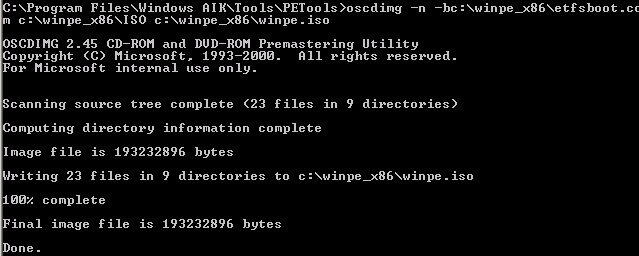
Now, once you’re happy with the reference image and have all the windows updates etc. installed you need to sysprep it to generate a new SID and make it “general”.
Run SYSPREP.EXE and choose OOBE and generalize, then shutdown the reference PC – if you have a sysprep.xml file now is the time to use it.
Now you can boot the Vista “reference” PC from the PE CD and capture the image.
you can keep the image on the same disk as the Vista installation, something you can’t do with Ghost etc.
this is done with the following command;
Imagex.exe /compress fast /capture C: C:\image-name.wim “build001” /verify
When its finished you can copy the resultant .wim file to a removable USB drive or network share (note: PE2.0 seems to support hot-swapping USB flash drives, which is handy – all my previous PEBuilder based CDs would only detect such devices at boot-time.
And you’re done, well you have a master image anyway.. next step would be to apply it to a machine.
Plenty of scope to automate the .WIM image deployment, I want to add it to a PE CD/DVD that the user can boot the machine from, then walk away and have it fully build a machine.
More later.
Performance on a cheap ESX PC
Posted by on February 1, 2008
I thought I’d post some performance graphs from my cheap HP D530 ESX server using the Virtual Centre console (which incidentally, is good for getting this info quickly and simply).
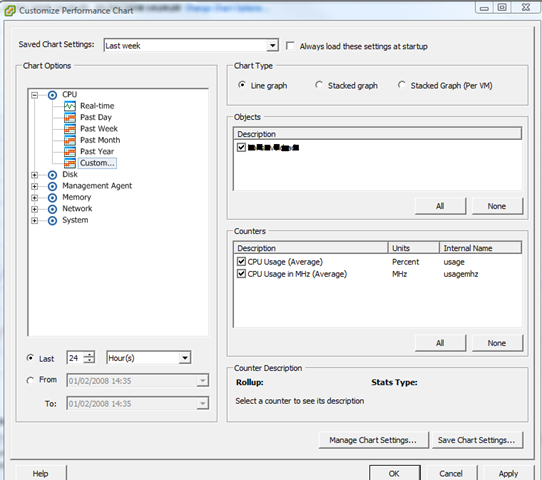
Screenshot of the UI for querying performance stats.
View of currently running VMs – a mix of Windows 2003/2008 VMs
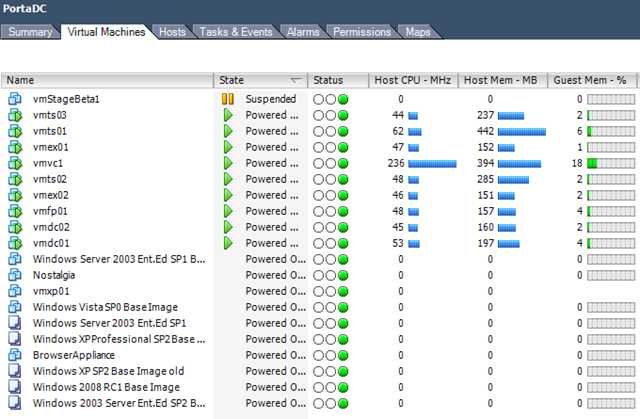
Current Overall ESX Host statistics (with a clone from template going on)

As I noted elsewhere on my blog it has 4Gb RAM and a single 2.8GHz HT CPU – and with this VM load it gives an average CPU load of 25-30%. Almost all of these VM’s are idling but all respond in good time to network access/TS etc- not bad at all for a desktop PC!
CPU usage for the last 24 hours
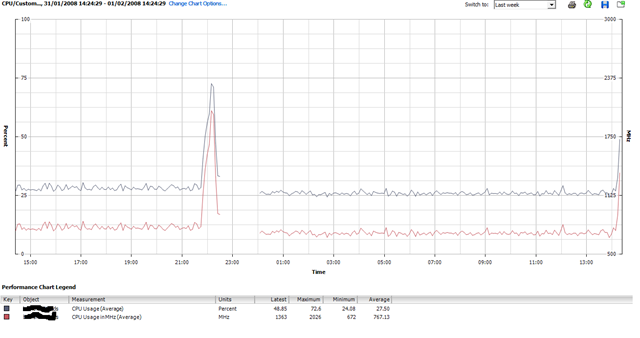
The big spike around 22:00 was when I cloned up a whole load more VM’s – seems to have upset the stats so need to try and have a look at that..
It’s also interesting to note that I added 4 Windows 2003 VM’s last night but that hasn’t actually increased the overall CPU average – ESX must be quite efficient at time-slicing all those idle VMs.
I had 3-4 “deploy from template..” operations going on at the same time and it really bogged down the performance of the VM’s (usable, but only just..) but it is just a single SATA disk drive so I can live with that.
Deploying 1 VM at a time had little or no impact – slight CPU spike to ~50% as you’ll see to the far right of the chart as I kicked off another one just now.
When i get time I’m going to drop some jobs into the VM’s that will tax the virtual CPUs a bit more and compare results – maybe some Folding@Home activity Mmmmm that would definitley tax it.
When Web 2.0 Goes Bad…
Posted by on February 1, 2008
Interesting article here and here on “side-jacking”; discussing people snooping session ID’s from URL strings to possibly bypass SSL security which is normally only applied at logon and then content typically reverts to non-SSL.
I’ve seen similar issues several times at airport or public Internet “Kiosks” and have accidentally walked into people’s airline reservations, webmail etc. by looking in the browser cache – and sometimes even in the address bar drop-down! as those machines don’t get wiped when you start/stop using them (easyInternet used to do a total wipe/re-provision of the OS once you’d finished using their machines)
Moral of the story? public kiosks are bad for doing anything you don’t want to share with other people even if you’re clever and choose the “secure session” option and if you can “sniff” a public WiFi connection you can get all of this over the air so game over anyway.
Of course session time-out typically means this is only vaid for “fresh” data… but still worth bearing in mind.
This is nothing new and has been around since the Internet started; but you’d think all the hip ‘2.0 tech companies and users would be up on this by now..
Update on the Cheap ESX Home Server
Posted by on January 31, 2008
All running well, we had a power cut the other day but the PC didn’t automatically power back on when power was restored; I wonder if there is a BIOS setting for that – PC’s always used to have something along those lines.
Bit of manual intervention to switch it on and it was back and running.. no ill effects and all the VM’s started up normally.
I’m hammering it a bit now and have some Windows Server 2008 RC1 templates setup as I need to try out the new Terminal Services functionality so I’m hoping to build a small 2008 TS farm under ESX – no customization wizard available yet for 2008 😦
Maybe will see how Windows built in NLB works under ESX Mmmm.
So, will see what performance is like when I have a lot more going on..
Where There’s Blame, There’s a ….
Posted by on January 24, 2008
Argh, I hate this kind of thing .. give us £5.99 and we’ll send you some PDFs to allow you to claim compensation from the govt. for identity fraud arising from the loss of confidential data, if you read around a little bit I doubt they’ll be paying much out unless something serious really does happen but the ambulance chasers with the website will have made a few quid. And even then if they did get forced to pay some kind of compensation – don’t you people get it? if you sue the Govt. where do you think the money comes from? that’s right – your own pocket, we fund the govt. they don’t really “earn” money; they are not Comet, or Sofa Warehouse, we are the share-holders – you might as well take an extra £10 out of your monthly salary and put it in the bank as compensation; as if the govt. have to pay the entire nation compensation they’ll pay for it one way or another via via your tax money, or by shutting down a hospital etc; it’s like fining police forces and the NHS for not performing.. by doing so you reduce their capacity to pay for improving things and give them a further excuse to grumble about how they don’t get enough funds.
I think it would be better for the govt. to do some kind of deal with Equifax’s identity watch scheme to give people a cheap/free subscription to their service for ID fraud detection.
This would be a good thing to do on a national level as the trouble with ID fraud is that it goes un-noticed for so long, it might also be better for the people that seem totally incapable of working out their monthly finances and don’t realise what impact missing payments/defaulting really has on their future pans to buy a house, TV, car “bling” etc. on finance. All those ad’s for sub-prime loans etc. are not cheap money and lenders don’t really just “write off” your debts just because you say you can’t pay them back and say “never mind… don’t worry about it”.
Seeing your credit report really makes it plain to see what criteria lenders use to assess your credit-worthiness, rather than making it such a dark secret; I guess the other side of the argument is that it gives people some scope to “game” the system; but this information is already available on request from the credit scoring agencies (£10 IIRC) so anyone wishing to do so already has the tools available.
Anyway, rant over.. must get back to the paracetemol, this cold is making me cranky!
Lots of Useful Scripts to Automate VMWare
Posted by on January 22, 2008
http://www.ntpro.nl/blog/categories/10-VMware-PowerShell
Like this one … must have a go at this http://www.ntpro.nl/blog/archives/316-Create-multiple-VMs-using-PowerShell.html and http://www.ntpro.nl/blog/archives/279-My-first-VMware-PowerShell-script.html
Wonder if you can also use these against the Free VMWare Server?
VMWare Stage Manager – No P2V/V2P Integration
Posted by on January 22, 2008
Ah, show-stopper for me for most of my potential customers; as far as I can tell from the demo video the product is geared more towards a VM-only environment. Maybe I misunderstood the announcements but I had thought I would be able to clone physical production servers (P2V and V2P) into stage manager for doing staging/testing “stuff” before releasing back to production.
Looks like it’s geared more towards end-end lifecycle management for VM’s where dev/test VM’s are managed through to production.
Development->Test->Stage->Production and then around the prod->Stage loop for patches, updates etc.
Obviously nothing stopping you from P2V or V2P’ing VM’s at any stage in this lifecycle using other tools (VMConvertor, Platespin) etc. but it won’t be managed as part of the lifecycle by Stage Manager.
Yeah I know “physical is dead“… but we’ve not managed to convince the whole world virtualisation will fix everything – 3rd party vendor support for important production systems is still a grey area under virtualisation; vendors seem to be coming round as it gets market traction but the instant “we don’t support that under VMWare” get out of jail free card for vendor support teams is still a problem.
Ah well, gap for a 3rd party to add value – would be nice if Platespin were able to write a plug-in as P2V and V2P seem to be where their products win, or even MS with their multi hypervisor VM Management stuff.
Managing lots of RSS feeds
Posted by on October 31, 2007
I’ve been into reading people’s blogs and tracking websites like theregister for a good couple of years. I never really found an RSS reader app that worked for me; I wanted to build custom views of feeds, flag and prioritize them and mark things to read later – and I could find standalong apps to do these things but not one that did it all – hopefully this post will show you how I do it – if you have some other suggestions feel free to comment & share them.
Outlook 2007 supports RSS feeds out of the box, and it’s ideal as I already use Outlook and it’s calendar/tasks features to manage my workflow. Outlook 2003 and later (I think) added the ability to flag and tag items and even build a custom category list.
It means I can basically add all my RSS feeds as sources of information in the same way as I use it to manage my company emails, and categorise, flag as required and it all merges with into task list.
I can do this categorization manually or I think automatically via a rule
Custom Categories

Flagging – which passes it into Outlook’s task list

I have two main folder/sub-folder structures – regular reads, for feeds that have a lot of frequent/interesting traffic and another folder/sub-folder structure for less noisy but important feeds (for example software release notifications etc.)

Best of all I can build custom views across of all my RSS feeds using custom search folders – for example I have the following (yes, and lots of unread emails too!)

And this gives me the following consolidated view across all my feeds, sorted by date (but could be lots of other criteria)
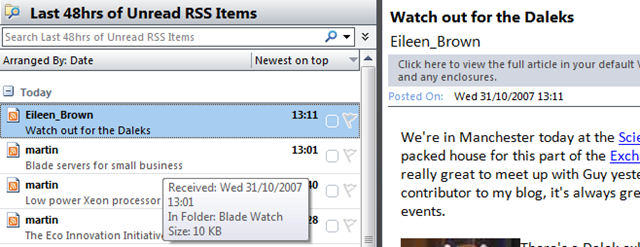
The add feed GUI components definitely have the feel of an afterthought but using them works brilliantly for me. Clicking on a page’s RSS feed brings up Outlook but doesn’t want to add it as a feed so I’ve always cut & pasted.. I assumed this was a beta bug but have been using RTM for quite a while now – must get round to investigating that.
Technorati Tags: Microsoft , office , 2007 , Outlook , Cool ways to do things , RSS , managing feeds
Tiny Laptop for £229 with solid state HDD
Posted by on October 31, 2007
I generally wouldn’t touch anything other than a Dell/HP/IBM laptop with a bargepole for reasons of spares availability/cost… but at £229 inc VAT this is almost disposable if something dies.

It’s tiny and has a (small) solid state HDD but SD card reader slot to allow you to add more storage space.
Review here..
http://www.cnet.co.uk//i/c/rv/e/laptops/asus/eee_pc/asus-eee_pc-440x330_2.jpg
Expansys are going to have them soon..
http://www.expansys.com/p.aspx?i=158485&partner=froogle
No Bluetooth but has a £40 option for adding an integrated 3G modem very cool.
I had a P133 Toshiba Libretto years ago and it was ace.. I like the idea of this..
Linux OS only at the moment (+VMWare maybe?) but WinXP in near future
And a bit of an update to this post Bryce posted a great link to a site covering upgrades to this mini notebook – 2Gb RAM upgrade, how to install other software & WinXP. Must, resist… must… http://www.notebookreview.com/default.asp?newsID=4062

 Virtualization, Cloud, Infrastructure and all that stuff in-between
