Virtualization, Cloud, Infrastructure and all that stuff in-between
My ramblings on the stuff that holds it all together
Free VMWare Disaster Recovery Solution Book
Posted by on August 31, 2008
VMWare have made an excellent free book available online here. it goes into a lot of detail around the various DR scenarios that you can use VMWare for; even P2V DR and has lots of example configurations with various vendor’s server & storage equipment.
Some really good technical documentation coming out of VMWare & it’s partners recently like the Cisco doc.
Problem using Photosynth in Firefox?
Posted by on August 29, 2008
I’ve been playing with Photosynth since the first demo was available on the web; it’s a very cool visualisation project from Microsoft Live Labs (info here) and it’s recently gone ‘live’.
It also works under Firefox which is great as I’m a keen FF user, but since the recent updates I’ve not been able to use it under FF, it kept looping round and asking me to install the plug-in.
I also noted that the version I downloaded earlier in the week was 0.2Mb smaller than the build I downloaded today, so assume there have been some bugfixes or a bad build.

After some fiddling, this turned out to be because I had an older version of the plug-in which must have had some problem, I had to disable the older version and it then ran fine, steps to do so are below;
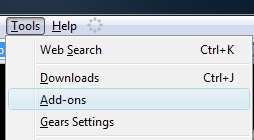
And choose to disable the older version of the plug-in (1.1.0.602) leaving 1.1.10683 enabled.

Then try again, no restart required (in my case anyway) and it works perfectly
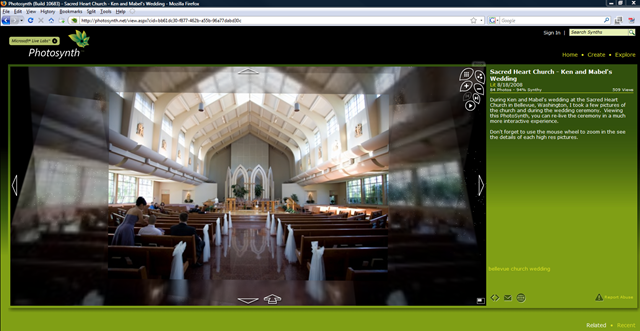
Hope that helps someone else.
VMWare Workstation 6.5 Release Candidate Build 110068
Posted by on August 28, 2008
There is a new build available for VMWare Workstation, I’ve installed it on my Vista laptop; definitley seems a lot faster and unity is pretty slick now at screen refreshes.
Flawless uninstall/reinstall as per usual VMWare standards… it’s almost there!
Unity icon has now changed to a rather nasty pinkish colour 🙂

and

Exchange 2007 Automated Install & Documentation Template Resources
Posted by on August 21, 2008
The Exchange team Blog (EHLO) has a pointer to some good resources for building an automated Exchange 2007 installation here and here
it also has some templates for your server build documentation for Exchange servers, always better to start with something than start from scratch!
Automation is one of those great things in Microsoft products, almost all of the products support automated installation, but often unless you are setting up hundreds of them the time invested to get it up and working far exceeds the time it would take to deploy so any pre-build resources and guides are an excellent idea.
Install automation can ensure you have repeatable results – this is especially handy where you are factoring in a non-P2V disaster recovery situation or where you have labs/demo environments or are trusting local IT staff to deploy and manage enterprise applications in a distributed environment.
And you thought your ESX lab at home was big..
Posted by on August 7, 2008
Chad has an interesting article and set of photos here about the joint Cisco/EMC/VMWare lab they maintain to test v.large implementations.
Excellent stuff, makes any of my labs pale into insignificance, especially my garage geek temple.
I definitely agree with Chad that they should publish the details of solutions that didn’t scale too well as well as those that did; if only for the allies (EMC, VMWare, Cisco) 🙂 to get feedback on if the market wants those kind of solutions that didn’t work; or at least to show where there is room for improvement to focus dev/R&D effort – but validated.
11/8 Links fixed
Hey, I Broke Photosynth
Posted by on August 3, 2008
Lol, more sites should have error messages like this – this would be far more entertaining (but maybe less useful) than a PSOD or BSOD 🙂
vinf.net at 50k Hits and 8 Months.
Posted by on July 27, 2008
Well over the weekend this blog turned over 50,000 visits since it started in November 2007 whilst I was on a break at Briforum 2007 in Amsterdam, so lots of thanks to everyone who has been reading, this blog is currently averaging 500 views/day which considering I just started it as a repository for my own useful work tidbits is quite amazing to me.
I’ve got a couple of interesting posts in the pipeline around unattended ESX installations and a step by step to build this under VMWare Workstation and my experiences with Platespin PowerConvert – particularly how it maps into my mini/dedicated cloud architectures to deliver a totally flexible and easy to manage infrastructure through the physical to physical conversion process (P2P) and the normal V2P/P2V features.
Similarly, if there is anything you’d like to see – comment here with your suggestions!
Happy reading
Vista Mobility Centre
Posted by on July 27, 2008
Ironically, I’d never actually seen this screen before.. Windows Key – X and it pops up the following screen so I can get one place to find the Dell extensions and the MS normal control panel applets in one place that are relevant to “mobility”.
 Thanks to
James O’Neil‘s post on where Microsoft went wrong with Vista for the tip, maybe thats one of the areas 🙂
For the record my laptop flies with Vista, and I agree with James’s point about suspend rather than shutdown reboot with suspend/resume it’s ready in < 5sec .. so why continually shutdown etc?
I hardly ever reboot my laptop other than to (un)install some software and suspend/resume works flawlessly, (unless I try to do it with my laptop’s built in 3G cell modem connected to Vodafone – as it will fail 1/2 way though and slowly cook in my laptop bag – but that’s a driver issue I assume rather than the OS).
as Eileen Brown discusses here I also frequently use MSCONFIG.EXE to keep the startup crapware free and the services stripped down to bare minimum…although I think Vista should police this a bit better.
VMWare aims for the Clouds
Posted by on July 26, 2008
Interesting post by Dave Ohara here; looks like VMWare are gearing up for some big cloud-related product announcements at VMWorld in September.
This folds nicely into my previous post about how VMWare can enable you to build your own clouds
Looking forward to September.
ESX3i for Free
Posted by on July 24, 2008
VMWare ESXi (aka ESX 3i) is about to be available free, pricing kicks in 28th July and the attached doc shows an overview of the features in each edition as you step up.
Basic principal is you can start with ESX3i for free (rather than full ESX @$1k), then add licence keys to enable production features like VMotion, HA etc.
It’s useful for dev/PoC projects which could then move to production later on by adding licences but with a reduced upfront cost. It avoids having to use and migrate from the free Windows/Linux version of VMWare Server when moving into a production class system and this gives a further one-up on Microsoft’s Hyper-V release a couple of weeks ago.
You should note that ESX3i is currently a bit more limited than the normal base ESX installation as there is no service console so no ability to install host based HPSIM/backup/etc. agents. That said, it’s been speculated that the next major release of full–blown ESX (4.x) will move to this model as well.
ESX3i is available from some HW manufacturers as embedded boot from flash in specific server models or is a downloadable installer with a small disk footprint (c.32Mb).
I have to wonder if the name change is a bit OTT – VMWare ESXi said fast in an English accent is“VMWaresexy”? 🙂

 Virtualization, Cloud, Infrastructure and all that stuff in-between