Virtualization, Cloud, Infrastructure and all that stuff in-between
My ramblings on the stuff that holds it all together
Excellent Set of Resources for VMWare HA
Posted by on July 15, 2008
Free EMC Celerra for your Home/Lab
Posted by on July 9, 2008
Virtualgeek has an interesting post here about a freely downloadable VM version of their Celerra product, including an HA version. This is an excellent idea for testing and lab setups, and a powerful tool in your VM Lab arsenal alongside other offerings like Xtravirt Virtual SAN and OpenFiler.
I’ve been saying for a while that companies that make embedded h/w devices and appliances should try to offer versions of the software running their devices as VM’s so people can get them into lab/test environments quickly, most tech folk would rather download and play with something now, rather than have to book and take delivery of an eval with sales drones (apologies to any readers who work in sales) and pre-sales professional services, evaluation criteria etc. if your product is good it’s going to get recommended, no smoke and mirrors required.
As such VM appliances are an excellent pre-sales/eval tool, rather than stopping people buying products. Heck, they could even licence the VM versions directly for production use (as Zeus do with their ZXTM products); this is a very flexible approach and something that is important if you get into clouds as an internal or external service provider – the more you standardise on commodity hardware with a clever software layer the more you can recycle, reuse and redeploy without being tied into specific vendor hardware etc.
Most “appliances” in-use today are actually low-end PC motherboards with some clever software in a sealed box – for example I really like the Juniper SA range of SSL VPN appliances, I recently helped out with a problem on one which was caused by a failed HDD – if you hook up the console interface its a commodity PC motherboard in a sealed case running a proprietary secure OS – as it’s all intel based, no reason it couldn’t also run as a VM (SLL accelerator h/w can be turned off in the software so there can’t be any hard dependency on any SSL accelerator cards inside the sealed box) – adopting VM’s for these appliances provides the same (maybe even better) level of standard {virtual} hardware that appliance vendors need to make their devices reliable/serviceable.
Another example, the firmware that is embedded in the HP Virtual Connect modules I wrote about a while back runs under VMWare Workstation, HP have an internal use version for engineers to do some development and testing against, sadly they won’t redistribute it as far as I am aware.
PSOD – Purple Screen of Death
Posted by on July 8, 2008
Just incase you ever wondered what it looks like here is a screendump..
this is the VMWare equivalent of Microsoft’s BSOD (Blue Screen of Death)

I got this whilst running ESX 3.5 under VMWare Workstation 6.5 build 99530, it happened because I was trying to boot my ESX installation from a SCSI hard disk – which it didn’t like – I assume because of driver support, swapped for an IDE one and it worked fine…
update – actually the VM had 384Mb of RAM allocated and that’s what actually stopped it from booting.. upped to 1024Mb and it runs fine.
Its the first time I’ve seen one – all the production ESX boxes I’ve worked with have always been rock-solid (touch wood)
I’m preparing a blog post about unattended installations of ESX when I hit this, in case you were wondering.
Funky USB Device Entries After Using VM Converter..
Posted by on July 6, 2008
I’ve noticed this a couple of times, if you P2V a VM from VM Workstation to ESX using VM Converter – it brings across a virtual USB device which isn’t supported by ESX.. if you look at the properties you get the following amusing entries..

Now, I wish I really did have a funky USB dongle, or doohickey… sounds useful!
VMWare Workstation 6.5 Beta 2 – my experiences
Posted by on July 3, 2008
I’ve installed the updated build of 6.5 as Eric discussed here; first impressions Unity works much, much better – less screen jitter and flashes of guest desktop – performance definitely improved too and makes my multi Outlook setup much nicer to use.
 Also noted that the unity icon has changed colour from red to orange..
I’m always impressed at how well VMWare Workstation uninstalled and re-installs between Beta versions.. works 100% every time for me.. impressive considering how many drivers and helper services it installs into the host OS.
Don’t think it will be long until RTM now…
Handy Reference Chart for Microsoft Server Application Licences
Posted by on July 2, 2008
Taken from a download on the Microsoft Partner Licencing Specialist site, the following diagram makes for a useful quick reference chart for what licencing options are applicable to the big MS Server apps – far easier than having to check the product sites and documentation individually if you are trying to spec something up.
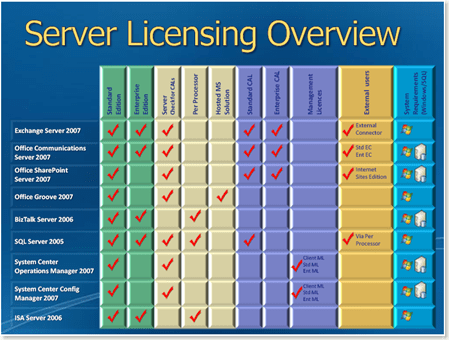
Also lots more useful information on this site – it’s designed to train people to become Microsoft licencing specialists (MLSS/MLSE) it’s mainly sales staff orientated training, but some useful/easy to digest reference material for techies/consultants alike if you’ve ever struggled to understand Microsoft licencing.
Useful links..
Revision Presentations – .PDF files to download https://partner.microsoft.com/UK/40033119
Training Videos – downloadable http://www.microsoft.com/uk/partner/learningpaths/?id=licensing.mlss
Certified..
Posted by on July 1, 2008
I had my 2nd attempt at the VMWare FastTrack course last week (the 1st attempt was cut short due to power problems, and I’ve only just managed to find the time to reschedule).
The course went ok, the 1st 2 days were a bit dull as I’d already sat through them once; the course has been restructured since and is now contiguous through the 2 books, in the 1st attempt we were jumping back and forth as the Fast Track course is the Install & Configure and DSA course mashed together.
I found the pace ok, infact I could probably have been pushed a lot harder, as such I didn’t find it as “intensive or extended hours” – we finished by at least 5.30 most days and earlier some other days – the last day did feel a bit like treading water as it was quite spread out.
Wasn’t overly impressed by the facilities at QA-IQ’s Roseberry Ave – could do with a lick of paint, some better lighting and A/C that works properly. In all fairness it did look like they were in the middle of refitting it. More importantly the instructor was good and the kit/resources worked as required – no free lunch though 😉
No VCP exam voucher is included with QA-IQ as you get at DNS arrow – considering the QA and DNS courses are virtually the same price I think that’s a bit cheap – so you may want to check with your vendor before booking.
There is a lot of team working in building up DRS clusters and doing HA etc. and you have to have sat the course in order to be officially certified as a VCP.
I sat my exam yesterday morning and passed – not by as much as I’d have liked, but I was a bit lazy and didn’t do much (any) specific exam prep – there were a whole load of questions on a particular subject that I had not revisited since the course* and I fell foul of the “mark for review” option where you can go back at the end and can review/change your answers before submitting the exam – several of them from correct to incorrect as I later worked out – d’oh I learnt (and subsequently) forgot that from my MCSE exam days – if you don’t know 100% your 1st instinct was probably right.
Ah well, another one down – must get round to updating my MCSE too.. I quite like the certification exams, it’s just finding the time to learn the MS/VMWare answers and I’m lucky that English is my 1st language as I think a lot of the cert questions (not just VMWare – MS, Cisco etc.) are more about English comprehension and understanding what they are actually asking in order to answer correctly.

*As usual I had to sign an NDA, so no I can’t say what they were – sorry
Virtualization – the key to delivering "cloud based architecture" NOW.
Posted by on June 23, 2008
There is a lot of talk about delivering cloud or elastic computing platforms, a lot of CxO’s are taking this all in and nodding enthusiastically, they can see the benefits.. so make it happen!….yesterday.
Moving your services to the cloud, isn’t always about giving your apps and data to Google, Amazon or Microsoft.
You can build your own cloud, and be choosy about what you give to others. building your own cloud makes a lot of sense, it’s not always cheap but its the kind of thing you can scale up (or down..) with a bit of up-front investment, in this article I’ll look at some of the practical; and more infrastructure focused ways in which you can do so.

Your “cloud platform” is essentially an internal shared services system where you can actually and practically implement a “platform” team that operates and capacity plans for the cloud platform; they manage it’s availability and maintenance day-day and expansion/contraction.
You then have a number of “service/application” teams that subscribe to services provided by your cloud platform team… they are essentially developers/support teams that manage individual applications or services (for example payroll or SAP, web sites etc.), business units and stakeholders etc.
Using the technology we discuss here you can delegate control to them over most aspects of the service they maintian – full access to app servers etc. and an interface (human or automated) to raise issues with the platform team or log change requests.
I’ve seen many attempts to implement this in the physical/old world and it just ends in tears as it builds a high level of expectation that the server/infrastructure team must be able to respond very quickly to the end-“customer” the customer/supplier relationship is very different… regardless of what OLA/SLA you put in place.
However the reality of traditional infrastructure is that the platform team can’t usually react as quick as the service/application teams need/want/expect because they need to have an engineer on-site, wait for an order and a delivery, a network provisioning order etc. etc (although banks do seems to have this down quite well, it’s still a delay.. and time is money, etc.)
Virtualization and some of the technology we discuss here enable the platform team to keep one step ahead of the service/application teams by allowing them to do proper capacity planning and maintain a pragmatic headroom of capacity and make their lives easier by consolidating the physical estate they manage. This extra headroom capacity can be quickly back-filled when it’s taken up by adopting a modular hardware architecture to keep ahead of the next requirement.
Traditional infrastructure = OS/App Installations
- 1 server per ‘workload’
- Silo’d servers for support
- Individually underused on average = overall wastage
- No easy way to move workload about
- Change = slow, person in DC, unplug, uninstall, move reinstall etc.
- HP/Dell/Sun Rack Mount Servers
- Cat 6 Cables, Racks and structured cabling
The ideal is to have an OS/app stack that can have workloads moved from host A to host B; this is a nice idea but there are a whole heap of dependencies with the typlical applications of today (IIS/apache + scripts, RoR, SQL DB, custom .net applications). Most big/important line of business apps are monolithic and today make this hard. Ever tried to move a SQL installation from OLD-SERVER-A to SHINY-NEW-SERVER-B? exactly. *NIX better at this, but not that much better.. downtime required or complicated fail over.
This can all be done today, virtualization is the key to doing it – makes it easy to move a workload from a to b we don’t care about the OS/hardware integration – we standardise/abstract/virtualize it and that allows us to quickly move it – it’s just a file and a bunch of configuration information in a text file… no obscure array controller firmware to extract data from or outdated NIC/video drivers to worry about.
Combine this with server (blade) hardware, modern VLAN/L3 switches with trunked connections, and virtualised firewalls then you have a very compelling solution that is not only quick to change, but makes more efficient use of the hardware you’ve purchased… so each KW/hr you consume brings more return, not less as you expand.
Now, move this forward and change the hardware for something much more commodity/standardised
Requirement: Fast, Scalable shared storage, filexible allocation of disk space and ability to de-duplicate data, reduce overhead etc, thin provisioning.
Solution: SAN Storage, EMC Clariion, HP-EVA, Sun StorageTek, iSCSI for lower requirements, or storage over single Ethernet fabric – NetApp/Equalogic
Requirement: Requirement Common chassis and server modules for quick, easy rip and replace and efficient power/cooling.
Solution: HP/Sun/Dell Blades
Requirement: quick change of network configurations, cross connects, increase & decrease bandwidth
Solution: Cisco switching, trunked interconnects, 10Gb/bonded 1GbE, VLAN isolation, quick change enabled as beyond initial installation there are fewer requirements to send an engineer to plug something in or move it, Checkpoint VSX firewalls to allow delegated firewall configurations or to allow multiple autonomous business units (or customers) to operate from a shared, high bandwidth platform.
Requirement: Ability to load balance and consolidate individual server workloads
Solution: VMWare Infrastructure 3 + management toolset (SCOM, Virtual Centre, Custom you-specific integrations using API/SDK etc.)
Requirement: Delegated control of systems to allow autonomy to teams, but within a controlled/auditable framework
Solution: Normal OS/app security delegation, Active Directory, NIS etc. Virtual Center, Checkpoint VSX, custom change request workflow and automation systems which are plugged into platform API/SDK’s etc.
the following diagram is my reference architecture for how I see these cloud platforms hanging together
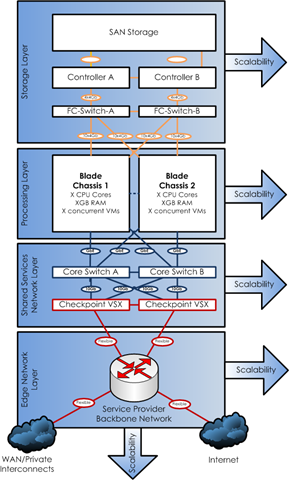
As ever more services move into the “cloud” or the “mesh” then integrating them becomes simpler, you have less of a focus on the platform that runs it – and just build what you need to operate your business etc.
In future maybe you’ll be able to use the public cloud services like Amazon AWS to integrate with your own internal cloud, allowing you to retain the important internal company data but take advantage of external, utility computing as required, on demand etc.
I don’t think we’ll ever get to.. (or want) to be 100% in a public cloud, but this private/internal cloud allows an organisation to retain it’s own internal agility and data ownership.
I hope this post has demonstrated that whilst, architecturally “cloud” computing sounds a bit out-there, you can practically implement it now by adopting this approach for the underlying infrastructure for your current application landscape.
VMWare/Cisco Switching Integration
Posted by on June 21, 2008
As noted here there is a doc that has been jointly produced between VMWare and Cisco which has all the details required for integrating VI virtual switches with physical switching.
Especially handy if you need to work with networking teams to make sure things are configured correctly to allow failover properly between redundant switches/fabrics etc. – it’s not as simple as it looks, and people often forget the switch-side configurations that are required.
Doc available here (c.3Mb PDF)
Can you run ESX as a VM under ESX?
Posted by on June 12, 2008
Crazy, yeah – but hey you’ve got to try it, prompted by a question from Prasad – can you run ESX in a VM under ESX?
In the interest of science I just tried this, I used VM Convertor to convert my working ESX under workstation image as-is to my ESX box (hoping it would keep the custom settings intact, and saving me from having to rebuild it)
good news, the VM converter did it’s thing and it does start up on the ESX box.
..bad news, it doesn’t get past this screen as far as I can tell…it’s sat there for a good 20mins so I don’t think its going to get much further.

Also tried to import my ESX 3i image to see if that would work, but VM Convertor wouldn’t import it for some reason, so will have to try a clean install on that.
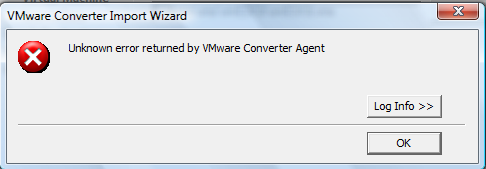
Looks like some kind of error when it’s trying to determine what version it is..
[2008-06-13 00:23:29.164 ‘P2V’ 5748 error] [task,295] Task failed: P2VError UNKNOWN_METHOD_FAULT(sysimage.fault.OsVersionNotFound)
[2008-06-13 00:23:29.164 ‘P2V’ 5748 verbose] [task,339] Transition from InProgress to Failure requested
[2008-06-13 00:23:29.164 ‘P2V’ 5748 verbose] [task,388] Transition succeeded
Ah well, anyone know how to get this going/if it’s possible?

 Virtualization, Cloud, Infrastructure and all that stuff in-between