Virtualization, Cloud, Infrastructure and all that stuff in-between
My ramblings on the stuff that holds it all together
Category Archives: Work
How to Convert Virtual Center from Evaluation to Licensed Version
Posted by on April 10, 2008
or “How to convert virtual centre from evaluation to licenced version”… for us Brits… the “American English” is to help the international Googlers 🙂
I can’t believe I missed this, on a couple of platforms I’ve built I’ve had to start with an eval licence and then move to a proper licence but could never find how to change virtual center from eval to licenced mode.
ESX itself was fine you can do that via the VC GUI (below)
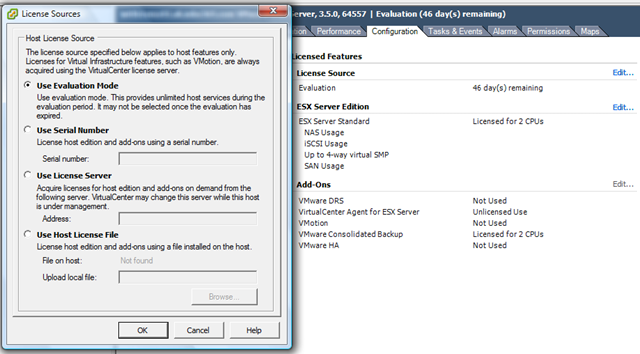
But despite a lot of googling I could never find out how to set Virtual Centre itself to use a licence server – so I ended up reinstalling/repairing and then selecting the option to use a licence server, my bad – it’s actually in the VI client GUI d’oh as Homer would say!
for my own reference, and for anyone else who has missed and is searching for how to convert Virtual Center from evaluation to licensed..
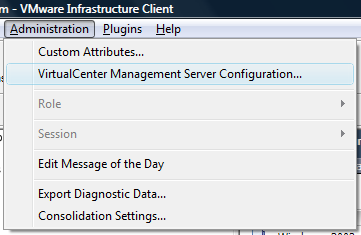
and then configure the setting here to point it at a proper licence server to enable full VC.
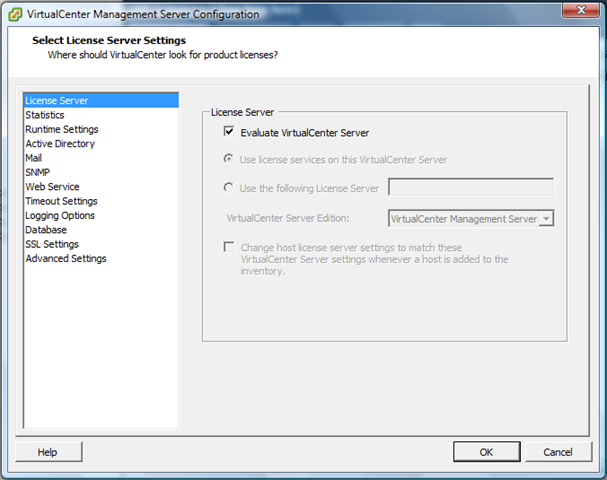
D’oh!!!
How does an HP Fibre Channel Virtual Connect Module Work?
Posted by on April 9, 2008
Techhead and I have spent a lot of time recently scratching our heads over how and where fibre channel SAN connections go in a c7000 blade chassis.
If you don’t know, a FC-VC module looks like this, and you install them in redundant pairs in adjacent interconnect bays at the rear of the chassis.

You then patch each of the FC Ports into a FC switch.
The supported configuration is one FC-VC Module to 1 FC switch (below)
![clip_image002[6]](https://vinf.net/wp-content/uploads/2008/04/clip-image0026.jpg)

Connecting one VC module to more than one FC switch is unsupported (below)
![clip_image002[8]](https://vinf.net/wp-content/uploads/2008/04/clip-image0028.jpg)

So, in essence you treat each VC module as terminating all HBA Port 1’s and the other FC-VC module as terminating all HBA Port 2’s.
The setup we had:
- A number of BL460c blades with dual-port Qlogic Mezzanine card HBAs.
- HP c7000 Blade chassis with 2 x FC-VC modules plugged into interconnect bay 3 & 4 (shown below)


The important point to note is that whilst you have 4 uplinks on each FC-VC module that does not mean you have 2 x 16Gb/s connection “pool or trunk” that you just connect into.
Put differently if you unplug one, the overall bandwidth does not drop to 12Gb/s etc. it will disconnect a single HBA port on a number of servers and force them to failover to the other path and FC-VC module.
It does not do any dynamic load balancing or anything like that – it is literally a physical port concentrator which is why it needs NPIV to pass through the WWN’s from the physical blade HBAs.
There is a concept of over-subscription, in the Virtual Connect GUI that’s managed by setting the number of uplink ports used.
Most people will probably choose 4 uplink ports per VC module, this is 4:1 oversubscription, meaning each FC-VC port (and there are 4 per module) has 4 individual HBA ports connected to it, if you reduce the numeber of uplinks you increase the oversubscription (2 uplinks = 8:1 oversubscription, 1 uplink = 16:1 oversubscription)

Which FC-VC Port does my blade’s HBA map to?
The front bay you insert your blade into determines which individual 4Gb/s port it maps to and shares with other blades) on the FC-VC module, its not just a virtual “pool” of connections, this is important when you plan your deployment as it can affect the way failover works.
the following table is what we found from experimentation and a quick glance at the “HP Virtual Connect Cookbook” (more on this later)
| FC-VC Port | Maps to HBA in Blade Chassis Bay, and these ports are also shared by.. |
| Bay3-Port 1, Bay-4-Port 1 | 1,5,11,15 |
| Bay3-Port 2, Bay-4-Port 2 | 2,6,12,16 |
| Bay3-Port 3, Bay-4-Port 3 | 3,7,9,13 |
| Bay3-Port 4, Bay-4-Port 4 | 4,8,10,14 |

Each individual blade has a dual port HBA, so for example the HBA within the blade in bay 12 maps out as follows
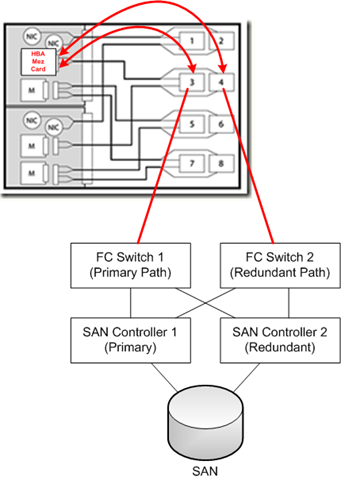
HBA Port 1 –> Interconnect Bay 3, Port 2
HBA Port 2 –> Interconnect Bay 4, Port 2
Looking at it from a point of a single SAN attached Blade – the following diagram is how it all should hook together
Path Failover
Unplugging an FC cable from bay 3, port 4 will disconnect one of the HBA 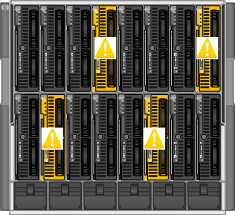 connections to all of the blades in bays 4,8,10 and 14 and force the blade’s host OS to handle a failover to its secondary path via the FC-VC module in bay 4.
A key take away from this is that your blade hosts still need to run some kind of multi-pathing software, like MPIO or EMC PowerPath to handle the failover between paths – the FC-VC modules don’t handle this for you.

FC Loading/Distribution
A further point to take away from this is that if you plan to fill your blade chassis with SAN attached blades, each with an HBA connected to a pair of FC-VC modules then you need to plan your bay assignment carefully based on your server load.
Imagine if you were to put heavily used SAN-attached VMWare ESX Servers in bays 1,5,11 and 15 and lightly used servers in the rest of the bays then you will have a bottleneck as your ESX blades will all be contending with each other for a single pair of 4Gb/s ports (one on each of the FC-VC modules) whereas if you distributed them into (for example) bays 1,2,3,4 then you’ll spread the load across individual 4Gb/s FC ports.
Your approach of course may vary depending on your requirements, but I hope this post has been of use.

There is a very, very useful document from HP called the HP Virtual Connect Fibre Channel Cookbook that covers all this in great detail, it doesn’t seem to be available on the web and the manual and online documentation don’t seem to have any of this information, if you want a copy you’ll need to contact your HP representative and ask for it.
VMWare Fast Track VCP Course – Lights Out Edition
Posted by on April 9, 2008
I have been on a VMWare fast track course this week to complete my VCP cert; annoyingly the VCP is one of those vendor certifications where you need to prove you’ve sat the course as well as doing the exam to qualify as a “proper” VCP.
I’ve been doing it at QA-IQ in central London, and whilst I know most of the content its good for filling in the gaps and detail for the areas where my knowledge is high-level.
Unfortunately the building lost all power 1/2 way through yesterday and we had to finish the remaining theory for the day without PC’s or projectors etc. – full credit to the instructor who didn’t break a sweat doing so, I’d probably have sworn a lot more.
When I arrived this morning they still haven’t got power back on so the day has been cancelled, waiting for a call from our account manager to work out what to do next. it’s already a compressed version of 2 training courses and my schedule is pretty tight so wonder what’s going to happen.
EDF the electricity supplier are bringing in generators – so someone must have really broken it!
VMWare Workstation 6.5 Beta Open Now
Posted by on April 2, 2008
As of 1st April (not an April fools joke!) you can register for, and download the VM Worksation 6.5 beta programme here..
Main new features are;
- Use Unity to integrate your guest apps with your host
- More Powerful VM Record and Replay
- Support for Smart Cards & Smart Card Readers
- Enhanced ACE Authoring
- Link State Propagation Networking
- Improved 3D graphics Support
I’m most looking forward to being able to use Unity… very cool, have used it on the Mac with Fusion and Parallels equivalent, maybe now I will be able to run 2 instances of full-fat Outlook 2007 side by side, plugged into different Exchange mailboxes and orgs (maybe a bit overkill – but I have my reasons!)
New Microsoft Data Centre is Container Based
Posted by on April 2, 2008
Article here, it’s coming people!
Some interesting discussions on how you can measure the productivity of a container and come up with some common metrics to compare and contrast and handle charge-back.
Installed Windows Vista SP1 and Have No Sound?
Posted by on April 2, 2008
There are probably a number of reasons for this, but I’ve come across a number of people recently that have installed Vista Service Pack 1 from the Microsoft Web site (note: not via Windows Update) following articles on the web about its availability (like mine) and have since had problems with sound or other devices not working.
If you read this KB article you’ll note that cause 5 says if you have some particular devices you will not be offered SP1 by Windows Update as there are not yet SP1 compatible drivers.
I don’t know for certain as I don’t have any of these devices on my laptop by I would think even if you downloaded it manually the SP1 installer would warn of this; so maybe those people just chose to ignore it – none of them could remember 🙂
To be fair to Microsoft I think this is a good idea, previously there would have been no check mechanism for known incompatible drivers, this is definitely a step in the right direction to protect people from themselves 🙂
Pasted from the KB article… some of the problematic devices are listed below;
To help ensure a positive update experience, Windows Update will temporarily not offer Windows Vista SP1 to systems that have the following device drivers. In some cases, these device drivers are problematic on Windows Vista-based computers when you update to Windows Vista SP1. By installing updated device drivers, you will resolve the issue and enable Windows Update to offer Windows Vista SP1.
Audio drivers
Realtek AC’97•For x86-based computers: Alcxwdm.sys – version 6.0.1.6242 or earlier
•For x64-based computers: Alcwdm64.sys – version 6.0.1.6242 or earlier
SigmaTel
•For x86-based computers: Sthda.sys – version 5.10.5762.0 or earlier
•For x64-based computers: Sthda64.sys – version 5.10.5762.0 or earlier
SigmaTel
•For x86-based computers: Stwrt.sys – version 6.10.5511.0 or earlier
•For x64-based computers: Stwrt64.sys – version 6.10.5511.0 or earlier
Creative Audigy
•For x86-based and x64-based computers: Ctaud2k.sys – version 6.0.1.1242 or earlier
•For x86-based computers: P17.sys – all versions (This was originally a Windows XP-based driver.)
Conexant HD Audio
•For x86-based computers: Chdart.sys – version 4.32.0.0 or earlier
•For x64-based computers: Chdart64.sys – version 4.32.0.0 or earlier
Biometric (Fingerprint) Sensors
•AuthenTec Fingerprint Sensor with the Atswpdrv.sys driver file – version 7.7.1.7 or earlier
•UPEK Fingerprint Sensor with the Tcusb.sys driver file – version 1.9.2.99 or earlier
Display drivers
Intel Display•For x86-based computers: Igdkmd32.sys – versions between and including driver 7.14.10.1322 and 7.14.10.1403
•For x64-based computers: Igdkmd64.sys – versions between and including driver 7.14.10.1322 and 7.14.10.1403
Other drivers
Texas Instruments Smart Card Controller with the GTIPCI21.sys driver file – version 1.0.1.19 or earlier
Sierra Wireless AirCard 580 with the Watcher.exe application – version 3.4.0.9 or earlier (This application is located in the AirCard 580 Program Files folder.)
Symantec software driver for Symantec Endpoint Protection and for Symantec Network Access Control clients•For x86-based computers: Wgx.sys – versions 11.0.1000.1091 or earlier
•For x64-based computers: Wgx64.sys – versions 11.0.1000.1091 or earlier
Useful OneNote Information
Posted by on March 27, 2008
Eileen also has another post with some some useful linkage for getting more out of OneNote (my favourite MS application!)
I really must set some time aside to review my working practices and try to get some more out of these types of useful applications (Groove, OneNote etc.)
Groove Templates
Posted by on March 27, 2008
Eileen Brown has a post here with some links to new Groove templates here.
I really like Groove and but I think I could do a lot more with it once I figure out what all the different bits work!
Liking the idea of the RFP/RFI tracker – its so hard to manage that stuff with lots of people involved and Sharepoint just doesn’t cut it for me.
How to Monitor VMWare ESX Servers from Microsoft System Center Operations Manager 2007 (SCOM)
Posted by on March 26, 2008
More Cheap ESX Servers
Posted by on March 14, 2008
Techhead has posted a nice article on his ML110 ESX test server, nice alternative to my D530 approach, he’s got a few more disks than I have.

 Virtualization, Cloud, Infrastructure and all that stuff in-between