Virtualization, Cloud, Infrastructure and all that stuff in-between
My ramblings on the stuff that holds it all together
Category Archives: Work
Split Screen Browsing with Firefox
Posted by on February 7, 2008
My home office setup has a 20″ widescreen Dell TFT which I use with my laptop an elevated docking station – my laptop has a rather low screen resolution as it’s quite small so this is a great dual monitor setup. The widescreen is handy for keeping a web browser open for referring to online documentation or and working on documents or large Visio diagrams.
The only gripe is that a lot of web pages (like the BBC) waste a lot of the widescreen real-estate as they format (or don’t re-format) for different screen resolutions.
The Split Browser Plugin for Firefox (my favourite browser) that allows you to essentially have multiple browser sessions and sub-tabs in one full-screen Window.
it has load of options – if the screen layout gets a bit confusing you can bring all the split pages back to one window with multiple tabs and vice-versa.
Screenshot
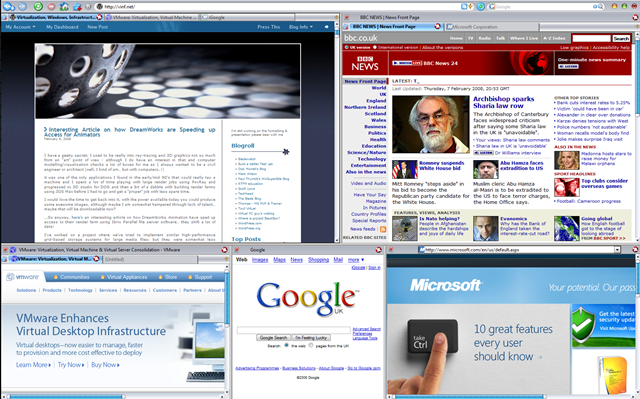
The (also useful) IETab plug in means some of those sub-pages can also be rendered using IE – but all within Firefox.
Firefox has such a good community of developers and I have always been able to find a plug-in that does exactly the odd-feature I “need”.
Brilliant.
VMWare ESX on IBM Blades
Posted by on February 5, 2008
I’ve worked with HP c-class stuff recently, but this is a good article on the IBM equivalent and the post looks a lot simpler to read than all the official IBM docs!
In my book if you are virtualizing your infrastructure there is less of a religious argument on the underlying hardware – it’s a lot more flexible so do you care as much?
Thanks to Martins post on Bladewatch for the handy link
Problems Restoring a non-SysPrep Vista Image Using DiskPart & ImageX
Posted by on February 3, 2008
Goal: keep a single .WIM file, Multiple instances of the same build in the .WIM file
Build001 non-sysprep’d version for maintenence with all latest patches and corp apps
Build002 sysprep but no domain for home workers/3rd party
Build003 sysprep + domain joining and scripted OOBE for corp machines
Build004…etc. tweaks to the sysprep – for different domains/customers or OOBE settings like language etc.
Build a bootable WinPE DVD with ImageX and the large .WIM file stored on it so no network connectivity required to install (at this stage) just a single DVD.
Reboot from Win PE to start Vista MiniSetup/OOBE
I hit a problem as when I restored build001 to my reference machine it wouldn’t boot and immediatley gave a 0xc000000e error
This was because my automated build DVD runs diskpart with a scripted set of commands (WIPEDISK.TXT) which includes the clean command
WIPEDISK.TXT
select disk 0
clean
create partition primary
select partition 1
active
format fs=ntfs quick
assign letter=c
exit
This caused problems in this instance because The clean command erases the partition table ID.
If an image has not been-sysprep’d it still looks for the original partition table ID (which diskpart removed) hence the stop error at boot.
Sysprep’d images don’t have this problem as the “/generalize” switch resets this dependency on the partition table entries and mini-setup runs at 1st boot to fix it up.
So, if you need to do maintenance on a non-sysprep’d reference image then
- You need to restore it via imageX and your usual process (in my case a bootable PE DVD)
- It won’t be able to boot – it will give an 0xc000000e error
- Boot the reference machine from your original Vista install DVD and choose to repair
- This puts back the partition table ID and it will boot again
- Once it’s booted you can carry out any online maintenance, add extra software etc. to customise it
- Then sysprep /generalize /oobe /shutdown your reference machine
- Map a drive to your master .WIM file, or a USB disk etc.
- Append the changes to the master .wim file (remembering to use the /APPEND switch; if you just use /CAPTURE you will OVERWRITE your .wim file and be very sad.. Did it twice before I learnt to backup the .WIM file before hand!
- Then re-master your DVD – with the appropriate files – I just inject the .WIM file to the Windows PE DVD I made using PowerISO.
Rinse and repeat.
Thanks to this post http://forums.microsoft.com/TechNet/ShowPost.aspx?PostID=1099145&SiteID=17 and this post http://www.svrops.com/svrops/articles/winvistape2.htmI figured it out…eventually!
Making Something Run When a Windows PE 2.0 CD/DVD Starts.
Posted by on February 3, 2008
I need a DVD that automatically applies a .WIM image when WinPE boots – no prompts; just want to press F9 for the BIOS Boot menu and walk away until build is finished.
I built a WinPE 2.0 image the usual way, but I want to add files to it (easy with PowerISO) but I want it to do something when it starts up..
To do this I had to customise the BOOT.WIM file which you use to generate your WinPE ISO file, note you need to edit BOOT.WIM not the WinPE.WIM file.
I used the /MOUNTRW switch for imageX (more details here) to mount the BOOT.WIM file – if you look in it’s WINDOWS\SYSTEM32 directory there is a file called STARTNET.CMD – this is mostly the same as a batch file so you can put whatever commands you want in here, in my case I edited it as follows;
wpeinit
CALL D:\tools\buildPC.bat
wpeutil reboot
Once the changes are made you can save the changes back using the /UNMOUNT and /COMMIT switches – you’ll then need to rebuild the Windows PE .ISO using OSCDIMG.EXE.
You can then inject files into the .ISO file you’ve generated – you could put them in the BOOT.WIM as above but its quicker and easier to do this via PowerISO (or similar tool) if you are going to need to make changes, rather than recompiling the BOOT.WIM and .ISO files.
This is the BUILDPC.BAT batch file that STARTNET.CMD calls, it prepares the disk and deploys the image file to the local HDD.
@echo off
diskpart /s d:\sources\wipedisk.txt
d:
cd\tools
Echo applying image
imagex.exe /apply d:\sources\MasterImageFile.wim 1 C:
Echo Image Downloaded, rebooting.
Save the file and burn.. job done.
It’s a good idea to use a virtual machine to test the .ISO file out – and is cheaper than wasting lots of DVD/CD-R’s while you are fine-tuning!
Update on the Cheap ESX Home Server
Posted by on January 31, 2008
All running well, we had a power cut the other day but the PC didn’t automatically power back on when power was restored; I wonder if there is a BIOS setting for that – PC’s always used to have something along those lines.
Bit of manual intervention to switch it on and it was back and running.. no ill effects and all the VM’s started up normally.
I’m hammering it a bit now and have some Windows Server 2008 RC1 templates setup as I need to try out the new Terminal Services functionality so I’m hoping to build a small 2008 TS farm under ESX – no customization wizard available yet for 2008 😦
Maybe will see how Windows built in NLB works under ESX Mmmm.
So, will see what performance is like when I have a lot more going on..
Managing lots of RSS feeds
Posted by on October 31, 2007
I’ve been into reading people’s blogs and tracking websites like theregister for a good couple of years. I never really found an RSS reader app that worked for me; I wanted to build custom views of feeds, flag and prioritize them and mark things to read later – and I could find standalong apps to do these things but not one that did it all – hopefully this post will show you how I do it – if you have some other suggestions feel free to comment & share them.
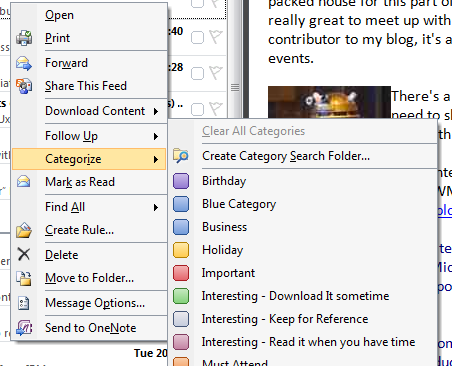
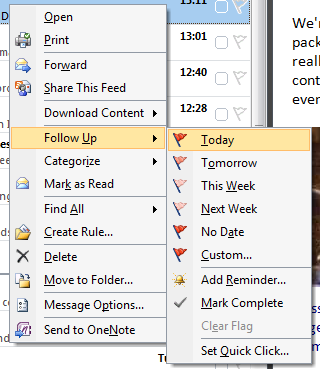
Outlook 2007 supports RSS feeds out of the box, and it’s ideal as I already use Outlook and it’s calendar/tasks features to manage my workflow. Outlook 2003 and later (I think) added the ability to flag and tag items and even build a custom category list.
It means I can basically add all my RSS feeds as sources of information in the same way as I use it to manage my company emails, and categorise, flag as required and it all merges with into task list.
I can do this categorization manually or I think automatically via a rule
Custom Categories
Flagging – which passes it into Outlook’s task list
I have two main folder/sub-folder structures – regular reads, for feeds that have a lot of frequent/interesting traffic and another folder/sub-folder structure for less noisy but important feeds (for example software release notifications etc.)

Best of all I can build custom views across of all my RSS feeds using custom search folders – for example I have the following (yes, and lots of unread emails too!)

And this gives me the following consolidated view across all my feeds, sorted by date (but could be lots of other criteria)
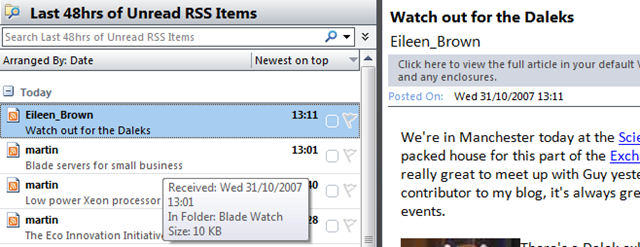
The add feed GUI components definitely have the feel of an afterthought but using them works brilliantly for me. Clicking on a page’s RSS feed brings up Outlook but doesn’t want to add it as a feed so I’ve always cut & pasted.. I assumed this was a beta bug but have been using RTM for quite a while now – must get round to investigating that.
Technorati Tags: Microsoft , office , 2007 , Outlook , Cool ways to do things , RSS , managing feeds
Building a Better Test Lab
Posted by on October 22, 2007
This is the outline of a number of posts on building a {relatively} low-cost accurate test lab of your production systems using P2V, VMWare, ESX, custom scripted HP voodoo, HP MSA1500 SAN, Virtual Switch Tagging (VST), Checkpoint on Sun Firewalls and Cisco switches. in order to clone a complicated multi-tier Windows based production platform with lots of DMZ segments into a VMWare farm for use as a test/dev & development environment (and possibly a DR one too in future)
This is all based on some of my recent work with customers* and I hope will help someone else to navigate the pitfalls (both business and technological) I & my team encountered in delivering this idea.
The following is a list of titles or sections and will hopefully serve as an index, but please, don’t expect them all at once I do have a day job to do! 😉
Why do this?
The traditional approach to test labs & why I think it’s wrong
Pro’s
Con’s
Isn’t this all a bit too complicated/mad-scientist/far out?
Reload lab from production process – how often?
is change control important?
What do you want a test lab to do?
Scoping/Expectation Setting
Load Testing – is VMWare right for this
Dynamic/Grid based approach to load testing
Break/Fix analysis
Release Testing
Options for disaster recovery/production failover
What won’t it do?
Storage Design
“Big” SAN’s are always better if you have them, but what if you don’t?
HP MSA 1500 – it’s not big, but it’s clever
Disk/SAN bandwidth – my practical experiences
Server Design
ESX Node specification
The RAM per VM debate
Networking Design
VLAN tagging
VST vs. Guest Tagging etc.
Firewalls
Clone to test lab Process
P2V Tools – VMWare Convertor vs. the rest
Changing IP addresses
HP uninstall Scripts
Build-Out Steps
Build ESX environment
Scripted VMWare installations – automatically create custom Virtual NIC’s/LANs
Adjust install paths for SAN storage
Set administrator password/create accounts
Install Networking
Configure VLAN’ing
IP Load Balancing
Install Firewall(s)
Test Communications between virtual DMZ segments and across hosts
Import Production machines
VMWare Convertor
General issues found
P2V Windows 2003 Domain Controllers – Special Notes
P2V’ing entire Windows Cluster’s – not that easy but do-able
P2V Process over a WAN – issues found & workaround.
Fresh VM 1st boot, changing IP address etc.
HP tools removal
Some further problems caused by changing IP addressing.
Into the Future
Can you use this for disaster recovery?
VMWare Lab Manager
Total Automation – Platespin products?
*This article has been deliberately made anonymous & I’m afraid I can’t disclose the name of the customer or provide any further reference materials without a commercial engagement via my employer, you can contact me for more details on this via this blog.
This article & information contained within is provided entirely without warranty.
Technorati Tags: VMWare , ESX , HP , MSA1500 , Test Lab , P2V , production , clone , Sun , Checkpoint firewall , VLAN tagging , VST
Citrix EasyCall
Posted by on October 8, 2007
Seen this presented at Briforum today, I’ve not come across this before so excuse me if it’s old news http://www.citrix.com/English/ps2/products/subfeature.asp?contentID=682168
I just don’t get it. it’s basically screen scraping from an ICA session to initiate a phone call via a PABX. It calls you on your selected number and then calls the number it’s screen scraped.
It’s pretty cool tech if it works, but why are Citrix doing this – surely they’d be better leaving this to the click to call / VoIP /Telco vendor, in the demo they show it’s not relying on a locally connected phone device (USB?) as the PABX initiates and controls the call(s).
Why do you even need Citrix doing this as part of the PS suite -surely there are more mature/dedicated apps to do it on the server/app session side, to me Citrix is all about presentation (sic).
Is this kind of thing feature creep too far? what do you think?

 Virtualization, Cloud, Infrastructure and all that stuff in-between