Virtualization, Cloud, Infrastructure and all that stuff in-between
My ramblings on the stuff that holds it all together
/CONSOLE switch Goes away in Windows 2008/Vista SP1/XPsp3 versions of MSTSC.EXE
Posted by on February 18, 2008
Post here on the terminal services team blog, about why they’ve changed this switch to /ADMIN in Windows 2008/Vista SP1/XPSP3.
This is the first I’ve heard of it, not a huge issue but I can see a potential problem where the /console switch is ignored, again not huge but a bit of an annoyance just to change a bit of syntax?
if you have device CAL’s and normally use the /console switch to remotely administer a machine to my understanding that doesn’t allocate a device CAL to your admin machine (or whatever machine you are admin’ing from at the time)
What if you use this method to administer terminal servers, doesn’t this silently ignoring just eat one of your device CALs (permanatly if you do it often enough from a machine)?
The article says:
The /console switch is silently ignored. You will be connected to a session to remotely administer the server.
The /console switch is silently ignored. You will be connected to a standard Remote Desktop session that requires a Terminal Services client access license (TS CAL).
Virtual Centre Plug-in Repository
Posted by on February 18, 2008
More Useful Things You Can Do With ImageX
Posted by on February 12, 2008
James O’Neil has a good post here – an example of how he used ImageX to quickly build and maintain his own vista system image with his typical apps.
Also handy for reference as he shows how to split very large images across multiple CDs using the /split switch.
Make Your own Offline Windows Update CD/DVD
Posted by on February 12, 2008
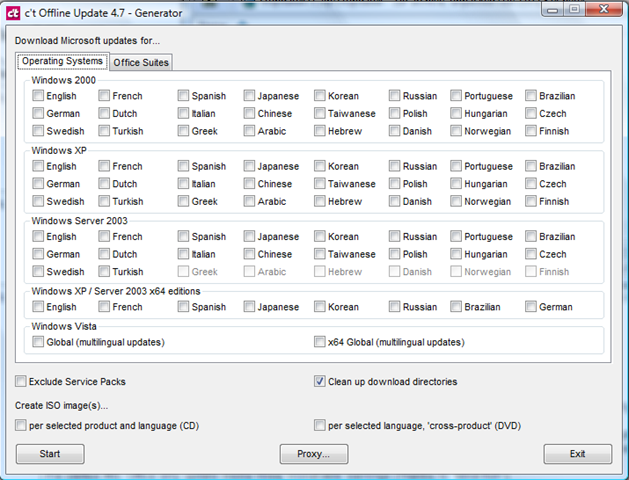
What a handy tool; if you download the app you can select which Microsoft OS/Applications you need patches for and it will download them all via the Windows online catalog to a source directory and then compile a script to auto install them all – it will even generate a .ISO file and handle dependencies and reboots – v.handy (and more efficient) if you need to quickly present it to a bunch of virtual machines with no Internet access or are on a site with slow internet access.
Excellent; now as far as I know Microsoft have no mechanism for doing this other than downloading all the patches manually… even with the Vista RTM images I built last week it had nearly 100Mb of OS patches alone!
Screenshot of the available options in the app – download it here here (updated 14th Sept’09)
OS Updates – multi-language too
Office Suite Updates too
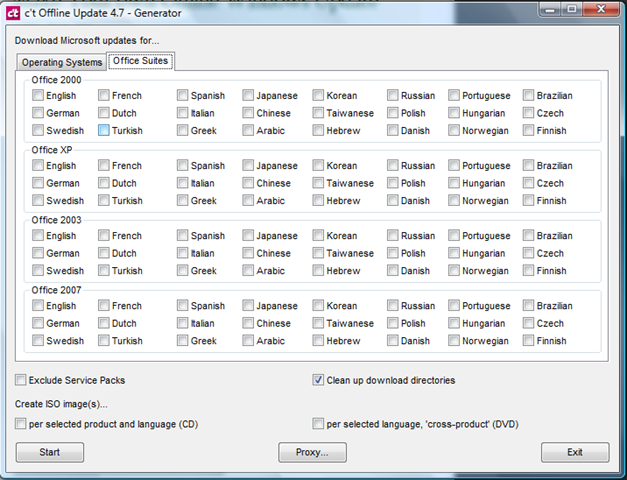
You can even get all the patches for everything and it will compile it into a DVD .ISO image – I’ll definitely be using this – hopefully you can use the info it downloads to slipstream update a vista .WIM image – will have to try that in a couple of weeks.
(original link from a post on slashdot)
Mmmm, Big, Really Big Cisco Switches
Posted by on February 11, 2008
Hot-Swap Datacentres
Posted by on February 11, 2008
There’s an interesting post over on Forrester research blog by James Staten. he’s talking some more about data centres in a container; making the data centre the FRU rather than a server or server components (Disk, PSU etc.).
This isn’t a new idea but it I’m sure the economics of scale currently mean this is currently suitable for the computing super-powers (Google, Microsoft – MS are buying them now!) – variances in local power/comms cost could soon force companies to adopt this approach rather than be tied to a local/national utility company and their power/comms pricing.
But just think if you are a large out-sourcing type company you typically reserve, build and populate data centres based on customer load, now this load can be variable; customers come and go (as much as you would like to keep them long-term this is becoming a commodity market and customer’s demand you are able to react quickly to changes in THEIR business model – which is typically why they outsource – they make it YOUR problem to service their needs).
It would make sense if you could dynamically grow and shrink your compute/hosting facility based on customer demand in this space – thats not so easy to do with a physical location as you are tied to it in terms of power availability/cost and lease period.
New suite build out at a typical co-lo company can take 1-2 months to establish networking, racks, power distribution, cabling, operational procedures etc. (and that’s not including physical construction if it’s a new building) – adopting the blackbox approach could significantly reduce the start-up time and increase your operational flexibility
Rather than invest in in-suite structured cabling, rack and reusable (or dedicated) server/blade infrastructures why not just have terminated power, comms and cooling connections and plug them in as required within a secured warehouse like space.

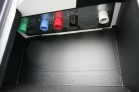
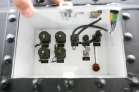
Photos from Sun Project Blackbox
You could even lease datacentre containers from a service provider/supplier to ensure there is no cap-ex investment required to host customers.
If your shiny new data centre is runs out of power then you could relocate it a lot easier (and cheaply) as it’s already transportable rather than tied to the physical building infrastructure; you are able to follow the cheapest power and comms – nationally or even globally.
As I’ve said before the more you virtualize the contents of your datacentre the less you care about what physical kit it runs on… you essentially reserve power from a flexible compute/storage/network “grid” – and that could be anything/anywhere.
Blogging from a Blackberry
Posted by on February 11, 2008
Performance Update on Cheap ESX PC
Posted by on February 10, 2008
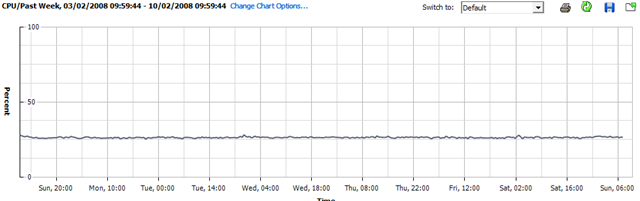
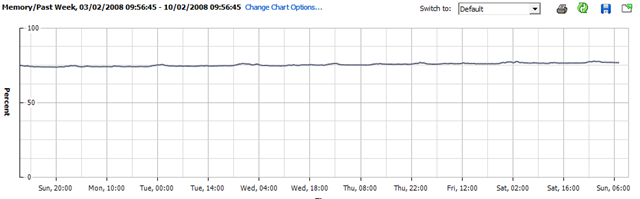
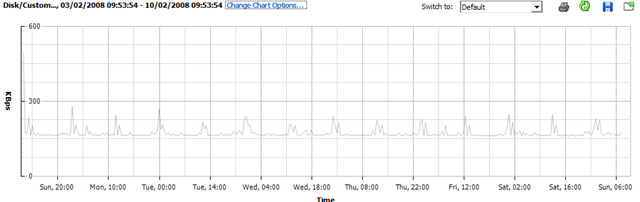
I’ve not done anything with my home ESX server this week as I’ve been busy with work; so this will be interesting – it’s been powered up all the time with all the VM’s spinning; but not doing very much.
CPU Utilisation
Memory Utilisation
Disk Utilisation
Whist running this set of VMs.. (the CPU stats for VMEX01 and VMEX02 are a bit skewed as I added this bit after the original post and they are both running seti@home (hence increased CPU)
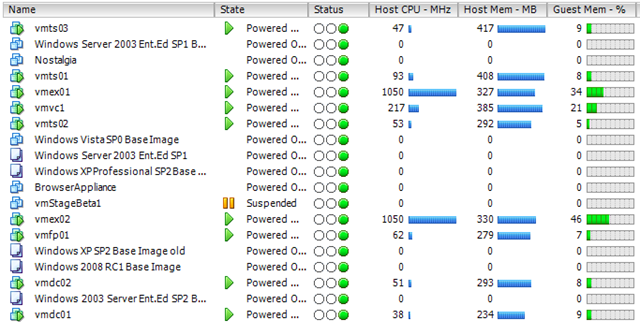
So, nothing interesting to see here – but might be worth bearing in mind for some kind of sizing estimate; this is a single core CPU (HT enabled) PC with 4Gb RAM and a single 500Gb SATA disk
Hopefully I will get some time this week to load up SETI@Home or Folding@Home and see what that does 🙂 it should be a good test to see how well the hypervisor manages CPU timesharing between hosts.
Split Screen Browsing with Firefox
Posted by on February 7, 2008
My home office setup has a 20″ widescreen Dell TFT which I use with my laptop an elevated docking station – my laptop has a rather low screen resolution as it’s quite small so this is a great dual monitor setup. The widescreen is handy for keeping a web browser open for referring to online documentation or and working on documents or large Visio diagrams.
The only gripe is that a lot of web pages (like the BBC) waste a lot of the widescreen real-estate as they format (or don’t re-format) for different screen resolutions.
The Split Browser Plugin for Firefox (my favourite browser) that allows you to essentially have multiple browser sessions and sub-tabs in one full-screen Window.
it has load of options – if the screen layout gets a bit confusing you can bring all the split pages back to one window with multiple tabs and vice-versa.
Screenshot
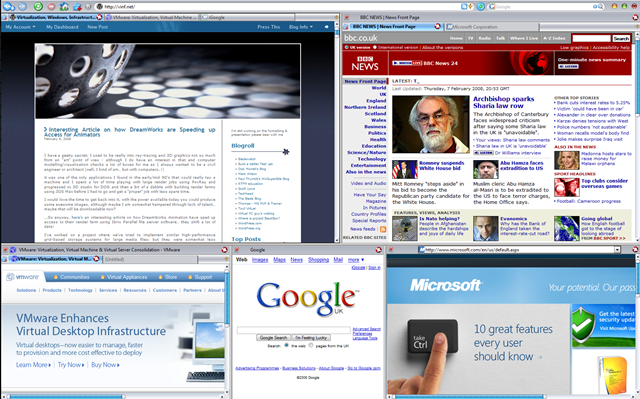
The (also useful) IETab plug in means some of those sub-pages can also be rendered using IE – but all within Firefox.
Firefox has such a good community of developers and I have always been able to find a plug-in that does exactly the odd-feature I “need”.
Brilliant.
Interesting Article on how DreamWorks are Speeding up Access for Animators
Posted by on February 6, 2008
I have a geeky secret; I used to be really into ray-tracing and 3D graphics not so much from an “art” point of view – although I do have an interest in that and computer modelling/visualisation checks a lot of boxes for me as I always wanted to be a civil engineer or architect (well, I kind of am… but with computers..!)
it was one of the only applications I found in the early/mid 90’s that could really tax a machine and I spent a lot of time playing with large render jobs using PovRay and progressed to 3D studio for DOS and then a bit of a dabble with building render farms using 3DS Max before I had to go and get a “proper” job with less spare time.
I would love the time to get back into it, with the power available today you could produce some awesome images, although maybe I am somewhat hampered through lack of talent… maybe that will be downloadable now?
….So anyway, here’s an interesting article on how DreamWorks Animation have sped up access to their render farm using Ibrix Parallel file server software… they shift a lot of data!
I’ve worked on a project where we’ve tried to implement similar high-performance grid-based storage systems for large media files; but they were somewhat less successful/undeveloped; this one looks promising.
I wonder if these kind of vendors will start moving into the virtualization space; it’s essentially the same principal.
Deliver large flat files (.VMDK), over cheap/scalable commodity media (GigE) as quick a possible
This would reduce the depende.ncy on expensive back-end fibre channel SANs, and you could invest more in flexible Ethernet – or maybe Infiniband to deliver networking and storage within a “virtual fabric”
If it’s “virtual” and “grid” based the quality/features of individual hardware devices (DL380, NAS device etc.) that make it up the overall grid are less important and a 100% software approach gives you the flexibility to pick & choose building blocks from the most appropriate/affordable manufacturer rather than be locked into a costly single vendor solution (HP EVA, EMC Clariion, DMX etc.)
Thanks to Martin at Bladewatch for the link.

 Virtualization, Cloud, Infrastructure and all that stuff in-between